Problems? See this thread at archive.org.
can u help install it without XTU?!
-
Find the OEM.INI file in CCC directory before you install it; then change SupportXTUFanTable=1 to SupportXTUFanTable=0Trafficante, hmscott, afloyd and 8 others like this.
-
So you got me looking into this because...XTU does not control fans. And it would appear after testing different versions that the CPU fan setting doesn't even show up.(It shows on my P870DM3 as a monitor though. Along with 10 or so other settings that are weirdly labeled.) And this board has 2 headers for fans.(Asus Rampage V Extreme)
So that brings me around to why is that even in the oem.ini in the first place. Sounds like more mistakes have been made for sure.... Good find on setting it to disabled.
Side note:
48 gigs working for now....
![[IMG]](images/storyImages/0IpNrLB.png)
Running Memtest86 now while I go take a power nap. Last edited: Nov 24, 2016
 -
-
XTU is not the problem. XTU + Clevo Control Center with the CPU OC utility seems to be the problem, perhaps due to a cocktail of conflicting files. Uninstall Clevo Control Center. Download the latest XTU. See how that works. Did you already try what @Phoenix suggested by editing the OEM.ini file?
Did this help your issue?
I see some other interesting things in the OEM.ini file as well, which I am sure you already spotted.
I have a weird monitor/sensor in XTU labeled "67" that was automatically checked and a bunch of other numbers without names. Does yours have that? This makes me curious if the problem is a mistake on Intel's part with a borked version of XTU or just one more thing that is messed up with Clevo BIOS. @Prema any thoughts on this?
![[IMG]](images/storyImages/crap.jpg) Last edited: Nov 25, 2016AKHIL, Georgel, Papusan and 1 other person like this.
Last edited: Nov 25, 2016AKHIL, Georgel, Papusan and 1 other person like this. -
I don't know bro, it's either the new CCC OR the fact that I was running those messed up RAM timings on XMP Profile 1, those are the only 2 things that I changed since the problem has been solved. I have a feeling that the old CCC .50 may seriously not be suited towards the newer DM3 machines.
-
I'm not going to install CCC any more. At least not for a while. Once I have everything working right I might entertain the idea of playing with their cancer software. Having that garbage installed makes it too difficult to understand what's going on, not to mention that everything about it is just a pain in the ass... piece of crap constantly changes my power profile from High Performance to Balanced (or "Entertainment" as they call it). The GPU OC utility is also worthless since is maxes out at +300 for memory. The only thing of value it contributes is keyboard lighting control and I'd rather put up with tacky blue LEDs than deal with the other nonsense. I wish we had a standalone utility for nothing but LED controls. But, @Prema is working on that problem also and we may not even need CCC for that when he is done with it. Give me permanent white keyboard backlighting and I'm fine with that for the rest of my life. I don't care about changing colors.FredSRichardson, Georgel, Papusan and 4 others like this.
-
It's sad that CCC is needed for things like "working audio ports after sleep" and other basic functions. At least that's how it is on other models, maybe the DM3 doesn't have that. It also as I said in the feedback thread causes problems with some hardware/software like forcing Logitech headsets to output only 2 channels despite it and the system being 7.1 after reboot. It's like all the speakers are playing but you can only hear two, so it's worthless.
On the other hand... IS LORD @Prema THE PHOENIX GOING TO MAKE IT SO WE CAN GET THE FUNCTIONS WITHOUT CCC? BECAUSE I MEAN... YES PLEASE. ALL HAIL PREMA. ETC. EVERYTHING. MEOW.
Also my second 780M is kind of dead, I probably will have to get something soon. I might have help, which is good, but if I can get a decent basic desktop on these sales I probably won't get another laptop anytime soon. If not, I might end up with another laptop in the future. (Warning: "basic" to D2ultima is WELL beyond "basic" to 99.9% of other users, meaning things like "hexacore i7" and "16GB 3000MHz+ RAM minimum" and "144Hz monitor"). -
so basically a basic config for 99.9% of the clevo crew
gotcha
sorry to hear about your second 780M, that sucks! especially such a short time after the first one said bye bye...
Sent from my Huawei Mate 8 NXT-AL10 -
Exactly!
Yeah, they literally died within a week of each other. My wifi card also died within about 2 months of the cards starting to give problems, so I assume the first year of terrible voltage in my house simply reduced the lifespan of the more sensitive electronics in my PC. My CPU, motherboard and RAM were all replaced and only spent about a week or so on it, so I feel they're just fine. But honestly it pretty much sucks. If I get a new PC I'll have to sell this mostly for parts. -
yes it did. Now i have CCC installed without CPU OC Utility. Feels like using .50ver of CCC
For CPU OC i use only BiosSpartan@HIDevolution likes this. -
@Mr. Fox - I don't think we were supposed to OC with more than 300 MHz on memory. I mean what Clevo intended.
About CCC - it installs it's own instance of XTU, installing XTU over that will cause conflicts - I tested this, there is a BIOS power driver installed by CCC along with XTU, they are there, I cannot say if for better or for worse, but it has direct control embedded in BIOS over the power delivery. Killing the process instantly resets the computer.
Their meaning of XTU is not exactly the same as Intel's. Maybe they [paid Intel to make their version, but it does have some pretty weird stuff.
My personal research points that some of those sensors are the ones causing throttling and some of them are causing fans to spin crazy.Last edited: Nov 25, 2016jaybee83 likes this. -
-
It would be good to include more detailed responses.
The fans don't spin with usage nor with temperature.
Opening this very forum makes the fans spin like crazy. Usage in CPU is always under 5-10%, temperature always under 50C while opening this forum.
I've been trying to pinpoint what sensor makes the fan spin too much to eventually play with it's sensitivity a little. -
Hi all,
Just got a quick question. Has anyone had issues with setting the multipliers in the BIOS (Prema) and it not sticking above 4.2Ghz? Just tried and 4.0, 4.1, 4.2 all work fine
Fixed.... Needed to change the max processor oc ratio as well above 4.2ghzLast edited: Nov 25, 2016bloodhawk likes this. -
Dont take this the wrong way, but im seriously edged out with the same questions being asked again and again and again and again ....over different threads multiple times. When detailed answers have been posted by multiple members.Spartan@HIDevolution likes this.
-
i think @Georgel is not really asking the question what is causing this in general, but rather investigating the possibility of pinpointing the exact xtu "sensors" responsible for this. could be handy to tweak only those parts and still maintaining xtu functionality without the drawbacks.
Sent from my Huawei Mate 8 NXT-AL10Georgel likes this. -
Does anyone have any idea why am I getting these warnings at every system load?
![[IMG]](images/storyImages/24WvmWI.jpg)
The CPU is not throttling and the cpu performance is okay.
Another bug in the factory BIOS ?
ps: If we can trust 10 hour memtest86+standard Windows memory diagnostic test, then Corsair RAM are now stable with the latest factory BIOS. -
I have them as well
Maybe it's C-States on causing them? -
Are you on the stock BIOS or Prema's beta?
I remember seeing these on P870DM-G, when i was on the stock BIOS with overclocks that were done using XTU. Specially when my power limits weren't high enough initially. With you guys it might be slightly different, since Clevo has taken their level of incompetence to new heights.
@Phoenix
Are you having these even after raising the power limits in the beta BIOS? -
Unfortunately I am not part of Prema's inner circle so I don't have access to the beta BIOS :/
It is the latest bios from PC SPecialist (1.05.06.TPCS) which is based on Clevo BIOS 1.05.06.
I am guessing maybe the undervolting bugs it? -
I am on the Prema BIOS and you know me, power limits / ia current / VR limits are always maxed out
-
Gotcha. But considering you are on the P77X, i wouldn't be surprised if it wasn't another one of the BIOS/EC bugs.Johnksss, Papusan and Spartan@HIDevolution like this.
-
Did you get that voltage problem solved? How did you do that?
-
That's fine also, but that means it was identified as suggested right? Or no?
-
APC Line-R 1200VA
-
It doesn't matter what Clevo intended. If we had to do what Clevo--or any other laptop manufacturer for that matter--intended then I would never waste money on another high end laptop. I'd buy a $300 BGA turd from Walmart and use it (somewhat) as intended and go back to desktop.
Honestly, I think they just arbitrarily pulled some number out of the air with no rhyme or reason... 300... yeah, 300... that's the ticket. I think it has been 300 since before Pascal, too. I don't have any use for it. It was worthless with Maxwell also because of no GPU voltage control.
If they knew what they were doing, @Prema wouldn't have to work so hard to fix their messes.Last edited: Nov 26, 2016D2 Ultima, Papusan, jaybee83 and 1 other person like this. -
Suggested here - http://forum.notebookreview.com/threads/clevo-p870dm2-3-drivers-mirror.795059/page-12#post-10395284. Not sure if there's an earlier post.
-
I understand some one else stated it first. I get that. The part I don't get is it was put out there for all to find/see/try and report back. That's the part i'm not understanding.
So, did he try it and it failed or did it work? -
My take on it was @steberg tried this small hack and it worked for him.
In regards to @Phoenix, I think it worked for him as well - http://forum.notebookreview.com/threads/clevo-p870dm2-3-drivers-mirror.795059/page-13#post-10395296. Also he's been spreading the word - http://forum.notebookreview.com/threads/clevo-overclockers-lounge.788975/page-673#post-10395534, which I think he'd correct if there was a problem.Last edited: Nov 26, 2016steberg, Spartan@HIDevolution and Georgel like this. -
Spartan@HIDevolution, Papusan, jaybee83 and 2 others like this.
-
The only stuff I've seen @Phoenix mention regarding XTU was @steberg's suggestion.
Not sure where @Georgel is at on his Wingman and anything XTU related posts I've seen is him trying to figure out what temp sensor affects the different speeds/ triggers within the fan tables.
Perhaps too much Turkey and wine, and I missed something.Mr. Fox, Spartan@HIDevolution, Papusan and 3 others like this. -
Sorry if I am a bit redundant in my questions, the learning curve for this is steeper than I would had expected.
I come from a long history of owning laptops with no OC or such things and the last time I owned a PC, something something Pentium 4 was the latest trend.
This is exactly what I'm trying to do!
I'll share it with everybody if I find something interesting.
Sorry it I'm annoying, I can handle software very well in general, but those things are new and not as clear as most software..
I'm trying to figure what triggers the fans, I already did pull xtufan thingy from CCC, buy the fans if left in over clock profile, will still spin up when browsing the internet or doing actions that normally don't use more than 20% of CPU.
I'm trying to see if I can pin point what sensor triggers the fans to spin up, and then see if I can tweak it.
Would opening up 4-5 pages of this forum heat up the CPU? If not really, then something else triggers the fans . -
My best guess is it is caused by a spike and not so much the temperature it's holding.... Speculations
@Georgel
Ok, i have it all loaded it up. What exactly are you doing? What programs do you have running other than say Google chrome?
I'm going to see if I can recreate what you see....but mind you I'm on a P870DM3
Edit:
Right now Fan is sitting at 1500 rpm's (Overclocked Profile). I have Chrome open and am watching a video.
Edit: Test 2 Set to Custom. Fans on 0 rpms.
So far no random spin ups.Last edited: Nov 26, 2016Georgel likes this. -
Hi all,
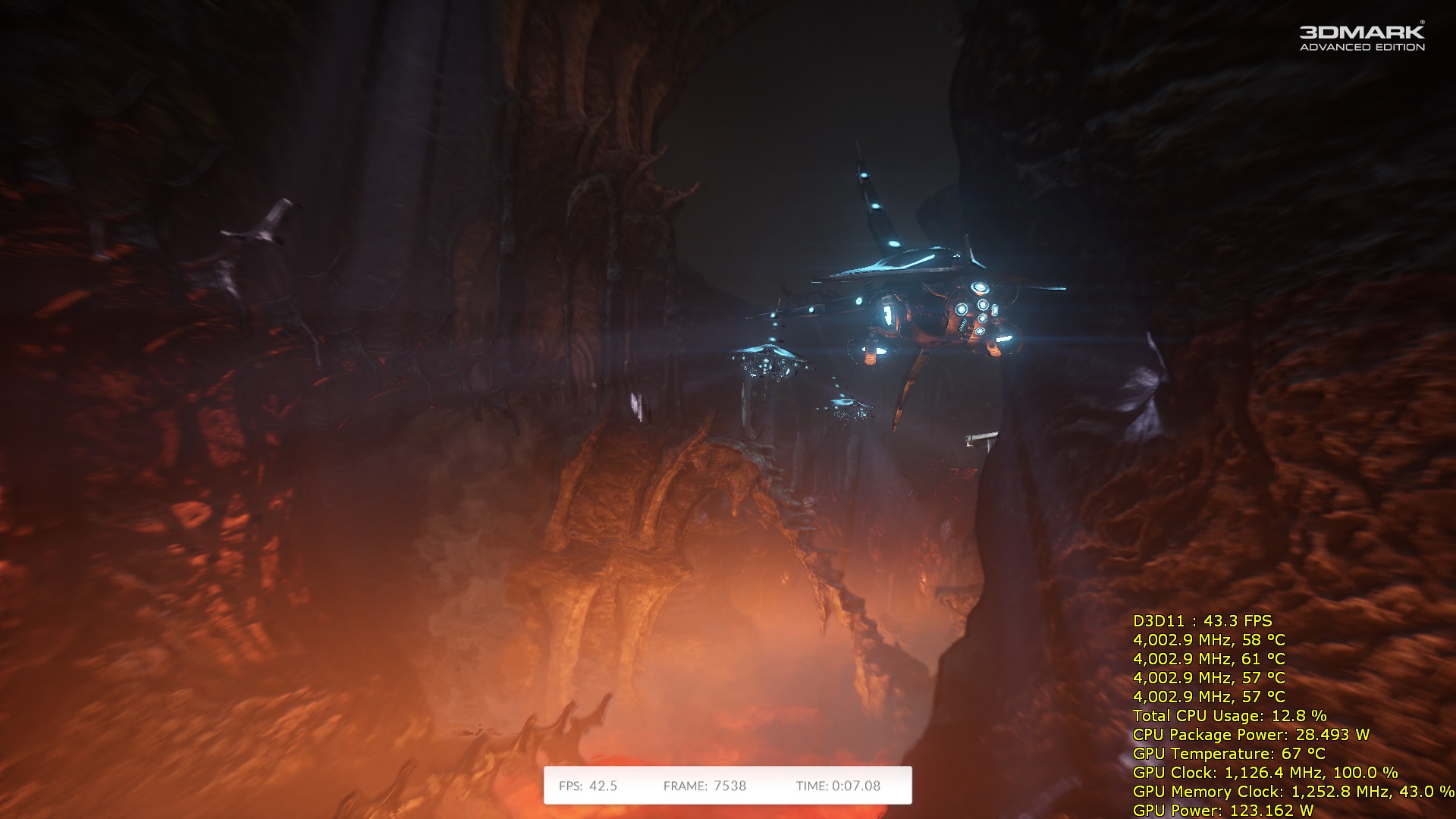
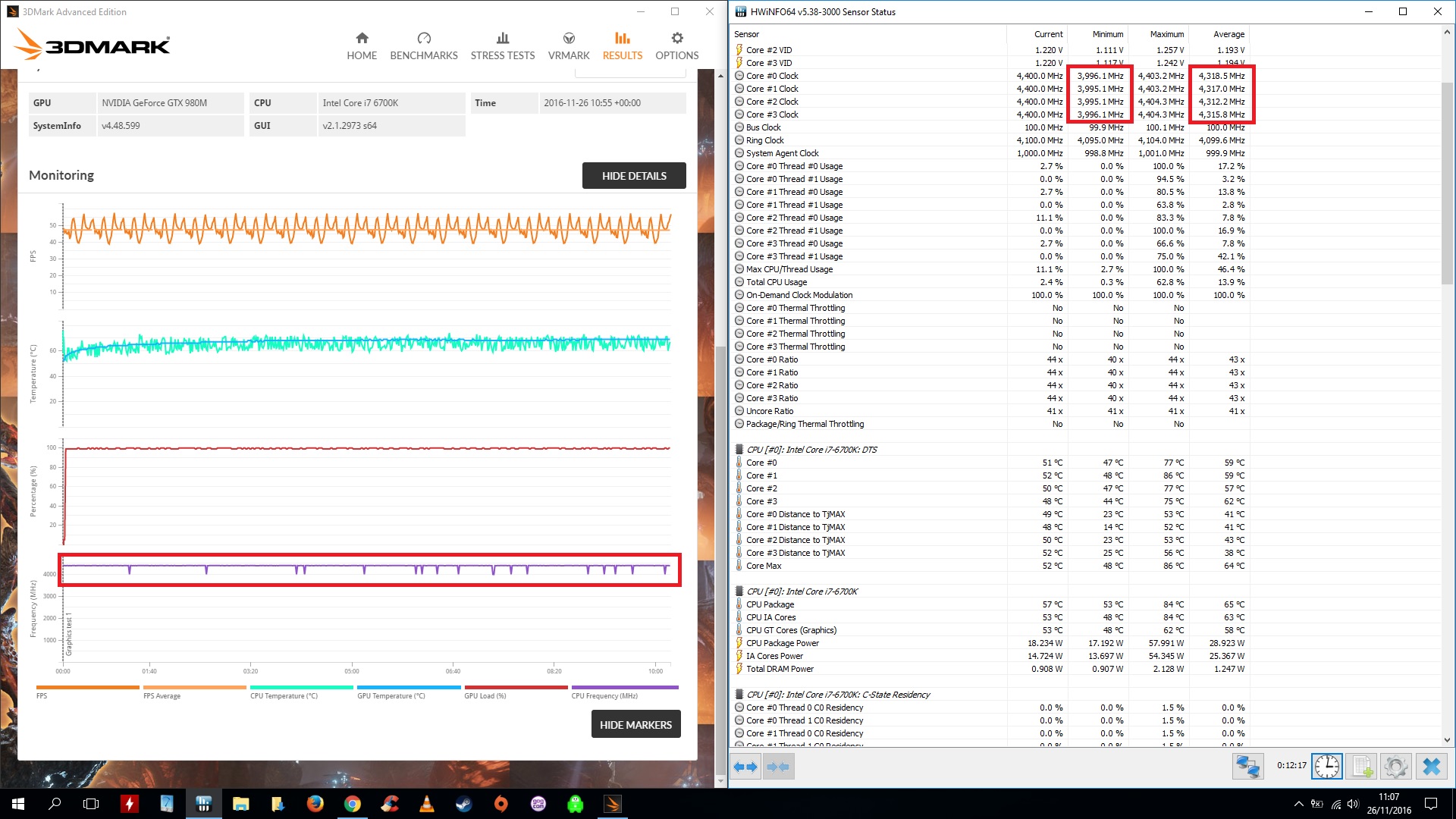
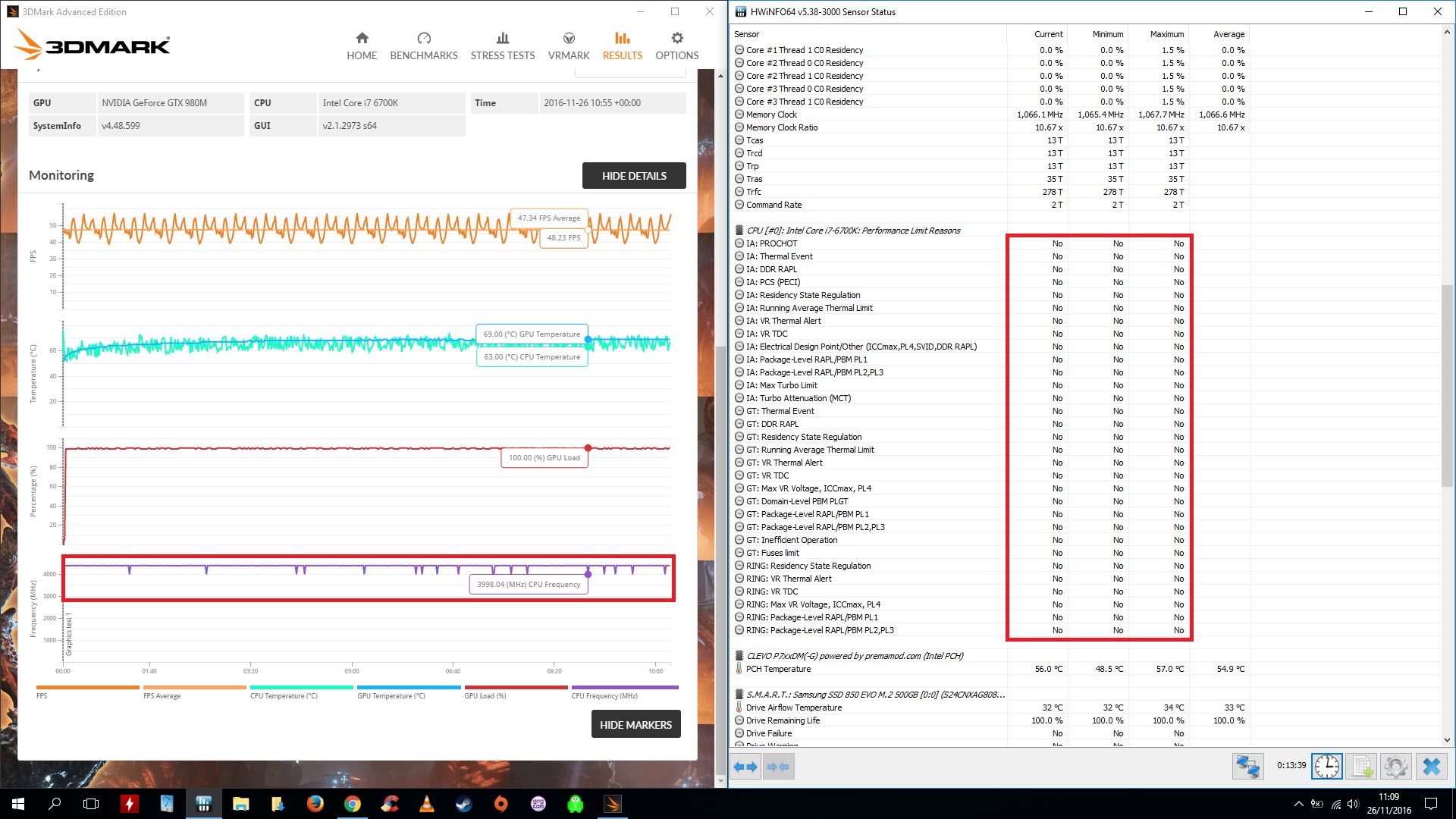
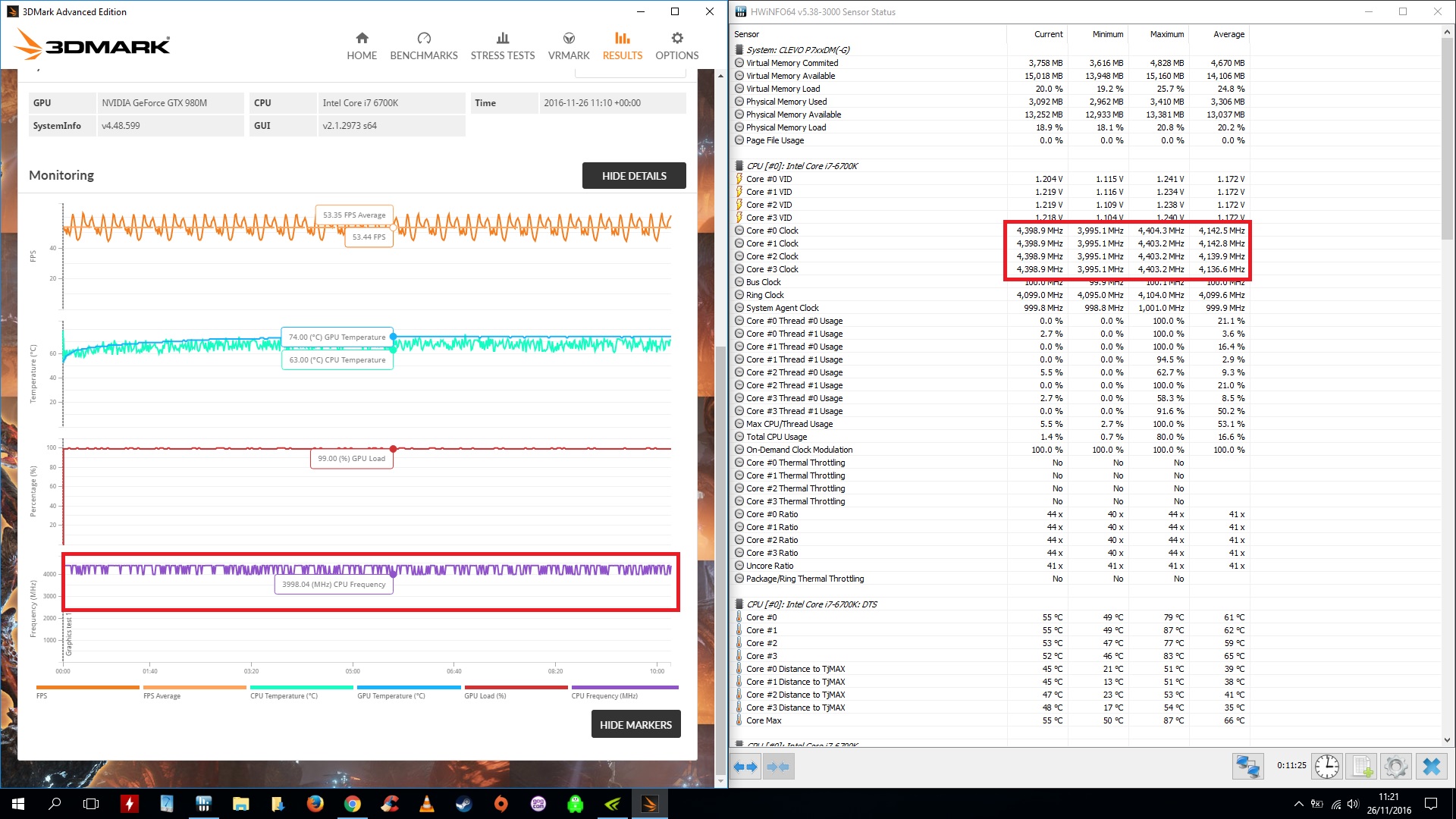
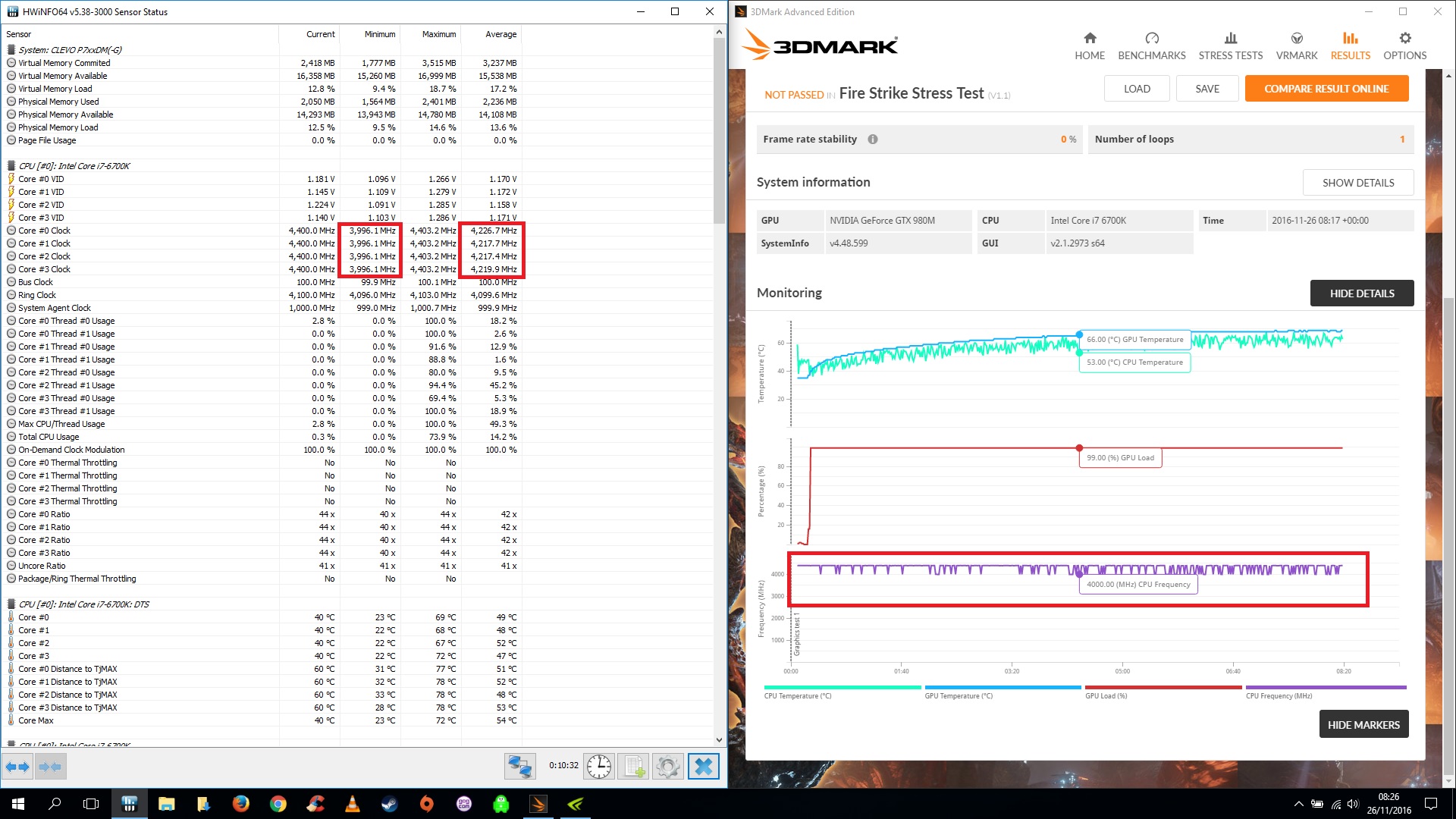
Well I seem to still be having problems holding my overclock on my P771DM-G. Im running Premas BIOS (Updated one) which he very kindly sent me but its still failing to hold. Everything is maxed out in the BIOS so im at a loss. @Scerate seems to of solved his problem but mine refuses to hold. Any ideas guys? Running Windows High performance and even tried clearing CMOS last night as well.Attached Files:
Scerate likes this. -
-
This was actually talked about in 2015....The oem.ini settings.
-
That sounds cool.
My P775 does this.
Only windows loaded - chrome loaded - HWiNfo loaded and task mgr loaded.
Open three different pages on this very forum, fans blow full speed on CPU, almost not at all on GPU.
Custom profile thingy works well, but it has the problem that the max max speed the fans will spin is 80% so there will be some overheating and throttle if CPU is used at max of it's capacity, this is why I'm using OC fan profile from CCC... -
Give me a few minutes and ill do the same thing.
Edit:
Custom should only last if conditions are met. If they surpass that, then max fax are suppose to come on by default.Last edited: Nov 26, 2016 -
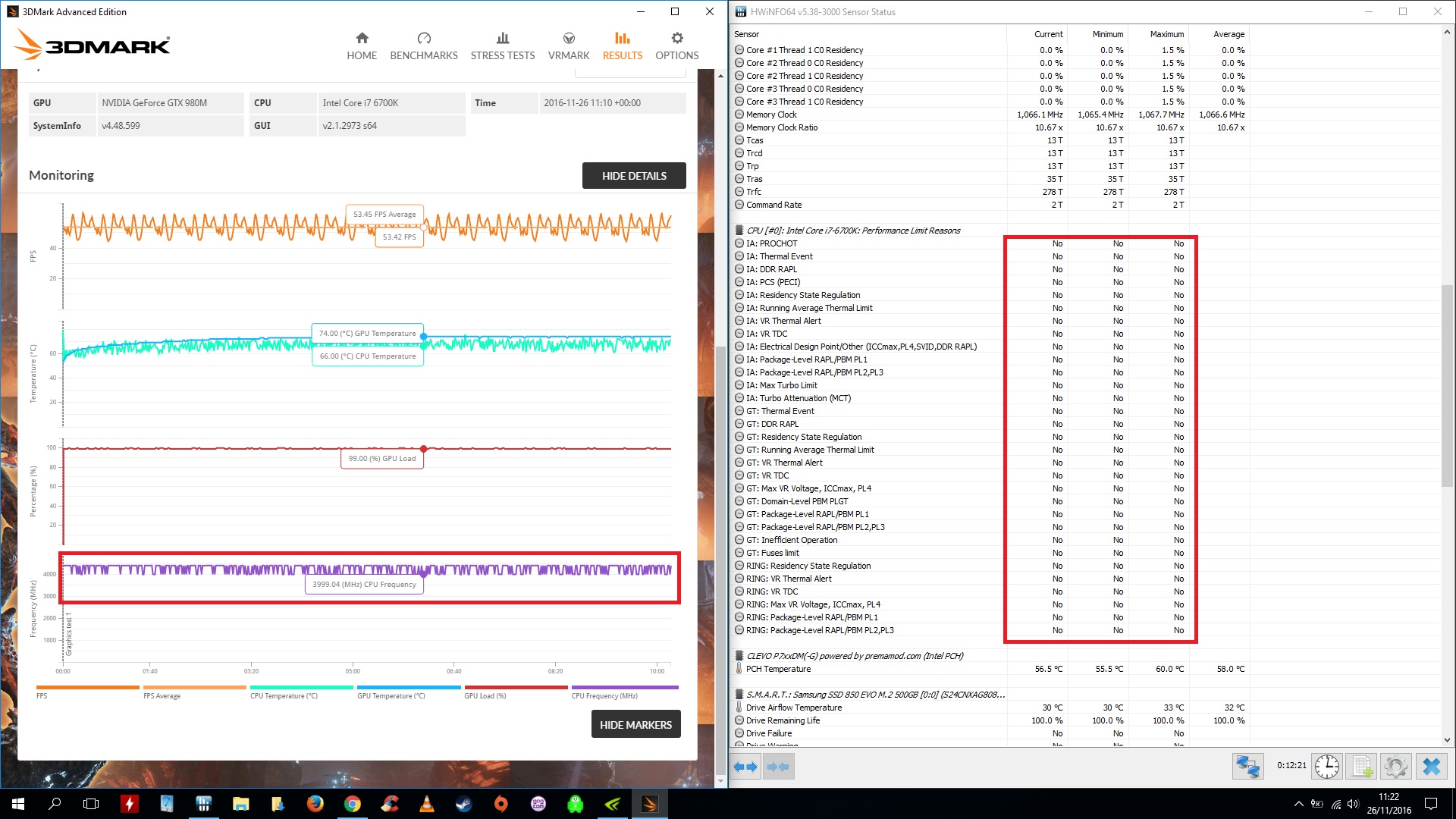
does hwinfo give you any more info on this throttling in the respective section?
Sent from my Huawei Mate 8 NXT-AL10Last edited: Nov 26, 2016 -
I'll try a full 3d mark stress test now and check if it brings up any limitations.
Sent from my SM-N910F using Tapatalkjaybee83 likes this. -
XTU can give a wide set of reasons too.
-
Well as you can see from the attached HWinfo is not saying any limitations. You can see the issue is seriously exacerbated when applying a 175Mhz overclock on both memory and core
Attached Files:
izombot likes this. -
Clevo Overclocker's Lounge
Discussion in 'Sager/Clevo Reviews & Owners' Lounges' started by Spartan@HIDevolution, Mar 4, 2016.


![[IMG]](images/storyImages/yCL7xYJ.jpg)
![[IMG]](images/storyImages/uhUwai7h.jpg)
![[IMG]](images/storyImages/umORlJkh.jpg)


![[IMG]](images/storyImages/TqcybRt.png)