Problems? See this thread at archive.org.
This is why I always told newer people to avoid liquid metal. That does not mean the experienced people should get complacent though.
-
-
Dude, I never asked for numbers, I already told you I know enough to stay away from conductive pastes, it's just not worth the risk to me, and that's why I never recommend it to others, optimizing use of non-conductive pastes is the way to go.

-
Certainly if replacing parts would impact you financially quite badly then how could it be worth it? The benefit/risk ratio is pretty bad compared to a good paste you have to agree with hmscott on that.hmscott likes this.
-
-
Professionals? Where is that certification program for "safe and sane" toxic Liquid Metal application?
Well, yeah, now that you made me think about it, the root cause bad idea is to plug in those laptops with Liquid Metal applied, that's really what kills them.
Until you plug them in the Liquid Metal spills shorting out components don't do any real damage. Well, except for the dissolving parts with aluminum in them...
Thanks for bringing that up
@Papusan - this is why you shouldn't tag me in LM posts
Last edited: Aug 13, 2017FrozenLord and Papusan like this. -
Not all kill their laptops although they have applied Liquid metal several times in same machine... + all the other machines they have as well. Don't put all in same bucket. Not all fit in same bucket.hmscott likes this.
-
Handling liquid metal is not overly toxic by the way at least, I would not get a lot in a cut but otherwise it's pretty safe in that sense.
-
From what I have researched I don't think we really know that for sure. Not enough research has been done, and not enough casual exposure to it for medical emergency reports - with only one fatal dosage reported - but these LM guys are apparently trying to make that happen
If you read some of those links from before the fatal report in 2012, there were idiots that were swishing this stuff around in the mouths because they thought it was cool to have the metal turn liquid from their mouth heat.
"Non-toxic?, cool let me swirl some of that around in my mouth" - gets slapped on the back - "Gulp!!" - 911 dispatch, can I help you?...Last edited: Aug 13, 2017 -
In the amounts even a computer builder would come into contact with I would not worry too much, for them some gloves should be fine.
-
I don't recall anyone suggesting to use a glove when applying LM before this, but that's a great idea.
Maybe protective glasses in case you splash some in your face? And, a simple filter mask to keep from breathing the flickkerings off the application brush that become airborne.
All good precautions.
Papusan likes this. -
I am talking system builders, end users with a single tube every so often, just don't eat it or use gloves if your skin is broken.
-
-
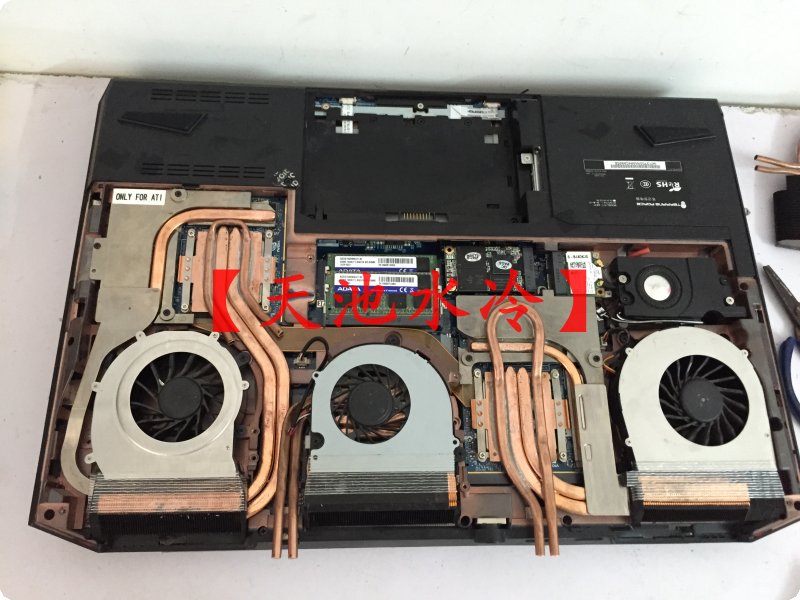
Water cooling your Clevo!!! They can run on air and water at the same time by the looks of it...
https://world.taobao.com/item/15784075513.htm?fromSite=main&spm=a21m2.8232368.0.0.2edcb5c21s7i2p -
A lot less easy to pop in a bag at that point though.
-
To the mighty @Mr. Fox and the great Bios modder and ascension of BGA books @Prema
First if you guys tell me to just stop right now, because I'm getting in over my head, I will.
But I found something interesting. and I'm sorry if this is off topic for this section although I dont know where else to get your guys attention:
In MSI GT73VR EC firmware 17A1EMS1.108 (this firmware used in GT73VR 7RD, 7RE ,7RF, 7RF SLI): with HxD:
I was browing with HxD through the EC, and I found some values in plain text, and I have no idea why there are even values in plain text, unless they were put there for a reason.
PwrBtn=H.SIM=.=L.SusOn=H.PwrBtn=L.SysS0.SysS3.SysS4.SysXX.SusPG=H.SusPG=L.PMS3=H.PMS3=L.PMS4=H.PMS4=L.AllPG=H.AllPG=L.RsmRst=H.USB_En.RunOn=H.M=M.M=I.RunOn=L.DimmOn=L.VROn=H.EC_MXMEN=H
Below that something more interesting:
EmSD=1.EmSD=0.AC_Out.AC_In.SusOn=H.Batt_Out.Batt_In.BattThrottleST = 1.BattThrottleST = 0.BattCurrThlFlag = 1.BattCurrThlFlag = 0.BattCurrentCrtFlag = 1
Below that, something even FAR MORE interesting:
CPU_CrtT = 1.CPU_ThtlT = 1.CPU_ThtlT = 0.SYS_CrtT = 1.SYS_ThtlT = 1.SYS_ThtlT = 0
Now I'm guessing that CPU_CrtT means CPU Current Throttle (although not fully sure here if the T means throttle or not), and CPU_ThtlT=1 means CPU Throttle (something). lT would either mean low throttle (low power? battery power?) or limit throttle(?)
Sys CRT clearly means System Current, then the same type of variables after.
What's interesting is that CPU CrtT=1 only has 1 here, same with SYS CrtT having only "1", while the TltlT ones have both 0 and 1.
My question should be blatantly obvious.
Would changing any of these CPU area 1 values to 0 with the hex editor and reflash with ECflashwin_041:
would:
1) instantly brick the system hard:
2) would remove CPU current throttling or "Electrical design point throttling" when total system power exceeds 230W (the limit for GT73VR 7RE, even when using a 330W power supply)?
I may be crazy but I think these have to do with the CPU power limit (Power limit 2 to be exact, and EDP Other(RAPL, PL4, ICCMax) throttling that gets turned on, at the same time) when system reaches 230W of power draw, as they both get turned on at the same time.
If the answer is 2, then which one has to be changed? And why are there both =0 and =1?
The most important thing is NOT to touch ANY sort of battery throttling if AC is removed for very, very obvious reasons.
I'm guessing that the 'best' thing to do if I wanted to risk having a 10 pound football is to change CPU_ThtlT = 1 to CPU_ThtlT = 0 only, so there are then two instances of CPU_ThtlT = 0, flash and then see what happens, and if no brick but nothing positive happens (Power Limit 2/EDP throttling happen at 230w power draw again), change CPU_CrtT = 0 as well, and then see what happens?
I'm also wondering about "System." e.g. if I changed one of the system values to 0, but again I'm worried about the battery, I think CPU only is best.
Advice? or am I completely crazy? (you've had experience with this). -
The short answer is "It won't even flash"
The long one is that someone (other than this guy here) bricked Fox's original board into RMA while playing with this...FrozenLord, Falkentyne, Papusan and 3 others like this. -
And just where would you get the checksum? Let alone insert it.... Without that it's an instant brick no matter what you change.Jon Webb and Falkentyne like this.
-
Checksums
Me and my bright ideas...I think I should just stick to chess!Jon Webb likes this. -
-
I know. I already promised HIDevolution my next laptop will be a PREMA Modded Clevo, just like yours and Mr Fox, with a SOCKETED cannon lake 6 core CPU (that's my plan).
When I first started studying this forum (well I joined when I bought my MS GT683 whitebook from xoticPC but I didn't start reading until this year), I never knew why everyone was complaining about BGA and cancer over-locked firmwares. But now I know... -
At least you asked before doing anything. Now you still have a usable laptop.Mr. Fox and Stress Tech like this.
-
Yes, that's the old saying "there are no stupid questions..".
I wish I had been able to afford the 1080 model like the mighty and helpful @Phoenix, the 330W cap on the 1080 7RF is far less of an issue than the 230W cap on the 7RE and it ignoring 330W PSU's because of the hard EC limit. But MSI never anticipated that modding a 1070 to 150W would ever be possible. The 151-170W 1070 is fast and smooth. But the CPU now can't exceed 50W or it visits the Volcano God and gets bored with Life (Quake 1 for you guys)
Stress Tech, Jon Webb, Spartan@HIDevolution and 1 other person like this. -
-
Just gave you +5 rep for reaching the decision to make your next system a socketed Clevo P870 from @Donald@HIDevolution and @Ted@HIDevolution - excellent choice.
Yeah, and about the BGA filth... don't beat yourself up too bad. We all make mistakes. I make them daily. You are obviously intelligent enough to not make this same tragic mistake twice and that is what matters most. Once you ditch the BGA filth you can speak from a position of authority and first-hand knowledge as you counsel noobs to avoid it, and provide them examples why it is trash. That will be good for everyone.Ashtrix, steberg, Donald@Paladin44 and 5 others like this. -
Thank you!
Stress Tech, Jon Webb, Papusan and 1 other person like this. -
Mission done. it has been added to your debt with a 10% interest rate
Papusan likes this.
-
Reading this thread makes somewhat regret (not exactly regret, but still) going for a BGA laptop, but at the same time, there's not many options either for a 15" socketed laptop. I bought a P650HS-G last month and I was bewildered when I got into the BIOS coming from a desktop, completely locked down and utterly stripped even though it's supposed to be overclockable (7820HK model). Another thing I don't really understand is why the heck so many of them have a shared heatpipe between the CPU and GPU? That heats the CPU like crazy when both are under load.
Still, I can't really justify paying near 3k for a laptop when the same setup for a desktop would cost half as much and it's not going to be my primary machine. Also, aren't the upgrades somehow restricted by the BIOS too? If I wanted to, I could pop a 1080 into an i7 920 build and it would run with no problems even though the CPU could be a bottleneck, plus what happens when there's a new CPU socket? Are there new motherboards for that specific laptop, if you have to buy the next iteration then what's the point?
In the end, I would have liked getting a Tornado F5, but I can't really justify paying 1k more for it while also being heavier. I wish they did socketed mobile chips with MXM GPU's for reasonable prices though, being highly portable while also being an "enthusiast" product and rettaining a reasonable price would have been awesome, but the closest thing was the P650, I would not call it a truly enthusiast laptop though, it's too locked for that. -
Yeah, we live in sad times and BGA filth just makes it all the sadder. But, some of your comments are why they can get away with selling garbage. As long as sheeple say yes to the mess, we will have whatever they are willing to put up with. The firmware part is absolutely inexcusable and unforgivable, and totally half-assed... and it is status quo for laptops to have garbage firmware regardless of what they have for internal components.
Building a beast desktop makes the most sense, but some people love laptops or need them for mobility. If the notebook is not going to be your main machine, just getting something extra cheap for a notebook ($500 or less) will be fine because everything special and exciting you would do with the desktop. Using the laptop would basically be a temporary or last resort measure. For those that don't want a desktop and want a monster laptop to be their main machine, having socketed options is essential.
The added cost for buying the best laptop you can get to serve as your main (or only) machine is also less important because you're not spending money on a desktop and extra peripherals to go with it, just to make it functional. I would not want to build a desktop that cost less than my P870DM3. It would be unable to do the things that I would want it to do. So, for me the cost is mostly irrelevant. I'd end up spending as much or more on a desktop configured to specifications that I would want it to have.Last edited: Aug 13, 2017FrozenLord, Ashtrix, Donald@Paladin44 and 4 others like this. -
They're getting away with it not because enthustasts want it but because they're forcing it down our throats, much like smartphones getting rid of user replaceable batteries and SDcard slots, I don't think most of us here wants intel to make every laptop BGA, but there's less and less options every year from what I've read on this very forum, not because people actively look for BGA, but because Intel gets more money from them and phase socketed laptops out.
I spend many weekends away from home and need a machine I can bring with me as I travel around the city while still being powerful enough so no, a $500 machine would not cut it, I know I'm in the minority here and while I may not render or compile a huge project on my laptop I still need a machine with reasonable amount of power while also being portable, and lugging a 15"+ 3Kg+ machine is not my definition of portable, at that point it's just a desktop replacement that you can easily plug from site A to site B, not something you're going to carry around up and down.
That's my opinion though, I'm sure there's people carrying monster laptops on their also monster backpacks everyday.
Thing is, you can recycle most of a desktop's parts from build to build (you don't need a new screen, keyboard, case, etc), if I have to buy a whole $3k laptop every couple of years (which is something I don't know, would you have to buy the next P870 if you want to upgrade to Coffee lake? Would I be able to upgrade the GPU down the road?), it just doesn't make sense money wise, I could do an octocore build paired with 2 1080Ti's for less than a high end P870DM3 since I would only need a new MB, CPU and two GPUs, and those specs are something you can't have on a laptop no matter how much you pay.
What I want to say is, there should be some middle ground, right now there isn't much to choose from, I think the MSI F5 is the only socketed 15" left? There should be more enthusiast portable laptops, I would love to have a 2k, truly unlocked/upgradeable 15".
Enthusiast shouldn't mean you have to spend 3k on a laptop with the specs of a sub 2k desktop.Ashtrix, Stress Tech, Mr. Fox and 1 other person like this. -
All blame Intel. But the big wolf is the OEMs. I'm sure Intel couldn't push so hard for soldered trash if they said No to trash!!Stress Tech, Donald@Paladin44 and Mr. Fox like this.
-
Back on topic again... DDR4-3333 AIDA64 Memory Benchmark
![[IMG]](images/storyImages/0Pd1e5V.jpg)
![[IMG]](images/storyImages/drK20so.jpg)
![[IMG]](images/storyImages/fzgqd6k.jpg) Last edited: Aug 14, 2017bloodhawk, Prema, leftsenseless and 4 others like this.
Last edited: Aug 14, 2017bloodhawk, Prema, leftsenseless and 4 others like this. -
-
"Alien!" - Taobao
![[IMG]](images/storyImages/TB2pmFglFXXXXb1XpXXXXXXXXXX_!!463584812.jpg)
^
Clevo P377SM-A
Ohkay TaoBao. Slow your roll there.
Ironically, my sister got me a shirt that says "Of course I don't look busy! I did it right the first time!" and now I feel conflicted to agree but my shirt says don't agree... xDLast edited: Aug 14, 2017hmscott, Georgel and leftsenseless like this. -
-
I find it difficult to believe that would be enough "water cooling" to make a huge difference, but I could be wrong. It seems like not enough just looking at it.
When I think I may be wrong about something, it often turns out that I was mistaken.Last edited: Aug 14, 2017D2 Ultima, Stress Tech and Papusan like this. -
Yeah, I'm thinking similar. The pipes would need to zig-zag back and forth and have a lot of solder piled up around them to make contact with a significant amount of surface area on the heat sink for it to be meaningful the way they are making that with the pipes stuck on top. With just one copper loop making contact with a really small amount of surface area I cannot imagine how that could be very effective.
-
I suppose, but to be honest for an average (I'm assuming) of $50 USD (the prices ranged from about $5 to $62) for a high end notebook, this is essentially "extra" cooling, since it's welded to the pipe.
So for example, when I used my P370SM3 the highest I ever got any component was 85c in the middle of the day playing a certain game (and only that game; others topped out around 81c) on a very hot day. My CPU generally never passed 80c unless streaming with serious compression and my slave didn't know what 80c was (this is inclusive of way back when, when I tried Furmark one time; after 15 minutes it was still at 79c) without any overclocking.
That added-on heatpipe solution, even if it helps 5c, might be more than enough of a benefit. In a cooler living situation than mine, (such as when I tried using A/C rooms in university, without even propping up the laptop) I used to be able to stream at auto fans and not even cross 85c on my CPU; max limited that to near 70c. With such a cooling benefit that's essentially the difference between 24/7 overclocking and not, once all your thermal pads and whatnot are set well at least.
The real question is how would it help the higher end systems like a P775DM3 or something, for general usage. -
could soldering the water loop on a heat sink cause it to warped out of shape?
Ok foolish question, guys are soldering shims on with no problem. -
THIS heatsink design is born.... Should be brought to death!! No future!!! Death!! @Donald@HIDevolution !!!!
-
Yes, you have to be very careful and not use too much heat when soldering or you will ruin it. You need to use a very low melting point solder paste (138°C) and use only as much heat as it takes to fully flow the solder paste.
The copper heat pipes are very soft and you can bend them just taking the heat sink off if it is stuck really hard with something like IC Diamond. This is especially critical on the P7 unified heat sink design. If the CPU and GPU are both stuck hard, you have to be even more careful. You can't just grab it and yank it off without a risk of distorting its shape and bending up the heat pipes. I always used a plastic pick tool to pry upward on the copper heat plate to "pop" the thermal paste loose on the CPU and GPU before attempting to lift the P750ZM heat sink off and never had any trouble doing it that way. If you are using a soft and creamy paste like Kryonaut or a liquid metal, this is not as much of a thing to be careful about because those don't get stuck as bad. But, it's still good to be gentle to avoid distorting the shape/fit of the unified heat sink. The more curves and loops the pipes have, the more careful you need to be. They seem to bend easier than straighter pipes do.Last edited: Aug 14, 2017 -
If you guys are seeing this...
...if you click on update, the newest version available for download does not show up as 1.80.1 for some reason. However, if you download the 1.80 version shown at the top (even if it seems like you already have that) the version you download will have the .1 at the end. This has been bugging me for several days and I could never see the new version. I discovered they did not label is correctly and what you download will be newer in spite of the description. I went ahead and downloaded it anyway to see if that would make the update nag go away. It did.Last edited: Aug 14, 2017 -
@D2Ultima
I think it might just surprise you how good it would be. I mean it really depends.
I will have to take the time and do the math with some equations to have a very rough estimate on how good it is. It would really depends on the flowrate and the quality of weld.
Ideally you have to toss in fins near the die to increase your surface area.Last edited: Aug 15, 2017 -
Water is pretty good at absorbing heat, it wont help much at idle but at load it would depending on the size of the radiator of course.
-
The internal fans will heat up the water defeating the purpose..... Speculations of course
-
-
How did the water cooler work on that Asus machine? I think @Mr. Fox called it a colostomy bag attached to a laptop.
Attached Files:
-
-
I probably answered my own question. A colostomy bag isn't too appealing so I doubt it was a compliment
Clevo Overclocker's Lounge
Discussion in 'Sager/Clevo Reviews & Owners' Lounges' started by Spartan@HIDevolution, Mar 4, 2016.