 Problems? See this thread at archive.org.
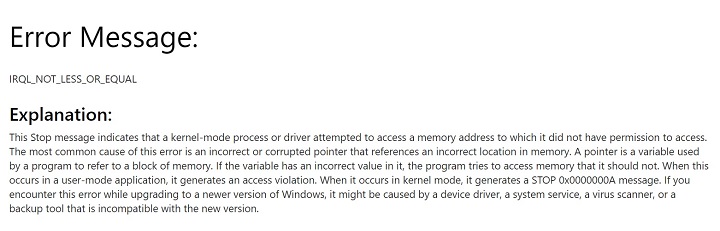
I got "IRQL_NOT_LESS_OR_EQUAL" before, below is the explanation from Microsoft.
I used Debugging Tools for Windows to read the crash dump, found out it was related to Bluetooth driver (in my case). So after I turned off Bluetooth/uninstalled the driver, it fixed it.
You can try to read and analyze your dump file to see what caused you the BSOD.
-
In the past my 330W psu was too hot, I put a usb fan on top to blow air on it, it helped a lot.
Maybe you can consider getting something like this:
https://www.amazon.com/Thermaltake-...=UTF8&qid=1504156025&sr=8-41&keywords=usb+fan
or:
https://www.amazon.com/AC-Infinity-...rd_wg=0zXy6&psc=1&refRID=DJBM12H2KPX84TXE9KFGhmscott likes this. -
Buy a cheap kil-a-watt if you don't already have and measure the power draw from the wall.Falkentyne likes this.
-
Well I think it's my apartment temperature, because I was running the 230W with 250W power draw and it was hot but not too hot. But I've run the 230W in my apartment before with 180W draw and had it scorching....
-
Gotta pick one of those guys up soon! Good idea.
-
Going from full load to idle is the most stressful time for the VRM circuitry, worth keeping in mind.
Ashtrix, Falkentyne and Stress Tech like this. -
Looks like "10" gives a 460W power limit (assuming the 2x230W AC power adapter is the exact same as the AC power limit).
@sirgeorge tried 91 and his SLI system throttled hard with the CPU hardlocked at 3.4 ghz at combined load. When he set it back to 10, it ran full speed again.
What we need is for someone with a 1080 system to use "10" instead of "91", unplug their battery first of course, and see if they can get full combined CPU+GPU load without throttling.
(With battery disconnected, you will throttle at the "Hybrid Power cutoff point").
@Phoenix wanna be our guinea pig?
@Mr. Fox If you're talking about that "Power Limit 2" flag that just comes on at 4.8 ghz on the 16L1 barebones Evoc, with nothing except the CPU loaded by itself, capping the TDP to 91W (stock 7700k), not sure how that would help. However offset E4 (04:E0) is writable and seems to control whether throttling is ACTIVE or not. "10" means it's not active. When I had PL2 flagged in red before changing E3, after firestrike had already finished running, but PL2 was still throttling the Prime95 program, when I changed E4 from the current value (It was either 0F or 11, I forgot what it was), to "10", it instantly turned off the PL2 throttling. But something ELSE wrote to this when I exceeded 230W and turned it on in the first place...
I do not know if this would work if another register were turning this -on- however. Anyway we can only hope that can be attacked in the EC Ram, but I have my doubts because if something is changing a writable MSR (or whatever these memory locations are), and you change it back, what's to stop the original process from turning it on again?Last edited: Aug 31, 2017hmscott likes this. -
I need some help please. Which of these 120mm fans are best for the U3 plus fan mod. I already have the U3 Plus cooler and 3x Kuncan Dc 5v USB to Dc 12v Converter I just now need to find the best 120mm fans for this mod (I need 3 of them):
EK Water Blocks EK-Furious Vardar FF5-120
http://www.ebay.co.uk/itm/EK-Water-...507462&hash=item1c88a92b5c:g:nvwAAOSwpONZRGDa
or
G839 Noctua NF-F12 IndustrialPPC 3000RPM PWM
http://www.ebay.co.uk/itm/G839-Noct...235543?hash=item1ec4690417:g:3yQAAOSw-jhUFuWx
If there is a better 120mm fan or idea, then please inform me.
Also do I need to use one Kuncan Dc 5v USB to Dc 12v Converter per fan? -
If you based it on specs , the noctua fan has advantage because it produces more cfm and have higher static pressure capacity. If you're looking for more, then look into this:
By the way, I want to ask for what you will use the Kuncan converter? I think you need a fan controller like this https://www.amazon.com/Kingwin-Chan...qid=1504215084&sr=8-8&keywords=FAN+CONTROLLER then just buy https://www.amazon.co.uk/230v-AC-4p...mr0&keywords=molex+power+converter+coolerguys for power.Stress Tech likes this. -
-
Numbers in the spec sheets ain't the same as real world tests But, yeah both of mentioned fans is one of the best you can get today. If you want more airflow and static-pressure... Look for the
stronger and more powerful Delta fans. But the noise will be in an other class.
![[IMG]](images/storyImages/cTuri7al.jpg)
Delta...
@Stress Tech want power the fans from the laptop usb ports. Therefore the Kuncan Dc 5v USB to Dc 12v Converter - Need 3 of them.Last edited: Aug 31, 2017Ashtrix, cj_miranda23 and Stress Tech like this. -
Guys do you know why everytime I power off my laptop, oc bios settings get reset? any idea?
-
Good idea famo Thank you all.
I will look into buying a fan controller and some Delta turbines too. Them Deltas look ridiculous! but that's what I like lol. I will just control them with the fan controller. I don't want them to lift my KM1 in mid air though, unless I'm overclocking
By the way; how many "230v AC to 12/5v DC 4pin Molex 2A Adapters" do I need for 3x delta fans you reckon?
Thanks guys. Them Delta fans made me grin
Rep for you all. -
Mind you, the mentioned Delta fans use 48w each 4A from 12v adapter.
Ashtrix, Falkentyne and Stress Tech like this.
-
I'm not sure if that power supply is capable of running the delta fans. I think its only rated 24 watts while a single delta fan need 48 watts to run. Better to get a separate power supply for like https://www.amazon.com/Electronics-...93124&sr=1-36&keywords=200+watts+power+supply.Ashtrix and Stress Tech like this.
-
Damn! these Molex adapters are only 2A too. Also I'm in the UK it costs £33 for one fan and £22 for delivery...Which is daft money for 3 fans, and that doesn't include the power supplies and fan controller. Also those power supplies that @cj_miranda23 mentioned look like something off a Boeing 757.
*Sigh*
I will just be normal, and get the EK Water Blocks EK-Furious Vardar FF5-120 fans with the fan controller that @cj_miranda23 mentioned.
Good TechPorn by the way @Papusan
-
Boeing 757 lol, any power supply that is capable of supplying the total amount of power needed to run the 3 delta fans will do. http://www.mini-box.com/PW-200M-DC-DC-power-supply. If you are using the eurocom 780 watt PS for your laptop?, why not use the spare clevo 330 watt PS for the u3 mod.Stress Tech likes this.
-
I don't have a Eurocom 780w power supply, I only have two 330w bricks you see. Thank you for informing me though. I didn't know. I will do some information gathering first and keep this overclock forum informed about any new fan mod, but for now its looking like a standard U3 Plus mod as I have stated above. Cheers bro
cj_miranda23 likes this. -
Do you have XTU Interface enabled in the Bios?
Are you using XTU in windows?
Only time I've seen this is when someone has XTU installed, and XTU decides to randomly reset the overclock... -
http://www.ebay.co.uk/itm/Lamptron-...e=STRK:MEBIDX:IT&_trksid=p2057872.m2749.l2649
@cj_miranda23 I got this for £25 on offer. Its a 6x fan controller 30w per channel. It comes with sensors too.
And one power 12v 2A molex power supply for £7.
U3 Plus cooler £30
I just need 3x fans...
EK-Furious Vardar FF5-120 only takes 5.64W power draw. Now I have the 30W per channel! I was thinking if I should get any different fans? or would this make the Vardars run more faster? I don't think I be able to power the 48w 4A Delta turbines with these 30w channels though. What do you reckon @Papusan ?
Kind regards. -
The 48w Delta turbines is a way overkill, bruh. 3x 66db fans ain't exactly quiet. More for fun. Read you up on db noise (how it changes with increased db). Different Fans can give different noise although they give same db. Normal good quality high airflow/high-pressure fans should be enough. Don't forget fan filters
Ashtrix, Stress Tech and cj_miranda23 like this.
-
Thank you, I understand you. I also think: even though the 48w Delta turbines were running on low (below their optimum speed) they still will be loud. I think I will go for 3x EK-Furious Vardar FF5-120 fans. And I did forget the fan filters. looking for some now... Cheers bro
-
@Stress Tech That will definitely work. The only consideration you have to take into account is its size because you want to make sure that it will fit under the cooler together with the 3 fans.
Stress Tech likes this. -
You would have to check to have a decent power supply to the fans too
Papusan likes this.
-
Thank you. But I just bought:
3x EK-Furious Vardar FF5-120 fans (3000RPM) £68.85
3x 120mm aluminium mesh fan filters £6.87
1x Lamptron FC Touch Fan Controller - 6 Channel - 30W per Channel £25
1x U3 Plus notebook cooler £30
1x 12v 2A Molex power supply £8
Total £138.72p
Sounds daft, but I have but the shopping list here for future reference if anyone (amateur) decides to go into modding a U3 cooler. I hope this helps someone browsing about on this forum. The UK prices will give UK residents an idea on prices too.
Thank you @cj_miranda23 and @Papusan for guiding me. You been great
Looks like I'm going to be having some fun next weekend
And hopefully my 17w thermal pads will come too. I been waiting for over a month for them
Adbear likes this. -
Yeah, if you want run them 24/7 (I use my U3 the whole time) they will be noisy even with lowest possible voltage. I mean I have read some places +57-59db on lowest possible voltage.
This is a minor problem I think I have lying 3 or 4 power adapters. And they collect dust as now
Ashtrix and Stress Tech like this. -
Good. This will drown the sound of my forever nagging girlfriend
Time to find some Asus ROG Centurion 7.1 Surround headset... then! I'd be in a world of my own
-
Noise cancelling headphones work well blocking out annoying noise
... And they work on loud fans too xDAshtrix, Papusan and Stress Tech like this. -
Nice, just a reminder and I'm not an expert but the vandar fans need 1.3 amp(3000rpm) per unit at max load. Make sure the power supply is rated above it to avoid overheat. This is the reason why I went with the noctua fans which have a maximum .3 amp input requirement.
Goodluck
Stress Tech and Papusan like this. -
Somewhat wrong bruh, but yeah they need more powa than the weak, small useless 5v fans who follow the U3 Choose the one that comes out cheapest. Both, Noctua and Vardar fans is quality products. One of the better out there.
Edit. My (homemade) fan filter I use to get from my wife from time to time
Ps. A ok deal on power adapter if yoo can use a soldering iron ($11 usd) https://www.amazon.com/Adapter-Transformers-Supply-Output-Listed/dp/B00DKSI0S8Last edited: Sep 1, 2017Ashtrix, cj_miranda23 and Stress Tech like this. -
-
Yeah I know, especially with weaker fans, but still ok temp + airflow and almost no dust inside the chassis Even though I have open up and modified the cooling 2-3 times after the purchase, I still haven't needed to clean the fans (the machine is now 1.5 year).
Ashtrix and Stress Tech like this.
-
Thanks for this, I'm in the UK and it's handy to get a full list and links as I'm looking into doing this myself over the next month or so.
Did notice the fans seem cheaper here
http://www.watercoolinguk.co.uk/p/EK-Water-Blocks-EK-Furious-Vardar-FF5-120-Fan-3000-RPM_50434.html
even with the £5 shipping they come in around £50 for 3Last edited: Sep 2, 2017Stress Tech likes this. -
Your welcome. Thats why I always add as much detail on my post so Google (or search engines) can tag and index the important words for the people searching through the internet or this forum for information. It's saves modders some time hopefully.
And thank you thats a good find. I never searched there sorry as I don't use Amazon, but I wish I did. I could of saved alot of money on them fans..Last edited: Sep 2, 2017 -
I'll be more precise. The only configuration that I see being reset its the default mV offset (by default its on -100).
I can change it, for example, change to -125mV. But when I restart or power-off, it goes again to -100.
I had installed Intel XTU, but its behaviour is the same uninstalling XTU...
Weird, huh? -
Clevo forces the P7 KBL models to be undervolted to 100mV-.
So the voltage offset setting simply won't allow you to change it and flip right back before it actually does anything.
It was one of the things we had to fix for the premamod bios.
The stock Clevo EC would also just start to throttle if run at zero / positive offset, another thing that required some special attention...Last edited: Sep 2, 2017 -
But you can use ThrottleStop for undervolt if you are on ordinary bios? Aka make your own profiles who logon with Windoze?
-
So I'll have to rely in ThrottleStop or Intel XTU.
Thanks for the explanation. -
-
I usually stay at -125mV, multipliers 46x-45x-45x-44x.
-
Why do the ODMs make such strange decisions with their cancer Bioses?
MSI using hybrid power when it's not needed anymore, then Clevo throttling madness......hmm I better go back to sleep.hmscott likes this. -
Because they want to save money on AC Adapter, cooling and overall system footprint and the end-user don't know the difference...
Last edited: Sep 2, 2017Ashtrix, electrosoft, D2 Ultima and 8 others like this. -
I don't know about the Chicony units, but the Delta PSU is easily capable of supplying its full rated power by itself.
And at stock settings (meaning, no GTX vmods) it's impossible to even exceed the rated power.
PSU running slightly cooler, maybe. But from all the complaints on the MSI forums about people asking why their battery keeps draining...seems like people aren't very happy with that...
My issue is people replying there and saying that "MSI is drawing power from the battery because the PSU can't keep up with the demands of a heavily loaded GPU+CPU" which is utterly wrong.
Alienware does the exact same thing. No wonder Papusan is upset about that.Ashtrix, hmscott, Papusan and 1 other person like this. -
Alienware's Vice President Azor learned how to cripple their new modern JokeBook's with Battery Turbo Boost from MSI. The lead star/bell sheep for this awesome ****y useless tech. But the newer Alienware's is crippled regardless of their adoption of MSIs Hybrid functionality Battery eating tech. Filthy matching filthy!! As always
-
so was a bit afk some sort of, due to work etc, did i miss something besides some thicc benchmark points
? my notebook seems to run too good now, no errors crashing whatsoever bit bored about that, jk.
Prema likes this. -
Got to have some fun. My friend's Alienware 13 R3 + my other friend's AMD RX Vega 64 + my Alienware Graphics Amplifier:
![[IMG]](images/storyImages/3iQYxwa.jpg) Prema, Coolane, bloodhawk and 1 other person like this.
Prema, Coolane, bloodhawk and 1 other person like this. -
If Intel were not so stingy with CPU PCI-E lanes we might have seen a universal solution sooner for external GPUs.
Nicely water-cooled and overclocked and the performance can be epic
Prema likes this. -
Oh by the way here is a quick step by step for my stand:
https://linustechtips.com/main/topi...-response-laptop-standcooler/#comment-9822795ajc9988, Stress Tech and Papusan like this. -
If you mean tethered fast to your desk home as with Asusbook and the water dock...

-
Benching with SPECviewperf 12.1, pushed the card stably running at [email protected]:
Scerate, Stress Tech, Papusan and 1 other person like this.
Clevo Overclocker's Lounge
Discussion in 'Sager/Clevo Reviews & Owners' Lounges' started by Spartan@HIDevolution, Mar 4, 2016.


