 Problems? See this thread at archive.org.
Will get better...
-
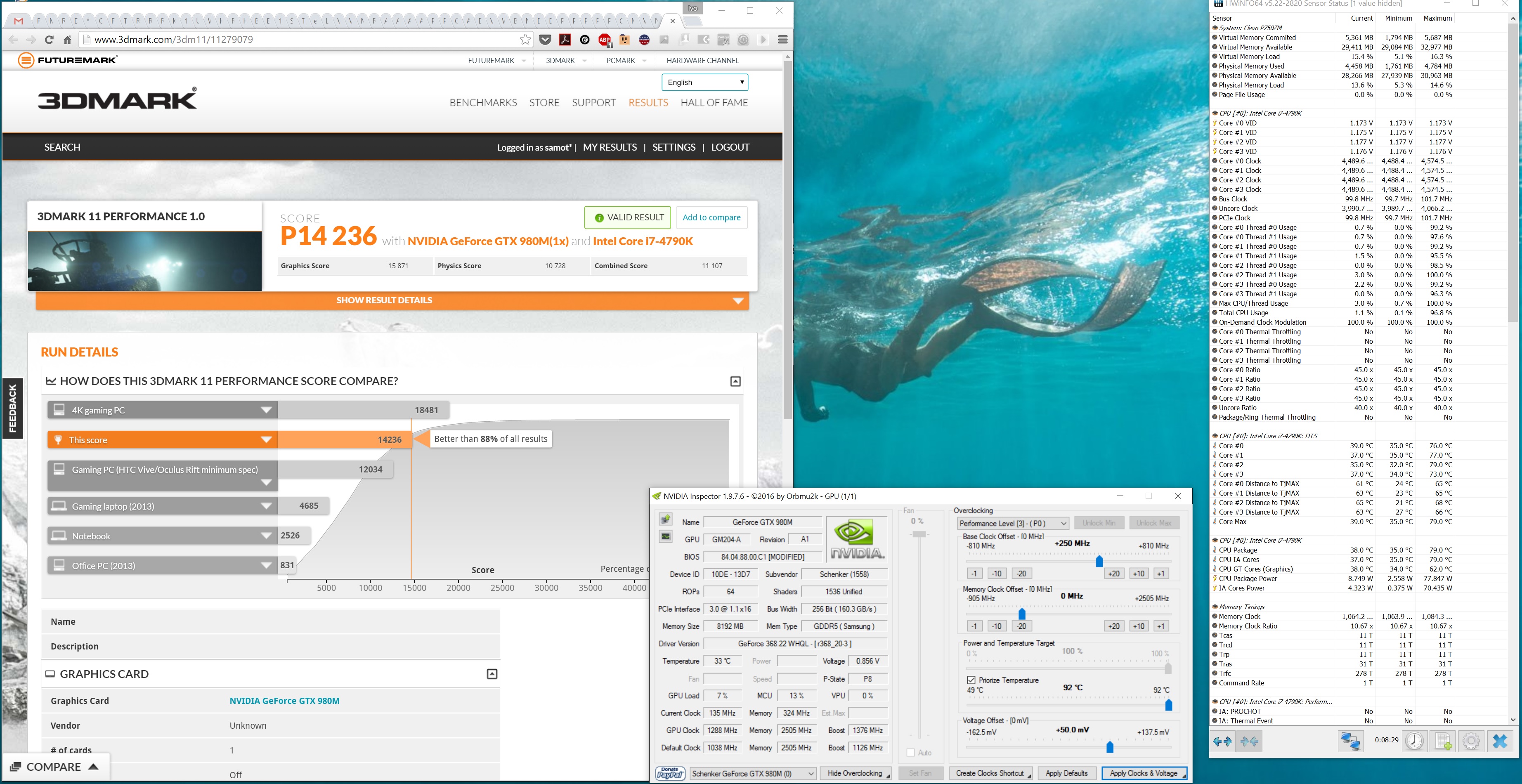
BTW, didn't post this when I did it, but this is my system at 4.5GHZ, 2400MHZ DDR3, and overclocked 980M. Sorry it isn't the normal validation stuff, but was ran to be ran...
http://www.3dmark.com/3dm11/11256017
Edit: I am ajc9988-2 on 3dmark.com. I had ajc9988, lost my password, then tried to merge accounts. Huge headache. But so you know where my scores are. Still haven't passed 11,000 yet on firestrike. :-( But goals....
Edit 2: This was with the 365.19 desktop reference modded driver, in case people care to check it against their scores and drivers.Last edited: May 26, 2016Thumper_23, Mr. Fox, Samot and 1 other person like this. -
Ok guys I think I might have narrowed down my issue with throttling, its been a while. I have maxed out ICCmax but still shows as 124A in HWinfo also when I go above 1.31v under performance limit reasons HWinfo shows, IA: Electrical Design Point/Other (ICCmax,PL4,SVID,DDR RAPL), IA: Turbo Attenuation (MCT), and RING: Max VR Voltage, ICCmax, PL4, as the points of failure. Any ideas guys?
-
What is your Core multipliers set to and what about ring? If I increase ring to anything about the default o (ie. 41X), I get crackling in the speakers
-
Are you using Adaptive voltage or static? In order to avoid those flags/trigger you will need to find your processors static voltage for the frequency you are trying to achieve.
For lower frequencies its not a problem since things stay under limits, but for 4.6Ghz + it goes over pretty easily on adaptive.Papusan, hmscott, Spartan@HIDevolution and 1 other person like this. -
Right now core is at 44 and ring is 41
Spartan@HIDevolution likes this. -
then I don't know the solution. I hope someone can help us. If I set my voltage to manual the temps go rocket high. I don't even know what's a good starting static voltage for 4.5 GHz overclock on all cores and when setting static voltage, should the ring voltage also be the same and static or should it remain as adaptive......_deadbydawn_ likes this.
-
Are you throttling at those clocks as well ? Or if you try to go higher.
Because normally for the 6700k you shouldn't need more than 1.3v to hit 4.5Ghz.
I have my ring at an adaptive of -160 @ 4.3Ghz. When i bench i set it up at static voltage which i know is good for my main cores to hold 4.8Ghz.Last edited: May 26, 2016 -
so what do you think I should my static voltage to for 4.5x4?
-
I can hit 4.6 no problems at stock voltage, which is what 1.25 around there and 4.7 at 1.3 with adaptive which sometimes and jumps into the throttling, but anything over that and throttling just drops my freq to 4.1 and lower.
-
You don't really need static for those clock speeds, also 6700k's seldom use the same voltage. Like mine can do 4.5ghz at 1.235v. But needs upwards of 1.35 V to go beyond 4.6ghz.
So you gotta play around and then you might be able to round out what your processor needs.
Hit me up over the weekend, and I'll explain and show you how to do this using TS.Last edited: May 26, 2016Spartan@HIDevolution likes this. -
Just tried with static voltage throttling at 1.3 volts with clock at 4.6
-
right, thanks bro
-
4.6ghz at 1.25 is rather impossible IMO. Since its adaptive, it's using up way more voltage. When the load is low, the voltage drops to the bare minimum, but when the load increases it ramps things up. And for higher frequencies adaptive voltage triggers the voltage limits and that throttles the clocks. That is why with adaptive voltage people use a negative voltage offset to even things out. But for higher clocks static voltage is needed.
This is a very crude explanation someone else will have to chime in with the details. -
Can you post a HWinfo screen shot with your processor at 100% load and at 4.6ghz , and with the static voltage at 1.3 V.
-
I was just assuming thats what is was now that I look at it it is 1.3 with 4.7 going up to 1.35 but that is with at 0 and +30 but these voltages are jumping around so much its hard to pinpoint anything.
-
Well, start a Wprime 1024M run and while it is running take a screenshot.
-
I will post them tomorrow. I need to get some sleep.hmscott and Spartan@HIDevolution like this.
-
At 45x4 I have been able to run with voltage set on BIOS defaults with both 6700K CPUs with no problem.ajc9988, Papusan, bloodhawk and 1 other person like this.
-
![[IMG]](images/storyImages/1643229.jpg)
I'll just leave this here:
http://hwbot.org/submission/3224210_Thumper_23, Samot, hmscott and 2 others like this. -
So went to a local shop to buy a 6700k but i found out my delidded 6700k is alive!!!! Now i am concerned its my system that has a problem rofl
![[IMG]](images/storyImages/90e99da2fbc005e2a1706265e9d68513.jpg) tech had to adjust the ihs he said probably it wasnt locked in tightly thats why it failed to post. Hope he is correct!!
tech had to adjust the ihs he said probably it wasnt locked in tightly thats why it failed to post. Hope he is correct!!
-
-
What do you mean? But my system is lighting up and all but just no display. Hope my system is ok and hope its just me who did not put it in properly

-
Static is good but in our clevo laptop Mobo
It might be some kind of mechanical problem like pin bent but electrical problem must be considered first since you have not removed the battery while removing CPU. -
The 980M in my P750DM-G doesn't overclock very well. ASIC is 66%
 I can only get +200 core, +400 vram with a 50mV over volt to be stable in Firestrike. Interestingly Heaven benchmark will cause a black screen failure with no recovery, have to reboot. This is the VRMs shutting down, correct?
-
For that much OC, I think 50mv+ is not enough.
-
Whats the largest safe OV that has been used regularly?
-
So, my 210/210 is set to 50mV. The ram is not dependent on that voltage, but the extra heat can prevent it from allowing higher core OC. Keep them close together, moving them up together in units of 10. I don't go to 62.5mV until 240/240. You need to redo how you are overclocking. You may be pushing too much voltage for 200 to be stable. When I OC, I primarily do it for benching and 210/210 is my lowest batch file! I have an asic of 69.6%, lower than many people here, and I'm still rocking it out! I've got an older model card, though, which even with lower asic overclocks better than some of the newer batches. So before you give up, don't! My firestrike OC is pretty good, tied with liefang almost just under 11,000. I can't use that same OC on Heaven! It will shut my **** down! Each benchmark stresses the card differently. Such as my gpupi score using a core that I cannot even use in firestrike. So please, stop blaming the hardware until and unless you have ruled everything else. In overclocking, there is the OS, drivers, the hardware itself (which heat can affect a non-sensored component and limit you), cooling, and user error. You don't seam to have tried everything you could and going black, often, is a sign of too much voltage. I used to jump the voltage up and try to march for gpu, DON"T!!! Instead, move both core and mem up together. once the driver crashes, up the voltage one notch. Repeat until you are at the top for that benchmark. Each benchmark will have it's own limits. Use the one with decent temps and lowest settings with the games you play, if you are looking for the 24/7 overclock ( @hmscott ). This will tell you if your cooling is sufficient and whether it can handle your gaming. If you have the P7XXXM series (both Z and D), remember to factor in spikes of CPU usage. The cooling to prevent the voltage being higher from damaging the components is more important than asking for an arbitrary voltage which may be fine for someone else but not for you. Any OC can shorten the lifespan of the card. I don't know what others would recommend but I'll say an arbitrarily low overclock, like the 130/130/0mV, which is available under stock bios, would be safe.bloodhawk, Mr. Fox, CaerCadarn and 2 others like this.
-
I am going to look for an example of this. Where do you see some people splitting the plastic? Do you remember?
-
It's more people complaining about the metal sticking to the heatsink and needing sanded. Also, comments from users showing a split when they take it off allowing for metal flakes with risk of shorting if it falls on your board. (Edit: it wasn't a bleed out issue and may have split by one side sticking to the heatsink and the other to the ihs) The only way the metal could stick to the heatsink is to melt through the plastic. This was a complaint with the original indigo extreme. The newer versions did change the plastic used, so melting through may not be a concern anymore, nor the splitting at the edge. The newer indigo extreme xs doesn't have a lot of reviews or direct information on it, unfortunately, so I've taken what I could from the first version to list warnings, just so no one can say they weren't told of a risk...
Edit: I can't remember where I read all of that at the moment.
Sent from my SM-G900P using Tapatalk -
What is this melting you guys talking about? Cheese?
No seriously, im intrigued and if either you guys ( @ajc9988 ) have the time, would love an explanation. -
Look up indigo extreme
Sent from my SM-G900P using Tapatalkbloodhawk likes this. -
Aye sire.
Just did a bunch of googling and i like what im seeing. I will definitely buy the XS in a few weeks and give it a shot!
Just wish they made one for GPU cores
Any thing i need to be overly cautious about?Last edited: May 27, 2016 -
4.6 adaptive
![[IMG]](images/storyImages/6nWrBT4.png)
4.6 static 1.3
![[IMG]](images/storyImages/kyEb8SJ.png)
-
Its exactly as i explained earlier :
![[IMG]](images/storyImages/UpAofAY.png)
![[IMG]](images/storyImages/yqZvVhD.png)
See those max voltages? In the second one since its adaptive its keeping them under limit.
Also the voltage required for 4.6 Ghz is way over 1.3V , you will need around 1.365V as a starter (give it +/- 10mV to 15mV). At least this way you can start playing around and figure out exactly what your processor needs and set voltages so that the limits are not triggered. -
Exact voltages will vary from sample to sample.
-
Improving...
This driver (368.22) won´t let me get to +350 core. Older drivers (353.3 and 348.?) did.
Strange thing: despite having done many 3dmark11 runs, if i go to "my results" i only have one run (done last year) stored on 3dmark´s database. Does anyone know why my scores aren´t getting recorded?
Btw, @ajc9988 , been trying to get to 49x on cinebench r15 with no sucess.... While at 48x i can run at 1.310v, for 49x i´ll probably need 1.45v which will certainly throttle (not to mention that´s a huge delta compared to [email protected] -> [email protected])
Another thing: it seems that some bios settings aren´t getting applied. TS8 reports that cache ratio, system agent offset, and digital/analog i/o offset are at their defaults, but if i reboot and enter the bios those settings are as i set them initially, not at their defaults.Spartan@HIDevolution likes this. -
Some drivers don't oc as well. Go with what gives better scores, regardless of highest achievable clock. Points, not clocks, matter in these benchmarks. You aren't doing reference clock benchmarking.
Next, unless you upload your scores AND ARE LOGGED IN WHEN YOU OPEN THEM ONLINE, they will not attach to your profile!
As to multiplier, normally after you reach the shelf (the huge jump like you had between 4.7 & 4.8 of 90mV), the next multiplier does not always need more than the last.It could require as little as 25-30mV more, or as much as the same. You are assuming another huge jump of 140mV!!! Test and let it crash, but start with 50mV jump (1.36V) and go from there. If it works, tighten it to less than that. If it takes more, go slowly. If you are not doing additional cooling, ABANDON YOUR GOALS! You could damage your CPU. If you are pumping AC cooling, then you might make it. I don't know your temps, so use your judgment.
As to TS, I'm a noob to it and only tried it a couple times. I dumped xtu too and set all in the bios. But many others here could give advice on it!
Sent from my SM-G900P using Tapatalk -
Yeah, i know, was just stating that fact. This driver gives me better scores, so i´m sticking with it. First thing i usually do when i do a new set of benchmarks with a new driver, is to compare stock clocks and +250 core scores with older drivers scores.
As you can see on the screenshot, i was logged in. Don´t know what i´m missing.
Ok, will try that this weekend. I´m at 89/90c at [email protected]. In these situations i´m always with my finger on the "trigger" - as soon as i hit 99c i turn the benchmark off.
I´ll never touch XTU again. If you use HwInfo64 for monitoring, could you set your cache ratio to something other than 40x and see what it reports? Here, HwInfo64 also reports cache ratio @40x even if i set it to anything else on the bios, but if i set the cache ratio on TS8 the correct value is displayed on HwInfo64.Last edited: May 30, 2016ajc9988 likes this. -
You should trust TS8. Never failed. Also try 362.00 a golden bench driver. Test also to see if Hwmonitor show the correct clockspeed.Samot likes this.
-
First, check to see which version of opencl and cuda you are using. If it is not 1.2 & 8.0, respectively, extract the executable driver, navigate to the display driver folder and install the vulkanrt.exe!!! It may help other scores ;-)! Next, download the new Intel openCL 16.x drivers from Intel's website. These will help with all tests using openCL!
Do you stay logged in all the time or log in after you get online for the score. If after, go back to the program and click to view online after logged in. Should help.
I can't do the cache thing until after my project. If xtu is installed, refer to my prior post looking for the sweet spot with xtu benchmark on static voltage, but set all settings from the bios.
Sent from my SM-G900P using Tapatalk -
@Mr. Fox - You remember how I told you to modify the 365.19 desktop driver. That physx driver in it is the key! It literally gave me 500 higher on the physics score (granted comparing the 980M overclocked at 270/270 compared to 280/280). It made that much of a difference. Meanwhile, with the same clocks, 365.19 gives me 40 points over 368.22 using the 365.19 physx (doing an upgrade, not clean install, after having DDU'd). So, edit the desktop_ref4i and give it a try! Remember, it helps if you use the info from the nvcvi.inf to plug in instead of using the info for the 980 and just plugging in the hwID. Give it a try and let me know!
Edit: Another thing you can try is taking the Physx folder from 365.19, throw it in with your favorite modded driver, and see whether that gives even more performance. Meanwhile, take the VulkanRT.exe from the desktop driver 368.22 and install that for openCL 1.2 and Cuda 8.0 and let me know how it works!Last edited: May 27, 2016 -
As always clocks are not everything, if a driver can't hit as high clocks but gives you greater performance anyway then all is good.
-
I agree, just was trying to point out not exactly a 1-1 comparison because both drivers allowed for 280/280 for me, but that alone cannot explain a jump of 500 points, approximately, on physics performance... Just trying to help out with something I found. Also updated my MEI and chipset drivers after that score and did significantly better on my superpi score. Wondering if any Intel firmware updates for ME have come out since the last bios update, but would need to ask @Prema about that...
Sent from my SM-G900P using Tapatalkhmscott likes this. -
Can you link both scores?
-
@Meaker@Sager
http://www.3dmark.com/compare/3dm11/11282094/3dm11/11282067/3dm11/11256017#
This is three scores compared. The two higher scores on physics are the 368.22 upgraded from 365.19, both desktop drivers modded to work with the laptop. The lower is a DDU install of 368.22 desktop driver modded, which did not allow the option to install physx. Each individual score is:
368.22 desktop upgraded from 365.19: http://www.3dmark.com/3dm11/11282094
368.22 without physx: http://www.3dmark.com/3dm11/11282067
365.19 desktop mod: http://www.3dmark.com/3dm11/11256017godfafa_kr, temp00876 and hmscott like this. -
Well, in our case, as long as your on the list.....Then that's all that matters. Its when your not on the list....that you are now last.
A few things jump out like it looks like 6 pads are burnt and the heat shield is not on correctly. So that may have messed up the cpu....You can try straighten it out and just set something on the heat sink and see if it will power up.Mr. Fox, jpsm, Papusan and 1 other person like this. -
Cpu is working. I confirmed it by testing it in a local computer shop
-
Then it should work in the laptop...the CPU would pfft! before the rest of the laptop components.
Maybe try unplugging AC power, pull the motherboard main battery cable, pull out the CMOS battery, push and hold the Power Button for a minute, and then let the whole thing sit for a few minutes, then pull out the DIMM's.
Then put the CPU back in, repaste, etc. Then plug in the main battery, cmos battery, leave out the DIMM's. Plug in the AC and power up.
Wait for the memory fail. Power down, do the unplugging and power button re-setting again, plug in 1 DIMM, and power up.
I think what confused things was the OC and CMOS settings not at defaults.
At least I hope that's what it was
If you can get into the BIOS before putting the memory back in, do the Load Defaults and F10. -
I brought it to the local sager reseller in our country(helix philippines) i asked them to diagnose it for me. Ill hear back from them in a couple of days.
Clevo Overclocker's Lounge
Discussion in 'Sager/Clevo Reviews & Owners' Lounges' started by Spartan@HIDevolution, Mar 4, 2016.


