Problems? See this thread at archive.org.
Yeah that sucks definitely then. Last tjp you could try is using static Voltage, helped for my 4770k back then. Namely -30mV UV was max i could do i guess lower clocks were unstable, i could lower with static from stock 1.22v to 1.08v tho.
Gesendet von meinem Nexus 9 mit Tapatalk
-
It even throttles while running The Witcher 3. That ought to be a realistic load...
-
How high is the CPU temperature When the throttling start?
-
92°C.
-
What is the current paste used?
-
IC Diamond, I think.
I'm going to head down to my reseller on Monday to get the entire cooling assembly changed, and see if it fixes the issue (usually does). After that, I'll mod the cooling pipes by adding more pipes from the CPU and GPU. -
I would check to make sure it's still holding. Ic diamond sometimes gives way and temps start to creep over time
GTVEVO likes this. -
Exactly why I started using metal based TM so I didn't have to worry about it any longer. I know it's not for everyone but something that always worked well for me along with good prepping of the surfaces.
Sent from my LG-H901 using Tapatalk -
![[IMG]](images/storyImages/hFKBSUwh.png)
![[IMG]](images/storyImages/WvN4g2mh.png)
![[IMG]](images/storyImages/JhSKZOih.png)
I mix it with something else, because i have found that over time it dries out. -
So, @Papusan , @Mr. Fox , @Johnksss@iBUYPOWER , @Meaker@Sager , @bloodhawk , @Phoenix , @Prema , and anyone else I'm forgetting, I just proposed an overclock series to HWBot for DTRs and "gaming" laptops, locked to only accepting laptop MBs. This is what I proposed for the series:
What I suggest is a year long series that will take the laptops across the majority of the spectrum. As XTU can screw with the fan profiles on some laptops, I've left it out. The rules are that the MB must remain in the chassis. If you want to hook up liquid cooling, chilled water, etc. to the components, you can, but the MB must remain inside of the chassis.
27 Tests, 3 repeats (Time Spy in 2&6; 3DMark 11 Physics in 3&5; RealBench HWBot in 1&4)
6 Rounds, 2 Months each, 5 stages per round
Round 1
SuperPi 1M
Realbench HWBot version
Geekbench 3 Multi Core
Unigine Heaven Xtreme Preset
Cinebench R15
Round 2
3DMark Time Spy
wPrime 1024m
GPUPI 1B
HWBot Prime
HWBot x265 Benchmark 1080p
Round 3
3DMark 11 Physics
Geekbench 3 Single Core
SuperPi 32M
3DMark Firestrike
Catzilla 720p
Round 4
MaxMEMM2
RealBench HWBot
3DMark 11
Cinebench R11.5
Geekbench 4 Multi Core
Round 5
3DMark 11 Physics
GPUPI 32B
Geekbench 4 Compute
wPrime 32m
GPUPI for CPU 1B
Round 6
3DMark Time Spy
GPUPI for CPU 100M
Geekbench 4 Single Core
HWBot x265 Benchmark 4K
Unigine Heaven Basic Preset
This will get points and scores across the spectrum on the different components to better compare what is possible.
So, what do you guys think of this series? Especially since it would allow Clevos with desktop CPUs to go head to head with the cream of the crop of BGA (LMFAO as I type that)... -
You mean they actually agreed to this?
And a year is too long. Not everyone keeps laptops that long. -
I asked, they asked me for a proposal. So this is what I came up with. Waiting on their response. They recently posted an article on laptop overclocking, so I commented on how it could be done.
As to the length, you don't have to use the same laptop throughout. We have Kaby Lake coming out during that period, potentially new GPUs, the Acer won't be out for months, same with a month or two for the alienware. All that matters is the MB is recognized as a laptop MB (which also means submitting MB models and then having to process them quicker).
The reason for a year is to try to get people interested as they discover it. One two month contest can flop and make it harder to suggest again. A one year, multiple round contest that allows you to use whatever laptop you have (including upgrading to new laptops), while not restricting CPU or GPU models opens the flood gates for all laptop OCers to get down on it, and incentivizes overclockers to keep submitting new laptop MBs to them... That is why I said it just had to be a laptop MB, no specific laptop MB...
Sent from my SM-G900P using Tapatalkiunlock, Chronokiller, CaerCadarn and 2 others like this. -
Love the idea. But maybe need to bring it down to 6 months.
The full year does make things flexible, but some might loose interest over the period.
I'd be in either ways.Mr. Fox likes this. -
Hummm, we went through this many times with them. And the answer was always we will think about it if interest grows....So maybe that time has come. They also said it was harder to keep track between laptops and desktop. Maybe this hurtle is finally over come with the coding.
What thread did you post in over there?
I don't think you can run timespy without a key?Mr. Fox likes this. -
HWBot Facebook wall.
https://m.facebook.com/story.php?story_fbid=10153970680091275&substory_index=0&id=148387966274
Sent from my SM-G900P using Tapatalk -
They have a free version of Time Spy on steam and I've used that one once before...Last edited: Sep 16, 2016
-
I'm on steam now trying to download my copies of 3dmark, but they seem to expect me to pay. lol
ajc9988 likes this. -
Type in Time Spy in the store search box. It should drop down two options. One is the upgrade, the other should say free!
Sent from my SM-G900P using Tapatalk -
Now I wish I had paid more attention to what dumbdumb was talking about when he was allowed to use his key for steam and normal. GRRRRRRRRRRRRRR
ajc9988 likes this. -
I agree... great idea if they will go for it. Thanks @ajc9988!
Steam lets me install the free version then I use my key to register. I rarely ever use the Steam versions though, as the idea of having extra crap running in the background during a benchmark seems kind of stupid to me. I typically only install the stand-alone (non-steam) benchmarks. If you save the results and later open the Steam version and upload them, that should work if you are trying to get Steam achievements or something like that. I've never really paid any attention to Steam achievements, as they are not particularly important to me.ajc9988 likes this. -
-
I want to test the ui of the steam version And steam is not letting me download any versions without paying for the base version. Which I'm not going to be doing.
-
Try going to the download page in your browser after logging into Steam and download demo. http://store.steampowered.com/app/205270/
-
New single 980M score! http://www.3dmark.com/3dm11/11583651
Beaten only by Brother @Johnksss@iBUYPOWER with the P570WM with Xeon Physics, but the baby beast matched and beat the graphics score by a very tiny 0.3% margin... http://www.3dmark.com/compare/3dm11/11407903/3dm11/11583651
![[IMG]](images/storyImages/JqKTM56.jpg)
-
And, how 'bout that physics-killing Windows 10 piece of cah-cah? 10% hit on CPU performance with that crappy new OS, LOL.
http://www.3dmark.com/compare/3dm11/11583651/3dm11/11568175hmscott, Papusan, Chronokiller and 1 other person like this. -
But it have nice UGLY pastel colored tiles
 Do you need more Fox?
You shouldn't bench. Rather tweak the colors!!
Last edited: Sep 17, 2016Chronokiller, ajc9988, CaerCadarn and 4 others like this.
Do you need more Fox?
You shouldn't bench. Rather tweak the colors!!
Last edited: Sep 17, 2016Chronokiller, ajc9988, CaerCadarn and 4 others like this. -
Darker colors add a few 3DMark points. The nasty pastel cartoon and white vomit colorization themes slow things down.
-
Papusan, got a short question for you. I wanna repaste my bga turdbook with i7-6700hq and gtx 1060 and was wondering what the best spread methods were. 3/4 line for cpu and x (or pea) for gpu? I will be using gelid gc extremePapusan likes this.
-
Yeah. Do the 3/4 line on cpu. And a very small x for the gpu. Gelid Extreme is fine
-
Thx. Well i just took the gpu heatsink off.. Appeart to be a longer chip as well so will apply a line here as well.
-
Remember only one thin line paste on GPU can be a bit small. Depends on how good fit the heatsink is on the die. Big gap between the heatsink and die is a classic problem with Clevo. Their QC isn't always top.
-
Just put this on my gpu think it will be enough? Took at bit off with a qtip already cuz my new tube spew suddenly. With the lil spatula that came with the paste i spread some of the bottom to the top(still in line form not filling the gpu or anything)
Attached Files:
Last edited: Sep 17, 2016 -
-
Problem to see the pict. More than enough. I would cleaned up again and applied a steady line.
-
Its enough.
-
It's a fair bit more than the minimum required but should work just fine.
-
Think its too much il notice? Cuz otherwise il just take the heatsink out again and do it again?
-
True, but we dont know what the heat sink is like and how well it fits.
Rather have a bit more than too little. -
Yeah it should be fine to leave, it's just for future reference. The heatsink should be pretty flush.
ajc9988 likes this. -
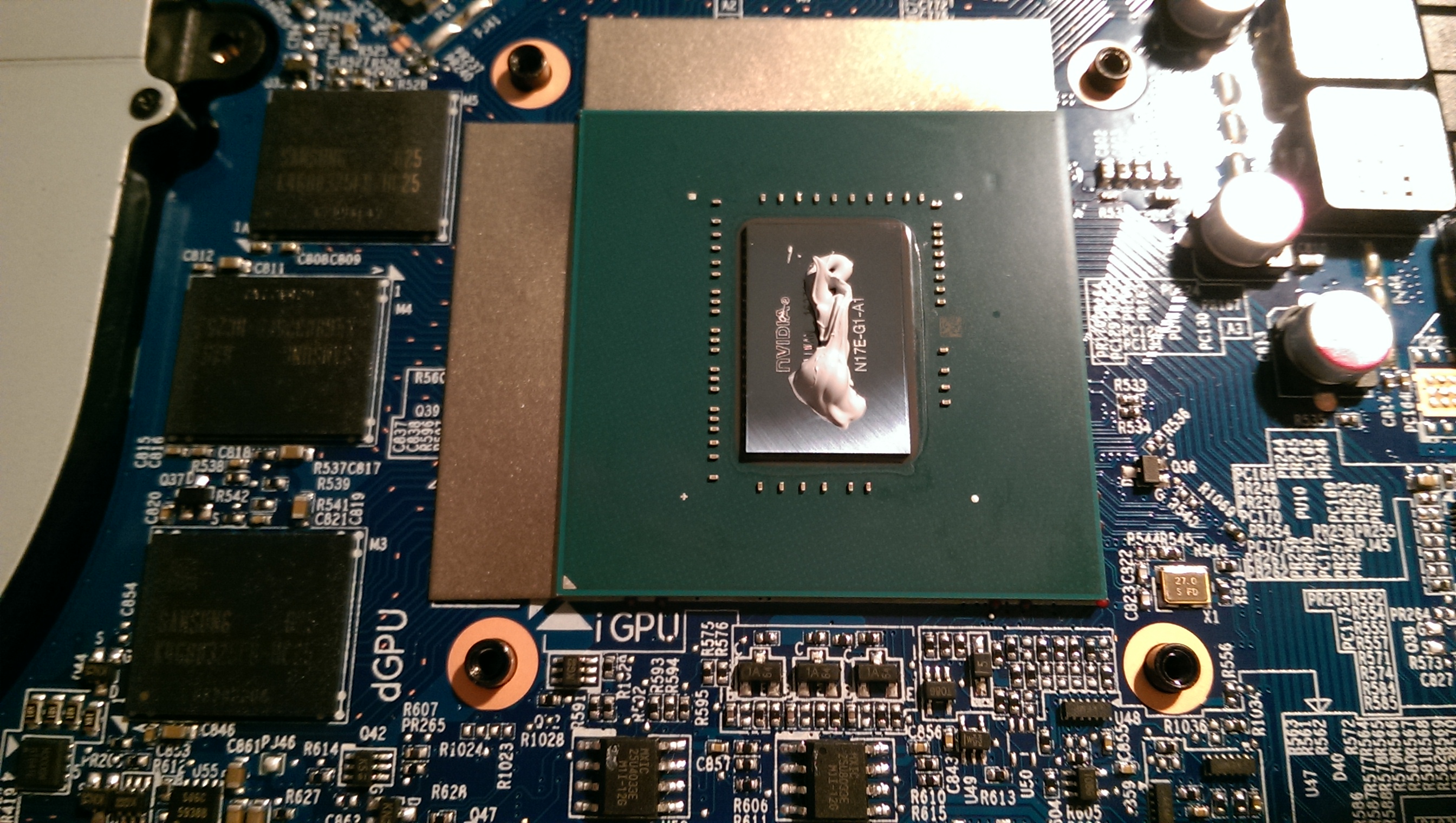
This was how the thermal paste was applied on my notebook (i7-4710MQ CPU on left, GM107 GTX 860M GPU on right):
And on the two heatsinks:
I'm going to re-paste this, but what do you guys think?Last edited: Sep 17, 2016 -
Need to see both pictures. One of the heat sink and one of the cpu and gpu...
Edit: Thanks.
The problem is...
When the heat sink was placed back on the base did not have full contact. It squeezed itself out from the parts you can see the heatsink and the dies. You could technically use the same paste to practice before you start the cleanup process.Last edited: Sep 18, 2016Ionising_Radiation likes this. -
The paste that was already on the heatsinks and processors was super-hard - I honestly don't think I could've reused it. Cleaning everything took a needle, my fingernails and nearly an hour of diligent scraping, and four alcohol swabs.
Clearly my reseller doesn't know how to clean heatsinks.
Anyway, after cleaning...
CPU (there's a burn mark, and the die is fairly scratched):
GPU (die is also badly scratched):
Heatsinks:
![[IMG]](images/storyImages/c58cba675439caee3dc000b56ea0fbba.jpg)
I plan to use Autosol to shine out the heatsinks.
Now, what thermal paste should I use, out of the list below? I'm not going near IC Diamond anymore, given that it scratches everything so much.
I can purchase these pastes here (prices in Singapore dollars, 1 USD = ~1.4 SGD) :
![[IMG]](images/storyImages/66a1cffb2549b56853e3c597f8c74237.jpg)
-
Wow, those heatsinks make me want to cry a little.....
Chronokiller and Ionising_Radiation like this. -
The scratching is from IC Diamond. It requires very patient cleaning with a lot.of alcohol and cotton swabs.
Try to get GELID GC Extreme or Kryonaut or ICD .
All of those pastes will be a downgrade from the paste that was already there. (Guessing it was IC Diamond.) -
Kryonaut is seriously expensive here... nearly a hundred bucks for a single tube. I'm a little wary of ICD now, because it sets, and scratches so much.
Was that before or after cleaning? -
Yes, but in his case...I would be very careful with that. His resisters are a tad bit close to be making mistakes. And liquid runs into places you can't see when heated up.
bloodhawk likes this. -
That's alot better than what I've heard of. Mind letting me know what thermal you used for the gpus?
-
Factory paste. I haven't changed anything as of yet. The bottom cover is still intact as well.
-
Wow that's strange. Is it very cold there?
My folks are experiencing >90c while playing overwatch.
>80c during 3dmark fs. -
Overwatch taxes the GPU way more than GTA V. Specially during longer sessions. My 980 Without CLU (and stock heat sink, not my modded one) and at the clocks in my signature, easily hits 80C with the bottom cover off. This is at Ultra settings averaging about 110fps.
With the modded heat sink + CLU and bottom cover on, it tops off at 70C. Most other games, reach a max of 65-68C and Dota2 never crosses 57-60C.
I think if you try Overwatch at lower settings, the temps will be even higher. -
So, any suggestions for thermal paste? Kryonaut, Liquid Ultra and GC-Extreme are off-charts because I have to ship them in...
hmscott likes this.
Clevo Overclocker's Lounge
Discussion in 'Sager/Clevo Reviews & Owners' Lounges' started by Spartan@HIDevolution, Mar 4, 2016.