 Problems? See this thread at archive.org.
I also received my NP6110 from LPC digital. Running it with IC7 (pasted myself) and 8 copper heat sinks I bought from ebay. Temps are about 55-60 with light browsing...... How the hell did you get 10C lower?....I have the I73610 and a 130w power brick as well.
-
-
There's some odd behavior with the fan profile I think. Sometimes after letting my laptop sit for a while, I come back to it and it's sitting at 45-47C, but then I can feel the fan running slowly. If I load the CPU and fans kick in med/high, then let it sit for a few minutes, the fan doesn't spin at all, at least not for another 10-15 minutes. I haven't been able to figure it out.
-
My fan stays on 24/7. It's on the lowest setting which is why it keeps my laptop so cool. I hear my SSD whine over the fan that's how quiet it is. The bottom never gets hot, or warm for that matter. I used the stock paste that came with my barebones W110ER and do not have the desire to change it because it's been working so well. I have a couple of tips for everyone that I posted in the W110ER owners lounge forum.
1. Tape the fan slots and leave the middle one open. This forces the fan to draw air from the other ports keeping the laptop cooler.
2. When re-pasting always make sure after you screw the cooling system back on to slide it back and forth. Grab it by the base (the part that is actually touching the CPU/GPU and wiggle it, but only while it's warmed up. Doing it cold will not help) This helps spread the paste and keep the bubbles out. -
I tried taping the fan slots after I read your post, but it made no difference whatsoever. Propping mine up made a significant difference 5C about, and adding fan with the heatsinks another 4-5C. I usually run about 80C CPU with BF3 and 72C with GPU for extended sessions.
The other strange thing is I'm actually getting over 4 hours on battery now with regular surfing. About 13-14W power drain which is more in line with what I'd expect. -
My np6110 come with ic diamond 7 from sager.
I do not made nothing, just turn on the notebook and use the windows update and in this time I run the hwinfo64 for look the specifications.
maybe here is more cold than your place.
A question. the nvidia works, I run the 3dmark 6 and it work. but in the windows score, just intel as working, and in the hwinfo, just show the intel.
is it this ? nvidia just will turn on in games?
BR -
Right click desktop.
Choose nVidia Control panel.
Manage 3D Settings / Program Settings tab.
Click Add and search for the 3dmark06.exe file (whatever it's called).
Then tell it to use dedicated GPU. -
Hah, no. That is not it. Faulty readings, if you ask me. Speedfan gives me bunk readings (says my core temps are 35C-40C idle, when hwinfo64 gives me 58C-63C)
-
I not change nothing in the system.
it is the temperature playng games in the screeshot in the post
![[IMG]](images/storyImages/aajBO4J8.jpg)
Alien demo
![[IMG]](images/storyImages/aauNPunk.jpg)
![[IMG]](images/storyImages/aaf7pPsZ.jpg)
![[IMG]](images/storyImages/aah7wZ5b.jpg)
DMC4
Configuração
![[IMG]](images/storyImages/aawgjO70.jpg)
Bench
![[IMG]](images/storyImages/aazSmDMt.jpg)
![[IMG]](images/storyImages/aag5eDyI.jpg)
![[IMG]](images/storyImages/aanfLzf8.jpg)
Streetfighter IV
![[IMG]](images/storyImages/aabOXa2O.jpg)
![[IMG]](images/storyImages/aamYIgBx.jpg)
![[IMG]](images/storyImages/aakMA5Dl.jpg)
BR -
whats your room temperature? that makes a huge difference, its a chilly 18 degrees C here in Australia and y laptop will not peak 70 even at extreme prime load
-
It's 25c here in my apartment (with my AC on), and my CPU is idling around 67c and getting up to 92c after 20 minutes of gaming, GPU gets up to 87c during gaming..
-
my room is +- 20 to 22C
BR
[]'s -
What is your EC version (shown in main BIOS screen)?
-
I've just done some battery testing with mine and results are pretty bad and weird. Tests were done with a CPU intensive game (Spring TA) with the HD4000, which is barely used. My CPU is the i5-3210m. I managed its speed with throttlestop.
Profile: High performance. Max brightness. Wifi idle.
CPU: No boost. Locked at 2.5ghz.
Battery life: 1 hour, 40 minutes
Profile: High performance. Max brightness. Wifi idle.
CPU: No boost. Locked at 2.0ghz.
Battery life: 1 hour, 45 minutes
Profile: Power saver. Brightness 1 above min. Wifi off.
CPU: No boost. Locked at 2.5ghz.
Battery life: 1 hour, 50 minutes
It's amazing how little difference the brightness and battery profile makes. The CPU speed doesn't seem to make much of a difference either (but I'll try taking it down to 1ghz next). I wonder if the GT650m is to blame. It doesn't have any load in GPU-Z but I don't know where else the power could be going. -
Use nVidiaInspector or DxTory or Bandicam to limit your FPS to 30 and turn off turbo (Prema's BIOS). This should help battery life considerably. I can get over 1.5 hours using the GT 650m if I limit fps, turn off turbo (I think it's off by default on battery anyhow, I forget), and underclock the GPU.
-
http://forum.notebookreview.com/8621054-post1098.html
Marksman30k helped me out by doing some ThrottleStop Ivy Bridge testing. Click on the above link if you would like to download the TS 5.00 beta version. The new beta seems to have put a big smile on his face. It is helping him get the most out of his W110ER.
He said something about full CPU Turbo Boost when the Nvidia GPU is active. Not sure what that is all about.
EDIT: After reading through this 77+ page thread, now I get it. ( 3093 MHz / 2295 MHz ) or ( 31 mult / 23 multi ) = +34.7% increase in CPU speed when gaming on the Nvidia GPU. That should make for some smoother game play when playing CPU intensive games. If I owned one of these laptops, I would be smiling too.
Where's a new Cinebench score to see if this really is working? -
Great ! Thanks Uncle !
-
Bios Version for both Fields: 1.00.03
-
@ha1o2surfer
How the Hell you have such low temps ? mine not propped up idles around @ 60-65 deg.Celsius and full load at 80 deg. with intel burn test.
-
I really do not know, I have not done anything special other than my tips I posted earlier.. This same CPU in my Lenovo T420 was horrible, it never overheated but that laptop could not handle it nearly as well as my W110ER.. Eventually people are going to think I am lying but I'm really not! haha I posted a video on the Owners Lounge of my temps while I was holding the fan and the temps level off way below everyone elses. (granted the bottom case was off too) I will make another video of some gameplay and temps with the laptop in it's stock position with the bottom case on.
EDIT: one thing I do differently from everybody else is I don't use the power brick that came with the laptop, I use a bunch of 3rd party ones with interchangeable tips. I haven't even took it out of the bag yet.. I have ran benchmarks and they do not differ from one power supply to the other. (I have a bunch from different companies) -
actually dude, with an ambient temp of 20-22 its quite possible. its like 18 here and I get about the same as yours, just after cold booting. Perhaps you got the recording shortly after a cold boot? -
When I woke up to take the video for the other forum It was on all night. No way to prove it but I guess you can take my word for it
Even then, I stopped the fan for quite a while to let it heat up then let go and it still dropped to below 80c -
Would love to be able to...however, i have no clue how you got that fan stuff on to the usb ports. If i tried, i'd fry everything. xD
-
ha1o2surfer, could you try your temps while using the charger you got with the computer?
There was another user that reportef lower temperatures in regard to different chargers. I think.
Might be nothing though. -
I use a different charger myself - a Delta-made Toshiba-branded 120w - and I have the same temps as with the original 90w brick.
-
Allright, figured, thanks though
-
Even if, in theory it shouldn't make a difference, I will try it anyways!
-
Turbo was disabled and the game ran at about 5-20 FPS anyway since the CPU had so much work to do. I'll try NvidiaInspector though, I've been looking for something to underclock the GPU so thanks for that.
I'm actually able to get the full turbo boost with the GT650m active using v4.10 of throttlestop, it took a little time to figure it out but it works fine now. You have to use the "clock modulation" box to control the speed, the "set multiplier" box usually causes the multiplier to go down to 8x or 12x no matter what you set.
EIST also needs to be off in BIOS, otherwise the HD4000 won't stay at its max speed under load. -
Soldering isn't too difficult. Just practice on an old motherboard or broken laptop board. I just have a cheap solder set I got from Amazon. Just important to use some flux to get the solder to stick where you need it to. I had this issue with my switch, and had no flux, so it was a pain in the butt, but managed to get it to solder eventually. I used to do some soldering in the past, just for fun experimenting, but it's been at least a few years.
I thought EIST (SpeedStep) had to be ON in BIOS to get control of the multiplier? -
I did another battery test and going from 2.5ghz to 1.2ghz only saved me 20 minutes. Next it's time to underclock those GPUs (even though the HD4000 has about 5% load most of the time and the GT650m isn't even used).
I would have thought the same, but throttlestop is letting me set it to any speed I like. The multiplier will drop down when idle but under load it stays at the specified speed. I get the same results with EIST on. Throttlestop's EIST checkbox might have something to do with this. -
w00tguy123: ThrottleStop 4.10 does not correctly support Ivy Bridge processors. Ivy didn't exist when TS 4.10 was released. Check out ThrottleStop 5.00. EIST should be enabled in the bios for CPU multiplier management. Enhanced Intel SpeedsTep (EIST) refers to being able to adjust the multiplier in steps.
Can someone post a screen shot of the ThrottleStop 5.00 Turbo Power Limits (TPL) window? Are any of the limits unlocked in this laptop? As far as I know these limits are for the CPU + Intel GPU. The 2nd Generation Core i mobile CPUs had very limited adjustability of these limits but only if the bios supported this feature. -
Here you go:
![[IMG]](images/storyImages/f3vtx.jpg)
Just so you know, I believe this can be unlocked in BIOS (ask Prema) so should be able to be adjusted here as well I would think. -
Thanks HTWingNut. That window shows that the bios has locked the Power Limit register. With these settings I think you are already getting full Turbo Boost when fully loaded. Unlocking this register with a new bios and increasing these limits won't gain you anything. With your CPU, the power limits are high enough already.
If you had a 3920XM, then things might be different.
I assume the Turbo Ratio Limits are all locked too.
How about a Cinebench test with the Nvidia GPU active; with and without ThrottleStop helping out?
How many watts is TS showing when fully loaded with wPrime or similar? I haven't had the time to read any Intel documentation recently so I just did some copy and paste programming and crossed my fingers, hoping it would work. Any feedback is appreciated. -
Yep! Cinebench 11.5 score 4.5 with throttling, 6.05 without (using ThrottleStop).
![[IMG]](images/storyImages/YwI7g.jpg)
![[IMG]](images/storyImages/h9K6b.jpg)
-
31 multiplier / 23 multiplier = +34.8%
6.05 Cinebench / 4.50 Cinebench = +34.4%
Looks like full CPU Turbo Boost is now working when the Nvidia GPU is active. Hopefully the temps don't get too crazy when running normal applications. -
I was getting 17000 in CB 10 64 bit without TS but now I can get a healthy 20350.
It doesn't make too much difference in new games which are GPU bound but it makes a helluva difference in older games like simcity or Sins of a Solar empire. -
Can you post some temps during gaming with Throttle Stop active?
Would be interseting to see results. -
I have unlocked the long term TDP in the Mod BIOS. I left the others, because people would just fry their machines with it.
But we can alter short & long term TDP and long Turbo Time Limit.
I have yet to set up my own W11, but could send HT a BIOS with all 3 options in BIOS.
(it has the lockbits though as "can not be set in TS directly", but we could see if they are at least reported correctly. -
For the non-Extreme Ivy Bridge CPUs used in these laptops, you can unlock the TDP and Turbo Time Limits with a modded bios but I don't know if that will improve performance any.
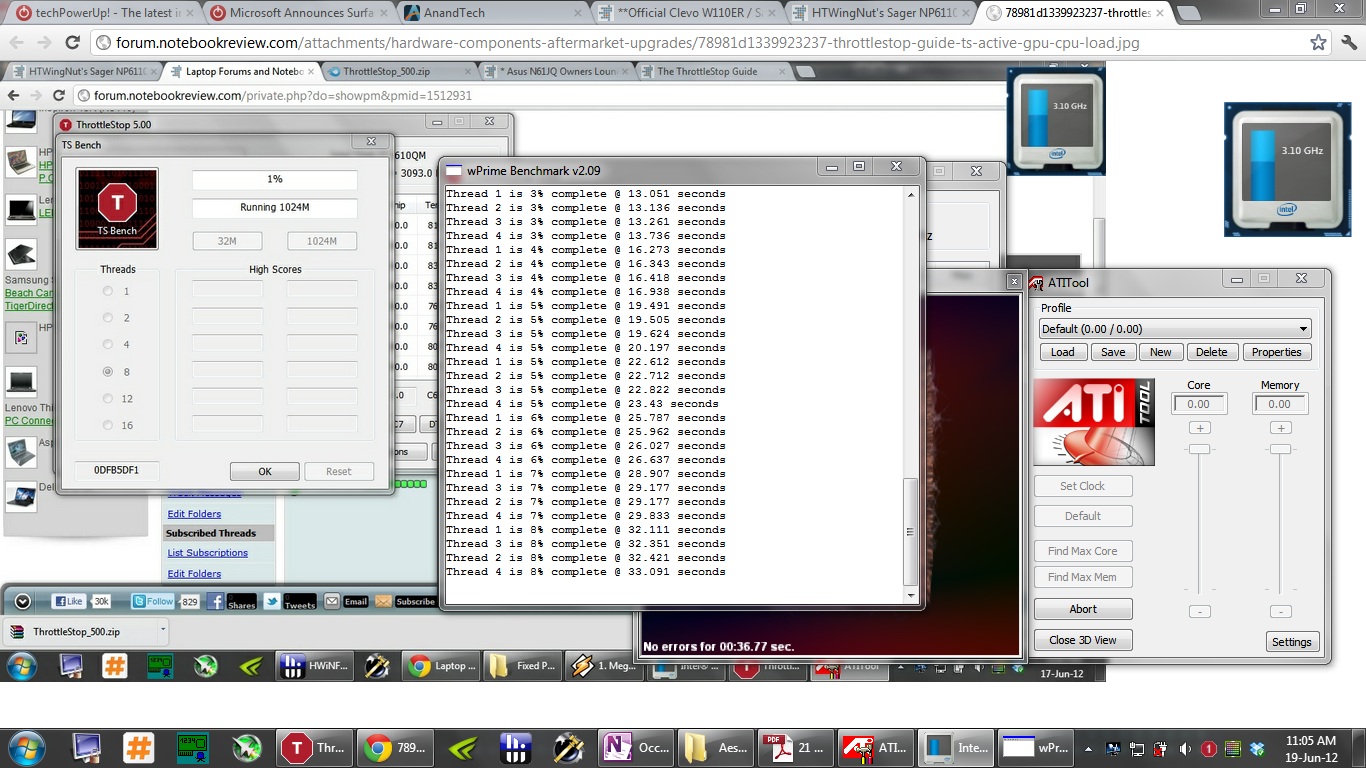
Someone needs to run wPrime 1024M. While that test is running, keep an eye on the ThrottleStop multiplier or run a Log File. If these CPUs can run at full Turbo Boost for the entire 1024M test then there is no need to raise the turbo limits. If the multiplier starts to throttle back during that test then unlocking this in the bios might be useful. What does ThrottleStop show for power consumption when this test is running? Ivy Bridge is more efficient than previous generations so I think there is a lot less to be gained.
I had a brief look at some Intel docs last night and the register that contains this information has not changed between Sandy Bridge and Ivy Bridge so the power and time limits reported by ThrottleStop should be accurate.
Section 5.5 of the data sheet has some info about the turbo limits.
http://www.intel.com/content/www/us...d-gen-core-family-mobile-vol-1-datasheet.html
The long term limit can be increased from 45W to 60W and the short term limit can go from 56W to 72W. For the time limits it says, "The default value is 1 second, but 28 seconds is recommended for most mobile applications." The maximum turbo time limit for these CPUs is 64 seconds. -
There's a reason for that, since Ivy Bridge tends to get hotter when overclocked or turbo'ed than Sandy Bridge.....
Also the W110ER tends to blast out in high temperatures if you actually manage to make the turbo work properly as the GPU tends to get quite hot too, hmm. -
I noticed in this picture posted earlier by Marksman30k that the W110ER was using full Turbo Boost when both the CPU and GPU were fully loaded.
http://forum.notebookreview.com/att...throttlestop-guide-ts-active-gpu-cpu-load.jpg
That's a good sign. I am not sure if the CPU will maintain that though after the 28 second time limit is up or how hot it will get when running fully boosted. That's why it would be interesting to see some wPrime 1024M testing. If it turbo throttles the multiplier after 28 seconds then being able to increase these limits in a modded bios would be a good idea. -
just did a rerun
Turbo remains very active after 28 seconds, even with GPU loadAttached Files:
-
-
With just wPrime running and the CPU fully loaded, what does ThrottleStop report for power consumption? Looks like there is no need to unlock the turbo power limits in the bios.
Using ThrottleStop allows the Clevo W110ER to run at the speed that Intel intended their CPUs to run at.
-
Hi! I am using the beta 5 and tryng to modify the tpl values but they are all greyed out...how can I do it?'thanks!!
-
The bios has locked the Power Limit Register. Without a modified bios, there is no way to adjust these values.
-
Oh, sorry, I forgot to mention, my TDP was set at 60W in the BIOS. As far as I remember on the TS forum, I posted that my machine downclocked to 2.8ghz on full IGP+CPU load with 55WTDP.
-
Good work unclewebb again ! Throttlestop 5.0 seems to work beautifully with the Ivy Bridge CPUs ! +rep !
-
Should I get the IC thermal paste when config my laptop? Or should I just do it myself? Is it easy to or more complicated than normal?
-
it is a piece of cake; very very basic procedure
-
:O
What did you do? Force turbo or OC the GPU?
HTWingNut's Sager NP6110 / Clevo W110ER First Look & Review
Discussion in 'Sager/Clevo Reviews & Owners' Lounges' started by HTWingNut, May 3, 2012.




![[IMG]](images/storyImages/HWePW.jpg)

