 Problems? See this thread at archive.org.
Both.
Well GPU would only run at max turbo of 950MHz, no way to go beyond that that I can tell. vRAM running at 1150MHz vs 900MHz stock (+250MHz FTW).
Fixed CPU at turbo 3.1GHz with ThrottleStop (thanks unclewebb!
-
Niiice. Really hoping that a tool comes out to allow turbo and voltage control.
Got my 6630M from 800MHz RAM to 1150MHz. (+350MHz FTW) That was with voltage control, so yours could go higher with it.
-
actually, my gt650m could go to 1085mhz corespeed with MSI afterburner. But no higher setting exist without a vBIOS flash.
I have an interesting idea, I noticed the GPU idles at 400mhz. NVIDIA inspector can change the idle speeds so I put it to 51mhz core and 51mhz Memory with a shortcut, going to test if I can get better battery life via Optimus. -
mine idles at 150 core 400 mem
-
Well then. I have finished reading all 804 posts, over the last 24 hours, and first let me say, gentlemen, well done! I decided two days ago that I would like a new laptop that had gaming capabilities but wanted it to be small and extremely portable. I first was looking at the Alienware M11x because a co-worker has one and was raves about it. But I know it has been out for a year or so and because of that the tech might be slightly out of date. So I searched and came across different people talking about a custom built 11.6 laptop. After looking some more, came across this thread on Google and pretty much have paid little attention to anything else since. This laptop seems to be exactly what I need. In fact, I am already in contact with Larry from LPC Ditgital to see approximately how long it would take to get one. But being completely new to high-end laptops, I thought I had better ask some questions first. I am not sure if they quite belong in this thread but it seems that this thread attracts the best and brightest of NBR members who also happen to be N6110 owners or at least interested in one.
1. As I am not used to spending +$1000 on a laptop, I want to be reasonably assured that I can use this for 3-5 years FOR GAMING (long shot, I know). Upgrading RAM from 8 to 12 or 16 when needed or changing the CPU out with a fast, newer one, if compatible is fine. My main concern is the GT 650M. As it connected to the motherboard, it is not as easily upgradable as the other components. Do any of you see it being a capable card in 3 years?
2. I see that different people have different setups for their laptops (DUH). I wanted to go with the 240GB Intel SSD drive but I see many people have the 7200RM 750GB drive. As I have a number of external drives, I don't necessarily need the space, but has there been any concrete evidence found of worse battery life using the SSD? If the SSD is smaller, more expensive AND causes worse battery life, I will pass on it or at least wait and change it out at a later time.
That is all I will ask for now, since this already looks like an essay. Please take the time to answer if you can. Again, good job on the thread, especially HTWingNut and Prema. The added back and forth between them and all of you was very informative. -
![[IMG]](images/storyImages/87YBa.png)
For Proof http://3dmark.com/3dm11/3670045
I am shedding some light on the GPU score. You can def push more out of it
-
As to 1, if you intend to game on the notebook screen, i.e., with its native resolution, the 650m may last for 2-3 years if you accept playing with medium or low settings. Depends a lot on what games you play. Since the gpu is soldered on the motherboard, upgrading it is a chore, if at all possible (keep in mind there's also a power consumption and heat constraint, given the small format).
As to your 2nd question, in principle an ssd should be lighter on the battery than a mechanical hdd, especially a 7200rpm one. This is not always the case (e.g., Kingston's V+100 enterprise series, which does os-independent garbage collection), but in the vast majority of cases the solid state drive is an improvement as far as battery life is concerned.
Plus there is another good reason to go for the ssd: hdd's will get very hot in the w110er (the original segatate momentus xt in mine was generally at 46-52C), and this is problematic for your data. An ssd will be cooler.
To make a long story short, ssd's now are much faster (and snappier), cooler, consume less, and are also lighter and - though this is still controversial and depends on brand - less prone to failure. Unless you need a lot of storage space on the w110er, and are content with 160-256gb, the price / gb is also less onerous, by comparison with mechanical hdd's, than it used to be before the tsunami. -
So if I want to play on high setting for the next 3 years or so, this is not the laptop for me?
I want a 11" but am willing to go up to 13" if I can find something with comparable stats. But I can't even find a 13 inch that uses the new Ivy quad-cores. From what I read, a 13 inch will be able to fit the bigger (and better) graphic cards. Is this true? -
Well, there seems to be a lack of any capable notebooks < 15", with this one being an exception. Maybe in a couple of months / years there will be a ~13" laptop with capable HW, but as of today, this isn't the case.
If the GPU will be enough for you depends entirely on what games you play. -
That's with your 3720QM though which would bump up the score.
Have you found a way to get GPU faster than 900MHz? My vRAM will run at 1150MHz but beyond that I start to get artifacting. Plus your machine has the i7-3720QM and that extra CPU speed can boost the score a bit. -
That's my W110ER... if you scroll down you'll see the model name.
-
Ha, recheck my post, I just noticed that and rewrote. You sniped my post that was up all of 2 seconds.
-
HAHA sorry! we are too fast. and I have the 2720QM actually.
I use nVidia Inspector and have pushed it past 900MHz. I'll post some screenshots.
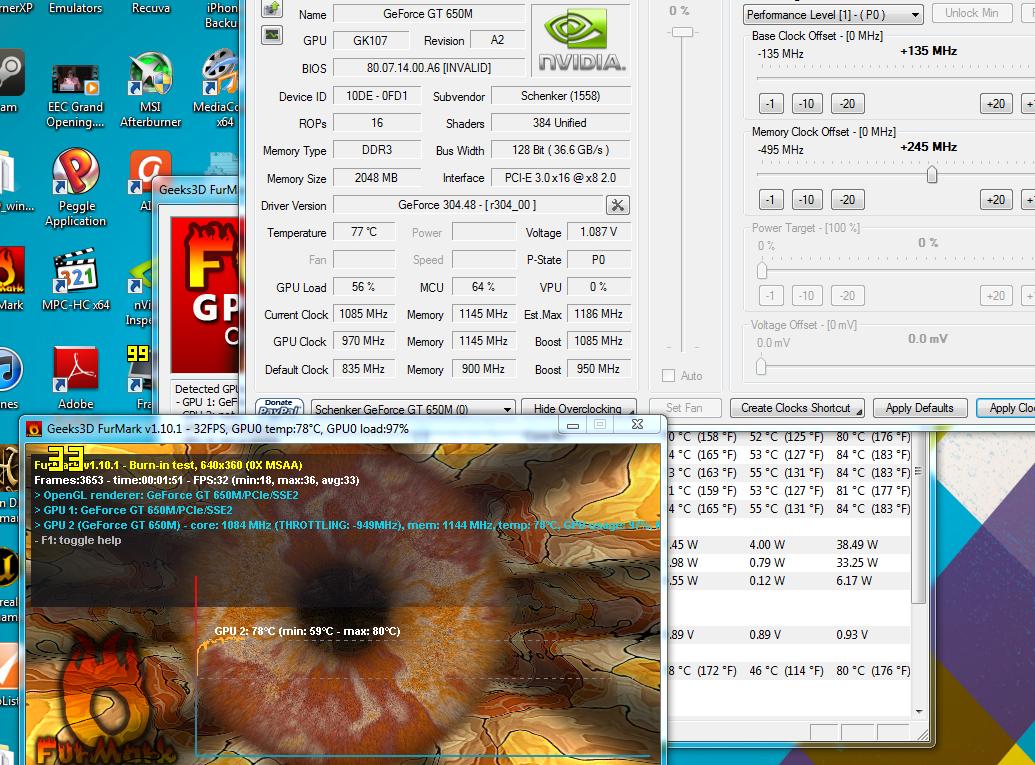
I cut off the current Wattage usage by mistake but there it is. I have disabled turbo boost on the CPU because I don't need it and I always game on my 90watt. So maybe that's how I'm getting into clocks higher than 900Mhz. I also have the beta drivers installed that nVidia just released.
Sorry guys for the large image.. I keep forgetting what laptop people are viewing this forum on.. I took my laptop off my desk and viewed the image on my W110ER's screen.. haha
-
No equally capable 13" on the market yet.
To play on higher resolutions in 3 years' time, I suggest going for a 15" with at least a 660m and gddr5 memory. -
How long will this machine last me if I play Battlefield 3 at medium - high settings at the native res (720p)?
I also have a cooling pad and thermal diamond paste. -
Sorry, it should be 970 (835+ 135). Your nVidia Inspector shows only +135MHz which should only be 970 too. I don't get it?
Oh, AH HA! The new beta drivers let it run at 1084MHz. !!! -
Nice! What clocks on the core?
-
That's impressive!
-
Core is 1084MHz. Guess the new drivers bump it up some.
MEM was at 1150MHz. -
there you go baby!!! I had to double take at the score.. holy cow! I'm impressed.. Guess I better do another run and play with my overclock a little more!!!
-
I ran at 1170MHz, but the score only went up like 8 points, and got some artifacting and skipping during the benchmark. I really want to find a way to clock the GPU higher. I know my vRAM realistic limit is about 1140MHz, 1150 occasionally will throw a spec or two artifact.
Not sure why I'm doing this, other than I can, the GPU performs admirably at stock as it is. But now I want to break 3000, lol. -
Is that the max the drivers allow? could you run vantage? I want to see if it beats my M15x.
-
Here's 1280x1024 (had to hook up to external monitor):
3DMark Vantage P10777
GPU 9222
CPU 21803
![[IMG]](images/storyImages/GkzSG.jpg)
Just for giggles I ran 3DMark11 Extreme mode (1080p) and here's the result:
3DMark11: X874
Graphics: 778
Physics: 8101
Combined: 977
http://3dmark.com/3dm11/3709441
![[IMG]](images/storyImages/Q7Rvn.jpg)
-
Yeep, beats my old 5870M, just barely. Just wow. If I were to buy this, it would be both the smallest and fastest laptop I've owned.
-
This IS overclocked though. Although GPU at 1084MHz still stays below 75C and vRAM I can clock at 220MHz over stock with no issues whatsoever. I can do 240MHz, but I think that's borderline, so would rather play it safe.
-
My 5870M was overclocked too, it was like P10400 or something. Pretty crazy.
-
Which version of the new driver did you use? Are you using windows 8? The new drivers only appear to be for windows 8... -
I downloaded them directly from here: NVIDIA DRIVERS 304.48BETA
Installed without a hitch. These are Win 7 / Vista 64-bit. -
Thanks. With the OC-ed system memory, unlocked cpu throttle using throttlestop, and afterburner to increase the clock frequency, it finally feels like I can get more out of the computer.
Edit: how did you find that the core clock is at 1084? Mine still shows 835Mhz even after the new video driver update in MSI afterburner (without any background applications running). -
Just want to be able to clock the GPU further, I think it can go quite a bit further at stock voltage, and unlocking voltage would be nice too.
-
Oh, so with the new drivers I can just OC the graphics frequency at +150mhz in the afterburner?
-
It allows for +135MHz, but that kicks it to 1084MHz, that's like 135MHz over the 950MHz max turbo I was getting. So it seems that 135MHz overclock clocks the boost speed that much too.
-
Ah, awesome. Thanks for your update and experimentation. The memory at 2166mhz with 11-12-11-2T timings is also working fine, to give an update. (hope this doesn't cause long-term problems)
-
How beneficial is it to have the IC Thermal Diamond paste on the gpu/cpu? I paid an extra $25 but I am unsure of the benefits, despite the possibility of lower temps.
I do not plan on OC'ing, in any case. -
Good to hear. You should be fine. It's still running at stock voltage which is the real killer. I need to tune my memory at 2133 as well, bumped back down to 1866 at stock timings for now.
If they applied it properly, it definitely helps idle and load temps. Not by a whole lot, but at least a few deg C not to mention less likely to dry out or have to change it after a year or so. -
I'm really quite amazed at the scores. They're quite amazing - a GTX 670M level score on a 11 inch laptop!!!
Can you test what the maximum possible (stable) OC 3Dmark11 score would be? i.e. 2166mhz memory (11-12-11-2T), OC-ed iGPU, throttle unlocked 3610M CPU, +135mhz main gpu clock and +140mhz gpu memory clock? I really want to see this break the 3000 point mark!
This is really awesome. We can get GTX 670M level performance when needed, and still get the portability and utility of an 11-incher. -
the lower temps are nice but I reckon the best advantage is the IC DIAMOND's thermal conductivity seems to be sustained at higher temperatures for a longer period of time before needing to repaste
-
Has anyone seen any benefits of the 120w psu over the 90w one?
I've got the possibility to choose which one, if there aren't any pros I'd rather go with the increased portability of the 90w.
Thanks in advance, and thanks for all the testing, etc. you've done
-
Well, the 90W may run near peak power draw which isn't necessarily good for the PSU, but there's only a handful of games that do that. To be honest the 90W isn't that much smaller than the 120W though.
I've found that 105-110W or so from the wall equates to about 90W delivery to the laptop. If you look at my power draw charts: http://forum.notebookreview.com/sag...110-clevo-w110er-first-look-review.html#power
Games like Dirt 3 and BF3 draw upwards of 90W which likely equates to about 75W power delivery to laptop. It's borderline acceptable as you your PSU should normally run 20-80% of rated power.
That 3DMark11 2900+ run was peak performance with CPU @ 3.1GHz with Throttlestop, GPU at 1084MHz, GPU vRAM at 1150MHz (+250MHz OC), RAM at 1866MHz, iGPU doesn't matter because it's not utilized.
Also keep in mind that 3DMark isn't always indicative of in game performance. The GT 650m with DDR3 is showing faster performing than the GT 650m with GDDR5 at the same clocks which makes no sense whatsoever. -
get the 120w and buy an additional slim, light 90w to carry around (the bundled 90w is chunky and a bit on the heavy side)
-
Allright, thanks to both of you. Cleared it up for me, can't wait for my laptop to arrive
-
Just tested 3d mark with i5 @2.7Ghz, gpu @1085/1100, default ram settings: 25xx
-
What do you get in 3dmark 06?
-
Well, while the beta drivers overclock well, BF3 has also crashed many times since I started using them. I don't really need the OC's now, so will revert back to original Sager drivers for now. I guess that's why they're beta.
-
I find that even though our GT 650m outperforms the GDDR5 model at 1366*768, we haven't accounted Overclocking plus the performance of the GDDR3 seems to drop like a brick whenever even mild AA is used, resolution increases or even heavy game texture usage...pretty much any setting that will tax the ROPs or need constant data streaming from the memory.
Sadly, it seems they could've put GDDR5 considering the Macbook Pros now have them
-
Yeah, considering every other GT 650m available uses GDDR5 it is a bit disappointing.
-
HW, how much AA do you use for BF3?
What about anistrophic filtering? -
HTWingNut: Your review says HDMI works like a dream, plug and play. Any clue why mine isn't working? I'm using a DVI cable that has a DVI-to-HDMI adapter plugged into the laptop, and I just tested this cable on my m11x and works fine (the m11x even makes the Windows 7 sound recognizing new hardware, but my w110er doesn't). I checked Device Manager and there are no missing drivers, no yellow (!).
Anyone? -
Talking to a Clevo insider... a slightly better laptop from Clevo is going to hit the shelves with the 660M soon .....
and maybe something entirely else too.... checking it out for now
HTWingNut's Sager NP6110 / Clevo W110ER First Look & Review
Discussion in 'Sager/Clevo Reviews & Owners' Lounges' started by HTWingNut, May 3, 2012.


