Problems? See this thread at archive.org.
I'm getting very high CPU temperatures while gaming: above 90C. Is this normal?
And no, the fan isn't known to be quiet.
-
-
@infinite012
@darlyn
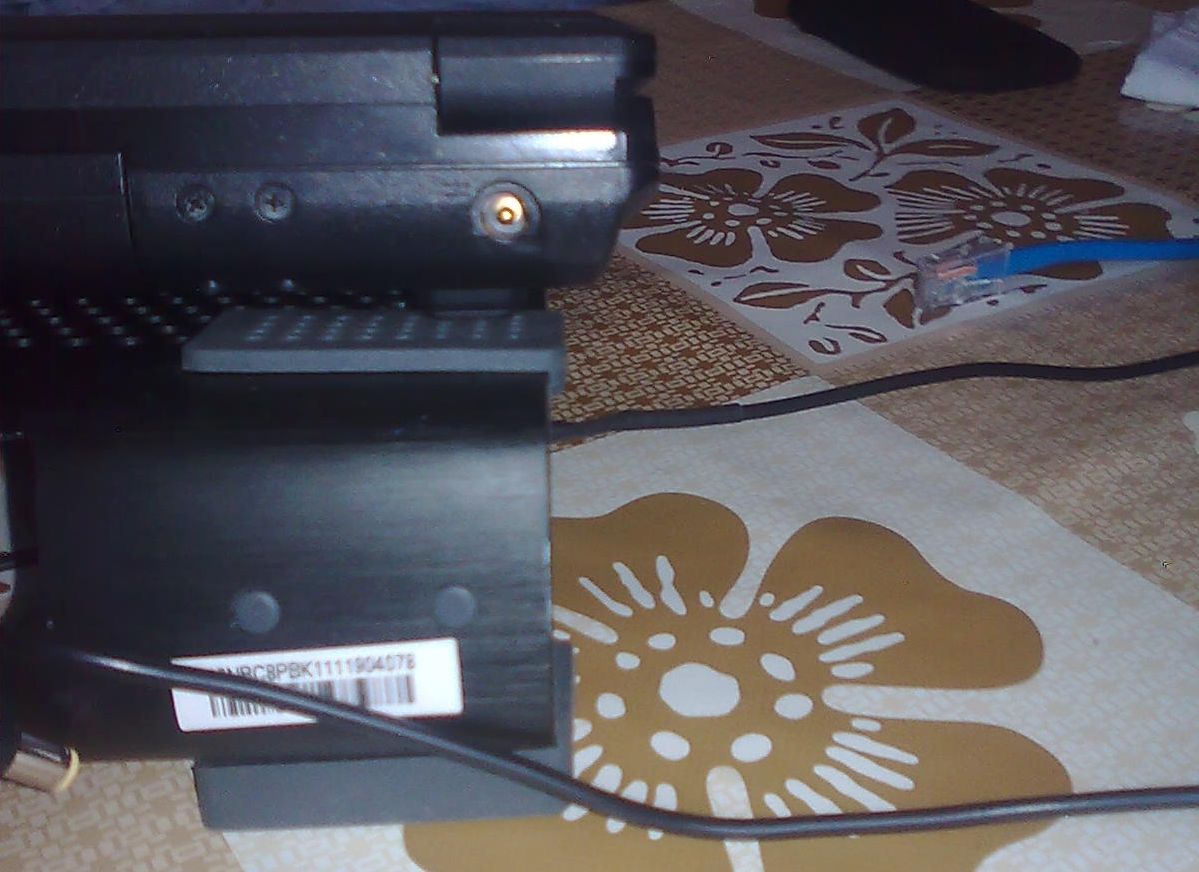
Do you have any pictures of the melting plastic around the power plug?
I only get high temperatures when playing games, and I will get a notebook cooler to help with that. I have always kept my drivers up to date, but I haven't had any problem with an overheating power adapter melting the plastic.
Did the power adapter stop overheating after you updated the nvidia drivers? Also, how often do you play GPU intensive games on the notebook? -
When gaming I definitely get scalding temps, but I've never actually measured it. Where surface is it resting on when you get 90C? I know that if I use it in bed it heats up terribly, so I make sure to keep it several inches away from the ventilation-blocking bed covers by elevating it on an old college textbook.
No pictures, but it was deformed enough to be quite plain that the plastic had started to melt. I haven't touched those problematic drivers since then and just now see that there have been new ones released (275.33), so I'll be trying those out for a while. This is all in reference to the NP5125, by the way, since this thread now deals with two models. -
Has anyone traced what the vga button does to enable/disable optimus? I assume it triggers with use of the hotkey software. Has anyone logged the changes with a registry monitor?
-
Another update: My AC adapter port on the laptop is now getting finicky. Sometimes the laptop won't "see" that the AC adapter is plugged in. I think it's due to the same issue that caused the damn laptop to melt in the first place.
My next laptop will probably be an Asus, Lenovo or a tried and true Dell. -
Woah, again? I recommend sending it in. Had the entire motherboard+bottom chassis replaced three months ago, hopefully it doesn't repeat for me. I've been keeping tabs on temps this time around, maintaining a good 63C at full load in a 30C room.
Did you ever get Hackintosh installed? I'm thinking of doing it for Snow Leopard if there isn't a guide for Lion yet.
It's interesting how you and me have been having the exact same problems (fan noise, melting) at the exact same time...
Oh, and good news everyone! What is Fn + 1 on other Sagers is actually Fn + 4 on the NP5125. That -
Hackintosh was fail. There are/were no drivers available for the integrated Intel graphics and Optimus isn't/wasn't supported, so no go for the GT330m. That meant I was stuck with 800x600 resolution on this awesome 1920x1080 display, and I'm not so much of an Apple fanboy to allow such a low resolution.
-
Laptop won't charge anymore...
EDIT: About 10 minutes after I typed ^ that, the laptop shut down and is now refusing to turn on. I'll give a few hours to "charge," but I've already put in a service request with Sager. Let's hope they make this right. -
custom gaming laptops - Welcome to Sager Notebooks
Lol, it's not even considered a model anymore. -
I just got the laptop back from Sager. They probably replaced the motherboard, but they also switched out the entire bottom casing so my AC plug area isn't melted anymore! They also gave me a different 6 cell battery.
Hopefully I won't run into another problem with this laptop.
Sager did, however, manage to scratch the bejesus out of the plastic around my trackpad. Not cool. -
I'm unsure on what ram speed we use?
DDR3-1066 (PC38500)
or
DDR3-1333 (PC310600)
Cause the front page says... DDR-1066, while CPU-Z says the ram is DDR3-1333. -
@infinite012 and darlyn
Same EXACT problem for me too. Plastic melted and laptop doesn't charge properly anymore, but I don't think the two are related. I have to constantly re-position the chord and force it downward. I'm thinking something internally is loose.
How long did the repair take from sent to returned? Any problems still? -
Hope it's not too late for you, but my repair took 12 days from the day I shipped it to the day it arrived back at my doorstep. As for the two issues being related, for both of us the power connection problem started happening shortly after/before the melted plastic one. Definitely get it repaired.
-
Hello all,
Proudly owner of one of those (Clevo B5130M, i5 430M, GT 425M, 4GB RAM)
I would like to know what is the best processor that we can throw at this baby here. When I bought it, I had the option for an i7 640M but don't know if this is the maximum supported.
I also did some benchmarking with 3DMark06 and some OC using NVIDIA Inspector. These are my results:
Shader Clock/Memory Clock - Result
No OC: 6511
1200/720 - 6774
1300/760 - 7231
Temperature didn't pass 73C on both tests but I'm using a nice cooling pad here.
Cheers. -
Nobody?
/10chars -
I believe those were limited to dual core cpus so the top one would be the i7 640M
-
Does anyone have any experience in Ubuntu with the NP5125 and disabling the dGPU? I just want the nvidia card off so that I can actually have decent battery life. I've tried ironhide and acpi calls with, as of yet, no success.
-
9Speaking about the GPU, for a bit now there's finally been a way to get the actual GPU temps using RealTemp. Just check the "nVidia" box in the settings. Can everyone post the temps they're getting, especially the NP5125? I'm getting around 49 C at idle, 60-80 at full load (mostly GTA IV and X-Plane). Was getting 20C higher than this until I popped the bottom lid and removed a pretty much solidified chunk of dust that was obstructing the heatsink.
-
cody canning, sorry for the slow answer, but yeah i use it mostly with ubuntu, and nope, irohide doesn't seem to work for us, i tried asking for some ppl to help me find the right acpi call, anyway you can always shut it down from the bios, i get almost 4 hours battery life on ubuntu with the card down.
everything else works great though you ubuntu, camera mic, even the finger print if you insist on it, multi touch for the mouse pad.
only other thing that hussels me is that screen brightness keys doesn't work, have to use the terminal for that... -
Noob question, im new to digital HT and answers are hard to find regarding specific S/PDIF issues. I own a Sager 5135. (for those interested, i too have had issues with some melting near the AC power supply, inconsistent power connection, and a loud fan however i am outside my warranty)
I set my SPDIF Interface under Sound control panel to Default (sound meter on the right responds to show sound recognition). Plug in a Toslink cable mini jack to the far right or away-from-user output (headphone, mic, spdif). Now, the other end of the standard Toslink cable will not light up nor play sound through my optical audio input on my receiver. All components have been verified to work independently of the laptop. I have tried re-installing my drivers as well with no improvement. When i changed my sound to default out to the HDMI (or standard speakers/headphone jack for that matter) everything works flawlessly.
I have read about people using other 'softsynth' software (which i know nothing about). Is this something i need to look into? I would think alternative software wouldnt be necessary... but will do what i must.
[now here's the real dumb question] If the Toslink cable does not light up, then doesnt that indicate that there isnt even a signal being sent by the source? no light = no sound? [had to ask] So in my eyes, my software and audio player are sending, my cable/receiver is ready to receive, but the actual SPDIF output jack is faulty??
little long winded but i wanted to convey that the basic stuff is all there. i am stumped and frustrated. PLEASE HELP!!
----------------
AC3Filter - SPDIF Test:
DirectSound test:
DirectSound test:
48000Hz support: YES
44100Hz support: YES
32000Hz support: no
(Still no red light in toslink cable. What is this implying? I just want to know the source of the issue) -
Hi, i'm new at this forum, sorry for my english
Searching the posts, i haven't found any tip to cool down the np5125 in this linux distro, so i'll post my experience:
@windows, measuring via speedfan (don't use it, will mess up your keyboard), the temp barely achieve 70C, under light use.
@ubuntu, doing nothing, temp easily reach 90C. It's bad to even plug a usb device @ left side of the laptop, cause it's getting too hot. Fan is too loud also.
You could see the temp with sensors installed via
or Xsensors (installed via Ubuntu Software Center)Code:sudo apt-get install lm-sensors
To avoid this temperature and noisy fan, you could:
Right-click in the top bar, Add Panel-> CPU Frequency Scaling Monitor. With this applet you can control the cpu scaling. One good choice is the CONSERVATIVE governor. After some time, temp will lower.
You need to set the CONSERVATIVE governor for the 4 CPU (CPU0-CPU3)
The annoying thing is that after every boot, the cpuscaling auto change to default config: ONDEMAND, and you need to set to CONSERVATIVE in the 4 CPU again. ONDEMAND hots your NP5125.
An easy, but not pretty solution is to edit the daemon /etc/init.d/ondemand, changing the line:
toCode:echo -n ondemand > $CPUFREQ
Reboot and you're done.Code:echo -n conservative > $CPUFREQ
Temp now @UBUNTU barely raise to 65C, under moderate use. Now i can attach usb devices @left side without hotten them.
If you need to quick change to other modes, like PERFORMANCE, you can set it via command-line:
Ps: In high performance modes or clocks, Fn+4 (as said before) lower fan speed and also lower clock.Code:cpufreq-selector -c 0 -g performance cpufreq-selector -c 1 -g performance cpufreq-selector -c 2 -g performance cpufreq-selector -c 3 -g performance
I hope this tip will be useful for you
Wolff -
dude, you have some serius problem.
i have np5125 and using ubuntu constant, the temp is at ~45-50 most of the time.
getting to 65 only when i use the GPU to try to run some games on wine
usully i just turn it off in the bios when i don't need it,but even with it being on the normal temp is around 55...
not limiting it by cpufreq -
So first, I use SPDIF out on my PC at home. It's true optical out, and yes it glows red at all times.
Second, I have an Alienware M18x that has SPDIF out and it comes with a gold plated Mini-TOSLINK plug to transfer from 3.5mm to TOSLINK. It does NOT glow red.
The reason for this: these "Multipurpose Audio Jacks" require feedback from the line in order to activate. Have you ever plugged in a set of headphones and a message pops up saying, "You have plugged a line into your audio jack."
Is your TOSLINK cable gold plated or is it the clear type? Are you using a Mini-TOSLINK adapter, or are you plugging right into the 3.5mm output? -
Thx for the tip. Disabling optimus in bios decrease even more the temp. Now it's ~40-45. I've kept the cpufreq in conservative mode for the 4 CPU.
-
Is there any bios available for download?
If someone can provide it I can try to unlock hidden options like fan control and clock settings. -
Bad news: I contacted Clevo and asked them to release an EC with modified fan table. They refused to do so...
Good news: I contacted Schenker (Germany) and they gave me the current B5130M EC firmware!
Can somebody modify the fan table of the EC firmware? Are there any tools available to do that?Attached Files:
Last edited by a moderator: May 8, 2015 -
-
great news for all of your ubuntu users out there,
bumblebee (nvidia optimus open source project) just released version 3.0
what does that mean? that it support most features of optimus, including shutting down the card to conserve energy when not in use!
go here for instructions:
https://launchpad.net/~bumblebee/+archive/stable -
Had the NP5135 for 1.5 years by now and it's still going strong. Granted, I ran into some nasty overheating issues similar to what darlyn experienced, but ultimately resolved them in the same way he did.
-
Good to hear, almost two years since I got mine (and one year since repairing it).
By the way, I know this is common sense, but if heat's an issue, pop the lid and use compressed air/tweezers to remove dust every 5 months or so. I do this and I get an instant 15-20C decrease in peak temps at load. I've removed thick, semi-solid chunks of dust every time that clogged up the left vent (NP5125).
Sadly the fan is still loud a heck and no BIOS updates correcting this have been issued. -
I used a 3 Ohm (0.5 watt) resistor to lower the speed of the fan to 80%. Its quiet now at idle

Temperatures at full load are 4°C higher (tested with Prime95), so nearly no difference.
If you need more information and/or pictures how to do this, write me a PM and I'll post it here for everyone. -
Does anyone know where I can download current VGA drivers for NVIDIA for Windows 7 64bit?
The clevo site times out and I cannot get it to download. -
Here you go Drivers - GeForce
These are the latest WHQL drivers from nVidia, NON-BETA. -
I appreciate the link but I am actually looking for the official clevo drivers. The current nvidia drivers for the clevo B5130m is bugged and will cause your computer to not be able to access the GPU causing you to only use the INTEL chip and ignore the NVIDIA.
The place I bought the computer from (ibuypower.com) told me to download the drivers from the clevo website and it will fix the problem until NVIDIA releases another update. -
Have you tried the Sager drivers yet?
They might help, last update was Aug. 2010 from the looks of it though...
custom gaming laptops - Welcome to Sager Notebooks -
I am using the latest drivers from nvidia.com and they are working perfectly.
-
So is this an update? Seeing as it's from September 2010, I have my doubts. And since it obviously didn't do much, even more.Last edited by a moderator: May 8, 2015
-
I have had the sager 5135 since october 2010 with i7-640M / 720p /nVidia GT 425M /1024MB 8,192MB DDR3 1066MHz Dual Channel Memory
Is it possible to upgrade the video card? I'm interested in editing video and find this system lacking when editing 1080p video using premier cs5
also, I've been having a lot of trouble getting my MyPassport 1TB drive from WD to work at usb 3.0 speeds. anyone else have trouble with that? Currently troubleshooting it, but no progress so far. -
I also have a Sager NP5135 and I am planning to buy a WD MyPassport USB3 external drive. Can you please elaborate on what the problem is? How bad is the speed?
You can try to update the firmware and driver for your USB3 controller. The Sager NP5135 uses a NEC/Renesas uPD720200 controller. You can get the latest driver and firmware from here: RENESAS/NEC Drivers & Firmwares.
The latest firmware version is 3.0.2.8.0.8, and the latest driver version is 2.1.36.0. -
I installed the drivers a few times. Still no luck. I get about 30-40 mb/s when the drive is plugged into the 3.0 port. I have heard I should be getting at least 60mb/s. I'm transferring large HD video files and 20meg .CR2 camera raw files.
Windows 7 PROBLEM with USB 3.0 For Some | Windows Secrets Lounge
I will go back to it later, but at this point I'm wasting more time fixing it than I would save in faster transfer speeds. -
I bought this SSD drive for my 5135. Haven't installed yet. Anyone have any problems installing an SSD? My IT guy wants to use the migration utility, but I'm more of the camp of doing a clean install. (win 7) Anyone have any regrets doing one way or the other?
Amazon.com: OCZ 256GB Vertex 4 Industry's Highest I/O Performance Up to 120K IOPS SATA 6.0 GB/s 2.5-Inch Solid State Drive With 5-Year Warranty - VTX4-25SAT3-256G: Computers & Accessories
Also, has anyone installed a 2nd harddrive using the DVD bay? I'm thinking of putting in my 500gb 7200 in that bay and using 2 drives (could use a spinny disk for adobe scratch disk needs) -
I know this has been covered before, but if you're procrastinating on cleaning out the dust from your CPU. I would recommend doing that, I just did mine when it was open for another reason and was really surprised how much dust had caked in there. Huge temp improvement. I was starting to get high temp alerts in WIN 7 when running resource intensive apps.
-
Hello everyone.
I have had my Sager NP5135 from XoticPC since December 2010, and it has always worked fine. Now I have my first serious problem with it.
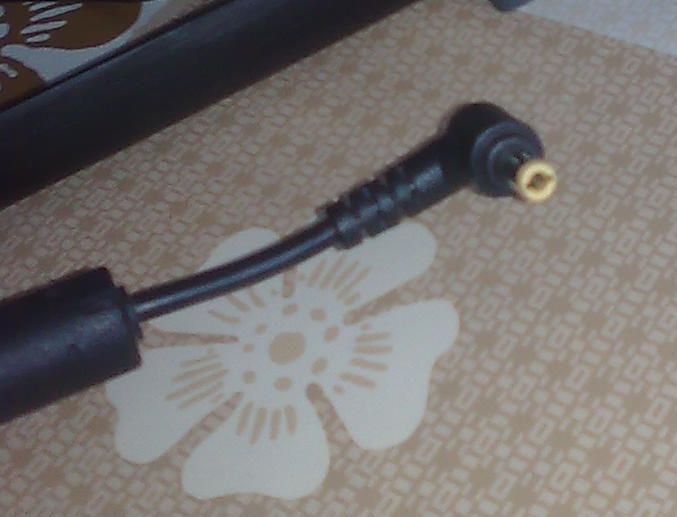
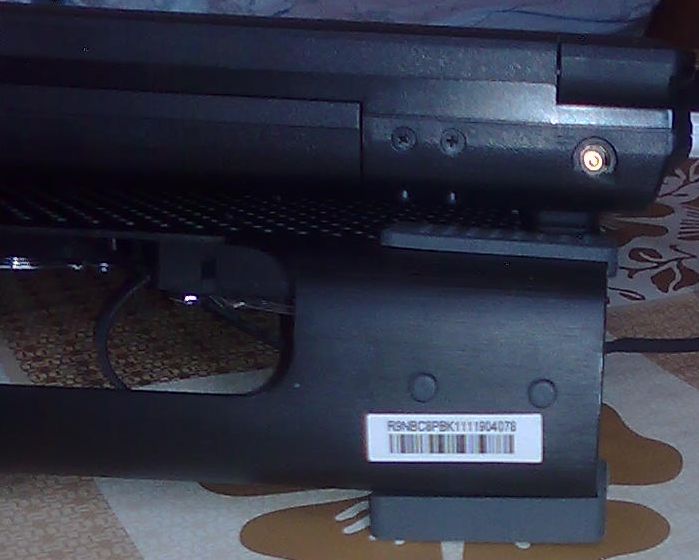
I noticed a few days ago while turning off my laptop that the end of the cable that charges my laptop is very hot. I looked at the DC-in port of my laptop, and I noticed that the plastic around it was melted a little bit. Also, the metal tip of the cable that goes into the laptop is very hot.
Over the last few days I did some experiments to find out what can cause the problem. I found out that if I am browsing the web, watching videos, movies, etc, the laptop works fine, and the tip of the charging cable does not heat up significantly (it heats up a little bit, but I guess that's normal).
But when I play games, like Prototype 2, even for five minutes, the tip of the charging cable heats up a lot. I have made several tests in which I would play Prototype 2 for five minutes, and then exit the game and take out my charging cable to see how hot it is. I don't have a thermometer, but I could barely hold it in my hand.
So I am asking you, do you know what could cause this problem, or how I can fix it? I would really appreciate it if someone from XoticPC could assist me with this problem.
EDIT: This also happens when playing other games too, not only Prototype 2. I clean out the dust in my laptop every 6 months or so. I opened it up and there was no dust. The game is at medium detail, with antialiasing turned off. The laptop can handle the game just fine at higher detail, but I choose not to run it that high. I always use a notebook cooler while gaming. I also attached a screenshot of SpeedFan running while I played Prototype 2 for 5 minutes. As you can see, the CPU and GPU don't report very high temps, but the charger cable tip gets very hot.
Thank you.
PS: I have attached some pictures of the DC-in jack, and the charger cable tip. You can see the melted plastic below the DC-in jack.Attached Files:
-
-
hi there, i have the exact same problem, and i saw other people here also reported it, the explanation i belive is that they simply didn't put the right connector for the DC, this computer takes a lot of current when using the gpu and cpu thus the cable heats up because of the electricity flow, a bigger connecter with less electrical ressistance whould probebly have heated less, you can compare it to other similar laptops from different manufacturers, our's is much smaller.
the down side here is that sending it back to the lab will only resault in them giving you a new plastic panel and this happening again after a while...
it's a design failure... not much to do unless you can find a lab that'll replace your connector to a more suited one. -
Would it be possible to fix it yourself?
-
Somehow i can't write PMs so i'm going to quote this.
I would be very interested in your modification of the fan, especially the pictures -
You need 5 forum posts to send a PM
-
If yours is overheating, first off, have RealTemp running at all times in order to monitor the temps. Never let it go above 95C, set an alarm for it. The safe high-load temps should be 60-85C. Second, Fn + 4 toggles between fan speeds. It should be on "Normal" for proper operation during gaming, otherwise within a few minutes the thing will burn. So try it.
And yes, pop the cover every 6 months or so and remove the dust, optionally removing the GPU fan and carefully cleaning it.
Anyway, for anyone with the standard screen, have you noticed how the bottom half of it has less saturated or lighter colors? -
I installed 2 ssd drives, primary and in the ODD bay. significantly brought down my temps. I know it's overkill. but if you were to stick with even 1 SSD as your only drive. that might make a difference.
two questions. what do people recommend as a replacement for the battery? anyone see a 9 cell out there? i have 22% wear and get maybe 1.5 hours on a charge
anyone know of any good replacements for the stock fan? either quieter, or more powerful at the same volume? -
I got mine in mid-2010 and my hard drive is already starting to die.
I wish I could get a quieter fan myself. That's been my main complaint about this thing since day one. Someone suggested adding a resistor to it a in this thread. I still haven't tried that.
Sadly I think this thread is kind of dead, though. -
I'm not sure if this is where I should post but I am having problems with my Sager NP5125. The battery is dead so I have been running off direct power until today. When plugged in it has a solid orange light on. When I press the power button the green light flickers on for .5 second before returning to solid orange. The laptop does not boot or even begin to boot. I cleaned out the inside of the laptop with an air duster after and nothing in the house was affected by a power surge. I think it has to be something with the power supply but I have no idea how to go about fixing or replacing this.
**OFFICIAL Sager NP5125/Sager NP5135/Clevo B5130M Owner's Lounge**
Discussion in 'Sager/Clevo Reviews & Owners' Lounges' started by Skwiggler, Jul 12, 2010.