Problems? See this thread at archive.org.
I completely agree. One of my hobbies (that I am currently unable to pursue because it was too much for my computer) is making *very* CPU-intensive games. If an increase of 10% in clock speed yields an extra 3-5 FPS, I'm hooked.
On p150hm it was sataII, but I don't know if they changed it. The user manual should be floating around here somewhere...
Bumpy bumpy. I can has answer?
-
The USB3 is built in to the chipset, however, that data has to go somewhere and thats your limiter in this case is either the transfer rate into RAM or out to SATA. But the USB3 bandwidth it should be able to peak as fast as USB3 can.
-
Can we has answer?
-
Went ahead and pulled the trigger on a P150EM. I could not wait any longer since I will be deployed to the sandbox by the time Ivy Bridge/660m were to be delivered. Here are the specs.
Sager NP9150 / Clevo P150EM
- Wireless Network: Sager - Bigfoot Networks Killer™ Wireless-N 1103
- External USB Optical Drive: External USB 2.0 Slim DVD±R/RW Drive
- Optical Drive Bay: Remove DVDRW Drive and Install Optical Bay Hard Drive Caddy Only - Primary Hard Drive: 750GB 7200RPM (Serial-ATA II 300 - 16MB Cache)
- Ram: 8GB - DDR3 1333MHz Dual Channel Memory (4 SODIMMS) - SPECIAL!
- Graphics Video Card: nVidia GeForce GTX 675M 2,048MB PCI-Express GDDR5 DX11
- Thermal Compound: - IC Diamond Thermal Compound - CPU + GPU
- Processor: Sager - 2nd Generation Intel® Core™ i7-2670QM, 2.2-3.1GHz
- Dead Pixel Warranty: Standard Dead Pixel Policy
- Monitor Calibration: XOTIC PC Professional Monitor Color Calibration w/ Spyder 3 Elite
- Display: 15.6" FHD 16:9 "Matte" LED w/ 95% NTSC Color Gamut (1920x1080)
I plan on purchasing a 60/120gb mushkin
Newegg.com - Mushkin Enhanced Chronos MKNSSDCR60GB 2.5" 60GB SATA III Asynchronous MLC Internal Solid State Drive (SSD)
Newegg.com - Mushkin Enhanced Chronos MKNSSDCR120GB 2.5" 120GB SATA III MLC Internal Solid State Drive (SSD)
64/128gb crucial
Newegg.com - Crucial M4 CT064M4SSD2 2.5" 64GB SATA III MLC Internal Solid State Drive (SSD)
Newegg.com - Crucial M4 CT128M4SSD2CCA 2.5" 128GB SATA III MLC Internal Solid State Drive (SSD) with Transfer Kit
or
Newegg.com - Plextor M3 Series PX-128M3 2.5" 128GB SATA III Internal Solid State Drive (SSD)
I don't have much to spend since I just dropped all I had on the laptop. Would 60 or 64 GB be enough to run the OS and several programs without bogging down the ssd? Or is 128 GB a more legitimate solution?
This will be my first SSD setup. -
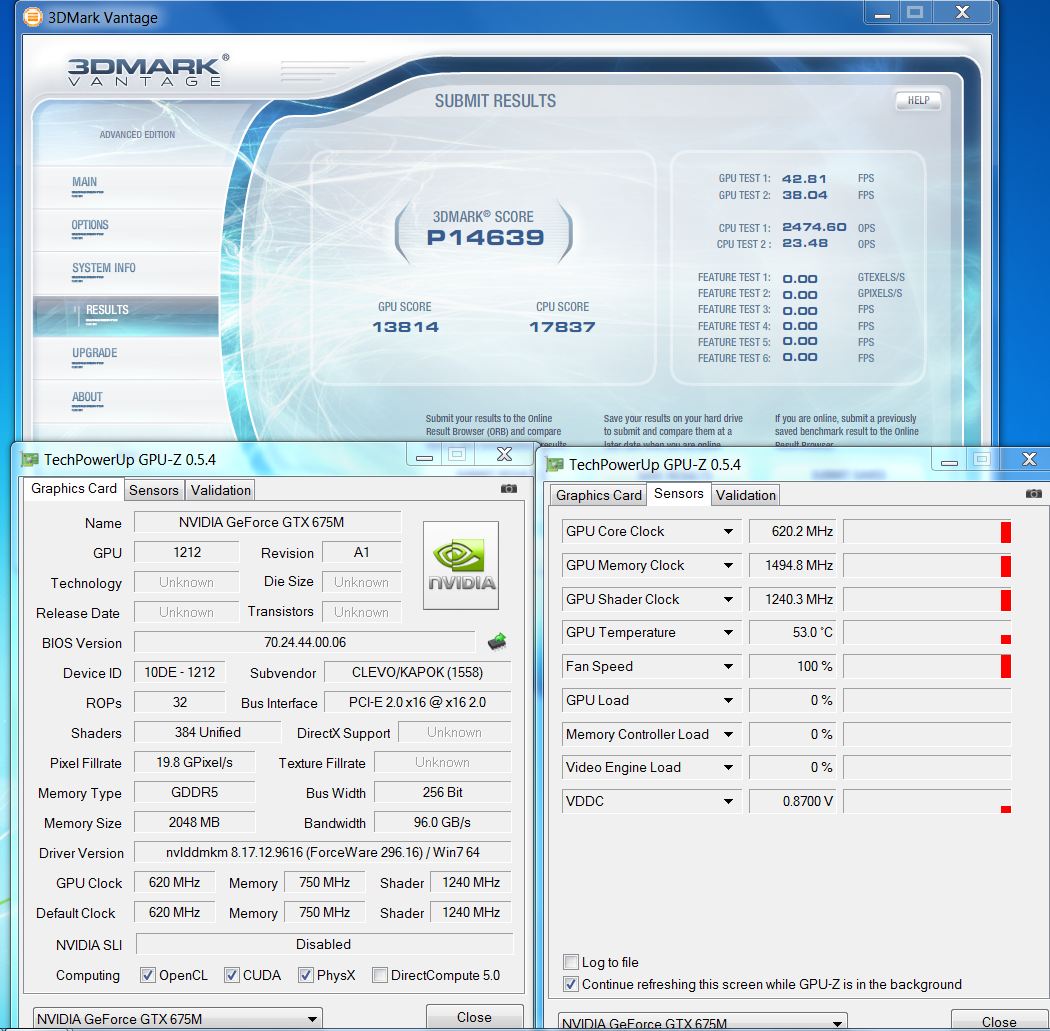
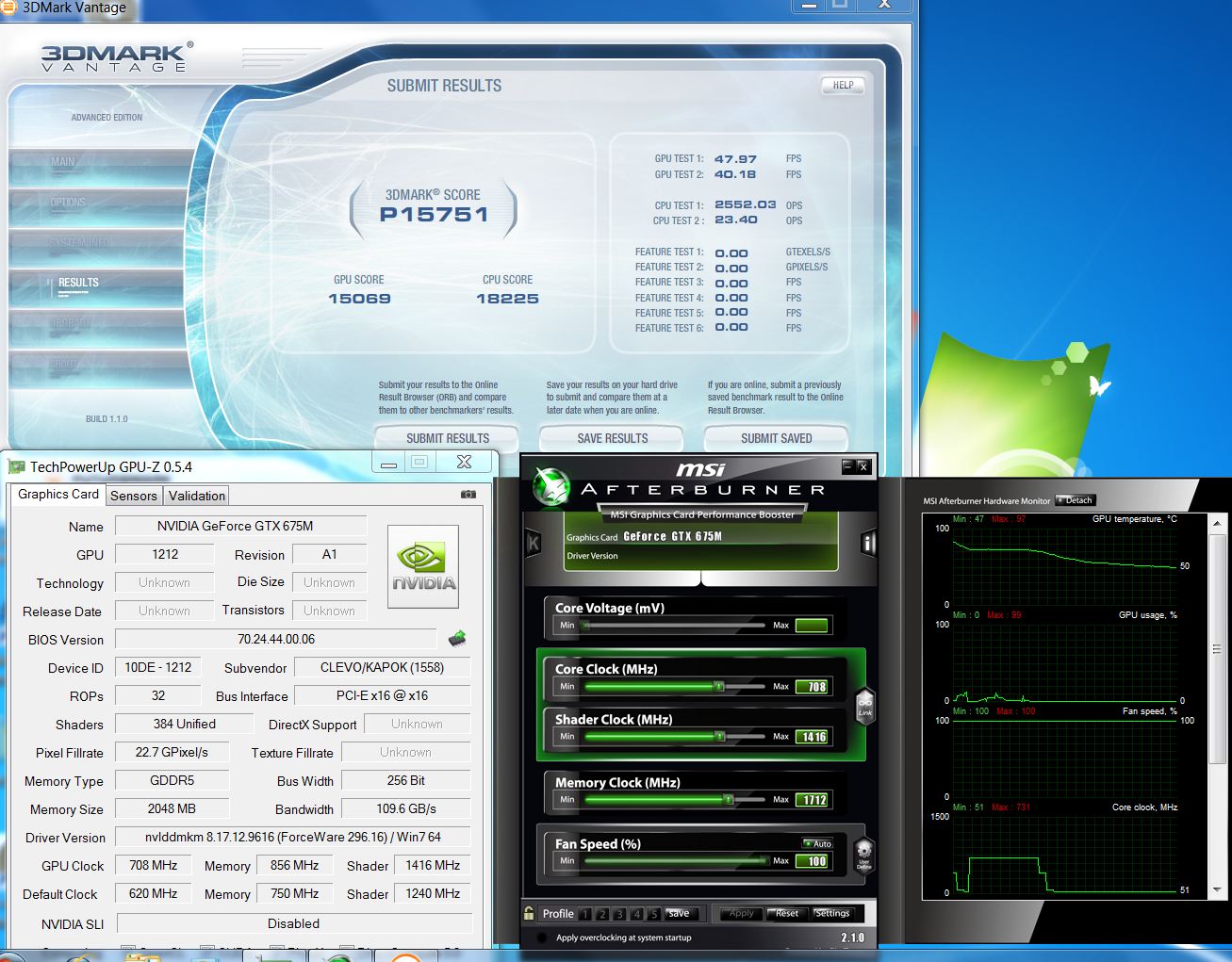
some benchmarks on NP9150 with nVidia GTX675M
 :
:
Attached Files:
-
-
97C under load with slight OC
My NP8150 580M runs at 80C max with 740/850 clocks, but that's with FN+1, of course) Bad paste job?
-
That's what I noticed as well.
97'c? Must be a bad paste job.. -
About the fan noise problem, this is a quick review from Logical Blue One (Australia):
http://forums.whirlpool.net.au/forum-replies.cfm?t=1897877 -
In the new P150EM, except mSATA on the SATA II (instead of a useful UMTS), above 90 degrees Celsius for GPU and CPU, fans emitting 57dB and the faulty keys in the backlit keyboard, is something that could convince me to buy it?
-
Wait, the P150EM WILL support the 7970M right? I'm waiting for that mobile card... hopefully it'll still be in the ~$1400-1500 price range
-
Come on guys, you're talking about an extremely powerful laptop in a 15 inch form factor here.
You want a quiet machine? Get an ultrabook.
The noise level of my Clevo gaming rig is just about the LAST thing I'm concerned with. I understand some of you guys travel with your rigs, but the obvious answer here is that under normal-light load the fans won't be nearly that bad. You can't always have your cake and eat it too. While we're at it, I want Clevo performance in Razer Blade form factor. Can I have that please? No? Damn.
As it is, I'm debating if I want to sell my 8130 and upgrade to the 9150 or not. It's very tempting with the amazing prices on these things, but I'm not sure how worth it the performance returns will be. The 560m handles things surprisingly well, and when I need the extra muscle I use my Alienware. But still...that backlit keyboard is just...so...shmexy...I don't know what I'm going to do. -
It should. Unfortanetly I've got nothing to clarify this with so take my word for it, time should show
I completely agree, well said! +1 REP
And the backlit keyboard does looks cxy indeed, so beautiful makes me drool from time to time (don't tell no one!!) -
Ken,
Could you confirm the GPU temp went as high as 97°C during 3dmarkVantage with such an o/c ?? -
Does anyone know what the max out is for the gtx675m yet for overclocking with out modifying bios? (Such as overvolting?) I just cancelled my msigt683 order and purchased the sager np9150! This was from gentechpc! I do have to say the customer service from gen techpc is absolutely amazing! Ken was a huge help and made the msi to sager transition not only possible but quickly and hassle free as well! Sorry I got a little off subject. lol. When I receive the sager np9150 I do wan to overclock but not by means of bios mod. So any info on what this card will be able to handle fro oc clocks would be amazing. Also I do remember a little while back someone had asked for the vbios for the gtx675m. If you still need it, when I receive the laptop I can get you a copy. Just please walk me through steps on how to do that as I am unfamiliar on that. Thanks again. Also Paul1ow great job on your score! 4700 plus on 3dmark 11 is crazy! I pushed my m14x to almost 2000 points so I cant even imagine how yours would handle video games. Any pointer from you would be appreciated !
-
Thanks, this is what I needed to know. I can always compress on the fly if 2x750gb RAID0 isn't fast enough for uncompressd 720p, but the product will not work at all if usb speeds are too low for uncompressed 1080p.
-
It came with stock thermal compound. I am sure the temperature will be a lot cooler with IC Diamond.
Also our product showcase video is up, enjoy :
<param name="movie" value="http://www.youtube.com/v/yzsu9vs52Nk?version=3&hl=en_US&rel=0"></param><param name="allowFullScreen" value="true"></param><param name="allowscriptaccess" value="always"></param><embed src="http://www.youtube.com/v/yzsu9vs52Nk?version=3&hl=en_US&rel=0" type="application/x-shockwave-flash" width='350' height="208" allowscriptaccess="always" allowfullscreen="true"></embed></object>Last edited by a moderator: May 6, 2015 -
Well said. Now, if you want my advice on what to buy, hang on to your current stuff for a little while, it's nowhere near outdated yet. Wait for 680m and maybe 7990m to buy. I don't know what you use your stuff for, but you could even consider selling both of your rigs and getting this decked out with 3920xm and 512gb ssd, as it has most of the features of m17x: beautiful high-gamut screen and backlit keyboard, too. But definitely wait for better gpu's, and think while you wait.
-
In the GentechPC video, where would the mSATA be located? There seems to be a location just above the battery, but it looks like there are some capacitors or something in the way.
-
I don't know about the video, but the actual location is right under the back panel near the CPU fan. There's a slot there with a single retaining screw and it should be pretty obvious.
-
That's the area I was speculating. Thanks
-
Oh man, I can't belive I forgot to ask this for so long: how good is the new optimus? Surely there are some resellers around who have been able to play with this and can tell me a) if there is any performance hit to the dedicated gpu, and b) how good is it at telling when to switch?
-
The 3DMark Vantage scores show there is no hit to performance, and the switch to and from the video cards is totally seamless.
-
Finally! A real video review...
-
Seamless is good, but how does it switch? Is it manual or automatic? Or does it just always use the nvidia gpu on AC and the intel one on battery? And can you switch which switching method you use, or is it constant?
-
Assuming it is the same as other Optimus machines it will automatically switch based on which program is used (more demanding apps will use the NVIDIA chip, most times). But you also have the option to manually set which graphics card is used with each application. The options are all in the NVIDIA control panel and it's very easy to use.
-
I know that, but this is supposed to be optimus 2.0 and I'm wondering what's changed.
-
sooo...does this bad boy (or the future one with IB) support 2 external displays + laptop display (3 total)?
-
It will depend on which port you use. DVI or HDMI will support one external monitor, but the DisplayPort can support several external monitors depending on the DisplayPort adapter you get. https://www.google.com/search?q=DisplayPort+to+3+DVI+Adapter
-
So can I use the DVI/HDMI + Display Port + Internal LCD all at the same time?
-
And what about DVI+HDMI? Can I run 2 external displays with those if laptop display is off? If so, what about DVI+HDMI+DisplayPort with no laptop display?
-
No, you can only use one of the ports. Either DVI or HDMI will support one external monitor, or you can use the DisplayPort with an appropriate adapter to run mulitple monitors.
Or, for less than most DisplyPort adapters you can get a ViBook SE USB to DVI adapter for your 2nd external monitor...that is what I use on my rig. We have them.
Why would you want to waste your laptop display? -
^^^^In the event that I get my hands on dual 1920x1200 displays. Of course, I'd still use my laptop screen for color-sensitive applications and school, but I tend to love 16:10.
-
Then run the dual 1920x1200 off the DisplayPort with a 2x or 3x DVI adapter, and you can still use your laptop screen as well.
-
Will the P150EM support password for the system drive ? So I can use the encryption of my intel 320 SSD.
To bad it doesn't have the same type of keyboard layout (chicklet), but I like the led though
Any resellers that sell barebones? I want to take the parts from my P150HM -
Anybody know what the gtx675m is capable of overclock? Without svet bios mod
-
Clevo for a year did nothing. And your clever thinking are as good as your eyes and ears. Look, as you put it, "so ... shmexy" backlit keyboard. Particularly, the F4 key: Prostar Clevo P150EM Gaming Laptop Video Review (Compare to Sager NP9150) - YouTube and F3 key: Prostar Clevo P170EM Gaming Laptop Video Review (Compare to Sager NP9170) - YouTube ...so?
-
I can't quite follow you there...
-
About 20%, any more than that and it just crashed. Your experience/mileage may vary.
-
Well, I finally made the leap and ordered a Pollux 1612 from Mythlogic with the following options:
Matte 95% NTSC screen
2760QM
16GB 1600MHz (4x4GB) RAM
675m
Blu-Ray drive
MyDigitalSSD 128GB mSATA SSD
750 GB 7200 HDD
Killer WirelessN 1102
Mythlogic won me over with superlative customer service, and I appreciate their thorough testing and upgrade plan. I seriously spent a solid hour straight talking to Eric yesterday via online chat and phone, and I never felt like I was rushed or given token answers just to be placated.
Now comes the fun part: waiting! -
I know the feeling. I ordered the msi gt683 from gentechpc and then the sager np9150 cam out with gtx675m the same day my msi shipped to me! I just canceled the msi and am now waiting for gentechpc to receive it and then send out the sager np9150. From what I have read so far it looks like the wait will definately be worth it! I am wondering if the 6 core i7's will work in this model? Both are lga2011 being this laptop is hm77 chipset.
Is that 20% max overclock of gtx675m on the core only? How high can you OC the memory? Or is it all the same? (20% for core, shader and memory) -
Hi guys, what I'd like to know is have they redesigned the keyboard on the 9150 versus the 8150? A lot of reviewers really complained about the 8150's keyboard saying the numpad was useless due to keys in the wrong place and the arrow keys crammed in.... Thanks!
-
HM77 is mobile, LGA2011 is desktop...you're looking for the P270WM if you want 6 cores.
-
In my experience, the arrow keys seem crammed in with the numpad on most laptops. I'm much more used to a desktop keyboard so hitting the zero key with my thumb is more second nature. It took a little getting used to.
I would have to say, the keyboard on the NP9150 is nice, has a great feel to it, and I didn't seem to miss keys once I got the feel of it.
I'm checking on that currently. Our resident overclocker is out sick today. I heard he got it to 20% but he didn't specify parameters.
Okay, so, our tech was using the MSi Afterburner and I believe it was 20% overall concerning memory, core, and shader. -
Perhaps you can also provide temps + benchmark scores with an OC'd 675M?
please?
-
^__^
For your answer, just watch the videos at http://forum.notebookreview.com/sager-clevo/656018-youtube-videos-resellers-p150em-p170em.html -
As Paladin44 has stated, it should be in our video.
You should see our low scores and then the higher scores in the video. -
Oh thanks, I'm so used to old computers I often forget what new ones are capable of
-
Quite all right, I'm right there with you.
I was actually really impressed with these coming with not only the HDMI, but the Display Port and DVI.
-
Oh my bad, I thought it was a 10% OC and that was why I was wondering xD thanks, though!
-
Sorry to hijack the thread, but has any of the resellers tested the 675m in the old p150hm? im still waiting for a response before upgrading to it.
A 20% oc is nice, it means hitting 800mhz on core easily, which brings the card almost on par to a desktop 560ti.
*** Official Clevo P150EM / Sager NP9150 Owner's Lounge ***
Discussion in 'Sager/Clevo Reviews & Owners' Lounges' started by Ryan, Apr 7, 2012.