 Problems? See this thread at archive.org.
Going to go with your memory causing the artifacting over the core.
Start with one and see how high it will go, then try the other. Then find a happy medium.
Memory is all over the board this trip.
-
I think I need more voltage... I've only used 1.05V while ssj92 has used 1.2V and HT has used 1.1875.. I'm not too sure if it's safe to use so much voltage permanantly though.. My card has potential as with the unlocked Maxwell vBIOS, I'm running full boost clocks on 0.95V which is a shocker..
-
I tell you what TomJGX. We already tested it at max and it worked. (970M/980M) Not like you are going to leave it there for ever.
Find out what your card can do then find a happy medium from there.
PS That slider is core voltage also, not memory voltage. Finding the memory max is super easy. Finding the core max...takes time. And you will of course need more voltage for core. Far more if you want to get more out of it. -
Guys. I still need help with my issue. I installed an old driver to my laptop and it told me that it couldn't work because the monitor is not connected to the graphics card. So where is the connector so I can try do so? Is it the same connector that you hooked the LED indicator panel to?
-
Johnksss, is there no way to have extra memory voltage? I think my memory can do more but just needs a bit more voltage... I thought there would be an option for more memory voltage in unlocked BIOS..
-
For now leave memory at stock. Increase your voltage and power target and see how high you can go before artifacts/crashes. Tone it down a bit from there. Once stable on the core, start overclocking your memory with the same process. Once you have a stable core and memory, you can start lowering your voltage, then power target until it's fully stable as low as it can be with both.johnksss likes this.
-
I'm using Precision X and only have option for adjusting core voltage..Where can you adjust memory voltage?
-
You can't adjust the memory voltage. I'm talking about increasing the memory clock after you have a stable core clock. My result was from stock memory voltage. Every chip is different, I can hit 1520mhz on memory and be stable, where some people can only get like 1450mhz etc. Don't worry about memory just yet, leave it stock and work on your core clock first.TomJGX likes this.
-
The 970m may have a different stock memory voltage.
-
where can i get a used or cheap barebone for Clevo P570WM?
-
It's not really a system where you can get a cheap barebone.
-
Hard mod and it's not really worth it.
There has never been an option for this in moible. Only one person rasied his memory voltage and that was Meaker.
Define cheap? -
Double H100i P570wm cooling mod.......
I decided before taking the new heat sink apart, I might try to using the existing heat sink fin-set's thermal dissipation capacity by mounting Hydro coolers to the tops of them. I see that those fin-sets do most of the work in the process of removing heat. So I gave it a try, simply by reinforcing the existing fin-set (so that it doesn't rip apart), and super-gluing the AMD style mounting loop-studs to the sides of the CPU heat-sink fin-sets. I just got it working and idling at 38 deg. C !! running at 4.Ghz now. Did a quick Unigine Heaven 4.0 basic for 127fps and 2583 score.....temps barely hit 60 deg. C. Here is a couple of pics...
Edit: Another run with unigen heaven 4.0 at extreme setting, pulled 782 score with 166 fps max @ 4.0Ghz, max temps where 43 deg. C!!!! With all fans running full speed.
I used Antec7 for the coolers and Liquid ultra for the CPU. as the thicker material can fill in the groves of the fin-sets
<iframe width='480' height="360" src="http://s1256.photobucket.com/user/Takaezo/embed/slideshow/Dual%20H100I%20on%20P570wm%20CPU"></iframe>
@ Meaker. When I use the FN + 1 function for full fans I get a double flashing locks in the upper right, followed shortly by shut down. I still have the yellow jumper attached from FAN1 to FAN2, but now I am using both fans; can I just get rid of it? Will that stop the FN + 1 shut down?
Edit: yes removing the yellow did stop the error and allow me to use full fans. The Unigen is heavy on the GPU side though. gonna try an XTU next.
THanksLast edited by a moderator: May 6, 2015Prema, triturbo and Solariseir like this. -
I'm assuming you don't care about portability now that you've gone with two H100i's?
If that's the case, your money really would've been better spent building a custom water cooling loop.unityole likes this. -
No I will probably go back to the single I just wanted to try this since I had the time. just posted a 1380 4.5Ghz xtu with it.
although two is not much different than one. it just wraps to lay on the top, it could still fit in my back pack.
And..... I think I know how to spend my money thank you very much.
I am the one who created a 4.9Ghz mod that is portable with a P570wm, for......wait for it ....$180.00
A couple of your mods that I have seen are very nice too.Last edited: Jan 6, 2015 -
lol I think you took what I said the wrong way. It was not meant to be a slight, more of a "it's a cool mod but if ultimate cooling was what you were after this might've been a better idea"
This is what I had in mind: 420mm radiator ($84), a D5 pump ($77), a decent CPU block ($75), pump top + res ($65), fittings + tubing (~$50). Total cost would be around $350. Could potentially be even cheaper if you ditch the optional pump top and went with a smaller radiator. I don't know how much you spent on 2x H100i + spare P570WM heatsink but I'm assuming somewhere around $300?
Of course you do lose portability, although it's as simple as removing the CPU block and leaving the loop at home and switching in the stock heatsink when you're on the go. -
a chance at haswell E with clevo?
ddr4 sodimm coming soon.. Crucial.com - Crucial DDR4 -
Yes with both fansin just connect them regularly, should sort the shut down since the system is iin a normal configuration.
Takaezo likes this. -
@ unityole, I could not access your link here...interested in ddr4 so dims my self.....
-
weird. ddr4 sucks so much right now with its high latency. its just a link showing what has to come. future is about pcie ssd in raid and DMI 3.0 and everything running off cpu if thats possible. so much faster than the junk we have now..Takaezo likes this.
-
-
Hmm...its strange that I can not access that link....
On another note, I have been thinking about my K500m's in terms of longevity etc.....
Eventually I will save enough to replace them with most likely gtx cards for which they are being outperformed at present.
With the NGO force-ware and modified vbios, I show option for SLI in Nvidia... I am thinking about trying to solder SLI pin headers on to the (future tense) k5000m's, to see if I could get them to work in SLI.
Anyone here with an opinion on this idea, or thoughts are appreciated.
Thanks -
hey guys, do you know any way that I can get my hands on Eurocom Panther 5D Bios? it seems its the only supplier with 3D LCD.
-
Considering 980ms are working in SLi, chances are pretty good... at least on the certification front. Desktop Quadros can work in SLi, so I see no reason not to work. If you have everything needed, go ahead, you are two headers away from SLi How would you source the SLi headers though?
Takaezo likes this.
-
I inquired to Sager about doing this on the 9570 and they told me no go, so would definitely take some custom work.Takaezo likes this.
-
How would you source the SLi headers though?[/QUOTE]
Well that is the exact issue, since I don't have anything with a SLI header to look at, and I would need a part number most likely. Also was reading about people changing/removing resistors on their GTX's to change the registry code causing them to register as quadros. unlocking features. Its seems plausible as the software seems to support it.
Anyone know the part number for the NVidia m series SLI header? -
I got a 3d emitter and glasses to go with my Asus swift. Played some metro last light with it and it's pretty good
Prema, Solariseir and Takaezo like this. -
You can try finding some cheap GTX 4XXM cards that support sli or a card that is broken and source the headers from those.Takaezo likes this. -
At least there are no SMCs required along with the header as far as I can tell.
Takaezo likes this. -
I found this card on ebay , the connector looks like Hirose DF12 Series 0.5mm 20 Way 2 Row but I'm not sure. I will open up my laptop and check it later.
-
That connector looks about right to me too.
Solariseir and Takaezo like this. -
Wow, thanks a lot for that link and the confirmation, I should be able to source it now that I have the part number and a picture. Hope I don't have to buy a hundred of them..lol
Solariseir likes this. -
Steady hand
-
@ meaker; can you verify for me that it is 20 pin? Just want to double check.
Thanks -
Yes 20 each side like the connector you posted, the pitch is roughly 0.5mm by the looks of things but I don't have any fine measurement tools on me.
Takaezo likes this. -
heh, try solder mini pcie connector, pain in the as* too
-
Well they are 0.8mm pin pitch so this is even worse :/
-
I dont have the tools too, but what about the whole connector is it the same size?
by the way mini pcie is not that hard with proper soldering Iron. -
I know right, was trying to repurpose mPCIe to mSATA, ended handing it over friend, still have to figure out some stuff
unityole likes this.
-
It is a lot easier with a decent iron true, mine is a bit bargain basement to be honest so not great for delicate work.
-
Once I get the parts, I will probably have someone in the Electrical engineering dept., here at the university, to help me or just do it for me. Shouldn't be to difficult to find a grad student to help out.
-
the most i'd do is msata/mini pcie solder anything smaller is too difficult and risk of me destroying my board. have successfully added few mini pcie slots in few of laptops that come with empty slot on mobo. xps m2010 and w701ds are few of them.
i still remember first time i tried soldering USB 2.0 4 pins and I thought i was TEH BESTtriturbo and Solariseir like this. -
Get a lab assistant to do it (even better the head assistant even if it costs a little bit) they are probably the most component person at it for miles.Takaezo likes this.
-
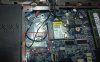
now that we are talking about mini pcie slots, what is this spare mini pcie on the P570 about?
will it work if we solder the connector?
 unityole likes this.
 -
It seems that you'll need 4mm connector which wont be able to clear the 6 pin connector behind it. You can move it away though. There might be a few resistors and condensers missing as well. The multimeter and the schematics are your friends
unityole and Solariseir like this. -
Oh I think I know what that is(maybe). so you can order a wifi+blutooth combo card OR you can have a separate wifi card and a separate blutooth card. Is that the header for the separate card maybe?
Solariseir likes this. -
Great result man.
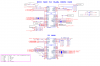
I thought about bluetooth too, but it the schematic, it is written the TV card slot. and down there there is something about mSata too. not sure if I can get a mSata out of it.
 Takaezo likes this.
*** Official Clevo P570WM | P570WM3 / Sager NP9570 Owners Lounge ***
Discussion in 'Sager/Clevo Reviews & Owners' Lounges' started by jclausius, Feb 5, 2013.


