 Problems? See this thread at archive.org.
uhm, not sure, there are many enable disable USB lines, but I don't recall seeing one that says select 2.0/3.0 I will check it out thanks. If you or anyone knows what the Bios line item is that would help too.
Thanks
-
I just checked and there is one setting to enable USB3.0 XHIC (enabled) XHIC hands(enabled) off and EHIC hands off (disabled)...all USB ports are enabled across the board, then in the advanced tab there is USB 2.0 (enabled) the (disabled) EIHC. Followed by many USB lines(enable).........
Last edited: Feb 13, 2015 -
it doesn't have to do with usb 2.0/3.0 though. expresscard slot is linked to pcie lane, likely pcie 1.0 x 1 lane which is maxed at 180MB/s after conversion. if clevo has settings to change it to pcie 2.0 then 2.0 x1 lane its 400MB/s peak after conversion. i'll get a picture of alienware bios, see if clevo has something similar.
also that expresscard slot in the front left.. how you get usb plug in on the front lolTakaezo likes this. -
Works great in front for thumb drive, exterior drive, 3Dspace mouse, so works for me I have all others in use. Yeah that is what I was thinking the settings for PCI lanes, I will look later.
-
@unityole, thereis a whole page for PCIe under the advanced tab, it has option to enable /disable/auto PCI express, as well as enable disable PCI PME/SCI (all disabled) for each line of PCIe. I have tried to read about this but the search turns up a lot of contextual examples that I don't understand. Is this what you are referring to?
-
pcie bios menu for m18x, we have options to go pcie gen 1 or gen 2. my camera broke so i took a video and took shots lol
Attached Files:
Takaezo likes this. -
-
Here are a bunch of photos of the M18xR1/M18xR2 unlocked BIOS screens... (Both have the same features except no UEFI on the M18xR1.) Very robust options compared to this machine.
http://imgur.com/a/eJlYG#0
I can only imagine how amazing this machine would perform with all of those fine tuning capabilities.ole!!! likes this. -
Hi @Shinra358 - I could not get the 32GB of Vengeance 2133 to run any higher than 1866, so I am back to the slower 16GB G.SKILL Ripjaws 2133. Even the G.SKILL will not run 2133 set to "Automatic" in the BIOS. I don't know if it is the 8GB stick the Panther does not like or just the Vengeance itself. Since @Takaezo is running 4x8GB sticks at 2133, I am going to assume the BIOS does not play nice with the Vengeance 2133 8GB sticks.
You asked about my WEI. I just refreshed it. This is with the 16GB of G.SKILL 2133 manually set to run at 2133.
-
@ takaezo, that sucks man, those ASPM control thing if you disable it you get more out of pcie, same with sata. disable sata ASPM you get more performance out of your SSD in latency, 4k, sequential etc.
Takaezo likes this. -
OK, yeah that makes sense, I have my power options set to traditional, rather than power optimizes, I don't think there is any other setting for power states. I will look again later.
Thanks -
I would talk to prema since he is the one that got the MXM slots running at 2.0 as on the stock bios they are 1.1 only.
Takaezo likes this. -
@unityole do you not have an avatar right now?, just wondering because since the change in site format I often can not see seemingly many more avatars. Its like refresh, refresh back page forward, then most of them come up.
-
I sent you a custom Mod yesterday Takaezo, check your mail.
 Takaezo likes this.
 -
just checked it will install and let you know!
-
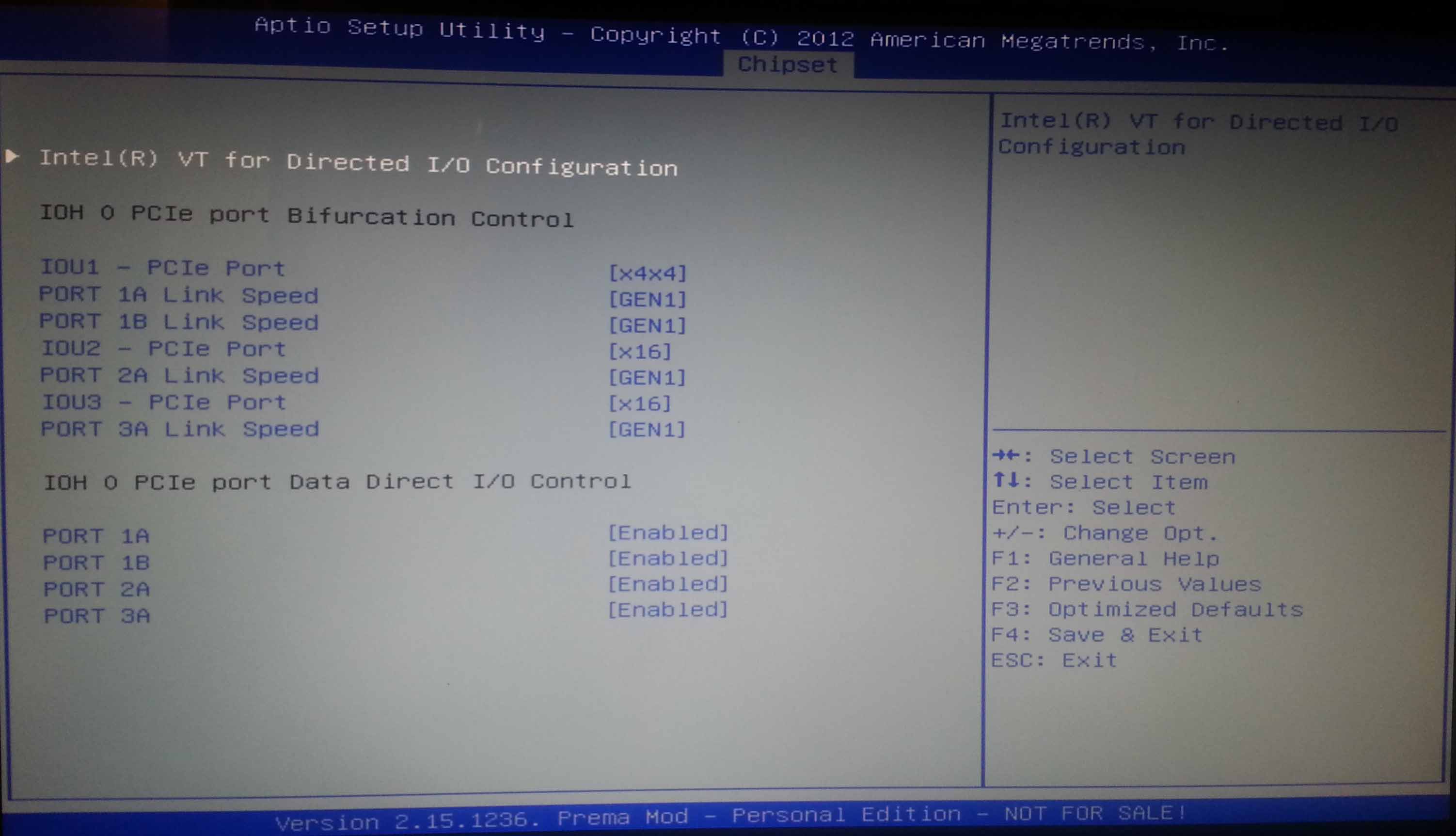
Ok, installed, went in and changed them to Gen2, didn't change anything else, still getting 150 MB/s R/W on the PCIexpressPort. Do I need to change the first option to 8x8, or stay with 4x4? it limits the number of line items if you do that?
Here is the picture without changesAttached Files:
-
-
Here is a Fire Strike Extreme run...
NVIDIA GeForce GTX 980M video card benchmark result - Intel Core i7-4930K,Clevo P570WM powered by PremaMod.com
![[IMG]](images/storyImages/es1M8wr.jpg)
-
See to do fine at everything. So does 344.75 drivers for the most part.
-
@Takaezo, if changing all of them to gen2 and still doesn't help its likely those settings doesn't change anything, or not reflecting expresscard slot so likely things are left out or hidden, or just clevo in general. in alienware bios we got some temperature settings/fan settings and changing those don't do anything. now i know for a fact that win7 is pretty bad when comes to usb 3.0, i'd recommand leaving them all at gen 2 and install windows 8 or 8.1 on another partition boot it up and try it out maybe you'll get something else out of it hopefully.
and no avatar for me, never had one since i signed up here years ago lolTakaezo likes this. -
Thanks for the suggestions, I might try that, although the driver for the fresco hub says "XCHI" in the driver name....there is a setting for xhci in the bios, for I think disabled or hands free......I wonder what that does exactly in relation to this and that driver?
Thanks -
-
Interesting comparison of 780M SLI and 980M SLI...
![[IMG]](images/storyImages/vmmaxEMl.jpg)
![[IMG]](images/storyImages/DpFEvFql.jpg)
-
-
@Meaker - I took your advice and tightened up the tRFC. Could not get to 150 or below, but MUCH lower than default. After doing some benching and stability testing with tm5, that being tighter and other timings looser (what the RAM sticks are rated for) seems to produce better results. See comparison below. CL11 is faster than CL10 (probably because CL10 was silently experiencing errors).
![[IMG]](images/storyImages/4huUu6S.jpg)
![[IMG]](images/storyImages/K28oahp.jpg)
![[IMG]](images/storyImages/tjtaT88h.jpg)
-
HELP!, so I went in and enabled all the PCI settings and enabled ehci hand-off as well as left Xchi hand off enabled as well as setting all the PCI to enabled with SME Enabled as well. In the new settings I tried to change it to x4x4x4x4, and the rest Was just messing around a little to try and get the so basically every thing was enabled. Restarted and BAM, nothing, no post no nothing black screen, screen never enables or enables video. Oh also enabled the virtualization . How can I get back into bios?? anyone?
-
I think I have effectively locked myself out of my own bios???
Do I need to reset CMOS to reset bios to stock settings? -
HA!. fixed it in the blind, just F2 for awhile, (until I thought it would be in bios) then enter(resets to default), then F4 save and exit, followed by enter!!!!! I feel pretty lucky!
Last edited: Feb 17, 2015reborn2003, ole!!!, TomJGX and 2 others like this. -
So, pressing F2 enters the BIOS and holding F2 down for a really long time resets the BIOS? Is that correct?
Glad you got it sorted. -
Hold F2 until you think your in the bios, then press F2 one more time then enter, this resets the bios to default, then press F4 and enter to save setting and restart. just the exact same step used except in the blind without a screen to see what you are selecting.
Freaked me out though!! lmaoLast edited: Feb 16, 2015reborn2003, ole!!!, Santander and 1 other person like this. -
Thought you guys might be interested in this...
reborn2003, Solariseir, Takaezo and 3 others like this. -
-
Thanks for the video Mr. Fox! I will definitely try that out, haven't been able to use that program because I didn't know all those little tricks and settings.
Mr. Fox likes this. -
Until @unclewebb has a chance to update it, it is really primarily effective starting with your max overclock and setting three lower clock speed profiles. Since the two cores/four threads are missing, it is only effective for lowering core ratios. If you try to increase them, it omits the last two cores. Going down in core ratio, all six cores remain equal. It's really sweet being able to switch among four overclock profiles by simply pressing a key combo. Makes everything super easy.
-
I just seem to run at 4.3ghz because it just hates going any further but does it rock stable.
Mr. Fox likes this. -
There seems to be a lot of variance in the silicon quality. I am fortunate to have one that does 46x6 stable on air cooling, but I think that might be the exception to the norm. If the BIOS had more adjustments we might be able to go higher with both of our CPUs, but the power and voltage tweaking options are very limited. I am still very happy with this machine... really like it a lot. I have hardly touched my Alienware beasts since I got it.
CPU input voltage, cache ratio and voltage, and base clock adjustments would all be very helpful. I did some checking and there are not even any MSRs for those features in the BIOS, so there is nothing that Prema can "unhide" from what I can tell. -
Well more control over vdroop would be the real kicker.
Takaezo likes this. -
Thanks for the video. mine cannot go further than 4.2 , on 4.3 I got random bluescreen after logging to windows. the temp is normal the watt is around 280 for whole notebook (I use power meter on laptop power outlet) . it seems its the matter of quality or luck
-
throttlestop is one of the best software made for overclocking cpu tbh, unless bios came crappy and force lock a bunch of crap lol.
@Takaezo nice one on that bios thing, usually when i mess up pcie settings and goes black screen nothing happens i just reset cmos and it does the trick. i have done it so many times now i know what not to enable/disable lol -
I had one system where you had to reseat the memory if you did something really dumb, the system detected a module configuration change and reset some critical settings.
-
I am pretty sure the mistake that will lock you out of the bios, or just gives blank screen is the enable EHCI hand-off, while this is enabled and XHCI hand off is also enabled, I believe this "confuses" the system into not knowing what to do....maybe....lol
Edit, after listening to some others here I do not think this what the cause, rather the change of 4x4x4 to 8x8x8 in the Bios may have actually been the culprit. Not going to try it again to verify though ....to risky.Last edited: Mar 30, 2015Mr. Fox likes this. -
Considering it's toggles that were never tested to the full extent it could be anything
-
Strange... I have both enabled and no issue.
-
strange, not sure then I suppose.
-
-
I get a black screen every time I try. I don't know if it is drivers, or just gimped 980M modules, something getting too hot on the GPUs or what. Doesn't matter how much or how little voltage I use, single or SLI, AC cooling or just fans, always the same problem. I have tried several different vBIOS as well. Had the same problem with these GPUs in my M18xR2, so it's probably the video cards. Might be the reason NVIDIA is trying to hide something with their clock blocking drivers. I don't have a valid reason to RMA them since they work perfectly except for extreme overclocking efforts. ASIC scores are above 70% on both cards. If I had to guess, maybe something to do with the missing VRMs on the top edge of the card. Probably would not happen if they had populated all of the available connections.Santander likes this.
-
They are 8GB. I have never seen a 4GB 980M MXM. The BGA turds are 4GB if I am not mistaken.
You cannot combine the vRAM for two 8GB GPUs in SLI or CrossFire to arrive at 16GB, so showing 8GB is accurate. -
Reminded me of an interesting article I read recently. Article
-
Trade in some performance if you need more vram, it's a nice option for more unbalanced setups.
*** Official Clevo P570WM | P570WM3 / Sager NP9570 Owners Lounge ***
Discussion in 'Sager/Clevo Reviews & Owners' Lounges' started by jclausius, Feb 5, 2013.


![[IMG]](http://i.imgur.com/vmmaxEM.jpg)
![[IMG]](http://i.imgur.com/DpFEvFq.jpg)
![[IMG]](http://i.imgur.com/tjtaT88.jpg)


![[IMG]](images/storyImages/Jl9QlPX.jpg)
