 Problems? See this thread at archive.org.
Sounds like I have a ram issue then
-
-
Yup, already did. XMP1 and XMP2 not working. If I use the default dimm profile, it only runs at 2400. Any suggestions?
-
-
Thanks for the response. My bios version is 1.05.03PM v1.5. I even inputted manually the values from xmp1/xmp2, still did not work.
-
no manual input is required if that's what your RAM is rated at bro. XMP Profile 1 should do the trick.
Awaiting Prema or Mr. Fox's advice.temp00876 likes this. -
Ordered 2 of these: http://www.scorptec.com.au/product/Memory/SODIMM/61671-F4-2400C16S-16GRS/?member_pricing=true
But not from this site since they don't ship to a PO Box
Sent from my SM-N910G using Tapatalk -
Have you tried your new ram without any OC settings of processor?temp00876 likes this.
-
Yes, I did. It does not boot at all. What is strange is when I select xmp1/xmp2, the freq and multi does not adjust e.g 133 x 9 instead of what I see in others e.g 100 x 15.Last edited: Jul 24, 2016Papusan likes this.
-
I don't know what's wrong. Maybe you have ram with different revisjon? You could try @Mr. Fox ram tweak in the bottom of the page below. Try it if you or other can't find other tricks https://biosmods.wordpress.com/2015/10/21/sky-x9/5/
-
Thank you for the reply. I'm not sure what is wrong too. Here is the RAM model I bought GS-F4-3000C16S-16GRS (GSkill DDR4-3000 CL16). Setting to XMP1 or XMP2 should work, but it did not in my case.
-
Thanks dspboys ( and everyone who gave me a hand before ).
I wish i could do the same for someone else but i'm not qualified, except maybe, due to all my mistakes and errors,
i'll ask a moderator if i can create a new Topic:
Clevo P870 newbies Mistakes ( and Fixes ).
This would prevent most Topics to be spoiled by idiots like me... but i learn quickly: for example, the problem of
freezing i had because i changed SATA configuration from Raid0 to AHCI ( i know, i'm dumb ! ) was caused by
former Win10 files on my Raid0 SSD's. So i deraided it through the Bios, began a Win10 installation but only erased
the 2 disks in the first step of Win10 then stopped the install, shut down and F12 + Raid 0 array creation and
then re-installed fully.
This must look obvious to nearly all of you, but imagine a newbie like me... or future ones.
This could be a Goldmine to prevent more and more accumulated mistakes to a point Nothing works
anymore !
By the way, now that it rolls like a wave on the ocean, this Laptop is a KILLER !
I Love it ( except its dwarf's keyboard: i miss my AW M17X R4's one ! ).Last edited: Jul 24, 2016CaerCadarn, bloodhawk and temp00876 like this. -
It is a big show stopper for me. I hate it every time I type anything on it, every single day....
Clevo makes the worst laptop keyboard EVER!Stheto likes this. -
Don't know if they ship abroad but have a look at these: http://www.rueducommerce.fr/Composa...MM-2400-MHz-Cas-14.htm#moid:MO-0227CM57534640... The stock price is about 83 US $
I bought 2 of these for my Clevo and am happy with it....
All i need now is a clever mind to guide me for a little overclocking up to 2666 Mhz...
And tonight, i'll follow Phoenix' guide how to OC my i7 6700 K up to 4.5 Ghz: step by step of
course, don't want to brick the baby again...
Last edited: Jul 24, 2016 -
@dspboys - If you still haven't figured this out, maybe I can help. How many modules and what denomination (capacity) do you have? Please post a link to what you bought.
@j95 was having the same problems you are with his new machine and it turned out his G.SKILL DDR4-3000 is not the same as what I and @Phoenix bought and it's has slightly different SPD timings and memory chip configuration. (His DDR4-3000 is this version http://www.newegg.com/Product/Product.aspx?Item=N82E16820232309 and I am guessing you may have what he has.) What is weird is his machine started booting with his different RAM at 3000MHz totally stable after setting my CPU overclock settings. Using BIOS defaults his machine would not POST using XMP profiles. Why? Don't know... doesn't matter a lot at this point since it is fixed.
I recommend following these steps:
- If you have XTU installed remove it and forget about using it, at least for now
- Remove all RAM sticks and insert 1 (uno) DDR4-3000 module in DIMM slot #1
- Disconnect AC power and pull the CMOS battery for a few second to flush NVRAM
- Reboot the system and load Windows, then shut down (totally power off not reboot)
- Power up, F2 into the BIOS then enable overclocking. Press F4 to save and exit
- F2 back into the BIOS after enabling overclocking and carefully replicate ALL of the settings in this video, skip nothing (assuming you have @Prema BIOS)
You can set the 4 multipliers at 45 or 46 if you want, but make everything else identical on each and every screen - Save and exit the BIOS, let it configure itself and load Windows with these new CPU OC settings
- Reboot, F2 into the BIOS and set XMP 1 without changing anything else
- Save and exit the BIOS, wait up to 3 minutes for it to work things out... if it does not power off manually, then power up...
You might have to do this more than once... be patient and give it time to work things out (30 seconds may not be long enough) - Once the system boots, confirm XMP 1 profile is set, reboot Windows and re-confirm it
- Power off the system and insert the additional DDR4-3000 modules...
- Power up and enjoy DDR4-3000
Last edited: Jul 24, 2016Spartan@HIDevolution and Prema like this. -
If that is the default speed, then it should not take longer than normal. If you are overclocking to 3000 from suppose like 2800, then the first boot will take way longer than usual.
Is it the same G-Skill memory as Phoenix's? Sometimes memory modules do have compatibility issues within the same type of systems. I would try a CMOS reset, leave everything to stock , boot into Windows, restart, then go into the BIOS and setup everything and then let it boot. -
Nope, based on the part number he posted it's not the same memory that @Phoenix and I have. I cannot find the 16GB modules than we bought from HIDevolution for sale anywhere in the US.
Appears he has the same memory as @j95 which is this: http://www.newegg.com/Product/Product.aspx?Item=N82E16820232309Last edited: Jul 24, 2016 -
Ahh, that would explain things. Will it possible for you to PM, me a few pictures of the modules when you pop the hood next time? -
Taking a second look, it appears he does, in fact, have the same modules. I missed the "S" and those in the link that j95 has have a "D" in the part number. Sorry, my bad.
I already had this photo if you can use it.
![[IMG]](images/storyImages/uJCiJBi.jpg) bloodhawk likes this.
bloodhawk likes this. -
I have seen these exact ones on Newegg when HIDE first got their stock.
The new ones have different stickers. Good change they changed something. OR maybe Ted got the cream of the lot review samples
-
Thank you @Mr. Fox , I will try this when I get home tonight I just saw the video. When you selected XMP1, the grayed out values were 100 (mem clock) x 15 (ratio), mine stays the same 133 x 9.
@bloodhawk , the one that Mr. Fox posted is exactly the one I have in the picture. The F4-3000C16S-GRS does not have a kit for 32GB though. -
The greyed out values don't change instantly when you apply an XMP profile. You will not see the values from the XMP profile until you have rebooted and those values are active. It shows whatever the active values are the machine last booted with, so what you are seeing is normal.temp00876 likes this.
-
Gotcha.
I would reboot and change the Memory base clock to 100 and multiplier to 15 once it boots normally with XMP1. And this time it may take way longer to post. -
If he boots successfully with XMP there would be no reason for him to manually do that because the XMP profile would have already set those values. You cannot use manual values and the XMP profile at the same time.
-
Oh nono , i meant switching to manual after XMP boot works. From what i understand isn't his XMP1 profile also loading wrong clocks?
-
The clocks he is seeing is the default memory timings that the machine booted with, not the XMP profile. He won't be able to see the values from the XMP profile until the machine has successfully booted with it.
-
Ok, now im confused. Is the system not booting with XMP at all ? Or is XMP loading entirely wrong/low clocks and timings?
From what i have tried, you can set to XMP, boot into Windows, come back , switch to Manual and set timings and clocks manually.Mr. Fox likes this. -
Not booting at all with XMP from what I understand. Only booting with the default memory profile. Same problem @j95 had until he applied my BIOS settings and then everything fell in place like magic and runs 100% stable at 3000MHz using XMP 1. Why? I have no idea, but it worked. Probably just one setting someplace, but we don't know which one.
-
Yeah that is weird indeed.
Did @j95, wait for it to boot for eternity? It happened to me a couple of times, it took even longer than a CMOS reset to boot after settings things up. Just went to grab something from the kitchen and when i came back it was up and running, and subsequent boots were working fast usual. -
@dspboys - I forgot to include a step. I've corrected the original post. You need to enable overclocking, press F4 to save and exit the BIOS before applying the rest of the overclock settings.
-
Yes, waited forever and it would just sit there with a black screen.
One thing I have noticed is if you replace the RAM you need to let it boot once with the default memory profile. If I have XMP 1 set with my Kingston HyperX Impact and try to boot the machine from the G.SKILL with the BIOS already set on XMP 1 it will never POST. So, before you switch DIMM modules you need to set the BIOS to use the default memory profile and boot with that first. Swap in the new RAM and boot with default memory profile. Then you can set an XMP profile with the new modules. -
-
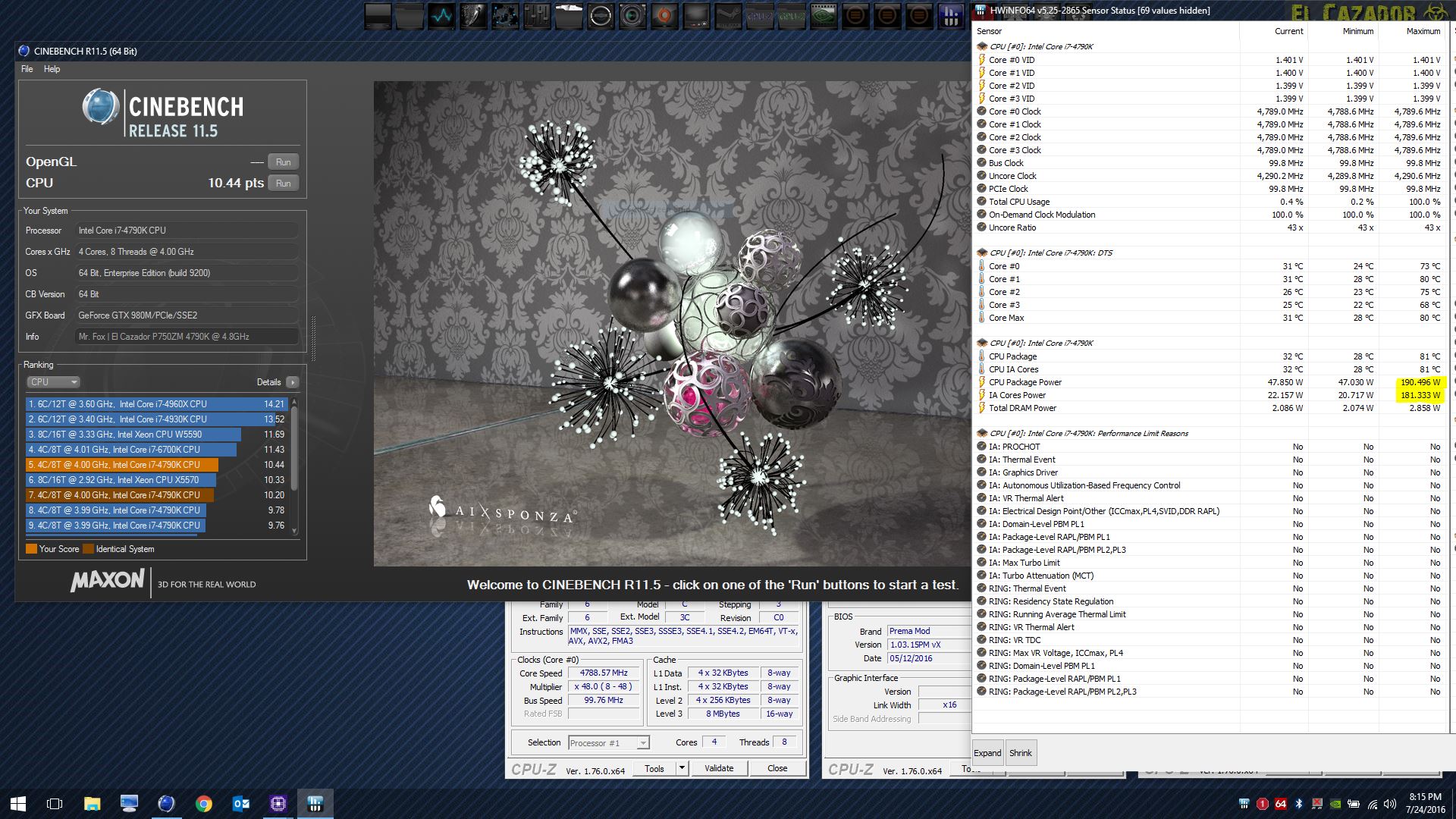
More benchies for the baby beast...
http://www.3dmark.com/3dm11/11440229
![[IMG]](images/storyImages/f5ka6WL.jpg)
![[IMG]](images/storyImages/ftULKZV.jpg)
wPrime 32M @ 4.9GHz
![[IMG]](images/storyImages/322pOZP.jpg)
Attached Files:
Last edited: Jul 24, 2016 -
-
Just follow the instructions above, remove one stick if you're still having issues w/ XMP1 then enter the BIOS and power off (XMP1), finally reinsert the second stick, no need to clear CMOS.
@Mr. Fox 16-18-18- 39 CORSAIR Vengeance Performance 32GB (2 x 16G) 260-Pin DDR4 SO-DIMM DDR4 3000 (PC4 24000) -
-
-
-
You win the prize for making me laugh for the first time today.
Check the temps in the AIDA64 sensor panel. It was still 100°F outside at 10:00 PM here.bloodhawk likes this. -
Jesus Christ. Did you go ahead and mod that AC as well or what? Those are getting closer to LN2 temps lol.
I need to buy some more Dry Ice.Mr. Fox likes this. -
Nope, just turned it down as far as it would go.
-
I have a few questions regarding the static mode , can't start a conversation with you on my end. Will you be kind enough start one?
I'm of to lala land for now, gonna reply tomorrow morning. -
Slightly OT: @Mr. Fox
Everytime I look at your Screenshots I am wondering what kind of widgets you're running? It's looking freaking awesome!
I hate my Homescreen, cause it is paved with icons all along, but haven't been sucessful finding a kind of icon bar like yours as a replacement that pleases me. Also your sensor Panel is really looking smart! Dunno for sure, but I think you mentioned once that it is some aida64 widget that one can enable, right?
Would luv hearing some advice from your side pointing me in the right direction.
 Last edited: Jul 25, 2016
 -
what's a good starting point for bios settings to get up to 4.5ghz?
-
You can use @Phoenix OC guide in the Clevo Overclocker's lounge http://forum.notebookreview.com/threads/clevo-overclockers-lounge.788975/
The OC Settings are in the first post.
Thank you @Mr. Fox !!!!! That did it. I do not know the reason why but the first time I tried your settings it booted.
+rep
Papusan, bloodhawk, Mr. Fox and 1 other person like this. -
-
It should be pretty good, even better when delidded
-
WOOT! Congrats, bro. I knew you could do it.Papusan, bloodhawk, temp00876 and 1 other person like this.
*** Official Clevo P870DM/Sager NP9870-G Owner's Lounge - Phoenix has arisen! ***
Discussion in 'Sager/Clevo Reviews & Owners' Lounges' started by NordicRaven, Sep 22, 2015.



![[IMG]](images/storyImages/buUKfEH.jpg)
![[IMG]](images/storyImages/f9lryWH.jpg)
![[IMG]](images/storyImages/3T8sB4B.jpg)
![[IMG]](images/storyImages/66580115.jpg)
