Problems? See this thread at archive.org.
Eh, it's probably enough for the intended purpose.
Of course Xen can have just two mounting points on an 8 core
-
-
But I wouldn't recommend it
Maybe not the best advice
@Meaker@Sager
Last edited: Mar 3, 2017Spartan@HIDevolution likes this. -
Has anyone ever had IC Diamond do this to their GPU Die?
https://imgur.com/a/RO9Zu
Sent from my iPhone using Tapatalk -
So long as the mount is true the quality of the contact plate, heatpipes, fans and fin area are far more important.
-
Are those GPU's scorched black at the edges? Can't really tell on my screen.
-
Nah, the temps are fine with them and they work well. The reason I took it apart was because the two cards had a 10 degree delta between them after a fire strike stress test and needed a repaste. After the repaste the cards are within 3 degrees of each other after passing a fire strike stress test (69 and 66).
Sent from my iPhone using Tapatalkhmscott likes this. -
Hi @Mr. Fox, finally got the Premamod and playing around with it. So happy @Prema made this possible
 .
.
Saw your tube regarding your premamod bios settings. Wondered why you let GPU Performance Scaling enabled, because IIRC you once recommended to turn it off. Also, I would like to know why you turned off Flexicharger, does this help with OC? Thought others might want to know as well so I didn´t pm you but posted in this thread. -
Hi bro! Congrats. Glad you were able to finally obtain that.
GPU Performance Scaling enabled is correct. That is essentially a fancy way of saying "GPU overclocking enabled" and there was a post that said to disable it in error. It should not matter with Prema firmware, but best to leave it set to enabled.
I disable things I don't need or want, regardless of whether it matters to overclocking. Flexicharger is one of those things. I have no use for it. I always disabled Dell's version of that on Alienware systems as well. I leave my system connected to AC power basically 24/7. I only run on battery a few minutes here or there, just long enough to switch to a different outlet if I am moving to another location with the laptop.bsch3r likes this. -
Yeah, that's totally normal Brother @izombot and you do not need to worry about it. It does not hurt anything. It doesn't need to look pretty to run cool and last a long time. I've never understood why some people get wound up like an 8-day clock over metal discoloration on processors or heat sink contact plates.izombot, Papusan, TBoneSan and 1 other person like this.
-
They just don't like their babies being scratched in any way
-
But, we know that it builds character and the scar tissue is stronger than the original.
However, on a serious note, the discoloration can be due to pores being filled and making the surface a better conductor of heat due to decreased porosity. Perhaps not enough to measure, but certainly not causing any harm. -
Info for all of those of you who complain that ICD can scratc die and that you should avoid this thermal paste. Die withstand more than you think (Just continue to use ICD, and with good conscience) View from 4.10
lctalley0109, izombot and Donald@Paladin44 like this. -
Plus it looks like Ryzen should really be left as is heatspreader wise.
Papusan likes this. -
I just reinstalled Windows (7 x64) and noticed that Flexikey software won't let me change lid color, the option just doesn't exist there. At first I tried version 5.0001.1.07 uploaded by @Phoenix here http://forum.notebookreview.com/threads/clevo-p870dm2-3-drivers-mirror.795059/ and then version 5.0001.0.90 downloaded directly from official Clevo servers. Does anyone have an idea what's wrong with it? Everything else seems to work fine. Below is the screenshot from Flexikey:
![[IMG]](images/storyImages/v7qcg2.png)
-
What is the latest Stock EC/Bios for the P870DM2-G ?
If there is does it bring anything to the party - Fix anything or add anything.
And where can I download it (if update is available)
Currently on Bios 1.05.03, EC 1.05.08 -
I didn't like that there are only a few lid colors. I exported a configuration file then edited the color codes to match the key board.R1sky999 likes this.
-
Dear Friends, need your advice,
I'm facing a strange problem with my DM2, I'm using XMG BIOS came with the laptop, everytime I shut it down, it restart instead of turn off?! after I repeat the process it shut down? and I have the attached error in the MS event viewer, I don't know if it's related or not.Attached Files:
-
-
-
No, but many times, 5 of 10.
-
It's odd that it would be intermittent, have you installed anything else that starts with the system? Have you tried manually closing all programs before shutting down?Dr. AMK likes this.
-
This is the 1st time in all my life something happened like this to me, I think it's one of 2 reasons, 1st BIOS/EC bug, 2nd Windows bug. I decide to consult NBR 1st before I do anything consume my time like reinstalling Windows, and to avoid any risk flashing the BIOS which I don't have it yet.
EDIT: I'm always closing all application before shut down my laptop. -
![[IMG]](images/storyImages/0364918b5b34b529272e398c7a672db9.jpg)
I sent an email to SAGER with my serial number asking for the original BIOS, they sent me the locked one, so I didn't use it. The XMG was flashed buy the 1st owner.Last edited: Mar 9, 2017 -
-
With that change, Windows will no longer reboot when I tell it to shut down. But it will still has a problem.
Fixing the underlying problem is much more difficult. If I get any visible error message, I can just study it for clues.
It could be a hardware or driver issue.
The System Log may also give a clue. If someone expert with Windows logs, I can send the logs files to investigate.
Regards. -
Image added to the OP
What's discord? if it's any sort of chatting system then no, I don't do chats -
I would be happy even with those few colors... now I'm stuck with white with no option to change that (I'd like to use regular red 255/0/0 instead). Do you think it would be somehow possible to change the lid color outside of CCC?
-
This solution didn't fix the problem. Still from time to time the laptop restart instead of shut down.
-
I'm not aware of way to change the colors outside of CCC.Spartan@HIDevolution likes this.
-
That's cool but could you add credit to myself for the idea and Mobius for the image creation?
-
Sorry for the late reply, I just flew over to the Philippines and have been jet lagged the last few days.
Thanks @Mr. Fox and @Papusan for the info and the peace of mind. I appreciate the wealth of knowledge on this forum. I figured everything was ok because my temps are great, but I had to ask since this is my first true DTR. I do love how IC Diamond does on these heat sinks. Nothing else can keep the temps down on my heat sink. I've tried Grizzly Kryonaut and a few others. I just don't have good enough contact._deadbydawn_ and Papusan like this. -
same here. i tried a few different ones without much success (using clu i had higher temps than with the default paste that it came with), but in the end, ICD made a world of a difference on my heatsink. temps are so easy that i din't even bother to get a new one
-
Hey guys,
A little help needed. I've tested my DM2 for the past few days, with the i5-6600K, and this CPU is getting constantly bottlenecked. The two 1070s' temps are asynchronous, probably bad contact on one heatsink, but I am pretty sure by now that it's the CPU that is causing stuttering in crysis and Doom. Moreover, even if I play Path of Exile, I get 70%+ CPU usage. I've undervolted the CPU by -46mV @ 4.2ghz, uploading a screenshot of all of it while playing Doom. Two more things tho:
With Prema bios, is it possible to upgrade this CPU to 7700K?
Have I made a mistake by purchasing the DM2 with two 1070s instead of a DM3? People tell me I cannot get the VC heatsink for it.
![[IMG]](images/storyImages/UVBtlxm.png)
-
My 1800X is stable at 4.0 @ 1.362 Volts with a Noctua NH-D15 max temperatures in stress tests are around 80C. Maybe I got lucky on the chip but no reason for water cooling as it has no more headroom.
Edit: just wanted to mention as well I know none of this has anything to do with this thread but the 1080TI founders edition has some good headroom for overlocking with a fan curve. I haven't done enough testing yet but I did play some BF1 at +150/+300 and the temps never went over 60C.Last edited: Mar 16, 2017Dr. AMK, TBoneSan, hmscott and 1 other person like this. -
Yep, premamod version works for both KBL and SKL. You can just pop the 7700K right in there...Last edited: Mar 16, 2017Dr. AMK, Spartan@HIDevolution, bsch3r and 4 others like this.
-
Yeah, the nice with lovely socket hardware and Prema firmware
Dr. AMK, TBoneSan and lctalley0109 like this.
-
Hello all,
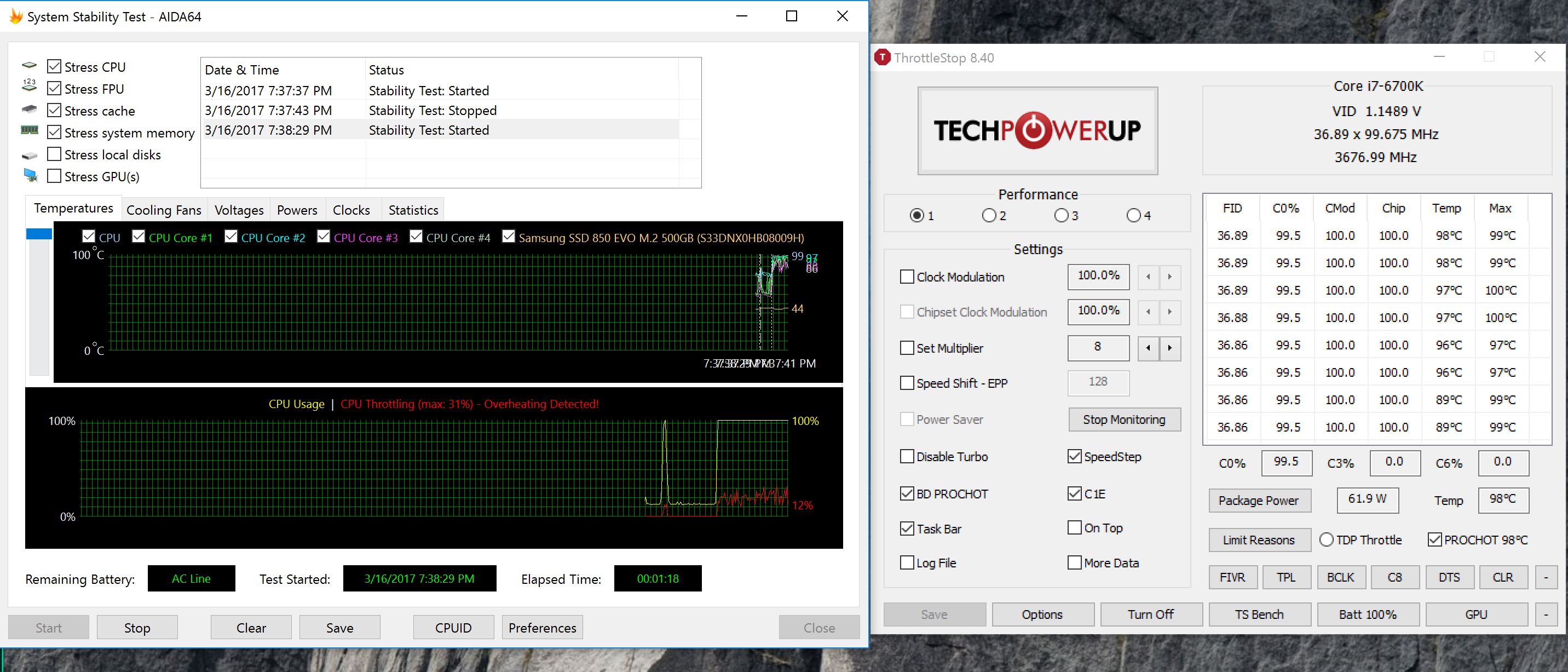
I would like to know if my temp are too high. I run aida64 stability test for 90 sec and I get this.Attached Files:
-
-
Don't use your machine with high load. The processor throttling and almost thermal shutdown. Re-paste with new thermal paste yourself or let other help you out. Eg where you purchased your machine.mhp32 and _deadbydawn_ like this.
-
also delid the cpu or have someone do it / help you with this. the 6700k is easy to keep at a really comfortable temp with a delid, good t.p. and a nice undervolt in this machine
Last edited: Mar 17, 2017 -
I brought it from gentechpc. they said that they put Coollaboratory Liquid Ultra on CPU, but with others saying that no paste has been found on their system..
look like my temps are high. just doing some training on Crysis 3 got the cpu really hot.
I do have the Prema bios so.
I need to take it apart and see what up. do a delid and repaste, but so little time right now.
Thanks -
Just remember not to push your machine as the situation is now. Good luck
 mhp32 likes this.
 -
The training session on Crysis 3 is more CPU heavy due to the higher frame rate.
Keep an eye on temps and be careful. -
Could someone please link me the newest control center working best with Prema Mod? Thank you.
shizz likes this. -
@Meaker@Sager or anyone else who has had issues installing NVidia drivers. After reinstalling windows and drivers I was having a issue with installing Nvidia 378.66 or 378.78. Any tips on getting these installed since you are running pretty much the same system?
Edit: seems like windows 10 automatically installed drivers 376.74 not sure if this is the issue or if the others just aren't compatible.
ThanksLast edited: Mar 18, 2017 -
sure will do, actually I will delid and repaste before using it again to be safe.Papusan likes this.
-
Check if the permissions are good for the "C:\NVIDIA" folder.Prema, Papusan and lctalley0109 like this.
-
Thanks Bloodhawk you were super helpful, got it running.
-
Hello,
I am currently having a problem with my laptop. I just finished reapplying the thermal paste for the laptop because the temps were going a bit high.
After assembling it back and starting it again, I decided to try a 3d mark benchmark while monitoring the temp of the system. My system crashed in the middle of the benchmark.
Now, it is not showing any display to the monitor. Though windows are running perfectly in the background and as there are sounds of it loading and even logging in. I can't even project it to a 2nd display. Thw display is turned on and I can even turn off the monitor using Fn + F2.
Any suggestions of what i can do and probable causes? I am suspecting the connection between the motherboard to the monitor, though I am not sure on how to check it.
HELP! -
Yea it sounds like your moniter cable has become dislodged. I'm not intimately familiar with this model but it might do you good to check out a disassembly guide from one of the gents in the thread. Wish I could be more helpful.
Sent from my SM-G930W8 using Tapatalk -
Try an external monitor and see if you get an output.
-
I've tried to project it to my TV which is connected to the laptop. Nothing happen.
*** Official Clevo P870DM2/P870DM3 (Sager NP9873/NP9872) Owner's Lounge! - The Phoenix 2 is here! **
Discussion in 'Sager/Clevo Reviews & Owners' Lounges' started by Spartan@HIDevolution, Aug 3, 2016.



![[IMG]](images/storyImages/H4f9PM7.jpg)