Problems? See this thread at archive.org.
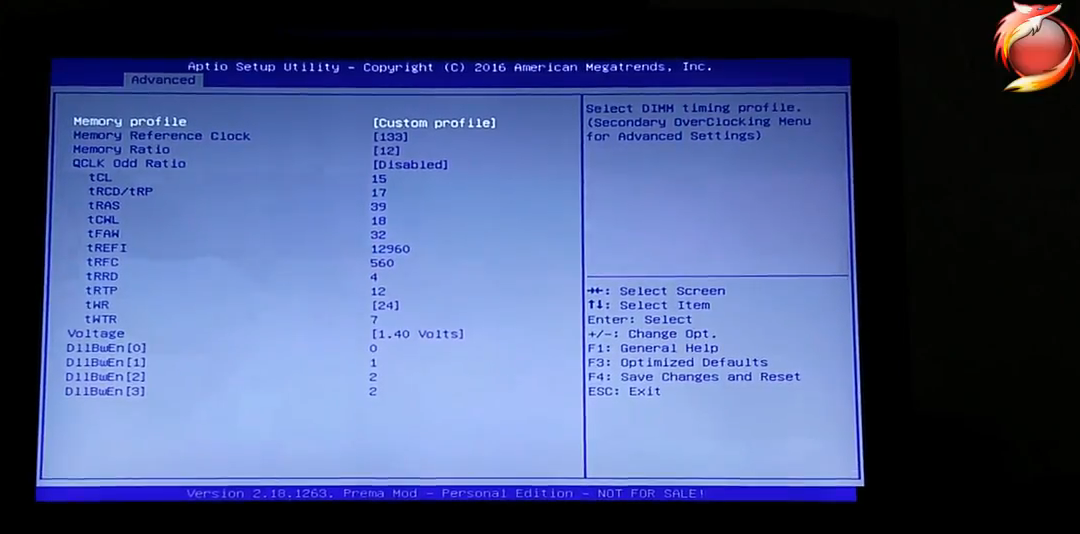
Just use the timing in this video from @Mr. Fox , it works great for me, start from 9:58
P870DM3 - 5.0GHz / DDR4-3200 CL15 BIOS Settings Walk-Thru
-
-
Does the tRFC need to be that high?
-
It's been a while since I checked this thread. Is the prema bios out yet for the P870KM1?
-
Please help.
Corsair Vengeance Series DDR4 SODIMM 3000MHz CL16 RAM timing needed please.
Its running at 2666Mhz default settings for now.
I got a total of 4 x 16GB=64GB on a P870KM1-G laptop if this changes anything...Georgel likes this. -
Regarding to @Mr. Fox , it's for stability reasons. And it's working perfect with my G.Skill-3000 @3200.
-
-
Edit: I'm not an expert like you guys, I was just trying to help you supporting other members, with what I already learned from you and other senior members.
Sent from my SM-N920C using TapatalkLast edited: Oct 19, 2017 -
I asked because I was genuinely curious. I have only played with the kingston sticks.
Dr. AMK likes this. -
For P870KM1-G user reference.
Witcher 3: Wild Hunt gameplay on P870KM1-G using the .925 Silver lid, but with "Full" fans on Clevo dash and full fans on the x3 U3+ Vardar FF5 fan mod cooler. Everything is maxed out. Nvidia HairWorks enabled too. Temperatures and speeds are displayed in-game and before and after the video. On desktop the CPU drops to 800mhz on idle. This is because of Intel's Speedstep technology. In-game stays at 4.5GHz constantly though.
Thank you @Mr. Fox for showing me how to display my CPU speeds in-game by using HWiNFO64 with MSI Afterburner.
This Video (Full Fans on Clevo dash, 100% 3000RPM x3 Vardar FF5 fan mod cooler)
2560x1440
Nvidia Drivers: 387.92 Notebook
#1 1080 GPU: 52c max
#2 1080 GPU: 51c max
CPU 7700K 4.5Ghz: 60c max
*This video is rated mature*
Sorry about my Steam username, (unless you are a committed BGA lover) as I don't want random adds. Please take a joke.hmscott, Papusan, Dr. AMK and 1 other person like this. -
Nice work, brother. Very cool (pun intended).Papusan, Dr. AMK and Stress Tech like this.
-
Yes, the higher tRFC keeps the errors to a minimum or none at all. The default G.SKILL tRFC has many browser crashes and some BSOD, and some benchmarks like Time Spy exit unexpectedly with default tRFC. Same was true on the 16L13.
For 3000 I use 12296 and 3200 I use 12960. You can use the higher tRFC for both. It has almost no measurable effect on memory benchmarks. Setting tWTR from zero (auto) to 7 also improves stability._deadbydawn_, ole!!!, hmscott and 4 others like this. -
Thank you for sharing. Do you know any good timings or posts mentioning the Corsair Vengeance Series DDR4 SODIMM 3000MHz CL16 RAM please.
I got a total of 4 x 16GB=64GB on a P870KM1-G if this changes anything.
Its running at 2666Mhz default settings for now with no errors. XMP1 and XMP2 does not work at all.Dr. AMK likes this. -
I had Corsair Vengeance 3000 and RMA'd it. I know @jaybee83 has had his fair share of issues with it as well.
You can try my settings that @Dr. AMK posted and see if they work. That was with 4*16GB G.SKILL 3200 (which is on its way to him right now in the DM3 he purchased). It works just as well with the 16GB G.SKILL 3000 sticks. If those settings do not work well, and you have the ability, I would RMA it and go with G.SKILL. -
The Kingston 8GB 3000Mhz has been the easiest to work with I think. These Samsung B-die guaranteed sticks could be interesting, though likely very expensive.
Stress Tech, Dr. AMK and Mr. Fox like this. -
This is what I had that got RMA'd because it never worked right...
![[IMG]](images/storyImages/R0cxaiG.jpg)
Hopefully the G.SKILL Ripjaws V desktop RAM will be more receptive to clocking stable past their speed rating than the G.SKILL 3000 and 3200 SO-DIMM modules have been. And, hopefully... unlike the notebook RAM... the stock XMP profiles will be stable.Stress Tech, hmscott, Dr. AMK and 1 other person like this. -
B-die are some of the best chips out there at the moment.
hmscott, Stress Tech, Dr. AMK and 2 others like this. -
This is exactly same ram I running well in my Tornado F5 from June at xmp1 profile (3000 cl16) very cheap when I bought it (2x8GB kit about 135€)
yeah seems to be samsung b-die chip on it,
K4A8G085WB-BC??
https://www.reddit.com/r/Amd/comments/62vp2g/clearing_up_any_samsung_bdie_confusion_eg_on/
is this a good overclocker? is it safe to operate 24h at 1,35v on z170+6700k?(if overclocked now is on 1,2v)
Attached Files:
Stress Tech, hmscott and Mr. Fox like this. -
-
I was able to run the G.SKILL B-die at 1.35V and 1.40V on the P870DM3 with no problems, but I could not get higher voltage to stick on the 16L13 unless I wrote it to the XMP profiles with Thaiphoon Burner. If I tried to use Custom Profile it would always go back to 1.20V after BIOS save and exit.Stress Tech and aaronne like this.
-
I spent all night trying to level out my GPU die to my copper block and finally succeeded by making some fine adjustments to my thermal pad configuration

Everything's touching, and I only had to use a thin X of Kryonaut on the GPU die to get it to spread across the entire die, awesome!
Stress test max temps went from 86/90 C to 74/77 C, that was a huuuuge difference over the pads arrangement Clevo shipped it with.
I'm just using cheap SPHINX 3.2 W/mK 3.0 and 2.0 mm and ARCTIC 6.0 W/mK 0.5 and 1.5 mm from Amazon
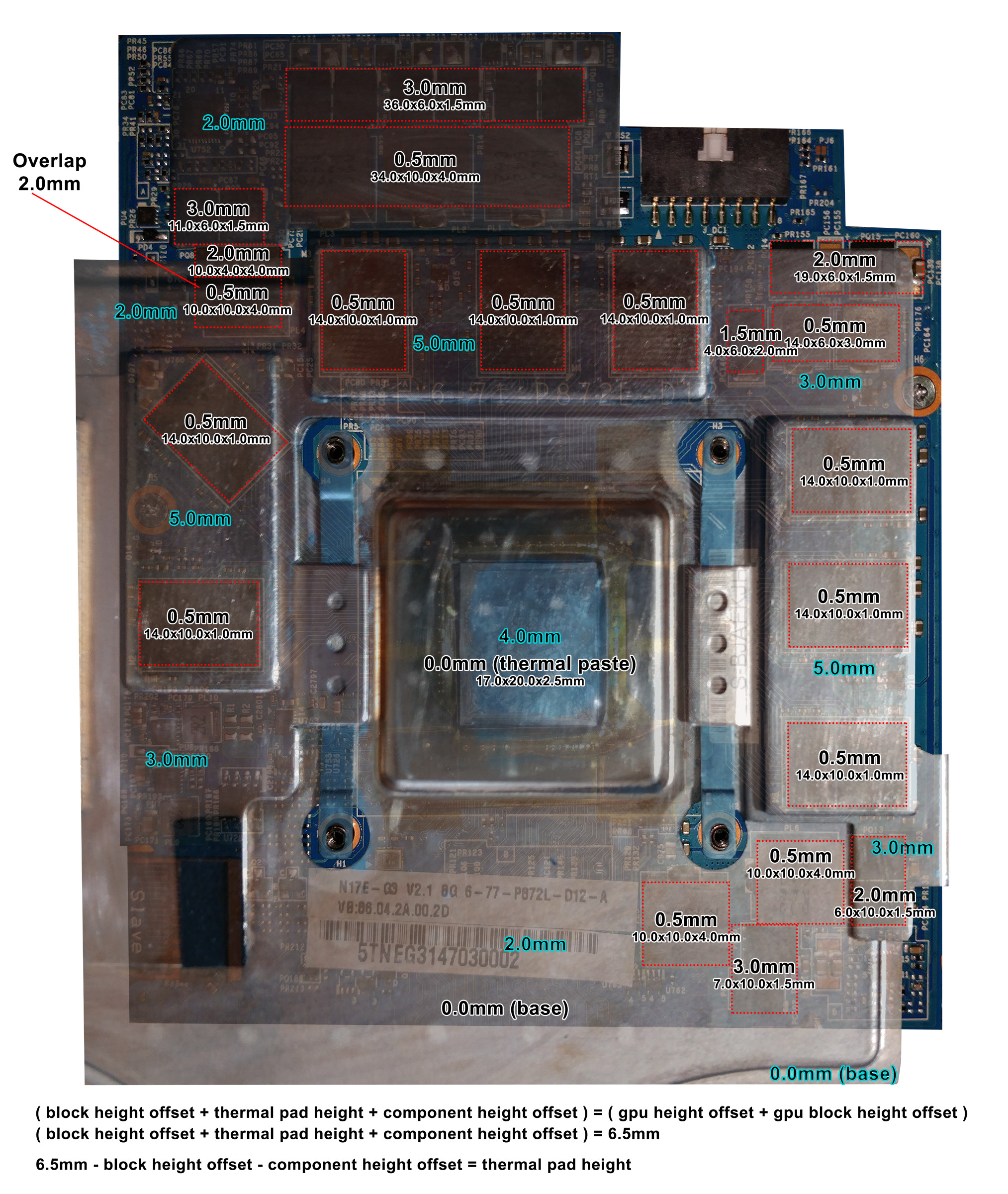
If anyone wants a nice super detailed thermal pad map, I made this beast in photoshop (see attached)
I took a photo of the GPU & copper block and mirrored the block with a transparent overlay to match up exact positions.
All measurements taken using a photo paper printed 0.5mm accurate 10cm ruler.
PSD files for printing a pad cutting template and the pad map (adjusting transparency, etc..) at:
https://adduono.com/p870km1/
On current topic, I got the G.Skill 32GB 16GBx2 3000 MHz SO-DIMM kit but I'm RMAing it right now, 1 stick is flawless and made it 20 hours in memtest86, the other only makes it 20 seconds lol ><Attached Files:
Papusan, Dr. AMK, cj_miranda23 and 2 others like this. -
-
Thank you for the template. This will make it so much easier for cutting thermal pads.
And a good thermal pad setup and copper contact cleaning changes temperatures big time.
For everyone one on this thread: make sure you dont pick up the dual gpu VC heatsink with one hand. It might slightly bend it. Pick it up with two hands and treat it like a baby.
I'm sure on one of my P870km1 dual GPU VC heat sinks are slightly warped due to me picking it up with one hand and cleaning it while it's not completely weight distributed evenly. I may be wrong though and just paranoid. -
Nice work, really your efforts are appreciated,
We need a confirmation @Mr. Fox @Meaker@Sager so no one get confused. This exercise already done before I'm not sure.Papusan, Stress Tech and Mr. Fox like this. -
The best way to do it is for each person to use a guide like this one, mine, @Meaker@Sager or @Prema as a starting point and check fit. On an SLI system you need to check fit of each GPU, as getting one to fit right may not align perfectly with the other GPU. This is a downside to having a unified heat sink. Discrete heat sinks are almost always superior.
Having a guide like these is a great starting point and for most it will probably be excellent. There can be minor variances from one laptop the the next. A minor change (1mm-2mm) in the positioning/alignment of the two GPU PCB retention screws compared to the MXM slot or a minor variance in the GPU cold plate shape can cause the "YMMV" scenario to rear its ugly head. The most critical thing is that the cold plate make firm and even contact with the die (or both dies with SLI). Since no laptop manufacturer has a standard of manufacturing things to aerospace tolerances, one cannot assume buying a given thickness of pads and slapping things together is going to produce the same result for every system.Last edited: Oct 24, 2017Papusan, Stress Tech and Dr. AMK like this. -
We will be doing a close inspection of the unit and if all looks good I will be moving ahead with a mod project to upgrade the DM3.
Any further mods would come later down the line as I get time.Papusan, Dr. AMK and Stress Tech like this. -
dm3 -> z370?
-
Yes.
-
Sell official upgrade kit if you succeed in doing so?Dr. AMK, Papusan and Stress Tech like this.
-
-
-
Yup. I think his and mine are the same pad size, just a different picture for reference. Stock pads are too thick and lift the heat sink off the die. If you use the overpriced high W/mK rated pads that are hard and do not easily squish under pressure it is even more detrimental.
-
Core contact is far more important than the thermal pads being more efficient, getting that perfect die contact with the thermal pads making contact is the end goal.
-
I know that the 17/W/mk thermal pads are hard and do not squish down as good, but they still leave an impression mark on the pad after some time of use. But then again, every heat sink is different.
The only downfall with the 17W/mk pads that I can see; is that every time I remove my dual VC GPU heat sink, one to three pads tear/crumble and need replacing. This is so annoying. When I have run out of 17W/mk pads I will buy the more squishy 11W/mk version as they will last longer and will have a better wrap around the chips.
Have you ever had any other problems with 17W/mk thermal pads? You used the word "detrimental"... I got these pads in one of my P870KM1-G, is there anything I need to be aware of please? -
This is 100% correct. But as I have stated on my older post. I think that the 0.5mm 17W/mk thermal pads are much thinner than the common 0.5mm thermal pads. So this will be better for a good contact to the GPU die.
Edit: when measuring them with my digital caliper; the 17W/mk 0.5mm are really 0.39mm without squashing them hard. When I squash them hard with the caliper, the measurement is 0.25mm. -
Thats why i used the 1mm pads and they went down to 0.7mm-0.725mm, this squishes down to about 0.55mm. Fit perfectly along with the core making perfect contact.hmscott, Dr. AMK, Stress Tech and 1 other person like this.
-
Also when talking about 0.05mm differences then each heatsink will want a slightly different figure.
Dr. AMK and Stress Tech like this. -
The self-destruction thing is one reason I stopped buying expensive over-rated thermal pads. When you pay out the kazoo for them, take time to cut and fit them, only to see them break and rip apart the next time you remove the heat sink it is pretty frustrating. Waste of money.
I use the super-cheap 0.5mm sticky blue silicon pads from China that I bought on eBay. I also have them in other thicknesses, but haven't needed to use them. I place the cheap 0.5mm pads on top of the RAM and the inductors (large gray square blocks) in small rectangles just large enough to cover each piece of RAM or inductor. Using them in long strips is wasteful, as the pad bridging the air space between the RAM chips serves no useful purpose. By placing pads on the GPU, instead of the heat sink, perfect alignment with components is a given.
But, long story short, these cheap soft silicon thermal pads work great... stretchy and spongy, easily compressed if they are a little bit thicker than they should be, and best of all, do not tear apart or crumble the next time you remove the heat sink.
As @Meaker@Sager said, good die contact is the most important thing. As long as there is some kind of thermal pad (doesn't need to be an expensive one with a high W/mK rating) on the other components for them to transfer heat to the heat sink that will be sufficient.Last edited: Oct 24, 2017cj_miranda23, Dr. AMK, bloodhawk and 2 others like this. -
I am glad to know the Corsair Vengeance 3000 RAM works well in the 16L13. Great news. I had excellent results with Vengeance DDR3-2133 memory in the M18xR2 and I was optimistic about getting it. For some strange reason it seems to have stability issues in a Z170 Clevo. I was disappointed about that because it was a bit more reasonably priced compared to other brands. I really wanted it to work well.Stress Tech and Dr. AMK like this.
-
I like the thermal grizzly pads, not overly expensive and consistent quality.
Stress Tech and Dr. AMK like this. -
dumb question brother fox, but do you still use 1.4v even for 3000mhz, or the default value of 1.2v? cheers
-
No, that is not a dumb question. I never have used 1.400V for 3.0GHz. I used 1.265V for that. Didn't even use 1.400V for 5.2GHz. For that I used 1.325V. Maybe you saw a screen shot or something showing idle/no load voltage. The load voltage is what is important.Dr. AMK, Stress Tech and _deadbydawn_ like this.
-
ah no sorry man, i meant forbyour memory settings (at least it showed 1.4v in your video i got 16gb (2x8) 3000mhz ripjaws yesterday and am having system freezes and was looking for recommended settings / timings as i'm pretty clueless when it comes to memry settings, so i was looking through your video
Gesendet von meinem SM-G955F mit TapatalkStress Tech and Mr. Fox like this. -
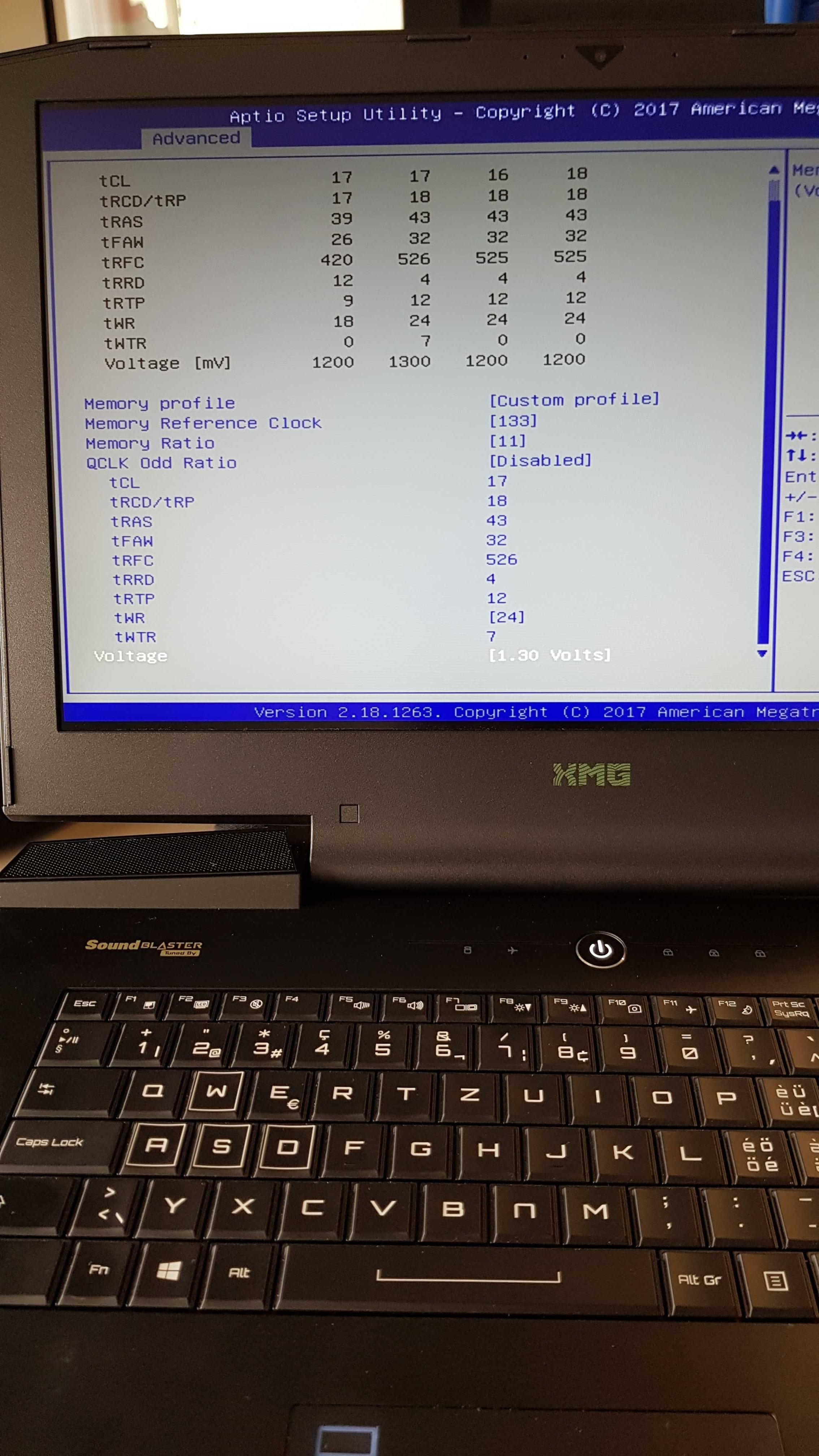
OH, LOL... Sorry. I should have paid closer attention. But, yeah, anything 1.300V or higher worked well. It didn't need to have 1.400V except for running 3333. I had modded my SPD for 1.300V for 3000 and 1.350V for 3200.
![[IMG]](images/storyImages/Mr._Fox_P870_DM3_RAM_Settings.jpg) Last edited: Oct 25, 2017Papusan, Stress Tech and _deadbydawn_ like this.
Last edited: Oct 25, 2017Papusan, Stress Tech and _deadbydawn_ like this. -
ah i see. funny that the default is 1.2v but not running really like that. but i guess that's notebook-type-specific ^^ okay i will try your settings for 3000mhz using 1.3v and all of the timings to see if i can get it stable this evening
Dr. AMK, Papusan, Stress Tech and 1 other person like this.
-
DDR4 default is 1.200V for desktop as well, but I think it's too low for 3000 or higher.Dr. AMK, Papusan, _deadbydawn_ and 1 other person like this.
-
thanks for the clarification, i will report the outcome later on tonight
Dr. AMK likes this.
-
-.- i dont even have the tREFI setting available damn

![[IMG]](images/storyImages/5f959ba20e4e8feef85a70b5eb7bf9f1.jpg)
Gesendet von meinem SM-G955F mit Tapatalk -
Desktop ram voltage usually creeps up a bit from launch.
_deadbydawn_ likes this. -
Yeah all of the 3000Mhz + kits i have seen and used run at at least 1.35V._deadbydawn_, Papusan and Mr. Fox like this.
-
Yeah... major bummer... stock BIOS is missing a ton of stuff, and that's one of them._deadbydawn_, Dr. AMK, Stress Tech and 1 other person like this.
-
totally!
sooo turns out that the problem with freezes i had was throttlestop. it seems like i was testing an undervolt on the cpu core / cache of -180mV for 4.4ghz and that's what raised hell. oh and i must have done this while drunk, that's why i didn't remember xD so kids, don't drink and undervolt! haha
now i have the ripjaws running at 2800mhz with the above settings. i don't really know with which settings to play in order to get them run faster (or better, i don't know which settings to loosen while raising the multi to 12 in order for not crashing and having to remove the cmos-battery in the end..). so at the moment i'm just reading up on stuff
never gets boring ;-)
Gesendet von meinem SM-G955F mit TapatalkAttached Files:
Last edited: Oct 26, 2017Stress Tech and Dr. AMK like this. -
*** Official Clevo P870KM1/P870KM1-G/Sager NP9876 Owner's Lounge! - Phoenix 3.0 ***
Discussion in 'Sager/Clevo Reviews & Owners' Lounges' started by Spartan@HIDevolution, Jan 5, 2017.