Problems? See this thread at archive.org.
Don't mention me if there's nothing for me to answer, help, or reply! Stop abusing the mention feature people!!You know you can simply type my name without the @ sign right??
To the ignore list you go!
-
-
woah jump in temper. i think he is trying to let people know u're great at tweaking his lappy
Stress Tech likes this. -
Cool, thanks. Do you mind sharing the model of the headset that you are using ?
Sent from my ASUS_Z016D using Tapatalk -
Etekcity professional gaming headset. So fun to stream with.
https://www.amazon.com/Etekcity-H5GX-Professional-Lightweight-Headphones/dp/B01KLQZZRA -
My Sony XB950BT is a really comfy headset
Stress Tech, Rynaus and KabyZen like this. -
I don't like the wireless quality of any headphones. They can't match the wired quality. I know these can be connected wired as well, but I assume the mic only works via Bluetooth ?Stress Tech likes this.
-
True, and also because they are wireless, they have to install low energy saving speakers in them. I have tried alot of wireless headsets and I have given up on them. I'd love to try the Sony XB950BT what @Meaker@Sager mentioned though because he does knows his tech and I'm curious on how they preform.
I'm looking into getting a pair of ASUS Rog centurion 7.1, as I have tried these out and they sound awesome... the only downfall is the microphone.
Gursimran82956 likes this. -
I do have 1 wireless headphone which will blow your mind. But again it has no mic. It is more meant for entertainment - Movies mostly. There is also a game mode. I wouldn't use it for Music even though you can turn off all the sound effects.
https://www.sony.co.uk/electronics/headband-headphones/mdr-hw700ds
As for bluetooth headsets, they all have limits when used wirelessly. I have tried the XB950N1 and B1 headphones at the store. They are good to use while traveling and have tight bass. But I wouldn't replace my wired headphones. I use my IEMs while travelling, currently using Sony XBA-N3AP.
Sent from my ASUS_Z016D using TapatalkStress Tech likes this. -
Nice.
I like the reviews of the HW700DS, I will have to check these out. They might have a good use for my sitting room. But for gaming I think its a different story.
There is one thing that makes the ASUS Rog centurion 7.1 headset different from the rest of the gaming headsets, and this is; that they're not virtual surround. They sound like true surround. Also the software that comes with it allows you to tweak the sound band to hear only footsteps or disable ambient background sound.
You can actually tell if someone is behind you, unlike virtual surround headsets.
I'm still researching for the best surround sound gaming headset though and the Asus Rog centurion 7.1 are on top of my list for now...
If anyone is looking for the best headphones for movies, music, or reading then the Focal Utopia headphones are the daddies IMHO... But that is if you don't have a budget of course as they cost £3000+ -
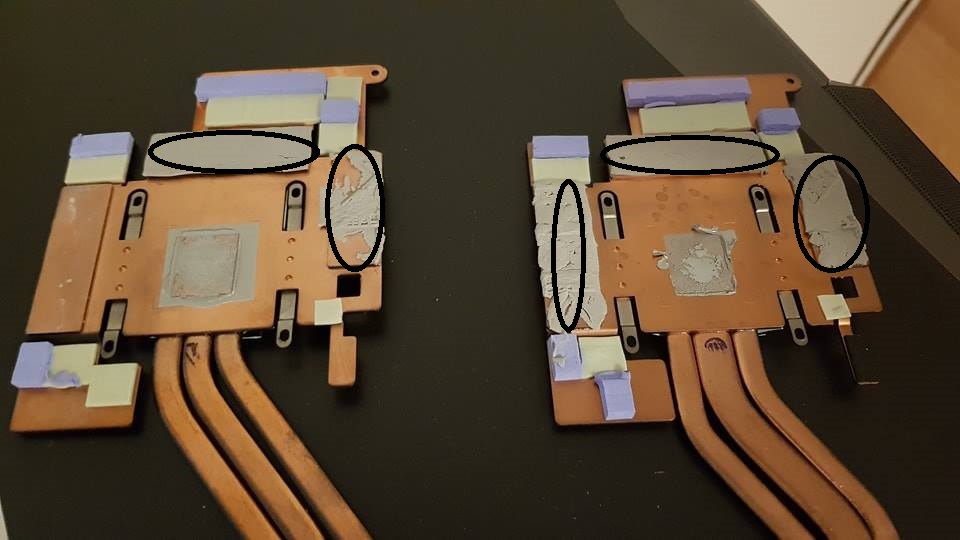
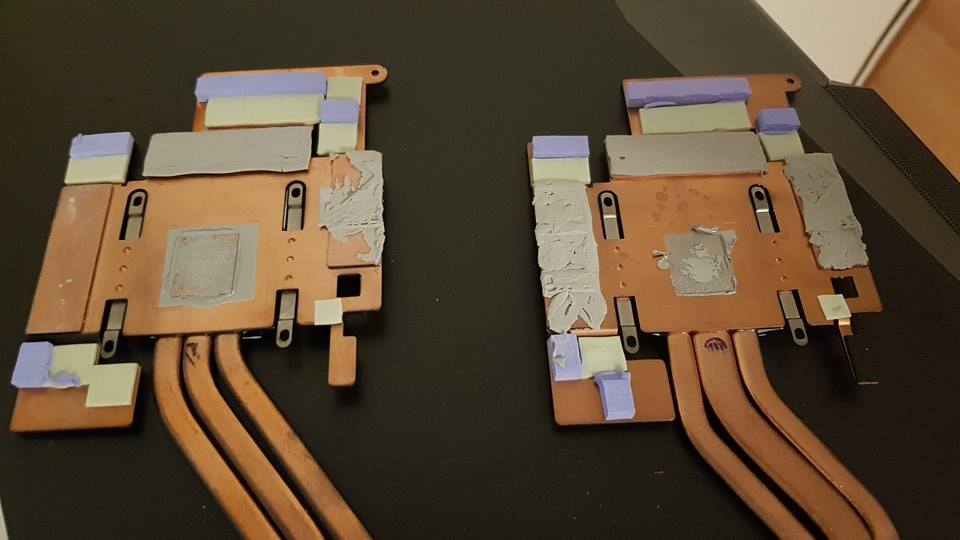
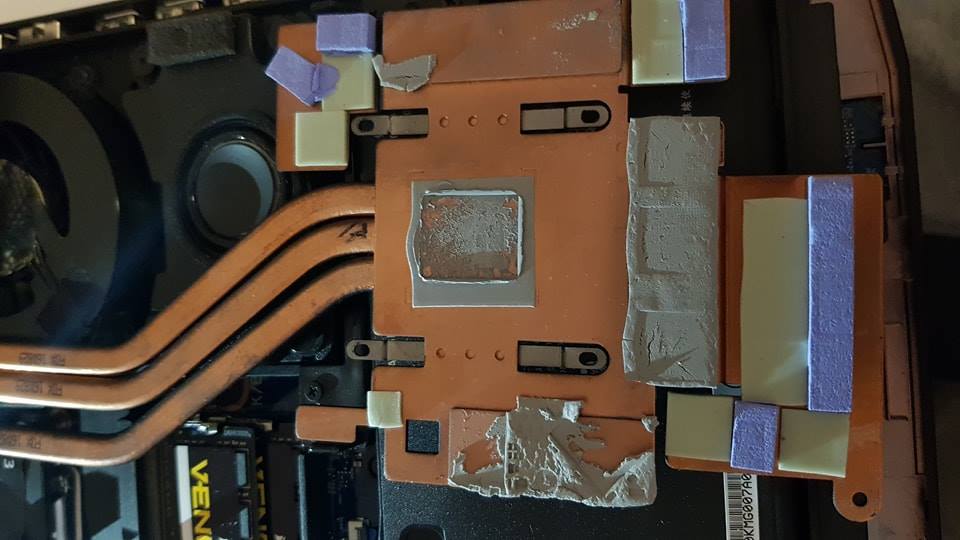
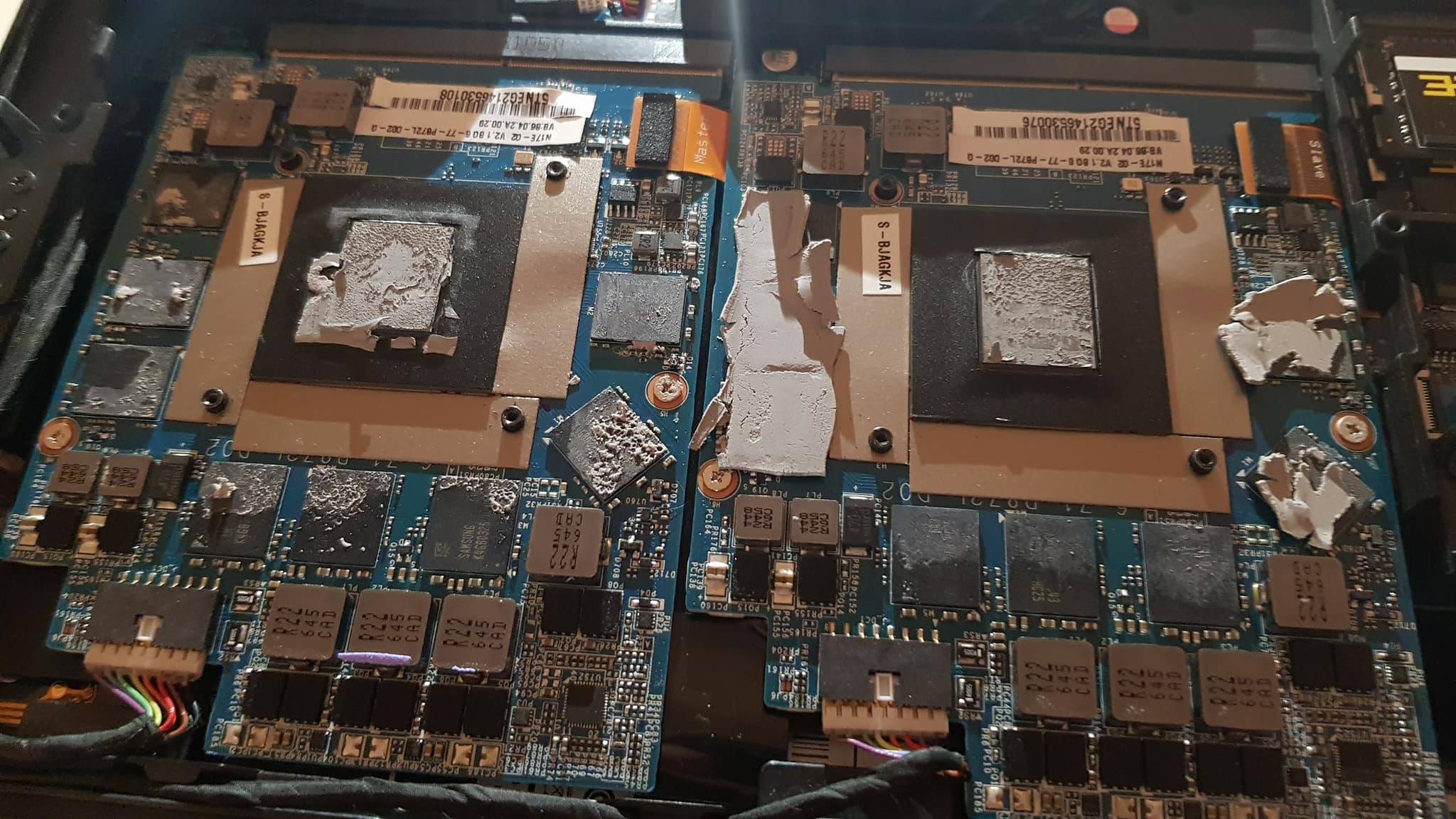
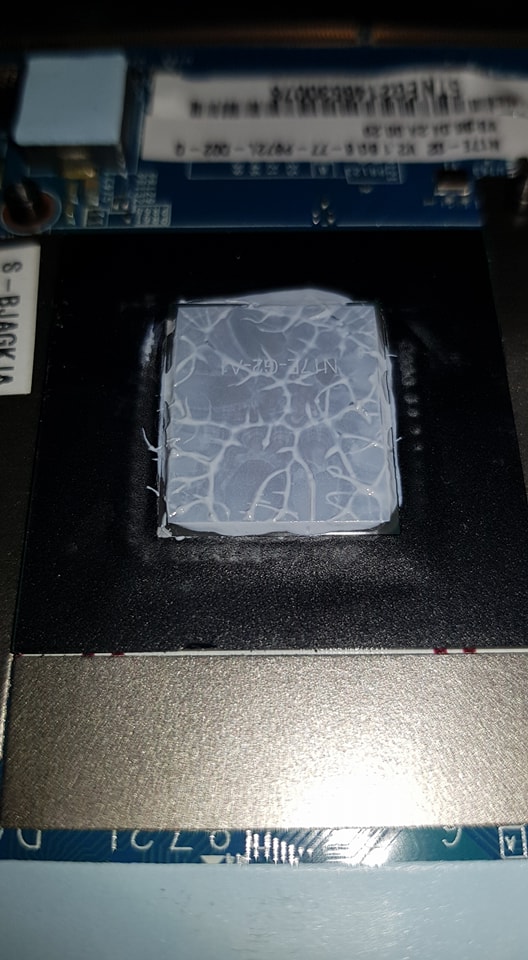
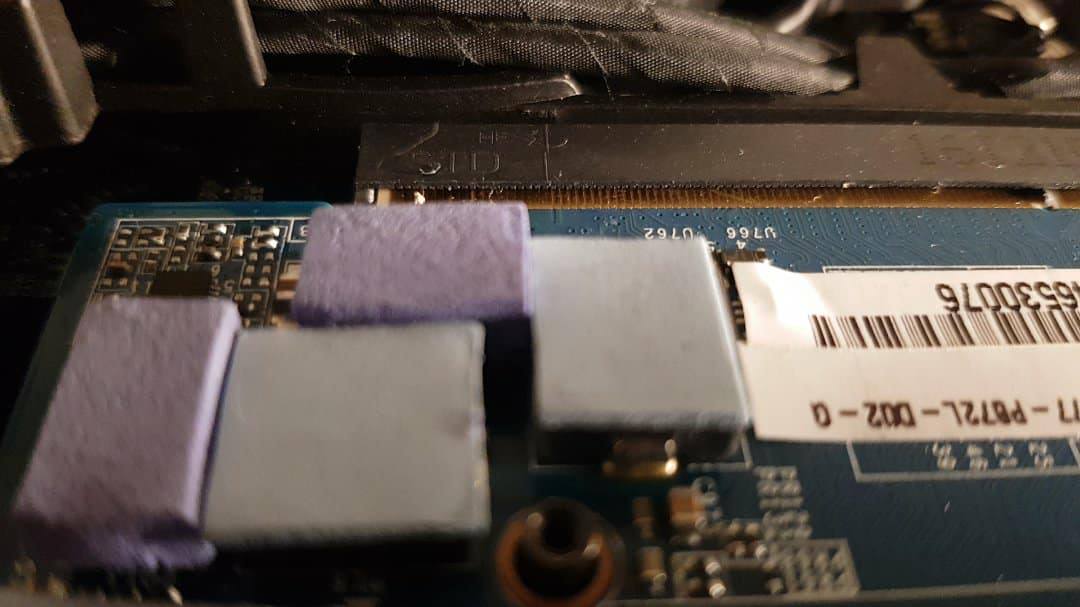
Hi , i purchased new Laptop with is P870KM1(7700k 1070 SLI) i do have temps issues on GPU's and CPU . I found the reason once i open it...... . This is new machine from UK seller( i won' mention company) and this is how they check it before send it to me..... I need to know what size(thickness) pads going to gpu (grey colour ) and green (1 square is missing). Going to delid cpu tomorrow and repaste GPU's with grizzly kryonaut tomorrow aswell. Main question is the pads (what brand and thickness should i use) . I live in Poland atm and there isn't many different brands available in here so if i can have couple of different to know i'll appreciate .
I have ''tuning successful'' my P775DM3 so I'm pretty sure i can also get it done on P870KM1 by myself . I don't want to send it back to the company where i get it from . Why? see pictures please
Attached Files:
-
-
That´s stock thermal paste.
A system sold like that, which is what 90% of stores sell, is going to throttle like crazy.
Have fun doing a proper setup, i know you already have enough experience doing it....
Xavier2612 likes this. -
ok but if i want to apply thermal pads on there where i have thermal paste how thickness they should be?Last edited: Nov 21, 2017
-
You want to change thermal paste to thermal pads? That´s a bad ideia, no thermal pads have the same efficiency as thermal paste.
-
No no . If you look at my heatsink's (1070's) you can see on both side's (grey colour) looks like thermal paste not pads.... . There is mess and i want to replace that with pads . I won't apply any pads on gpu's lol . I need to know how thickness pads should be (black circle see image) . 0.5 mm or 1mm?
Attached Files:
-
-
Another possibility is to get the vapor upgrade with the 1070 and then just TDP mod the 1070 to 195W and off you go.
If the 1080 uses the exact same form factor (meaning: the heatsink still works), then you can look for a fire sale someday on someone dumping their 1080 and just swap it in.
Yes I know, I know. You can just mod the 1080 and then nothing can touch it, right? There are very few reports of anyone modding 1080's for 250W+ TDP, compared to the cheaper 1070's running at 150-195W. -
Looks like ripped up thermal pad to me.
I would say you should not have bought your laptop from an alleged Specialist if this is the care they take. Gives all Clevo a bad name. -
Yep, torn up soft pads.
-
Well I'm going to replace them and repaste the gpu's but I need to find out how thickness thermal pads should I use. Any chance to have answer here
?
-
Same as the vapor chamber guides that multiple users have created.
Is mine.bennyg and Xavier2612 like this. -
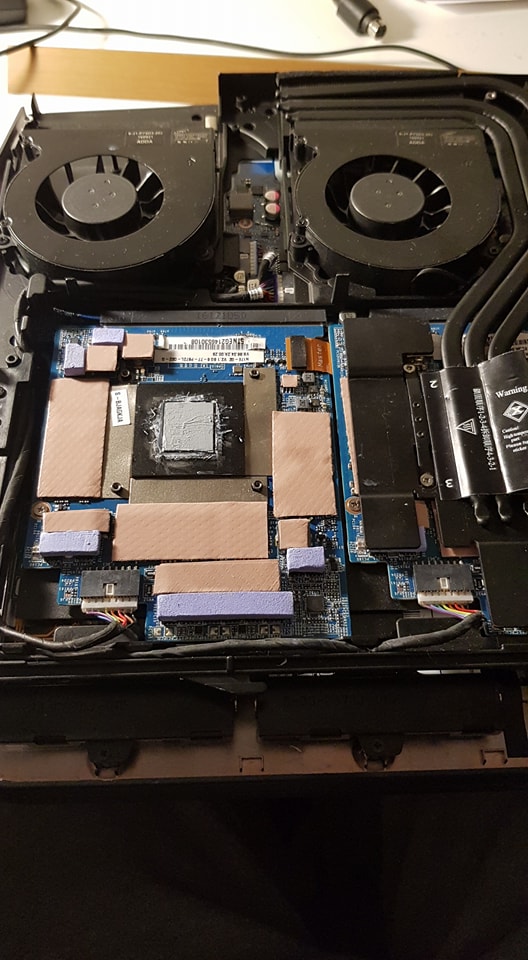
i have used same size pads on mine 870mk1 1070 sli and now i even have higher temps lol on gpu . I removed second gpu and testing first one now with pads applied same as on this picture.... . What's wrong im doing :S
-
What does your contact pattern left by the paste when taking the heatsink off look like? (pics?)
-
those are stock thermals and light blue are 1mm they should be on the same lvl?
Attached Files:
Last edited by a moderator: Nov 23, 2017 -
-
The thermal pad thickness will depend on the heat sink you are using AFAIK.
You might want to take the GPU out, and then screw it onto the heatsink carefully to maybe eye ball the thickness' while both are out of the system. You can even try slipping the pads into the gaps, to judge the thickness based on the pad thickness' (while the pads still have their protective plastic layers still on them).Stress Tech and Papusan like this. -
What thermal paste application method are you using?
-
spread method and i use Grizzly Kryonaut and Gelid thermal pads
After 10 hours of testing it i cannot find the issue :/ on idle temps are fine on gpu's 35-40 C but when i start running 3dmark 11 benchmark it will hold temps ok for 2 minutes then temps going fast to 85 c on gpu1 and 90 on gpu 2.....Last edited: Nov 24, 2017 -
What clocks at that point?
-
You would need to ask Prema/HID.
-
@Meaker@Sager - does the KM1 support MMC card for its realtek card reader?
I downloaded the driver from clevo own website (the newest, through asia server) - it can read SDHC and microSD but not a 256MB MMC card formatted FAT32.
Would like to backup the contents of the card.Last edited: Nov 27, 2017 -
Don't know off the top of my head, what's the hardware ID and that will tell you.
-
Finally I fixed my issues with gpu temps. What avg temps I should expect from 1070 while benchmarks or gaming? Thanks
-
ok weird problem I fixed it
updated the driver using card reader driver from the sager don't work, even though in device manager show up as realtek pcie card reader - all of my sd card and mmc card isn't read
however using driver from direct clevo website asia download (us version failed crc) the sd card reader work with all type of cards but in device manager show up as yellow triangle
this is weird, but the problem is fixed now thankfully -
While gaming or benchmark GPU 1 76C GPU 2 79C and CPU 75 is it ok for P870MK1? This is my first SLI model and i wonder to know what else will help to drop temps . I use OC Profile because on auto fan profile my GPU's going to 90c same with CPU.... . GPU' temps should not get same Temps?
I just can't decide with one to keep and with one sell it P775DM3 (7700k/1080) or P870MK1 (7700k/1070SLI) i like both but going to keep one -
Anything below 80C is decent, what kind of clocks are you getting?
-
Those temps are all stock with undervolting CPU -140mv . Today i did full repaste/repad (grizzly thermal pads and paste Kryonaut). Same as you picture from previous post . Now is way better . Cards now seat's on 75/77c OC profile . One more question does second GPU always run hotter ?
Attached Files:
Last edited: Nov 29, 2017 -
-
second / slave gpu is hotter (actually I'm not sure if the hotter one is master or not) because the utilization don't 100% use both cards - one card is biased to more utilization and create temp difference
also the gpu heatsink bridge will probably help in spreading heat for the gpu that is closer to the cpu heatsink
edit: if you don't have the vapor heatsink then ignore the 2nd pointStress Tech likes this. -
Yes due to the design in that model it will be a bit hotter.
-
I have similar configuration.In BF1 my gpu temps is 55-57 C and cpu temp 70-75c 4.5Ghz.In Shadow of war gpu temps 58-60c and cpu temp is 50C.I play always on max fans.Stress Tech likes this.
-
Can the P870KM1 run Linux (Ubuntu 16.04)? Can nVidia CUDA perform well with two 1080s? (Anyone played around with TensorFlow or Theano?)
Sent from my Pixel 2 XL using Tapatalk -
You have the same boot options like secure boot as the previous models.
-
Does anyone know if I can cut this P870KM dual GPU vapour chamber where it is marked red on the photo?
Will this damage the vapour chamber or is this bit solid copper?
I'm curious if the P870TM new CPU heatsink will then fit in the P870KM1 without having to purchase the full P870TM heatsink kit (CPU heatsink and GPU VC dual heatsink).
-
The vapor chamber part you can see ends at the same point as the new heatsink.
-
So do you think cutting it where the red circle is; will not destroy the whole VC feature?
-
So long as you do not pierce the main vapor chamber, no.
Obviously those two heatpipes would be destroyed.Stress Tech likes this. -
Okay, thanks for your insight.
At least the vapour chamber is not in that red circle, then it is okay to cut.
Can them 2 heat pipes be welded shut after when they get cut. Maybe they will run more efficiently than leaving them open... that's if they are hollow heat pipes. -
It would be too late for that; the liquid inside them will have escaped by then. It's the evaporation that makes them effective, after all.
Better heat them with a torch just before the point where you plan the cut and the pinch them as flat as possible by using pliers. The pinched area should be fairly generous in size. Make sure to keep the whole heatsink at an angle that will keep most of the 'free' liquid at the side you plan to keep. Proceed to cut off the offending end, reheat the flattened part and fold half of that back over itself, creating a nice seal. Maybe some additional solder to cover the cross section, for good measure. -
Deus Ex: Mankind divided overclock benchmark and gameplay with speeds and temps.
P870KMx-G Prema Mod BIOS
7700K @ 5GHz
2x 1080 GTX SLI @ 2100Mhz core and 1375MHz on GPU memory.
64GB 2666MHz RAM
Ambient temp at 28c
1440P
-
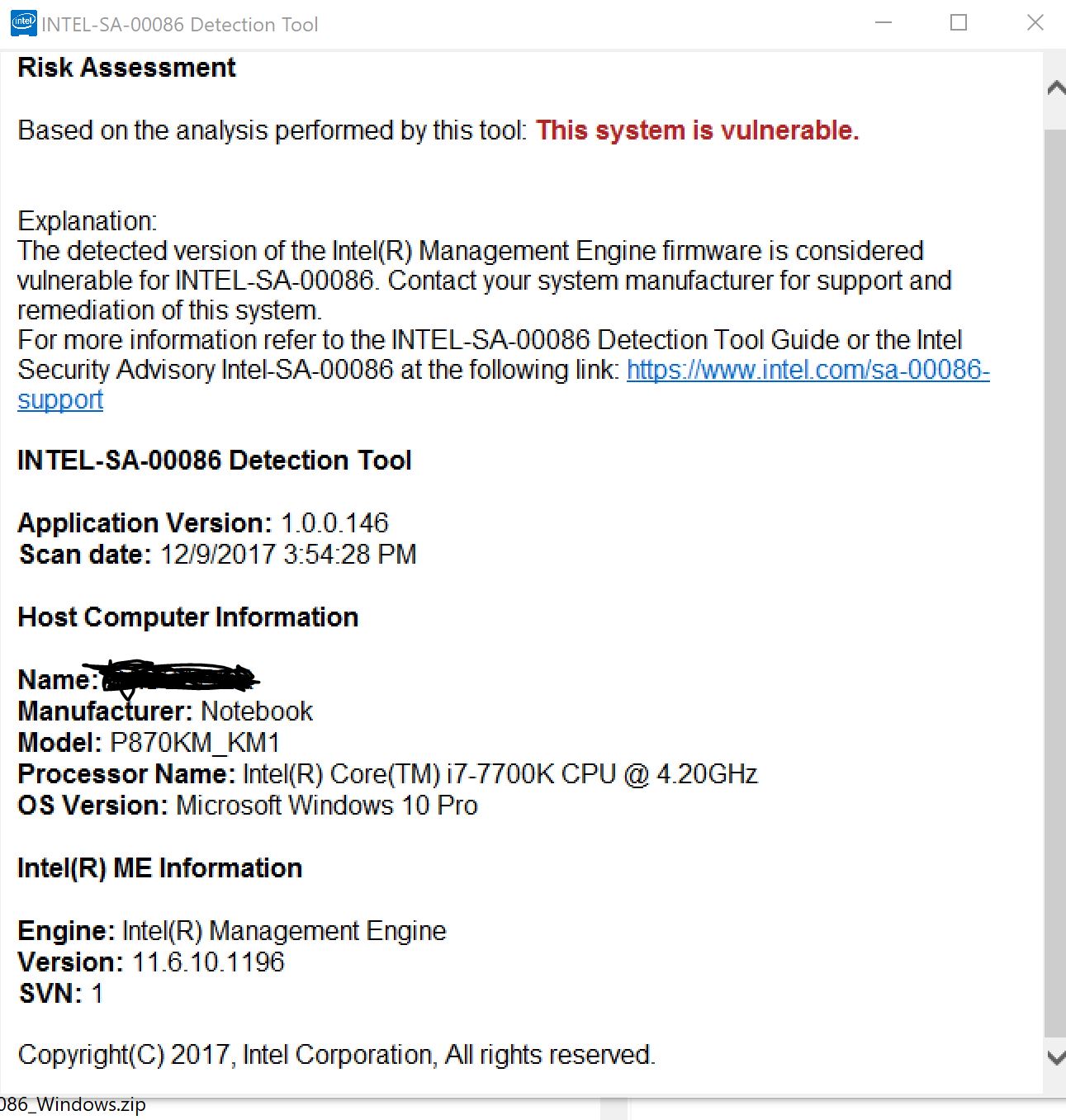
Anyone knows about a fix for our system for the Intel ME Security Bugs?
Attached Files:
-
-
@Stress Tech. I' be updating my driver with this https://premamod.wordpress.com/2017/08/15/j95-nvidia-inf/. You can also get the latest nvidia inspector from that link. Then I''ll being posting my result together with DX11 tommorrow.
Btw my result are 2 fps below from my previous ones maybe due to the fact the I just updated my windows 10 to the latest build 1709.
1080p Max DX12 PageFile SSD
3K Max DX12 PageFile SSD
Stress Tech likes this.
*** Official Clevo P870KM1/P870KM1-G/Sager NP9876 Owner's Lounge! - Phoenix 3.0 ***
Discussion in 'Sager/Clevo Reviews & Owners' Lounges' started by Spartan@HIDevolution, Jan 5, 2017.