Problems? See this thread at archive.org.
going by your other post, you mentioned:
pin1 5.2v
pin2 2v (ec control)
pin3 5.2v
pin4 ground.
how come bus switch is also 5.2? if that header is EC controlled then just need a fan with 3 pins, going to 1 2 and 4 should work im assuming, skpping the 3rd since i donno what its for
-
I do not know. Only what is measured. And that's what was measured.Donald@Paladin44 likes this.
-
Bus switch could be currently in a high logic state so 5.2v.
-
makes u wonder how much an added fan will benefit to cooling but would destroy the noise. small fan at 5v gonna be highly pitched sound at all time especially with just ground and 5v wire. if temp is not over 3-4c underload its probably not worth it.
-
Take a screenshot like this one. I want to see what the voltage looks like.
![[IMG]](images/storyImages/vUoqjHs.png)
![[IMG]](images/storyImages/b5vjEEv.png) ole!!!, Papusan and Donald@Paladin44 like this.
ole!!!, Papusan and Donald@Paladin44 like this. -
One example DELTA GDM610000463 KDB03105HC 5V 0.45A (Noise:20dBA - Air Volume:30CFM if shall trust it).
![[IMG]](images/storyImages/HTB1wlcpGXXXXXcIXXXXq6xXFXXXv.jpg) ole!!! and Donald@Paladin44 like this.
ole!!! and Donald@Paladin44 like this. -
It will depend on the fan but it could be pretty annoying.
-
3 cm x 3 cm LOL thats tiny yo. didnt you found another one thats 5 x 5 x .5cm? i'll measure it today once im off work and post some bench too.
edit: found it here https://www.aliexpress.com/item/FOX...-717a-402c-b586-cd0d0240b9bd&rmStoreLevelAB=5 5mm fan 5cm x 5cm. imma grab like 5 and see how it goes. thx brother papusan
edit 2: damn the smaller fan 3 x 3 is more powerful, choices, or get bothPapusan likes this. -
HeHe. Better buy and try more than one model when you first order
 I don’t know what shipping cost is for you.
And please come up with how much available space you have for fan
ole!!! likes this. -
still on stock bios havent had time to flash yet. the voltage thing i was talking about is in the screenshot too, took first one on idle, 2nd shot is during test and voltage goes down, but its different than my VID value so basically what my VID value is + maybe 70-120mv more ish.
also to add another quick thing, whenever i up cache ratio, limit reason window shows edp or something under cache/core. score doesn't really improve..
last thing, circled in green on idle, do you disable core park under windows? i had it always on max so get the best storage scores and performance, unless you already have cstate turned off
Last edited: Dec 27, 2017 -
@ole!!!
Going by that second screen shot... You may have action at having a decent chip. Wont know till it's unlocked and then the numbers may reverse. Since the system is just dialing you back instead of giving you full steam ahead and out right crashing out. -
ah I see what you mean. so with the amount of current it might not be able to fully use the voltage so its actually lower than what it shows. once current full out voltage goes with it too. the chip is from silicon lottery but I think at 1.15 VID set in TS is the limit before I crash with stock bios.
I left it at 1.19 because it starts to barely throttle which nets me the highest score in CB, also my firefox was crashing because it has some avx workload, had to up it.
btw, so what is the reason why idle voltage is so high? is there anyway to lower it to when its under load? -
Not sure. It seems to work differently than the DM3 machines.
-
Please change the IA AC DC Loadline setting to 1, or 0.01 or whatever the lowest non-zero value is, then see if you are stable or not.
This setting is under Intel I/A Domain (probably in one of the power or performance sections in the bios. IF you have access to it!)
No CPU can run 5 ghz at that vcore.
Most likely the VID is being boosted to 1.3v+ by the 2.10 mOhm intel reference setting (boosting up under load).
On most of the desktop boards, this setting is supposed to be ignored when using static voltages. On some of the boards, the VID will still rise sharply at load, but the temps will not change at all, if this setting is at auto, compared to setting it down to 1 (or 0.01).
Please check. -
the actual vcore during load is 1.272, at least its stable for xtu memory test without throttling. this is the benefit of CFL better silicon of 10nm++ vs 7700k 10nm+, upping another 100-200mhz remain on similar voltage. VID value of 1.19 set in TS is messed up, w/e load is, it will add additional 75-120mv to it. my screenshot as an example, i set it to 1.19 but actual vid during test is 1.27
-
-
opsy 14nm++ vs 14nm+
if volta AND 10nm+ come out next year imma buy again. -
Ok, I'm set on the P870TM1 from HIDevolution (thanks to those who helped me in the 'what to buy' section) but can't seem to find a definitive answer on hard drive configuration performance. If I were to put three 960 evo's in RAID 0 for my boot drive, would the system even utilize that much I/O? Is the total bandwidth across all slots capped at ~3.5gb/s no matter how many drives I put in RAID 0? If so I will look at larger drives and no RAID.
Thanks.
-
Pcper did do an interesting article on this:
https://www.pcper.com/reviews/Stora...-Pro-Z170-PCIe-NVMe-RAID-Tested-Why-So-Snappy -
@tilleroftheearth AKA the SSD Doctor is the best person to answer this.
-
Thanks for that. If I'm reading it right, this is what I should expect for 1-3 NVMe drives in RAID 0 (single drive obviously not in RAID):
1 Drive = full read/write performance for the drive, i.e. you get what you paid for
2 Drives = small increase in read speed, much improved write speed, *split load reduces chance of thermal throttling, less latency/faster drive response
3 Drives = scant increase in read speed, almost no increase in write speed, *split load further reduces chance of thermal throttling, slight additional reduction of latency/faster drive response
* Even though adding more drives can spread the load to reduce thermal throttling it may swing faster towards throttling in a laptop or poorly ventilated PC due to less overall airflow and because you added more drives (heat sources).
Anyway, that's my take on it, which makes me lean towards Two M.2 drives in RAID 0 to get the big bump in write speed since Three drives seems to offer diminishing returns.
I'd still love to hear from anyone in the know or who has experimented with various configs on this laptop model, as Phoenix mentioned.
-
I just throw out finds. Take it for what it is, bruh
https://www.ebay.com/itm/New-CPU-Cooling-Fan-Fit-HP-84
-
how you come up with those conclusion lol. by raiding them, any raid or similar kind either internet bonding, multiple channels of ram, or raid0 SSD, all will increase latency this is an unavoidable issue. by raiding you get more bandwidth so in this case sequential performance which is rarely used in consumer environment, ontop of that 1 drive already capable of hitting 80-85% of DMI 3.0 limit in terms of sequential.
the only real benefit you'd get and what pcper mentioned is that, at higher QD, generally at 4 to 8+, only then it'll be faster and much faster past that point. consumer workload are all generally 1-2 QD so raiding which lowers that 1-2 QD performance due to increased latency. if you plan on running multiple vmware which involves 2-3 OS running at the sametime including their background services/work then it make sense to be hitting 4 to 8+ QD, otherwise its pointless, a single SSD is already so fast that most of your work will finish at QD1-2 before it has a chance to hit 4-8+.Georgel likes this. -
@Papusan @Johnksss compiled a list of fans bruh, gonna buy them all and test it out. the space i measured took a look again today, vent is around 58mm wide, depth 52-54mm prior to heatsink being raised higher. within 52-54mm, thickness of 6-7mm should fit.
1. 54*54*6mm, seller said 5v 0.5A https://www.ebay.ca/itm/372130873797
2. 55*55*8mm, 5v 0.5A https://www.ebay.ca/itm/282590636507
3. 55*55*7mm, 5v 0.4A https://www.ebay.ca/itm/162751288268
the one i bought rather weak =(
4. 42*51*5mm, 3.3v 0.35A https://de.aliexpress.com/item/FOXCONN-EW2000-NFB53A05H-F2FA3M-DC3-3V-0-35A-K264D00D-DIY-53-51-5MM-the-necessary-cooling/2003023167.html?ws_ab_test=searchweb0_0,searchweb201602_4_10152_10151_10065_10344_10068_10130_10342_10547_10343_51102_10340_10548_10341_10084_10083_10139_10307_10312_10313_10059_10314_10534_100031_10604_10103_10605_10594_10142,searchweb201603_25,ppcSwitch_5&algo_expid=85dedf3e-a64a-423a-8450-bb7b974bd23c-0&algo_pvid=85dedf3e-a64a-423a-8450-bb7b974bd23c&rmStoreLevelAB=5Papusan likes this. -
-
Raid has a very consistent latency penalty no matter the number of drives for a basic array so it's down to you.
My pair of 850 EVO drives do feel very snappy even compared to my single SM961 1TB though so I don't think you will loose out either way.camberman3000 likes this. -
intel gotta release those m.2 optane SSD with decent capacity say 90gb/120gb type, that would solve a lot of issue for us.
-
Better to do it straight from the CPU with optane however as the chipset becomes the bottleneck to latency as well as speed.
-
allyn from pcper did the test already. chipset adds like 6 us which is tiny. at optane's level its already so fast that software can't take advantage, the reduction of latency only benefit benchmark. though i wouldnt mind optane going straight to CPU, so i can install another NVMe SSD that will connect to chipset.
-
AMD have that so I hope intel match them on that front.
-
no way bruh, intel cheapin out all day all yr. 4 core milk forever, 16 pcie lanes to consumer cpus for almost a decade as far as sandybridge. they will only increase chipset lanes, even then they'll be as cheap as possible. increase 2-4 lanes every 2/3 chipset iteration.
finally, even with pcie 4.0 coming along we'll have GPU that runs on x8 lane even though x4 of pcie 4.0 lanes would be enough, and we sitll have to face mobo maker purposely separate those lanes for us and design a x2/x4 dedicated to SSD connect directly to CPU.
with all these combined, chances of that happening on a laptop is nil -
Competition is a wonderful thing
-
Does the P870TM support 3 m.2 in raid 0? I have 3 thnsn5512gpuk nvme SSDs and only 2 show up for raid menu. The Toshiba that isnt showing up works by itself and in a desktop. I cant install windows with the 2 drives in raid because it keeps locking up but works fine without the 3rd SSD.
-
Please confirm the configurations you have tried (Raid mode enabled and disabled for each including single drive configs):
Slot 1 - SSD 1
Slot 2 - SSD 2
Slot 3 - SSD 3
Slot 1 - blank
Slot 2 - blank
Slot 3 - SSD 3
Slot 1 - SSD 3
Slot 2 - blank
Slot 3 - blank
Slot 1 - blank
Slot 2 - SSD 2
Slot 3 - SSD 3
I do believe only 2 in a raid configuration at once is officially supported but the third should be able to operate outside this array.Last edited: Jan 17, 2018 -
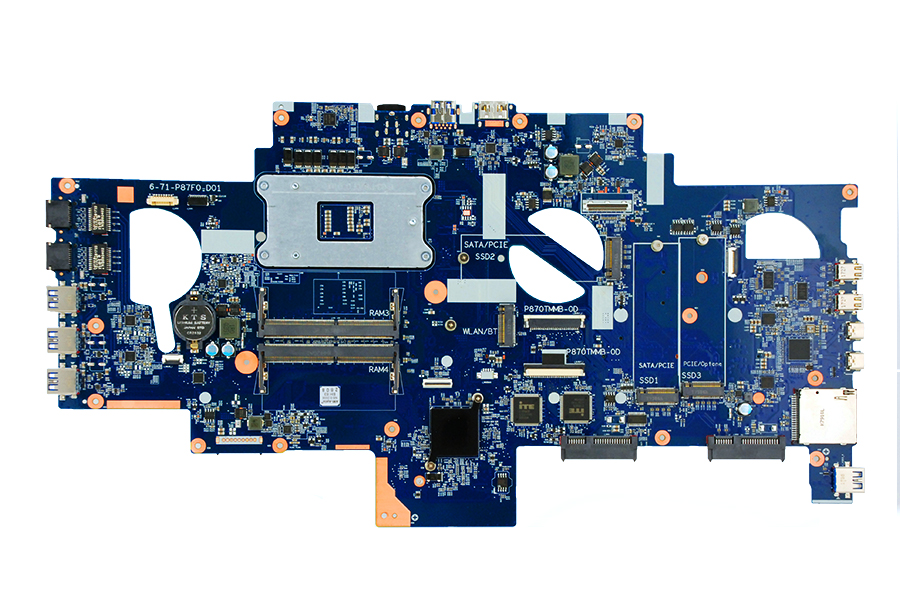
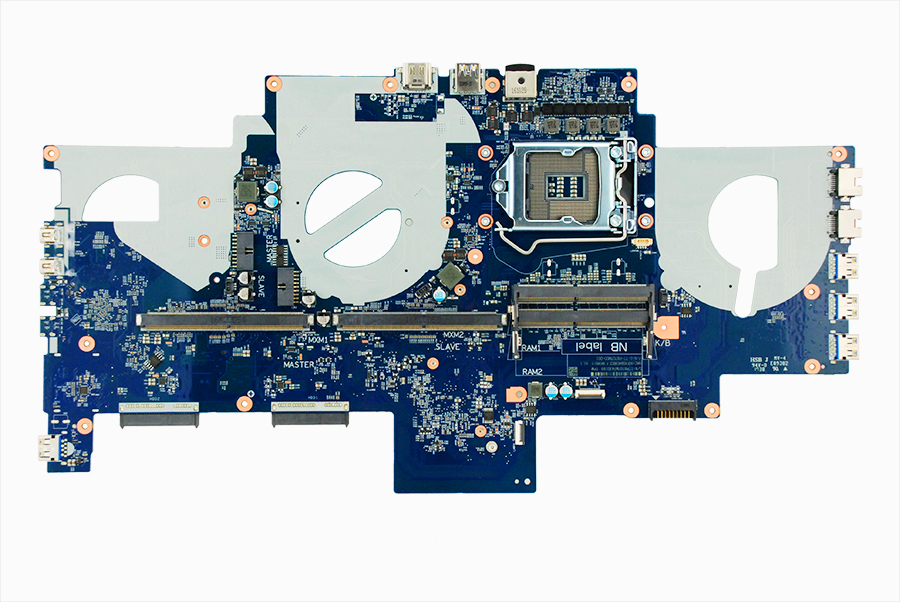
Here are some pics of P870TM1 motherboard. We offer upgrade kits to upgrade from previous P870xx version to Z370 based P870TM1.
Attached Files:
RandomID, cj_miranda23, Georgel and 3 others like this. -
-
No option for P775DM3-G motherboardS?
-
Yes we offer P775TM1 upgrade kit from P775DM2/DM3-G too. You would need to replace both CPU and GPU heatsinks as they are different along with the motherboard and a bottom case. Check with our Sales Team for details.
Jaces9900, Papusan, Georgel and 1 other person like this. -
Would you guys recommend this model over the P775TM1-G (assuming they both have the same configurations of 8700K and only one 1080) to avoid thermal issues?
-
Yees. P870TM is a better laptop. And with better cooling.
-
P775TM1 uses 2 seperate heatsinks one for GPU and another for CPU unlike previous versions of P775DM/DM2/DM3 that used only single heatsink so thermals are better. Check pics of heatsinks here: http://www.eurocom.com/ec/images(430)SkyX7C
-
Does this mean that the cooling on the P775TM1 is almost as good as the cooling on the P870TM?
-
Yes cooling in P775TM1 is as good as in P870TM1 unless you use in P870TM1 dual GPU heatsink (the one used for 2x 1080) with a single 1080 card. Just make sure that you order single 780W AC adapter too as 8700K + 1080 needs well above 330W specially if you are planning to O/C.
-
The dual fan 1080 single heatsink is better than the single heatsink on the 775 too.
-
We will do some testing side by side P775TM1 vs P870TM1 this coming week and post temps results. Let me know if there are any specific apps that you would like us to test with.
Jaces9900, electrosoft, raz8020 and 2 others like this. -
I'm interested why you believe the cooling is better before testing then.
ole!!! likes this. -
http://www.putme.net/wPrime155.zip (1024M stabillity test) is an exelent choice for Cpu. For Gpu 3DMark suite.
-
Wasnt able to get that third toshiba SSD to work outside the raid but different SSD works fine outside the raid. @Prema Is Xotic PC a prema partner and if so will i be able to get prema bios for my P870TM-G?
-
Yes, they are and yes they have it.
(Just make sure that it is a Xotic PC and not a Sager branded model)DreDre likes this. -
If you want a sager with the ultimate @Prema modbios, buy it through lpc digital, they only sell sager laptops and are prema partners( this puts me question xoticpc are also prema partners, then why arent they providing prema bios on the SAGER notebooks?)
@Meaker@Sager
@Tanner@XoticPC
@Prema
@Larry@lpcdigital -
*** Official Clevo P870TM Owner's Lounge! ***
Discussion in 'Sager/Clevo Reviews & Owners' Lounges' started by Spartan@HIDevolution, Oct 6, 2017.