Problems? See this thread at archive.org.
Nice. Request you to pm me (or share it here) your settings + some ideas on why you chose them ? I got the software and didn't want to miss something !
-
-
PM sent
Sent from my iPhone using Tapatalk -
Since Fan Control allows you to import and export a fan profile it would be cool if users started to share setting files!

I´m sure it would help a lot of users to get a good starting point.jaybee83 likes this. -
I will do that today !
Sent from my iPhone using Tapatalk -
I have no tutorials online anymore and no plans on making any... Sorry.
-
I tried creating a backup of my profile and clicked save to the desktop but don’t see the .ini file anywhere.
Sent from my iPhone using Tapatalk -
On some systems you cant save .ini files in the desktop and you need permissions to save it on other directories so just save it in your documents folder for example.joluke likes this.
-
Did Prema managed to bypass the 150w limit for the gpu on tdp? It's impressive
Too bad nvidia is asking for much for such little improvement over the 1080 :/ -
Not yet, this is the A51M vbiosraz8020, Mapl, jaybee83 and 1 other person like this.
-
God damn it and here I was with my hopes up but he will do it! I believe in him

-
thats already quite the feat! transplanting the alienware vbios onto a clevo card, nice!
how much of a difference in clocks does it make when comparing 150 with 190W? -
i meant in percentage or Mhz turbo im guessing its not even nearly linear to the TDP increase.
-
No but not insane at that level looking at 7-15 is not bad.jaybee83 likes this.
-
yep, looking at the FPS in the screenshots, id say about 10-12% fps increase for 27% TDP increase. more than i expected!
-
You'll see the true tail off at stick desktop speeds, they have aimed those clocks there.
jaybee83 likes this. -
You know I don't do percentages. i'll post the numbers and then you guys can go from there. The numbers change to much to be valid. And if someone doesn't get the promised percentages, they think their system is broken..
200W
Last edited: Mar 13, 2019 -
This just in from OWNorDisown
Forward to 5:53 for a comparison between the current and previous generation.sicily428, raz8020, Papusan and 1 other person like this. -
-
I'm not sure I would say it's over for LGA laptops. I think we finally saw the curtain drop for the end of Act I. The P870 line needs to make way for what comes next (not what comes backwards). The CPU/GPU technology war is currently being fought in the desktop environment where the advantages of custom cooling and higher TDPs can be taken to previously unfathomable reaches.
I think we are at a cross-roads where initially desktop-developed technology can be transported for the most part as is to the laptop/DTR form factor. You see this as the difference between desktop and laptop RTX GPUs from NVIDIA. Sitting on yesterday's technology, and milking it for everything it's worth, will eventually lead to non-credible contenders for our money down the road.
i have my brand, spanking new P870TM1-R in a position where I can learn everything there is to learn from CPU/GPU/RAM/SSD technologies. This machine will serve me well as I figure out what kind of X299 desktop (with EVGA Dark motherboard ) will make me happy. When it comes time to replace, I will look forward to seeing the choices offered by HID Evolution. I like being in the EOL of fold.
-
Re-developing the desktop models is hugely expensive per machine. Doing that when the rest of the internals is staying the same would be insane.
You guys are not looking at the bigger picture here. -
I know. What they have again is the P7xxx models developed for release in 2015 with minor changes afterwards. Now in revision 4 and if Clevo continue with the same chassis next year it will be +5 years old. Of course I looking in the big pictures. There is nothing left, good sir.Last edited: Mar 17, 2019
-
The chassis has to last that long to provide a decent ROI, but then knowing the longer cycle you would be making changes around generational hardware changes in the platform to take full advantage of that.
You are not going to for example re-design another z370/z390 motherboard from scratch in a new chassis when you have one that already does better than any mobile platform/competitor. -
The question is will they put in Z470 (they skipped Z390 for well-known reasons) in same old chassis if Intel continue the name chipset branding? This will be the cheapest for Clevo. Or will they continue with Z370 if this is compatible with upcoming 10 cores (this even cheaper than a develope and put in new MB)? And will people like me buy it? Nope.Last edited: Mar 17, 2019
-
At which point people would complain it's not upgradable any more lol.
-
The part that has me scratching my head is why the powers that be decided to hold onto the inferior product instead of the better one for the transitional period between. Sure, the better one was built with the capacity for SLI, but getting rid of the better product and keeping the inferior one (regardless of installed GPU count) seems to reflect a disconnect by those with the power to make decisions. Kind of like tossing the baby out with the bath water the way I see it.
We can assume that some analysis and KPI had an effect on that decision, but the end result is many people that might have purchased a P8 are going to turn their noses up and walk away from a P7 because it's not good enough. Hopefully, the loss of those customers was a metric they contemplated, because that is the harsh reality. -
Because it sacrificed size for SLI and is expensive to produce. People do tend to still care about size and weight somewhat at this level even.
-
agreed. would have been so much potential to go the 980 desktop route as with the P870DM: stick to the Phoenix, abandon SLI capability, only include one MXM slot, but offer a 2080 RTX with a 200+W TDP and a special VC heatsink that uses two GPU fans and you've got yourself a winner! Combine that with the 15 incher (for people like me
) and there is basically no need for the P775 model anymore!
and those people can just opt for the 15 incher with identical hardware but a bit less overclocking, thermal and TDP headroom
Last edited: Mar 18, 2019jclausius, raz8020, Mr. Fox and 1 other person like this. -
-
I think the absence of proper cooling on their power delivery components (a Dell Hallmark trait) might have something to do with that, but a knee jerk reaction from their competitors certainly may screw things up for everyone else that hasn't slurped any of the Dell Kool-Aid.
-
Not sure what is going on or if they are all gpu related.
https://www.reddit.com/r/Alienware/comments/b2r1rn/my_area51m_started_smoking_i_took_it_apart_and/ -
The problem started before the 200w vBios.
http://forum.notebookreview.com/thr...m-owners-lounge.826831/page-533#post-10883050
http://forum.notebookreview.com/thr...m-owners-lounge.826831/page-533#post-10883056Ashtrix, raz8020, Arrrrbol and 1 other person like this. -
-
Well, in their defense it is covered and they have vent holes on the bottom beneath the cards heat sink....Maybe they thought it would be enough?
-
We both know you can only read the cores temp. Maybe they the engineers forgot to measure temps on everything else? This smells bad airflow. The ssd's also have no cooling from airflow.Arrrrbol likes this.
-
I've never liked the idea of putting hot components like mosfets on the bottom of the PCB, at best its going to hinder your overclocking potential or reduce the lifespan - at worst you'll burn something out under heavy load. They could have probably fitted the mosfets on top if they'd made the PCB a few mil longer.
-
At least you don't need to replace the MB
 Only when rest of the power delivery on MB start burn and make some nasty smells.
Btw. Directly from Azor!
![[IMG]](images/storyImages/aojHJC6.png) ole!!!, supernovastar, Ashtrix and 3 others like this.
ole!!!, supernovastar, Ashtrix and 3 others like this. -
Dell was quick to launch 200w vBios after Ausus put out the big boy and all could see the same up again as last time (remember the 1080 bragging - The other OEM's used fake 1080). I think their engineers looked only at power delivery max out put and core temp. They simply forgot the rest in excitement Azor is also to blame for this mess if this is and will become a serious problem.
-
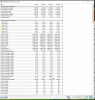
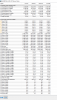
I was really hoping someone would post atleast a quick video / guide for Prema's bios esp the overclock settings. I installed a new windows ( dual boot with linux) and with HWinfo I saw the speeds as in picture 1 below. During my dual boot install (as I had no guide to go on because the net guides are old and don't have all the menu options) I had to change some things during install eg csm, fastboot, legacy logo etc. After much trial and error I knew what options to change so I just reset the bios to default settings and just enabled/disabled those 3 - 4 things and I got my dual boot. But now on booting and running HW info I see that the max multiplier is somehow set to 35x and none of the cores go above it ! Seems like the default settings set it to 3.5GHz as its upper limit! I am trying to ask the experts here to help me get the earlier performance back. Here are the two pictures
Attached Files:
-
-
Ah ok nevermind. I think I figured it out. I had changed the power settings to balanced instead of max performance. Btw when in power settings 'performance' mode I give the values for cpu to 99% instead of 100% I see that the cpu frequencies go to ~3.5 GHz but giving it a 100% value lets me see it getting to 4.8Ghz on cores!
Also, can someone tell me how do I enable turbo for 2 cores ( so they go up and down as windows wants them) and lock the other 6 at 4.2 Ghz ? Which menu settings do I change to do this ? I just wanted to try it out though I don't need it seeing that cores can hit 4.8 Ghz and sustain it with good temps if just browsing or some workload (This system is really something !!!) -
Use ThrottleStop. You can put up to 4 profiles and change them on the fly with a key combo. Read the guide. Or ask your questions in the ThrottleStop Guide thread here on NBR forum.
How to Lower Temperatures, Stop Throttling, and Increase Battery Life
supernovastar, kfxsti, raz8020 and 2 others like this.
*** Official Clevo P870TM-R Owner's Lounge - Phoenix 5 ***
Discussion in 'Sager/Clevo Reviews & Owners' Lounges' started by Spartan@HIDevolution, Jan 9, 2019.


![[IMG]](images/storyImages/36zuxFh.jpg)