 Problems? See this thread at archive.org.
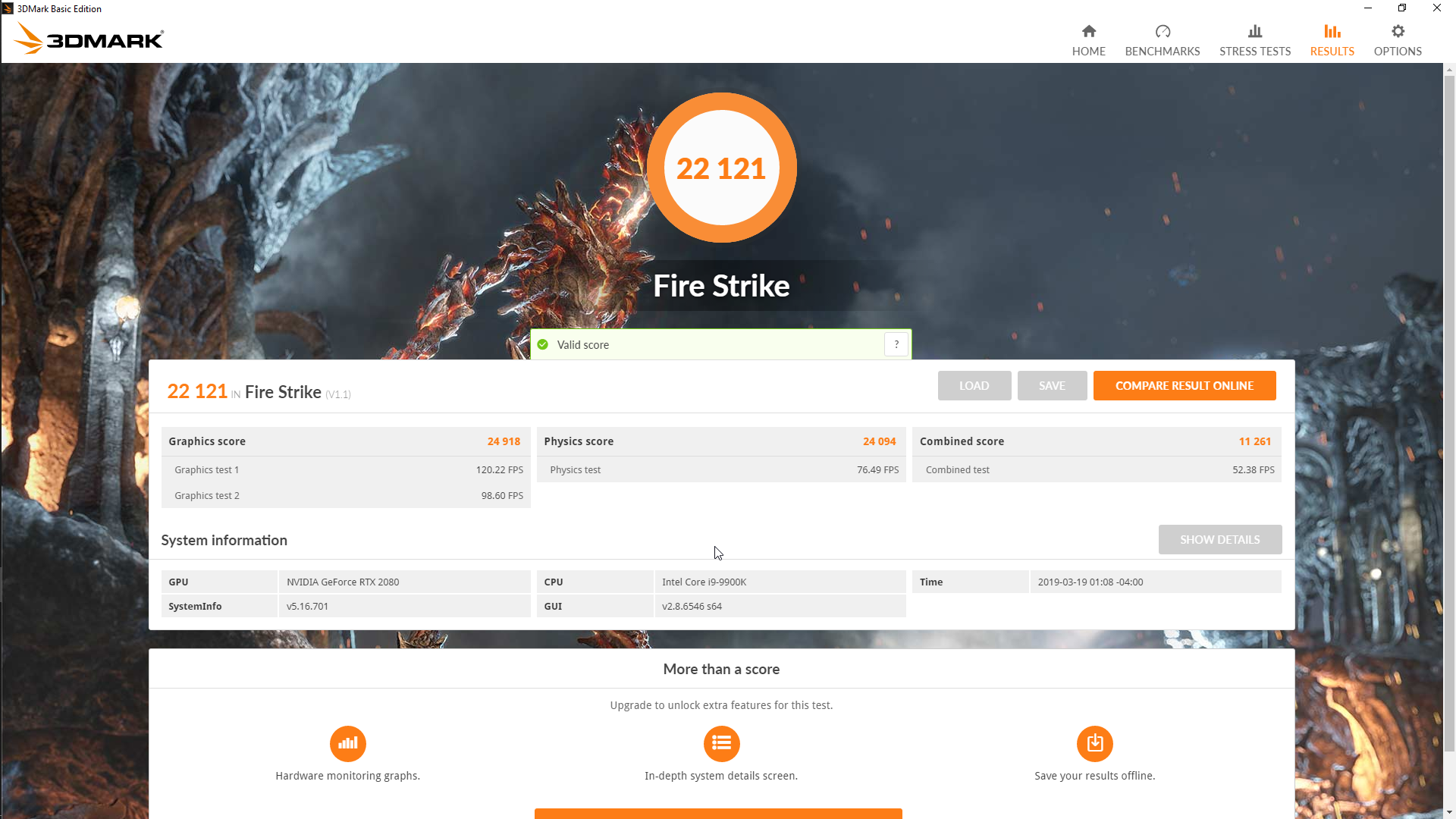
 Thanks @Papusan. Will try it but for now just going to performance mode from balanced and doing nothing else and testing with firestrike gave me a very nice score. I am satisfied
-
-
i completely missed that TDP war between Asus and Dell. any more details on this?
varunreeves likes this.
-
Search Twitter. On my little phone. One start https://mobile.twitter.com/search?q=Johnksss 200W&src=typed_queryAshtrix, raz8020, jclausius and 1 other person like this.
-
For comparison here is the performance that my lenovo y510p with the dual 750m gave me on benching today. I need to do something to this ie a good thermal paste ( suggestions please ? grizzly kryonaut / gelid / something else ? ) and retry the bench on it !
-
Generally the prema bios is used by more advanced users, people usually start off with the normal bios which is fine for most people's needs.jaybee83 likes this.
-
Exactly. For me example is enough this which we receive from manufacturer plus my modifications.. So.. Now I'm by N350TW i7-8700 and external GPU gtx 1070.
Fastest Customizable Gaming Notebooks & Mobile Workstations | CLEVO System Integrator Last edited: Mar 19, 2019
 -
-
Yep I agree that, that is the general case. But also, there have been quite a few walkthroughs in the past for the options and I assumed even the advanced users might need some help sometimes to set it right and have to know what each menu option means which is precisely what I was/am trying too !jaybee83 likes this.
-
there are some walk through vids on Youtube by @Mr. Fox, for example. but basically, every iteration of the Prema Mod is a little different and caters to the respective hardware generation and its available options. Thus, even advanced users have to go through and familiarize themselves with new versions by trial and error and DIY research. After all, thats part of the fun!
Last edited: Mar 19, 2019
-
This is soooo true. After another NBR member recently commented in this thread about his difficulty in overclocking via the BIOS, I took another look at both @Mr. Fox and @Ultra Male 's videos. There have been some (with emphasis on few or limited) changes in the BIOS. But, for the most part, the videos are just as relevant today as they were when made almost 3 years ago. My 870 came overclocked from HID Evolution, and I really hadn't had the opportunity to play with the specific settings. All of the settings have an effect on performance, and I know from watching the videos that I will need to put my engineer's hat on and research what the settings generally do. Instead of matching the disabled/enabled settings as in the videos, I left them currently as is.
-
I need to ask how's the touchpad, because I really like my p870dm-g but the touchpad is really bad.
-
it's same. Generally DTR notebooks have rly bad touchpads. If you're looking for good touchpad - go for dell XPS/razer/macbook - generally slim laptops with good specs.
-
Hi bro, what its the height of each shim? or can explain me about how i can mod, I buy one 2080 for mine and I have the vapor chamber
ThanksLast edited: Mar 22, 2019 -
Did you have G-Sync on? Stock should be above 120 in test 1lsflp likes this.
-
Yep I didn't change anything which came from HID so it should be on.
On another question I was trying to get the modded audio drivers that you have uploaded on the premamod sight but whenever I try installing one it fails with error code E000024B. I have tried installing two of them with the same issue :
[IRealtek_UAD_6.0.1.8648_Creative_SBC_UWP_Clevo_Mod.exe (full package)[/I]
Realtek_UAD_6.0.1.8652_Creative_SBC_UWP_Clevo_Mod.exe (full package)
Could you please hook me up with a working mod for the audio drivers for this machine ?
-
You can't really do performance tests with G-sync on, it messes with the numbers.
raz8020, Papusan, jaybee83 and 1 other person like this. -
hey. have you found a way to solve the problem with the keyboard ? and if you have a guide for best performance for this laptop
-
nope not really. I am thinking that this is some setting or that the keyboard daemon goes to sleep or something behind the scenes ! This happens now ONLY when I let the computer idle for quite a lot of time eg 10 hrs or so. Otherwise it works fine. I have also disabled hibernate
-
Which one problem?
Fastest Customizable Gaming Notebooks & Mobile Workstations | CLEVO System Integrator
-
keyboard does not work after sleep
-
Bios? Ec? Control Center? What of versions?
Fastest Customizable Gaming Notebooks & Mobile Workstations | CLEVO System Integrator
-
And control center 5.0001.1.88
Attached Files:
Last edited: Mar 27, 2019 -
-
Does anyone else have such a problem with the keyboard?
@Prema i need your help with this problemLast edited: Mar 30, 2019 -
I checked the system with different drivers and different build windows, the problem remained, it looks like it is in bios, I also had a non-working microphone and camera module, I had to replace
-
Try to press any num key than any alphabet key see if its work.
Sent from my iPhone using Tapatalk Pro -
i tried and it doesn't work.
only fn + keys work -
Hello Everyone,
Is it not possible to control the back LID colors using obsidian-pc tools for this model from HID. Can someone please tell me how they are controlling that besides the clevo control center ? I don't want to install the CCC just for that one thing when I am liking the obsidian-pc tool for the fan control etc! It keeps things very cool.
@Donald@HIDevolution and to others who are interested an update on the laptop. Lovely performer for sure !! I keep the laptop on balanced power settings it keeps below 40 degress Celcius !! when idle with the fans just making barely a whisper (ambient temps are around 25 degress Celcius). If I put it on performance mode the cpus cycle to and stay around 4.7 - 4.9 Ghz and the temps go up around 47 -50 on idle. I have played some games (on balanced mode) and eg for NIOH at ultra settings and temps for Cpu stay in 50's and that of gpu touches 60. All this when keeping it still on balanced mode.Spartan@HIDevolution and CedricFP like this. -
@Donald@HIDevolution I am looking at buying a p870tm-r, I heard it's possible to get a discount for member of this forum?
-
@gqman69, you can email Donald directly. He is always ready
Sent from my MIX 3 using Tapatalk -
Correct.
Just shoot me an email with your full name and we can get started. [email protected] -
how can I find out about the release of a new version of bios for my laptop ?
-
Contact HID if you have their machine.
-
Thanks, I hope when the new bios comes out, it will solve the problem with the keyboard
-
I was wondering if a tutorial has yet been posted for the new current p870tm-R bios. I have been tinkering with it but made very little change. Can someone tell me some basic settings for the prema bios for the two overclock menus. Alternatively I guess I will call HID sometime during the week (if I can find sometime
) and ask someone to help me with it but would also be nice to know some settings myself. I know that
@Mr. Fox posted some tutorials a while back about older bios but the new one has more features and different layout so would help to get something about that too ! Anyone please pm me if you have some basic tips
-
even the senior members like @Mr. Fox have to do research for every new bios setting. google is your friend if u cant find anything, just do trial and error, see how clocks/voltages/stability is affected.
i do the same, every new prema bios iteration just blows my mind with the gazillion new options and features. but thats part of the tinkering fun!
Sent from my Xiaomi Mi Max 2 (Oxygen) using Tapatalk -
Sad News. After about 6 months of stable performance after the initial hiccups today the machine simple blacked out while in the middle of a playing divinity original sin 2. Seems like it might have to go for RMA and I was really hoping and crossed my fingers lots of times that a brand new machine esp one this costly wouldn't fail on me but just my luck I guess. Anyways now have to get in touch with my vendor and see how they can help me. @Zoltan@HIDevolution hope you are listening !!
.
Last edited: Jun 14, 2019 -
That's why a warranty is always nice to have just in case
-
Hi guys, today I broke my damn lcd panel, so one question, this panel was the old AUO B173ZAN01.0. I hate for gaming, what its your recommendation for buy one.
-
The 1080p 144hz is pretty nice.
-
Dunno if it does apply to your machine but I bought a AUO B173HAN03.1 from obsidian-pc a while back and it works great. 144hz with g-sync 1080p. Send @John@OBSIDIAN-PC a PM and maybe he can help yalsflp likes this.
-
G-sync can be impacted by the cards and firmware you have.
-
you say 17.3-inch (43.9cm); 144Hz FHD 1920x1080; Matte; 800:1; 300cd/m2; 72% NTSC; IPS; eDP; 40pin; B173HAN03.1
but this its bad? 17.3-inch (43.9cm) 120Hz; QHD 2560x1440; Matte; TN; 5ms; 700:1; 400nts; NTSC 72%; eDP; AUO B173QTN01.0 -
This is stock display for rtx vgas. Because work
Fastest Customizable Gaming Notebooks & Mobile Workstations | CLEVO System Integrator
joluke likes this. -
Exactly due to some scan line brightness compromises on the 1440p panel.
-
OK, thanks for your information, and what about the response time
-
Worse than the 1080p 144Hz panel.
-
The 1080p was way easier to manufacture in comparison.
-
Hi gents! Longtime forum reader, first time forum poster.
Does anyone know which card the video output is hooked to on these...LCD and External ports? I'm trying to figure out how this machine would perform in a virtualization setting -- I can hand off one GPU to the VM -- and I need to figure out whether the slave card (in SLI) or second card would output directly to an external LCD, or if it would have to be a master.
If anyone has one of these and is running Linux, I bet we can figure it out together!
*** Official Clevo P870TM-R Owner's Lounge - Phoenix 5 ***
Discussion in 'Sager/Clevo Reviews & Owners' Lounges' started by Spartan@HIDevolution, Jan 9, 2019.





