 Problems? See this thread at archive.org.
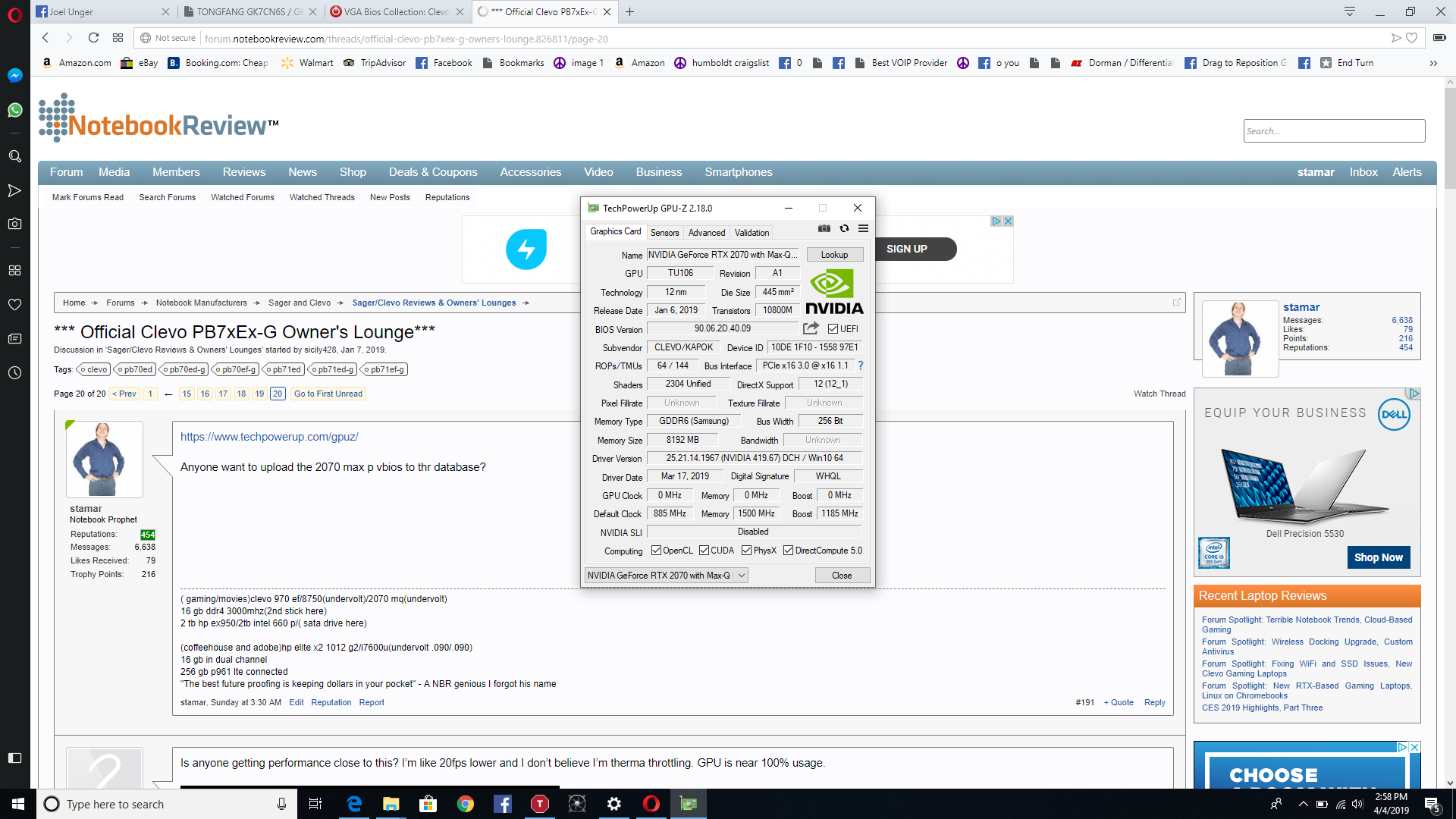
please use gpuz
anyone with a 2070 max pand then use the arrow button after bios version to upload to to tech power up
or attach it to a post here thank you very much
this is the clevo 80w max q 2070 vbios lets compare the device etc
-
Whats the response time on this panel? Does anyone experience any kind of ghosting in this panel??
-
This is the same 17.3" panel as used in our other machines.
-
Is the 9750 going to make it into this model?
-
The panel is AUO B173HAN04.0 (AUO409D), response time of 9 (Typ.)(Tr+Td); 7 (Typ.)(G to G) ms.
-
I'm thinking about picking up this model in the next few days. Is it just the picture, or is the keyboard somewhat small and cramped compared to other 17" models? Any feedback from current owners would be appreciated.
-
It's using the same keyboard from the 15" version.
-
How does 2070 clock during gaming? On Forza Horizon 4, i manage to push it to 1750 mhz with voltage control. But on BF1 and Ghost Recon Wildlands, it only clocks at around 1525 mhz before hitting power limit.
-
BF1 is a very heavy load all round the system.
-
I'm really liking the balance of features with this model, and I'm 95% sure I'm going to pull the trigger this week. I'm looking at going with XoticPC on the configuration below.
Anyone willing to offer feedback or suggested changes with this build?
Price: $2,264
Core Components
Display *
17.3" Full HD 144Hz, Wide View Angle 72% NTSC Matte Display with G-SYNC Technology (1920 x 1080) - Default(SKU: 4017)
Graphics *
NVIDIA GeForce RTX 2070 8GB GDDR6 - Default(SKU: 2070gpu)
Processor *
8th Generation Intel® Core™ Coffee Lake i7-8750H ( 9MB Cache, 2.2GHz - 4.1GHz, 6 core | 12 thread ) Processor - Default(SKU: 10085)
Ram
M.2 SSD Drives SATA/PCIe *
32GB Dual Channel DDR4 SDRAM at 2666MHz - 2 X 16GB(SKU: 20034SGR)
- Slot 1 M.2 SATA/PCIe
- PCIe
- 1TB WD Black M.2 PCIe NVMe SSD(SKU: 5009SGR)[ +$0.00 ]
- 2.5" Bay 1
- 1TB 7200rpm SATA3 Hard Drive - Default(SKU: 100005SGR)[ $0.00 ]
- Wireless / BluetoothKiller Dual Band Wireless-AC 1550 M.2 AC Wireless LAN + Bluetooth Module(SKU: 9982SGR)[ +$25.00 ]
- Thermal Compound
Stock Standard Thermal Compound - (Default)(SKU: 9893SGR)
Operating System *
Windows® 10 Home 64-Bit Edition Preinstalled (Clean Install | Drivers Only | No Bloatware)(SKU: SGR6823)[ +$0.00 ]
Branding Options *
- Sager Branding - (Default)(SKU: SGR12273)
Thanks!
-
I would ditch the Killer wifi and get the basic thermal paste instead.
-
Might as well wait to buy anything at this point with the 9750h getting announced in a few weeks
-
It seems like the 9750h is going to have 6 cores... I hope this laptop is available with the i9. Also the Killer 1550 is definitely a downgrade from the 9560, it's based on the 9260
-
Depends on what you want to do, for gaming 6 core 12 thread is going to have a lot of life in it.
-
I just got this laptop two days ago. The cursor was stuttering for the simplest things and some things took a lot of time. I thought at first it was Optimus since it's known to cause problems like this on some laptops, but I changed to G-sync (discrete mode) in bios and it didn't help. However, I found out today that it was caused by Malwarebytes, it was the first thing I installed when I got the laptop. I went through a lot of headache to found out the root cause, uninstalled and reinstalled many things. Then I uninstalled Malwarebytes today and restarted, and now it's lighting fast, no lag, stuttering or hangs.
Last edited: Apr 13, 2019SlickDragon likes this. -
If things get really odd it's always worth going back to a totally stock windows image to see if its software related

-
im about to get my hands on mine in about two weeks from now. i came from an alienware 17 r3 and this would be my first sager laptop (PB71EF-G).
do you have any advice on the first thing that i should do or install to get this beast up and running on its prime? -
I had the same issue. Installed Malwarebytes ann encountered a lot of stuttering. Took me a while to find out (unstalled Control Center, Avira anti-virus, change bios etc)
How did you manage to re-install it without the stuttering? -
Just make sure your gpu delivers are up to date and run some games to make sure it's all behaving well, check all the USB and other i/o.
-
All you really need is throttlestop. And I have afterburner too. GPU never goes above 900mv
-
I only uninstalled Malwarebytes, did not reinstall it.
-
Why would anyone use Malwarebytes stuff if your PC doesn't have any malware? It is known for slow-downs when you let it run all the time, I believe Dell even has a Knowlegebase article about that... Try Windows Defender instead - it is FREE, comes with OS and according to independent tests it provides same level of protection as paid antimalware programs.
https://www.av-test.org/en/antivirus/home-windows/Xikar likes this. -
Malwarebytes is designed to be used along side a regular anti-virus like for example Windows Defender, so if your regular anti-virus don't find something, you can swear Malwarebytes will find it. I've used Malwarebytes on every single PC I've bought, even a 200$ PC without problems. It has only bugged this laptop, even though this laptop is 100 times more powerful than any other PC i've used. So it is something about my unit, my 200$ PC have no problem with malwarebytes.Last edited: Apr 15, 2019
-
You can't say there is something "wrong" with laptop even if Malwarebytes app runs on your PC without issues - your laptop has unique drivers and stock apps like Clevo Control Center (which is probably not the one that is causing it but I am listing it as an example of unique software), all of which can easily cause conflicts with Malwarebytes (which is not the laptop manufacturer's fault). Dell already warns their users about this:
https://www.dell.com/support/articl...cpu-usage-with-malwarebytes-installed?lang=en
I hope you'll understand at least that part. In any case, you should report this to Malwarebytes tech support since they're the only ones who can fix issues with their program being incompatible with some software configurations.Last edited by a moderator: Apr 15, 2019 -
Corona 1.3 Benchmark Finished
BTR Scene 16 passes
Intel(R) Core(TM) i7-8750H CPU @ 2.20GHz
Real CPU Frequency [GHz]: 3.6
Render Time: 0:03:01, Rays/sec: 2,674,570 -
Though that's not the issue Malwarebytes had on this laptop, Malwarebytes hardly had any CPU usage, if it did I would know right away that it was malwarebytes that was causing stuttering when doing specific things.Last edited: Apr 16, 2019
-
Just got my PB71EF-G the other day from Sager.
Arrived in perfect order.
The reduction in bulk factor from my old P377SM-A made me laugh, including the much smaller power supply.
The screen lid offers much less hinge resistance as well.
The keys have a nice response, although I will likely use a peripheral, and the individual key lighting is fun.
The G-sync is supposed to be default, as well as auto-switching to non- discrete video.
Sager seems to have loaded all of the drivers but they also included a memory stick loaded with manuals and drivers...with no explanation about those which I may need to load which they did not.
Only complaint in this regard so far is that the advertised SB CInema software does not exist.
I like the intel wireless as Killer was disappointing...but I go wired for gaming.
Played Battlefield V last night and CPU hit 90c, which concerns me.
My only serious complaint so far, but I think some have good advice regarding. -
One other thing, after inserting an sd card to test drivers, I had to use tweezers to remove it after ejection.
If that function were important to me, I would be greatly annoyed. -
You should be able to simply press the card in to eject it with a standard shape.
-
I did, but it ejected to a point my fingers could not grasp. I love the front load position but the alcove of the case prevented me from gripping it.
Not a big deal to me because overall, very pleased!
My cpu temps after nvidia driver update and using my cooler pad now hover in 80c.
Very pleased with that. -
I sent my laptop back to Sager to have checked out after consistently posting CPU temps in 97-100 range while playing Far Cry 5 (fan speeds at max). Sager could not replicate those temps with any other games. They are seeing if they can obtain updated bios to resolve the issue.
If anyone has access to Far Cry 5 I would greatly appreciate some validation on these temps. I haven't seen any other users posting this high. Thanks! -
Just saw Bob Of All Trades review of the 15" model. It looks like his temps got pretty high too before doing significant tweaking.
Xikar likes this. -
There was no significant tweaking really. Everyone with an 8750 needs to undervolt and get a good repaste. The only other thing he did was prop it up.SlickDragon likes this.
-
^^^
Never played with these settings but may do so.
If my cpu runs 80c, peaks at 90ish, I’m not terrifically concerned. -
-
How about the bios? When i previously owned and alienware 17 r2 i didnt update my bios since updates on it were quite crappy.
-
Hey i just checked out this vid. i was wondering if the 17 inch versions also suffer from what he calls "suffocation". do we really need to prop these laptops whenever we use this even in flat surfaces so that the temps wont spike and suffer from throttling??
-
Feel free but unless you have issues you can usually leave it.SlashNLennon likes this.
-
yep this is what i did with my previous laptop. thanks sir!
-
I have the 15" and leave it sitting flat and it's been just fine. It does get alot cooler if propped up, so he says is true, but even flat the temps are within the typical range for the 8750h.
Eventually I might try to fabricate some sort of stand to attach to the bottom to lift up the back a mm or two. It sounds like that's all thats really needed if you go by the fan pitch change. But, as for now, I'm perfectly fine with it being flat. -
there are no thermal throttling of some sorts like what he mentioned on the video? im thinking if i should buy that x-stand that he has. hahaha. my laptop is about to arrive next weekend. and im really excited to test it
-
Sure there's thermal throttling, but it depends on the game and generally only happens sometimes with the stock voltage. With a good undervolt it should rarely occur.
SlashNLennon likes this. -
i see. thanks for the insight bro!
-
I’ve never had thermal throttling. Then again I keep my profile at entertainment and not max performance so my cpu is only pulling 45 watts. Also when I’m playing games like the Witcher 3 I lock it at 60fps because honestly I can’t tell the difference really between 60-100 and the fans stay quieter. I might even change it to be a max of 72 in the nvidia control panel and disable gsync.
-
-
Maybe I am looking in the wrong place but I can't find the Clevo PB70ED-G / PB71ED-G anymore on Clevo.com.
If it is not there anymore would that mean anything? -
They've replaced by the 9th gen i7 versions. Strange the 17" isn't listed though.
-
They may not have it finalised yet.
-
I have been playing BFV for a while now, minding temps on control center.
80+ on the cpu, without tinkering, with stock paste, as well as using optimized settings from Nvidia.
Very pleased.
Years ago I thought I was the stuff with my 980m....lol.
By the way, as my old rig, I purchased my new Sager from Midern.
Question....Is there a break-in time on thermal paste? My temps have improved over a short time.
Also, as previously stated, I have a fanned pad under the machine. I don’t think the pad’s fans help except to chase away heat radiated to the lower case, but why not employ it? The airflow design of this new case is far superior to my old Clevo 377 so I use low fan speeds on my pad. Probably just a placebo effect, but if it reduces temps by one or two degrees...content with that.
I am really happy with this build.
*** Official Clevo PB7xEx-G Owner's Lounge***
Discussion in 'Sager/Clevo Reviews & Owners' Lounges' started by sicily428, Jan 7, 2019.


