Problems? See this thread at archive.org.
How's your battery life with that QHD screen? (Anyone else with the screen feel free to reply please, as I'm getting a w230ss soon!)
-
i am getting around 05 hrs + with moderate usage and screen brightness set at roughly 25%.
as per battery bar, my machine idles at minimum 8.2W. -
Has anyone ever hooked this laptop upto the a Korean monitor (Achieva QH270)? It only has a dual-dvi. I've got a dvi to hdmi adapter-would that work at all?
-
Indeed, hopefully it will get easier. Did you manage to get sound and powermanagent working?
-
That makes sense, the QHD was supposed to add an extra 1.5-2W to the idle consumption. My unit with the FHD idles at about 6.5-7W.
On a different note, does anyone with the Prema BIOS know what the CPU IOUT Offset, IOUT sign and IOUT Slope settings are? I'm assuming they are to undervolt the core but I want to be sure before I use them. -
Just wondering, I think it does but I'm not sure: Does this model support UEFI or does it only have regular BIOS?
-
Not sound, not yet, but power management, yes. Go to this link:
https://github.com/Piker-Alpha/ssdtPRGen.sh
And there you are. Follow the instructions there. You can also customise it to your XTU settings, such as max clock speed, TDP and so on.
Then you need Clover Configurator to give you an SMBIOS of MacBookPro11,2. In Chameleon, I then go to org.chameleon.boot.plist to change DropSSDT=Yes, and GeneratePStates and GenerateCStates to No.
By the way, I use Chimera/Chameleon, not Clover. Why did you use Clover? Any reasons? -
This is full UEFI with optional BIOS mode if required.
-
![[IMG]](images/storyImages/28fd2b6dce53a35cd959b5d8d7f857dd.jpg)
Ladeez and gentlemen, lowest idle temperatures recorded in a W230SS, in a tropical, 32-degs-average country, i.e. Singapore.
Small print: I got such low temps by opening the back cover and blasting the thermals with air conditioned air at 22 degs. -
-
I was looking at the bottom plate of my laptop and I noticed 3 of the vents near the harddrive and ram were covered with tape. Anyone else's laptop like this? Do you think taking off the tape would help with temps or just make the laptop less dust proof?
CyberTronics and SRSR333 like this. -
Nice find! can you show the temp difference for gaming with back cover and without ? tnx
-
but interestingly the battery life I am getting is the same as reported by other users with a FHD screen.
after some more usage now I can say battery life is around 5.5hrs or so.
also, is the extra consumption if you run at 3200 x 1800 resolution? i am presently running at 1600 x 900..... -
My HDMI port is unreliable and doesn't play sound unless you un-plug it, then plug it back in.
Does anyone else have this problem? Could it be a driver issue? -
The extra consumption is primarily related to the backlight. Your QHD unit has a really powerful backlight in order to have decent brightness with such a screen density. Running at half resolution should yield benefits though mostly related to the fact the GPU and memory busses are not running as hard. The number of operational pixels are still the same as running at full QHD.
I was on a 4 hr flight yesterday and my machine got through it with 65% battery left. I'm currently using Windows 8, my CPU is undervolted and I've got the CPPC driver installed -
Thanks!
I used Chameleon always in the past (it's been two years since I setup a hackintosh), but I read on forums that Clover will be better on the long term (to quickly make changes). I also like the clover skins, but I discovered that Clover refuses to start when my USB mouse or keyboard is plugged in, so it's not yet bug-free . Maybe I'll revert back to using Chameleon, but that depends on how the Clevo will be easiest to be configured I guess.
-
Personally, I've had lots of trouble with Clover, mainly because it's very complicated and the documentation is terrible. Chimera on the other hand, is very easy to set up and configure. Less odd options as well. The boot plist is also much more organised...
-
Same here. I would like to know why those vents has been covered.
-
Probably done to optimise airflow, these systems go through quite a bit of testing before shipping.
-
Yes, I have HDMI issues also.
This is one of the pet peeves I have with this computer. The headphones jack gave me issues early on but the HDMI still is a pain in the butt. This is the only computer I have owned with an HDMI that you have to manually mess with settings for the sound to go through the TV speakers vs defaulting to keeping the sound coming though the laptops speakers. I usually just don't even try anymore and just use my headphones if its hooked to the TV now. Although I realize this is way less than ideal for most people. -
Btw, does anyone have light leaks around the screen? I don't mean just backlight bleed, I mean the actual backlight seen between the LCD panel and bezel. I have a few spots on mine. I'm pretty sure they are primary suspects in causing backlight bleed. Maybe some tape could do the job.
-
My Dell XPS 12 has exactly the same HDMI sound issues; it also runs win 8.1. Very annoying.
-
Is it possible the bezel isnt snapped together properly.
-
Out of interested how did you cut it?
-
Maybe. Do you think snapping it properly could help?
As far as I understand, all screens have more or less backlight bleed. I was wondering, is it true that all screens also have light leaks as I described? Or there might be other causes for bleeding?
So far I'm personally afraid to remove the bezel as it seems to be partially on adhesives (is that so?), and I might leave more leaks when I put it back making the situation worse. My bleed is visible only in artificial situations. However, my main concern about the screen is that right half has a slight blue tint compared to the left half and is slightly dimmer (1/3 stop measured by a DSLR). Strangely, this makes me uncomfortable. iPad 3's screen, although, is much worse. -
It's sort of normal with these screens. HTWingNut exchanged his screen couple of time with similar results, mine has it too...
-
All screens leak light, that's how many companies light the logo on the back of the display.
-
Guys, massive issue here, I have a QHD screen and I use 1600x900 resolution. Now, in any Sniper Elite game I am unable to play the game at a different resolution other than the desktop one, I get black lines around, basically there is no scaling option to stretch the smaller resolution to fit the current desktop one. There is no option in the nvidia control panel. If I disable the Intel HD, and start the game I gate the not responding error, this happens with any Sniper Elite game. I noticed there are other people with Alienware laptops having the same issues, any help?
It is clearly a conflict between Intel HD scaling and the nVidia one. Just to underline this is happening only with Sniper Elite games!
Cheers -
F'ing mail company!
Said they would deliver my W230SS today, but they sneakily updated it to tomorrow
I don't have too much time on my hands ATM, but I'll make a written review and do a look-and-feel video ASAP
steberg likes this. -
So which USA reseller has the best deal on the W230SS? XoticPC looks good so far...
-
I may be understanding what you mean incorrectly, can you provide a pic?
-
Like this
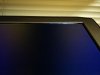
Although it's not completely obvious how these spots are associated with backlight bleed spots. -
Yes you will get that, though it should not be obvious from the front. If it bothers you thin foam could be used to help bock the light.
-
super noob question.
so let's say i order a np7338 without an os and an external disk reader. will the motherboard have any issue loading windows 7 off a cd via the usb disk reader?
and what is this nbr member savings ad that i am seeing from xoticpc/that's where i plan on ordering it from.
thanks for any replies in advance. -
Nope, no problem at all. You can install your own Windows on anything without any problems.
-
Oops they did it again!
It's coming tomorrow, for realz this time!
-
With a blade and ruler...
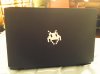
I traced the outline of the top of the laptop onto a sheet of paper and then used it as a template...This step needs to be carefully to make sure the piece you cut matches the laptop as perfectly as possible...There one corner I was off by a bit but not enough to re-do it....other than than, I am very pleased with the way it turned it out, especially since I don't have to worry about the finger prints any more...
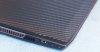
another shot of the opposite corner...
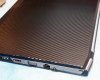
-
I loaded Windows 8 using an external optical drive with no issues at all...I just popped in a new msata drive and everything was recognized at Startup...
-
Yes you can load the OS from a USB drive. We are not allowed to talk about discounts on the forum, and you do need 5 posts to send a PM. So you can click on my name in my signature which will open up and email to me and I can let you know of any promotions.
-
sounds good
thanks for the input everybody -
You are right, it's not visible from the front. I thought it affects backlight bleed, but then put a piece of paper next to it perpendicular to the screen and saw that the light from this leak does not actually illuminate the screen, it goes towards the keyboard. So it shouldn't affect the bleed.
Actually, it seems that the bleed is caused by some internal stress tensions inside the bezel. -
I guess many people have already answered, but just to clarify: I installed my own windows 8 (dreamspark) from usb drive, and it was absolutely straightforward. Just make sure that afterwards you install Clevo drivers from the official website in the order of the numbers in front of driver filenames.
-
If you put the CD in it tells you the order
Also you could adjust the screws on the screen if you want to test that theory groupoid. -
My W230SS just came in the mail.
Inserted the CPU, RAM, SSD, put my beautiful i5 sticker on it, booted and...
F*CK!
It doesn't boot correctly.
The LEDs work (Power, charging, keyboard backlight is also controllable), but I don't see anything on the screen.
The fan ramps up to 100% after a few seconds and shuts down about half a minute later.
I re-inserted the CPU already to make sure it's in correct, and no pins are broken or anything.
Any help, please?! I was looking forward to this moment for more than 4 weeks but now it's kinda ruined
If anyone knows what might be the source of the problem, please comment. -
Try with another RAM...
-
To my horror, I discovered today that the headphone output of my W230SS is not working
The speakers are working just fine. The headphones when plugged in get detected. But no output. I have Prema BIOS. I have tried all driver combinations from the Clevo and Sager sites.
I am inclining to believe that its a hardware problem with my unit.
Any suggestions/ ideal will be highly appreciated...... -
Any chance your laptop was in a suspended state before this? Trying doing a full shutdown (i.e. not restart but full power off) and the start it again and see if it works. There is an issue on this laptop where the headphone jack doesn't wake up when the laptop does. On Linux we are waiting for a kernel fix to this, however on Windows one of the clevo utilities includes a small utility for restarting the headphone jack, maybe HotKey?
-
A million thanx man..... working now with a cold re-boot.
You saved me from ordering a USB DAC, which I was about to order form Ebay by tonight!! -
Hi, so what are the funny shaped foam pieces for that came with the driver CDs?
*** Official Clevo W230SS/Sager NP7338 Owner's Lounge ***
Discussion in 'Sager/Clevo Reviews & Owners' Lounges' started by Ryan, Mar 20, 2014.