 Problems? See this thread at archive.org.
They're fir making your HDD fit better if it's ridiculously slim
-
-
You need to install Clevo Control Centre (aka Hotkey Utility), it's a problem with their implementation of the VIA audio system. Metabox Driver Downloads
The wiring is non-standard with independent outputs (i.e. hooked up to 2 output ports on the VIA EC) for the 3.5mm jack and the internal speakers (i.e this means that the speakers AND the 3.5mm jack can output at the same time, the muxing is done purely in software) whereas most systems have the speaker + jack hooked up to the same port and muxed via the hardware (i.e. internal speakers disabled when 3.5mm device is active). However, the Windows driver is bugged since it can't access the API that Clevo uses to do the muxing when resuming from sleep/hibernation, this can only be accessed with Clevo Control Centre.
It sounds a lot like the issue might be the RAM, I would try and get that sorted first. The second issue is possibly the LCD wasn't connected properly.Ronll likes this. -
Any one know what's the deal with the creative sound? Is it a physical chip? And where can I get the latest driver for it, in the creative Web site
-
It's modifications made to the software running on a realtek DAC, i'd stick with the ones from sager.
-
I have installed Windows 8.1 on my laptop, but when I install the NVidia driver (340.52) the fast-boot shutdown does not work anymore. When I press shut down the screen goes black, the backlit keys stay on and when I press a key or move the mouse I am returned to the logon screen.
Does anyone experience the same issues and is there a fix for this behaviour? -
Try installing the stock drivers first and the latest over the top.
-
Thanks! I'll try that.
-
Thanks for the suggestions.
I pulled the RAM from my working laptop (which is also working... get it?) and put it in, same story.
When I put in an old HDD, I noticed it didn't even spin up (at least, I didn't feel it spinning).
The HDD activity LED is also not on or blinking at all.
The only thing that could be broken from what I put in personally could be the CPU, but I have no means to test that.
Edit 1:
I cleared the CMOS, but that didn't do anything.
Edit 2:
I tried to boot from USB, but the USB activity light also doesn't show anything. -
1- See if the display is correctly plug on the motherboard
2- Remove the bios battery and wait 30 seconds
3- Remove you SSDs/HDs, wifi card, LTE card etc and keep just one memory module
4- Remove your CPU, then plug it again
5- Power On then FN + F2 a couple of time at startup, then F2 to go on the bios -
@all
There's a new Hotkey Ap since september 2. Maybe It fixs the issues with the audio
è天Clevo
Try it -
Where can i get the driver for ACPI , ( ACPI\INT340F\2&DABA3FF&2 )
it says its unknown device -
1. It is
2. Been there, done that
3. Ok
4. Yup
5. Doesn't work
I'm quite certain the CPU was just DOA, but thanks for the help anyway. -
Hmmm that's weird, I haven't seen a case of an Intel CPU being DOA since Pentium 4. Say what you will but Intel manufacturing is extremely consistent and rigorous. I mean, even the chassis itself, shouldn't the reseller test it after assembly to weed out the infant mortality cases?
It could be you also have a bad motherboard or GPU or video block. I think its best to consider sending it back for warranty. -
Hi, sorry for having my first post here be a question post :/
- Is there a difference between the 4800MQ and 4810MQ other than the 100 MHz? My own research wasn't able to turn up much, and the current discounted availability on the former from Xotic is nice. I want either of them over the 4710MQ more for VT-d than the speed.
- On that note, does the motherboard and bios in the units sold by Sager/resellers support VT-d?
- ... does the repasting option make that much of a difference in temperatures? I think I saw earlier in the thread that the copper sinks didn't do as much ...
-
The 4810MQ is the "refresh" series. Slight clock bump and possible more stable manufacturing (purely speculation).
As far as repasting, usually they use a better compound which may give you a 2-3 degree improvement. This may seem small but you'll be kicking yourself if you end up just 1 degree over the throttling barrier, or when fan triggers at idle etc.
However, the MOST important aspect is whether the pasting is actually done correctly. A good pasting job is far more effective than the actual material used. -
Voltage curve, the 4810MQ is better binned due to the more mature manufacturing. Basically, it can operate 100mhz faster at the same voltage, thus there is no real increase in TDP compared to the performance boost. However, the usual chip variation still applies, the very best binned 4800MQ units are still superior to the worst binned 4810MQ.
-
The difference is very slight at best, it's not something to really be concerned about.
-
If the i7-4810MQ cost $135 over the base i7-4710MQ and the i7-4800MQ was only $45 to upgrade. I would definitely go with the i7-4800MQ for that price. The extra $90 for the 100MHz higher clocked i7-4810MQ would more than likely never be noticed in real world use. I have the 4810MQ and it won't even hold it's max rated turbo speed of 3.6GHz with a 100% CPU work load anyway due to thermal throttling. But either way, $45 is a good price to pick up a slightly better CPU over the i7-4710MQ....which is still a very good chip on it's own.
-
The 4800mq will do just fine
-
That's good to know
About the other half of the CPU question - has anyone tried GPU passthrough/etc. (the VT-d stuff) to a VM on this? I searched the thread, but if anyone posted about it I had the wrong terms to find it ...
It'd be neat if it worked, but it's not a deal breaker - I know it's pretty hilariously niche for this sorta computer. -
Pretty sure GPU passthrough wouldn't function (at least not as you'd intend) due to the way Optimus works. The NV chip doesn't have its own video output and instead writes to the Intel IGP frame-buffer. So even if you could get the PCIE device ID to pass into the VM, it wouldn't be able to output to anywhere.
That being said, if you could attach it without physical output, you could use it as a CUDA processor or render to a virtual screen (e.g if you're doing RemoteFX over RDP the GPUs don't need their framebuffers). -
Just as an fyi- the boost speeds given are (and always have been) for single core. 2/3/4 core boost has always been within a couple hundred mhz of the base clock due to thermals. Granted, this is based on stock settings.
-
The 48xx series wont hold max turbo in any machine, they are TDP restricted anyway.
-
Thanks, but I already knew (and always have known) that Intel has different boost speeds depending on the number of cores active. That is why I said its rated speed of 3.6GHz NOT 3.8GHz. From Intel's very own web site it lists the i7-4810MQ as 3.8GHz for one core active, 3.7GHz with two cores active and 3.6GHz with 3-4 cores active. My 4810MQ running stock and with no intervention from Intel's XTU will only run at 2.99GHz under a 100% load. While undervolting the CPU as low as I can go and still have stability, it only runs at 3.19GHz at full load.
I didn't know if the 48xx series chips were just pushed beyond the limits of the small Clevo's cooling capacity or if this chip has the same problem in the big laptops with much better cooling potential. How do the i7-4710MQ and the i7-4810MQ compare side by side in the same laptop. Considering my 4810MQ seams to run at around what the 4710MQ is rated for, I was wondering if the 4710MQ runs at full spec, in which it would essentially be equal to my 4810MQ or if it suffers from the same heat problem the 4810MQ does and throttles down even lower than I am seeing with mine. -
With -83mV undervolt my 4710mq runs at full spec (3,3 GHz with four cores) in XTU stresstest. It does not throttle. The backside was lifted about 2cm for this test to get a better airflow.
-
I can only run a maximum of -70 to -75mV undervolt with mine. If I can keep it going at -.75mV it will sometimes go up to 3.29GHz but only for a couple seconds, then it's back down to 3.19GHz. At -.70mV it never goes above 3.19GHz but it's 100% stable at that voltage. Heck, maybe bigger really isn't always better regarding upgrading from a i7-4710MQ to a i7-4800MQ or 4810MQ.
On Edit:
What happens if you OC it by 100 or 200MHz on all the sliders in XTU? Does it still max out at 3.3GHz or will it run up to 3.4 or 3.5GHz without throttling? -
The quality of the chip isn't always the higher voltage offset. The devil is your starting VID. Generally, I've found that Haswell operates fairly close to threshold voltage for 22nm so units that don't undervolt well tend to start with a lower VID. I can only undervolt -60mv for mine but my starting VID is a decent 0.684V for idle.
The very best unit I've seen is an i7-4702MQ gem on a notebookcheck review that had an idle VID of 0.621V, this is lower than most of the ULV units I've seen. I suspect that this CPU can only undervolt around -30mv at the best.AndiiiHD and LostCoast707 like this. -
I keep getting a little pop-up in win8.1 pro titled "Warning". When I click on it a dialog box says "Wrong jack plugged". Anyone else see this?
-
Has anyone else had a problem with plugging iphones in? My 4S (using the same cord) world on ALL my other pcs except this w230ss. Other usb devices plug in fine (ie usb disk).
What could be the cause? -
Sorry, need more info. Have you checked to see if your device manager is unable to detect any hardware? Have you installed all the proper drivers? Also, if you may please provide a screenshot of what you're seeing, this may help.
-
Don't own an iPhone myself but I've had similar issues whenever new USB devices don't install drivers properly in Windows. This normally happens whenever a new USB device is either removed or jostled while Windows is installing the USB driver for the first time. A possible fix would be to check to see if the device manager is showing an "undetected USB device" after you've connected the iPhone. If so, the easy fix would be to remove the "undetected device" as Admin and then do a full restart of your computer. Once logged in, re-plug the iPhone in a USB port and leave it there for while allowing Windows to properly re-install the driver. This is what has worked for me in the past when I've had similar issues.
-
Device manager is clean, all drivers should be installed. It's a really crude little square dialog. I'll try to grab some pics next time. Might be related to HDMI or WIDI use? I'll try to correlate it with a use case. Thanks...
-
Honestly, given the wording. Sounds more like a Realtek audio jack issue instead but that's just my impression given the wording provided.
-
How can i read my VID? CPU-Z when idle?
-
I'm having this issue when trying to install the Airplane Mode drivers:
View attachment 115582
I tried to Disable the Unknow driver, uninstalling the Airplane HID drivers rebooting and reinstalling but had no success.
Anyone can help me in this one? -
Cheers for the help- it was actually caused by iTunes not being installed. I didn't know that even to charge it, you need iTunes. Oh well.
-
Get your PC to idle at 800mhz, usually on battery power set to balanced and get the readout from Hwinfo64 or Hwmonitor programs
-
Actually, no, you don't need iTunes. All you need is the 'Apple Mobile Device Driver' which comes in the iTunes install. Meaning, you install iTunes, go to Programs in Control Panel, and uninstall iTunes but leave the driver there.
-
For the OSx86 people who don't have audio, try: VT1802 Patched AppleHDA - Hackintosh
I haven't collected my system yet because I was busy with school, but when I do I'll test it.SRSR333 likes this. -
Glad to hear you got it working.
-
Good point.
-
Just wanted to share my XTU stress test and benchmark results after a -75mv undervolt.
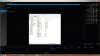
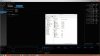
I plan on keeping it like this for a while to test stability. -
Tried it - mic out doesn't work and audio quality and volume is lower than that in Windows. Furthermore, the AppleHDA version is 4 revisions behind - the one in OS X 10.9.5 prerelease is 2.4.something, while that is 2.0. You guys can try to patch AppleHDA yourselves, but please don't rely on me. Link:
http://forum.osxlatitude.com/index.php?/topic/1946-complete-applehda-patching-guide/ -
Seriously? You have to install their drivers just to charge your i-phone? You just gave me another reason to dislike anything Apple.
-
Dunno about that, mate. My One M8 needs its own driver to charge; as does my sister's Galaxy S5 (only difference is that Windows automatically detects and installs drivers for the latter two, while you have to do it manually for the iPhone).
Seems like you're just hating on Apple, mate. -
Thanks for the answer/discussion to my questions about the CPU and pasting ... I guess I'll have to post back here when I actually get the thing and play with it, huh?
-
Here's a pic, though I'd be surprised if it helps -- it happens when I plug in HDMI...

-
Ok fair enough, ...I was about to say wait a moment, I have an HTC One (love it btw) and don't need to install drivers manually, but yes you are correct, Windows auto detects and installs them. I guess I should have been more precise in my original post, so I'll rectify that now:
But yeah, I am kinda hating on Apple too mate, but not without reason.
LostCoast707 likes this. -
What bios versions are you guys using? Has Sager updated it yet?
I am currently using Prema Bios on a NP7338, and am thinking about flashing back to stock Sager because I am not using any of the added features. -
Just bought one of this and its screen bleeding is soooo annoying.
What a crappy LCD assemble.
![[IMG]](images/storyImages/b2ac17f859ed128adf38051669d9598e.jpg)
I've sent it back and they assume that almost all the units share that weird issue.
My old Apache's screen was definitely better.
*** Official Clevo W230SS/Sager NP7338 Owner's Lounge ***
Discussion in 'Sager/Clevo Reviews & Owners' Lounges' started by Ryan, Mar 20, 2014.


