Problems? See this thread at archive.org.
yep, now all is fine =)
-
-
What sort of clocks have you managed to reach?
-
4300mhz all time on 9600kf with undervolt -110mV. With stock values of pl1 is95w but my i5 during render ate 101w and after 128sec processor going down to 4100mhz ( without thermal throttling)
-
For 9th gen to truly shine, you'll need to delid and lap it

-
Yep ive got that treatment made to mine, dont forget a taller IHS, i couldnt get my cores delta to stabilize until i swaped to the BartX custom clevo IHS. Thats a must have for the P775, i dont know if it helps for the p870. Does it?
-
P870TM1 heatsink lottery is hit and miss (mostly miss). BartX IHS definitely makes a difference for the contact pressure here. Only thing that can top is going direct die with a vapor chamber, which is a much more intrusive mod.
Papusan likes this. -
It is delidded already
-
Well at least that's a start Road to daily 5Ghz is paved with lapped silicon dies.
Papusan likes this.
-
It was actually really easy to do with the delid tool.
Papusan likes this. -
Yeah, the delid mate 2 is great investment. It works for 10th and 11th gen as well. The die thickness on 9th gen is what makes them run stupid hot, so lapping it does dramatically improve overhead.Papusan likes this.
-
That and 8 power hungry cores lol.
-
I have updated from Windows 10 Pro to Windows 11 Pro and even though everything else works. CLEVO CPU Memory OC application is not working (using CLEVO Control Center v5.0001.1.88).
Windows Event Viewer shows this:
===============
Source: XTUService
Description:
Service cannot be started. System.NullReferenceException: Object reference not set to an instance of an object.
at IronCity.Core.Server.CoreServer.Start()
at XtuService.XtuService1.OnStart(String[] args)
at System.ServiceProcess.ServiceBase.ServiceQueuedMainCallback(Object state)
===============
Looks like an issue with Intel XTU which comes with CCC. I have tried the following so far without success (rebooted between all uninstall/install):
1. Updated XTU with latest version but it fails to launch with a message that some other performance tuning application is running
2. Uninstalled CCC and installed latest XTU
3. Uninstalled CCC then installed latest XTU and then installed CCC
4. installed latest XTU then installed CCC and reinstalled latest XTU
Anyone experienced the same and know a way to fix? -
Might be worth reporting this to your reseller.
-
Reseller response
"If you open and go to the Microsoft Store, at the upper right hand corner of the Windows, you’ll see a “…” and please select “Download and Update”, you latest driver or Control Center app will automatically show or update for you. You don’t need to do anything else."
This doesn't work as there are no updates.
Anyone running Control Center 1 with Windows 11 or Control Center 2 or 3 with P775TM1-G 8700K/GTX1080? -
I'd you need it then it might be best to stick to 10 for now.
-
If you need it for strictly overclocking, you can either just set the values in the bios or use XTU.
-
I have tried installing/uninstalling/upgrading Control Center and XTU without success as described in my original post here
The values are in the bios but control center was also configured under Windows 10 which is now upgraded to Windows 11 and I cannot change those settings anymore as CPU Overclock app is not working. The ran Throttlestop and its not showing overclock settings so XTU is the underlying issue which I cannot uninstall or upgrade.
Trying to find out if there is a more updated version of Control Center v5.0001.1.88 for P775TM1-G 8700K/GTX1080 or anyone successfully upgraded to Windows 11 and can still use it. -
I am using 5.0001.1.94 - same effect. No support overclocking memory. -
Please help. Which better heatsink - separated from p775tm or split p775dm3?
I need make a choice.
My laptop is p775tm.
Gpu is gtx1080
Cpu is 8700 no k -
A split heatsink is perhaps a little better for high loads on both and the joined one is better for unbalanced loads.
-
Whos made a comparison of the thermal efficiency of p775tm and p775dm3 heatsink?
i just tested my p775tm1 8700 no K, gtx1060 stock with 775DM3 heatsink
throttlestop settings - power long limit 80w, short limit 100w, no undervolt and other settings change
CPU+GPU (load furmark+ aida64 cpu stress, no memory) speed fan max (auto - too maximum speed)
92 C - cpu
74 C - gpu
Only GPU - max speed 65C, auto - 74C
Only CPU - max speed 77C, auto - 82C
Results after 3 min and more when stabslize temp (when start test temps are higher for CPU - 96-98C - fan not have time to spin up instantly to max speed)Last edited: Dec 16, 2021 -
That is pretty high for the CPU, is it delidded?
-
After, i test with p775dm3 heatsink and p775tm heatsink in same time, all components same - 8700, gtx1060, arctic cooling mx4.
Test 2 times.
P775DM3
Only cpu - 82C, max fan 80C
Only gpu - 71C, max fan 66C
Cpu + Gpu max fan automatically - cpu 98 (throttling, overheating), gpu - 78C
P775TM1
Only cpu - 92-95 (overheating, throttling) max speed fan auto - results - little better than p775dm3 but too bad.
Only gpu - 74C, max speed 72C
Gpu + cpu - similar temps when only cpu and gpu, maybe 1-2 C higher.
Results - p775dm3 heatsink does a much better job without 100% load on the processor and graphics card. when everything is loaded at 100% it is a little worse.
P775tm has an advantage only in terms of noise level at idle, but it has a significant drawback that in the first 5-10 seconds the processor at 100% load instantly reaches a critical temperature of 95 degrees, the fan does not have time to spin up. p775dm, it doesn't happen so quickly, the processor heats up the entire area of the two heatsinks not so quickly.
i did tests and decided to keep the heatsink from p775dm3





I will repeat again - the laptop does not have undervolting, modified BIOS, or delided cpu. everything is in stock. throttlestop settings power pl1- 90w long and Pl2- 130w. this is the limit of the laptop in this configuration.
that's the efficiency of heatsinkLast edited: Dec 17, 2021 -
-
-
-
Can someone help me.
Is it ok if I install Pop OS on this laptop? Will it mess with the bios or affect the undervolt capability? is it somehow gonna turn my laptop to a paperweight, do I need to do something or just plug and play?
I'm using the stock one (1.05 I think), and is there an MSI afterburner alternative for that OS? -
hi. i know that linux working fine on p775dm, my friend was install on his laptop, because he use programming softwareRedMarl likes this.
-
It wont mess with the firmware unless you tell it to.
RedMarl likes this. -
P775TM1-G
8700K
GTX 1080
Everything was working fine but after a reboot the resolution changed. Checked and this is the issue.
Have uninstalled and reinstalled drivers. Also restored to an earlier windows backup with same result so not a driver or settings issue.
Display is working fine with no artifacts but drivers not loading.
Is it dead? any tricks to revive it or where to find a replacement?Last edited: Jan 4, 2022 -
video card is dead
may be bios update with lower memory and core clocks -
To liven up the topic.
I ordered an RTX2060 and a separate GPU heatsink for it.
Finally, let's check if Gsync works with PREMA-bios. -
Have you got a supported panel?
-
@Meaker@Sager for now Gsync is working, panel is LP173WF4-SPF5.
-
-
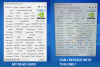
Model P775TM1-G (8700K/GTX1080)
Can I use the card on right pulled from a P775TM1 as a direct replacement? Everything including the Device ID, BIOS and release date etc are exactly the same. -
There can be some funny behaviour putting a non G-sync card into a G-sync system. Best case is you loose G-sync.
-
almost bought the card but stopped thanks to your info!
do these laptops work without internal GPU? like if I remove the MXM card and use some external thunderbolt enclosure with a GPU? -
duplicate
-
Though with a patched nvflash one can put the Gsync bios on...
-
1. Will the system boot with the non g-sync card to flash?
2. Anyway to identify if the card is different based on device id or something as the cards show identical in GPU-Z. -
The answer to 1 is yes, its just that the G-sync option won't appear (it happened to me)
The answer to 2 is regular nvflash. In my case when I was flashing vBios to get ready for dsanke's mod NvFlash had a different identifier for the Gsync bios firmware and wouldn't let me flash the non-gsync card with it (hence where the patched one comes in).Qadhi79 likes this. -
You think the attached cards in the image are identical?
Attached Files:
-
-
Looks like it. From what I have experienced, Gsync and Non-Gsync cards have different BIOS versions.Qadhi79 likes this.
-
thank you sir for the quick feedback! much appreciatedKabyZen likes this.
-
If it helps I did a little searching in this thread (see page 180) and that bios version IS gsync.
-
My RTX 2060 and heatsink arrived.
Seller put some thermapads, so there is no problem to replace. Only longer screws were needed to install the heatsink. Heatsink is compatible with RTX3xxx, so just waiting to lower prices for GPUs)
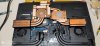
General view of the heatsink:
-preview.jpg)
The weight is significantly different compared to the original: (285 vs 409 g, much more cooper here)
-preview.jpg)
-preview.jpg)
Final view:
-preview.jpg)
As a result, GPU correctly defined in BIOS ( Thanks
@Prema magic), G-Sync is working (!), everything works perfectly...
Thanks
@Prema magic), G-Sync is working (!), everything works perfectly...
Except for the fact that the card constantly choke against its power limit. (80 W) So far it is not possible to adjust the curve to a stable frequency, there are jumps around 1500-1700 MHz. (continue to work on it) I remember
@Prema be able to do magic to stabilize frequencies on these cards or
@Meaker@Sager can tell me about a shunt mod?
-
2 shunt resistors on the back, do them equally and you are good.
FTW_260 likes this.
*** Official Sager NP9175 / Clevo P775TM Owner's Lounge! ***
Discussion in 'Sager/Clevo Reviews & Owners' Lounges' started by Spartan@HIDevolution, Oct 6, 2017.