 Problems? See this thread at archive.org.
Which SSD brand is in your machine?
-
-
Sollution for too wide usb devices:
https://dl.dropbox.com/u/8392718/foto/usb_900x3c.jpg

(supports USB 3.0, available on dx ) -
HI,
has anyone got a solution for the problem created by the latest bios upgrade that means that opening the lid will not wake Windows 8 from hibernation?
Thanks
Andy -
Somebody correct me if I'm wrong but I'm pretty sure that is how it is supposed to work when it transitions from S3 to S4. No keyboard, mouse or lid opening should wake it up, only the power button.
-
Windows 8 Fast Start is a form of hibernation. It should certainly wake from that. Fast Start is enabled by default when Windows 8 is installed.
-
Well it certainly used to wake up on lid open. The only thing that changed was the bios upgrade.
-
I opened a case with Samsung on this. The first reply I got directed me to a screenshot of the Windows 7 utility with the option for Fast Start. I clearly told them I'm using Windows 8.
I'm looking through the previous threads on how to downgrade the BIOS...
On the upside, I got Intel Rapid Start to work on Windows 8... made a lot less useful by the fact that the lid won't start the machine anymore.
-
Regarding the lid wake issue, there are a few things I would try:
Turn off Windows 8 Fast Start
Turn off Hibernation
Test sleep and resume. Verify sleep is the lid close setting.
Close the lid and see if the machine sleeps.
Open the lid and see if the machine resumes from sleep. -
I fixed it by rolling back to the P04AAC BIOS. I would have went back to P05AAC but I couldn't find the link. You can get it here:
http://forum.notebookreview.com/samsung/696197-samsung-laptops-roll-back-bios-updates-8.html
Now IRST works and so does my lid.
-
Good tip. Unfortunately, the issue still occurs in Safe Mode, so it looks like I'll have to send it in for repair
-
Hey, how did you install IRST on the series 9?
Thanks! -
hi guys,
Sorry for not reading all the way through the full 207 pages. Read about 30, but I couldn't find the solutiion to my problem:
Is there any way of stopping the laptop from adjusting colors while watching a movie? My laptop always seems to change the colors, even though I didn't select that mode in the easy settings app. -
Yes, this is really annoying. Right click on Desktop, Graphics Properties, Media, and turn off all the Color/Image Enhancements.
-
I'm having the same issue with np900x4c and P06AAC bios update. Did you find how to re-enable the open lid action?
-
If you're running Windows 7, can you get it back by going to your Settings utility and enabling Fast Start?
Otherwise, I got it back by going to an older BIOS:
http://forum.notebookreview.com/samsung/696197-samsung-laptops-roll-back-bios-updates-8.html -
Do you guys think that the S9 13,3" version will be swallowed by the new S7 Ultra? Better graphics, better screen, more RAM, ports...
-
What do you mean swallowed? Discontinued?
-
What I mean is, if you had the chance to get one of them, which one would you get?
-
The S9 Haswell...
-
1600x900 on a 13.3" screen is my point of tolerance. 1920x1080 isn't going to work for me. I will need to see one up close and personal to see if 125% DPI will ease the pain.
The 15" is probably a different story but that largely depends on it having a PLS screen or not. So far, no confirmation has been provided. -
Maybe a crazy idea, but did you consider using Qt to build those apps? Qt Project -> mix C++ (backend) and javascript (QML, declarative UI language) for the apps and very little porting effort between iOS, android and Ms platforms. Also, it all runs on Linux (or Win or Mac of course) so your choice for Samsung would be well warranted ;-)
-
I;m installing windows 8 in uefi mode but was wondering what the difference is between UEFI mode and Intel rapid start technology.
I know UEFI is a new 'bios" and shortens the startup time and Intel Rapid Start also shortens the startup.
Won't they conflict if I install both? -
The key benefit of the Intel Rapid Start in Windows 7 is intelligent loading of RAM from the hibernation partition so that the computer can start running from resume before it has loaded everything. IRST also proves (if set up correctly) a silent transition from sleep to hibernation. IRST has less impact on a clean boot. Some of these enhancements may be built into Windows 8 (I've not tried it).
I'm not sure if UEFI inherently improves the boot time. A useful description of UEFI is here (and mentions the risk of bricking Samsung notebooks when UEFI is enabled).
John -
You can definitely use both UEFI and IRST, they're two completely separate things.
Having enabled UEFI and then upgraded to Windows 8, here's some things you can expect:
- You will not be able to boot anymore without UEFI enabled, and keep in mind that UEFI disabled is the default for this laptop's BIOS so anytime you update the BIOS and you wonder why it's not booting - this is why, go and re-enable it.
- Cloning drives etc. is a big PITA, your disks become GTP instead of MBR, which means they're not supported by many popular utilities, installing another primary partition with a different OS can be difficult if not impossible, basically... if you plan on messing with your disk after install, stay away from UEFI.
- UEFI is supposed to give you some sort of security benefit, but I'm not really sure what that is on this laptop without TPM, I think it's more akin to having DRM on your OS.
- On this laptop, flipping on UEFI is not going to make booting any faster, I can tell you that.
- I'm pretty sure next time I do a clean install on this laptop, I'll just disable UEFI.
I've used this laptop on Windows 8 with hibernation and with IRST. Return from hibernation is probably almost as fast as an IRST resume, maybe just slightly slower. However, I think IRST is still more convenient, because of the way the timers are controlled for IRST vs. hiberate.
For me, the main goal if hibernate is to not waste any battery while the laptop is sleeping in S3 state. On the other hand, I don't want the laptop to go to go to sleep unless I tell it to, so I generally set a pretty long inactivity timer before it goes to sleep or hibernate (like 2h). Therefore if I put it to sleep manually, it sleeps for 2 hours, wasting battery, and then 2 hours later it hibernates. But the IRST timer is relative to when you put the laptop to sleep, so it doesn't matter if it went to sleep after you shut the lid manually or after 2h of inactivity, when it's sleeping it's not going to waste any battery.
In practice what I ended up doing is setting a 1/2 hour "grace period" IRST timer so that within 1/2 hour I still get the faster resume from S3, but any longer and it will be IRST. So now my laptop wastes only 1/2 hour of battery when it's sleeping. -
Cool, thanks for the info guys.
Yeah I installed windows 8 twice today, first time in MBR mode, 2nd in UEFI. There was no difference in booting times.
I rarely use hibernate so guess IRST will be no use for me. Tried installing IRST using the link on the previous page but messed up my windows so I'll be staying away from it.
Hibernate is enough for the rare moment I need it.
Thanks again.
-
Would anyone still recommend this laptop for university/general use? If so does anyone know the rrp of it at the moment?
Best price I could find was $1000 for the base model. -
Yes, depending on what you're looking for. As long as you don't run VMs or other RAM/graphics intensive applications and are looking at 13", I think you'll be very satisfied with an S9. The X3D (W8 with sandy bridge) model is the most affordable, it is regularly on sale at amazon for $700. I really don't think you can find a better ultrabook at that price point. You might also check the MS store website as they occasionally have very good sales.
-
Thanks, I'll check it out.
-
My np900x3c has a problem
All of the sudden the laptop makes a really high pitch tone. This mostly happens when using the speakers, while a source is playing a sound. However when I plug my headphones in, the same noise channels trough the headphones. When I remove the sound source, the high pitched tones stops. The tone begins on pretty random occasions. Both in soundcloud, silverlight and youtube video's.
Is this a driver problem? -
If it were hardware then the sound would most likely be continuous. Perhaps the microphone is picking up the sound from the speakers and playing it back as a feedback loop (although this shouldn't happen with headphones). What happens if you cover the microphone (the small home next to the audio socket) with your finger?
Next I would update / reinstall the audio driver package.
John -
I was just going to ask about that, I started getting the exact same thing often lately. It's like a loud high-pitched whistle that plays whenever a sound comes out. Last time it happened I turned the volume all the way down, then I turned it back up and it went away. No idea what causes it. I didn't have it particularly loud and the only sound playing at the time was the Windows error chime.
I use Windows 8 so I'm not even sure if my drivers got updated recently or not. I run the P05 BIOS. -
If anybody is interested in still grabbing the 1600x900 versions the microsoft store has both the NP900X3C-A05US and the NP900X4C-A06US for $400 off with coupon code RMN400 applied at checkout..only good until the 26th. $899 and $999 respectively.
-
This happened to me as well somehow. Left my notebook in sleep mode over night and when I came back to it, it took awhile to wake (displayed a black screen) so I kept hitting the space bar until the sign-in screen came up and this high-pitch noise started too. I thought it was a one-time thing but on occasion when I'm on YouTube I'll hear it. Fixed it by using the system restore point and going back to before I ever encountered the sound and it never happened to me again.
-
Found the fix! Restart your computer and press F2 at the BIOS screen to go into the BIOS settings. Enable the S3 Auto Wake function. It's in the same list as the battery charge saver and USB charging options.
-
Hi everyone,
I've been looking for a new laptop for grad school and I came across the NP900X3C, theres a model on sale at futureshop for 1200 canadian dollars with a 256GB SDD. Is this a good deal? Now I'm guessing that they're on sale because there's a new release coming up, but is there any information about samsung releases for 2013? Is it worth the wait? Also, I've read in this thread that the SSD on the x3c is a bad one, is that the case for all models? (I haven't seen anything specifically about the 256 model). From the research I've done it looks like a similar ultrabook to the x3c is the x1 carbon. From reviews I gather that it has a worse screen and battery life, but a better keyboard and I guess a better reputation because it's a thinkpad... Is that a reasonable comparison? It's a big investment so I want to make sure this is a good purchase, thanks for your help! -
1. Also look around for the NP900X3D which has identical internal hardware but in an unpainted magnesium alloy chassis. You might also want to look for the X4C / X4D which packs a 15" screen into a 14" footprint, has a bigger battery (all-day operation is possible) and doesn't have the 4GB fixed RAM limitation (see my X4C review).
2. There is an NP900X3E in the pipeline: It has been listed in UK since January but I've never seen it available. The only significant change is the FHD display which will make everything more microscopic. A Haswell version of the Series 9 will also arrive sometime later in the year.
3. The problem SSD is the Sandisk U100. It's most common in the 128GB version and only one person in this forum has reported getting a 256GB U100. It's 99% probable that a 256GB SSD will be Liteon or Samsung (both very good).
4. The Series 9 keyboard has limited travel. Most people find it easy to adapt to. I went from a Lenovo T420s to a Series 9 without difficulty and feel that metal construction of the Series 9 is more robust. The one downside of all the metal is that the WiFi signal is weaker.
John -
My buddy has one of these. He is looking at updating it to Windows 8 so he can run a VM on it (have to use RetroUI Enhancing Windows 8 and Bringing Back the Start Menu with it of course as I hate metro for work).
Anyone have issues with installing Windows 8 on this PC? -
Windows 8 Pro runs extremely well on my NP900X3D-A02US (Ivy Bridge). It should run fine on the Ivy Bridge based NP900X3C, too.
-
I agree with this, I'm always looking for largest resolution and I have purchased Sony Vaio Z with 13" 1920x1080 screen (paying quite a premium for it). for things like codding in Eclipse or displaying multiple windows side by site it was awesome, but for normal day to day work, like browsing the web, reading email etc, it was way too high. I'm 37 with good eyes and constantly had to zoom in or change the res down as it was just hard to use for a longer period of time. The eye strain was just too much.
I just switched to the S9 and while it took a couple days to adjust to the lower resolution, overall I find it much easier to use. I only miss the higher resolution of the X once in a while when working in Photoshop or doing some code compare in eclipse where i have two panels of code side by side. -
Cover / Skin for the S9
Maybe it was already in this long thread but I could not find it.
I'm looking for options of a skin for s9. Preferably carbon look that would cover the top, bottom and the wrist pad.
something like this
Amazon.com: SONY VAIO X Laptop Cover Skin [Carbon]: Electronics -
1. Note that with only 4GB RAM there isn't much RAM to play with so the VM can't be allocated much RAM.
2. Why do you need Windows 8 for a VM? I have XP running in VMware Player under Windows 7.
See the suggestions in the Series 9 accessories thread.
John -
I could not find anything in the thread about an exterior skin. I was using the forum search so it may have missed something.
-
Thank you John for your fast and informative answer. I hadn't looked at the 15" versions yet, the x4c looks good!
Google sent me back to these forums when I searched "np900x4e" so I guess there's no point in waiting for new 15" models this year.
Apart from the fact that I prefer the color, I'm interested in the "c" models because of the intel 4000 graphics (although it isn't the use I want from a laptop, some light gaming would be fun).
Have you tried running games or graphics-intensive software on the x4c/x3c? I saw on your review that the 15" has one less fan than the 13"model, perhaps it there could be overheating issues?
I'm leaning more toward the X4C, although it's even more pricey than the X3C... -
Most of the D models use Ivy Bridge but there are some cheaper Sandy Bridge ones around.
The X4C does not overheat. The fan rules are, IMO, unnecessarily conservative. Because the X4C has only one fan it has to work harder and the noise becomes noticeable in a quiet room while the two fans in the X3C can shift the same heat with less noise.
John -
You should also check out the Lenovo Yoga. It's a little bigger than the Series 9 but you get the occasional tablet use. It also has 1600x900 IPS display so it's great as a desktop.
-
I'm on my 3rd Lenovo at work (seperate models) as they exclusively use it after using IBM before Lenovo bought them out. You would not believe how many issues we keep having with these machines. I think most of it has to do with drivers but the issues are many and thats in IT (developers) group.
-
I read all the posts and nothing about skin. The keyboard covers are interesting. but not sure I would like it. What I might do is get some carbon vinyl wrap (3M) and cut it out myself.
-
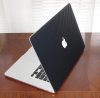
The 3M carbon rocks. The top of the Series 9 should be relatively easy but the bottom is going to be rather hard with the curves and all te cut outs for the vents, screws, etc.
Here's a pic of the Retina Macbook Pro I sold.
-
What a shame we all missed out on this..I'm guessing somebody bought them all for resale as they were sold out by the time I got the email.
Buy Samsung Series 9 900X4C-A03 - 15 inch notebook PC, Intel Core i7 processor, sleek design, HDMI - Microsoft Store Online
X4C-A03 for $899.
13.3" Samsung NP900X3C with Ivy Bridge CPU
Discussion in 'Samsung' started by John Ratsey, Apr 11, 2012.


