Problems? See this thread at archive.org.
Seems odd the would sell that model at that price when it wasn't even listed previously. Might have been an error. Someone got a killer deal if it was for real.
-
-
Very nice, great job cutting out the apple logo. I only want to do the top and the wrist pad. I guess I will use the tracing paper to create a template for the wrist pad as I would like to cover under the touchpad in one piece.
-
For the Mac, you can buy them already cut. See iCarbons - Superior Scratch Protection That is where I got mine.
-
I'm considering buying the NP900X3C but from what I've read in this thread, the wifi reception isn't very good. Is anyone able to stream 1080p videos smoothly using the wifi with this notebook?
-
Have a link to some videos you want me to test?
-
Distance between computer and router is an important factor.
I would add that Intel WiFi driver 15.6.1 published last week improves the connection stability for most people.
John -
Thanks for the link, John. Do you think it will improve speed when you are farther away from the router? I have insanely fast speeds with a fairly new Linksys N but once I move out of the room, across the hall and/or down the stairs, speeds deteriorate quickly.
This said, I would also suggest to Razer that if your download speeds under ideal circumstances with another notebook is at least 20 mb/s streaming 1080p should be fine, even if the speed drops to 10, which hopefully it won't with the new drivers. -
Increasing the distance, particularly with a wall or two in the way, causes a rapid drop in the transfer speeds. I can get >40Mbs on my X4C when in the same room as the router but <4Mbs at the other end of my house.
I wouldn't be so confident. The new driver has primarily reduced dropped connections but it doesn't compensate for relatively low signal strength (the result, IMO, of having the antennae at the back of the chassis instead of the usual position at the top of the screen). InSSIDer will show the signal strength. -20 to -50dB should be fine for streaming but -60dB or worse is likely to give problems.
John -
I would think any 1080p youtube video would be fine, thank you.
It will be about 20 feet and between 2 walls so doesn't sound very promising. I'm currently getting an average of 10Mbps from my desktop with a USB adapter which I believe is (spec wise) similar to the Intel 6235. -
Does anyone use Skype video chat? My image is flipped on the other party's screen. I used to have a Microsoft webcam and was able to check a box to mirror/flip the image. But can't seem to find anything on my NP900X3C/Windows8.
-
I agree that 20ft / 2 walls is in the marginal zone. It's where the 5GHz band (which gives best throughput at close range) has dropped off.
Does the USB adapter has an internal antenna (like this) or an external antenna (like this)? I bought the latter as backup for my Series 9 for the occasions when the internal WiFi signal was too weak. With the external antennae it does give a stronger signal than the internal WiFi but I would expect a postage stamp size antennae in a simple dongle to be no better than the Series 9 arrangement. (That TP Link adapter with the external antenna has the further advantage of having an extension lead so it can located somewhere where the signal is a bit better.)
Is the Cyberlink Youcam software installed on your computer? If so, look there for the settings.
John -
My USB adapter has and internal antenna. Do you think getting one with an external antenna is likely to make a good enough difference?
-
Bigger is better (within limits). There is also an adapter with two antennae.
I see the USB WiFi adapter as a backup plan in case the internal WiFi isn't up to the task. However, I would expect the internal WiFi in the Series 9 to be better than a USB adapter with an internal antenna. Unfortunately, I don't have one to hand to make any comparative tests.
John -
Hello lovelies, it's been a while.
I've just wiped my NP900X3C in prep to install Linux Mint. though I like to keep dual boot with Windows in case I need it for work. I'm in the two-day process of cleaning things up, and have gotten stuck on a couple of sticky system tray icons. I did a search and couldn't find direct references on how to easy remove these. They are:
- Samsung Recovery Solution 5
- Samsung Software (this one has a strange tooltip)
-
Are you saying that you have uninstalled the programs but they have left something running?
I recall Dannemand saying that SW Update leaves something behind when uninstalled which needs to be separately disabled. (I hope he will drop by and give more details).
John -
Great, thanks for your help.
I actually have one more question. I heard that this notebook is a bit of a finger print magnet, if so what's the best way to clean it? -
I know my eyes are past their best but I've not noticed a problem. The paint (actually very dark blue, not black) has an eggshell finish, not glossy.
However, every now and again I do my standard notebook clean which is a wipe using a damp cloth with a hint of washing up liquid detergent, starting with the screen.
John -
@chicgeek & John:
Most Samsung software can be uninstalled through the Programs & Features control panel; if it doesn't uninstall, something is usually wrong/corrupted in the installation, and the easist fix is to install the same software & version anew, then uninstall again.
SW Update installs a separate product called S Agent which must be running in order for SW Update to access Samsung's servers. As John mentioned, It is a bit dirty in that it S Agent does NOT uninstall along with SW Update and is just left hanging there.
You can uninstall S Agent manually by:
1) Delete the Scheduled Task that loads it.
2) Reboot.
3) Delete the C:\Program Files\Samsung\S Agent folder.
There are still a few registry hooks, most of them in HKCU/Software/Samsung (and mostly harmless).
I used to remove SW Update after completing Windows installation (and before that its predecessor Easy Software Manager) in order to keep the amount of background tasks and latencies to a minimum. Now I actually keep SW Update installed, but disable the Scheduled Task that automatically loads it. Before opening SW Update I just run a Start Menu shortcut to S Agent. -
Hi,
I recently got a new NP900x3c-A02 model, within a few minutes of turning it out I noticed that the laptop started to get very warm. It got warm in the top keyboard area as well as the bottom got very hot as well.
I was thinking it may be that unit so I even went back to best buy to exchange for a new one and it has the same issue. I am not sure if this is because of certain software or something that I need to change in the system to get the unit to run cooler.
Does anyone else have this issue with the same unit?? I love everything else about the laptop but it's gets so hot even on light browsing.
Thanks in advance! -
I have just received my unit today as well. I don't have any issues with the laptop getting warm.
What surface did you put the laptop on?
Are there any recommended things to do? The only things I have on the list so far are:
- update the WiFi driver to what John has posted in the previous page
- Battery Life Extender turned on
Also, do you think a third party micro hdmi - vga (such as the one posted below) will work fine for the S9?
1080P Micro HDMI Type D Port Input to VGA Female For CRT Monitor Adapter Cable | eBay
Cheers -
Good point: The main air inlets are on the bottom with the hot air blown out the back. Make sure that those air inlets are not obstructed when running on mains power.
If obstructed airflow is not the problem then I would check the CPU utilisation on the Processes Tab in Task Manager. If, on idle, it is more than a few percent then see what process is loading the CPU.
- Make a backup using Samsung Recovery Solution
- Check for BIOS updates (see here)
- Check for other driver / software updates using SW Update
- Uninstall Samsung Easy Support Center (causes problems with some web browsers)
- Check whether you want the other pre-installed software and remove it if you don't. (Easy) Settings and SW Update are worth keeping.
It will work. However, I would note that I first bought a 3rd party adapter and the display quality wasn't very good. I subsequently bought the Samsung adapter which was better. But maybe that adapter you have linked to is as good as the Samsung one.
John -
Brilliant, thanks both, and to Dan for the detailed reply.
No, I haven't uninstalled these specific programs yet - I was wondering if you uninstalled SRS5 from within Windows if you would still be able to access the SRS boot option (F4?) to recover from the backup partition. I'll play more with stripping out some Samsung programs after I've properly set up my Mint install, as I won't be using Windows all that often.
Cheers again. -
I use an alcoholic wipe every now and then, something such as UVEX, like you would use to clean glasses/lenses with. It gets rid of any marks I have had on it so far
 Also handy to have around for mobiles and other electrical bits and bobs if you get them dirty.
-
How easy is it to open the display bezel?
Which parts of the chassis are made of plastic?
Is there a service manual available?
Does Samsung whitelists MiniPCIe devices? -
I believe the bezel is glued so, if you pull it off then you will need a new one.
The cover over the WiFi antennae along the back between the hinges. The internal keyboard surround / palmrest, bottom and display back are all metal.
You can buy one from samsungparts.com.
Not than anyone has reported. Are you planning to change the WiFi?
John -
Thanks John! ... although this information doesn't make me very happy.
In the process to find or mod a Full HD ultrabook with WWAN I indeed thought about replacing the WiFi with a Wifi / 3G combo module.
So the antennas are placed there and not in the bezel?
Are they the yellow in the picture?
![[IMG]](images/storyImages/cdman-series-9-review-2_29.jpg)
Since the bezel doesn't seem to open and the chassis is well shielded I guess it's the only spot for the additional antenna(s). It looks quite cramped though and even if it does fit in there I'm wondering if the antennas will interfere with each other. -
Yes, that's the antenna made of gold colour metallic paint to the left of the yellow and blue arrows in that picture. There's not much spare space.
It's a project to be undertaken in hope, not expectation. It might work OK or it might not.
A lateral thought is to look for the new NP740U3E. The photos here showing the display back suggest a plastic strip at the top back which might house the antennae on that model.
John -
Another challenge is to add a SIM slot. The easiest way I guess is to use the neighboring SD card slot. I don't like blocking it though, so another idea is to cut open one of the air grids in the back and place it there. Not sure if the SIM Card likes the hot temperatures or if the CPU will even throttle if ventilation is reduced. Would you say there is at least enough space available?
I digged out a 2y old thread in the networking forum where I posted all info I could find on the web: http://forum.notebookreview.com/networking-wireless/593607-wifi-3g-pcie-half-mini-card.html
This model was even announced to have LTE 3 months ago! But talking to Samsung they don't know about anything. Although looking at the internals it seems there is free space for an extra WWAN card.
Good observation, but to place the antennas there one still have to open the whole bezel I guess.
In general I'd go for the 900X3E rather than the 730U3E. Much smaller / lighter, matte(r) screen?, although 4GB non-upgradable RAM is an absolute joke in a 2013 model. -
I received the 3rd party adapter today and you were right - the quality wasn't so good and when I put the resolution to 1080p, monitor says no input signal. Will be returning it.
I guess it's time to buy the Samsung adapter. Hopefully it will push 1080p with no problem. -
I wouldn't plan to push much higher than VGA resolution through the VGA port because it is an analog signal. I only have the VGA dongle in case I need to connect to a projector. There's more about the VGA adapter here and here.
If your monitor is 1080 then does it have an HDMI or other digital input? In this case keeping to a digital signal would be much better. You can get adaptors from HDMI to other digital signals. Another of my recommendations is to not get a long cable with micro HDMI on one end but to get a short micro HDMI to HDMI cable. These are thinner and more flexible and won't put much stress on the micro HDMI port.
John -
Would it be entirely impertinent here to suggest maybe it's time to look at Samsungs newest UB offering, the Series 7 Ultra, reviewed here ;and here. It has essentially all the same specs as the Series 9/C plus user interchangeable components for RAM, SSD, Wifi, etc. at an alleged $999 retail price coming to Best Buy in the States soon? I mean, as wonderful as the Series 9 is, it's just so cramped and not amenable to user modification limited by space alone if not the architecture to permit alteration. As the Series 9 "Premium" has already been unveiled and it's little more than a screen upgrade (to one similar to the one in the S7 Ultra) I'm wondering if Samsung hasn't cannibalized the 9 with the 7 even if the latter is a bit heavier and thicker. Thoughts?
-
I've been thinking along the same lines. Note, however, there are 4 potential permutations of the 13" Series 7: Touchscreen (740) and non-touch (730) with / without the AMD graphics. With AMD graphics there's some RAM on board and one SODIMM slot while the version without the AMD graphics has two SODIMM slots.
As far as I can discover from the thread about those models is that the 740 has a plastic panel along the top of the display which presumably houses the WiFi antennae but the 730 (with the thinner non-touch display) doesn't have this.
John -
I don't think so. True, the 7 Ultra offers a lot more - RAM slots, dedicated GPU, 3x USB, better speakers, anounced LTE... but it comes at a price:
Going by the official dimensions the 730U3Es volume is around 44% bigger and weights around 26% more. This is not just a bit, but a whole different league IMO. -
Can't you download the drivers manually? My local Samsung page offers only SW Update. Is it possible to extract the drivers from SW Update downloads to keep them for a clean installation?
Is there a battery program to keep the charge at a certain level when on AC?
Has anyone tried to run XP? I see the older 900X3B has some Samsung specific XP drivers. Are they compatible with the 900X3C? (I guess specific Ivy bridge & device drivers can just be used directly from the manufacturer) -
Are there higher resolution pictures of the internals available than those shown on Samsung Tomorrow?
-
SW Update is the only route for the newer models. No need for Samsung to spend time updating web pages and, for the user, it should mean we see updates sooner.
The Battery Life Extender option in (Easy) Settings keeps the charge at 80% which is said to be good for the overall battery life. If you want to reduce the occurrence of top-up charges then charge to 90 or 95% and then enable Battery Life Extender. There won't be a top-up charge until the battery drops below 80%.
I've got an XP virtual machine running on my X4C if that counts. I don't remember installing any specific drivers. I'm sure that a combination of X3B drivers and manufacturer's drivers (particularly Intel) would get you working. Easy Settings might be the one headache although I don't think Samsung made significant changes to the platform between the B and the C apart from the new Intel CPU etc.
There's the photo in my X3B review. The internal layout is the same. If you want an even higher resolution version then I can post it.
John -
I'm not a fan of being patronized. I'd rather choose the drivers / programs by myself. Plus I wouldn't be surprised if Samsung collects user data that way.
Yes please. Do you also have photos of different angels?
Can you actually remove the plastic cover so you have access to that area from on top of the device? There is this black screw right of the right antenna...
edit: It should read angles, I see you posted the angel picture here already -
Samsung Software Update is actually a fairly robust application where you can choose which drivers and factory apps you wish to download or update. You don't have to take them all.
-
So basically you don't have a choice to have the choice.
-
You can install it and download/install the drivers you want (I believe you can save them locally) then you can uninstall SW update.
As far as modifying the machine for WWAN, why not not just tether to your phone? How often would you use the laptop without your phone nearby. It will preserve your warranty and save you the additional monthly charge. -
Thanks, I will check that out once I get hold on a Samsung.
Regarding WWAN I don't think tethering is a convenient long term solution on the road. Have a look at that discussion: http://forum.notebookreview.com/networking-wireless/706071-why-no-wwan-ultrabooks.html -
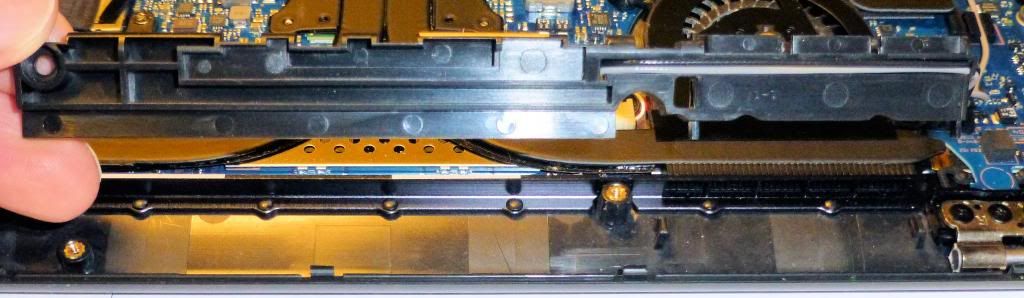
I've been into my X3B and unscrewed the WiFi antennae module.
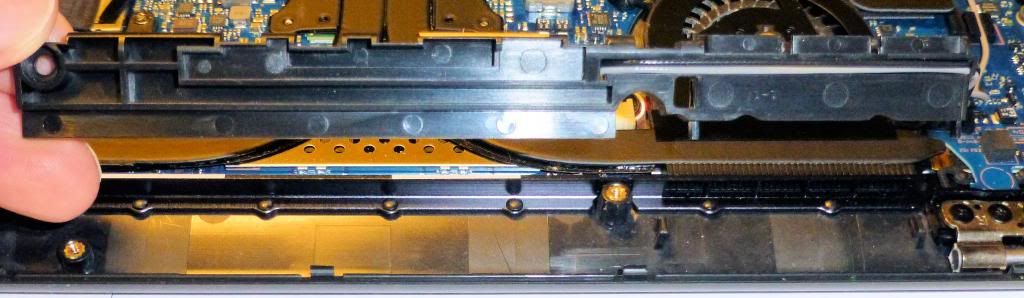
You can't get into that area from above: The top part of the plastic cover is bonded to the keyboard surround / palm rest unit.
I've used my HTC phone as a WiFi hot spot a few times. For me, one of the advantages of this option is the ability to put the phone somewhere (such as by a window) where the signal is better.
John -
That is very informative. Thanks a lot John!
-
How much RAM is available after a fresh boot on a non-bloatware installation? (No Anti Virus, System Suites etc..)
How much of that is dedicated to the GPU?
Is the RAM for the GPU dynamically allocated or fixed?
Do you have results for both Win7 / Win8? -
Hi. The screen auto-brightness feature it´s not working. It is set to on Easy Settings (turned off and on a few times). Any ideas?. Thanks.
-
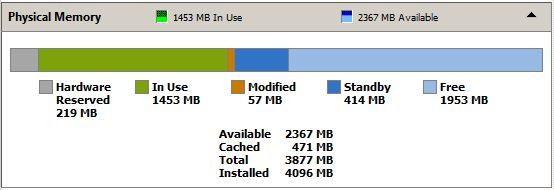
Here is the RAM usage on my NP900X3B running Windows 7 after reboot but with NOD32 Antivirus running. I've never put much effort into optimisation. (I've just done another reboot and this time the "In Use" is about 300MB less but the "Standby" is more giving free RAM of 1966MB.)
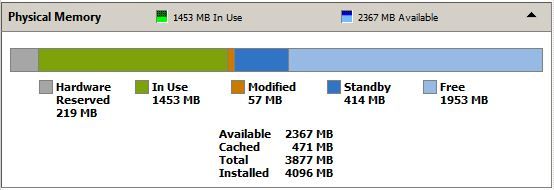
I've not tried to understand the RAM allocation for Intel graphics but I'm sure it is dynamic. It probably starts with that 219MB "Hardware Reserved".
Try version 2 of Easy Settings. It isn't offered as a download for Windows 7 by SW Update but is in the Windows 8 Settings installer package. In SW Update search a model shipped with Windows 8 (eg NP900X3D) and go to the Windows 8 downloads. Then export the Settings package to a known place. In it there's a Win7 folder which contains Easy Settings V2. I'm not promising it will work but I think Samsung have broken a few things when they introduced Windows 8 (the keyboard backlight is also very erratic). Also check your BIOS is up to date (I recommend using the BIOS Update program as explained here).
John -
Speaking as someone who hates bloatware and does a clean install on all my machines, I really have no issue with Samsung's SW Update. It's clean, light, and practically invisible in the background except for the tray icon which remains hidden. It never nags, you just run it when you feel like it. And even when you have it installed you can still manually update your drivers outside of SW Update if you want, so you could just run it once after the initial install and then remove the tray icon if it bothers you. I updated my Intel drivers by downloading them directly from Intel, and later when I ran SW Update it was happy that I had the latest version.
Also it's the ONLY thing Samsung forces you to install (well, you should install Settings if you want all the functionality that Windows has no way of getting to, but technically you don't have to). I think they did a great job of staying out of the way. -
I've had bad luck with my eBay micro HDMI - VGA dongle. Half the time it doesn't show anything and the rest of the time everything is in shades of blue.
The original Samsung VGA dongle didn't cost me much more, works great, and it frees the mini HDMI for a dual-monitor setup. -
Hey all!
I just pulled the trigger on a Used - Very good condition X3C on amazon, complete with the squaretrade 2 year extended warranty. I'm looking forward to joining your little club and having fun with my new machine!
Mr. Mysterious -
Congratulations - a great choice and, I would guess, a great bargain! So, spill: how great a bargain??!!
13.3" Samsung NP900X3C with Ivy Bridge CPU
Discussion in 'Samsung' started by John Ratsey, Apr 11, 2012.