 Problems? See this thread at archive.org.
The driver for the Fn keys is embedded in the Settings package. Try reinstalling it.
Are any of those devices also plugged into the computer? If so, try disconnecting them from the computer and see if the touchpad problem continues.
Uninstall IntelliMemory. It's some form of caching program which seems to do more harm than good.
Get the 15.6.1 WiFi driver from Intel. There's plenty of discussion of the problem here. The new driver has improved things for most (but not all people). Some have to go to extreme measures such as disabling n mode.
John
-
-
hey john, does your LCD calibration work for 3xc? i noticed that yours is for the 3xb. Just wanted to get a forsure before i apply it.
thanks. -
It should work - it's the same panel. But (i) I don't know if Samsung put and different default settings into the BIOS; (ii) in (Easy) Settings set the display color to standard and (iii) Windows 8 might behave differently.
If my profile doesn't give any improvement then you can easily change back to the default profile in the graphics properties (in fact, the Intel driver will probably try to push you back to the standard one - this thread may help you to get the custom profile to stick.
John -
gotcha. thanks ill check it out.
-
I had the same problem. No idea what the cause was. Samsung replaced the display for me 10 months after purchase.
-
Fn keys worked, and I guess silent fan also, but it just never showed anything on screen nor was it hearable. I can live with that.
No not plugged into the computer. I tested it on my room, the problem occurs on every socket, even if there is nothing else plugged in. So it must be somewhat to do with the electricity at home. Downstairs, I don't have any problems. My question then is though, if this problem will remain when I trade the laptop for another series 9 of the same model.
That indeed did the trick!
Couldn't install that driver, said I was using newer drivers. And when I uninstalled the older drivers in device management, it still wouldn't install the intel drivers. Is this also a problem with every series 9 of the same model?
Basically those two questions will decide if I get a replacement, or just my money back.
Thanks for all your help John!!! -
There seems to be a problem with the upstairs wiring that should be checked by a competent electrician. If your computer is happy when connected to the downstairs sockets then changing the computer won't fix the problem (and you will probably find that other computers with a modern touchpad will give similar problems when connected to the upstairs sockets). I forget if I asked whether the sockets are 3 pin. If they are, but the upstairs ground wiring is not actually properly grounded, then that could be the cause.
Which way are you trying to update the driver? By running the installer or using the driver update facility in Device Manager. Does the Intel Driver Update Utility think your driver is up-to-date? If you have the ProSet package installed then you probably need to use the ProSet package for the updating.
John -
I'm looking at getting one of these soon, does anyone know the best deals in the UK? I'd be willing to get refurbished if it came with a warranty.
-
This one on fleabay claims to be manufacturer refurbished with 1 year Samsung warranty.
You might also want to look at the Sandy Bridge version of the NP900X3D. It's a little slower (but not noticeable in everyday usage) and slightly shorter battery time. There's also the bigger NP900X4C which has clear-out pricing. It offers the advantage of expandable RAM and about 40% longer battery time. However, it doesn't have the same display quality and, while it is heavier, it's so thin that it doesn't need much baggage space. More comparison of the two models here.
John -
Thanks John. It's definitely the 13" I'm after and in black. I don't mind sandybridge, I work be working it too hard.
That ebay one doesn't look too bad. -
I'll have to let it check then, thanks!
That site indeed mentions my drivers are not up to date, even though devide manager says so! I'm installing it now.
My last question will be this: will every trackpad of the same series 9 model be this choppy and jumpy? Even when the power is not plugged in, the trackpad is nog 100% responsive.
I've tried latest drivers, removing drivers, tweaking settings, but still.
Thanks once again! -
There may be small production variations in the trackpads. Did you find the palm tracking and sensitivity controls? If not, see this thread.
John -
Yes I've looked into the thread, but still. Oh well, I'll have to think about what to do.
But thank you very much for all your help! Much appreciated!! -
I was looking to buy Samsung Series 9 "13, but in two stores i came with the same problem, when I was trying to use my USB3 flash drive just to see how it show movies. But both models didn't recognize my usb3 drive. On usb2 port is working perfectly. Also, I've tried my usb key on Asus Zenbook Prime and Lenovo Carbon X1 and there were no problems at all. What is the problem with Samsung? If it has such problem with my key it also can have more problems with other usb3 devices? Could anyone comment on that?
-
It seems that USB 3.0 is not a fully debugged standard. I must now have half a dozen USB 3.0 flash drives. One doesn't get properly recognised in my NP900X4C. To be more accurate, it wasn't properly recognised when the computer was new. Then a firmware update appeared by the USB 3.0 controller and the drive was then recognised. Then a further firmware update undid that improvement! So I wouldn't completely blame Samsung: You will probably find the same problem with other notebooks using the same USB 3.0 chip (Renesas, either uPD720201 & uPD720202). I't possible that the flash drive maker didn't do enough compatibility testing. My USB 3.0 hard drives all work OK.
John -
One more questions, as i seen posts on this forum that there are some dead pixels on monitors... is this a warranty fix and they need to fix it?
-
I can't lay my hands on a clear statement by Samsung (although I've sure I've seen one). There is no promise of 0 bad pixels but you are far more likely to be able to get a replacement of a pixel with a bright colour is stuck on than if you have a dead pixel which is permanently off). Some months after I received my NP900X4C I discovered there was a dead pixel near the right side of the screen. I thought it was a speck of dust but couldn't clean it off. It's unobtrusive and not a nuisance. If you are unlucky enough to get a cluster of several bad pixels I'm sure it will be replaced.
These days, however, I suspect it's a less than 5% probability of getting even one bad pixel.
John -
Hello, me again, fellow with the broken samsung series 9 A1. I've bought the windows 8 version of the series 9 with some upgraded hardware for less than the price of the A1 I bought. The only difference is the keyboad, it's qwerty instead of the usual azerty over here, but that's no problem. Backlit keyboard works fine now, as well as trackpad. No more jumpy trackpad and during charging it's completely the same. I still had wifi disconnect problems but it was solved removing intel drivers and letting windows install the microsoft drivers.
All in all I'm happy now because I always found the series 9 to be very attractive and handy to carry. -
Will the price of these drop when Haswell is released next month? Is there a plan for a Haswell version update?
-
We expect Samsung to release a Haswell version but how soon after Haswell's official launch is another matter. It will have an FHD display (most probably the panel that has already been released in the NP900X3E) but whether there will be other chassis changes remains to be seen.
If Samsung manage their inventory successfully then stocks of the Ivy Bridge versions will be running out concurrent with the arrival of the Haswell version but, if you are lucky there will be some stock that is cleared by discounting. It is possible that a lower spec Ivy Bridge version may be maintained to provide an lower price for entry into the range. This is currently provided by a Sandy Bridge version of the X3D.
John -
I think there will be Ivy Bridge deals for a good 6 months. Computer sales have been down all year, OEMs blaming W8, so I expect there is a surplus. There may be a touch panel option on the Haswell version, a new color (white), and hopefully an 8GB option on the X3_. It would be great if they improved the wifi, but not sure if there will be any redesigning other than a touch screen.
-
Keep in mind that notebook touch screens are thicker and heavier, so Samsung may have to wait for the tech to lighten and slim down further before they add touch to the waif-like Series 9. I suspect that's why the 1080p refresh didn't see a touch option and they left full HD touch to the new Series 7 Ultra.
-
I recall that somewhere Intel proclaimed that Haswell Ultrabooks had to include touchscreens. We have to hope that Samsung don't bother to take Intel's marketing money and can therefore continue with matte non-touch displays. None of us want to see the new Series 9s getting fatter and heavier than the current generation.
John -
There are many machines marketed as Ultrabooks right now that don't actually meet Intel's specs. So I'm sure Samsung can work a little fudge factor in
 And I think Samsung's famously immense marketing budget doesn't need much help from Intel's relatively minuscule bucket of marketing dollars. I also wonder if Samsung will take some time refreshing the S9 with Haswell CPUs; so far they've not been as quick to update the S9's internals compared to competing brands and even other lines inside Samsung.
-
They have not been completely sleeping. Want the X3E with 3517U CPU and 512GB SSD (and the FHD display)? Not cheap (and it comes with single channel RAM)! I think the main items on people's wish lists are 8GB of dual channel RAM and a mini display port.
John -
Yes, I have that model in for review. It's lovely, other than the mind-boggling single channel RAM. But it just takes Samsung longer with the S9; in the past two months I've reviewed the S7 Ultra, Asus UX31A, Acer Aspire S7 and others that had the same specs much earlier. I suspect the S9 is about cutting edge style and portability, rather than speeds and feeds.
-
Yeah I'm hoping they keep a matte option, I have a hard enough time keeping the smudges off my phone. In fact I'd rather have the current 900p screen so I don't have to use windows scaling. Oh well. 8GB is a must, otherwise I can't believe the bump in battery life will be worth it. Hopefully DDP, it is completely unacceptable to cost-cut the ram in your most expensive laptop. I am sure Samsung will be one of the first out the gate with haswell refreshes. They are not like Dell, who took 6 months to refresh the XPS13. Apple may have a slight head start, but Samsung will not be far behind. Regardless, I won't be upgrading till I can find one well under a $1000.
-
Hi!
I got my 900x3c-a02 a few weeks ago. I am about to install elementary os as a second os next to windows 8. The problem is that I'm not even able to boot from the USB-drive. I tried three different usb flashdrives. And I even tried to boot some other OS'es from different usb drives like ubuntu and windows 7. Still no joy.
Yes, I disabled the fast boot option.
One thing is a little bit strange. In the uefi (bios) I can´t even choose usb-hdd in the bootlist. Check the image below.
http://i44.tinypic.com/akd8hx.jpg
So, am I just dumb or is something wrong?
I'm using the latest swupdate bios btw. -
Hi fingret, welcome to the forum. Nice machine there
And no, you're not dumb. It's just more tricky because Win8-delivered PCs are locked down for security. It is a Microsoft requirement.
Try and disable SecureBoot in the Boot menu in BIOS (F2), and under OS Mode Selection choose UEFI and CSM OS. Now connect the USB drive and reboot (so BIOS can detect it).
You can either press F10 immediately after power on to get a temporary boot device menu (Esc on some models) or you can change the Boot Priority in BIOS.
Let us know if that works. Otherwise maybe it's I who am dumb
-
Ok, thanks for your time. Unfortunately disable secureboot didnt help. The usb drive still doesnt show up in the boot priority menu. And it doesnt show in the F10 menu either. Is it normal that "usb-hdd" is missing from the boot priority menu in bios?
Any other alternatives or am I forced to buy an external optical drive
Btw, I tried both left and right usb ports, no luck on either side. -
Maybe there's something in this thread about installing from USB that will help.
John -
Thanks but I don't find anything in there that help me Maybe my 3 usb flashdrives are just too old and/or unrecognized by the laptop?
I'm not into computers that much anymore but I do need linux to get some work done
-
When I got my Sammy, I found that some USB sticks simply would not boot, no matter what I tried on the computer. Then finally, I tried creating the same boot image on a different USB stick -- and it booted no problem. I don't know why, but there definitely is a difference between sticks.
The BIOS in my model also has a Legacy USB boot option which needs to be enabled. I forgot to mention that, but you probably already knew.
Try another USB stick first. It really should work! -
I just updated my elan touchpad driver to 11.7.10.4 and unable to access the touchpad settings. Anybody else having this issue?
-
Was that driver from Samsung or elsewhere? The Samsung installation package includes two control panels: ETDSimpleUI.exe (or ETDSimpleUI_Win8.exe for Windows 8) and ETDAniConf.exe either of which should work as a standalone package (but Samsung uses the former by default).
Also, there are two ways to access the touchpad settings: Either directly in Control Panel or through the touchpad tab in the Mouse control panel.
John -
Update was done through Samsung's SW Update. ETDSimpleUI.exe refuses to open from under system32 driver folder but ETDAniConf did some work. The touchpad setting is now gone. It's just listed as a PS/2 mouse.
-
I would uninstall, reboot and reinstall and see if that fixes the problem.
John -
Working now after rolling back to 11.7.5.5. Think they messed something up in the new version. Thanks for your help.
-
Personally, if I had one thing to add to my Series 9 it would be a swivel touch screen like on the Lenovo Yoga (OK technically that's two things). So keep everything the same, including 1600x900, but give me the touch screen so that I can use it as a tablet on rare occasions. Then I would have zero use for an iPad.
1080p is too small if you want to use Desktop mode in Windows because of the poor scaling support, and touch screens are useless when you can't use the device as a tablet by swiveling the keyboard out of the way. To me the Yoga is the best tablet/Ultrabook combo so far, except that it's bigger and not as sexy as the Series 9. -
When i download anything, or copy something...or use my SSD to write it seems the laptop gets really unresponsive. Almost to the point it´s impossible to use (open up and using programs is like using a 10 year old computer) What´s up with that? Can´t remember having this problem. Could it be because i switched to windows 8 recently?
I ran crystaldisk and its seems pretty bad. Its the scandisc u100:
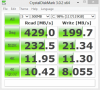
-
The SSD performance is in the same range as I reported here although the 4kQD32 read seems to be lower than normal.
The U100 should run OK under light usage. What is your RAM usage (check in Task Manager)? If more than about 75% then there may be a lot of virtual memory activity (which involves reading / writing RAM from / to the SSD) and if that is happening while you are trying to read / write the SSD then the U100 chokes. If you have IntelliMemory installed then try uninstalling it - it's a RAM guzzler.
John -
Just reading this review - Samsung Series 9 NP900X3C: Performance
For RAM it says 8GB max, is it upgradeable or did some models of the i7 come with 8GB?
Also, did all models come with 1600MHz RAM?
Which are the latest/best wifi and bluetooth modules? -
Regarding the 8GB RAM it's a misinformation on the Samsung website as discussed in the comments on that review. The original X3A had two SODIMM slots and some people didn't look on the inside of the subsequent X3 versions. The X3B/C/D/E and probably F use soldered RAM.
The X3C uses the Intel 6235 combo WiFi / Bluetooth card. It has been troublesome for many people due to, we think, driver issues which Intel now seem to be working on, a year too late. There are a few alternatives if you look around and there will, most probably, soon be an updated card as part of the Haswell family.
John -
Samsung SW update on my 900X3C-A02 has found an update for my wifi card driver...the new version is 15.6.1.20 and I currently have 15.6.1.6. For some reason it doesn't succeed in updating it, it says "error -10" anyone knows what that means? I read on the Intel help forums that some people had problems with 15.6.1.20 so has anyone here updated on a 900X3C and did it improve anything noticeable or does it actually makes things worse?
-
Get the latest driver direct from Intel. It improves the WiFi performance for most people (including myself) but a few have found that things get worse (in which case do a driver roll-back).
John -
The Intel update utility doesn't propose any updates for me...which I think is a bit weird since Samsung obviously has found a more recent driver. So I am not sure that Intels update is the way to go
-
-
I tried alot of stuff which didn´t work. Now i installed windows 7 because i upgraded to windows 8 and the ssd performs much much better. Strange. A shame thou since windows 7 is quite ugly
-
Tried searching the thread but didn't find anyone with the same problem... what can be the cause of this?
After waking the laptop up from hibernation, the wifi works flawlessly for a couple of minutes.. then all of a sudden it won't be able to load internet pages and "limited connection" is noted.. disconnecting and reconnecting to the network fixes the problem and then it continues working until next hibernation. No other devices do this so I doubt that it's the router (although I did update the firmware on that too).
Anyone with the same problem? Any ideas or solution? -
Have you updated the WiFi driver very recently? The Intel 6235 card has had well documented connectivity issues and the problem has finally been addressed by recent updates. First try whatever Samsung's SW Update offers and, if that doesn't fix the problem, use Intel's driver checker.
John
13.3" Samsung NP900X3C with Ivy Bridge CPU
Discussion in 'Samsung' started by John Ratsey, Apr 11, 2012.


![[toPh]](images/avatars/[toPh])


