 Problems? See this thread at archive.org.
Well I got it for $1037 after tax and shipping. The warranty was another $90 or so.Now I'm wondering if I should have gone for the S7 Ultra or the Chronos, but I have to remind myself not to have any buyer's remorse, which is always impossible.
I mean, the reason why I bought this at this time was because I knew prices would be falling in time for the Haswell refresh.
Mr. Mysterious
-
-
No buyer's remorse allowed here! You got arguably the most beautifully designed and solidly built laptop on the planet! Judging from your sig line you have an all the power you need for gaming or other heavy-duty applications.. As a [very] lightweight machine, that does absolutely everything imaginable as a second/travel computer and looks like it belongs in a sculpture museum, I don't think you could have done better. I am presently trying out an S7 Ultra and, while it's a nice machine and a good value, I do not need my feather light/travel machine to hold 16GB of RAM nor am I big on a touch screen - especially not a glossy one - and in virtually every other respect the S9 does everything the S7 does - perhaps with a dongle instead of a full size port here or there - and it does it while looking like the Maserati of laptops, with a design that not become trite, like the MBA already has.. In fact, I suspect you'll want to keep your S9 as a spare even when it becomes technically outmoded by new hardware (certainly not by Haswell, from all I've read) you'll probably want to keep it anyway because of the more than adequate performance , fine screen and audio, the feather weight and the to-die-for looks that will not fade with normal use. And the ST wtty means no risk of loss.
If it sounds like I'm trying to flatter your purchase, I am - by stating facts! If you really change your mind and you can't return it, PM me, You will have no trouble reselling it, but I might be interested in a trade, and I have until around June 1 to return mine to BB if I choose not to keep it. -
Lol wow, thank you! No, I just got it now, and while I'm annoyed by W8...I love the design and feel of it. It looks amazing! Right now I'm installing W7 on it and it looks great! I'll need to work on it for a few hours before finally being allowed and able to play with it.
Mr. Mysterious -
Well, I'm having a LOT of difficulty installing Windows 7 onto my machine, which has Windows 8. I disabled secure boot, but the disk management isn't allowing me to delete or modify ANY partitions on my SSD. It's the bad one, the U110 or whatever. I need help! A step-by-step guide on how to install W7 from a DVD would really be appreciated. A DVD, not a USB, please.
Mr. Mysterious -
I can guarantee you diskpart will nuke any volume or partition on a storage device.
BIOS setting recommendations:
Fast BIOS mode = disabled
UEFI Secure boot = disabled
OS Mode selection = CSM OS
These are my settings prior to OS installation. I use diskpart during OS installation to nuke all partitions then let Windows take the unallocated drive and work its partition magic. -
How do you use diskpart? Is it downloadable or part of windows 8? Wait a sec...did you say you used it -during- the OS installation???
I'll go and make those changes in the BIOS; rather, I'll double check that those are the changes I've made, that they're correct. *nods*
Edit: Never mind!!! SUCCESS! Oh sweet success! I forgot to disable the FastBoot, and now it seems like everything's working!
Later, I'm going to reinstall all of the Samsung drivers, and then re-enable FastBoot.
Mr. Mysterious -
When you are in Windows 7/8 setup and starring at the screen asking what storage device and volume to install to, press SHIFT + F10. This launches a WinPE console. Then enter diskpart to fire up that utility. Yes, it is an integral part of Windows and Windows PE.
-
There's one last obstacle: Easy Settings. I'm trying to uninstall it but I can't find it in the Control Panel. Any tips?
edit: Finally, it's done. Man, Samsung does NOT make setup easy, does it? And now I'm just going through all the million and one updates that Windows needs to make, including the service packs, and I'm all set. The best thing, the FN keys, are now working properly
Mr. Mysterious -
I would note that there is a V2 of Easy Settings that is not offered by SW Update but is included in a folder in the Windows 8 Settings package.
I think SW Update now offers V2 of Intel Rapid Start Technology (which fixes a lot of issues). If it doesn't then you can download from Intel. Also, the latest WiFi driver from Intel reduces a problem with dropped WiFi connections.
John -
So I'm messing around with various settings while I browse the Samsung subforum. The screen is really great, but I was wondering if anyone had any profiles or tweaks to make it look even better. Yes, I know that different people like different screens in different ways, but I'm just looking to see if there are any suggestions.
Mr. Mysterious -
You can try my X3B profile calibrated using Spyder 4 Express. I believe it is the same panel.
John -
Thanks! I'm checking the Samsung site about the maximum supported RAM, but I'd just like to check here on NBR if it really is limited to 4GB? Is it soldered? I might upgrade it in the future if it's not, to 8GB. I'm pretty sure that I only have 1 DIMM slot, because I asked Samsung support, and yet....I don't find a second fan active on the other side; only one fan is blowing out hot air.
Mr. Mysterious -
The original X3A had two SODIMM slots. The X3B/C/D/E all use soldered RAM.
You can see if you have two fans by turning the computer over an looking through the ventilation panels. The second fan may only activate under high CPU load.
John -
Is that second fan the one close to the WiFi card, or the one close to the SSD?
-
I'll have to leave that for an X3C owner to answer.
Have you tried to run a long benchmark such as the wPrime 1024k that will give the CPU plenty of time to warm up?
John -
Well if you have 2 fans, how do you determine which one is the 'first' fan and which one is the 'second'? Lol
Mr. Mysterious -
Yes, go into the Intel Graphics properties and disable all the skin tone enhancement and other crap like that. Otherwise your screen will inexplicably change contrast and flicker at various times.
I don't understand why they make this the default, it doesn't make anything look better it's just annoying. -
Hi,
Does anyone know what are causing these solid white lumps? They are visible over all colours apart from pure black, where they seem to disappear?
Are they easily fixed?
There are two that are quite visible, and it seems like another one is developing.
Here are the photos (sorry for the poor quality)
![[IMG]](images/storyImages/sam0252z.jpg)
Uploaded with ImageShack.us
![[IMG]](images/storyImages/sam0251h.jpg)
Uploaded with ImageShack.us
![[IMG]](images/storyImages/sam0250x.jpg)
Uploaded with ImageShack.us
![[IMG]](images/storyImages/sam0249u.jpg)
Uploaded with ImageShack.us
Look forward to your reply. -
Do you (or anyone else) ever poke the display with a hard object such as a pen? Those look like external pressure that has squashed the liquid crystals slightly. Pressure from the display back is unlikely since it is metal. They could also be caused if the screen is pushed hard on the keyboard during transport of if you left anything on the keyboard / palmrest when shutting the display.
Once there, they can't be fixed. If it any comfort to you, I've got one near the bottom of my X4C display which I think might have been caused when I had something behind the keyboard and then tried to shut the display.
John -
Thanks for your reply. This is very strange as I avoid touching the screen and always have the laptop in a padded case.
Is there anything else that could cause this as I remember it being present since I purchased it? I understand I'm going to have a hard job getting Samsung or John Lewis to replace it? -
If they were there when you got the machine then you can justifiably ask for a replacement screen although if several months have elapsed it will be more difficult to convince them. That said, John Lewis customer service has a very good reputation.
John -
I have a similar on my X3B, although it's not as pronounced as yours is.
The splodge lines up with a dent on the lid of my laptop, and I have no clue how it got there.
-
I use a shaggymac keyboard cover for my gamer 7. I would hate to mar that lovely display, and the gamer 7 definitely has a tendency for the display to possibly hit the tops of the keys. It's basically a nice soft and durable cloth to put on the keyboard before closing the unit.
-
I recently bought a 900X3C-A04 (with windows 8) and I happened to read in this thread about the updated driver for the WLAN-card to get rid of some signal drop issue. First I let the computer check for an updated driver for the WLAN-card but it didn't find any so I updated manually. My question is, since the computer obviously don't always find the most recent drivers is there any other drivers on the computer that I could update to improve performance/stability?
I tried to check for an update for the touchpad but I actually couldn't find the touchpad in the device manager. Someone that could help me with that? -
The normal way to get updates by running Samsung's SW Update. You can get the latest Intel WiFi driver here.
John -
So Samsung's SW Update would for example find and install that latest Intel WIFI driver automatically?
-
reviving this questions since I have the same problem. Have you fixed it? anyone know how to fix it?
-
SW Update only looks in the Samsung database. You can see what version it offers and compare it with what Intel will offer you. The general opinion is that the Intel ProSet software is best avoided and the driver only package is enough.
John -
So in other words I need to check manually for the latest drivers from Intel and the other manufacturers which is why I asked the question. So again, could somone please list any new releases of drivers you have found (that Samsung SW update doesn't find) ?
-
My information may not be completely reliable. I have Windows 7 and it is possible that Samsung isn't bothering to update its database for Win 7 machines but is doing so for Win 8.
John -
hi, Thanks for the topic post.
I had no issues with wireless and touch pad
but I would like to report other issues I have with the samsung series 9 , NP900X3C (with W7)
I got 4 problems:
1) when i got the np900x3C the keyboard failed in one key so I got replaced with the new one in the shop.
the second device (which I have now) have 3 problems:
2) two dead or stuck pixel ( :-/ )
3) the speakers make a noise: something is vibrating inside the case so it results in a distorted sound. If keep pressing the lower part of the case with my hands the noise disappear so seems 2 metallic piece inside the case touch each other in a wrong way.
4) the laptop doesnt touch the desk properly: one rubber feet does not touch the ground so making the laptop moving when typing.
Four hardware problem in 2 device is a very hi percentage of hardware failure. but overall I love this laptop.
Should I go to the exorcist before the Samsung service center? ;-) -
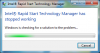
I just got a new NP9000X3C (warranty replacement for NP900X3B) and I cannot launch "Intel Rapid Start Technology Manager". When I launch it from the start menu I get an error dialog saying "Intel Rapid Start Technology Manager has stopped working".
I removed a lot of spyware from the computer when I got it and I am wondering maybe I uninstalled something that is needed by IRST. -
Samsung Easy Support Center offers to do disk defragmentation for its SSD drive in Series 9 laptops. I was under the impression that running defrag on SSD drives actually damages the drive because it wears them out, without any benefit. So should we be defragging our SSD's or not?
-
That was nice of Samsung to give you that
If you haven't yet added a lot of apps and data, you could use Recovery (F4) and restore the Factory Image. If you still have problems with Intel Rapid Start after that, you know it's time to call Samsung again. On the other hand if this solves the problem with iRST, you know the problem was something you removed and changed.
Of course you could also use Windows System Restore and go back to an earlier Restore Point.
Otherwise, if you want to troubleshoot iRST, John Ratsey's Guide to iRST thread is a must. -
Assuming you have Windows 7 then get IRST V2 which sorts a lot of configuration problems. SW Update may not offer it in which case go to Intel. There is also a V2 of Easy Settings hidden inside the Windows 8 Settings package. If you have Windows 8 then you don't need IRST.
I've never noticed that but Easy Support was uninstalled since it is primarily bloatware. Your observation is another nail in its coffin. I agree that SSDs are best left to manage themselves. TRIM should be working in the background as the equivalent of defragging.
John -
I would turn off IRST in easy settings, reboot, delete the partition in diskpart (override), reboot, turn IRST back on. It should rebuild the partition. If that doesn't work, I would repeat, but uninstall IRST after you turn it off and retry with the new version. It can be real finicky to get going.
-
This computer was in a sealed box and therefore the spyware you are referring to came from the Samsung factory? What spyware did you detect?
-
Do we know that for sure? A warranty replacement might be a refurbished model in the same way that parts used in a warranty repair may be refurbished , not new.
John -
That's why I asked the question of the person that posted it. I don't know. But I would like to know.
-
Sorry, I meant bloatware and not spyware. The computer was brand new and not refurbished.
-
I have Windows 7.
I uninstalled IRST V1 and installed IRST V2 but I still get the same error message:
I must have uninstalled a windows component that it requires. -
LOL. Thanks for the clarification. There is a big difference.
-
Also uninstall / reinstall Easy Settings. Note there is a V2 of Easy Settings inside the Windows 8 Settings package. It fixes a few issues.
John -
hello all..Anybody got any problem with keyboard's vibration/noise playing music etc. on the samsung new series 9 (2012)?
please, try this test-audio-sample 400mhz(see bottom link) and let me know if u get a strong noise from the keyboard.
www.dl.dropboxusercontent.com/u/14100148/track55 - 400.mp3
thanks
-
Hello everyone, I just bought this laptop today but I'm returning it.
The trackpad is twitching and gimmicky whenever I am charging the devide. Also, backlit keyboard never worked, not even with all drivers installed.
I guess nothing could be done about this?
And I was questioning myself whether to ask a complete refund, or just a new device.
Backlit keyboard was just unlucky I guess, but I think trackpad twitching when charging is with every device? -
The backlit keyboard was made less responsive to user control by one of Samsung's updates a few months back. However, there is a fix: Put a small piece of black tape over the ambient light sensor which is next to the power light. Then the computer thinks it is in darkness and leaves the backlighting on.
As for the trackpad problem, I have to wonder whether your mains electricity (both live and neutral) is floating well above 0V or the ground is well above 0V (which can happen if some other connected equipment is leaking voltage but the earth connection is no good). If this happens then the power fed to your computer is also likely to be floating and the excess voltage will tend to trickle through you to ground when you touch the pad, this upsetting its sensitivity. I would check the mains supply using a mains testing screwdriver which includes a neon light if the voltage is well above 0. In a properly wired system the light will only glow when you touch the live terminal. If neural and/or ground also cause the light to glow then the wiring needs to be checked properly. A work-around for bad grounding is to use a 2-pin adapter that excludes the ground connection.
If the mains wiring voltage is OK then it is possible that the computer's power supply is defective.
John -
Thanks for the reply!
About the backlit keyboard: I've tried to cover the sensor, and put the laptop in a dark area, but no light was visible.
About the trackpad. the problem is indeed solved when I plug the adapter in a socket without other devices connected. Is this normal for every series 9 laptop? Or for every other laptop? (it's my first laptop) -
1. For the keyboard backlight, there are also controls (Fn+F9 and Fn+F10) and in Settings (Easy Settings if you have Windows 7). One method that has worked for some people is to turn the backlight off in (Easy) Settings and then use Fn + F10 to turn it on again (there are 4 steps of brightness).
2. Your power tests suggest that one of the other items of equipment using that socket is generating a lot of interference. Or, if it is a printer or other device that is connected to the computer then you have created a ground loop.
John -
Thanks again for the answer! Sadly, the method proposed didn't work. Also, the silent fn mode doesn't work anymore in windows 8. That's the least of my concern though.
There are indeed quite some devices plugged into 1 socket. -
Additionally, I am performing some different tests which may help me choose whether or not I will ask for a refund, or another device.
Is it normal ram memory is always at 80-90% of total usage? Even when I just started the pc, and in windows 8 without anything else installed?
And I don't know if it's this computer or not, but sometimes my wifi drops completely for some minutes. I haven't really tested wifi on my room before, so I'll first perform a test with another laptop to see if it's the router, or the laptop.
13.3" Samsung NP900X3C with Ivy Bridge CPU
Discussion in 'Samsung' started by John Ratsey, Apr 11, 2012.


![[IMG]](http://imageshack.us/photo/my-images/194/sam0252z.jpg/)
![[IMG]](http://imageshack.us/photo/my-images/42/sam0251h.jpg/)
![[IMG]](http://imageshack.us/photo/my-images/17/sam0250x.jpg/)
![[IMG]](http://imageshack.us/photo/my-images/32/sam0249u.jpg/)


