 Problems? See this thread at archive.org.
We have only NP900X3C-A01HR here in Croatia,but i cant find anything about mAh,only i think 4 cell so its probably needs to be that with 5880mAh.
-
I've had problems with my fans from fairly early on, and it's only progressed to get worse. I just started it up after having it off for a while. Im in a cool room and the hand rest is still a bit chilly - and one of the fans is going off like there's a fire going on. It's loud and whining. Checking the back of the computer it's just the fan on the left moving/working - the other one is perfectly still. However, when I start a taxing game the right fan moves. When I end the game it goes still again. The one fan to the left is continually fanning at a high speed.
I've tried opening it up and cleaning them from dust - and I did remove a tiny bit of dust, but no noticeable difference.
It's even fanning a lot in silent mode - and it's not stopping even when idling in a cool room leaving the computer quite cold to the touch.
I don't know what to do here. Will getting a new fan help? It looks easy enough to swap out. -
Is there a place to download windows that came with the laptop? I installed windows 8 without backing up the old windows and it swiped the partition where it was stored

My model is the NP900X3C -
I hope you remembered to clean the grille on the heatsink through which the fan blows the air.
What CPU temperatures are you getting when on idle / slight usage / heavy usage? (Run HWiNFO and select Sensors). It is possible that the excessive fan activity is caused by a poorly mounted heatsink (often caused by too much thermal paste) in which case the heat isn't conducted away from the CPU as well as it should be.
You can download the Windows 7 ISO file using the links here.
You will need to activate it using the key supplied with your X3C (probably stuck on the PSU).
John -
Heatsink grille? Not sure, but I guess not. I removed the fan and its two screws and cleaned it out from top and from the "side" where there were some dust to be found. Couldn't see any dust anywhere else inside the laptop.
Temperatures while idling or light browsing (like this forum): 40-60 C. Fanning constantly, even at 45 which is where it's at right now.
Temperatures when playing a game: 55-85 C -
The headsink "grille" is the place where the fan blows the air through towards the back of the computer. It's the location most vulnerable to blockage. See the 6th photo in this post to see what happens with time.
The upper end of the idle / light usage temperature range is on the warm side. 60C is probably a trigger temperature and once the fan comes on it the system wants a big temperature drop to turn it off again. Similarly 85C for heavy usage is hot for the X3C with its two fans (but I can get there with my i7 X4C which has only one fan). I'm just running wPrime 1024 on my X3B (which also has 2 fans). After 7 minutes it reached 71C, the fans speeded up and temperature has dropped slightly.
Repasting the heatsink (both on the CPU and any other chip that it sits on), if you are comfortable to do this, would be a sensible next step in order to exclude that from being the cause. Otherwise you can pass the problem over to Samsung provided you can get them to agree that 85C in the 13" Series 9 is abnormally hot. I have to wonder whether one fan isn't working properly, which would explain the high temperatures.
John -
Yeah, I think I got it on the one fan that I dismounted - assuming that the constantly active fan was the faulty one. I should remove and clean the other one as well though.
Im not much of a gamer, but when I do play games for a while the computer gets so warm that if my fingers accidentally touch the metal between the keys it burns me - it actually hurts. So it gets very, very hot. Maybe new paste would be enough - doesn't seem like it would be all that hard to replace the old paste.
Thanks for the help!
-
That very high temperature shows there's something wrong. The two fan arrangement is effect in keeping things relatively cool when it is working properly.
It would be useful to run a few tests with the computer on its side with the back off so you can see how the fans are performing.
John -
A new (and so far pleased) X3C owner here! Some questions I've already started in another thread here, I was wondering could I bother someone with X3C that shipped with Windows 7 (and still has it) check what the BIOS says for UEFI by default - is it enabled or disabled?
Another thing I noticed is that the BIOS shows the laptop to have 4096mb RAM on Slot 1 and none on Slot 2, but I was under the impression that, even though it's soldered, the memory would be set up to show as dual-channel? I guess if it's not then there's not much to do about it. I've read newer models (maybe X3E, but X3F at least) use a single channel memory, yes, but my assumption was that it was changed later on for those models and didn't affect earlier models.
Last thing (for now) would be that anyone know a sleeve like
be.ez LA Robe but with a side pocket of any kind on it? I don't want to have extra room inside for the laptop to wiggle around there, that's why I've looked for MB Air 13 sleeves especially and so far that's the most usable looking one I've come across, but it's only missing a side pocket (I want a micro-HDMI to HDMI adapter to go around with me at least).
-
1. See my reply here to your other post.
2. AFAIK all the X3Cs use a DDP RAM package. If it does then CPU-z's memory tab should report 3878 MBytes Dual channel. Perhaps Samsung changed the board during the X3C production. The best test for the RAM configuration is to run the SiSoftware Sandra memory bandwidth benchmark. If you get around 12GB/s then it's single channel while dual channel should be near to 20GB/s.
3. There is some discussion of sleeves in the Series 9 accessory thread.
John -
I didn't run SiSoft Sandra but I trust CPU-Z's memory tab; looks like I'm stuck with a single channel unit... That was a surprise for me, I wonder if there's a way you could tell which one is it before buying one, or know when they made the change.
edit: The country variant is (NP900X3C-)A02SE in case someone wants to be cautious in the future. I believe the SE variant covers all the Scandinavian countries. -
Has anyone installed Windows 8.1? SW 2.1.19 still does n't work properly and there is no updated Settings program to fix the Fn keys.
-
Yes, works well for me. Just make sure all the stuff you need is working on Windows 8 before, then update.
-
But are you able to adjust the screen brightness using the fn keys?
-
8.1 here too. Fn buttons work, keyboard backlight, settings. As mentioned SW update just links you to direct driver downloads rather than its own standalone program with notifications.
My main issue is with the touchpad driver, it does not save my settings and I'm getting tired with dealing with reverse scrolling each time I turn the computer on. Does anyone have any links for the older drivers so I can try one please? -
I downloaded the touchpad drivers from here and the settings are saved fine.
Support - Laptops NP900X3C | Samsung PCs -
Yes. I have auto brightness off but I think Fn keys also worked with it enabled.
-
The fix for the touchpad settings is discussed in the Windows 8.1 update thread. Start with this post.
John -
Few things I've come up with after a few days of usage:
1) I'm getting electricity to my fingers when the computer is plugged on power and if I touch mainly the palmrest area with only a finger or two. Nothing - or not noticeable anymore - if I have more fingers or both hands doing something on the computer. Only happens with power plugged, is this normal?
2) I re-installed Windows 7 from scratch ditching the original SanDisk SSD and replacing it with Intel 525 (180gb model). Everything when more or less like supposed to in the end, but the following benchmark got me thinking:
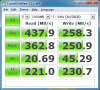
Otherwise the results are as expected, but 4k write should be a 100mb/s+ more than given compared to review results of the same SSD. BIOS, drivers, firmware, etc are set-up as supposed to and as I said it's strange that only 4k write (and nothing else) shows odd performance. Any ideas what should I check? -
<<) I'm getting electricity to my fingers when the computer is plugged on power and if I touch mainly the palmrest area with only a finger or two. Nothing - or not noticeable anymore - if I have more fingers or both hands doing something on the computer. Only happens with power plugged, is this normal?>>
I get this if I don't use a grounded outlet for the power supply.
bert -
Seems to be the same thing now that I tested it, thanks for the tip! Better that way rather than something wrong with the power supply (like I've read about cheaper 3rd party units bought from eBay etc).
-
Hey it's me again.
I found newer driver (11.7.14), but it wasn't working well - it often didn't react to gestures or even clicking, so I thought about older version and I installed 11.7.5 - but I have the same problem as before - it sometimes freezes and I have to reboot computer (last time I need to reboot several times).
If that wasn't enough something seriously wrong starts to happen with WiFi today :/ It looses signal - everything is working well and then every 1-5minutes it looses my wifi connection and automatically starts again. I was in work, so I thought it was something with their router, but now at home, it does the same thing. It's really frustrating when you watch some video on youtube or open new tab :/ I uptade to windows 8.1 but it was about week ago, so I don't know if there is any connection
Oh and another thing - I choose that when I close a lid computer will hibernate, but lately I realized that this option stop working - once after few hours of keeping laptop in bag I took it out and it was hot because it didn't hibernate :/ I checked options few times and it didn't change :/
Please help, I'm afraid that something is seriously wrong with my laptop and I would have to send it to samsung... -
Arrrgh!!! I updated my lovely problem free notebook to win 8.1. Everything seems to works well apart from NO inverse scrolling option on the elan drivers!!!
This is driving me nut! I have the 11.7.18.2 version of elan drivers.
Is it ok to go back to previous win 8 driver in win 8.1? I need reverse scrolling back!
Which version do I need? -
I don't have Windows on my NP900X3C laptop to check for the latest version of BIOS.
Anybody who has NP900X3C and Windows can you please check for BIOS updates and post here the latest version?
Thanks. -
As discussed in the Windows 8.1 update thread, there are various bugs in Samsung's 8.1 support (or lack thereof). For the WiFi, Intel has recently issued an 8.1 driver. It's worth trying.
It doesn't surprise me to hear that hibernation is broken. Someone else reported something similar. I would reinstall the Windows 8 version of Settings then check the configuration to make sure that hibernation (and not sleep or hybrid sleep) is enabled. It may also be informative to look in Event Viewer's System Log for what happened when the computer should have hibernated - it may reveal that something blocked hibernation.
I wouldn't ask Samsung to fix the problems. I'm sure they are software and they would just reinstall the factory image.
****Update**** Another post has revealed that the BIOS P09ABK can break the power settings for sleep / hibernation. This prompted me to check my X4C and it's also broken in this respect. Are you also on BIOS P09ABK (which was released about 1 week ago).?
Samsung's 8.1 touchpad driver is a known problem and is fixable. See the discussion here. (Hint, use the previous Windows 8 driver).
I'm 99% sure the X3C shares the same BIOS as the X4C. However, these models use two BIOSes: The latest BIOS for models shipped with Windows 7 without UEFI enabled is P06AAC which was released in February 2013. The name of the file is ITEM_20130219_1005_WIN_P06AAC.exe.
The newest BIOS for the Windows 8 models is P09ABK (ITEM_20131023_21241_WIN_P09ABK.exe) which is very recent and, in my experience, is buggy (probably a rush job for some Windows 8.1 issue). The previous P08ABK (ITEM_20130717_1173_WIN_P08ABK.exe) is better.
I'm giving those full file names so you can download the file you want using the instructions in the first post in this thread.
John -
I installed this new driver and I think it's better - I mean it still looses signal but not that often
Maybe i will wait for something new...
Edit:
SW Update found me yesterday new drivers for network card. On first sight it looks like it solved WiFi problem, I will see in time. Also I installed new touchpad driver - 11.7.18.2 - maybe it will also solve my freezing problem, but there is one thing that I don't like - in comparison to older version it has limited options :/ only one and two finger gestures and in two finger there is no reverse scrolling :/ is there any way to change scrolling to reverse? -
anyone know if ELAN or samsung are planning new driver for touchpad, because I can't use comfortable with my computer, because of it.
-
This post says that a new driver is in the pipeline.
I don't know why Samsung messed up the new touchpad package so badly but I suspect that a rush job for 8.1 compatibility is to blame.
John -
Nice, so I am waiting for it and Samsung should release some driver for keyboard, because still I have problem with my keyboard even it was in service and the problem still exist.
-
So i finally bought THE THING,ultrabook NP900X3C-A01HR
What to say? I molested my self for three months what to buy and finally when i bought it i am not satisfied.
Just for the record i am not from those that are not satisfied with anything.I was very satisfied with my three Crucial M4,with my mouse and my keyboard,with X58 platform that is now at my parents i was excited not so much with Z77,and so on.
I have some thoughts about this ultrabook and some question.
Ultrabook is pretty hot even when i am only browsing.It s not burning hot,its enough hot to feel unpleasantly while its on my lap.
I know it would not be cold but this is not good considering its not even a summer.
Sometimes notebook start to act funny freezing my clicks and other things,but i know cure for that,FRESH INSTALL! And installing only what i want.
It seems to me that this freezes only happens in Samsung optimization mode.
By the way my Asus X501A was not bad notebook i see now,except bad keyboard.
My first question is for everybody that has Samsung S9 or ativbook.
Can we control fans somehow?I tried to read whats rpm of fans but not SpeedFan no HWinfo cant find them.
My second question is for John.
Is 900X4C cooler then 900X3c while browsing and how much?
I ask this because i already selling my 900X3C and i want to try 900X4D-K01DE:
Samsung ATIV Book 9 900X4D-K01 - Intel Core i5-3337U 1.80GHz (Win 8) - NP900X4D-K01DE de Ultrabooks billiger notebook.de
Also what you think about this notebook that i putt link to?
Can i expect same quality of keyboard and other things?Low price(for Europe) is something that bugs me that its not same quality like 900X4C.I see cpu is different and it has different paint job(edge is painted).
It would be great if we have a 900X4D-K01DE owner to say something. -
To respond to some of your points:
Did you update the BIOS and use SW Update to update the drivers and Samsung software? SW Update and (Easy) Settings are the only Samsung packages you need. Some of the others are unwanted resource consumers. If IntelliMemory is installed then uninstall it. Is the SSD the Sandisk U100? Its poor write performance can cause significant short duration system slowdowns. What CPU utilisation are you getting?
I would expect the 13.3" Series 9 (which has 2 fans) to run cooler than the 15" (which has one fan). Is your heat problem happening on idle, or when under load? My X4C has been on for about 12 hours and is warm on the underside but can noticeably heat up if there is sustained high CPU load. My old X3B runs cooler than the X4C with peak temperatures at least 10C lower. However, I believe Samsung changed the fan behaviour with the X3C with one fan coming on first. The other thing to check is the cooling policy in the advanced power plan settings. I've not noticed a significant difference but Active should mean more fan activity than Passive. I don't know of any software that will read the Series 9 fan speed or control the fans.
The X4D is normally a bare metal magnesium alloy. That German one has been painted. If it was manufactured in 2013 the likelihood of having the U100 SSD is reduced.
John -
Yes i did update software and bios,but now i am sorry that i didnt leave old bios two-three days to see is notebook cooler with it.Maybe i try to return it to see whats happened.
Yes it also seems to me that only one fun work in idle and i tried everything even active cooling settings in power manager.
Also I believe its his normal temperature,but i just can except it because i plan to use laptop 80% of time on couch.
I dont know what to do,770Z5E was cooler notebook with good battery but i saw some users complain about burn in screen so i drop it out of list.Maybe i will stay with 900X3C and wait another year to see what Samsung has in mind.
About Sandisk U100 :I have Crucial M4 in Asus X501A and two Samsung in Raid field in desktop pc,so it seems to me that U100 is not so terrible SSD.I can definitely feel that i have SSD inside notebook.Its not Plextor M5M class but its definitely faster then HDDs .I dont know what will happened with use but for know i dont have reason to buy other SSD. -
Can we install Synaptics TouchPad driver on 900x3c?
If we cant can somebody tell me is there better driver for touchpad then those from Samsung download site.
My Asus X501A is on Synaptics TouchPad Controllers driver and i see better behavior .If Asus touchpad,which is from cheap plastic,had been made from same material like 900x3c i could say it behaves and feels better.
I know that on Asus X501a driver download site is both drivers,Synaptics and Elantech.I am not 100% did i tried elantech on Asus notebook but i think i am and it also had worst behavior then Synaptics. -
1. If using the X3C on the couch then try to not block the air vents on the bottom. If the air can't get in through those then the cooling system won't work very well.
2. The U100's weakness is a very small write cache. If you load a large program / data and Windows needs to dump some RAM contents to the swap file then the computer effectively freezes while this is happening.
I would not expect the Synaptics driver to work with the Elan pad.
Did you discover the ETDAniConf.exe control panel? It's in the installation package and has more options than the default control panel. There are also several Elan drivers in circulation. I'm using 11.7.15.3. You can find different versions by looking through what is offered for different models using the Find Model facility in SW Update.
John -
Thank you for this I finnaly changed my scrolling to reverse!
But still when I touch with two fingers it not always react... maybe next elan driver will fix it.
-
You can try adjusting the sensitivity (on the Additional tab). However, I agree that the two finger tap isn't 100% reliable.
John -
John thanks
Also,it seems that SSD with lower power consumption can mean 10-15 even 20 minutes longer battery life.I was close to buy Plextor M5M but i read its power hungry.So now it seems like Intel 525 180Gb version have great power results.I cant find power result of M4,so if you can say did you notice some difference between M4 and u100 in battery life. -
Unfortunately, Tom's Hardware doesn't produce a specific set of charts for mSATA SSDs. My m4 mSATA review didn't comment on power consumption because it is difficult to measure. However, months of usage in my X4C showed that it doesn't use much power. The newer M500 mSATA, on the contrary, does have a power problem because it is programmed to start throttling performance when it reaches 70C. The Samsung mSATA SSDs are also low power consumers but are hard to find.
John -
Hey John can you please give me link of 11.7.15.3 driver i tried to find it but i have no luck.
-
Search a big harder:
In SW Update use Find Model > United Kingdom > Series 9 > NP940X3G-K01UK > Windows 8.
John -
Ok i didnt know i can install driver from another model but when i think there is not reason not to do that .
-
You can use the driver for another model provided that you know the hardware is the same.
In this context, Samsung use the Elan touchpad in many of their models while the X3C / X3D / X4C / X4D are all basically the same electronics.
John -
I've been spending much of my free time trying to wrestle with Windows 8.1, but eventually gave up (for now). Now I'm running Windows 7 installed with GPT + UEFI flawlessly and everything is working perfectly so far - except for one thing: Fn hotkeys. I'm running dmhkcore.exe the sideloaded way, not having any Samsung stuff (SW Update, Easy Settings, etc) installed. Dmhkcore loads properly and everything, and I'm able to control brightness with its designated hotkeys, but that's it. No other hotkey combination works at all. I might understand the volume control not working since I'm not using Samsung specified sound card drivers (Windows stock drivers work fine), but I find it strange that nothing else works. I have the entire "Easy Settings" installation directory exported, should I be running something else besides dmhkcore I'm not aware of or so?
-
I would suggest that you install Easy Settings so that it does the required system configuration and gets the Fn keys working then if you really don't want it on board, uninstall it again. Perhaps, once the configuration has been done then dmhkcore.exe will work properly.
John -
Try direct download of Easy Settings 1.1.1.4 from NP900X3C. It worked flawlessly for Win7 (non UEFI install though) on NP900X3E
-
I installed Easy Settings (manually, not via SW Update) but it did no good - I'm still missing volume controls and keyboard backlight hotkeys. Wifi (Fn+F12) hotkey is acting otherwise strange saying it has turned wifi off every time I press it but that's not much of an issue. I have Intel 16.6.0 (drivers only) and no separate Bt drivers installed, so that's likely a combination the hotkeys aren't expecting. Also, I'm not seeing any settings related to keyboard backlight in Easy Settings under any tab and I could swear they were there earlier, but still no idea what other installation I could be missing...
Having re-installed everything from scratch a few times already I'm also experiencing really bad wifi dropping (now with those latest drivers as well). Power saving is configured to maximum performance and I've applied the wifi settings posted here in another thread as well. Sometimes it justs works fine, but sometimes it won't even connect when I turn on the computer. I have an aftermarket upgrade of 6235 wireless on my desktop as well so I know it's not a router incompatibility or such that's causing it. -
Which version of Easy Settings did you install?
on the 900x3e I installed device drivers from the respective manufacturer and on top of that Easy Settings 1.1.1.4 and everything worked just fine.
Did you install Intel Inf Update Utility? -
Try version 2 of Easy Settings which is better behaved than version 1 (and probably knows about UEFI). You can find Easy Settings version 2.0.0.54 using the Find Model facility of SW Update. I'm sure it is listed for many notebooks but I found it in United Kingdom > Series > NP900X3E-A01UK > Windows 7.
John -
Tried with both 1.1.1.2 and 1.1.1.4 to no avail. The latest I got from the 1.1.1.4 just now was that it wouldn't launch and using Fn + any hotkey froze dmhkcore.exe if ControlCenter.exe was running in the background at all. So I went back and thought what could interfere with hardware and OS settings / software that way, then I thought could karma be this bi*ch (even more when I just said "working flawlessly" out loud), went on to BIOS and yes: setting OS Mode from just "UEFI OS" to "UEFI and CSM OS" (compatibility mode) makes everything work normal again.
Oh well, back to re-installing Windows 7 from scratch - faster that way with all the Samsung bloatware'ish drivers and their installation methods via SW Update now that I was back at testing all this. I thought I was safe already when I managed to get through the UEFI + GPT Windows 7 installation without a single unexpected problem but that wasn't all I guess. No better way of finding out than trial and error, heh.
Just to make sure, do you have all Fn hotkeys working with just 1.1.1.4 Easy Setting installation, using "real" drivers otherwise? Even more specific, are you using the stock audio drivers or the Realtek ones and what WiFi and/or BT driver packages you have installed (assuming your Fn+F6-F8 and Fn+F12 are working)?
edit: Was typing before seeing John's post above, I'll try with 2.0 too next - just to see the effect as going back and forth with UEFI / UEFI + CMS in BIOS is quickly done anyway. Looking at the same program I downloaded for W8.1, it's version 2.0.0.65 and labeled just "Settings", but when I ran it - uh - about five re-installs ago it looked just the same and the label bar said Easy Settings anyway when it was ran in Windows 7. -
Windows stock drivers I only kept for the camera, Funny thing is that Fn keys for audio worked out of the box, I didn't even have to install Easy Settings for that.
Samsung drivers, only for touchpad & Easy settings
Everything else from the respective device manufacturer (intel chipset, wifi & bluetooth, realtek audio, usb3.0 I don't remember)
Yes, everything worked: all Fn keys, keyboard backlight, battery life extender...
Maybe the x3e behaves a little different. I installed win7 x64 sp1 in cms mode.
13.3" Samsung NP900X3C with Ivy Bridge CPU
Discussion in 'Samsung' started by John Ratsey, Apr 11, 2012.


