 Problems? See this thread at archive.org.
Okay, I've managed to re-install Windows 7 yet again and now that I (seemingly) got everything working I did some cross checking with Easy Settings v2.0.0.54 and Fn hotkeys:
UEFI and CMS OS set: Everything working, audio (F6-F8) included even without Realtek drivers. Bt with stock drivers keeps Fn+F12 Bluetooth showing off all the time (I guess intentionally if only basic functions would be available anyway).
UEFI OS set: F1 to F8 working (note the Easy Settings version here, F6-F8 aren't working with v1.1.1.4!), keyboard backlight (F9-F10) does nothing and F12 led keeps on all the time and wireless status is shown as off no matter what. Funnily F12 has a third icon showing WWAN as well even though the model doesn't have one.
To summarize, 2.0.0.54 does indeed have better UEFI functionality (I wonder if 2.0.0.56 would have even more...) but as it's still not fully usable there's not that much of a benefit using it - meaning 1.1.1.4 is sufficient with (UEFI+)CMS and hotkey functionality. Then again 2.x has a different methology under the hood running EasySettingsCmdServer.exe and sSettings.exe in the background instead of dmhkcore.exe (which doesn't even exist anymore) and other executables I can't remember from the top of my head. If I feel like pushing it (right now I need a break) I'll test with 1.1.1.4 furthermore to see if I can keep everything functioning. Other than that I'm quite confident there's a visible performance increase using even UEFI+CMS compared to CMS only so I prefer sticking to this if possible.
-
-
Thanks for the feedback about this research.
John -
Hey guys
Is there any way to create a shortcut or hotkey to toggle Bluetooth on/off? Drives me crazy to have to go through settings and four more mouse clicks to get to the setting every time I want to connect to my bluetooth speaker, and I haven't managed to find an easy solution for it. Is recording a macro really the only solution?? -
Which version of Windows?
With Windows 7 Fn+F12 provides control of wireless devices (WiFi and BT) depending how man times you press the key. At least, that's the theory and it doesn't work very smoothly. So it's quicker to use Fn+F1 to get into Settings.
For my Windows 8 I see that switching BT requires Fn+F1 and either 2 or 3 mouse clicks depending on which Settings interface appears. Fn+F11 switches all wireless devices (very quickly).
John -
im tired of the terrible scandisc ssd and wanting to upgrade. looking for this a-data sx300:
XPG SX300 SATA 6Gb/s mSATA Solid State Drive_Specifications_Solid State Drives_ADATA Technology
is it a good ssd? is it compatible? I see it uses a "controller":SandForce® SF-2281. I dont know what that is? if its important? -
It should be compatible. Sandforce controllers used to be a bit buggy but maybe that is now history. There's a review of the Adata SSD here which shows it falling somewhat short of the advertised write speed.
You may want to look through our mSATA upgrade thread which mentions some other models.
John -
thanks alot, think ill be getting the intel 525 instead, i have had good experience with my old intel ssd and its the same price...ish
-
Can you please reply back if you buy Intel 525.
-
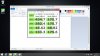
Just got it and installed it, it seems to perform its write speed at about 2/3 of the speed I expected so im not very happy with it.
But I don´t know very much about what these numbers mean, anyone has a input?
-
What capacity SSD did you get.
Your write speed is in line with the result for the 120GB here.
John -
Yes its 120gb version.
Can you please tell us temperatures of SSD in idle and when you copy something on it.You can read temps with Cristal disk info?
Thanks.
Hey John what you think does wifi pci-e slot in 900x3c also have usb connection ,i was thinking about trying this:
http://fotkidepo.ru/?id=photo:743828 -
Interesting, but I don't know if it would work. The only way to find out the answer would be to try.
John -
ok thanks anyway for always replying fast.
-
I think it should work.
Intel WiFi card inside Series 9 is combo card(bluetooth also).WiFi works over pci-e line and bluetooth needs separate line which is usb.
So it should work.The same story is with WiFi/WWAN combo card.
I will definitely try this if i dont sell 900X3C ,then i would have to postpone purchase of 15" Samsung till summer.I will spend some money that i save for 900X4C on this crazy project and also to buy new EVO msata. -
I think so too. Both modules WiFi operates directly on the PCIe bus, while Bluetooth and respectively the modem operates on PCIe's USB bus.
I have already purchased all parts (module, antennas, SIM holder & extension). But as I am currently traveling, I'll most likely won't see them until mid/end january. I'll give updates once I've tried that mod. -
Man that would be great if you can reply after.Its not problem for me to buy adapter,problem for me is ,if adapter doesn't work i cant sell this adapter to anyone here in Hvar or even in Croatia.So i will have 100 dead €.
On what notebook you have plan to try that?
Where you plan to put antennas? -
X3E, see here
But don't take that time frame for granted. I had the shipping of the parts postponed already once. -
Ok ,i can try without waiting you.
But where you plan to put antennas.I ask this because you know Samsung series 9 is not plastic notebook?
I will definitely connect default wifi antennas to WWAN part of adapter because i always use wifi connection in same room with router .
But where to put then other antennas?
Update: ok i see where you plan to putt other antennas.I was thinking same thing.To glue them .for upper plastic in ventilation holes.Even to cut them in half.
This would be easier to do on 900X4C because there is one unused hole near memory. -
Not sure if I got you right, but you should connect existing WiFi antennas to the corresponding WiFi interface. WWAN operates on different frequencies, so you'll need special antennas for that.
According to Option support the 4 antenna connectors are used with the following signals:
- GSM
- GSM diversity / GPS (combo?)
- WiFi
- WiFi diversity
I bought a bunch of different flexible Taoglas antennas
If they don't work / fit I'll try the antennas of my old Vaio TT.
Here are some more interesting parts: http://forum.notebookreview.com/net...-wifi-3g-pcie-half-mini-card.html#post9150948 -
Another possible location for the extra antennae is under the plastic panel behind the keyboard. However, wherever you put them they won't be far from metal.
John -
I didnt know that.I read something about that.
But i always thought that antenna is antenna and its not nuclear reactor,but i guess i was wrong
Maybe it would be best to wait for you to finish project,so i can see what exactly to order.
Hey John
I would be satisfied even with 5 meter range of wifi,so i believe that even somewhere behind metal would be good for 5m,or am i wrong again. -
1. Antennae are sized to suit the frequency. Hence the bars on a rooftop FM radio antennae (or old VHF TV) are much longer than on UHF TV antennae.
2. It's the location of the WWAN antennae that worries me. If you've got a smartphone then you can run speedtest with the phone in various locations including at the bottom of the screen on your notebook. In one place with a poor phone signal I was able to put my phone half way up a window and use it as a hotspot. That's not possible with built-in WWAN (but would be possible with a MiFi device).
John -
Anyone knows where I can find all samsung drivers and software for this np900x3c laptop? I can only seem to find windows 7 software and drivers, but my laptop came with windows 8. Thanks in advance!
-
I answered in the other thread where you asked ( here).
And please avoid cross posting. Few things are more annoying than writing an answer, only to find it was already answered in another thread. It also violates forum rules. OK, enough public spanking for now
John Ratsey likes this. -
Sorry, and thanks!
I'll ask my following question only here. I could only install windows 8 using CSM OS mode in the bios, and not UEFI. Now I can't boot while in UEFI although previously, before everything started breaking, I could only start in UEFI mode. Are there any benefits from one or the other? And should I change back to UEFI, if I can? -
No worries, many members don't realize cross posting is a problem -- which was why I mentioned it in a public post instead of a PM (as I would normally do). Again, no worries.
If Windows is installed in UEFI mode, the disk must be GPT, and UEFI must remain enabled in order for it to run. And conversely, if Windows is installed in CSM mode (legacy BIOS) the disk must be MBR, and UEFI must remain disabled.
I seem to recall your disk messed up and that's why you had to re-install. If you ran DISKPART CONVERT CLEAN as part of your repair (or a similar re-partitioning procedure), that would itself convert the disk to MBR. Subsequently, you might not have been able to boot without disabling UEFI (CSM mode) which in turn caused Windows to install in CSM/MBR mode. If you change mode, you have to convert the disk and re-install Windows --otherwise it won't boot, as you found.
There are some benefits to UEFI, among them a slightly faster boot (probably negligible on an SSD with Win8 Fast Startup enabled) and >4 primary partitions.
This post has more info, including links to some good Microsoft articles on the subject. -
So I got a microHDMI to VGA adapter and hooked up a secondary monitor but I'm getting hazy horizontal lines blinking across the screen.
I'm assuming its cuz its not a strong signal?
Anyone get this sort of problem? Bad MicroHDMI to VGA adapter possibly? I have the oem samsung one though. -
What resolution monitor?
Can you try to reduce the refresh rate?
John -
1920x1080
Not sure if I can, went through settings and didn't see anything like that. -
Needless to say, if there is any way you can use HDMI or DVI that will be far better, since you avoid the analog conversion of VGA. Most monitors produced within the last 10 years (particularly all LCDs) will have HDMI or DVI ports. VGA is mostly for older projectors and conference rooms that don't have HDMI cabling.
I believe your laptop has both a true MicroHDMI port (requiring just a straight MicroHDMI-DVI or MicroHDMI-HDMI cable) and a proprietary VGA port (requiring an expensive Samsung dongle).
To set the refresh rate, go to Windows Screen Resolution > Advanced Settings > Monitor tab OR use the Intel Graphics control panel. -
I consider VGA is provided for compatibility with some older hardware such as projectors with resolution up to 1024 x 768, perhaps 1280 x 800. 1920 x 1080 at the normal refresh rate of 60Hz is beyond what the analog signal can carry without degrading (hence my question about the resolution).
You should be able to find a refresh rate setting by right-clicking on some empty desktop and selecting Graphic Properties which should take you into the Intel graphics control panel. You might then need to select Advanced Mode.
John -
Hello all,
First time poster. I just purchased this laptop (NP900X3C-A01US) new unopen box and cant wait to start using it. Do you guys have any advice that you can share? I see that a lot of people are upgrading to Windows 8. I am not sure if I will do that as I am comfortable with windows 7 (unless there is a significant speed upgrade with this laptop that people are seeing).
Is there anything that you would recommend immediately doing? Bios upgrade? Driver upgrade etc? I read that the trackpad could be improved with a software upgrade but I am not sure. Also can you tell me if people are doing something that I should know about e.g. hard drive upgrade.
Any info you can share, no matter how small, will be greatly appreciated. Thanks!!! -
Hey John and oled
I order Option 671w today and Digicare reply to my message about NP900X3F-G01 wwan/wifi antenna.
They saying its this antenna so i need your opinion what you think.
BA42-00480A - SamsungPartsNL.com
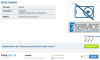
Also i giving you a link of wifi antenna from 900X3C so if you can compare those two.Maybe you see something that i don't understand and something that will convince me they want to sell me real thing that will suite my notebook case.
NP900X3C-A01NL - SamsungPartsNL.com
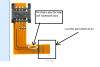
Thank you -
The BA42-00480A part description says "combo" while the BA42-00397A description says "WLAN".
Sensibly, this and the higher cost are confirmation that BA42-00480A is a combo WiFi / 3G antennae. It also suggests that Samsung have made a combo antennae unit as an alternative to the WiFi only antennae module that sits along the back of the chassis.
John -
looks good at first glance:
ANTENNA-COMBO - combo WWAN/WiFi!? hopefully!
Amor2 - Amor2 is the chassis of 900X3B-900X3G
13RFM - 13" RadioFrequencyModule?
800-21 - most WWAN frequencies operate between 800-2100MHz
I'm pretty much convinced this is the right part.John Ratsey likes this. -
Thanks people.
-
Hi, quick question, is there a way to drive 2560 x 1080 external monitor at that res from this notebook over its build in HDMI?
-
Officially, the micro HDMI port can deliver a maximum of FHD.
However, a few Book 9+ owners have reported running external displays at higher resolutions by reducing the refresh rate to 30Hz. It's worth investigating whether this can be done on the X3C.
John -
Thank you for the details, I guess I will hold off with upgrading my monitor till we get more details on the 15" S9 at CES. I might need to stay with this notebook for the next year I run it with 2 x 24" Dell monitors as well as its LCD at the same time and that does give me a good amount of desktop space.
-
Not seeing an issue with the touchpad, wifi is working well too. No bloatware I want to remove except for maybe Norton. Things are good. I Like the power settings so far. The only thing I have changed is to disable single finger tap clicks on the touchpad. I am depressing the touchpad fully for right and left click. This completely removes any chance of random highlighting etc. I much prefer this setup and still use the two finger and three finger actions.
Has anyone used the option to save battery lifespan by only allowing an 80% charge? -
That drives me crazy as well
I think thats a good idea if you plan on using it for a while (do not upgrade every year or two) and you do not absolutely have to have full charge. I also let my drain down with use before plugging it back in for a fresh charge. -
I've been using BLE except when I know that I might need the extra battery time.
It reduces the wear caused by fully charging the battery.
John -
Hi, does any one have a problem of the laptop not going to sleep properly? On several occasions now when I close the lid the fan keeps running and will not turn off. When I open the lid nothing appears on the screen and I have to do a full power off to stop the fans.
It does nt happen all the time, mostly happens when the battery is low and the laptop turns off but the fans keep going.
I keep my laptop in a sleeve and after a few hours opening the laptop I find that the laptop was still running which could cause it to overheat. -
Is anyone willing to share their Recovery Partition Image for NP900X3C-A03US ? I backed it up a year ago and removed the partition and now I can't find the backup
Also if someone can post the directory listing of the content of that partition? I can search my file server.
Thanks! -
Try searching for BackDate.txt
-
This sounds nasty but we need more info.
Are you running Windows 7 or Windows 8 and which BIOS (P**AAC or P**ABK). Running the standalone BIOS update program (link in first post here) will give you the BIOS version and whether you are up-to-date.
If running Windows 7 then are you using Intel Rapid Start Technology?
John -
Thanks, can't find it, I might have burned it to a DVD I did find the original restore CD that came in the box with the notebook. Still if anyone is willing to share a copy of the NP900X3C-A03US recovery partition backup, I would greatly appreciate it. I will even offer $20 via PayPal for the trouble.
Thanks! -
It's running Windows 8.1, although the problem also occured in Windows 7. The bios version is P05AAC
-
8.1 has created a few problems.
The latest BIOS in that family is P06AAC and I would suggest you do an upgrade (using the stand-alone BIOS update program). However, that BIOS was released in February 2013, long before 8.1 arrived so it won't be fixing any 8.1 issues. In fact, Samsung haven't tried. They only officially support 8.1 for the newer X3Cs that shipped with windows 8 and have the ABK BIOS.
John -
Hello all!
Bought this beauty last week, win8 preinstalled, updated to 8.1, it was sitting in a store for almost a year (prod. date Nov 2012). Everything seems OK for now, but it seems bit slow in comparison to my old Dell with 2310M i3 CPU (2.1 Ghz). Can someone post Passmark Performance Test 8.0 results for the i5 np900x3c? I got 752 points, my old i3 had 1130 points. The 2D graph score was strange, the i3 with HD3000 had 395 points, while the Ultrabook with HD4000 had only 179 points. Don't understand...
13.3" Samsung NP900X3C with Ivy Bridge CPU
Discussion in 'Samsung' started by John Ratsey, Apr 11, 2012.


