 Problems? See this thread at archive.org.
How come my battery only last for 3 hours on full charge Power Saver mode? I have NP780Z5E and it used to last for around 6 hours on Medium brightness when browsing the internet!
Would this be a overcharging battery problem?
-
-
So I've been playing around with the Windows 10 technical preview for a while. On the whole I'm impressed.
The first TP build fixed the metro issue, but caused the touchpad settings to be reset after every reboot.
The second TP build broke the screen brightness again, and I couldn't fix it.
I'm currently on build 10049 and it's much better. Brightness worked straight away (with the 8.1 brightness patch already installed), and after some fiddling the touchpad works, but this time the settings stay after each reboot. The superbar search bar does overlap icons, but you can shrink it to just the Siri circle.
I'm running the AMD Omega driver and the latest Intel driver. The only issues I've had was with Valkyria Chronicles, but I believe that is a general AMD issue.
My Caps Lock backlight and Num Lock (stuck on none numberpad mode) are broken, and I did have to glue the hinge covers after a drop. -
I've lost my webcam! I have no idea what's happened, but trying to use Skype or any other application requiring use of the webcam doesn't work. I can't see anything in Device Manager and the light just doesn't turn on, so I'm stumped!
Has anyone had anything like this before? -
There's a good chance your Radeon gpu is running for some reason. Go to catalyst control center > switchable graphics application monitor and press start. The program with 'high performance' is using the gpu. Go to task manager, kill that program. Then go back to CCC and choose 'power-saving' in application settings for that app.
You may also want to download MSI Afterburner which shows when Radeon is working and at what settings. -
Do you think GTA V will run on this laptop?
Did anyone already try the newly released 15.4 Beta drivers? Those are supposed to be AMD Radeon™ Grand Theft Auto V Optimized Beta Driver.
Last edited: Apr 13, 2015 -
**cough**Cortana**cough**
-
Thanks for the help! I got 5-6 of hours battery life again - (with Medium Brightness and browsing)
Apparently, there is this .exe called "Microsoft Powershell ISE" that was using "High Performance". I don't know what it is, but I switched it back to "Power Saving" and my battery life has improved. -
There's a new item on SW update called IFR <something korean>. Anyone know what it does and if it breaks anything?
Is it related to this?
https://software.intel.com/en-us/blogs/2013/02/06/intel-manageability-firmware-recovery-agent -
Hi guys. Quick question...
Short of upgrading to an SSD, is there any progress on the HDD disk activity spikes? I've tried literally everything. The page file method, disabling various services, not using windows defender, etc etc etc.
The one thing I've noticed though is that the problem is MUCH worse when I return to the computer after a time of inactivity. So it's almost like something is going on while the computer is inactive, or it's just slow to react when I need it to go back to doing things.
When I bought it I was worried about the 5400rpm drive but, I didn't think it would matter this much..
Can we safely assume that Win 10 is going to be more efficient? OR is a SSD upgrade just inevitable?
Quick Update... Disabling "BITS" service seems to have solved the problem for now. I believe that stands for Background Intelligence Transfer Service.Last edited: Apr 15, 2015 -
That the the Powershell Integrated Scripting Environment. It is the editor that Microsoft provides for writing scripts in Powershell. You wouldn't launch it unless you needed to write or edit scripts, and you should definitely be able to tell if it was running because it is an interactive desktop application.
-
BITS service is what Windows uses to download patches in the background. It should run all of the time but only actually does anything when there are new patches to download (patch Tuesday, usually). The point of it is that it only downloads the updates when the network connection is being lightly used so that it does not impact performance.
As to your first question, you probably will eventually want an SSD. A 5400 RPM drive is fairly slow to begin with, and the newer versions of Windows do a lot more in the background. Things that would't even register as a "blip" on an SSD show up as a "chug-chug-chug-thrash" on a 5400 RPM drive. They tried using that IntelliMemory to mitigate the effects of the slow drive, but I think that was ultimately not successful (not least because it used a big chunk of otherwise precious RAM). -
Yeah, when I bought the laptop I was concerned about the drive but ultimately I knew that I'd probably end up replacing it eventually. Those SSD's aren't cheap though!

-
Thanks! I didn't notice anything significantly different on my computer. I didn't even know how the program switched to High Performance mode!
-
Compared to a 5400 RPM drive, no. But the prices have come down quite a bit with the latest generation, probably close to 50%. I recall paying about $180 for my 256GB Samsung EVO 840. You can get a 512GB EVO 850 or a Crucial MX/BX model for about that much these days. NewEgg has a Crucial M500 960GB drive for $285 right now. -
Hey Sevester,
I don't have access to pm yet due to the botnet limitations but could you send me the unlocked bios for the PO5ADH Samsung? -
Okay so I've got a friend's NP880Z5E that doesn't boot at all. We're talking no bios, no samsung boot screen, no windows, no nothing. Screen doesn't even light up. I've disconnected and reconnected it and I've also tried running it through vga to an external monitor. It did nothing.
I've tried the CMOS reset, safe mode, can't get f2 or f4 to respond either. Even with the drive pulled, nothing.
At present I'm slogging through chkdsk with the HDD plugged into an external enclosure. A lot of corrupted sections were fixed, but an hour in and I'm only at 10%. While I'm waiting for it to finish, I wanted to come here for some help because I can't search my way to the exact problem.
I have no idea when W8.1 was installed, but I checked the version number on a file in system32 and it's 8.1.
Update: failed chkdsk and confirmed with Seatools that it's corrupted. Attempting the long generic test to hopefully recover the drive, but that still doesn't explain the issue with the screen not showing anything at all does it?
Even if I get a new hard drive for this, the laptop is still, as far as I can tell, unresponsive.
Any ideas? -
Do you get the fan spinning up and down constantly? I'm not really concerned with the heat except that the fans have been running way too often, including much of the time spinning up for a few minutes as it passes 50C, turning off for a few minutes until it passes 50C again, and then repeating for hours at a time. It's literally driving me mad.
-
Sounds like it's busted with a corrupt bios or it's just dead, is there any damage to an components or water damage? if not it sounds like the bios is toast and you'll need to reflash it somehow.
-
This thread contains much of this discussion about resurrecting dead Samsung notebooks due to UEFI or NVRAM related problems.
There have been several of these problems during the month or two as if a new bug has surfaced.
John -
Well, problems never ends with this laptop, i guess...
Anyone knows how to solve the problem with the ''100% hard drive use'' ? It happens (apparently) in random moments, and i have to close all and wait until it gets normal again. Also everytime i turn off my computer, it lost my mouse configuration (i like to use it at max speed from windows, i know is a small issue but still annoying). To be honest, i cant wait for midyear or chrismas to get a new laptop, and this will be my LAST samsung laptop or device in general.Last edited: May 2, 2015 -
I would check the hard drive's health, preferably using the manufacturer's diagnostic utility (eg for Seagate it is called Seatools).
John -
Seems like Hitachi only gives support to non-primary disk on the laptop, lol.
http://www.hgst.com/support/downloads -
You've got me puzzled. The Drive Fitness Tool should work with both internal and external drives.
Did you try installing and running it?
Another option is to put the HDD into a USB enclosure and scan it on another computer. That method also gives you the option to do a full scan for viruses and malware.
John -
Its says clearly on the page 5 of the install manual for the program.
http://www.hgst.com/hdd/support/downloads/WinDFT Install and User Guide.pdf
''WinDFT is not designed to run on your primary operating drive.''
I obviusly tried by installing and open it, but dindt work. I dont have any way to put my HDD into a USB enclosure =/ -
In that case you will have to use a third party software but there;s not the same level of certainty that it will interpret the SMART data correctly.
Perhaps first try this (which I haven't used but it is up to date) with CrystalDiskInfo for a second opinion.
John -
I run it, an says that all is ok. Seems like is a software problem or not??
Ps: i already tried all the ways around internet to solve this problem, but no one worked. -
OK. I suggest that your next step is to get SysInternals Process Explorer. It digs a lot deeper than Task Manager and should help you track down which process / program is causing the disk activity.
John -
Anyone have "Sleep" issues with the NP780Z5E?
The computer just stays on and goes to a black screen when you put it to sleep. It won't turn back on unless you hold the power button to shut it off.
I have had major issues with this computer for the past 2 years. I'm probably going to get another laptop that isn't made by Samsung in a month or so. -
I wouldn't blame Samsung for the sleep problem. About a month ago my Dell E7440 started crashing and rebooting when waking from sleep, but hibernation works fine. So far I haven't managed to debug the problem and fear that I will have to reinstall Windows. In your case, the switchable graphics (one or both drivers) is the likely culprit.
Advice on which are the best drivers to use is probably somewhere in this thread.
John -
Thanks John, I will look into more details tonight. The "Sleep" problem just recently started happening around a few days ago.
I will be studying abroad soon and I'm deciding to buy another laptop for backup. My Samsung MOBO had failed on me less than a year ago and luckily I had warranty to repair it. But since the warranty is over, I can't risk relying on Samsung. -
That's a very valid concern. We seems to be having another batch of UEFI-related bricking problems with many Samsung notebooks.
The safe solution is to get a non-UEFI Windows 7 machine, such as a Latitude from Dell Outlet.
John -
Hi All,
Read here a lot, first time posting (with a new account).
I own the 880z5e model.
I really enjoy this machine, although the common issues of 100% disk usage an all.
Recently i started thinking about a way to convert the laptop to a 360 degrees laptop.
I love the touch, but because i cant fold it in order to use it as a tablet, i rarely reach for the screen.
Any chance anybody here researched or know of a way to replace the hinges to a 360 degrees hinges?
I tried looking for suitable hinges online but didn't really find any.
Also, i'm not 100% sure, even if i had the hinges and replaced them, that the screen bottom edges will not pump into the upper edge of the keyboard.
Would be awesome to hear what you guys think. -
Welcome to the forum. I highly doubt there are original sammy hinges that go 360 on this laptop. Otherwise, they would come with it. As for the aftermarket ones, you can always check. But again, this is a very specific part and a high chance that it would only fit for this model. The demand for them is also a question. For these reasons, I doubt someone would be making them. Just my thoughts.
-
I had sleep mode issues on mine that were related to Acronis being installed. There was some agent or component that prevented systems from going to sleep properly. After uninstalling it I have had no issues.
-
Hi everybody, I have this question for a long time: How can I send files for Bluetooth to, for example, my cellphone?
-
I've just been exploring this since the solution isn't obvious.
Step one: Enable Bluetooth on both devices, make sure the phone is in Discoverable mode, get the computer to search for and find it and then pair the devices.
Step two: Double click on the Bluetooth icon in the notification area. This should bring up a window which shows the phone as a connected device.
Step three: Double-click on the phone icon which should bring up a new window listing the available services.
Step four: Click on the link to Send file then select the file to send.
Life would be easier if the phone showed up in Explorer, but it doesn't.
John -
In the step two, this appears:
![[IMG]](images/storyImages/3.jpg)
And I make double-click and nothing happens (I try even when my was connected of course)
Thanks for answer -
I wonder if the phone's security is blocking the computer accessing the storage on the phone.
John -
It's not locked, even I have a Windows Phone it don't work
-
This might help.
John -
Thanks, John you save my battery first and now you solve a big problem for me.
Really, THANKS A LOT -
Hello all! I am new to this forum and it may have been asked somewhere, but I need your help. Every time I stay on a window for too long, I see a faint burn in of the image that was on the screen. It goes away after a while, but for some time I see a burn in of an image. Is this a defect, or a graphics diver problem? Does anyone else have this problem?
-
Image persistence/retention is a known problem. A few people have had their displays under warranty.
There are several threads discussing this problem. Here's one. I also recall someone suggesting a work-around (using slightly lower display brightness?).
John -
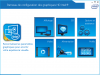
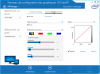
Hi, a lot of people have seen this non-persistant ghosting/burning "problem" as John said.
The work-around proposed was to decrease the contrast in the Intel Configuration Panel (see attached photos), which will lower the display brightness. My personnal experience (not scientific at all) is that lowering contrast offers a best "max-brightness/ghosting' ratio than lowering the brightness only.
I hope you can find a setting that you like and stop worrying about it.
 John Ratsey likes this.
 -
Hey all.
Is this laptop easy to clean? Ive been getting alot of fps drops/stuttering/throtting or whatever you might call it in games recently.
After installning HWMonitor ive realised that the cpu temp is around 75-80C just in windows and goes up to 95-100C in games.
I would just assume thats a major part of the problem... -
Accumulation of dust and fluff in the cooling system is the usual cause of deterioration of cooling efficiency. You need to remove the bottom cover. This probably involves removing the screws and then unclipping the plastic (probably starting at one of the front corners). The inside looks like this:
http://www.notebookcheck.net/fileadmin/_processed_/csm_Ativ8_UnterseiteOffen_6ebffbd043.jpg
John -
Hi all. I've posted this problem last year but got no relevant reply
When i play 3d games, at random times (from 1 minute to 15-20) the notebook hangs.. or better, the video hangs, but i see the hdd light keep blinking. The only way to recover is reboot.
i tried with windows 8, 8.1, and several 10 builds. With almost every driver version that got out since i bought the notebook. But it ends always in a hang.
the only thing that seems to partially alleviate the problem is underclocking the AMD video board. I ended up playing via Steam/Spladot streaming from my main gaming pc. For the rest, the notebook is blinding fast and quiet.
Damn me that i got over AMD Enduro instead of Nvidia gpu. -
I installed the Samsung 850 Pro SSD (500GB) and my goodness, this is a completely different PC now. It is BLAZING fast. I used to dread needing to restart, now it takes me less than 10 seconds!
I can't recommend an SSD enough. It drastically changes your entire experience with this particular laptop, especially considering the stock HDD is chugging along at 5400rpm.
Doing a clean install was incredibly easy as well. Best way to do it (in my opinion) is to use microsoft's website to download and create a USB boot image. Use that to boot from with the SSD installed, and then install windows as usual. Simple, easy, and fast!John Ratsey likes this. -
I just installed an 850 EVO in mine. Did a clean install and only installed the drivers I need. No S Agent, SW Update, Intellimemory, anything. Just a fast and powerful machine.
The only issue I have now with this computer is my speakers are kinda ehh. They rattle/levels peak very easily. Should I get them replaced? -
I mentioned the speaker rattling problem when I got my laptop repaired. I'm not convinced they actually replaced anything, but the issue is gone now. I think you just need to make sure all the screws are tightened properly (not too loose, not too tight), because the problem came back a bit when I replaced my HDD until I redid the bottom cover screws.
2013 Series 7 chronos / Ativ Book 8 15" owner's lounge (NP770Z5E / NP780Z5E / NP870Z5E / NP880Z5E)
Discussion in 'Samsung' started by pranktank, Mar 24, 2013.


