Problems? See this thread at archive.org.
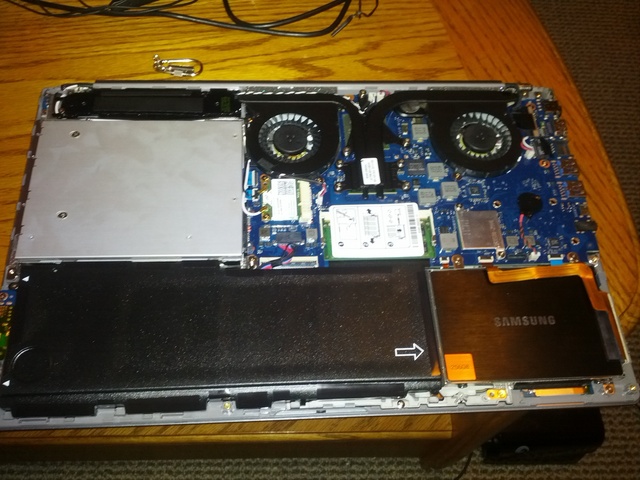
Has anyone found a hard drive caddy that fits the Series 7? I'd like to replace the DVD drive with a second hard drive so any pointers to a suitable caddy would be great.
-
You could try the caddies for the macbook
-
Here's a caddy from Newmodeus.com that might work for the slot drive DVD:
Optical Bay HDD Caddy to replace Slot-Loading Optical,9.5,SATA [OBHD9-SATA-SATA-NF] - $42.00 : NewmodeUS, Hard Drive Caddys for Notebooks -
The Newmodeus.com caddy works perfectly! I now have 1 Terabyte of storage installed - 256 GB on SSD and 750 GB on the HDD.
-
Sweet, could you put up a how-to guide?
-
Is the odd bay SATA II?
-
No both bays are SATA III. There's an old post on this somewhere.
-
+1 for the guide!!!
-
Great news that the newmodeUS caddy works - I just ordered mine...
-
Here are some instructions for removing the optical drive and replacing with the Newmodeus caddy:
Photo
https://docs.google.com/open?id=0BwrPuJFSQqZMM2JkZjA0NGEtYTgxMC00OWVkLWI5MzYtODE3MzgzNjkyY2Q0
Instructions
https://docs.google.com/document/d/1EmGUlRk8CY4WvPfqGVAROkj45I2dREYLqXfyWo9JLZw/edit
Newnodeus caddy
Optical Bay HDD Caddy to replace Slot-Loading Optical,9.5,PATA : NewmodeUS, Hard Drive Caddys for Notebooks
http://www.newmodeus.com/pics/OBHD/OBHD9-holes.jpg
Enjoy!!b_lindahl likes this. -
You might want to consider the Newmodeus external drive enclosure for the SATA DVD drive that you replaced with the HDD. I just got mine and it works great. Now I have a super fast SSD, and a decent HDD with a total of 1 terabyte of hard disk space installed. The DVD external enclosure connects to a USB 3.0 port and is pretty fast as well. I can watch DVDs and install new software using my external DVD drive.
Image
USB 3.0 External Enclosure for Optical Drive (9.5mm SATA) : NewmodeUS, Hard Drive Caddys for Notebooks
Product page
USB 3.0 External Enclosure for Optical Drive (9.5mm SATA) [slimSATA-USB-C12] - $26.95 : NewmodeUS, Hard Drive Caddys for Notebooks -
Thanks for the caddy and the guide! Both worked marvelously. Rocking a Samsung 830 SSD now. My next question is what is the best way to format the standard 750GB spinning HD? Is there a way which is best and will still take advantage of the express cache? Or is it irrelevant? Also, there is a 100MB "system" partition which seems to be locked. What is that for? and can/should it be formatted as well to make one unified data volume out of the HD?
-
Does anyone of you know, where in Europe I might find some simular equiepment? Or can put down some exact specifications for the ssd-caddy and a box with USB+kabel for the optical drive. It will be to expensive for me to get it sent from the States. With customs and all that.
I tried search for it, but I´m not sure that I will get the right one that fits correctly to the laptop. -
You actually only need the slimSATA to SATA adapter.
-
I would tend to leave the Samsung partitions. One is the recovery partition which you could use should you want to reinstall Windows on the HDD (for example, if you want to dispose of the computer but keep the SSD).
John -
I would not reformat the 750 Gb HDD. I have left mine the way it is, so that if ever have to send the unit in for warranty service, I can take out the SSD, put back the HDD and optical drive to factory install configuration.
Also I suggest turning off the express cache. With the blazing fast Samsung 830 SSD as the primary drive, express cache can actually slow things down. You don't need it any more. Samsung Magician gives you a tool to optimize speeds to access data and will not work with the Express Cache 8 Gb disk space.You can optimize the 830 SSD not the express cache. -
Ahh I hadn't even thought about that. How would I go about disabling the express cache? -
You can turn it off in Samsung Easy Settings Software.
-
Hi, I want to change my optical drive with a SSD. Can you tell me what's the difference betwenn these products? 2nd hard drive or SSD Caddy for Samsung Series 7 [OBHD9-SATA-SATA-NF] - $42.00 : NewmodeUS, Hard Drive Caddys for Notebooks
Optical Bay HDD Caddy to replace Slot-Loading Optical,9.5,SATA [OBHD9-SATA-SATA-NF] - $42.00 : NewmodeUS, Hard Drive Caddys for Notebooks
What's more suited to my needs? -
Both those listings have the same model number of OBHD9-SATA-SATA-NF, so I think they are identical. I suspect Newmodeus have created more than one listing to improve their chances of the search engines pointing to their products.
John -
Thanks a lot! ;-)
-
Anything cheaper for the caddy? MBP caddys are like 9-10$...... why 42$ here?
-
Modeus are charging a big premium for providing peace of mind. If you think you know your hardware than I would expect that a generic solution would fit: SATA HDDs have a standard connector; SATA ODDs have another standard connector; and ODDs come in standard shapes and sizes (check the thickness). In this case it's not as if one is paying extra for a bezel that matches the computer. If I were shopping I would first try the cheap option and, if it doesn't work, put it down to the learning process.
John -
its a 9.5mm bay. there are a lot of 9.5mm MBP superdrive caddys around. m gonna check one of those and report. can ne1 give me some dimensions and specs of the newmodeus caddy they purchased?
Edit:just tried this out,works perfectly.juz 16$.
SATA 2nd HDD Hard Drive Caddy for 9.5mm Universal CD / DVD-ROM Optical Bay
Link: http://www.ebay.com/itm/SATA-2nd-HDD-Hard-Drive-Caddy-9-5mm-Universal-CD-DVD-ROM-Optical-Bay-/290636895162 -
I'm in the UK, the caddies on ebay don't appear to have any method of fixing the caddy into the laptop. Has anyone any experience of fitting one of these?
I have a Crucial C300 SSD removed from another PC and quite fancy using it.
Any suggestions on what caddy to buy and how to fix it appreciated. -
Something like this. Make sure you don't get the 12.7mm thick version.
I expect it will fit snugly because the size should be the same as the optical drive module. However, it may be possible to transfer any fixing bracket that is on the optical drive. Alternatively some strategically placed foam or tape will hold it in place.
John -
Is basically all you need for this pretty much any 9.5mm SATA universal caddy?
-
Yes. Notebook optical drives come in 3 standard shapes and thicknesses: 12.7mm (1/2"), 9.5mm (3/8") and 7mm (quite rare). 2.5" hard drives come in the same 3 standard thicknesses (but the thick ones are rare) giving a lot of inter-changeability. Tray-loading drives have a detachable plastic faceplate (bezel) to suit the notebook. It's held on by some plastic hooks and needs to be unclipped carefully. The SATA connector and the fixing holes are in standard positions to facilitate inter-changeability.
So, yes, a standard 9.5mm HDD will fit into a standard 9.5mm or 12.7mm thick caddy and that caddy should be a drop-in / slot-in replacement for an optical drive of the same thickness.
However, I haven't need to use one myself so I'm not 100% sure if the universal caddies include holes for fixing any brackets or the faceplate.
John -
This one looks like it'll do the job:
Amazon.com: Protronix® SATA 2nd HDD Hard Drive Caddy for 9.5mm Universal CD / DVD-ROM Optical Bay: Computers & Accessories
around $13 including shipping -
I used a macbook one from amazon: Amazon.com: SATA 2.5" / 9.5mm 2nd Hard Disk Drive Caddy Adapter Special Designed For Apple macbook pro (13,15,17) SuperDrive MB466LL/A MB207LL/A MB470LL/A MB226LL/A MB724LL/A MB375LL/A: Electronics
At the time it was eligible for amazon prime. Not only did it fit perfectly, even the screw holes lined up. I have a 256gb SSD and the stock drive in the caddy. -
NOTE: This does NOT work for the 15.6 inch series 7 (14 either). You will have to saw off the right side that says "Serial ATA" and shows directions with red arrows. That right side needs to be cut off in order to fit into the 15.6 inch version. (or 14inch)
-
I'm in Norway, so my options are a bit more limited (seeing as I don't want to spend fortunes on customs etc.), but I did find this in an online company that delivers within Norway:
Link to product
Features:
· Fits in the optical drive bay (HP Upgrade Bay)
· Works with 2.5" SATA 9.5mm-high hard drives
· Also compatible with 9.5mm or thinner HDD and SSD
· Perfect solution for those that want to add the new 750GB or 1TB drives as a second drive
· Also compatible with the new 2.5" SSD drives
Will that work with my Samsung 15,6" 700Z5C?
Thanks
-
I have a 700Z5B 15.6" and I did not have to saw anything or modify the caddy at all.
![[IMG]](images/storyImages/t80e_3c8_u7uml.jpg)
Attached Files:
-
-
No it will not. It has to be 9.5mm only, as you can read from the previous messages. That thing you linked is 12.7mm tall. It won't fit in the computer.
-
Hey guys, any other option on Ebay/amazon for the optybay ????? Dont whant to spend those USD 42.00
thnx! -
What about caddies for the 14" version??
-
Optical drives have a limited number of formats so if the ODD is the same then the caddy to replace the ODD will be the same.
John -
hi can some one pleas let me know wich one of this works also is there any cable needed thanks
i have ordered a 15.6 inch Series 7 Chronos 700Z 15.6-inch
Innoo Tech**9.5mm IDE Optical Bay Hard Drive Adapter: Amazon.co.uk: Electronics
BrainyDeal SATA 2nd HDD Hard Drive Caddy Adapter for Apple MacBook Pro 13 15 17 inch: Amazon.co.uk: Computers & Accessories -
anyone have one 1h left to order for next day delivery, also what kind of tools you recommend to open the laptop without damaging the plastic
-
This kind of screwdriver set worked well for me: 15-piece precision tool set with soft handle | Screwdrivers | Ratings & Reviews | TheSource.ca
And a credit card to gently pry-apart the casing after all the screws are out (start at the back near the hinge and slide the card around the casing, gently popping the plastic tabs as you go).
Other questions you might have about the process might be answered by some of my previous posts here: http://forum.notebookreview.com/samsung/687673-clean-win7-install-ssd-2.html -
Hi thanks for the replay and the links i ended up ordering the first caddy on my links did not order any screws i have a Philips one hoping that will do the job.
Both laptop and caddy are being delivered tomorrow im planing on staring it up to cheek if everything is working clone the hdd to ssd and just replace drives ,hope nothing goes wrong if it dose the good thing when ordering from amazon is they will replace/refund without any questions asked. -
Very important: DO NOT use the wrong sized screwdriver! If you strip a screw, you will literally be screwed. You need a 2.4mm Phillips for the case screws (the smallest one in the set I linked - PH00), and the next size up (PH0) for the hard drive mounting brackets and the ODD screws inside.
-
Ok... I couldn't find an appropriate thread for this question but here goes...
Does anyone know where I can obtain a replacement bottom casing for an NP700Z7C-S01US?
Mine slipped off the back seat of the car and landed on the slider rail of the driver's seat so it's now got some dings and a less-than-attractive scratch down the side.
I called Samsung but they want the unit returned and I can't be without it while they change the base so I'm trying to find a DIY solution
-
This is the only one I've seen anywhere =/
GENUINE Samsung Series 7 700Z NP700Z7C-S03US Bottom case BA75-03697A | eBay -
Since replacing my optical drive with the original Samsung HDD (after replacing that with a Crucial M4 SSD), I have noticed an intermittent and puzzling problem. Occasionally, the 750GB HDD will dissappear from "My Computer". The issue is usually resolved by rebooting, but on a couple of occasions, I have had to reboot 2 - 4 times before it would reappear in My Computer. Anyone have any ideas what might be the cause/solution? It almost seems like it might be something simple like a slightly loose connection with the SATA interface, but not sure.
-
If you get the problem again, go into the BIOS on reboot and see if the HDD is listed among the hardware.
That would suggest a system or hardware issue. Remove, disassemble, reassemble and replace sometimes cleans up any problem connectors.
John -
Yes, I already did that. It has never failed to show up in the BIOS, only within Windows. Do you still think disassembling / reassembling is necessary? If it always shows up in the BIOS, it couldn't be a connection issue, could it?
-
If the HDD always shows up at the BIOS level then a possible culprit is the Intel Rapid Storage Technology (or its absence).
John -
Just installed yesterday with caddy (got it for 3 Eur) I was using it in samsung qs 410 and remember had this type of problem. Solution was to type one simple command, in disk part maybe. Forgot of course and now I cant find it
Problem after migrating OS to SSD, with paragon, I can see it basic BIOS settings, I can see it in windows, and do anything with it, but its not in Boot priority list or boot manager
Solved today, can't Use SSD in a caddy, had to swap them over
Hard drive caddy for Series 7?
Discussion in 'Samsung' started by iangilroy, Nov 23, 2011.