 Problems? See this thread at archive.org.
See this thread for the screw size / type. The easiest source is probably one of the notebook screw multi packs from China (see ebay) which will fit but not be perfect although you might find someone selling individual screws from a dismantled Series 9 (NP900X3B/C/D etc use the same screws as the NP900X4C).
I saw something similar on the NP900X4C which I have just sold. I did have battery life extender enambled most of the time which probabably helped - one advantage of a generously sized battery is that it doesn't get worked so hard.
John
-
-
thanks for fast reply

how much you evaluate my samsung 900X4C-A03PT
, i7, 8gb ram, 512 ssd all from origin with box, original charger and samsung original leather case
excelente condition -
should i buy here?
each one 1.21 euros?
https://www.samsungonderdelen.com/samsung-model/np900x4c-a01be.htm -
That's a possible source although I'm not sure if the correct screw is 6001-002734 or 6001-002734 as both are M2 x 4.
Or you could look on your local ebay for the equivalent of a pack such as this.
It is very difficult to put a value on your NP900X4C. Getting a good price depends on finding someone who values the size and weight and doesn't mind the display quality and resolution.
John -
that pack will have the screws i need?
-
That pack includes M2 x 4 (which means nominal 2mm diameter, 4mm long) which will fit, although not perfectly as the screws used by Samsung have a small thin head while the heads of standard screws are slightly bigger and thicker. These photos show the difference which will only be noticeable if someone examines the bottom of the computer.
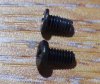
Samsung screw (back) and standard screw (front)
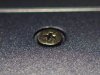
Samsung screw in place
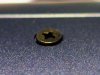
Standard screw - head is slightly proud
Johntugapt likes this. -
I haven't been offered the WIndows 10 anniversary update, and this page http://www.samsung.com/ae/support/Windows10_Update/ doesn't show NP900x4c as a supported model.
Does anyone have experience with the anniversary update? Did they force it or was it offered by Windows update?
thanks
Edwin -
Do you have Defer Upgrades selected under the Updates > Advanced Options? This delays the big updates getting installed for a few months during which time, I would hope, Microsoft sorts out the bugs.
John -
No I don't have that option - this is running Windows 10 home.
-
Then it's possible that Microsoft are now taking notice of whether manufacturers consider their products to be compatible. I had to put a lot of effort into preventing Windows 7 from taking over my NP900X3B.
John -
how heavy is the notebook exactly? there are different weights over the internet.
did someone successfully swap the screen against a matte fullHD IPS? -
According to my digital kitchen scales the weight of the NP900X4C is 1.65kg / 3.64 lbs.
There are several obstacles to changing the LCD panel which, I agree, is the weak link in this notebook. The obstacles are:
- The panel size is 15.0", not the standard 15.6"
- The 1600 x 900 resolution is coded into the BIOS (I think because it helps speed up the boot process) and you will have to edit the BIOS (someone has done this when changing the panel on a 13.3" Samsung from 1600 x 900 to FHD)
- The display bezel is glued and you may have difficulting finding a replacement.
-
time to say goodbye to my 900x4c-a03pt
best laptop i already had, this 900x4c is really amazing, i also had a 900x4d
but this design and aluminium alloy is just from another world, and the 512sd is so fast, i miss the 8sec or less to boot to windows
bought a lenovo y50-70 and start to have headaches
-
I'm starting to wonder whether the 15.0" FHD panel used in the Kaby Lake Book 9 would be compatible with the X4C / X4D. However, in addition to swapping the display there would also need to be a BIOS edit because the display resolution is coded into the BIOS (this helps the fast boot because the BIOS doesn't have to spend time finding the display resolution). There is information about how to do this edit somewhere in the forum because someone put an FHD panel on an older 13.3" Series 9.
John -
Hello, and here we are reviving this thread.
I've just got the same Kingston modules "KVR16LS11/8 and tried to install it, but no success. My np900x4C does not boot, just keep a black screen with the backlight on. It does not even get to the bios.
By the way, my bios version is the P11ABK.
I've tried all, followed the procedures to a CMOS reset, took the battery out, but anything seems to make the ram modules recognizable. When I put the original memory sticks back, everything is fine.
What you guys think? Maybe a compatibility issue, or the old fussy bios version problem? -
One of the BIOS updates many years ago created an incompatibility with some RAM modules (see here for my experience). The Series 7 notebooks were also hit with the same problem. Unfortunately, trying to find the posts about which modules are compatible isn't easy but someone reported success with your Kingston modules so I'm confused. Perhaps what is sold now isn't quite the same as what was sold with the same part number a few years ago.
John -
Dear John, thanks for the fast reply.
I've read the whole threads about the issue and I think it might be happening until nowadays.
I believe the memory module is identical (at least there were no changes in specs and the module number is the same) to the ones referred in the past. The most significant difference is the bios version, as seen in the original post. They had P07AAC while I have P11ABK. Didn't find any logs about this bios version, tough.
I'll try to check if the same occurs with a 1.5v DDR3 module. If anything happens, it might be the case to rollback my bios version? Other ideas are welcomed.
Thiago -
Be cautious about rolling back the BIOS on this notebook. P**ABK means that it has UEFI enabled by default and these notebooks were vulnerable to bricking due to NVRAM corruption. Samsung gradually removed the worst bugs with BIOS updates and I would recommend having the most recent BIOS. If you are not sure if you have this then see the BIOS Update thread http://forum.notebookreview.com/threads/samsung-bios-update-problems.698094/ for a link to Samsungs BIOSupdate software.
John -
I've double-checked my options in order to don't proceed rolling back the bios version. As John said, it can be dangerous that something goes wrong. And in the end, you will lose years of bios updates that fixed bugs, solved compatibility and security issues, etc.
So I've tried a safer move: to return the DD3L module and try with a regular DDR3 model. In fact, it solved my problems!!!
The ram module that works is the "KVR16S11/8" and I finally have my 16Gb ram linux notebook running smoothly as it can be.
It solved the problem but left me thinking: either the compatibility with DDR3L modules persists until nowadays or this specific Kingston module is not compatible with the np900x4C at all. Dunno.
Thanks John for the support and the guys in other discussions for commenting their problems and solutions as well.
Hope that if someone finds itself in a similar situation of mine this forum can help it too.
ThiagoJohn Ratsey likes this. -
Thank you for the update which may have helped get to the answer of this long problem. My best guess is that Samsung changed something in the BIOS to only recognise 1.5V modules and excluded the 1.5/1.35V RAM modules, perhaps because the latter had not been specifically confirmed to be supported.
JohnSpartan@HIDevolution likes this. -
Hi,
I am still very happy with my Series 9 NP900X4C, (which I have upgraded with a new battery and 500GB SSD). However the keyboard has started playing up, first the vertical row BHY and now a few other keys.
The row made me think of a bad connection to the motherboard, or a chip coming loose.
Any suggestions? Would a CMOS reset help?
Thanks -
You can try is removal / reinsertion of the keyboard cable into the socket of the mainboard. A CMOS reset won't help. Did you spill any liquid onto the keyboard? This can confuse the electronics.
Replacement requires either the complete keyboard / palmrest unit (called by Samsung the "Unit housing top" or a replacement keyboard (usually from China via ebay or similar) which involves removal of the old keyboard from the palmrest unit and then gluing in the new keyboard. A few people have done this.
John -
Thanks John,
No liquids spilt - I will open up next time it happens on a weekend and try the reseating option.
Will update the thread when I know.
Edwin -
Any link / hint please on to how to glue in a replacement keyboard? Replacement keyboards with the palmrest are over $250, which is stretching the value. I vaguely remember seeing a video but I can't find it anywhere.
-
If I recall correctly then the basic keyboard is fixed into the palmrest unit by what look like plastic pegs which have had their ends melted. You need to remove these ends using either a sharp craft knife or a Dremel (or similar) tool and then using some glue to fix the new keyboards.
Someone, somewhere in these forums (possibly the Series 8) has done this.
John -
Im having trouble with my computer suddenly becoming extremely slow. browsers load slow, programs load slow, videos lag and is pixelated.
It has happende in the last week, after a reboot where i installed a windows update.
Ive tried running, AVG tuneup, CCleaner, malwarebytes, setting RAM allocation, deactivated start up programs, etc.
Anyone got a good solution? -
Using system restore, put the system back to a time before the windows update.
-
Hi R_S, welcome to NBR.
My first suspect would be that your computer got stuck in Silent Mode. That is a classic trapdoor with Samsung laptops. Open Samsung Settings (Fn-F1) and make sure Silent Mode is set to OFF (not AUTO).custom90gt, katalin_2003, toughasnails and 2 others like this. -
Hi,
I jump on this thread as the original and historical Samsung NP900X4C one is currently closed.
I own an NP900X4C-01IT and I'm still very satisfied with it.
I must admit everything is still working fine, except for the battery which doesn't last more than one hour and a half/two hours maximum.
More that a couple years ago, I upgraded the RAM to a 16 (8+8) configuration (see attached hwinfo images for full specifications). Everything went smooth.
I was planning to buy a new laptop during this Black Friday but thanks to the amazing Lenovo sales strategy the Thinkpad X1 Extreme I was interested in went by approx 2100$ at Lenovo USA store (with 64 Gb RAM!) and same spec machine (but with only the half amount of RAM - 32 Gb) went at approx 3400$ at the Italian store. No words about it.
For this reason I have started thinking to spend a less amount of money and further upgrade my current Samsung laptop.
Things I need to upgrade:
- SSD: move from the original Samsung 256 msata ssd to a 1 TB disk. I bet no problems/issues should be encountered here. My only doubt is wether the Samsung EVO 860 will work or if I need to stick with the more difficult to find (and more pricey too) EVO 850. Other possible good candidates (where good stands for "works out of the box" apart from read/write etc capabilities)?
- RAM: as I said before, I already upgraded once. This time I would try to move to a 32 Gb (16+16) configuration. The reason why I need all this RAM is because I mainly use my pc with VMs and Virtual Labs. Reading the CPU specs the max supported amount of RAM seems to be 32 Gb. My current RAM works as per the attached images. From my searches on the net I have not founded reviews of people who did such an upgrade with these machines. Possible RAM candidates I have spotted: Crucial CT2KIT204864BF160B 32 GB Kit or the equivalent Dual Ranked, really don't know what's the difference...
Thank you very much for your feedbacks.
Cheers
Last edited: Nov 24, 2018 -
The forum automatically closes threads that have been dormant for a long time. I re-opened it and moved you post here. Post away
toughasnails, katalin_2003 and custom90gt like this.
-
Regarding the SSD, any mSATA SSD should work. I cannot think of a reason why the 860 EVO would not work and the price is very reasonable. The review here highlights the differences between the 860 EVO and the 850 EVO. The diffeences are and improved controller, bigger cache and newer (cheaper) memory chips.
Regarding your RAM question, as noted in this recent discussion discussion, Samsung implemented something in the BIOS which made it fussy about the type of RAM which will work (possibly something to do with timings or wanting only 1.5V modules rather than 1.35/1.5V modules) and that constraint will also apply to 16GB modules. This sales listing is for 16GB 1.5V DDR3 SODIMM and says 1.5V and says that the modules may be manufactureed by Micron, Samsung, Hynix or Gigaram. You need to research datasheets and check the voltages. Ideally borrow a box of different 16GB modules to see if any will work or purchase something which the seller claims will be compatible and will refund the money if it is not.
John -
Thanks John!
Regarding the SSD cloning, do you think this msata to usb enclosure will help the process?
About the RAM you linked from memoryx website, I don't understand if each stick is 16Gb or not. Dual ranked means what?
It would be also helpful try to find this stick with 1.5 V in a European based shop just to avoid extra costs.
Cheers -
I've got a similar mSATA-USB enclosure which I have used for cloning. However, that was several years ago and I can't remember if there were problems. The alternative is to use Macrium Reflect to make an image onto an external HDD and then restore the image onto the new SSD.
Here's an explanation of dual ranked RAM. I'll leave you to do the searching for possible suitable RAM. I provided that link because it named four brands which might offer 1.5V 16GB modules. However, you need to check as they might be 1.35/1.5V modules which the X4C might not like. Or maybe this voltage issue isn't the cause of the X4C being fussy about the type of RAM.
Johnkirth likes this. -
A quick update: ordered the EVO 860 and an msata to usb adapter to clone current ssd drive. Will update on this once done. I don't expect major troubles here.
Regarding the RAM, I contacted memoryten support and their reply was not promising. Here's the relevant part of the text (sorry I am from mobile and cannot properly format this):
--------------
Your notebook specifications:
Max Supported Size
8 GB
Technology
DDR3 SDRAM
Speed
1600 MHz
You have 2 slots and the max you can install is 2x8GB SODIMMS, for a
total of 16GB. Here is the link for that memory
https://www.memoryx.com/cyx.html
Or enter code CYX in the search box on our home page.
Your notebook isn't capable of upgrading to 32GB.
--------------
That's strange because the Intel website clearly states it can support up to 32 Gb.
I'm thinking about 2 options:
1) search for a 16Gb pc3 12800 ddr3 1600 cl11 1.5 v 204 pin module. Currently not able to find it anywhere
EDIT: memoryten module indeed is 16 Gb. I think I will give it a go
2) get the Crucial CT204864BF160B from Amazon which is reported as a 1.35v-1.5v module.
Any advice?
ThanksLast edited: Nov 27, 2018 -
Just placed my order at memoryten. Fingers crossed. I'll update this thread hopefully from a 32 gb RAM NP900X4C
-
Ouch....Intel official page reported it as supported: https://ark.intel.com/products/72054/Intel-Core-i7-3537U-Processor-4M-Cache-up-to-3-10-GHz-
Do I have to cancel my order?
Edit: too late, order already shipped...Last edited: Nov 29, 2018 -
Today I installed the Samsung 860 Evo 1 Tb msata ssd, cloning the original disk and everything seems good so far
Dannemand likes this. -
Do you know if there is a newer BIOS version for the Samsung NP900X4C?
My current BIOS is the following:
Phoenix Technologies
18/11/2013
P07AAC
Checking with the biosupdate.exe utility from Samsung I don't get any availble update.
But I remember some thread here at NBR with someone mentioning some P09 ams even P10 BIOS version.
Another related question: do you think I could run into problems/errors reinstalling my current RAM in case the newer 32Gb dimms would not work?
Thanks -
This link into Samsung's BIOS database confirms that ITEM_20131127_21276_WIN_P07AAC is indeed the latest update for the AAC Platform ID.
I've curiously been awaiting your report about those 16GB DIMM's. I hate to be a spoilsport, but I don't remember hearing of anybody who successfully installed 2x16GB DIMMs in any Samsung Ivy Bridge model. As I recall, the only Ivy Bridge model to support 32GB is the NP700G7C Gamer, through 4x8GB. Personally I would just cancel the order, or return it unopened if you can get your money back. But if you do try it, we'll much appreciate you report here. And if it turns out to work, I shall be the first to congratulate you
toughasnails, katalin_2003, custom90gt and 3 others like this. -
As expected those dimms didn't worked. The laptop did not even shown the BIOS loading. Just a black screen.
I think I will not try anything more and simply send the package back for a refund.
I would like to thank you all those who helped me providing useful information about this 'attempt'.
I will wait for Lenovo changing its insane commercial strategy and hopefully get an X1 Extreme or equivalent machine at a decent price one day...John Ratsey and Dannemand like this. -
Too bad. It was worth a try.
Thank you for reporting your findings!Last edited: Dec 18, 2018toughasnails, katalin_2003, custom90gt and 1 other person like this. -
Sorry to bump an old thread, but I've searched around and can't find the answer to this!
Is the LAN dongle that came with the Samsung Series 9 NP900X4C a gigabit dongle or a 10/100 dongle? If 10/100, does Samsung make a gigabit dongle compatible with this machine that I could purchase...? Or has anyone used another solution successfully?
Many thanks! -
Hi,
The old NP900X4D thread is closed and close enough so:
My antique but still daily driver NP900X4D has been sitting on my desk for quite a while as I take the 12.2 inch for travel. I had occasion to move it one day and found it no longer runs unless plugged in. I took a look inside and no unusual bulges in battery and I tried unplugging the battery connector and re-plugging it in just in case but still the same.
I tried powercfg /batteryreport from an admin command prompt and notice the mwH start dropping in the beginning of November substantially.
Windows says the battery is 100% charged but laptop won't run on battery. So should I buy a new battery or?
Battery capacity history
Charge capacity history of the system's batteries
PERIOD FULL CHARGE CAPACITY DESIGN CAPACITY
2018-05-06 - 2018-05-13 57,720 mWh 62,160 mWh
2018-05-13 - 2018-05-21 57,720 mWh 62,160 mWh
2018-05-21 - 2018-05-27 58,487 mWh 62,160 mWh
2018-05-27 - 2018-06-03 59,200 mWh 62,160 mWh
2018-06-03 - 2018-06-14 59,200 mWh 62,160 mWh
2018-06-14 - 2018-06-17 59,200 mWh 62,160 mWh
2018-06-17 - 2018-06-25 59,200 mWh 62,160 mWh
2018-06-25 - 2018-07-01 59,200 mWh 62,160 mWh
2018-07-01 - 2018-07-08 59,200 mWh 62,160 mWh
2018-07-08 - 2018-07-15 59,200 mWh 62,160 mWh
2018-07-15 - 2018-07-22 59,200 mWh 62,160 mWh
2018-07-22 - 2018-07-30 59,140 mWh 62,160 mWh
2018-07-30 - 2018-08-06 58,460 mWh 62,160 mWh
2018-08-06 - 2018-08-12 58,460 mWh 62,160 mWh
2018-08-12 - 2018-08-19 58,983 mWh 62,160 mWh
2018-08-19 - 2018-08-26 59,200 mWh 62,160 mWh
2018-08-26 - 2018-09-02 58,745 mWh 62,160 mWh
2018-09-02 - 2018-09-09 57,720 mWh 62,160 mWh
2018-09-09 - 2018-09-16 58,242 mWh 62,160 mWh
2018-09-16 - 2018-09-24 58,460 mWh 62,160 mWh
2018-09-24 - 2018-10-04 58,460 mWh 62,160 mWh
2018-10-04 - 2018-10-07 58,460 mWh 62,160 mWh
2018-10-07 - 2018-10-14 58,460 mWh 62,160 mWh
2018-10-14 - 2018-10-21 58,460 mWh 62,160 mWh
2018-10-21 - 2018-10-28 58,460 mWh 62,160 mWh
2018-10-28 - 2018-11-05 58,460 mWh 62,160 mWh
2018-11-05 - 2018-11-16 58,460 mWh 62,160 mWh
2018-11-16 - 2018-11-18 58,460 mWh 62,160 mWh
2018-11-18 - 2018-11-25 58,460 mWh 62,160 mWh
2018-11-25 - 2018-12-02 58,460 mWh 62,160 mWh
2018-12-02 - 2018-12-09 58,460 mWh 62,160 mWh
2018-12-09 - 2018-12-16 58,460 mWh 62,160 mWh
2018-12-16 - 2018-12-23 58,177 mWh 62,160 mWh
2018-12-23 - 2018-12-30 57,720 mWh 62,160 mWh
2018-12-30 - 2019-01-06 58,250 mWh 62,160 mWh
2019-01-06 - 2019-01-13 58,163 mWh 62,160 mWh
2019-01-13 - 2019-01-20 57,720 mWh 62,160 mWh
2019-01-20 - 2019-01-27 57,720 mWh 62,160 mWh
2019-01-27 - 2019-02-03 57,720 mWh 62,160 mWh
2019-02-03 - 2019-02-10 57,720 mWh 62,160 mWh
2019-02-10 - 2019-02-17 57,720 mWh 62,160 mWh
2019-02-17 - 2019-02-24 57,822 mWh 62,160 mWh
2019-02-24 - 2019-03-03 58,460 mWh 62,160 mWh
2019-03-03 - 2019-03-10 58,460 mWh 62,160 mWh
2019-03-10 - 2019-03-17 58,243 mWh 62,160 mWh
2019-03-17 - 2019-03-24 59,200 mWh 62,160 mWh
2019-03-24 - 2019-04-05 59,081 mWh 62,160 mWh
2019-04-05 - 2019-04-07 58,460 mWh 62,160 mWh
2019-04-07 - 2019-04-14 58,460 mWh 62,160 mWh
2019-04-14 - 2019-04-21 58,460 mWh 62,160 mWh
2019-04-21 - 2019-04-28 58,460 mWh 62,160 mWh
2019-04-28 - 2019-05-12 58,557 mWh 62,160 mWh
2019-05-12 59,200 mWh 62,160 mWh
2019-05-13 - 2019-05-23 59,200 mWh 62,160 mWh
2019-05-23 - 2019-05-26 59,018 mWh 62,160 mWh
2019-05-26 - 2019-06-02 58,460 mWh 62,160 mWh
2019-06-02 - 2019-06-09 58,460 mWh 62,160 mWh
2019-06-09 - 2019-06-17 58,892 mWh 62,160 mWh
2019-06-17 - 2019-06-23 59,200 mWh 62,160 mWh
2019-06-23 - 2019-06-30 58,925 mWh 62,160 mWh
2019-06-30 - 2019-07-07 58,961 mWh 62,160 mWh
2019-07-07 - 2019-07-14 58,948 mWh 62,160 mWh
2019-07-14 - 2019-07-21 58,946 mWh 62,160 mWh
2019-07-21 - 2019-07-28 59,200 mWh 62,160 mWh
2019-07-28 - 2019-08-04 59,200 mWh 62,160 mWh
2019-08-04 - 2019-08-11 59,200 mWh 62,160 mWh
2019-08-11 - 2019-08-18 58,525 mWh 62,160 mWh
2019-08-18 - 2019-08-26 56,240 mWh 62,160 mWh
2019-08-26 - 2019-09-01 56,791 mWh 62,160 mWh
2019-09-01 - 2019-09-13 56,980 mWh 62,160 mWh
2019-09-13 - 2019-09-15 56,980 mWh 62,160 mWh
2019-09-15 - 2019-09-22 56,980 mWh 62,160 mWh
2019-09-22 - 2019-09-29 56,980 mWh 62,160 mWh
2019-09-29 - 2019-10-06 57,081 mWh 62,160 mWh
2019-10-06 - 2019-10-13 56,980 mWh 62,160 mWh
2019-10-13 - 2019-10-20 56,980 mWh 62,160 mWh
2019-10-20 - 2019-10-27 56,980 mWh 62,160 mWh
2019-10-27 - 2019-11-03 56,980 mWh 62,160 mWh
2019-11-03 - 2019-11-10 56,980 mWh 62,160 mWh
2019-11-10 - 2019-11-17 52,569 mWh 55,335 mWh
2019-11-17 - 2019-11-24 47,520 mWh 47,520 mWh
2019-11-24 47,520 mWh 47,520 mWh
2019-11-25 47,520 mWh 47,520 mWh
2019-11-26 47,520 mWh 47,520 mWh
2019-11-27 47,520 mWh 47,520 mWh
2019-11-28 47,520 mWh 47,520 mWh
2019-11-29 47,520 mWh 47,520 mWh
2019-11-30 47,520 mWh 47,520 mWh
2019-12-01 47,520 mWh 47,520 mWh
2019-12-02 47,520 mWh 47,520 mWh
2019-12-03 47,520 mWh 47,520 mWh
2019-12-04 47,520 mWh 47,520 mWh
2019-12-05 47,520 mWh 47,520 mWh
2019-12-06 47,520 mWh 47,520 mWhLast edited: Dec 9, 2019 -
So I bought a battery from Amazon.com It was not an original Samsung battery. It would power the laptop but would not charge. I know my charger is ok because it charges the old battery and I have 2 of them and tried the other. So I watched the video on Amazon which told me to update the bios, hah. Bu no update available so I took it out, boxed it up and returned it.
Dannemand likes this.
Samsung 15" Series 9 NP900X4C with Ivy Bridge CPU
Discussion in 'Samsung' started by John Ratsey, Mar 10, 2012.


