Problems? See this thread at archive.org.
thanks kalahari! I think I'll first try to uninstall what I don't find useful before going tabula rasa
-
Locking cables... I think this been mentioned before.
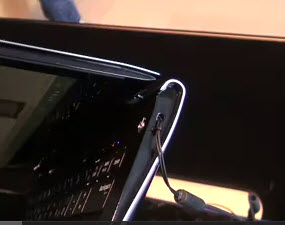
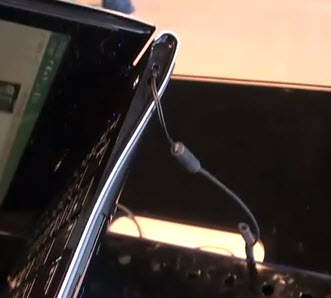
I've followed up with Samsung, Kensington and Brenthaven to see if they sell locking cables that work with the 2 holes that the Series 9 have. All say they do not.
Here's pictures of Samsung using one on a display model. Anyone know where one can buy one of these? It's obviously not the standard t-bar.Attached Files:
-
-
on your second question, i just copied Adobe Photoshop CS3 (2.8GB) to the desktop on my office computer, than copied it via wifi to my S9 and opened it or installed it from the S9's desktop. Did the same with microsoft office 2007. I created a folder for each, then copied all the files on the CD into that folder. You'll always see a file with the title "setup" or autorun - sometimes you'll see two, one will be a text file, and the other will be the .exe file. Just clik on that one and it will auto install same as it does from a CD
-
I apologize if this has been covered before but I can't find it if it has. How can I perform right click functions on the touchpad? It seems like only the right or left click button can be enabled at one time. I don’t think it is a hardware issue because if I switch the pad from right handed to left handed the right button works (and then the left is turned off). I can’t figure out how to enable both at once.
-
Hi Ralph, I know this works with apps but I'm afraid it could fail with an OS installation. I'm still googling how to make a bootable USB drive image for this installation. I'll post it here when I'm 100% certain it works
-
sorry - i was asleep at the switch - insert sound of me smacking myself on back of head
-
hehe s'ok, thx for the help anyway
-
I was just wondering..am I the only one who is having the issue of single clicks randomly register as double clicks?
Its starting to drive me crazy..and want to make sure if its just me and I should just get it replaced or is this a driver/hardware issue... -
yeah, mine's doing something similiar - seems to be ultra ultra sensitive - reading thru this thread, seems a lot of folks turn the touchpad off and go to a bluetooth mouse -
Unfortunately that isn't an option :/...I think I managed to improve it a bit by lowering smartsense by 1 and then setting up 2 button click and 3 button click from disabled to primary click..(idea being that with it disabled it may be mistaken 1 finger for 2-3 thus causing a double click)..this seems to have improved things a lot..but only time will tell if its a permanent fix or just an improvement...
did you manage to try the screen protector idea to see if it helps with the sensitivity and the sliding? -
Hi guys,
Do you also have problems with the "Silent mode" ?
I tried it today and when I switched the mode off, then re-open the the Easy Display interface it shows it as ON again (even if the laptop fans turns again so I think that the laptop itself is not in the mode anymore).
Full restart did not solve the problem.
Every time I try to turn the swtich to OFF, it moves, but as soon as i close/open the Easy Display Manager it is stuck in ON again.
I also have a problem with the Samsung update called "Easy Battery Manager", I got an error every time I try to install it (that was before the Silent mode problem above), do you face the same thing ?
Laurent -
not yet - actually found the spare screen protector for an earlier smartphone, now to find the exacto knife - will see if i can't get to it tonite
P.S. - just found another screen protector here in my desk at the office - an el "cheapo" i'd gotten from amazon - just laid it on and "wow" - it's desensititized it perfect - no more barely passing my fingers above the pad and having the cursor jump around - i definitely have to exert some pressure (not a lot) but definite pressure to control / move the cursor. Clikking - in a few minutes of trying, couldn't get it to do what it'd been doing ie: if the cursor was over top a selection key like "save" or "cancel", no inadvertent selecting of a function when my fingers simply moved near or above the frigging clik area.
tonite i'll use for a few hours and report again but think this is going to work nicely. The protector i had didn't cover the whole pad, from front to rear - leaves maybe 1/2" at top (toward the keyboard) of pad uncovered. And again, this is an el cheapo, not one of the heavy thick screens (forget the names) but some of the brand names were too thick for my liking. -
What do you mean by "2 button click" & "3 button click"? 2(3) finger click maybe? If yes, then your strategy isn't going to work since 2(3) finger click actions by default are disabled. If you try to click with 2(3) fingers on smth it's not going to reproduce a double click. So far, Smartsense is the only setting that can change this behavior (and Double Click Speed in Windows Mouse settings, of course).
I have my Smartsense setting on Max and 99% of time it works. Sometimes I experience my files to double open. It looks like the system register 2 double clicks instead of one. Weird... -
I played with it right now.
1. On my laptop it doesn't turns on/off by itself. The setting stays the same after closing and reopening EDM.
2. As far as I understood, all this Silent Mode setting does (at least in EDM) is changing the current Windows power profile. When you turn the mode ON my laptop switches to Power Saver profile. In the advanced settings=>Processor power management=>System cooling policy you can set whether the laptop fan will be used to cool down the CPU. With Power Saver profile it is set to Passive while in Samsung Optimized or Maximum Performance it is set to Active by default.
3. If you are experiencing issues with the disabling Silent Mode, try to do it in BIOS setup first.
I got an error during the installation of this update, but after the restart it appeared in my Installed updates history, so I didn't bother anymore. -
Realook maybe? I know they are thin and usually comes in packs of 2...
I want to prevent the random double clicking..thats the point....and I know they are disabled by default I enabled them to all register as single click...and smartsense one way or the other the issue still happens..it helps a little but but not a solution and the double clicking is frustrating.. -
have no idea - when i say el cheapo, iirc this was $3-4 approx shipped. Don't think this was in a pack of two - i apparently had applied it to a phone, didn't like it for whatever reason, and had already thrown away the waxed backing paper so i used the backing paper from a UPS label - that's what it was stuck to
for the hey of it, i typed a letter this afternoon, fairly length one, and still loving the desensitized touchpad vs before - highlighting is no longer an exercise in patience, thinking i just need to develop the sensitivity of a neurosurgeon operating on a house fly. Moving the cursor around to highlite something is definitely more positive or more definitive and controlled, with no sudden departure movements on the cursor's part from my hand having moved over top of the touchpad, and definitely no sudden disappearance of highlited areas (that's the one that really irritated me before). -
Thank you for your answer and explanation.
Unfortunately, changing the BIOS setting "Fan Silent Mode" from "Auto" to "Low" did not help.
If enabling the Silent Mode in EDM does only change the power setting, then it is not a problem because I can change it manually. I hope that it does not reduce other performances. Anyway it is interesting to know that it might be a more global bug since you are facing it as well.
For the Easy Battery Manager update, I investigated the cause and found that the Pow_Patch.exe might be incorrectly compiled as they let calls to debug dll which is not installed by the client version of MS Visual C++ 2008.
Since it's the main exe of the update, I don't think that it successfully installed even if the Samsung Update Plus software list it in the history.
Maybe those two problems are linked. -
on the single clik causing a double clik - just played video poker for about 45 minutes - last night, similiar period of time, about 5-10% of the time, when i'd left clik to "hold" a card, it'd double clik and un-hold it
tonite, it only happened 2 times -
i'll be keeping this screen protector on the touch pad for sure -
let us know how that works out - did my first samsung recovery backup tonite - a usb drive would be a nice setup
-
I have a Runcore mSATA SATA 3 (SF-2281) SSD on route and thinking of installing it in a Series 9. Can you tell me if the 11.6" have had any complaints of wifi?
Thanks ahead guys
Les -
I installed mine with the recovery DVD which is basically a normal version of Windows 7 Professional (no bloatware, no Samsung drivers or software).
To create a bootable USB key, I followed a tutorial in french but I think that formatting the key and copying all the files of the DVD should work. -
Thanks!
Do you know where I can buy replacement parts for this laptop? I need scandinavian keyboard, and the ones from ebay are US. -
I am again having problems with the power cord, which has been my pet peeve about the S9 from the beginning.
This time, the casing near the laptop jack has separated, showing bare wire. I have attempted to secure it with electrical tape, but it obviously won't be long until the connection is broken completely. VERY cheap, thin wires are used, so I am not really surprised. And note that this is my second power adapter, so it is only a few weeks old and has not been subject to any abuse, virtually never used outside the home.
Anyone else having trouble with the cheaply constructed adapter? They are expensive and hard to find in aftermarket, but presumably this will be a warranty issue, so perhaps I'll need to get a new one under warranty every few months for the next 2.5 years.
An L shaped jack would likely solve the problem, but no sign of that. Would love to have my wife's MBA adapter, what an elegant solution that is (Sumsung should have copied that also while they were busy infringing Apple patents). -
I just wanted to point your attention that there is absolutely no connection between faulty DOUBLE clicks and TWO FINGER clicks since by default even if your system would recognize your gesture as a TWO FINGER click it would not proceed with a DOUBLE click - it would do nothing because TWO FINGER click is disabled by default.
With the settings you described earlier you can achieve a SINGLE click with the TWO FINGER click while before you did those settings the system simply won't respond to your TWO FINGER click at all.
I might repeat myself, but only for a good cause: I want you and others to understand what these settings do and what they don't. -
I don't think you will see any system performance downgrade except the one that you will get with the Windows "Power Saver" profile.
And I don't facing any bugs with this function.
Have you tried to put this dll in Windows System directory and rerun the update? -
Well that sounds like an improvement..I wish though samsung would come up with a 100% fix..I tried contacting them and they told me to re-install the os via recovery (sigh) and if it doesn't work they'll replace it...but them replacing it isn't gonna do much good if its a hardware/software issue..
I guess time to find some old screen protector and hope samsung finds a fix for this within my 90 days :/
Let me explain my perspective on this..from what I noticed the double clicking happens most often when 2 or more fingers are on the touchpad...I am well aware of what the settings do..but it boils down to how something is programmed..
for example..you can never press with 2 fingers at EXACTLY the same time..so with 2 finger clicking disabled it may be mistaking the 2nd finger which is x microseconds off as another click aka a double click..by enabling the 2nd finger click to count as a double click sets up a timer for detecting 2 finger clicks..changing this setting seems to have helped slightly but issue is still there :/ -
Nice theory, but unfortunately it doesn't work: after I read your perspective I've minimized all windows and tried for about 20 seconds to do a two finger click on the desktop icon - I got zero double clicks from that action and the program under icon never started (remember, my two finger click is disabled). I assume it's because double click initiated when you tap twice at same spot while when you have 2 fingers on the touchpad they are taping at different spots so the system can differentiate double click from two finger click. That's my understanding...
-
I never claimed it was anything more then a theory..I was only looking to find ways to attempt to solve issue..I can click on 1 part of the touchpad and then another and it will count as a double click..of course if I position finger 1 and hold it then a 2nd click would not count as a double click unless i let go..but at the same time the touchpad should not double click from a single click either..and its not like this happens 100% of the time..so some sort of scenario is triggering it..so my attempt was at eliminating "possible" factors based on trial an error on things that "sound reasonable"..hence my theory above..
After further testing I concluded that it does not solve the issue BUT does help slightly...for w\e reason...this may mean that there are multiple factors effecting the double click or it could be a palcibo effect..who knows..either way these are just trial and error... -
Hah, nice observation! I've never thought that you can do a double click with two different fingers (thus using 2 different spots for first and second click). It's really weird, but probably works for someone.
And I never experienced double click from a single click. What really bothers me is a double click which sometimes doubled by the system - i.e. you double click a file to open it and laptop opens this file twice. I don't understand how 2 clicks might be confused with 4...
At the same time I don't like the idea of screen protectors since for me the smoother the touchpad surface is the better it is. I'm getting slightly tired after several hours of dragging my fingers over coarse touchpad. And my pointer motion speed is at max. That's my preference - to do less movements with less resistance...
I would say I am satisfied with my Series 9 touchpad at about 90%. -
I think your double clicking ending up as 4 clicks is similar to what is happening to me but with single clicks...
from my observation..if I keep only 1 finger on the touchpad and click it seems to work fine, also if I click on the really bottom edge it works fine...the problem happens when 2 or more fingers are on the touchpad is when problems begin to happen...and its annoying as hell!!
Also there are smooth screen protectors..for example I have a Realook which is a thin one and once its on you can hardly feel its there (just have to find my spare lol)..but in my view the current touchpad is making me more tired :/..but it might be more due to the fact that the touchpad is larger then my previous laptops and when clicking requires slightly more effort to click then say a small button...
out of all the touchpads I had I liked the one on my tx2000 the most..it had these pocket holes which would massage my finger lol
As for my gripes, it would obviously be the touchpad, the sticking out edges (don't get me wrong I like the look, just think the edges are sticking out more then they need to, mostly on the front) and lack of DX11 (I don't mean for gaming, I don't play games but for GPGPU support )..
IF the Touchpad was fixed, sticking out edges removed and DX11 added..I'd be in heaven!!!..maybe Samsung will release another version by end of the year to compete with the other ultraportables...cause this 400nit screen is REALLY hard to give up..works wonders outside...
-
generic question - was just looking at disk management and noticed a partition only identified as "Healthy Recovery" and 20.63 GB in size, but also showing 100% free or available
i did one samsung recovery backup and it saved the backup file to my D partition that i created
is it just hiding the recovery data that i thought it came pre-installed with or is there something i failed to do? -
Same thing happened to me after a couple of weeks ...
-
And me. Got samsung to send me a replacement power supply but initially they tried to make me pay for it. Stick to your guns and insist it is a design fault as this should not happen through normal use, and you will get a replacement.
Electrical tape is no good, instead use self amalgamating tape. This will stop the cable deteriorating further and enable you to keep it as a backup. I did this to mine a couple of months ago and it is still working fine (although spoils the look of a £1000+ laptop). -
Having had this laptop since April, I agree with previous posts that wifi is very poor and I am very disappointed with Samsung for not a) admitting that there is a fault and b) fixing it. They have had plenty of time to investigate this problem so no excuses, this will simply make me think twice before buying a samsung laptop again even though in most other respects this is a great laptop.
-
Sort of "officially", Samsung have admitted a problem with weak WiFi BUT that is only for those early purchases that had the Broadcom adapter (like yours). They will replace this with the Intel Centrino 6230 -- which "officially" they claim is the solution. It helps a little but this is NOT the solution.
Samsung is DEFINITELY aware of the weak WiFi issue on the Series 9. I don't think that all their tech support people have enough knowledge of the Series 9 to know about this "unpublished" problem though. I have had multiple twitter messages from Samsung Support people that their engineers are still working on a solution; I have spoken to a supervisor in tech support who contacted the product specialist who told him that they are aware of the problem; I have spoken to a customer service rep who went and spoke to the product specialist who acknowledged the problem; etc. etc. So the Series 9 "specialists" at Samsung are aware of the problem.
As to whether Samsung have decided to ignore the problem; whether they have decided on a solution; whether they have decided to change only new production models; ... is not yet public knowledge.
I haven't given up on the Series 9 yet. I just want Samsung to fix the weak WiFi... I have my 3rd one now, and the only problem that I've had with them has been the weak WiFi. Have had no other problems. -
Don't have an answer of the WiFi issue on 11.6" models but let me know if you'd like me to test that SATA 3 SSD in my A05
-
If you look, disc management is unable to identify the file system..so there is no way its giving you an accurate number..If I open it in my partition manager its 19.69gb full
I spend most of the time explaining to CS what the series 9 is..for their flagship laptop..most CS don't even know what it looks like or how it even works :/...
Also you say you only have wifi issues, how is your trackpad? or you just use a mouse? -
The trackpad, on all 3 that I've had, has appeared to operate just fine with the default settings.
I use my bluetooth mouse most of the time though -- I have never been a trackpad fan. So I am not aware of a trackpad problem... -
Has anyone tried the July 27 BIOS update ((Firmware) (ver.1.0.0.2)) posted on the Samsung website for the A05? I'd like to know if it caused anyone any problems after downloading it. Thanks.
-
I have updated two A05's with this BIOS 06HL and not encountered any issues during installation or afterwards. Did not notice any improvements either so not sure what updates were in it...
-
NP900X3A-A06???
On SamsungParts.com (USA parts seller), they have manuals listed for purchase for the NP900X3A-A06US. I have never seen any info this on model and have done searches. Anyone know anything about this model? -
Good find. Maybe that's the model that has a working wifi and good touchpad???
Nah. -
asolare1.
That's why I closely monitor for any new models -- hoping that WiFi is fixed
My current A05 has over 80 days left on its probation (i.e. in which I can return it) so I have some time... -
I've decided to keep my A05. The wifi certainly stinks but it is not a big deal for me to use a usb wifi adapter and that works well. I also am not enamored with the touchpad but would rather use the HP wifi mouse (which I'm happy with) anyway. I like everything else about the laptop so decided to keep it.
For this money should I have to settle? I don't think I should but I can't find anything else that I like as much on balance. -
I spoke to samsung support and they told me that they are working on the wifi issue that they hope to fix with firmware. I order a 6300 (buy.com) and an antenna (ebay) as I'm having a hard time using the wireless on this laptop (A03) anywhere outside of my home.
-
If it's hardware issue, be it wifi adapter or case material, no way a firmware update is going to solve this problem... sounds like standard "tell the customer something to get them off the phone" garbage to me.
-
@Zlatty,
Have to agree with Swiftks. Can't see how they could solve this with firmware. They have to do things with the case, antenna or install a different wifi adapter that will work in this case... -
While we're on the subject of firmware. I didn't notice if anyone had posted that a BIOS firmware update (v1.0.0.2) was available for the NP900X3A-A03US on Samsung's website... dated 7/27/2011. I updated a couple of weeks ago with no problem. Didn't really notice any changes. Change Log sure would be nice. Anyway, I'm sure it was reported here, just didn't see it.
-
I totally agree. Unless there is some class action lawsuit against Samsung for putting a crappy adapter ins a $1600+ laptop, I doubt much of anything will be done.
I'm thinking about using the holes on the right side of the laptop to expand the third antenna. Has anyone attempted this? -
oh god..anything but a class action lawsuit..last class action lawsuit I was in that involved laptops ended up giving people crappy laptops, having our own lawyer fight AGAINST us when we tried to get a more equivalent replacement, and the lawyers making more money then ALL the members COMBINED.
I give you advice..if you have an issue that needs to be settled..do it in small claims court...
Samsung 9 Series laptop (ZX310 / 900X3A) unveiled
Discussion in 'Samsung' started by SoundsGood, Jan 5, 2011.