Problems? See this thread at archive.org.
As far as the adapter goes, the Intel Centrino 6230 is probably the best adapter currently available and the one that other laptop vendors are using (for WiFi + Bluetooth). It's the case that is the problem. The only reason that I mentioned a different adapter is because there might be some an adapter with different characteristics that can work this Duralumin case (however unlikely that may be).
Holes on the right side? You mean those locking holes? You won't get an antenna out there. You can easily take antenna ends out the back of the case (between the hinge points) but that won't look pretty....
-
I bought the 6300 since I really don't care for bluetooth much. Perhaps this decision will bite me in the bum later on.
Hey as long as it works from 15 feet away I'm happy
-
We have a nice example of Nvidia laptop GPUs class action lawsuit. As a result of the settlement a lot of people got their laptops repaired for free. On the other hand, I don't know the forces and efforts that made this thing come true.
-
I bought a 6300 as well, as I don't use blue-tooth on my laptop. I also added a third antenna. I'm about 20 - 25 ft. away from my router with 2 walls in between.
Before hand with the stock Broadcom adapter w/ 2 antennas, I was receiving a 83% signal strength at best, with an average of about 80% signal strength. Also, at that same distance, I could not even pick up my 5GHz band.
After switching to the Intel Ultimate-6300 (+ additional antenna), I am now receiving a signal strength in the mid 90% range on average, 99% on a good day... fluctuates depending on which channel my router is using. I would set it to a single channel, but since I live in a row of town homes, my neighbors wifi signals are always changing between channels 1, 3 & 11 as well. Also, I can now pick up my 5 GHz band from the same location... signal strength is poorer than 2.4GHz, but that is to be expected.
So while the changing of adapters has not "fully" solved my wifi problem, it has defiantly helped and made an improvement over the stock adapter. -
That is the lawsuit I am talking about..the lawyers made off with most of the money and testified against their own clients..from getting better replacements. In that lawsuit the lawyers made more money then all their clients combined. Not only that, on the repair money, not all got it due to the limited amount of funds given out..
See these class actions rarely benefit the end user, even if a company gives out $10 million..with 1 million claims it ends up $10 for each person..In small claims court you can get back the full amount.. -
@Swiftks
For WiFi in Series 9:
"Almost any other laptop or phone on the market" > Intel Centrino 6300 > Intel Centrino 6230 > Broadcom
I was two rooms away from my ASUS Black Diamond router yesterday and I lost my WiFi signal! I could not reestablish on 5GHz or 2.4GHz. Very frustrating. This is with 6230. -
I am receiving a Cisco Linksys re1000 wireless N range extender today, to go with my Linksys e4200 router. Figure I'll stick it in the same room as my office, which is where I primarily use my laptop. This ought to help, at least on the 2.4GHz band, since it's not a dual band range extender. Didn't want to have to get a usb wifi adapter and have one of my ports taken up. Will report back once I get it in today and setup.... Kind of funny that I am getting a range extender for a 1 story house, and will be at most only 30 - 40 ft. away from the router. Oh well, at least my neighbors will be able to see how strong my signal is (even though they can't log on).
Linksys RE1000 Wireless-N Range Extender Bridge -
Is there a slim sleeve type case that fits this laptop? The macbook air sleeves are too large. I've already scratched it!
On the WiFi front:
- Had the Broadcomm
- Sent it for repair - it came back with the 6230. Range is only slightly improved.
- Tried an Airlink 101 AWLL5088 (really tiny, check it out on Amazon) nano-USB WiFI adaptor. Surprisingly, though the adaptor works well on my other laptops, WiFi was still weak using it on the laptop. No better than the 6230.
- Next step, get the 6300, add an extra antenna, and get a USB bluetooth adaptor. -
I bought a Medialink MWN-USB150N wireless-N USB 2.0 adapter. It is quite satisfactory, infinitely better than the installed wireless in my A05, and capable of pulling in a strong signal although it is still a little weaker than whatever is inside of my 5 year old Lenovo X60S laptop.
-
-
question on samsung 4 GB memory boards
my B01 came with 4GB, so i ordered the exact 4GB board, ie same samsung part number one from an aftermarket outfit - was supposed to be the same part number that they were shipping, but it's not. All the other specs are identical - how critical is it that the boards match? -
Haven't been on the forum last two weeks, good to see the activity going on.
I was also checking sleeves for S9 a month ago, and got this on sale at an online store. The length is little tight (that is why Case Logic says it doesn't fit). The width has almost an inch more room when the laptop is in and the sleeve is on the thick side (have seen slimmer sleeves) but with a good cushion.
Case Logic 13.3 Laptop Sleeve > Laptop Sleeves > Case Logic -
Offtopic: I bought D-Link DIR-825 for this purpose. It's a dual-band gigabit router. I had to flash it with DD-WRT firmware (pretty easy) since original firmware doesn't allow the router to work as a bridge repeater. And it's reversible in case you decide to return it. As a result I have a dual-band repeater which also perfectly works as a stand alone router. You can even select what band - 2.4Ghz/5Ghz or even both - to use for bridging... It will cost you less than $100.
Oh, one more thing: if anyone will follow my recommendation, don't take DIR-855 for bridging. It's a better (and more expensive) router in general, but it has different CPU and is not compatible with DD-WRT. -
Could you provide us with the links, please?
Nice, but I would prefer one with a perfect fit... -
I don't know about the clients of the lawyers, but my old XPS1330 was serviced promptly and free of charge. I am satisfied - no more overheating.
-
Disabling and re-enabling wireless adapter in the Windows device manager helps (not the same effect as with Fn+F12)...
-
Yeah, I know I could have done that I went back to my office with the router instead...
-
this one fits perfect Amazon.com: Neoprene Skin Velcro Top Flip Sleeve with Additional Pocket (Grey) for the 13.3" Samsung Series 9 Laptop: Electronics
the heavier standalone briefcase type case hasn't come in yet, bot got it on eby for $24 shipped Hard-Shell Nylon Case - SAMSUNG 13.3" Samsung Series 9 - eBay (item 360377778384 end time Sep-02-11 12:55:20 PDT)
looked to be a stiffer foam shell, like some holsters we used to sell. i wish it had a shoulder strap but right now i'm thinking to rivet some velcro to a samson aluminum briefcase i've got, and have someone sew some velco to the outside of one side of this case, so i can simply attach it to my samson which has a shoulder strap - the weight of this case with the sammy 9 shouldn't be too unbalancing (hopefully)
Amazon.com: CaseCrown Double Memory Foam Laptop Case (Nylon Navy) for the 13.3" Samsung Series 9 Laptop: Electronics
but if you do a search on amazon or ebay for "samsung series 9 case", there's a decent population of offerings - just found a neoprene one for $8 on amazon that wasn't there when i bought mine -
I am using the following Sumajin case, and it fits the S9 perfectly with adequate padding but very slim and light. It also zips open 270 degrees so the laptop can still be used while covered with the case.
sumajin Laptopsleeve
On another note, I was strongly considering replacing my S9 with the new Vaio Z21 that was just launched, but decided to wait until I could get a hands on with the Z, which I did last weekend.
Bottom line, I was generally disappointed with the Z and definitely prefer the design of the S9 (wifi and other shortcomings aside), so my current plan is to stay with the S9 for awhile, perhaps until the Ivy Bridge and/or Windows 8 laptops are available. I saw the black version of the Z, and it just didn't look as premium or solid as it should for the price (the gold version might be better), it essentially looks like a slimmer version of the Vaio S series.
I only mention this to confirm that there still doesn't seem to be a better Windows alternative to the S9 (at least in a similar form factor), unless you really need the higher definition screen and dock available with the Z -
@The Original Ralph,
The first case that you listed "Amazon.com: Neoprene Skin Velcro Top Flip Sleeve with Additional Pocket (Grey) for the 13.3" Samsung Series 9 Laptop: Electronics" does not fit the Series 9 13.3" at all well. If it's the same as the black one, and it appears to be, it is way too large especially on the length. The reviews of the black version cover this. -
So I FINALLY got a steady 99% signal strength on my series 9. After setting up the Linksys RE1000 range extender tonight, I'm at 99% signal strength on 2.4GHz and holding... guess time will really tell. All it took was:
1) Intel Centrenio Ultimate 6300 adapter - $35
2) Third Antenna - $5
3) Pro Install - $70
4) Cisco Linksys e4200 Router (was looking to upgrade anyway) - $120
5) Cisco Linksys RE1000 Range Extender - $80
Looking back now... Yeah, I probably should have gone with the Sony Vaio Z Series... lessons learned though. I just like the look and feel of the Series 9 so much though.
To bad my router is 450mbs + capable, but my range extender caps out at 300mbs.
Also, might want to take a look at the following usb wifi adapters for when I travel and stay in hotels:
Linksys AE2500
Amazon.com: Linksys Dual-Band Wireless-N USB Adapter (AE2500): Electronics
Netgear WNDA3100
Amazon.com: NETGEAR RangeMax WNDA3100 Dual Band Wireless-N Adapter: Electronics
As for a sleeve, I'm jut looking for something to protect my laptop in my laptop bag, as my bag is sized for a 16" laptop. Was thinking about this, but am not sure :
Amazon.com: Extreme Sleeve 13" (Black): Electronics
-
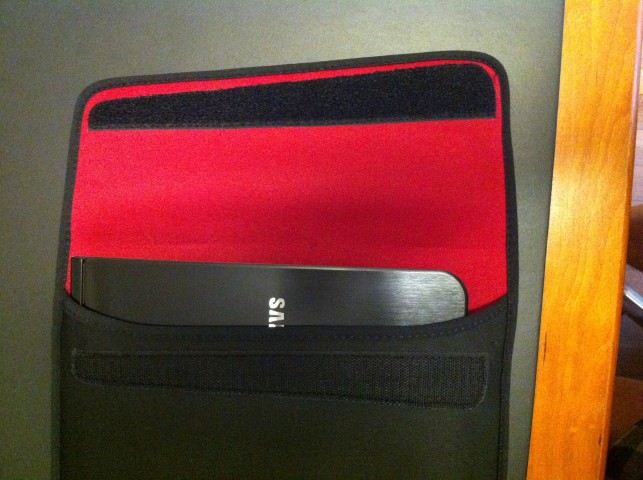
i'm not sure what case that poster received, but mine fits perfect - i still remember when it came in, after sliding it in (it was snug, not tight but snug) it looked like the case was short - the flap fit or folded over perfectly
in the first photo notice the paper clip at the fold of the flap
![[IMG]](images/storyImages/neoprenecase1.jpg)
in the second picture you can see the location of the fold by that same paper clip. if the sammy 9 were 1/4" longer, i'd have to stretch the flap somewhat, so when i say it's a perfect fit, there's no slop lengthwise or widthwise and it is snug in both dimensions.
![[IMG]](images/storyImages/neoprenecase2.jpg)
-
DID some research on the question i asked earlier about mismatched memory board part numbers
the one that came in is "M471B5273DH0 part # is a mass produced module for the OEM's. This is a very new variant of the Samsung RAM lineup D-die based on 30nm Technology"
found the one in my BO1 is "the previous version based on C-die which is 40 nm technology. The part #: M471B5273CH0-CH9"
so the question is - can i install the newer board alongside the older "c-die 40nm" board without unbalancing anything - apparently the newer one is lower current draw
electronics is not my background, obviously -
Shouldn't be a issue.. don't see how one RAM module would affect the other, but then again I'm no expert. When I first got my series 9 I also got a additional 4GB RAM Module that was made by different manufacture, etc. and it worked just fine.
But if your really concerned, take it back and get 8GB of this RAM (which is what I'm currently running.. super fast )
Newegg.com - Kingston HyperX 8GB (2 x 4GB) 204-Pin DDR3 SO-DIMM DDR3 1866 HyperX Plug n Play Laptop Memory Model KHX1866C11S3P1K2/8G
Review Here: Kingston HyperX DDR-3 1866Mhz 2x4GB Notebook Memory Quick Look - The SSD Review -
appreciate - wish i'd know about that before i purch'd this mem board. seeing as it's samsung's replacement part for the orig, i might just order a 2nd of the same and be done with it. cost on it was only $45 shipped
-
Sorry, it does looks like your case is a good fit.
I'm the one that received the black one and posted that review... Maybe my email exchange with the seller made them realize that they need to sell a smaller case for the Series 9.
And I just tried it again; the biggest problem was the width, not the length. It's too wide and slides around the case when one is carrying it.Attached Files:
-
-
just went back and looked at the seller's listing - he pictures it with a mac air book in the case, inspite of describing it for the sammy 9 13" series. suspect your review just prompted him to switch to supplying the one he was selling for the mac air book, as it is a little snug for my sammy. suspect it'll loosen up with use, but doubtful it is supposed to be this snug - any snugger and it'd be "condom" tight
-
It was the same lawyers on both cases..but in your case repairing is cheap, in HP's case..they had to completely replace the laptops..and with "equivalents"..so guess what they did? replace $1k-2k dual core laptops with a choice of the lowest end laptop or a netbook...and they counted that as "equivalent"...
Atm I am kinda ticked at Nvidia for purposely selling faulty gpus..my tx2000 failed, my tx1000 failed and i have a XPS1340 with overheating issues...so yeah..
Right now there are not too many alternatives, come late August/September and the other companies will be bringing out theirs like ASUS, Acer and HP...probably others as well..Dell released something the 13z but to me that looks like a quick attempt to get something in rather then actually competing... -
The terms of the settlement were a 1 year extension of the warranty. So if you had an extended warranty -it did not help. I am on my 5th motherboard -- once a year the heat undo's the internals of the GPU.
Class action suits are useless. Just money for lawyers. -
Where did you end up putting the third antenna?
-
Here, I took some pics. Didn't know if I could cut the wire to length, and couldn't find an answer on the internet, so I wrapped it up and stored it where I could. Also, there's not a lot of places to place the actual antenna pad, unless you want to disassemble the entire laptop; so again, I placed it where I had space. If someone knows if it's ok to cut the antenna wire in the middle and splice it back together, then I'll trim it to size... Anyone??
Hope this helps... need anything else, let me know.
![[IMG]](images/storyImages/img0830zh.jpg)
![[IMG]](images/storyImages/img0831t.jpg)
-
Very cool. Thanks for posting the pictures!
-
Swiftks,
Nice setup and its unfortunate how much had to be spent to get sufficient signal.
I am curious if you have tried it outside of your immediate wifi zone, and also, if you have tried downloading a large file yet. I had experienced very strong signal when I got the Asus Diamond router but downloads were still slow and spiky. -
I've searched for this in the entire forum but found nothing so:
It seems while cleaning up windows I lost the Control Center. Just noticed this while trying to edit power options and got most options disabled
Searching about this in the forums I read that Control Center is needed to allow you to edit those options.
I've searched in Samsung Donwload page, no Control Center available, grrrr
-
this link will at least tell you where to find it on the recovery disk as well as where to look for it in win 7, in case it's still there
i was looking for something else this morning and remembered having seen this page - hope it helps
Restore Missing/Hidden Items in Windows 7 or Vista Control Panel - How-To Geek -
wondering if anyone else has experienced this issue...
when i plug my earphones in, i only get sound on one side. If i play with the plug a little, i can sometimes get sound on both sides. I've swapped out the earphones for a different pair and it still had the same problem. I've checked the left & right sound balance, and it is in the center, so it's not that either. Im guessing it is some sort of bad connection with the audio jack? Any ideas how to fix this? thanks -
Would any of you owners recommend buying this laptop? I've heard many many issues with the wi-fi.
Thanks in advance. -
If I had to do it over again, I would probably either buy the newest version with the i7 core (NP900X3A-A05US - thanks a lot Samsung for not listing this on your website), since apparently you can not switch/upgrade the ultra-low voltage processors, as they are hard fastened to the mother board; also comes with the Intel wifi adapter.
or
I would just pony up and bought the Sony Vaio Z series w/ the additional battery sheet. -
thanks a lot Ralph! tho it seems that control panel is lost. Also checked the system recovery drivers/utilities I saved thru Recovery Solution before formatting the partitions, no luck
I'll keep trying before I reverto to an Acronis image I made, I've installed and configured many things and I wouldn't like to lose all that work... sigh -
Apart from WiFi, some people have had other issues with Series 9. I have tested three so far, and the only problem that I've had is the weak WiFi.
I really like this laptop. It does everything but WiFi well. If you do get one, make sure you are aware of the return policies of the store. CircuitCity took one back in 30 days with no problems; Buy.com took one back in 45 days with no problem. My latest one is from Costco as they have 90 day return policy. I'm hoping that either Samsung will have a fix in 90 days or that they will release a new fixed model in that time. I'm going to open another ticket with Samsung later today -- my last one was 2 weeks ago.
I am still likely to keep this Series 9 though. For me, the only competitor (currently) is the Sony Z but that has way more than I need and costs a lot more too. I'm going to monitor the new models that are coming out based on Intel Ultrabook platform. -
@ Xyvotha,
So hitting FN F1 does not bring up Control Center? It's supposed to.
You could try searching "Intel" from the Start button. I see it show up there (with other Intel apps). The executable is IntelControlCenter.exe
If you want to re-install, pretty sure that all you need to do is re-install the "Intel VGA Internal 64bit 8.15.10.2266" driver which you can download from Samsung. -
lol I was searching (both in the HDD and Samsung website) for Samsung Control Center, didn't know it was Intel's!
thanks so much for the help (again) Kalahari!
-
that other case off ebay ( http://cgi.ebay.com/ws/eBayISAPI.dll?ViewItem&item=360377778384&ssPageName=STRK:MEWNX:IT&afsrc=1 ) came in - actually a little nicer than i expected - only criticism, i wish it were maybe 1/4" wider, it's kinda snug zippering it closed. On the upside, it's thinner than i expected (approx 1 - 1 & 1/8" ) but it is the stiff ballistic nylon i expected it to be. Price was about $24.84 shipped
![[IMG]](images/storyImages/sammycase1.jpg)
![[IMG]](images/storyImages/sammycase2.jpg)
-
samsung recovery - a few pages back, someone posted asking about running recovery off a USB Flash drive. i'm still learning my way around the technicals of computers, but figured it might be interesting to see if recovery could be run off a micro sd card. Had a spare 8 gb card, so i copied the files off the samsung recovery disk (3.58 GB) onto the card. When i copied them to my desktop first, it copied as a single file folder - i opened that and copied the folders, apps etc inside direct to the micro sd card.
stuck it in the micro sd slot on the notebook, booted the computer up and got a bar at the bottom of the samsung recovery screen telling me "F2 setup & F4 for recovery". I didn't install it or use as the computer wasn't in need, but the fact that the system recognized the recovery disk in the micro sd slot, i assume it would have. If someone more knowledgeable knows a more definitive way to confirm it, without my having to actually running it, let me know or knows why this isn't a good idea - please tell me - i'm about "fred flintstone" level of computer expertise
thinking it will be a lighter way to carry that recovery disk around
in case it helps anyone -
I can't offer any help but I can confirm I have the same issue.
-
I have just tested this with two different headphones and plugged each of them in multiple times. I do not have any issues with mine. I have tried jiggling the plug but it does not move and the sound is not affected. Unfortunately, it sounds like yours has a problem but I do see that the headphones work (sort of like you described) if they are not fully inserted. You may want to make sure that that you are trying with a plug that goes all the way in.
[Mine is A05 June 2011 build] -
I recently received my third Series 9 (another A05 June 2011 build). I did my WiFi testing and it's still AWFUL. I can go 9 yards away from my fancy router (into another room) and my WiFi drops to 25% -- where my Dell laptop still has 100% WiFi signal.
I called Samsung Tech Support, which I've been doing about every 2 weeks for 3 months now, to report the weak WiFi. At first, the Support guy said he'd never heard of any weak WiFi issue. Eventually, he acknowledged that someone had called in the problem and that that person "had fixed the problem by making a change". Trying to get more info out of the Support guy was like pulling teeth but when I asked directly if it was by taking the back of the case off, he acknowledged that that was what the guy had done. He did not know if the person had found another back that fit or what had actually been done...
So, Original Ralph, was it you that has come up with a different back for this case? If not, does anyone have any ideas about another Samsung laptop that has a back that might be compatible with the Series 9 13.3"???
Thanks -
I bought my Series 9 end of July in a Microsoft Store (which makes it come with "Microsoft Signature", meaning Windows Live Essentials, Security Essentials and Zune software pre-installed, which I liked very much).
I have a A03 and the build says April 2011 (indeed a 4 in the serial number at position 8. I started spending time in this forum as a result of troublesome Wifi performance
. Somehow my reading started on page 160 and I worked myself all the way through the end, as if it was a novel.... very entertaining... Impressive work by
Kalahari and
Series 9 Guy!!!
I've been traveling Canada for 3 weeks and whenever I had connection problems or slow and dropping network issues, our other devices (Dell notebook E6400, Samsung Windows Phone and HTC Windows Phone) always worked well. In 1 hotel, I was never able to connect with the S9. They did have a bit of a strange network, full of issues, but it was interesting to see that the other devices would connect and the S9 not.
Today, I've requested a room change to a room close to an access point, so that I could use my S9. That is kind of strange isn't it?
For the rest my experiences are wonderfull and I have only found a few issues (Wifi being one of them). For completeness I will describe them here and for the Wifi, I will make sure to also report it as an issue with Samsung officially through the support channels.
1. Wifi performance
I will wait and monitor this forum to see if a real solution pops up from Samsung and I will live with it in the mean time. I decided not to return the S9.
2. Samsung Software needs admin rights to run
I have configured mutiple accounts on my S9 and all of the general usage accounts are set to "user more" (not Admin), This makes the start of a few of the Samsung programs fail and as a result the experience of the user not being complete with all the Samsung software running. In fact the programs start blinking on the taskbar and from what I've seen the users jsut ignore these. It concerns SamsungSupportCenter, SmartRestarterProgram, SUPBackground and WiFiManager. It is probably worth strarting a seperate topic outside the S9 thread as this is probably generic to other models as well.
3. I've noted that FastStart prompts the user for a weekly reboot
I really like the Samsung special Quick-Standby-with-Hibernate-features called FastStart. I don't know how it really works and it does do some strange things by greying out the Default Windows Hibernation timings.
I don't like that is needs a weekly reboot. Over the last years systems have become so stable that a monthly maintenance reboot is what is very common. I had hoped that I could somehow configure this weekly cleanup reboot to be "planned for next reboot". Maybe in a next version, but I have not seen people complain about this
4. Reliability Monitor does not start populating
Reliability Monitor is a great Windows feature to monitor OS and Software issues. On the S9, it didn't work.
The way I solved it is by giving everyone full access rights to the C:\ProgramData\Microsoft\RAC folder. I think I found this solution somewhere, but forgot where. So this problem is solved. I'd be curious if others had this too and the solution may help others.
All in all, no real big issues other than the Wifi issue and I'm overall still very happy with the S9. (Until I find out I cannot get stable Wifi in my home...., which may start a new chapter...).
-
This control center comes with the Samsung software "Easy Display Manager" which you can find on their website
Samsung 9 Series laptop (ZX310 / 900X3A) unveiled
Discussion in 'Samsung' started by SoundsGood, Jan 5, 2011.