Problems? See this thread at archive.org.
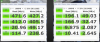
Yup the results of the Toshiba drive are particularly disturbing... Here is the Z830 with the Runcore SATA 3, Toshiba and then the PM800 in the S9.
-
Attached Files:
-
-
Thanks.
The Runcore is tested with 0 fill data. Not exactly a fair comparison. -
Hmmm... I could simply put the same for the Toshiba but the Toshiba scores are exactly the same, whether it be in oFill or random...will throw random up later if you like...
-
Well for a fair comparison that would be good. Now it looks as if the Runcore is way faster than the Samsung Series 9 SSD.
-
Ok, so I went to Best Buy last night and spent some time with both the Samsung and the Toshiba Z835. I decided to stick with the Samsung NP900X3A-B01UB even though it is more expensive and heavier. I was surprised at how noticeable the 0.4 pounds is when lifting them side-by-side. Also, I do wish the Sammie had a better battery life. I am going to have to read-up about the battery-saving features. Also I need to read about the feature that only charges the battery to 80%.
So I came home and opened the Samsung box and I can now verify that the wifi card is the Intel Centrino Ultimate-N 6300 (3x3 antenna). No wifi issues yet, although I notice that the 5Ghz has significantly less range or 'bars' than the regular Wifi although my throughput is much higher with the 5Ghz band.
Let me know if you have any other questions. One of the Wifi card attributes is "first installed date" and it was 9/30/11. I'm not sure if that means anything but I was hoping that it could be a surrogate for manufactured date. -
I would love to see the routing of that antenna to verify where the third antenna goes. On the four units I had, I learned very well that the number of bars means very little. You may get great five bar reception and then check signal quality to find you have very poor results of 1-4Mbps.
This was very common and I remember specifically cursing in an airport because I had four bars yet could not get enough strength to complete an e-mail check. -
Of course we have some questions

1. The 5GHz was ok also with old Intel chip - less bars but much better signal stability. With 2.4GHz there was problem not with bars (a lot of) but with randomly signal "picking".
2. Please do some test with 2.4GHz - further from router.
3. What model do you exactly have and were did you but it
4. Would you change your mind to Toshiba if you could?
5. What about the plug connector?
If you don't know what was the problem before I will paste some info from Kalahari:
EDIT: sorry, probably NP900X3A-B01UB is yours - I missed it. You bought it in bestbuy?
EDIT2: It's a really good promo at bestbuy - 999$ for B01 model with 1.6GHz i5. UB states for Brazilian version - I hope the rest is the same as in US versions. I've only heard that this model has only 5h on battery comparing to A0x models which have 6h. -
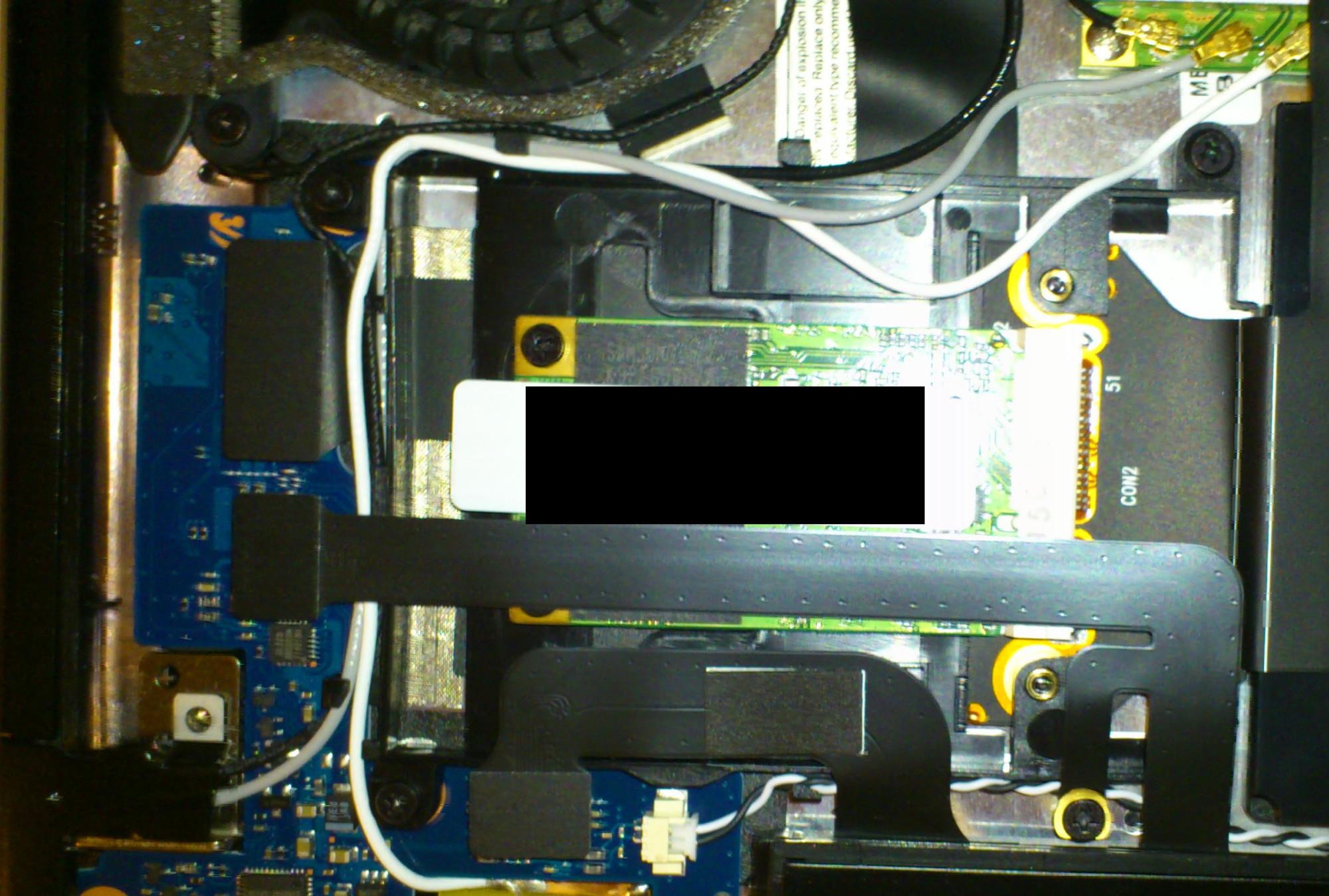
Have a picture of the third antenna.
How to post a picture ? -
If the picture is big (i.e. takes > 1MB) you can change the resolution to make it smaller. Then you can use during post writing the "Insert Image" button.
If you know that but just meant the way (as a link, as a picture in a post), than sorry for my clue
From what model do you have the picture? -
The grey wire goes to the display !Attached Files:
-
-
But what model do you have?
EDIT: Ok, I've found some pages before your post - you have Series 9 from Austria. You also wrote that the power connector has changed - could you post also some picture of it too? -
While traveling in Austria my touchpad broke. Had it replaced at a local service center (amazing 3 day turn around), but on this touchpad the right click does only work when I apply a lot off pressure ... will send it again when I'm back in the US.
But now I have a lot less functionality with the touchpad (gestures, etc.). Where can I get the correct driver software for my touchpad? My version now is 15.2.20.0. -
I just bought this laptop at Best Buy. I'll report later, but for now, can anyone recommend a good case for it? I want to be more careful with this one than my netbook.
-
Please hurry with the report I'm waiting for the last final conclusion - is the UB model with 3 antennas (just check the wifi module in device manager) - almost for sure it is Intel 6300, because user Theorby has this model and checked the WIFI module, but we are not sure if there are 3 antennas, so the best test would be to verify the signal strength and stability (especially stability) with 2.4GHz WIfi.
There is also a hope that the AC connector problem has been fixed (could you please check it too)?
Thanks in advance. -
Now I am wondering if I should return my new A05 and wait to see if they will have an a05ub soon. Best buy reviews seem to say that the ub version has the wifi fix.
-
Theorbo has already shown that the UB has 3 antennas, and although I haven't had time to set up my laptop yet (it's still in the box), I can confirm that it says "abgn(3x3)" on the box (as opposed to 2x2), which indicates a 3rd antenna. I'll be sure to confirm it when I start using the laptop though.
I think the review you're talking about mentions that it is fixed because it's a B01... this is incorrect. The fixed model is the B01 UB. Just pointing that out (not that you were saying that or anything). -
Great News! I just picked up the Besy Buy model this afternoon and ran speedtest.net. I had the Series 9 when it first came out and returned it due to the slow wifi speeds/signal. With the new model, I'm getting 25MB/s on speedtest.net; the old one got 12MB/S. I haven't had the chance to test the distance yet but at least I get the full speed now from nearby.
-
I just wonder if Intel 6300 == always 3 antennas, how do you think? I know that it should be 3 antennas...but 'should' is not always 'is'.
-
I think as long as it says 3x3 on the box, it would be 3 antennas.
-
1st impressions (very quick):
- very nice packaging
- took a long time to set up (probably normal): stuck at "installing software; do not turn of the power" for a while
- uninstalled a little junk like Norton, WildTangent Games, and the Best Buy app
- went to Mouse to up the sensitivity (it seemed slow) and was presented with a message saying the Synaptics driver was missing or needed to be reinstalled. I'm DLing the touchpad driver from Samsung's website right now. Furthermore, none of the mouse gestures were working.
edit: more
- Device Manager indicates an Intel Centrino 6300 -
I think that if it states "Synaptics driver was missing.." none of the gestures might work.
As I understand so far no problems with wifi in 2.4GHz band ? -
Correct, going to Samsung's site to download the touchpad drivers worked fine. Now the touchpad is much faster / more responsive, and gestures work. The 3 and 4 finger gestures aren't so great, so I just turned them off (ill use the 2 finger scroll soon).
No wireless problems; it's actually better with my home wireless than my old netbook. -
If I was you, I would return the A05. Apart the B01UB from Best Buy, I see that Microsoft now has a new model listed -- the NP900X3A-B06US. This is the first time that I've seen that model listed anywhere. Maybe it has the Intel 6300; it does not say.
Seems like there might be more new models available soon. -
Hopefully the B06 will be an i7 with 8 gigs of ram and 256gb hd.
Not sure why they have a model with 8 gigs ram and 128gb hd but not a model with 8 gigs ram and 256gb hd. But then again all the B's have been i5's so far. -
I wonder what means the UB code (NP900X3A-B01UB). Some sources say that UB states for Brazil, but other says that BA is for Brazil. Someone knows?
-
@Tazzer
I think the UB is just the Best Buy model. They like to put their own part numbers on so that (1) it makes it tougher for potential customers to price compare and (2) they often eliminate or change a component or two to get the price down. An example of the latter is the Toshiba Z835, which only they sell, does not have Bluetooth while the Z830, that everyone else sells, does. -
Thankfully, my S9 does not seem to have any hidden cut corners like the Series 7 did at BB.
-
Hope you are right! I bought this model from BB 2 days ago - waiting for the package I'm a little worried that they could take the B01US model, take out the intel N6230 and put N6300 inside without the third antenna...
EDIT: I wrote to BB with the question abut the UB and US models. Waiting for response... -
For those having WiFi issues (latency, signal drops, etc.) which affected everyday internet browsing and anything requiring networl access, I have a story to share with you.
I've got the same problem and I was able to resolve it simply by changing the Power Savings settings that Samsung provided by default. The WiFi Adpter was set to MAXIMUM POWER SAVINGS when running on battery and this makes it simply UNUSABLE. There are step by step instructions on how to correct this on my technical blog:
Samsung Series 9 13? 900X3A WiFi Problem / Slow Internet Browsing Solution insomniae c?dex - productive sleeping
I hope this helps someone out there... -
I'm sure for all the people having problems with wifi it never dawned on them to change the power setting...
-
Nah, the root of the problem was the bad antenna placement in the laptop given the signal-blocking material it was made out of. There's a reason the newest versions of the laptop (starting with the B01-UB in the US) have a additional, 3rd antenna behind the screen.
-
No one has checked that there is really a third antenna in B01-UB model from BestBuy. We know for sure, that there is WIFI Intel 6300 3x3 which supports 3 antennas, but it supports two antennas too, but guys who bought it say that the wifi problems are gone (no mention about changing the Power Savings mode) - it gives us hope that there are really 3 antennas.
-
Actually, axbl has checked and took pictures!
(^ from earlier in the thread) -
I'm glad to see the issue is resolved for Bestbuy's UB model. Unfortunately I was waiting for the responses about the WIFI and the price went up today to $1099. I may just go pick it up anyway. Is the power outlet problem resolved also?
-
Hey all - sorry I haven't been back sooner. I haven't noticed any issues with the WiFi since I bought my Best Buy version last week that has the 3x3 antenna. I do experience the difference in speed with AC vs. on battery but I understand how it's a compromise of the Samsung Optimized power profile and I'm ok with that. I'll know what I need to change if I'm ever in a battery-only situation and need the full bandwidth.
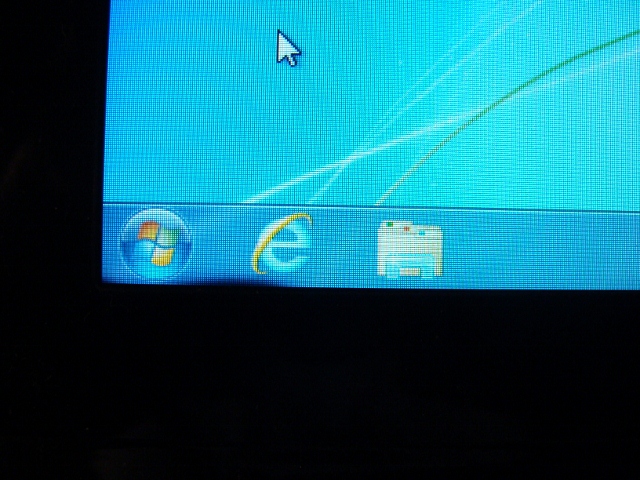
One issue I am experiencing is a dark spot on the lower left of the LCD (screen) near the start button and adjacent to the bezel. Has anyone read or experienced anything similar to this type of display darkening or issue with the screen? It's annoying and I worry that it will only grow worse with time.
Is there anything I can do and try to rectify the situation? It figures, the minute I get most things setup to my liking I have an issue.
I've tried to search this thread but i get no results every time i try it.
Thanks! -
Unfortunately you are wrong:
it was from Austria, not from BestBuy (model UB). So still we don't know for sure if there are 3 antennas.
No one has answered this question regarding UB model from BestBuy. -
-
Wow.. the whole problem is caused by a power saving setting?
Can anyone verify this fix? -
The same thing was reported somewhere in the middle of this thread - unfortunately this fix does not work for me, I am still unable to connect. Besides, I have mostly used this laptop on AC power with Max Wifi performance..
-
It could be only a minor cause of the wifi issue. I think that Samsung's support would recommend this settings instead of changing the wifi adapter from Broadcome to Intel 6230 - it's more logical.
In Poland we have something like: "Article is inconsistent with the contract" - it's apart from the guarantee and last always for 2 years (manufacturer independent, the responsibility lies on the seller). No working WIFI would be a very good reason to give back the laptop to the seller. Maybe your country has such law too. -
Oh, I wish it would be that simple! In the reality though the local dealers and the local repair shops refused to recognize poor performance as fault - they already replaced Broadcom with Intel 6230 for me, but that was it and they budged no further. I could not even return it, as the fault was "certified" to have been corrected. With Intel the WiFi works OK in close proximity to routers, at perfectly normal distance of 15m and with one cardboard wall in between the WiFi quality drops to unusable.
-
It's a mal functioning laptop in my opinion. If it was my money it would be going straight back to the seller. European laws would agree with that.
Too bad the situation in US is different. -
Since I did that not twice but thrice, I can assure you - the law is not helpful in this case. I could eventually get either my money back or a replacement laptop, but that could take more than a year. I went to the dealer and they took the laptop for servicing. The service replaced the WiFi card. When I discovered that the WiFi still sucks I went back to dealer, they sent it to the service again (authorized, certified, all legally perfect). The laptop returned as "no fault detected" despite the WiFi quality. Now, I can only get my money back if I prove that the product is faulty. To do so I need to get a statement from the service provider. Which says (conveniently for the dealer) that the product is in perfect condition. The next step is to go the State Buyer's Rights Bureau and to inform them about the situation. But the problem is - they need to get independent opinion on this matter, so they have to turn to a Samsung service abroad. Now, Samsung just denies that there is a problem and does so worldwide! So I have 80% chance that the laptop will NOT be considered faulty, I will have to pay for the independent opinion to three experts and all shipping costs and will be left without the device for at the very least one month whilst it is being sent back and forth. Risky, innit? I could then take it to administrative court and try to prove that wireless sucks, BUT again - a connected lawyer could easily state WiFi specifications, produce Samsung certificates, other experts would be needed, tests would have to be conducted..
-
If I were you I would not let it go. It's not working. You should find somewhere a definition of properly working WIFI - range, signal, etc. for Intel 6230. If one wall stops the signal it's a NOT properly working WIFI, especially as a N generation. I think that the expertise might not be as expensive as you think - just try to go to unauthorized Notebook service and talk to them. They can give you an opinion on the paper. Take two opinions in two different services and go again to seller/samsung.
-
My problem is not persistence, it is time that I lack. I bought this ultrabook as the lightest, the quickest (at that point) and the most power-efficient replacement for my previous laptop which suffered motherboard failure. I have already spent a month without this fancy toy, whilst it was serviced twice. Apart from the WiFi, Series 9 fulfils all my business needs. It is merely annoying that such company as Samsung fails to recognize its mistakes thus forcing the local dealers and the repair shops to provide unacceptable services to their customers. Currently I am creating a hotspot with my iPhone and focusing on my primary concerns - "holy wars" these days, especially in my country, simply never works.
-
I've attached a picture on the LCD darkness. I bought this at Best Buy and there was a leaflet saying to contact Samsung if any issues. I chatted online with them and their process seemed to be going in the send-it-in method.
Does anyone know if I could take to Best Buy to exchange? It has only been 8 days since I purchased.
Thanks for the help!Attached Files:
-
-
Probably it's always black right? I'm not an expert but it seems like dead pixels, or rather o whole bunch of dead pixels. It should be replaced by bestbuy without any questions.
-
Yes, that is there no matter what.
-
Guys how are drop down doors holding up so far ? I had a Series 9 back in summer but returned it and bought a Macbook air. MBA has so many quality problems that after exchanging 7 units I'm still not happy. Scratches on a brand new laptop, screen problems, creaking body, buzzing speakers etc. Now that wifi is fixed I may go back to series 9. I'm a little bit worried about that drop down door's reliability tough, so any feedback would be greatly appreciated.
-
Don't hesitate - exchange this unit.
Samsung 9 Series laptop (ZX310 / 900X3A) unveiled
Discussion in 'Samsung' started by SoundsGood, Jan 5, 2011.