Problems? See this thread at archive.org.
which case do you guys use/recommend? I'm looking for a soft cover when thats is not too bulky. Do Macbook air cases usually fit?
Amazon.com: Speck Products Form-Fitting Sleeve for 13-Inch MacBook Air / Ultrabook (SPK-A0227): Electronics
-
-
After almost 8 months of use, the side connector ports on my S9 are absolutely rock solid, not the slightest sign of them breaking or weakening.
The bigger issue remain the power connector...we still have not received confirmation that has been fixed (can anyone with a new unit PLEASE post pictures/details of the power connector??). Personally, wifi has not been an issue in normal use for me, the power connector has been the number one problem, followed by permanent smudges that rapidly appeared on the keyboard and trackpad
But again, the port covers have been no issue whatsoever -
Hi - i'm at work right now and can't get pics of the power connector. Do you remember if there are pics of the power connector earlier in this thread? If so, I can look at them and confirm whether or not that is what these 'UB' models have.
I agree about how the device is a smudge and hand/finger print magnet - how are people cleaning or trying to remove those?
I exchanged my laptop at Best Buy without hassle last night. -
I don't remember any pictures of power connector earlier in this thread. It would be great if you post some pictures after coming home and someone with the US model could check it.
-
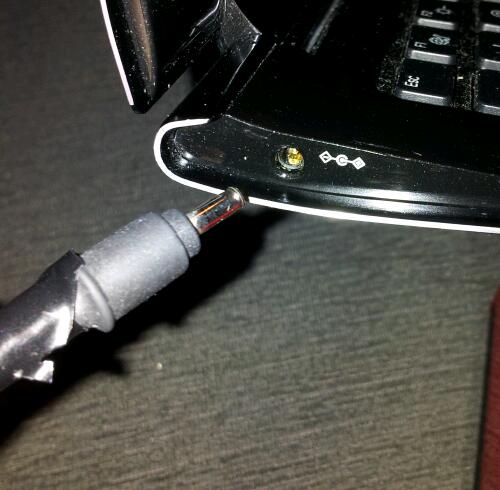
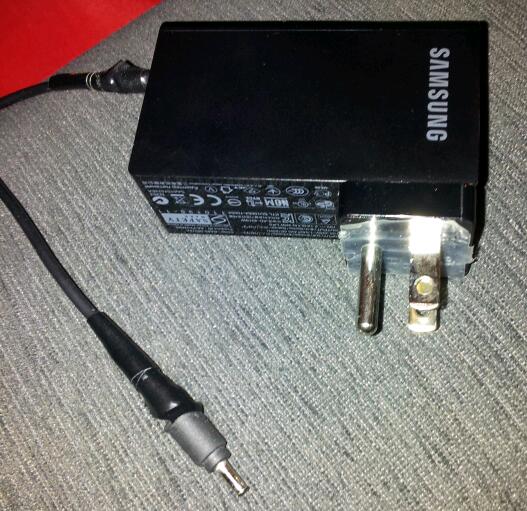
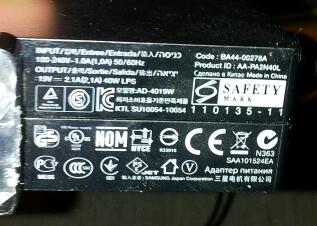
I attached pics of the old adapter, US version. Notice the electrical tape in two locations because the adapter is so cheaply constructed that the bare wires quickly become exposed at the joints (this happens even for very careful users). The actual (female) connector on the laptop also often becomes faulty, as it did in mine, resulting in a loose connection and/or inability to charge. All of these are VERY common problems with the old charger.
So the question is, what does the charging system look like on the new laptops? If the (male) connector jack is now L- shaped with a rectangular plug, as has been seen in Korean special edition prototypes, that is good news...
Photos of the (new?) adapter and connections would be very helpful for those of us asking for replacements under warranty, and for those considering buying the new version, although I just noticed that aftermarket prices for S9 adapters have dropped below US$30, so it may not be worth the hassle to pursue warranty replacement
As for cleaning the laptop, smudges on the outside case and palm rests wipe off easily with a cloth, but those on the trackpad and keyboard quickly become permanent and cannot be effectively cleaned, at least in my experienceAttached Files:
-
-
Thanks for the pics. Unfortunately that is exactly what the power adapter in both of my B01-UB models has looked like. Showing how you applied the electrical tape is helpful - i shall do the same with my adapter.
-
Thanks for the feedback! There is another buyer from Austria who was claiming that his charger connector is different than the old version. Maybe they changed it in Europe ?
-
This is just totally unacceptable. Has Samsung fixed this??
-
Anyone know where the air is sucked in and pushed out in the Samsung Series 7 Chronos?
-
Aren't you in the wrong thread?
-
Yes. Yes he is.
-
Wooooops!

-
Mine also now sports electrical tape at both ends; I was just thinking of trying to get a replacement through Samsung warranty. But I don't know if they recognize the problem or would argue that is 'wear and tear'. Has anyone had it replaced because of the wires?
-
I had this common problem with my adapter and asked for a warranty replacement to Samsung Benelux (Europe) since I read here that some users in USA got it replaced for free.
Unfortunately for me they refused and charged me 55 for a new adapter despite my numerous emails explaining that there is a design problem with it. -
I believe an Air case would work.
I went with this case, and while the laptop is a bit thin for it (not too much so), it works great:
http://www.amazon.com/Case-Logic-LA...ref=sr_1_5?s=pc&ie=UTF8&qid=1322704743&sr=1-5 -
I've had luck with two:
The MacBook Air Slipsuit from BoxWave and the Tuari 13.3 Neoprene Laptop Sleeve (purchased at Target). -
Returned the A05 and now have nothing. I don't see them fixing the wifi issue on any of the i7 models any time soon.
Not sure what to do now, I need a laptop, and the samsung is the only one that has everything I need (with the exception of wifi). I can't believe samsung is being so ridiculous about this. -
I don't have much issues with the power connectors, but probably because I have multiple of them (one at work, one at home, one in my bag).
I suggest grabbing this replacement... the connectors are much thicker, the box is slim/smaller, and its much easier to put in my bag. None of mine are stripping.
Slim Netbook Power Adapter, 40W -
@isosunrise, that adapter looks good. One reason I haven't pursued a warranty replacement is that I want something different, more durable and practical.
So, you can confirm that the plug pin is the correct size (I think its 0.7mm internally) and fits securely on the S9 13" without modifications? -
@Eppsing
I am using it on the S9 11.6", but it should work fine for the S9 13" too. The stock power supply is AD-4019W which supports both the 13" and 11.6" according to Samsung. The power ratings for AD-4019W are exactly the same as AA-PA3NS40. No modifications are needed. The plug is an exact fit. If you scroll down, "goes great with" and "see all", both 11.6 and 13 models are supported. -
Does anyone know which file to download to get the Ethernet port to work instead of wireless? I can't seem to get it to work.
-
Thanks, I did notice after I posted that the 13" is indicated to be supported. That charger definitely looks like a better solution than the standard (flawed) unit, so I will order one, but unfortunately the laptop will still be prone to the faulty connection at the input jack since the design has not been changed.
My latest S9 problem is that the F12 key wireless indicator no longer illuminates, but this is a minor issue and I expect there will be others so I won't send it for repair just yet.
I switched my home router to the Asus RT_N56U today, and as others have indicated, that makes the S9 wireless performance significantly stronger, faster and more stable than with the crappy 2Wire provided by my ISP -
There several Chinese copies of the Samsung power modules on E-Bay that work well are are better mechanically than Samsung. The one I have I use at home and have had no issues.
-
My Series 9 pulled an interesting stunt today. As usual I closed its lid at work and placed it into my laptop bag. I spent a couple of hours travelling home through shops and stopped at a petrol station. When I arrived home and reached for the laptop I was very surprised by the fact it was very warm - and I mean all of it. It had even warmed the bag and it is around 0 degrees Celsius outside, so not an easy feat. Upon opening the ultrabook nothing happened, it did not wake up so I plugged it into mains charger. The laptop then booted and informed me it has recovered from a serious error (blue screen apparently), its battery was 100% drained in 2 hours time so the error must have been quite resource consuming. The only thing I did on the ultrabook today was Intel WiFi software upgrade, as I was notified by the update utility (Intel 6230, 14.2.1.1, published 28.11.2011.). I did however reboot it after the update. Has anyone else experienced similar behavior?
-
Historically, I never trust sleep mode if putting a computer into a bag (because it is too vulnerable to the computer waking up for some reason, which may be revealed by Event Viewer's system log). I usually use hibernation but about 1% of the time I discover that the computer won't hibernate.
John -
Same here. I've come across occasions when the laptop would either wake up or do something funky. Last time I tried it, it changed the display settings -- I had to mess around in Control Panel to figure out what had happened.
-
That kind of nullifies one of the main benefits of this ultrabook - the superfast resume.. Have there been similar problems with MB Air?
-
I don't think they're talking about the Series 9, just laptops in general. I personally have never had a problem with laptops in bags doing that. Even if they did turn on, too, most are set (by default) to automatically go to sleep after 20 minutes or so, so it's not a huge deal.
Maybe I'm missing something here. -
After reading through a few pages, it seems like everyone that returned theirs either went for the toshiba, lenevo, or air. Any reason no one purchased the asus ux31 instead?
-
You read correctly what I wrote. It's just that if something breaks sleep 1% of the time (like it does my hibernation) then a few minutes in an unventilated bag can cause heat-related problems if the CPU has gone frantic.
Ensuring that the power properties are set to trigger sleep after, say, 10 minutes of no user input may help. However, if some broken process was blocking sleep when the computer was closed then this may not be immediately noticeable unless one carefully checks the indicator lights.
John -
I'm happy with the S9 B01-UB I got on sale at Best Buy for $1000.
Then again, it isn't perfect (although still really good)... I probably wouldn't get it for the $1200 it costs at most places.
I dislike the UX31 because of the touchpad mostly, but go to a store and try it yourself. You may not care or even prefer it. -
If Series 9 gets Icy Bridge, with IGPU 4000, what sort of gains are we looking at you think?
I love everything about the machine, except for the current weak graphics. Some people have been hyping up the Icy Bridge graphics, but hype is hype. Even if the theoretical performance is as good as people say, how can anyone be sure if it would translate over to games? -
i just got this incredible laptop from the MS Store. $999 + 25% off. $750 Total. I really like it. No issues so far especially wi-fi. Model no. 900x3a-b06.
-
I don't see that listed on the website, is it in-store only and how did you get 25% off?
Secondly, which wireless card came with it? -
yeah the coupon seems to be in-store only. damn, helluva deal, i'd pick it up if i wasnt sitting here in europe. :/
-
Promotion is in store only. 25% if item is over $1000.00. Newbie here so how do I find out what wifi card comes with the s9? I will chime more later. Thanks.
-
where is the coupon?
nm i found it, no locations near NYC though -
No coupon just an in store deal. Wifi card is the Intel 6300. Again, no wifi issues to report. It has been flawless so far. No better laptop for the money. Oh btw, if you trade in your old working laptop, you get up to $150 in store credit so my Ss9 was $600 + Microsoft assure and ms home/student office $750 total
before tax. -
endless glory - How is the Series 9 power adapter? A lot of talk is the power adapter is poorly designed and breaks after minimal usage. It wiggles too easily and can come unplugged from the laptop. Also the laptop has a metal clip to hold the power supply in but that breaks off. You appear to have a newer model. There was a discussion that Samsung may have fixed this.
-
IMO I believe Samsung has fixed this along with other known issues. Before I bot this S9, the rep said that they had to send their batch of S9's back to Samsung and got new ones. He said they fixed many issues including wifi. They got this new batch less than a month ago. As for the power plug, it fits very well with very little give. Very snug in there. I noticed that there is a gold clamp in the power port which I think helps. I wonder if the earlier ones have this.
-
Cool. Is the plug going from the power supply to the laptop L shaped or is it straight?
-
It seems like the fixes have been applied so far to the
BO1UB - Best Buy
B06US - Microsoft Store
Both are the same model I5, 4g ram, 128gb ssd.
I am wondering if we are ever going to see a fix for the I7 models. -
It is straight. After reading previous post, I still don't know if the straight one is the revised plug. Please let me know. I have had this unit for a week and love every minute of it. I will keep you guys updated on the status of said issues.
Before this laptop, I had the Samsung Series 7 Chronos. Great specs for the money but I will honestly say that the S9 kills it. Better screen, brighter, faster start-up, faster sleep, no lag when browsing, etc. Had to return the S7 also because I use my laptop for business use more than gaming. I need the ssd drive more than an i7. My S9 was built in Sept. 2011. -
I'm in the same boat. Use is for business. I was seriously considering Series 7 14" but based on what you just said I made up my mind. I did see in a forum that the slim power adapter from accessory site works well on the s9 if you experience issue with out of box adapter.
-
Was that the 14" Series 7 Chronos? If so, any other comparisons you can think of that might make someone favor one over the other? (The 14" Chronos actually doesn't look too bad...)
Thanks. -
I had the 15.6" model. The S9 fits my needs better. I commute a lot to sites so weight is a big concern to me. The S7 15 is 5.05lbs and S9 is 2.9lbs. Small in numbers but big difference when traveling. I thought I needed the i7 but in actuality I don't. I don't have the luck to play games with a business and two young kids. Also, the s9 is completely silent. Not noisy at all. Very useful when I am working in bed next to my tired wife. The weight helps too when I am lying down with it on my chest. I have read many reviews about the MBA and I can tell you that when it come to the heat issue, there is none with the S9. Placing on my chest, I don't feel anything or hear anything. I like the S7 but I feel the S9 is more compatiable with me. Sorry for unorganized post, just jotting down thoughts. Thanks.
-
Gotcha. Thanks.
-
After returning my third ASUS UX31 due to horrible WiFi issues, I will be picking up the Series 9 laptop tomorrow from a local Microsoft Store.
I went to the Bellevue WA store earlier today and they only had the A02US version in stock. Luckily, their other store had the B06US model in stock, so they will bring that over to my nearby store tomorrow.
One thing I was able to confirm with them today...the A02US model clearly indicates "2x2" for the WiFi right on the box, while the label on the B06US model shows "3x3" (the other store associate read the label to us over the phone), which is a telltale sign that it includes the Intel 6300 WiFi module.
They will upgrade my S9 with an additional 4GB RAM ($80 upgrade) tomorrow, so my hope is to take a photo shot of the back side of the B06US when they add the RAM. I'm sure many of us, myself included, are curious whether B06US has the third antenna behind the screen.
I'll post high quality photos once I get my laptop tomorrow. For starters, I'll have close-up photos of:
- backside of the chassis with cover removed
- AC adaptor plug tip and base
- adaptor plug receptacle on the laptop side
- outer box sticker of the unit indicating the model number and description
Anything else? -
as long as you're asking - how about wei? thx.
-
$750 at microsoft store B&M.
Centrino 6300. Get it while it's hot!
Samsung 9 Series laptop (ZX310 / 900X3A) unveiled
Discussion in 'Samsung' started by SoundsGood, Jan 5, 2011.