Problems? See this thread at archive.org.
I have bought the Samsung NP900X3A-A01NL UltraBook for my student daughter. I totally overlooked the bad reviews on the WIFI of this laptop.
In our house, when the laptop is about 7 meters away from the wireless access point the connection is already so bad that it is useless in effect. Sites take ages to load and watching a youtube clip is not possible. We have several other laptops that have no problems at all at the same distance.
I am a big Samsung fan, but find it very disapointing that a laptop in this price range has this kind of hardware flaw!!
I read through this thread to find out whether people have found a solution somehow. Apparently not...
I am interested to hear whether people have contacted Samsung about this wifi issue to reach some kind of solution??
-
Thanks! Probably going to upgrade my router too to the asus rt-n56u.
-
An inelegant work-around is to use a USB WiFi adaptor.
Samsung have been reluectant to acknowlege the problem but have now released a version which uses the Intel 6300 WiFi card which uses 3 antennae, one of which is in the display. This model is not available everywhere and you will have to read through the thread to see if is available in your country.
John -
To add to John's response above, the NP900X3A-A01NL appears to have Broadcom adapter (which is a 2x2) with weak WiFi. See here
I know that there are Series 9 models in the Netherlands that do have Intel 6300 WiFi (3x3 antenna) but don't have that info handy. -
I still found that when i used a usb wifi adapter, i was still getting a weak signal. I tried both the dlink nano and the airlink mini. -
Right now I'm writing this post in the kitchen connected to internet through my old iPhone (with bluetooth network) because the Samsung has no wireless coverage here...feels kind of ridiculous.
In the same spot...
- The iPhone 3GS gets 2-3 Mbit/s.
- Asus Eee PC gets 6-7 Mbit/s.
- Samsung 900X3A varies between zero and shaky 0,5 Mbit/s reception.
: ( -
I tried 3 different USB wifi adapters with my 900X3A and they all worked great. There's nothing wrong the internals of the Series 9; it's just the antenna needs to be out of the case.
Maybe you need to check your WiFi settings and check 2.4GHz vs. 5GHz etc. 5GHz is faster but 2.4GHz does a better job of getting around obstacles. -
First, why should I have to use an external wifi adapter on a laptop of nearly 1200 euros??
Second, How can you argue that there is nothing wrong with the internals of the Series 9 if at the same time you say that the antenna is in the wrong place?? -
1. Samsung used the "fancy" Duralumin for the casing. It does not appear that they did enough testing to determine that WiFi doesn't travel through it very well. Note that there are two WiFi problems (1) the range is not great and (2) the WiFi signal fluctuates (so if you do testing 3 rooms away, you will continue to see different results). Every other Windows laptop, Macbook, iPhone, iPad or iPod touch that I tried had far better WiFi range than the Series 9.
2. See #1 for my argument. The problem is not the motherboard or the Broadcom adapter (or Intel 6230 adapter or Intel 6300 adapter). WiFi works well (not great) if you take the bottom off the laptop -- it would be great if there still wasn't Duralumin at all.
The two antennae are in a normal location for a laptop -- the top right and top left corners.
I spent many hours testing using three different routers, in multiple locations in my house, on different floors, with bottom on and bottom removed, with three different Series 9 laptops. The problem is the Duralumin casing. That's why external USB adapters have no problems. I also did testing where I disconnected the two antenna from the Intel 6230, connected a new pair of antennae and left the ends hanging outside the case; WiFi was perfect. -
Since you opened the casing can you tell me whether it would be posible to relocate the antenna? Say towards the sides of the keyboard. Do you think that would improve the reception?
-
No, you cannot relocate the antenna to any better location.
I actually disconnected the antenna and added my own that I tried in multiple locations (like near the vents etc.). No other location made any difference until I located the antenna ends outside the case... I did testing with bottom just fractionally open and even that helped -- obviously one can't leave it like that.
I don't want to get into all my Support calls again but I can tell you that, while most wouldn't even even acknowledge knowing of any WiFi issue, I actually got a couple that knew that there was a WiFi problem but there was no fix that they had received from Samsung.
The primary option that a couple of us suggested to Samsung was to put a 3rd antenna inside the LCD --- and that's what they've now done to solve the problem. I'm not taking credit it for it; just saying that either they listened or they came to same conclusion themselves. -
good plan.
very good-looking router that works very well - as long as you make sure you have the latest firmware - which is quite easy to upgrade to. -
Hello, I have an np900x3a B01ES with core i5 2467M and the average temperature in iddle, with configuration in max performance and doing nothing is 52-55 degrees.
do you think this is a normal temperature?
and another question about the speakers
when I play music, at max volume after a few seconds the volume of the music decreases, when I click pause and play again music, the volume returns to normal but after a few seconds again it gets a little down
did someone experienced this?
I use the SRS Premium Sound enabled
thanks
borjazd -
The idle temperature depends on the rules for operating the fan. I would be happy with that temperature since getting much lower requires a lot of effort by the fan.
By the way, I would use a Performance on Demand power profile. Max Performance may be keeping the CPU running at full speed (HWiNFO32 will show the speed) which will create a little more heat. performance on Demand allows the CPU to adjust its speed according to the workload.
John -
Is there someone with a new Samsung 900X3A with Intel® Centrino® Ultimate-N 6300, 3x3 802.11 abg/n (with the third antenna in the display)?
Could you please compare the Samsung with another normal laptop (or iPhone) in a spot with weak wireless connection?
Both numbers (Mbit/s) how they compare and the behaviour (loss of connection, delay and such) would be greatly appreciated? I don't want to do the same mistake twice...

-
Solid performance, I haven't had any issues. Can download at full speed e.g. 3,000+kps
-
Thank you for the answer. So you have the three antenna 6300?
Could you please compare the Samsung with another normal laptop (or iPhone) in a spot with weak wireless connection?
Both numbers (Mbit/s) how they compare and the behaviour (loss of connection, delay and such) would be greatly appreciated?
I have no trouble with wireless speed close to the router. For instance at the current spot I have 16 Mbit/s download.
But compared to other laptops the range is lousy and when the speed is close to zero with the Samsung, other laptops can still have more than 5 Mbit/s at the same spot. My hope is that has changed for the better with the 6300 with 3 antennas? -
Mine is the 6300 with the 3+3 and I get ~19mb/s in my basement with the router up in our 2nd floor loft. That's the same or better than my old asus & dell laptops and my wife's 08 MBP. I'd say with the addition of the 3rd antenna they completely fixed the wifi issues the previous models had.
-
Hi: For those interested to see how to install external network antenna Check out the following link:
Samsung computer pictures by jjd85262 - Photobucket
There are 14 edited images with text to explain the specific details. Any questions let me know. So far no complaints on the set up I did. I get great reception but only a decent speed due to most router's and/or service provider's slower speed. -
So any current deals for less than 1000bucks out there? Bestbuy and MSstore seem to have shot up and I really dont trust the ebay products especially with this wifi issue.
-
Thank you!
Your comparison is reassuring.
Perhaps it would be even better if someone could find a spot with weak connection. Where either the Samsung, or the other laptop is struggling a bit. That is where the older Samsung (broadcom) really falls behind. -
Unfortunately, that's not a very elegant solution but it works.
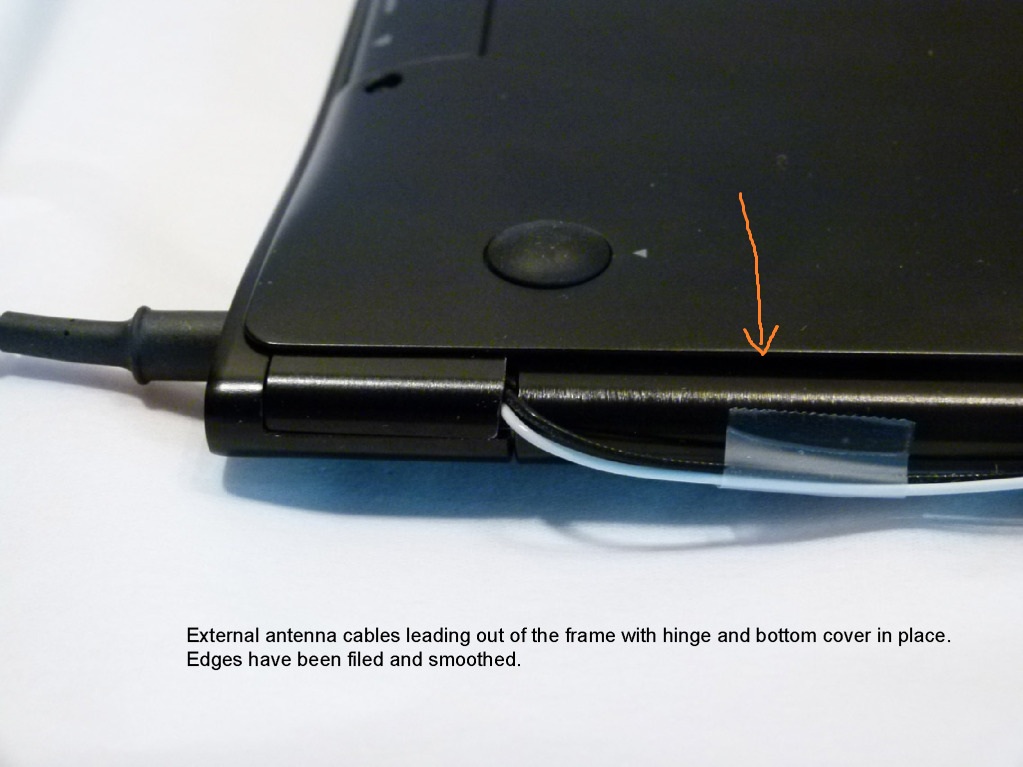
I don't know why you cut the hinge though. When I did testing with antennae outside, I just had them come out of this space next to the hinge (as shown by the orange arrow).Attached Files:
-
-
Unfortunately, that's not a very elegant solution but it works.
I don't know why you cut the hinge though. When I did testing with antennae outside, I just had them come out of this space next to the hinge (as shown by the orange arrow).
There are many ways to the most elegant method. I am only clearly, showing "a version". Passing the wires your way is much better. Regardless to say, I saw your option after I did mine! FYI, I am in the process to making my own bottom cover out of my own selected metal. Does anyone know the size of the cover screw threads? I would greatly appreciate it. Regards JJ -
It'd be awesome if some outfit creates a bottom cover out of CFRP or similar reinforced plastic material at a reasonable price.
-
jjd85262,
I was going to PM you the details of someone who was planning to look at manufacturing a bottom cover but you don't have enough "quality posts" yet. He and I exchanged a number of emails on the topic as he has the capabilities. I returned my Series 9 and I don't know what his Series 9 status is. Email me on 5643735 at gmail.com if you'd like to. -
Hi there, can you guys confirm if all the NP900X3A-B01UB models from bestbuy will have the new intel 6300 3+3 wifi. is there a way to confirm this without actually opening the packaging box
? want to confirm at the shop before taking it home. -
Hello It should say 3x3 on the box as mine did.
Attached Files:
-
-
thanks man...getting mine this week. Bestbuy prices are back to $999 so getting mine!! Any perfect fit cases out there?
-
Hi, can anyone out there with the A05 model (core i7, 256 SSD) confirm whether that model comes with the 3*3 wifi model! Also is the ram 6gb or 8gb. thanks
-
It probably isn't going to matter in about 90 minutes.
Samsung USA - Company - Ridgefield Park, NJ | Facebook for the next generation details and live feed of their press conference. -
It's get-ting bet-ter all the ti-i-ime...
-
The Series 9 is so beautiful
I so want one!
-
Even if they announce a new ultrabook series, judging from how long it took the Series 9 to get to market after being announced at the 2011 CES - I wouldn't expect them to arrive in retail channels until April or May. The base Series 9 was priced at $1600 when it came out, and got down to the $800-$900 level last week.
So judging from that I would expect any new ultrabook prices to be high for a while. And who knows if the new ultrabooks would have the bright 400nts screen. If you have one of the newer S9 with the Intel 6300 WiFi you have a pretty perfect computer - and hard to beat the $750 price I paid for it at the Microsoft Store in late December. -
Until you touch it. When I looked at them at BestBuy I liked everything EXCEPT the fingerprints. Lots and lots of fingerprints....
-
I was thinking same thing... It has all the features I was looking for and at that price point - too hard to resist! I'm glad I got it.
Co-worker just speculated next gen MAY be a touch-screen enabled version. Maybe combo notebook/tablet? Well we'll see in 3 mins. -
Well, I can say I'm not very impressed with the NEW Series 9. So, the ports are exposed and there are two USB 3 ports.
Seems like a step backward in design, though connectors are probably not as delicate as the current design. Although, there's not much clearance for some USB devices, I much prefer the sleek hatches on the current gen. and the aerodynamic lines of the edge.
And, as for the "sandblasted finish", I saw plenty of fingerprints on the demo.
10 hours battery life? :yes: -
I'll need more data before knowing for sure, but so far I very much like the new 15" Series 9. Check it out:
"For the first time, the new Samsung Series 9 will offer the world's thinnest and most compact 15-inch premium notebook. The Series 9 15-inch features a vivid SuperBright Plus display that fits into a compact 14-inch chassis. With a stunningly slim profile measuring just 0.58 inches and weighing just 3.5 lbs, makes this 15-inch Series 9 almost 50 percent more compact than any existing 15-inch thin & light notebooks." -
Just found a picture of the 15" keyboard. I'm VERY disappointed to see that they didn't include a row of dedicated keys for Home / End, etc...
Picture: http://cdn.slashgear.com/wp-content/uploads/2012/01/Samsung-Notebook-Series-9-3.jpg -
It looks good, but nothing that makes me want to return my series 9 to get the new version for likely $400 more. The most appealing thing on the new ones is the 1600x900 resolution.
-
Hmm. No SD / Memory card reader on the new version?
-
No, the only known ones so far with 3*3 antenna are the B06US from Microsoft Store and the B01UB from Best Buy. (I had two A05US.) And the A05 does come with 6GB RAM.
-
The early adopter tax is high for anything. About the only machines that never get discounted are the Apple machines and guess what? I doubt many people will pay the Apple tax with all of the new cool machines coming out.
According to some stuff I've read, the new Series 9 will be available 2/27/2012. -
Has anyone found a way to switch from a 128GB SSD to 256GB SSD? I've scanned the thread, but not found a solution.
-
I agree with the other poster who said he wasn't very impressed with the new Series 9. To me it also seems like a step back in design with the exposed ports and I too prefer the aerodynamic lines of the edge on the current S9.
Now if you are one of the unfortunate ones stuck with the first generation S9 with the WiFi issues then the new S9 would be a great upgrade. If you have the second generation S9 that came out last month with the improved WiFi then the new models not much of a upgrade.
I paid $750 ten days ago at the Microsoft store for the second generation S9. Would I return it for $750 and pay almost double the quoted price of the new S9 at $1399? HA HA -
oh ok thanks. now am sooo confused... am getting a really good deal on the on the A05 model but most likely it will be the 2*2. Do you guys think I should risk it and go for the A05 (am getting it for about $800 for an almost new one) instead of getting the B01 model. I really love the idea of 256SSD for a lower price.
-
There is info in this thread on that. The 128GB is mSATA while the 256GB is a PATA. The latter is larger but fits in the S9 -- that's what the 256GB models (like the A05) have. You need an adapter for the 256GB SSD.
I discussed some of this here. Look at this post and the following ones for more info. I even posted some pictures
The 256GB SSD is expensive...
EDIT: dammad42, I see that you were one of the users that I was giving info in those previous posts... -
I know; it's a tough decision. Some people just cannot live with the weak WiFi of the 2x2 --- I was one of those people.
-
Sorry for asking this question but all these model names are so similar and hard to differentiate when looking for specs. Can anyone tell me whether the NP900X3A-B06US has the fixed wifi with 3*3 antenna? Kinda urgent as might have to cancel payment for it if it has the wifi problem still. Thanks
-
Yes, the NP900X3A-B06US from Microsoft Store (which I think is the only place with this model) has the 3 * 3 antenna.
-
Thanks for the quick reply! Ill go ahead and buy it then!
Samsung 9 Series laptop (ZX310 / 900X3A) unveiled
Discussion in 'Samsung' started by SoundsGood, Jan 5, 2011.