Problems? See this thread at archive.org.
Not non-existent, but should slightly improve the situation. Enough, for some people, to turn unusable to usable. Some of the final X3As included an Intel 6300 WiFi card with an extra antenna in the display. This gave a noticeable improvement.
But micro-HDMI is limited to 1080p.
John
-
-
Good point. So I wonder, what are my options going forward. Things I learned from owning this first-gen S9 is that battery life does matter (real world battery life always 33% less than advertised), 1600x900 is minimum and 2560x1440 external must be an option.
X4C isn't an option then. Only DisplayPort, Thunderbolt or mini/full-HDMI is? Is there such an ultrabook out there even? -
In one of the Series 9 threads a user recently reported using a Lenovo USB 3.0 dock to power two high resolution monitors. Could this be an options for you?
John -
Could be. I'm already using a smaller DisplayLink-based helper USB-monitor. Xorg 1.13 is going to arrive with USB hotplugging support. It'll be most interesting to see if it works as smoothly as Win & Mac.
-
Hi all!
Spent lots of time reading through bits of this (and other) threads - head starting to get a little mushy now
I've had the 900x3a for about a year now. WiFi can be a bit slow, but rarely hinders me - I get no signal in one of our spare rooms where I sometimes work from (whereas by Destktop Replacement laptop, phone, tablet are all fine) but to be fair, there are about 3 hefty concrete walls between me & the router - so it's not a biggy.
I'm actually looking to give it a bit of an upgrade, and will probably kill 2 birds with one stone.
For RAM, planning to upgrade to 8gb. Am I ok just adding an extra 1066 4gb stick, or am I better replacing both to the same make? Any recommendations?
For SSD, someone linked to the 256gb MyDigital SFIII which I will probably get.
The cover sounds like it's no major pain to get off - is the SSD accessible enough though to replace? And how are you guys sticking the rubber feet back on?
And what it the best method for migrating to the new SSD? I have a portable HD somewhere - do I do an image onto the xHD, install new driver then transfer back?
Anything I can do with the image backups I currently run onto the network?
Couple of generic Q's, what is the deal with MicroSD? I currently have a 16gb card which fits perfectly - so are the 32gb+ cards slightly larger so *should* I already be having this issue.
Secondly - I've hunted high & low, but not able to find anywhere selling replacement packs identical to the supplied one - only ones with inline bricks - anyone managed to find one, as mine is currently covered if electrical tape!
Also - does anyone have issues with the keyboard relating to windows thinking you're holding down a key when you're not? Get it maybe once per fortnight and requires a restart to make the laptop usable again!
Apologies for all the questions!
Sorry - thought of another couple of things!
- Is there anyway to make the MicroSD bootable (like USB)? Would love to be able to use it for my decryption key rather than stick a usb drive in.
And, on the subject of encryption, how can I verify whether I have the trusted platform module? From what I gather it's a case of some do, some don't. I can't find it anywhere in bios, so assuming I don't - but have heard of this setting being quite well hidden! -
Hey Guys, I've got the 11.6" NP900X1B-A02US. Can the memory be upgraded in it? I opened it up earlier and the laptop is missing the SODIMM memory slots
-
This post in the X1 thread suggests that the RAM is soldered.
John -
Ok, RAM upgraded to 8GB! Happy days!
Next on my hit-list is the M4 drive.
Anyone know of anywhere in India I can order this from (or in Bangalore where I can buy in person).
when I opened the cover up, it almost looks like it was originally designed to take the larger sized SSDs - there is a lot of 'space' around it, which I don't think exists in the newer series 9's.
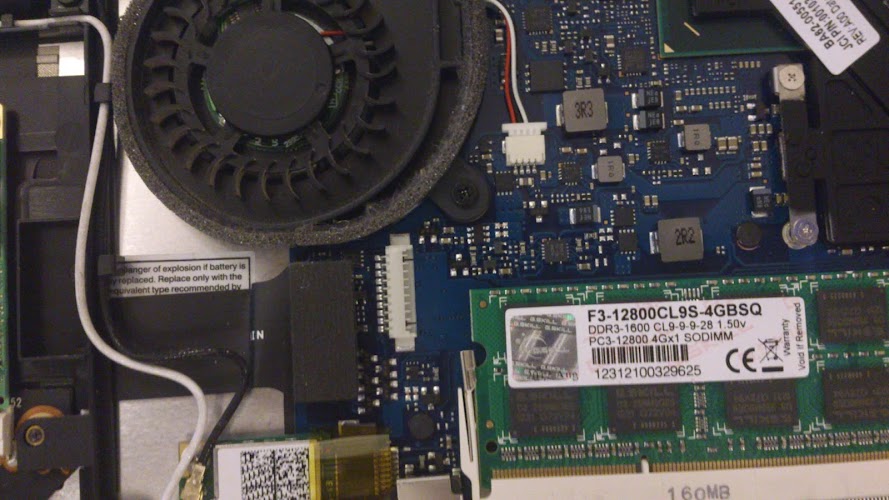
There is also a small white connector near the memory slot. Any ideas what this is for?
(middle of the photo. To the left, you can also just about see the outer mSata Drive Chassis I referred to)Attached Files:
-
-
anyone think this laptop looks better than the 900x3b\c series? I seem to prefer the looks of this model and the build quality better than the latter. Thoughts?
If only the LCD could be swapped with the 1600x900 it would be perfect. -
I'm not sure that the X3A has better build quality than the newer models. While Samsung hasn't openly acknowledged the X3A's failings (for example the poor WiFi) the X3B/C/D have built on the X3A experience.
John -
John do you know if a LCD from 3b\3c can be swapped into this model?
-
I don't know. It wouldn't be very easy because the displays may be glued into the lids in order to reduce thickness (the X3B etc have no screws holding the display together).
John -
Had to send mine in due to a white spot and a dead pixel that have developed on the screen. Hopefully they will not return my "like new" machine back with scratches. I have placed a sheet indicating I want the machine back in the same mint state.
I have read horror stories about Intelisole. -
hi everyone,
i'm new, so please bare with me. i recently purchased an np900x3a-b06us. like many other people on this forum, i, too, had problems with my wifi. luckily it still has its warranty, so i sent it in to be repaired. they replaced the wifi card and sent it back. it was no better. i sent it in again, and they sent it back, this time not changing anything. basically, samsung refuses to replace it because it was bought through a non-authorized 3rd party retailer (ebay), so that option is out. what do you suggest? i've purchased both an internal wifi card (intel 6235)-- which didn't utilize the 3 ports that the 6300 uses and didn't help even though the computer recognized it, and i've bought a usb wifi adapter from amazon, which, strangely, didn't help the speed out. to give you an idea about how slow the wifi is, on my home network, i should be getting ~23-25 mbps. i get .5 mbps. this is the fastest network that it runs on, and even then, it is unbearably slow. samsung has offered to repair it for a 3rd time, but, being a student, it is a real hassle to be without a computer for no less than 10 days. also, i don't know what they'd do this time that they didn't do the first 2 times (and why didn't they do it then!?). so, i'm really down to fixing it myself. are there any known fixes for it?
thanks in advanced!
daniel -
The underlying problem is having the antennae in the chassis surrounded by metal. The only way to improve the internal WiFi is to use the Intel 6300 with the third antennae (I'm not sure if that got squeezed into the display but it reported to help). However, your WiFi speeds suggest more than just an antennae problem.
Study this thread about trouble-shooting WiFi issues.
John -
i am using the intel 6300. where should i buy the antennas from? how do i install them (all of the ports on the wifi card all already full--should i disconnect them)?
thanks,
daniel -
If you have already got the Intel 6300 with three antennae connected then you can't add more and this solution provided adequate WiFi for most X3A owners. Most of the X3As had only the 6230 with two antennae. You only option is to use an external WiFi adapter such as this which definitely boosts WiFi performance of my X3B and X4C.
Let's try some other trouble-shooting to be sure that the problem is hardware and not software. Run InSSIDer and see what signal strength it reports. If -50dB or better (smaller number) then you should get decent throughput. If -70dB to -80dB then the speed will be poor.
Are you running the latest Intel WiFi driver? The Intel driver update utility will help you.
Under Windows Power Management, set the WiFi adapter to maximum performance / minimum power savings.
John -
So here I am with my state of the art, business class, warranteed and guaranteed Samsung Series 9. The wireless issue was never resolved - an ominous indication which I overlooked. Now I have had the laptop for 1.5 years and been quite anal about it - it was always stored in a separate compartment of my bag, specifically dedicated for laptop and insulated in various ways. I am the sole user of this machine and know for a fact that nobody has ever had access to it. Despite that - the keyboard letter T and cursor arrows have lost their paint and the bottom of the machine has lost several screws but, most irritatingly, the charger connector inside the laptop has moved, making it very difficult to charge the battery. Today the laptop was returned from the local authorized repair shop with indication - Samsung refuses guarantee repairs. It seems they think that I have employed powers of telekinesis to loosen an internal part. Or perhaps they believe in gremlins? Either way - I am NEVER buying Samsung again, this has been a total disaster and an APPALLING example of business idiocy. Naturally, I am hacking the laptop open today (voiding the completely useless service guarantee!!), installing +4GB RAM, buying spares from EBay, nuking the recovery partition, installing Windows 8 and, in general, taking care of things my way.
-
I'm seriously considering getting this ultraportable but im not sure as to whether to get the 15" or the 13" , i cycle to college daily and atm my laptop weighs 2.8kg (my bag is 11kg in total!!!!!!) and so im wanting a lighter faster laptop that has a great screen, hence the samsung series 9 but ive seen reviews claiming the screen on the 13" is better but the keyboard space suffers meaning typing can be hindered and as a college student i could do wiht the larger pad and screen size for watching films so can anyone comment on the quality of the screen? and i sure hope i have enough space on the rather small SSD! currently my laptop has around 80GB of space used up (1/3 of that being my music library!)
-
Are you planning to get the X3A (the 2011 Series 9) or a newer model (X3B/X3C/X3D)? Any of those models use an excellent 1600 x 900 PLS (Samsung equivalent of PLS) display. The 13" keyboard is not cramped but it lacks the row of dedicated navigation keys provided on the 15" Series 9. The 15" display is not as good as the 13" but is better than many. The 15" Series 9 also has a larger battery which gives you more time before having to look for a power socket. Also, the X3B/X3C/X3D have a fixed 4GB RAM.
You will find the 128GB SSD to be struggling for space, but there is a solution.
John -
Hi,
I have bought a NP900x3a without Display, now I have installed a new LCD, but hte Notebook won't start. I have seen, that there is no Ram in it and asked my seller, if he had forgotten the RAM. He told me, that the RAM is onboard.
Is this right? Both of my DDR3 Slots are free.
Thanks for your help -
You are correct: The X3A has two RAM slots and the computer won't boot without any RAM.
Perhaps the seller was thinking of the X3B/C/D/E which use a soldered DDP RAM module. Send the seller a photo of the board with the empty slots.
John -
Thanks for your answer, I have contacted the seller, he will send me the RAM
-
Hello, first sorry for my English i am from France.
I decided top put back Windows 7 on my 900X3A but i don't have anymore the Recovery DVD that were in the box and the recovery partition has been deleted when in installed Windows 8 on my PC.
Is it possible to download anywhere on the internet the ISO of the two DVD ? -
hmm I don't have a DVD either, better look for a solution before it's too late
-
No need to apologise. Your English is better than some of the native English speakers.
See this thread for links to downloadable Windows 7 ISO files.
You can download the drivers and most of the software here.
John -
Any Linux folks here running 900X3A? On 3.4 kernel /sys/class/power_supply/BAT1/cycle_count shows 0. Anyone seeing anything else with any other kernel version?
BTW Over 1 1/4 year, battery capacity has dropped 50%.
leho@s9 BAT1 $ grep -H '' /sys/class/power_supply/BAT1/charge_full*
/sys/class/power_supply/BAT1/charge_full:3200000
/sys/class/power_supply/BAT1/charge_full_design:6300000
I'm getting barely ~2hrs now on 80% battery. While I ran without the battery extender for about first 6 months, this is a somewhat disappointing result. Definitely looking for a replacement battery for it, but I don't have particularly high hopes, since the official claim is "not user replaceable". Even though reality is replacing the battery is a piece of cake. -
So yeah if anyone knows a trustworthy webshop to get this battery from, I'd appreciate it. Google results all look like scam artists.
-
Contact Samsungparts.com although I can't find the X3A battery.
John -
Thanks for the tip.
BA43-00292A - BATTERY
I doubt the 900X3A-XXX batteries are different from each other. But either way, $150 is pretty damn steep.
This is also indicative of their pricing levels http://www.samsungparts.com/Products/Parts_and_Accessories/PID-BA92-08031A.aspx?model=NP900X3A-A02US
Motherboard for $650. You can buy the whole computer for less. -
I agree that one type of battery should be good for all version of the X3As. Now you know the part number you can search for the battery. For example, fleabay has it for $130 and <$120 in Las Vegas. Still not cheap, however but somewhat less than we folk on the other side of the pond are expected to pay.
John -
Guys anybody getting eye strain from 900X3A?
It is the adaptive brightness thing...
Guys how do i disable it?
Tried
Here is another guy having same problem
How can i fix it?
daveb11 said it is Intel HD driver issue
please help! Love the machine, but the constantly changing brightness driving me crazy!
Here is what on of the newegg reviewers said:
-
Did you try this (that was a link)? That solved it for me, but on a different model.
Others found that there is a setting in the UEFI BIOS that can be disabled to fix it. See this discussion.
Others have taken to cover the light sensor with black tape.
There are dozens of posts about adaptive brightness almost daily in various threads here. Use the following Google search to locate those discussions: site:notebookreview.com/samsung adaptive brightness.
A lot of discussion is in the thread linked below:
http://forum.notebookreview.com/sam...ness-driving-me-nuts-unable-disable-help.html -
How long have you had your X3A - they were superseded over a year ago?
Is your problem that the display is dimmer than you want and changes according to ambient lighting conditions or that the display changes brightness according to content? The latter is the Adaptive Brightness which can be controlled from within the Intel graphics control panel.
The primary control for brightness is on the Display tab in Easy Settings. Make sure the auto brightness control is turned off.
John -
Dannemand thank you for your help!
However it didn't work for me - i have windows 7. And the BIOS doesn't have the adaptive brightness setting.
I have latest Intel graphic driver installed - VGA(Graphics),INTEL (Driver) (ver.8.15.10.2266)
Somebody mention that the adaptive brightness works correctly on previous versions but not on the latest?
John i just bought it. Brand new(was on display) 900x3a with 1 year warranty for $650 - i was looking exactly for 900x3a cause of lower resolution(higher PPI) comparing to latest 9 series.
Changed everywhere Easy Settings, and Power settings - not working...
UPDATE:
finally! This what solved it for me >>> http://forum.notebookreview.com/sam...e-nuts-unable-disable-help-2.html#post8596089
^^^ thank you prydniy - i will NEVER find it myself. -
Dannemand than you for your help - however this what fixed it for me >>> http://forum.notebookreview.com/sam...e-nuts-unable-disable-help-2.html#post8596089
John i just bought it, brand new(was used as display) with 1 year warranty for $650. Was looking exactly for 900x3a cause of lower resolution(higher ppi) comparing to later series 9. -
Excellent, thank you for that update. And well done fixing it. Based on your link I understood it was the Intel Graphics Driver settings that fixed it, right? I'll make sure to include that when I answer questions about Adaptive Brightness in the future
-
Guys how do i boot from USB?
For my PC and thinkpad i simply press f12 at start and than i can choose USB,
When i do same thing with 900x3a(press f10 instead f12) instead of regular 'blue' selection of booting option, it shows this message:
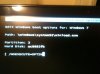
I've read about disabling [Fast Boot] option - but i simply don't have it, here is how my bios setting look like:
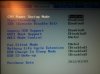
Any ideas? -
Not all Samsung models have Fast Boot in their BIOS (mine doesn't either). Try F10 immediately after power on (or Esc on older models) to bring up a one-time boot device menu.
The screen you are seeing when you press F12 is just Windows Boot Manager trying to change the Windows Boot Options -- and failing at it.
Edit: Of course you can also go to the Boot menu in BIOS and change the Boot Priority. -
Dannemand hi
You are right, Esc triggers the boot menu - now i have another problem - it doesn't recognize/see the usb - i tried using left and right usb - neither works?
What can it be? -
You already have Legacy USB Support enabled in BIOS, that's good.
Make sure you use a USB2 port (black) not a USB3 port (blue). It may or may not work from USB3 on your model.
Also, make sure you power on (not just reboot) with the USB connected, so that BIOS can detect it properly.
If that all still fails, then try Boot Priority in BIOS instead: If you cannot see the drive listed in the Boot Priority list (even after following the above steps) something else is wrong.
Do you have another USB stick/drive to test, just to see if BIOS will detect that?
That's pretty much all I got
Edit: I DO have one other small thing to add: I've had some USB sticks that simply couldn't be made bootable, no matter how much I tried. Then trying exactly the same with another stick worked perfectly. -
My S9 is 2 years old and it is falling apart. Next to the ON/OFF button and the ESC button on the other end are cracks in the plastic housing and - unless I move it very very cautiously - the screen goes blank and I need to restart it from SLEEP. Also the power cord on both ends is disintegrating. Anyone else having these problems? And what did Samsung do - replace it? (mine is still under warranty, but I am on the road for the next 4 weeks and the blank screen just started happening).
-
I had to register and notify you about this (if you're still considering this).
I have the:
Samsung Series 9 15" Ultrabook - Black (Intel Core i7-3517U / 256GB SSD / 8GB RAM / Windows 8)
also SC2 HoTS.
Frames drop so bad are all low settings. I thought it was a battery regulation thing but when I set to Max settings, it's just 10-20% better. Frame rates are excessively noticeable though.
You can play decent 1v1 up til 16mins, then you're screwed. Anything before, it's just minimal frame drops...but still.
I believe it has intel 4000. Macbook airs have the 5000. Sc2 states minimum at 5000. Unfortunately that's where this laptop falls short. But it works for me anyways, aside from the fact that I bought it already, because it forces me to work instead. -
You've posted this in the wrong thread. It belongs in either the X4C or the X4D thread.
Are you getting gaming performance within the range indicated here? The Intel integrated graphics are not the fastest and the version in your Series 9 is further constrained by the 17W power envelope of the combined CPU + GPU.
John -
I'm doubting to get this ativ 9 book, the ativ 9 plus or the sony vaio pro 13. The sony has the superior screen and specs, but this one has the build quality. What made you guys go for the ativ 9?
-
You are unlikely to buy the model covered by this thread since it was superseded 18 months ago.
Read this thread http://forum.notebookreview.com/samsung/703622-next-samsung-series-9-release.html and this thread http://forum.notebookreview.com/samsung/722548-samsung-ativ-book-9-plus-haswell-new.html.
John -
been awhile since i've been here - i remember someone had managed to boot their samsung series 9 from a usb flash drive
can someone give me the instructions - i've tried going into the boot and the changing the priority of boot up but nothing there looks like it does on my desktop - is there a paint by the numbers instruction somewhere?
tks in advance -
The B/C/D versions of the Series 9 have a Fast Boot option in the BIOS which has to be disabled (you can also do this in Easy Settings). If Fast Boot is enabled then the BIOS skips checking for bootable USB devices.
I would also note that pressing F10 at the BIOS screen should bring up a list of bootable devices from which you can select. This avoids the need to change the boot order.
John -
appreciate the assist
-
well, i've got the "a" model, ie NP9003XA-B01US model
no "fast boot" selection in BIOS, and no changes helped it recognize the usb drive
contacted samsung chat support, and at least there's a boot update - below is the link + the instructions that chat gave with it - but unfortunately it still didn't help my issue
figured, in case anyone wanted to up their BIOS, - it will not download in mozilla foxfire - has to be IE browser
http://org.downloadcenter.samsung.c...th=FM/201101/20110127160317214/BIOSUpdate.exe
Zion: 1.Please click the attached file and select the ''download''. Save the file in a folder and double click it.
Zion: 2.After activating the file, you can see the Windows messages. Please follow the steps and the BIOS update process will start.
Zion: 3.After BIOS update, the System will restart automatically. During the POST, please press F2 to enter the System Setup menu, click F9(Load Setup Default), and then press F10(Save and Exit).CAUTION : MAKE SURE NEVER TURN OFF(OR RESET) YOUR SYSTEM DURING THE BIOS UPDATE.
Samsung 9 Series laptop (ZX310 / 900X3A) unveiled
Discussion in 'Samsung' started by SoundsGood, Jan 5, 2011.