 Problems? See this thread at archive.org.
So I have tinkered with the BIOS in every way and can't get the computer to recognize any sort of a USB thumb drive or the new SSD as a boot drive. Samsung tells me that I'm supposed to install drivers (?!) for the new drive to register it as a system drive with the Motherboard(?)
Changes I made were
1) Turn off fast BIOS
2) Turn off secure boot
Set OS option to CSM OS
None of these activated the option to change boot drive priority. The option is always grayed out.
I have reached out to the drive manufacturer (Transcend) to see if they have any support that would help, though the fact that I can not even boot a generic thumb rescue drive tells me I have a BIOS issue.
I went to Samsung update and they have a lot of different software to update, but none seems relevant to my problem.
BIOS version is P06AED and the representative on the phone didn't have anything to say about potential updates.
Thoughts about which party to lean on for help? Samsung? Transcend?
-
Setting OS option to UEFI OS worked for me. I followed this.
-
I hardly ever use the touchpad, but I forgot my mouse the other day and found the NP930X5J touchpad very sensitive.
1. Where do I change the touchpad settings?
2. Does anyone have recommend settings for the touchpad? -
I thought that the absence of a proper touchpad driver and control panel is one of the "features" of this notebook.
Whatever options you have should be under Control Panel > Mouse.
John -
I am little late to the party here. As MikeB17 already pointed out, the problem is most likely a mismatch between your UEFI setting (in BIOS) and the format of the USB stick and SSD. UEFI is an alternative to the good old BIOS, and depending on whether it is enabled or not, only certain combinations will work, all others will fail.
With UEFI enabled the computer can ONLY boot from a FAT32 partition (not NTFS) on a disk using GPT partition style. If the SSD uses the good old MBR partition style, UEFI can't boot. Legacy BIOS mode is the opposite, and requires an MBR disk, but can boot from either an NTFS or FAT32 partition.
Disks can be converted between MBR and GPT using tools such as the free Minitool Partition Wizard or Windows' built-in DISKPART command line tool (see this post). Converting will wipe the disk.
This rule of UEFI requiring a FAT32 partition also applies to the USB flash drive used for installation. Microsoft's commonly used ISO/USB creation tool always creates an NTFS partition, and thus doesn't work with UEFI. Use Rufus (another free tool) or create the USB stick manually, as described in this guide.
In short: UEFI mode ( OS Mode Selection=UEFI OS) requires the main SSD/HDD to be GPT and the USB stick must be created as GPT/FAT32 (using Rufus or manually). BIOS mode ( OS Mode Selection=CSM OS) requires the SSD/HDD to be MBR and the USB stick can be created with Microsoft's ISO/USB tool.
In all cases do you want Fast Boot/Fast BIOS and SecureBoot disabled in BIOS during installation. They can be re-enabled once everything is up and running (SecureBoot only with Win8.x).
Samsung laptops delivered with Win8.x are delivered in UEFI mode with the SSD/HDD being GPT. Win7 models are delivered in BIOS mode with the SSD/HDD being MBR.
I hope that clarifies more than it confuses. The following posts have more info:
Overview of SecureBoot, UEFI, GPT, cloning Win8 or downgrading to Win7
Installing on blank SSD, standard UEFI partitions, convert SSD with DISKPART
Overview of UEFI, SecureBoot, Fast Boot, disk types and install guides -
Hi all,
Apologies if this has been mentioned, but I'm having difficulty locating a solid answer, does anyone know why I can't find this laptop for sale anywhere in the UK?
I have the Pre-Ativ book version, NP900X4C and am looking to replace, thanks! -
Samsung were about to send the UK versiond of this notebook down the production line when someone took the decision that they would stop selling notebooks in Europe. So, although two versions were listed in the SW Update database last April, they never arrived (I was waiting with credit card ready). Germany and Italian versions were listed on Amazon UK and ebay UK for a while but now your only option are the US versions.
I wasn't prepared to get the US keyboard layout because I know it confuses my fingers so, after much deliberation, I bought a Dell E7440 with FHD display to replace my NP900X4C (one attraction was that the Dell could take my 1TB mSATA SSD). The E7440 does have a size smaller screen but is lighter than the NP930X5J. It is also thicker, but the keyboard has much more travel. I also paid only about half what the top spec NP930X5J would likely cost and, after 4 months, I'm still happy .
.
John -
Thanks John, but why, Samsung, WHY!!!!!!! The Series 9 has been a fantastic laptop and having looked around at alternatives I just don't like any of them. Oh well, have to wait for the Retina Macbook Air then (running Windows of course).
-
Don't ask me, ask Samsung.
I think this thread is our most recent discussion of the subject. At the time someone made the decision the notebook market appeared to be shrinking rapidly and there was more money to be made making phones and tablets. However, Samsung are now getting squeezed in those sectors while people are realising that notebooks are still useful and if Microsoft get Windows 10 to people's liking then there could be a lot of notebook upgrading being done.
Johngo45cvi likes this. -
I'm trying to install a new SSD in this unit. I read that it should be front and center under a Ribbon, but my unit seems to have placed it under the motherboard top>right looking at the unit with the cover off. It looks like the installation could get messy given all of the items bolted to the motherboard.
See green bit at the bottom right of this picture:
https://drive.google.com/file/d/0B33mz6b9yVqjMlIyS19RbkRpTEU/view?usp=sharing
Can you confirm how hard it is to get to the SSD? Is it just a matter of removing the screws around the motherboard? or are there several layers of hardware to remove? I have a 940x5j-K01US, which does not have the second SSD slot...that would have made life simple. -
I don't have first-hand knowledge of this notebook but my understanding is that the SSD is under the long ribbon cable (in your photo it is to the left of the fans and has a bar code on it).
I presume that the cable is removed by carefully lifting the ends but you may want to wait for confirmation from another X5J owner that this is correct.
John -
I chatted with Samsung support, and they pointed me to buy a service manual to replace the SSD. Before I spend the money on the manual, could anyone provide me with the couple pages to support this drive installation?
Thank you,
Marcva -
I don't think you need a service manual, this should cover it.
John Ratsey and Dannemand like this. -
That process worked perfectly. The poster even had the same Transcend drive I was installing, so it was important to remove the rubber bumper below the original SSD before installing the replacement. Overall time was about 15 minutes including distractions to help kids with their technical projects. Machine now has a main 128G partition and a ~357 G data partition. To confirm a couple things:
The Samsung recovery application includs a utility to clone the drive that made the process painless
Getting the notebook to boot from the USB drive to confirm is a three step process
1) use f2 on startup to go into BIOS.
turn off secure boot and rapid boot
Set to UEFI boot
2) Save settings and exit to reboot unit.
3) After rebooting unit, go BACK into BIOS and you will see that the alternate boot disk alternatives are now enabled.
4) You can select the USB drive to boot from it to verify functionality.
Hope this helps someone else in the future. This is a very nice unit, but the 128G HD isn't very practical for dayto day use. If only they'd included the second SSD port, this unit would be spectacular.
The screws on the back cover were all locked in with Loctite blue, and I will probably go back and refresh a couple to assure that they do not fall out, but my wife's computer now has a half terabyte SSD upgrade for $200 (less resale value of the old SSD if any).
Thanks to all for their advice. -
@Marcva: Good job getting that SSD installed and working. And thank you for sharing your experience here.
When it comes to getting software onto a new SSD, there are generally four different approaches, depending on whether one wants to clone an existing installation or start anew. Some preserve Recovery, some do not. They are summarized here.
Note that the recommended choice of UEFI more (OS Mode Selection) depends on whether it's a Win7 model (which comes with UEFI disabled, running from an MBR disk, and using Samsung Recovery Solution 5) or a Win8.x model (which comes with UEFI enabled, running from a GPT disk, and using SRS6). Switching between them wipes the disk, loses Recovery, and requires reinstalling Windows. It is summarized here.
Unfortunately SRS5 doesn't have that neat cloning feature. -
1. Thanks for the update. I wouldn't worry about the Loctite but it's good practice to check the screw tightness every few months, including those inside.
2. I recommend keeping the original SSD so you can put it back in should you ever need to get the computer serviced.
John -
I too am struggling with the trackpad on this laptop. It's 'almost great' but not quite. Some ability to adjust settings would be great, but there are few options available. There's no dedicated applet in the control panel, and Samsung's separate "Settings" app simply allows you to turn the touchpad on or off (!).
There is another place to adjust this device - from the windows 8.1 'start' screen, choose the 'gear' icon (settings) - or, click the down arrow on the start page for 'apps' and choose 'PC Settings' under "P". On the first menu, choose 'PC and Devices', and on the next menu, choose 'Mouse and Touchpad'. Here you can tweak a few settings, but you cannot (for example) disable pinch-to-zoom, or adjust sensitivity or speed. You can tweak a 'delay' for tapping, which is designed to 'prevent the cursor from accidentally moving while you type'. I have not been able to adjust this to get satisfactory behavior.
For me, the mouse pointer is moved occasionally by the wrist/thumb area of my right palm, causing typing to be entered in the wrong place, but the far more annoying feature is that two-finger (drag) scrolling up / down (on a web-page, for example) is so often not interpreted correctly. More than half the time, my two-finger drags result in the cursor moving down rather than the page moving down.
It's really a sad commentary on the whole Windows 8.1 debacle that I have to hunt around to find a setting page like this - I should be able to go to 'Control Panel' and find an applet there - but now, I have to look in control panel, Samsung Settings, and The PC Settings area that is new to 8.1.
Good Luck and let me know what you find!
I did read that there are some 'Elan' drivers, but I've never been able to find them. -
I'm so glad to find this forum; at last, a place where I can find technical information on my Samsung ATIV Book 9 2014!
I bought the model NP940X5J in June 2014, which has only 1 SSD slot. I want to update the 256 GB SSD with a 512 GB SSD, and a friend has given me a Plextor PX-G512M6e (spec: PCIe M.2 2280 SSD) at a good price.
Tonight - BEFORE finding this great forum - I figured out how to change the BIOS settings so that I could boot to an external DVD drive, and booted up my trusty old Acronis 11.5 boot disk so I could take an image of the existing 256 GB drive - writing it to a USB drive. I have since read in this forum that the Samsung NP940X5J has some pretty good built-in cloning tools; I may try those later, but I've always been a big believer in taking an image of a disk anyway, so I'm trying to figure out how to write the image just taken back to the new Plextor SSD drive.
So I now have a good image of my existing SSD on an external USB drive. But when I removed the existing SSD, and installed the new SSD, the new SSD is simply 'not seen' by BIOS or by Acronis.
These two forum threads were very helpful: First and Second.
This excellent post gives great details about OS types and boot settings.
In my case, I'm simply trying to get the new SSD recognized by Acronis, so I can write the image to it. But I noticed, with the new drive installed, the BIOS did not 'see' the drive either - bios screen showed nothing in the 'Sata Port 1' field. So I'm thinking I need to partition the new drive as GPT, and set BIOS mode to UEFI.
It seems like I can use Diskpart to convert the SSD to GPT mode. BUT - I don't have a USB-to-M.2 adapter to mount the new SSD as an external drive ... so I'm guessing that without that, I'm SOL?
Thanks for the helpful forum!
Edit To Add: will this USB 3.0 adapter work? I will go to Fry's to see if they have one for immediate pickup, otherwise I will have to order online ...
Also - as I think through my experience last night ... what really mystifies me is that I was able to 'see', and successfully grab an image of, the existing SSD drive while in 'CSM' mode, yet in that mode I could not 'see' the new SSD. Will switching to UEFI mode address this, and if so, how come the existing SSD (which must be GPT since it's windows 8.1) is seen without switching to UEFI ...? Sorry if I'm being dumb on this ....Last edited: Dec 28, 2014 -
Welcome to NBR, Steerpike58
As I think you gathered, the partition layout style of your new SSD probably doesn't match your UEFI setting, which is why it doesn't show up in the Boot Menu.
Your model came with Win8.x and thus with UEFI enabled ( OS Mode Selection=UEFI OS). While temporarily disabling SecureBoot and Fast BIOS/Fast Boot is fine (and necessary) in order to boot an external device (such as Acronis), you generally should NOT change OS Mode Selection. UEFI is a system wide setting that affects everything, and changing it generally requires wiping your disk and starting over with everything.
Both GPT and MBR disks can be read and written perfectly fine in both UEFI and CSM mode (legacy BIOS). It's only booting that is restricted: UEFI needs to boot from a FAT32 partition on a GPT disk, while CSM mode needs to boot from an MBR disk (NTFS or FAT32 partition). Booting a DVD in UEFI mode is even trickier: Even some of Microsoft's own ISOs don't work.
I assume you booted Acronis from an external DVD that didn't have UEFI support, and that's why you had to switch to CSM mode in order to boot it. Once it was booted, Acronis had no problems saving an image of the GPT disk. But if the new SSD is MBR, it must be converted to GPT before you can restore the image.
Since you don't have a USB adapter for your SSD, you are right that creating a Bootable Factory Image backup on a USB stick (same link as you posted) is the best solution. It also has the benefit of preserving Samsung Recovery Solution on the new SSD, which is usually lost with Acronis. But it requires swapping the original SSD back in order to run SRS.
If you choose this route, I recommend getting an older USB stick, which is more likely to be compatible with SRS. You want one that behaves as a Removable Disk (not a Fixed Disk) when shown in Windows Computer. Make sure to set OS Mode Selection=UEFI OS before you proceed.
Alternatively, you can give the Acronis image another try by temporarily using OS Mode Selection=UEFI & CSM OS. I think that may allow Acronis to boot from the DVD AND see the new SSD as well. But the SSD still needs to be converted to GPT before the image can be restored. Maybe Acronis can do it (I don't know); otherwise you can boot a Windows Setup USB/DVD or a Linux Live USB/DVD. And maybe you need to be in UEFI mode for Acronis to create a proper EFI System Partition on the new SSD (I have no firsthand experience with Acronis). In any case should you set OS Mode Selection=UEFI OS before trying to boot the cloned SSD.
Once everything is running (whichever technique you use) you can re-enable SecureBoot (to protect against malware and rootkits) and Fast BIOS/Fast Boot (to improve boot speed by ignoring external devices during startup).
For anybody else seeing this, the post here summarizes the different approaches for cloning or installing on a new SSD. Reading it before starting out may save you some time. -
SW Update just offered a new BIOS: Version PO7AED
Release notes:
"This update is to improve system stability" -
It is possible that the PCIe M.2 2280 SSD may not work and you will need to get a SATA M.2 2280 SSD.Dannemand likes this.
-
Thanks for the detailed response.
I'm replying to this on another computer with my Samsung at the bios screen, so I can accurately describe what I did / saw.
The computer is now in the same state it was before I started, booting successfully to the original SSD, etc. When I click on 'boot' in the bios, 'Secure Boot Control' and 'Fast BIOS Mode' are 'on'. When I disable Secure Boot Control', the new line 'OS Mode Selection' appears, and the dropdown is displaying 'CSM OS'. I assumed that, when Secure Boot was 'on', the 'OS Mode Selection' values were simply 'N/A', and that the appearance of 'CSM OS' wasn't an indication of what was in place when Secure Boot was on. I mention this because you say 'you generally should NOT change OS Mode Selection'. The way I read your words, I should have seen 'UEFI OS' as soon as I turned off 'Secure Boot' ... but I'm sure I saw 'CSM OS', and I'm seeing that now as I look in the BIOS.
I booted my Acronis 11.5 'linux' boot CD from an external drive (actually a USB BluRay drive, all I have on hand in my current location). The Acronis boot CD offers a couple of launch options, one being 'Acronis Backup and Recovery 11.5 (64-bit with UEFI support)', which is the option I chose.
My goal is to 'clone' my current environment to the new, larger SSD (and not restore the factory image to the new SSD) (edit to clarify - I DO want the factory image / recovery partitions, IN ADDITION TO my current active environment). To do that I'll need a bootable 'something' - something capable of handling both source and destination, but how would I achieve this without a USB adapter for the new SSD? My thought was, I'd be booting to the USB 'something', which would then 'clone' from the current internal SSD to the new SSD in the USB enclosure. To achieve this without having both SSDs active at the same time, I'd need to somehow get the entire current SSD contents onto the 'USB something' - would I not?
Acronis online documentation suggests it can do the GPT conversion, so I think my challenge is to get Acronis (and the laptop itself!) to 'see' the new SSD ...
I just saw hubertm's reply to my post ... maybe I have the wrong SSD type? PCIe vs SATA? Yuk. Let me do some more digging!Last edited: Dec 29, 2014 -
Oh My. Looks like I still have a lot to learn about SSDs! I'm reading this article now.
So the m.2 NGFF 'form factor' can accommodate PCIE and SATA interfaces, and they share the exact same electrical pin connector ?! That's confusing. The Plextor PCIe fit perfectly in the socket in the laptop. Lets hope I didn't do damage!
So when searching for a replacement device, if I search for 'SATA M.2 2280 SSD' I should be ok?
When I search, many models include 'M550' and 'MTS800'- are these OK?
So is this model ok - Crucial M550 512GB SATA M.2 Type 2280 Internal Solid State Drive CT512M550SSD4?
How about this one - Transcend 512 GB SATA III 6Gb/s MTS800 80 mm M.2 SSD Solid State Drive TS512GMTS800
Time to give the Plextor back to my friend, I guess! -
Here's another useful reference about the M.2 sockets options.
We weren't certain that a PCIe SSD wouldn't work in this notebook but you've added to our knowledge in this respect. However, if it did work you might well end up with a thermal problem.
The Crucial and Transcend SSDs you have linked to will be OK as would be the SATA version of the Samsung PM851. I think you will find these all mentioned further up this thread.
You may need to research DPIM in order to tame the Crucial's idle power drain.
John -
@Steerpike58: Oh my... I didn't even give any thought to the choice of SSD or think to question it. Thanks, as always, to huberth for alerting us to it.
I too am surprised that OS Mode Selection=CSM OS would be set after you disabled SecureBoot. Again, since yours is a Win8 model, we know it's UEFI (otherwise SecureBoot wouldn't work). I wondered if there there is a deliberate design reason for OS Mode Selection to default to CSM OS when disabling SecureBoot, but I cannot think of why. In any case will be aware of this when advising other members, to make sure they manually select OS Mode Selection=UEFI OS after disabling SecureBoot on UEFI models.
(Some 2014 Samsung models, such as the NP930X5J, are sold with Win7 in certain countries. Those still have the newer BIOS with full UEFI implementation, but are delivered in CSM Mode (SecureBoot disabled, on an MBR disk). THey also have the older Samsung Recovery Solution 5.)
Once you have a compatible SSD, I imagine Acronis will work as expected and allow you to restore the image you created. I would still set OS Mode Selection=UEFI OS first, or UEFI & CSM OS if that is the only way to make Acronis boot. Then set it back to pure UEFI mode before booting the new SSD.
I notice in your other post here that you bought this in Microsoft Store (as I read it). If so, you probably don't have Samsung Recovery Solution, as Microsoft is known to wipe that as part of their Signature treatment, and create a Windows Recovery Tool factory image instead. And since there is no SRS to lose, you can safely proceed to clone with Acronis (which normally destroys SRS during restore).
Otherwise (if this is NOT a Microsoft Signature model) your cloning options options are still the ones summarized here.
In your case, you may want to consider a fifth option, which is to create a full disk image with Clonezilla from a Linux LiveCD. Those have been reported to preserve SRS intact, as long as it is a full disk image (not individual partition images).
Otherwise, there is the combo option: FIRST use a Bootable Factory Image Backup to image the new SSD with a factory installation, including working SRS (follow this post). AFTER that restore ONLY the Windows partition from your Acronis image. This should be possible without damaging SRS, and preserve any apps you have installed on the Windows partition.MikeB17 likes this. -
I'm finally getting around to selling my NP930X5J. I have only tried it for maybe an hours tops and continue to use my NP940X3G. Its just too big for me to carry around.
If anyone is interested send me a PM for details. -
Hi
i just bought the Samsung 930X5J and it comes with windows 8.1 is it possible to install windows 7 on it ?
i tried to boot windows 7 from usb but didnt work and i cant find the setting for it in bios on boot priority on bios
i cant find the usb to boot from
thanx -
You should be able to downgrade to Win7. In fact, Samsung delivers the NP930X5J with Win7 in some countries. But for best compatibility, you want to switch from UEFI mode (used by Win8.x) to legacy BIOS mode (so-called CSM mode, used by Win7). This means converting the partition style on your SSD from GPT to MBR, and losing everything on it -- including Recovery.
If you will be installing on a new SSD, the decision is easier, since you just store the original SSD away (in case you want to sell the computer someday, or need to send it in for service) and install Win7 on the new SSD. You still need to change to legacy BIOS mode in BIOS before you begin installation.
The post linked below sums up the considerations, including links to backups you want to make before, and an install guide that has the necessary conversion steps.
Considerations and steps for downgrading to Win7
You could also just install Classic Shell (Google it) which allows you to use Win8.1 as if it were just a faster Win7. At least give it a try for a week or two. -
i got it to work thanx but now i have another problem
it wont detect my wifi drivers and i dont know the name of it any ide what its called ? -
Win7 doesn't have built-in drivers for your WiFi. Download the latest from Intel's Download Center. Also, make sure to install Chipset drivers from SW Update before any other drivers, since it affects the entire device tree.
-
thanx alot got it to work
-
I applied this update almost as soon as I saw your post, a few days ago. A few things to note:
1) it seems to reset certain preferences/settings, such as when the computer goes to 'sleep'. Mine is(was) set to go to sleep after 15 minutes on battery but never when plugged in; the latter changed such that it went to sleep even when plugged in (which is a default of sorts). I think certain brightness settings were adjusted also. No biggie, of course, but not sure what else got reset.
2) Ever since the update, my CPU utilization goes haywire and the fans go berserk when the computer has been idle for a short while. Not sure of the exact timings yet, but if I leave the laptop sitting there for, say, 15 minutes, I hear the fans kick in big-time. If I 'wiggle the mouse' to un-blank the monitor, and view Process Explorer (which I always leave running so I can troubleshoot issues like this), I see there are two 'explorer' processes hitting all four CPUs in 'kernel mode' (I think that's what the red color in the graph indicates). One of the explorer processes has PID of 5000, which sounds like an oddly round number! See image hopefully displayed below of the CPU chart from Process Explorer:
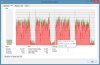
As mentioned above, my system is set to never sleep when plugged in, but I have it set to 'turn off' the monitor after 15 minutes when plugged in. It SEEMS like it is at this 15 minute mark that the super-high utilization is kicking in. I just tested with the laptop running on battery, and a similar phenomenon is occurring - after the 5 minute 'screen off' period, the screen goes dark and then soon after I hear the fans kick in - but with much less gusto compared to being plugged in. If I wiggle the mouse and look at process explorer, I see the exact same graph - very high utilization of two explorer processes.
I'm pretty sure this started right after I applied the BIOS update (but of course, could be a coincidence). Is it possible to downgrade the BIOS as a test? I have so far been relying on the built-in/bundled Samsung "SW Update" utility, which I'm very uncomfortable using (I'd prefer to download a file and run it ...).
Edit to add: I have no screen savers running, and nothing set to kick in on idle. I just did another test, and I heard the fans kick in almost immediately after the screen darkened, and then ramp up to high speed after about 2 minutes of being in this mode. -
Thanks for the detailed followup. I will order the Transcend SSD late this week for delivery early next week, when I should be back home and able to revisit this project.
To clarify how I bought the laptop (I wasn't clear) - I saw it at the MS Store in Scottsdale AZ, loved it, but wasn't sure if the MS Store price was competitive with online vendors. It turned out they were, and I wanted to buy from them because they were very helpful and informative (it was like an Apple store without the customers ), but I had to leave town and so ordered from Amazon. The upshot of this is, I SHOULD have the SRS features available.
I just picked up a PNY 32 Gig USB 2 stick today for this project also. When viewed in windows 8.1, properties shows type as 'removable disk', and the right-click context menu shows 'eject' as an option. Does that validate it as being 'removable' in the context of this discussion? -
I have to wonder if some housekeeping is going on and which only happens if the system is idle. It's possible that Windows thinks that something has changed as a result of the BIOS update and is doing some background optimizations. The easiest way to test this hypothesis is to leave the computer running overnight which should give plenty of time for the activity to be completed.
Otherwise you can try the SysInternal Process Explorer which digs deeper than the standard Microsoft version.
BIOS downgrading can be done although Samsung don't make it easy. See here and here.
John -
i have a problem anyone knows how to save the screen brightness on the laptop running windows 7 everytime i reboot the computer the screen goes back to standard brightness.
-
It's possibility whatever is set in Easy Settings (Display tab) fighting with whatever is set in Power Management.
Do some experimenting to find out which takes precedence.
John -
I did a lot more testing last night. I closed almost EVERY program on my laptop (I tend to leave a lot running all the time, including IE with ~10 tabs and FireFox with ~10 tabs, two or three spreadsheets, a word doc or two, and dozens of emails in the process of being read or replied to in Outlook connected to three accounts, etc. Once I shut all of them down, the phenomenon stopped. I then gradually re-launched each app in turn, and left the machine idle; no fans, no high CPU! At this point, I'm pretty much back to my messy ways of having tons of stuff open and have yet to encounter the issue. So whatever it was, it seems to be a passing thing and probably not related to the BIOS. And as you say, could have been housekeeping 'triggered' by the upgrade. The fact that it was the two 'explorer' processes and not an application is very interesting. Anyway, time to put this on the back burner until it recurs!
BTW - I AM using Process Explorer from SysInternals; I wasn't aware there were two versions now. I know Microsoft bought sysinternals way back, but I've never seen a dumbed down version from MS. The link you provide above is a TechNet link, which is a MS site. Is there a feature to look for to confirm I have the 'advanced' version? The window title bar shows "Process Explorer - Sysinternals: www.sysinternals.com" -
I think they are one and the same.
I can't remember the history but I think that Microsoft considered the SysInternal tools to be sufficiently useful that they offered to provide them with a home. The current setup is described here.
John -
sorry to ask so many questions but i hope someone can help me i feel the laptop being little slow i mean when i am on youtube if i open another tab the video starts to stutter and if i forward it the video it stutters for a while i dont feel it being to fluency as most computer is i have the ac power connected and on high performance it should be alot better performance than this i have tried a few videos same result also when i minimize chrome i notice it lags for like a half second etc. I have installed the newest intel hd grafics drivers also i have the intel widi drivers installed aswell anyone have any idea ? im running the computer on windows 7
thanx -
1. Are all the problems with streamed videos or do you have the same with videos stored on your computer?
2. Do you get the same problem if you use the Samsaung Optimized power profile. The High Performance profile may be maximising the CPU speed at the expense of the graphics. I've never found High Performance to give any significant performance improvements while it has disadvantages shuch as increase the CPU power drain when on idle.
John -
i tried the samsung profile same thing there and videos stored on the computer works fine. its mostly chrome and youtube that runs slow and laggy. i see now on task manager if i run a youtube video the processor power jumps between 50 to 80 %thats insane it shouldent be like that
-
Is there a solution to the issue where the trackpad gets stuck on tap to drag? It seems as though when this happens, mine gets increasingly worse where I'll have to use multiple fingers to be able to move the cursor instead of just one, and can only press down on the trackpad instead of tapping to click something due to the tap to drag. Eventually, the trackpad is completely unresponsive, and I have to use windows key + i and the arrow keys to restart. Toggling Fn+F5 to turn on/off the trackpad, and doing the same in the input settings (Fn+F1) are futile.
-
If the problem is with streaming videos then I wonder whether your internet connection is running slowly. Next time it happens run speedtest (some connections slow down during peak usage periods).
The other possible thing to try is changing the hardware acceleration (right click on the movie).
Unfortunately, Samsung didn't use the Elan pad (which after 3 years is fairly well debugged) in this model so you are stuck with whatever limited controls are offered in control panel.
Are you using the touchscreen version (NP940) or non-touch (NP930) and which version of Windows?
John -
my internet speed is good 100mbit and i also tried the speed test its ok on that department.
-
I'm using the NP940 touchscreen version. I usually have the touchscreen disabled though, since it seems like this problem occurs less often if that is the case. It's probably just a coincidence though.
-
Google suggests that other people are recently having similar problems. Start with the suggestion at the end of here. If that doesn't work search for "chrome youtube video laggy" and work through the other hits.
Normally I would suggest checking through Samsungs SW Update database for any newer versions of the touchpad drivers for the NP940X5J. However, at the moment it is not listing any Windows 8 drivers for any versions of this notebook. If you have the touchpad driver stored locally then you can uninstall + reinstall which sometimes clears problems or you can try uninstalling whatever driver there is in Device Manager and trying without it.
John -
i found the solution i had it on silent mode the fans and i guess when i have it on silent it reduces the cpu power and thats what caused the problem
thanx anyway for all the help -
As you have discovered, Silent Mode achieves reduced fan operation by throttling the CPU performance.
I should have remembered to suggest that gotcha. At the same time it is disappointing that the CPU / GPU can't adequately handle a streamed video when locked down to the minimum speed.
John -
Just in case you weren't aware, I posted this earlier in this thread:
I'm not thrilled with the touchpad and would love to be able to fine tune it, but so far no luck. -
First, question for the moderators / forum regulars ... I'm used to being on forums where each discreet 'issue' gets it's own thread, with a suitable title. While not without its own issues, I find that preferable to posting a new issue on page 109 of a generic thread for the computer model that has all manner of info in it. But since I'm a newcomer here, I'm trying to play by the rules/practices, and so I'll post this here ... if it's ok / recommended to post this as a new issue, I'll start doing so.
Subject - Strange 'CPU throttling' type issue when computer gets no user input for a while.
I occasionally use my Samsung ATIV Book 9 to do BluRay and DVD rips using Handbrake and AnyDVD (I mainly do them at home on a dedicated desktop, but I'm often on the road and need to do this on the laptop).
Whether you are familiar or not with Handbrake/AnyDVD, the essential elements are, 'ripping' a BluRay disk takes a good 4 hours or so of time, and runs all available CPUs/Cores/Threads at close to 100% so is best done when you aren't needing the computer for anything else (overnight, etc). What I'm finding, each time I do this, is that the process slows down at some point after the computer has been idle for a while. When Handbrake is 'doing its thing', the CPUs run close to 100% and the fans are very audible. What I notice, if I leave the computer alone for a while while this is happening, the fans stop running - this is my clue to something changing. Today, I kicked off a 4-hour process and went out. I came home after 4 hours to a 'silent' (no fans) machine, and Handbrake was reporting a 'time remaining' of 9 hours. Almost as soon as I wiggled the mouse, I heard the fans kick in and Process Explorer confirmed 100% utilization - as I would expect.
I've been sitting at the computer doing miscellaneous tasks now for about 30 minutes, and the CPUs have remained close to 100%, and the fans are on continuously (as expected). Handbrake is now reporting a 'time remaining' of 5 hours ... so it has re-evaluated the duration based on much-improved recent measurements (in the past 30 mins).
All this is clearly telling me that the CPUs were getting throttled while I was away. Can anyone think of a setting in the power profile that may cause this? I'm using the default "Samsung Optimized" plan in 'Power Options', and I've only customized it to prevent sleep when plugged in, and increased display off time to 15 mins when plugged in. The dedicated (and somewhat overlapping) Samsung 'Settings' app does NOT have 'Silent Mode' enabled. Also - in the Samsung 'Settings' app, Power Management section, ECO Mode is off.
So I'm at a loss to think of what setting would throttle CPU after a period of no user input ... thoughts?
(I've now been on the laptop for about 45 minutes, and CPUs are still full bore, fans still on, and Handbrake now predicting just over 4 hours remaining). I'll stop using it now and see at what point the CPUs and Fans 'drop' ...
PS - the laptop is NOT going to sleep ... I've set it to 'never' sleep when on power, and there IS evidence of the Handbrake process having made progress (and it showed 'elapsed' of about 4 hours).
Samsung NP930X5J / NP940X5J ATIV Book 9 (2014) 15.6" Haswell announced Jan 6, 2014
Discussion in 'Samsung' started by zordex, Jan 6, 2014.


