Problems? See this thread at archive.org.
I always have the screen bightness on high. For some reason, even though it's very bright, it never made my eyes tired. I think it's die to the size of the screen, but it never ever made my eyes tired. I always think when I look at the laptop : "dat screen".
I use the laptop for gaming and school. It's very light IMO, and I have no troubl having it in my backpack. It's great to use in school as it boots quickly and has an amazing task-switching performance.
So for work I would say that this laptop is definitely great. Not only because of its performance but also portability.
Not to mention that the design makes it look like extremely busines-ish, slick and sexy, unlike the AW laptop that give away your ID of gamerz...
-
-
I do have to agree. The samsung gives you gaming performance with a sexy business look. It doesn't scream gamer like Alienware does and Asus says gamer a little with their ROG symbol and stuff on the screen lid. The samsung goes for a under the radar approach. Anyone looks at it and won't think twice about it. But if they stopped to see it perform, they would be amazed. Great for college students, business people (who game or need power) and what not. You pretty much said anything else I should have said! lol.
-
Yeah, I thought about that, too. It's not got a big presence on ebay, either, so if it goes out, it may be hard to get hold of.
I totally agree. 3-D's about as realistic as cardboard dioramas.
-
I like that. If it's that good, I am really tempted.
Task-switching performance is a real selling point.
LOL on Alienware. My mid-life crisis bought me that. I swore I'd own one before I died. I game at home, so the bling isn't a problem. I like that it screams 'gamer'. Tells me I've finished work.
But I agree on the Sammy design, from what I've seen. And I like the gaming-mode show. Like a kid
-
Nice, never heard of it being put that way, but it makes sense. Heck the way a friend put it. "You look out the window or at stuff in real life and what do you see? Just an image, things don't really 'pop' out at you. When you look at your computer screen what do you see? An image, things don't 'pop' out of the screen at you. 3-D just 'pop's' out at you to seem real, but really it's not, it's just a wow factor that makes you want to grab at something. Real life isn't 3-D, you can't grab at that truck coming at you. (Heck if you don't get out of the way that truck will hit you.) So yeah, 3-D is a gimmick."
He agreed with me when I spoke about Danger Room or Holodeck idea though. That would be cool. He liked the way you put the 3-D in perspective as well.
Ok done talking, lol. -
The gaming mode show and everything is cool and I was like "WOW" like a kid. (I'm 27), but it did get old after awhile. Luckily it can be turned off. But overall it is a great computer.
-
does anybody else have 90c throttling issue with 675m. It downclocks to 310 Mhz when gpu hits 90c
-
I'm guessing that's a good thing. 90c is HOT.
-
Yea but after 5-10 mins of furmark it hits 90c
Is it safe to game with 750 mhz gpu clocks? -
That's the max overclock MSI afterburner will let me do. I never felt safe running games at that overclock. I would NOT recommend gaming while overclocked that high. Furmark MAXES your gpu and when you've done an overclock of that magnitude (base clock is 620MHZ) you can expect it to heat up far faster than normal with that overclock) Back down your overclock and your see an improvement.
-
I wont run furmark with that clocks and i didnt. I ran furmark with base clocks 620 mhz and gpu hit 90c after 5-10 mins
-
Ok, I thought you were trying to run it with the overclock. My bad. If it's hitting that hot with no overclock after 5-10 mins. That is HOT! Your fan might not be working properly. What is the ambient temperature when you run it?
-
Could happily jaw on too. I absolutely agree about the holodeck and danger room. When I can personally punch a virtual Nord guard and his sweetroll in the pucker in genuine 3-D I'll be happy.
But great talking to you. I now have a bid on a Sammy. Taking the plunge.
So thanks to all the advice I've been getting. -
25c. how is your temps?
-
Bad news
my samsung np700g7c just bsod'd. I was away for a couple hours so i decided to download files via utorrent while i was out. When i came back BOOM! I realised it had bsod'd once. It has been only 5 days and i saw my first bsod on this laptop
soo sad. I checked registry event(not sure about the name) and found this. Kernel - Power. Error code: 41. Virus is impossible because mcafee is active and i only download from trusted sources(utorrent) so why the **** this happened???
-
PHP:Windows Kernel event ID 41 error "The system has rebooted without cleanly shutting down first" in Windows 7 or Windows Server 2008 R2
Read that, but in a nutshell, windows doesn't really know what the heck happened. It just knows something happened and shut down.
It could be your ram, cpu, gpu, ANYTHING really! Not the answer you wanted i'm sure, but it's something. -
I have bad news for you, McAfee can only catch what it's looking for, and since when is µTorrent a "trusted source".
I still doubt highly your problems are viral, but I wouldn't be so trusting. -
Yea i know. Some resolved it by cleaning rhe dust in his cpu. I also found that some guy on internet had 3 ati hd audio driver in device manager and resolved by deactivating the other 2. I have got 5!!! Nvidia hd audio drivers. I dont know where they came from but i have only done 1 nvidia update from its own page and that was 3 days ago. If it happens again i will disable other 4 but i am still searching the net to find something but as you said it can be caused by ANYTHING so frustrating.
-
Yes i only download from the guys who are "trusted" or "VIP" like skidrow or razer1911 and i had it running on my old r510 for years and nothing happened downloads from utorrent just some false positives i am very cautios about what gets in my laptop. Not every download on utorrent is safe but not all of them are viral too. By the way how did you that "u" symbol?
I ran 2 3dmark11 with 750 mhz and 1 3dmark11 with 700 mhz clocks and played some sc2 on 700 mhz (i know it doesnt need, just wanted to try) if that causes a problem......i dont know what to do. Other than that i did nearly nothing. -
There's your issue. Karma.
-
Karma?? They are trusted. No harm came from them and it wont. Karma??
-
Karma as in doing bad things will result in bad things for you in the future. Don't pirate lol.
But your first test should be to run memtest for an couple hours or more. Detecting bad ram is as easy as that. Once you've confirmed bad ram isn't issue then look for other methods.
Sent from my EVO using Tapatalk 2 -
Well I appear to soon be joining the Samsung ranks. I ordered mine through Computerupgradeking as it will get a i7-3820 and a BD R/W. I am for now foregoing the 32 GB ram as even the 8gb I have now is not used. I have a 480gb SSD that will get transplanted. About the only thing I can see by spec's is I would have liked eSATA but my doc is also USB 3 so that should do.
I have been searching a long time for a replacement for the P79xx and this sold me. The backlit non chicklet keyboard, 120 HZ screen, great sound for a laptop and it is awesome looking. I am not a gamer but no other system could get me to hit that submit button when ordering. Now there is the painful waiting period.................
Edit; got a call and it will ship today..............
-
So I received my Nyx1712 a week ago now, and I am one happy dude! Really is a nice unit and so far, as I expected from my research, I do not suffer any Enduro issues.
The Enduro issues do not affect every bit of software and as I was pretty sure, none I run. With a driver fix coming, all is good for the future. That's was my only issue with 7970m, would a fix come before I faced the issue. Seems I may be spared.
I will say this, the Ivy Bridge mobile turbo core actually works, and works damn well. A lot better then Intel's SB or AMD's Thuban turbo cores. I am very happy with just the low end proc for gaming, in fact its a screamer for minimal buy. My 72% Matte screen is heaven, just glorious color, doesn't quite pop like a glossy, but not having to stare into my own eyes when gaming? Money! -
Wow significant upgrade over your original P78xx, and even your mod P79. What I have is actually a small GPU upgrade over the P68.
-
The i7-3820 should be at least 30% or more faster than the q9200 at 3.2 Ghz. If the system supports the +400 MHz that could go up to 50% faster than the C2Q. The CPUis my primary concern.
Now the GTX 675m is a huge jump as well over the gtx 260m. Not that I'll ever need or use it but it does not hurt to have it. As far as Cuda power I'm not too sure on the Fermi core..............
Edit; They seem to have blew it but I just got the email with tracking for being shipped today. Expected delivery is 9/25, hope it is sooner though. Can't complain too much as handling at order time was 4-5 days and I ordered 9/20 before opening hours.
As a side note the Asus G75 does not seem to support the XTU as the module is not in bios. I am still hoping on finding a way to OC the CPU though as I hate to leave 12% or so performance boost just sitting there. I am hoping someone here has found a way so that I don't have to tare too many hairs out, pretty bald already....................
-
I was wondering if anyone has noticed that when the laptop is on and you close the screen (I have no other screens attached.) do you hear the windows sound for a "device connected"? I do and noticed it. Does anyone know what that is? I never connected anything to the laptop when closing it and it seems to happen when closing the screen. I have a theory and that is one of the other display outs. (primarily the display port.) I'm thinking that when the internal display gets disabled from closing it activates the display port as an extra output option. Anyone else have a theory or even better figured it out?
-
I do not have mine yet but have a similar situation with the P79. It is my mouse as I have the trackpad disable with mouse plugged in and closing the lid disconnects the mouse and enables the pad.................
-
Yeah, i have the same thing. Your theory seems logical. But who cares about that sound anyway?
-
Not to enflame others but if you go to Samsung's support page there are no AMD driver sets. I think this should be proof to the fact we may never see a 7970m in these. Personally I would have prefered that, even with a premium price, as OpenCL performance and the like is more of a premium here. I would have been happy to wait a bit too but my Spidy sences say it is a waste of time....................
-
do any of you have wifi dropping issue. it drops during heavy use of bandwidth or using approximately for an hour. It is so annoying. i had no issue with my old r510. maybe it is because of karma haha
-
I've never had that problem on either 2.4GHZ or 5GHZ. Maybe your wireless router/access point is wearing out. How old is it? The other possibilities are try to reseat the laptop wireless card (My friend had a laptop that the card got lose somehow, it also had some dust preventing it from working fully.) The other possibility is maybe you got a bad card. Then again it could just be karma! lol.
-
it is only 1 year old. wireless modem router is Linksys wag160n v2. I had issues with this wireless modem. wifi would drop when playing games on ps3 or even staying connected but no problem with pc. So it all comes down to bad karma
edit: Twice in 2 hours! hmmm. i have changed encryption from tkip-aes to aes. dont think it will change anything but better than nothing. if it persists i will totally reinstall wireless modem from the dvd. i hope i dont have a problem with wifi card apart from this everything is amazing!
-
When you update a bios it probably resets the ACHI to IDE. After a biosupdate be sure to change the bios defaults to your norm before booting again. Sory I couldn't have got to you before the changeover to G75.
Wow 129 pages today, now more questions than answers too. I get mine tomorow and over the new few days I'll put it through the ringer............. -
Amazon.com: SAMSUNG 830 Series 2.5-Inch 256GB SATA III MLC Internal Solid State Drive (SSD) MZ-7PC256B/WW: Computers & Accessories
does anybody know if this is compatible with this laptop? i'm thinking about buying it. -
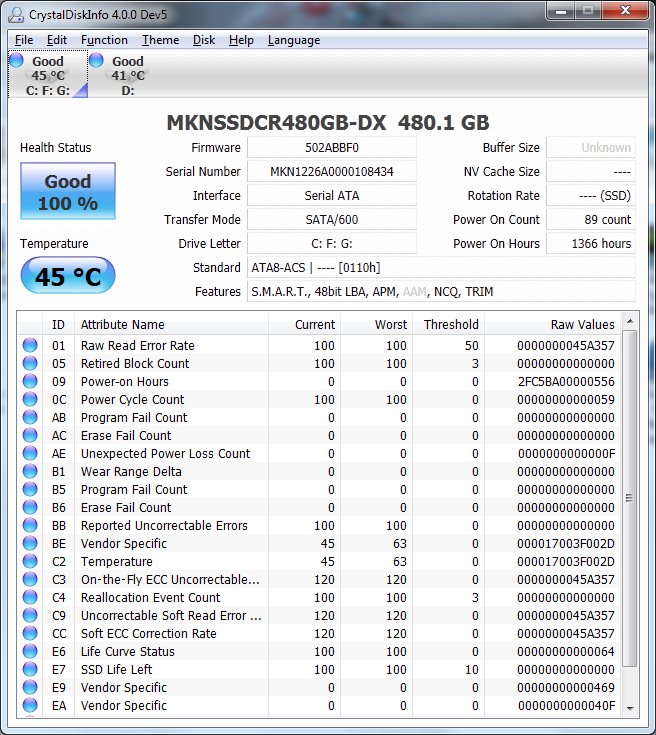
it is a 7mm drive rather than standard 9.5mm so it should fit fine. The question though lies in if both ports are true SATA III. While earlier in the post someone showed a Crystal disk info showing 6 GB/s transfer mode but that is for the drive not the port. My PM45 chipset with SATA III drive shows the same in cyrstal disk info as SATA III mode but it is without a doubt SATA II only on the port.
Another post here eluded to a Samsung rep stating one SATA III and one SATA II port. So tomorow I'll research this further when I get the machine. This is one of the things I refer to about more questions in my post above...............
From my PM45 equiped Mushkin 480GBAttached Files:
-
-
Thanks tanware. I'm not so tech savy, anybody else know if this for sure will be compatible with the samsung gamer 7. Looking to improve performance for sure. if not ill upgrade the ram to 24 GB? has anybody done that yet?
-
My one with nvidia cools pretty fine and not so noisy. They did a good work imho.
-
I realised i have this wifi issue while only downloading games from utorrent. Strange huh? Any opinions?
-
Depending on what you are doing upgrading to 24GB ram might not help. If you're just gaming it will do nothing. SSD is a great upgrade.
-
No matter if the SATA is II or III your see a performance improvement. The ssd in question should work no problem. In fact I'm looking at that model or saving up for the 512GB version. (By the time that happens the 512GB will be down in price. lol) As for SATA II or III mode will depend on if it's true on what ports are what in the gamer. If only one port is SATA III use that one. Regardless your see a decent improvement. An SSD is first on my upgrade list. When I can buy it. 24GB of RAM is pretty much overkill right now. Since this laptop has 16GB already. Your better off if anything saving that money towards an SSD in the future. I use this laptop for gaming, audio editing, photo editing and video editing, and much more and all while having at least a couple of tabs open in Chrome (usually for reference) and have yet come even close to maxing out RAM usage. I honestly didn't feel I needed 16GB of ram in the first place. But for the price and everything the Samsung stole my heart. I'll be holding on to this laptop for a very long time. Probably even after I want something more powerful I'll still keep it for backup or as a secondary machine. And be rid of my old Asus.
In short answer: Yes the SSD will work. Even if it's SATA II in the laptop, SATA III drives ARE compatible with SATA II -
I never garenty anything without having done it myself. There are issues with the express cache from my understanding but none that are not overcomeable. As stated by others a SSD is a much better upgrade than 24GB. Also as stated SATA II or SATA III will make little real world difference. Also this SHOULD work as I stated and for what it is worth I would have no issue with ordering it for myself for this system.........................
-
I actually have been lagging like crazy on some video games such as starcraft 2.. says virtual pool memory graphics too low? i'm not sure if that's the video card or the memory itself, however my computer does seem to slow down whenever i'm running a variety amount of applications at the same time. Maybe defective memory?
-
Got the system about 4 hours ago, and now it has to go back.
The front USB 2.0 port is DEAD. I mean nothing, no power, devices do not recognize as even plugged in etc. As far as I can tell the drivers are all there for the port but NADA. Other issue is the usb 3.0 port reverts to usb 2.0 with my dock. I know the dock works fine on my P79 with usb 3.0 addapter in the express 54. When I plug it in, after about 20-30 seconds I then get the device recocgnised and the "your device would work faster plugged into a super speed usb 3.0 port. When I benchmark it it gets only about 38 MB/s, where the usb 2.0 ports bench at. so it seems it tries to initialize as 3.0 but then reverts to 2.0
9368 cpu marks in 3dmark06, very happy there even with out the +400 for now. over 23,000 in total score. No over clock or tweaking at all yet so it is very fast.
The screen, wow the screen. Love the keyboard too, and the sound tweaked is decent as well. Overall a very nice package. I'll contact the vendor tomorow about the issues, hopefully a quick resolution.............
EDIT; Found this image earlier in this thread, notice that front USB is unplugged; hope this is not my fate.................
http://imageshack.us/f/705/s700g7ainside7sm.jpg/ -
Does anyone know if it is possible to change the graphics card to radeon 7970? I am really curious about this.
-
As of yet , no. The mxm port may be ok but one we need a card that will fit, then a cooling solution, then a vbios as the present one is merged with the primary bios...........
Edit; I have emailed the vendor of my plight. My primary concern is no front right USB port. For the USB 3.0 it seems the message at first was common place because of cables. Not sure then if it is my dock or cable but USB 3.0 speeds are fine on my P79. So I'll need to investigate that a bit.
I did have originally an old bios, 033aa and have updated to the now 066ab. This forced the wireless card to reassign. No real biggie just a minor pain to retweak it for my Draft n router.
There is more recent USB 3.0 drivers as they are up to 1.0.5 but this did not help the USB other than it reverts to 2.0 speed faster now. nVidia 306 seems no faster than the orginal 296.05 that were in the system. Man is the GTX 675m fast, just a real workhorse.............
On those notes anyone with a true USB HDD that can confirm true USB 3.0 speed with our systems?
Edit 2; The USB 3.0 is an issue with the cable for my doc. If insert it firmly and hold it so there is a good connection USB 3.0 works. The USB 2.0 port is fixed, the cable was not plugged into the header................. -
Just a couple of updates so far. I have a NZXT cooler I used on the old laptop. Funny thing with using it on the new laptop my wireless Draftn network connection drops to under 120 Mbs but without it I see 243 Mbs or above at all times. Ususally I am at 300 Mbs,even better than my old P79 with 5100 card.
I installed XTU but the controls are greyed out. EasySettings came on with the UAC control after install and I accepted so that MAY have somthing to do with it as it could have seized control. Something to play with later, too many other things to do now. I lost over a day troubleshooting and then all too carefull repair of the front USB port along with figuring out the USB 3.0 issue.
I can say thanks to this thread I was able to figure out the USB 2.0 port issue. The one user that claimed an issue and more importantly the post with the picture gave me the confidence it was a repairable issue rather than just another RMA for a bad mainboard........... -
Hey, just wondering, if I were to get this laptop from amazon.com, which is sold and shipped by amazon, does anyone know if I will get a warranty of some sort? If so, how long would that be and is it international?
-
If your wireless access point is below your computer, like downstairs it would be very normal for a cooler which might be metal and surely has metal fans throwing up EMI to reduce your wireless speed. Even if the WAP is somewhere else there could still be interference.
-
Hi, that is what was weird, it is 35 feet away and 12 inches lower so in no way should it be in the way. In the same spot the P79 has no interference. So I did look into it further, although not in the way directly my old machine is right next too the new one (so I can work on both for now). Turn it off and the connection rates go right up. Apparently being close to one another is an issue along with even slight orientation change.
Per Samsungs web site it is one year standard, there is no mention of international...............
http://www.samsung.com/us/computer/laptops/NP700G7C-S01US-specs
Another thing I've noticed, this is more though for people looking into the machine. The volume up/down, mute, wifi on/off and keyboard backlighgt switches are not touch. they are capacitive so even just a passing over of a finger on accident activates them.
Samsung Series 7 Gamer NP700G7C with AMD Radeon HD 7970M/Geforce GTX 675M
Discussion in 'Samsung' started by yknyong1, Mar 30, 2012.