 Problems? See this thread at archive.org.
Yeah, some background task or driver is causing latencies to spike. We have a thread dedicated to the subject of reducing latencies. Admittedly the opening post is a bit dated now, but much of it is still relevant -- and certainly some of the links and later posts in the thread are up-to-date.
One thing I would recommend is to uninstall all Samsung utilities other than Settings. If you want to keep SW Update (I do now, though I didn't when I created that latencies thread) I recommend you disable the Scheduled Task that loads S Agent and just load it manually (using a Start Menu shortcut) before SW Update, whenever you want to check for driver updates. S Agent can be a latency hog.
Also get rid of all Intel PROset drivers and install lean Driver Only packages instead.
OK, I am repeating myself. Just read that thread and click its links
-
-
Do you also two hard drives in your laptop??
-
Nope, sorry just one. But I *am* shopping for an SSD.
-Matt -
I kind of just figured the lag spikes seen in games were due to throttling, and not background processes. Maybe I'll have to look into that.
-
No, you're right, it could be that too. But if it seems to halt or slowdown at regular intervals (like neographic's every 10 seconds) that is often interrupt or timer triggered code monopolizing the CPU. Admittedly, on a quad core this should happen as much. LatencyMon or DPC Latency reveal this quite well.
-
For those of you who want more colour saturation, you do not need to use a colour profile. Just do the following:
Right click on the Desktop
<Graphics Properties...>
<Advanced>
<Color Enhancement>
Slide the Saturation bar to the right (mine is set at 15)
Voila, no more pale colours. -
Thanks, and it's quite a coincidence that you posted! I was *just* thinking the other day that my display has looked better, and sure enough when I checked, the color profile had somehow been "dropped" -- maybe a Windows update reset everything? Anyway, I restored the ICC profile, and put myself on the "Movie (Bright)" option under Easy Settings, and things were back to normal. Even so, I think I might tweak the saturation a bit -- will definitely play with the Intel options too.
-Matt -
So is the Samsung Series 7 NP700Z5C-S02UB highly recommended. I'm looking for a laptop for school and some gaming, will this get the job done. I do most of my gaming on console, but would like to play a few games on computer. Any problems I should know of before buying?
-
If you can find it I would definitely recommend it. Probably the only "con" I've seen on this board is some amount of throttling during games, but during my own gameplay I haven't personally noticed lag or dropped frames. Otherwise it's a beast.
I also carry it daily, and find it extremely portable. In addition, I get 5-6 hours of battery life (more with wifi off) which is a huge feature for me.
At this point the only other machine I might consider is the newer Series 7 models, but those are still a few hundred dollars more, and it seems there are some kinks to work out (especially AMD GPU), but it has a gorgeous screen. The S02UB is pretty good but not that good.
-Matt -
I'm looking at a refurbished one that is only 750, it seems a great deal for the price.
-
At that price it's totally worth it. It's a great laptop.
-
That *is* a good deal, though it also depends on the seller and how they'll respond if there are hardware issues. Can you play with it in person before buying?
-Matt -
While its from Best Buy. I have faith they are true when they say they painstakingly test there certified refurbs.
-
AH, excellent. Should we assume the 30-day return policy is in effect? I'd say go for it in that case.
-Matt -
I think 15 days, but, that should be plenty of time to test it thoroughly, and I believe theres a 90 day warranty through either best buy or samsung.
-
FYI- Best Buy covers any built in manufacturer warranty, so you never have to go through samsung. Best Buy actually does send it to them in many cases, but they take care of everything instead of you.
-
I have the np700z5c with the stock HDD I put a SSD in and it was raising my CPU usage up like crazy so I put the stock HDD in, now its back to normal but my fan seems to be running more than it should my cpu usage is 0-3% anyone have the same problem? Thanks a lot!
-
You're describing something exactly like I've seen on my machine -- but you'd have to be using Firefox and have thousands of tabs open for it to be the same problem. In any case, I put "about:memory" in the location bar, scrolled down to the bottom, selected "Minimize memory usage" 2 or 3 times, and voila those few extra CPU cycles were gone. I'd guess it's some poorly-written Java or similar script/code that continues to run after closing a tab that's the culprit. Of course I really doubt you have the same issue, in which case I'd check out Resource Monitor or if you have it, Process Explorer!
-Matt -
The only things that are running are Internet explorer (.8%) System interrupts (.1%) System (.1%)
-
Ah wait I think I confused myself. You're saying CPU usage is low to none, but fan is still noticeable. I'm going to channel John here and ask: is it possible you were in "quiet" mode before and now it's "normal" fan use?
Here's a different tack: how have ambient temperatures changed over the last week or two? I've found that back when it was below 50F outside, my CPU tended to stay under 50C (we're very stingy with heating and air conditioning). Now that outdoor temps are closer to 60F (or 70F today) I'm noticing my idle temps are also 5+C degrees warmer and my fan is quiet but on a lot more.
-Matt -
Quiet mode is off , and there hasn't been a huge temp change
-
I would add that perception of fan noise varies considerably with the environment. At home I have a quiet room where I can hear the clock ticking and I can also hear the fan of my NP900X4C once it speeds up (but not if on minimum speed). When I'm working elsewhere I very rarely hear the fan even when at full speed.
You have done step 1 (checking CPU load) of diagnosing fan issues. The next step is to install HWiNFO to check CPU speed and temperature. Under light usage does the CPU run at minimum speed except for the occasional spike of faster speed? What is the CPU temperature under idle?
John -
At idle its at 40-49 degrees the fan is pretty loud for how low the usage and speed is. usage is 0-1% at idle and the processor speed is 1.15 to 1.27 ghz
-
That looks like over-aggressive cooling. Sensibly the fan should allow the idle temperature to be higher (mid 50's is more normal) since heat transfer becomes less effective as the temperature difference between CPU and ambient reduces.
Excessive fan noise isn't a big complaint for this model. Two thoughts: (i) What is the GPU doing? You should be on the Intel graphics when the computer is idle; and (ii) is the BIOS up to date (see here for my preferred method for updating).
John -
Hi all, thanks to all the useful information from this thread and I just bought the NP700Z5C-S02UB Series 7 from best buy. I appreciate your sharing the problem and solution (e.g. wifi reception, SW Update, display setting, ... etc) and it really helps my experience with this laptop.
I immediately back up and update all the driver and bios through the Samsung Recovery and SW Update software but I am having problem with the USB 2.0 port on the right hand side. This USB port seems to be dead and it doesn't recognize all the USB drives that I have tried.
1) Is there any wrong setting for causing that?
2) The two USB 3.0 ports on the left are working. I can use the USB 3.0 that is next to LAN for charging my mp3 player but I thought the USB 2 port is supposed to do that instead. Does it mean the USB 2 was disabled somehow?
I probably should have tested all ports before doing all the driver and bios update and now I am not sure if it is a hardware or software issue.
I love the laptop apart from this USB problem. Love the keyboard, cool silent running, sturdy feel, fast performance, and no touch-screen.
Thanks for any help you can give. -
I'm on p05abj, and everything is set for intel graphics...
-
Sitting at idle

-
@getgadget: Welcome to the forum, and congrats on your new laptop. That's a great machine - as you found. Glad to hear you like it.
I have not heard of that problem before with left side USB ports working and right side not. And I cannot think of a simple reason for it.
I think you should give Samsung a call - or even try replacing it through the store if possible - before you install a lot of programs and data.
But maybe others have heard of it or have ideas. So give a day or two here first. -
Whoa dude looks like you've got mod powers now? All hail Dannemand!
I don't know how to help with your cooling issue though LuckRocks, that's weird. My laptop's totally silent unless I'm doing something crazy on it. -
Hmmm, was that just a short uptick in the temperature to 59C?
@Dannemand, that's AWESOME news! It's a well-deserved acknowledgement of your contributions to the forum!
@getgadget (hey, we might be distant relatives!) -- that is a pretty odd problem. Can you describe some of the USB devices you've tried with the port? I'm assuming it's the usual array -- thumb drive, CD/DVD drive, etc. My first suggestion would be to identify the port in Device Manager and completely uninstall the driver, and let Windows reinstall. I occasionally have issues like that (typically with wireless) where deleting the driver restores sanity! I wouldn't troubleshoot too much though -- Dannemand is right, it's likely you'll want to contact Samsung or if you're under 30 days take it back to Best Buy.
-Matt -
Thank you, guys
It has been eye opening to see the work done behind the scenes to keep our beloved forum (all of NBR) running so smoothly. Huge respect for that mod team!
@getgadget: Matt's suggestion is great: In Device Manager, if you choose View Devices by Connection, you can delete the entire USB device tree, then reboot to have it re-detected.
Not sure about uninstalling the drivers, though. If you're on Win8, I believe it's using built-in USB2 and 3 drivers. I'm on Tapatalk now, but will look again tomorrow.
In any case, DO create a Restore Point before doing this -- sometimes unexpected things happen when deleting big chunks of the device tree
Update: Yes, on my Z3A (with Sandy Bridge and ASmedia USB) Win8 has all USB2 & 3 drivers built-in. I assume that must be true on your Ivy Bridge model as well (I believe with Intel USB). Device Manager doesn't even offer to delete the drivers, as it does with 3rd party drivers.
Device Manager is still a good place to check if the inactive USB port even shows up. AND to delete that device tree and see if re-detecting it helps the problem.
Otherwise I'm afraid Best Buy (or Samsung service) is your next stop
-
It'll stay there for 3-5 seconds then either goto 60 or back down to the lower 50's. And is there any heat management programs from Intel? I do believe I have everything installed from swupdate
-
There's the Intel ME Interface driver:

SW Update should offer it.
However, the fan control is at the BIOS level. A temperature of more than 60C could well trigger the fan to come on which then drops the temperature down to the lower 50's.
John -
@Dannemand: thanks for the warm welcome and your continuous contribution to this forum. I will take the advice from you and gadgetrants to delete the USB driver/tree. In Device Manager, how do you find out exactly which one is the USB2? Or should I just delete everything under Universal Serial Bus Controller?
I just created a Restore point. I was almost ready to do a Recovery to factory state but now I would only try that if I ran out of ideas.
@gadgetrants: even though we might not be distant relative, it sounds like we both are interested in gadget. Thanks for your review comparing this Samsung to the Sony S15! I was looking at the Sony S15 and the Alienware at Best Buy but I ended up with the Samsung. Really like the keyboard and the touchpad. While trouble-shooting the USB2 problem, I am going to fully evaluate this laptop before sending it back for return or repair.
I'll post my update later. I was in the process of backing up the files from my old laptop for transferring to the Samsung. Also, I looked for the driver and SW Update program directly from Samsung which hopefully will help solving my USB2 problem. -
I would just delete the entire device tree for all USB2 devices (USB3 works OK, right?). See attached.
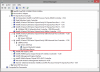
I wouldn't expect any Samsung drivers to fix the USB problem -- because it's supported by Win8 out-of-the-box. Only exception could be an Intel Chipset driver. If that wasn't properly installed, it could make a difference.
Again, try these and let us know how it goes. -
Yep, if you're seeing it bump up to 59-60 then I follow you -- I see the same fan behavior when my CPU reaches those temps. In other words, I hear "nothing" (John's comment about ambient sound notwithstanding) around 50 versus a pronounced but quiet spinning noise around 60. I already noted that mine has idled that high when Firefox has issues (i.e., maybe improperly cleared out javascript), but as long as I keep my tabs in order I'm 50C or less, with no fan noise.
So now the question is why you're occasionally bumping up like that, assuming it's not due to a poorly-written program that is spuriously grabbing CPU cycles. The details of what you've tried already are a little blurry, but John's comment about the Intel ME driver reminds me that I'd consider reinstalling all the CPU/motherboard drivers if you're willing.
-Matt -
Dannemand: Thanks for the picture. I checked under Device Manager and found the USB SMBus Host Controller (which is the USB2?) I checked the Properties and the Device Status shows "No drivers are installed for this device". Then I tried Update Driver and it said my driver is up to date but the Device status didn't change. My USB2 is still not working. Then I Disable it and unable it but the problem remains. Then I delete it from Device Status as you suggested and reboot the system but it didn't make any change on the USB2. So I think this laptop may have a faulty USB2 port?
I tried several USB2 flash drives, mp3 players and hard drives but none was detected on the USB2 port. All are detected on the two USB3 ports. -
@getgadget: I am afraid this does point to a hardware issue. I would try a Factory Restore first (from F4 Recovery). Samsung will probably ask you to do that anyway. Best Buy maybe too.
-
@Dannemand: I also am afraid it is hardware problem. *Sigh* If I create a Backup image through SW Update and then do a Factory Restore, can I restore to that backup point afterwards? Hopefully the USB2 will work after the Factory Restore and the Backup restore will take care the rest?
-
I looked at swupdate, and there is Intel ME for download but its not giving me the download button
-
Remember you can also run "Find Model" (in the lower left corner) and get a copy that way.
-Matt -
I already have it installed, do you think thermal paste on the CPU might help?
-
Of course...I meant "reinstall" (I figured that's why you'd checked SW Update). If it were my machine, the theories would be for me: (1) check software is correctly installed/configured, (2) check for misbehaving programs, and (3) rule out malfunctioning hardware. At this point in the game it's looking increasingly like (3) to me. I wouldn't think thermal paste would improve things much.
-Matt -
Reinstalled it, fan noise is quitter now I expect noise from an i7 but how does yours run? is it completely silent under a light load like IE with one tap open and WMP playing 1 song?
-
I don't have a way to measure the sound level but I can generally hear the fan just barely at idle -- it sounds like a very soft hum. It is near-silent, but if I put my head near the exhaust I can hear it pretty clearly. At around 60C it sounds more "machine-like"...a loud hum, and of course around 70C it sounds like your typical high-speed laptop fan.
-Matt -
Sigh. I'm pretty sure my second charger is on its way out. Looks like it's time to call Samsung again....
-
Right now its a 48 to 50 and the fan is pretty noticeable..
-
hi all, looks like a lot of support for this laptop. i recently bought an open box 15" np700z5c-s02ub. It only came with the AC charger.
1. what other items would a brand new purchase include?
2. i have suspicion that someone tampered with the restore on this laptop. For one, i cannot restore windows 8 from within the windows 8 settings. it gives me an error that the files are missing. I am able to restore from within samsung's recovery application at boot up by pressing f4. However, upon restore, the desktop has a pop up on the top right that indicates.. "series 3". In addition, it has AMD drivers installed instead of nvidia and synaptics drivers instead of elan. Also, the laptop is running pretty slow. For instance, pressing ctrl+shift+esc for the task manager takes 4 seconds, as does fn+f1 for the easy settings. does anyone else have these issues, or do i really have a laptop that the previous owner tampered with the restore partition?
3. has anyone fixed the backlight on the f12 key for wifi? it never goes off with the rest of the keys.
thanks for reading through this post and i appreciate the help. i'd like to keep this laptop as the hardware is nice, but i think the software is damaged. samsung will not send any restore cds, but they have offered for me to send it back to them to reimage the harddrive.. for $40. -
I took my Z5C back to Best Buy today. That particular store doesn't have any new unit but offer to sell me a display model in very good condition which is scheduled to be restored by Geek Squad tomorrow. I checked the USB on this one and it's working. It is on hold for me with a saving of $70 from a new unit.
There is also a new unit at another store with 30 min driving distance. So now I am wondering if I should save the money ($70 + gas) and time (~1 hr round trip) to just get a display unit or get a brand new one. Any thought or comment on this?
I also remember I read some member here used to work at Best Buy and I would appreciate your opinion. Are all display model powered off during off hours? My main concerns are the life of the screen and the battery of the display model as it is powered on all the time.
Again, your timely comments and suggestions are greatly appreciated. Thanks in advance!! -
I wouldn't recommend ever buying a display unit unless it's HEAVILY discounted. They're there basically to be put through abuse by the customers, and you have no idea what could have happened to it. From my experience of working at Fry's we did power off all the computers for closing and I'd assume it's the same for Best Buy.
Samsung Series 7 Lovers - Here's The NP700Z5C Ivy Bridge!
Discussion in 'Samsung' started by yknyong1, Apr 23, 2012.



