Problems? See this thread at archive.org.
Ah sorry, I think I didn't pick up on that.
-Matt
-
-
Yeh. I tried the hacked win7 version. Wouldn't install. Fail. I am still on BIOS 4, not 6. I think I may wait until 7, but I doubt it fixes the USB 3.0 issue. Anyone on Windows 8 have a functioning USB 3.0 that is NOT using the Rensas hardware?
-
How do you check this? I'm on Windows 8 and I think my USB 3.0 external HDD works as intended.
Device Manager says I have:
Intel USB 3.0 eXtensible Host Controller
PCI\VEN_8086&DEV_1E31&SUBSYS_C0D5144D&REV_04 -
what do you mean? Just right click, choose properties and look at the driver version. mine ends in 420 and works in Windows 7. Just not win 8.
-
So after paying more attention, the laptop definitely throttles while playing BF3 and probably BFBC2; mainly any heavily threaded game. With HWinfo in the background, I can see it throttles to 2.1Ghz at 89C and to 1.5Ghz at 91-92C. Kinda sucks because the processor is bottlenecking the GPU pretty hard, and I'm forced to play threaded games in silent mode @ 30fps to get a more consistent framerate with no stuttering. Maybe I can try replacing the AS5 paste with some MX4 or something with even higher thermal conductivity? I doubt it'll do much though. Still, it would be nice to keep the CPU temps under 90C.
Edit: turns out MX-4 isn't better than AS5, oh well. -
Did you look at Throttlestop? However, there's not a lot of thermal headroom. Or is the cooling of the CPU adversely affected by the heat generated by the GPU?
John -
Hi guys,
I recently re-installed WIN7 64Bit including the latest SW-Update Drivers and BIOS P06AAE. When I now choose the "Maximum Performance" Power Option, the first Core in the task manager is continously running at 95-100%! When I switch to "Samsung optimized Setting", Core No 2 is running constantly at 50%, in "ECO Mode" Core No 4 is running constantly at 75%. The average CPU load is at 13-16% not matter which power setting I choose. I didn't notice this behavior before so I wanna ask you guys if it's the same on your 700Z7C's?
How can it be fixed or is it a normal behavior?
Best regards from germany!
Dominik -
I was considering using Throttlestop but I'm debating whether it's safe to use it or not (for the longevity of my cpu). For now, I've settled to changing to a custom power plan that only allows 99% of CPU speed so that it doesn't turbo, and framerates have stabilized since that at a slightly lower rate. However, I think it would really show the potential of the 640M if the CPU was running at 3.1Ghz but it doesn't seem like there's the thermal headroom.
I actually tested the whole GPU + CPU cooling theory, but it doesn't seem to make much of a difference surprisingly. I played a game (I think just Portal 2) on the HD4000 and made sure there was 0% GPU usage and I still hit 91C, When using the GPU, temperatures hit the same number. -
Is that a 4 core CPU? Looking at my X4C (2 core CPU) I see that if I enable "Maximum Performance" then one core runs continuously at full speed so that is similar to what you are seeing (I'm using HWiNFO to see the CPU speed).
Personally, I always use the Samsung Optimized power plan which allows the CPU to slow down when not busy. Maximum Performance disables the dynamic speed adjustment (perhaps not for all cores) which is the computer equivalent of letting a car engine idle at high speed. The difference, however, is that a CPU can speed up in a few nano seconds.
I also don't use Samsung's Eco Mode which does reduce power consumption at the cost of reduced performance. If you are using High Performance + Eco Mode then confusion could well result.
Thanks for this useful info and advice.
John -
Always happy to provide some insight John.
So with my new power plan I have the CPU speed set to 90% minimum and 98% maximum. Temperatures after an hour or so of gaming maxed out at 82,87,91,87 for cores 1 through 4 respectively. This is decently better than it was with Turbo Boost enabled, which showed max temperatures of 86,89,91, and 90 respectively. The cores generally stayed in the range of 2.0-2.2Ghz whilst gaming rather than fluctuating between 1.2Ghz and 3.1Ghz. There was far less stuttering as a result. -
I have a Core i7 3615QM (Quad with 8 Threads) and the first thread is always at 100% when "maximum performance" is enabled. With "Samsung Optimized" Core 1 and 5 both run at constantly 55%...that's kinda annoying.
Maximum Performance
Samsung Optimized
@John Ratsey: how do your cores react when "samsung optimized" is enabled??? Can you post a pic of your taskmanager? That would be great!
By the way: I have two identical Win7 64Bit versions installed on different partitions of one SSD. One Win7 shows a WEI of 7.5 (CPU) the other Win7 shows a WEI of 6.5 (CPU)!! ? -
My CPU is a humble 3317U so only 2 core / 4 threads. Here's what it looks like in the Samsung Optimized Power Plan.
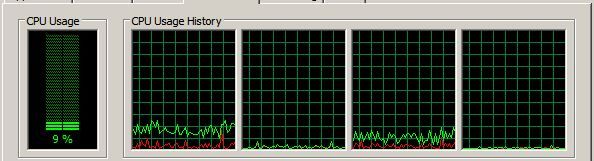
There's no difference in that graph (which is of CPU usage) when I switched to Maximum performance. The difference is in the CPU speed as shown by HWiNFO.
This might be a clue. Is there a special driver to ensure proper management of all those cores? I would reinstall the Intel chipset driver package.
John -
Thanks for posting your pic!
I already re-installed the chipset drivers. No changes at all... Unfortunately the - I call it "CPU bug" - happens on both partitions and even in "safe mode". I'm currently in contact with the samsung support team.
Any other suggestions? Can somebody else post it's taskmanager profile when in max. performance mode plz!? -
Dominik, here's a shot of mine. Oddly, I don't seem to have a "Maximum Performance" option -- so I ran it in "High Performance."
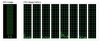
What it seems to do is run the cores at full speed, but as you can see, usage is minimal. I'm curious if you look at the process list (e.g, with Process Explorer), which applications are involved.
-Matt -
Hi Matt,
thanks a lot! Actually I ment the "High Performance" Setting!
Here is a screenshot of "process explorer" with the "samsung optimized" mode. As you can see, 2 cores are constantly at about 50-60% usage...
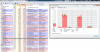
What do those "interrupts" mean? -
Ah good, we might be inching closer to an answer. To explore the interrupt issue, I'd suggest running DPC Latency Checker: DPC Latency Checker
Unfortunately, it's a bit of a brute-force approach, but you can use the utility to monitor latencies while you disable/reenable hardware drivers, e.g.,
My first guess is what John suggested (reinstall chipset driver) but the DPC tool might identify some other misbehaving hardware.
-Matt -
BIG UPDATE!!!!
I solved it!
I did not install the "Intel Rapid Storage Technolog" driver, because I thought it is only important for the conventionel drives (HDDs) and not for SSDs. I'm using a Samsung SSD 830 with "Magican" software. So I thought the Intel Driver is not nescessary...
After installing this driver, the idle usage is 0-5% and there are no interrupts anymore! I'm soooo happy right now!
Thank you guys a lot anyway! -
Ah that's super. Thanks for updating us.
-Matt -
First time poster here and am looking for some help. I bought an NP700Z5C this last February before they came out with the new model. I love it and have had no issues, except the "A" key has fallen off and it doesn't seem to want to snap back on. I have searched this forum but only come across whole keyboard replacement. Does anyone have any tips or suggestions to get the key to pop back on and stay there? Thanks in advance for any help.
-
Fascinating. Some people say that there's no need to install that driver but you have found a good reason.
Thanks for the update.
John -
Great info, thanks for sharing.
When I reinstalled my old HP HDX18 a few months ago, I tested a number of ATA drivers: Win7 built-in vs latest chipset from HP (for my model) vs latest chipset from Intel vs Intel Rapid Storage. To my surprise, the HP one turned out to be the fastest with lowest latencies, despite being a couple years old, while Intel Rapid Storage performed worse.
On my Samsung I've always used Rapid Storage, and not seen any ill effects.
I guess it's worth testing these on different PCs, depending on the hardware configuration.
Thanks again, great info
-
Dominik's experience rang a bell for me -- I had forgotten that something similar happened to me last year when I installed Windows 7:
http://forum.notebookreview.com/sam...eres-np700z5c-ivy-bridge-175.html#post8988946
Maybe I'll bookmark that post for future reference!
-Matt -
Hi guys,
unfortunately the CPU bug isn't completely fixed. After starting windows, the first Core is at 90-100% for about 2-3 Minutes and then turns into its normal state (0-4%). When I look at the "process explorer", the "interrupts" causes this delay but even when the CPU works normally after 2-3 Minutes, there is a certain amount of interrupt usage (0,5-1%). Are those interrupts normal or do they not appear in the process explorer, when the system works properly? Can you guys just check on you computers if you see "interrupts" in the process explorer! Thanks a lot! -
Yep, I think that's normal. At least that's what I see after each reboot. I've always interpreted DPC (deferred procedure calls) as low priority CPU requests, that are scheduled after the important stuff is handled, e.g.,
Deferred Procedure Call - Wikipedia, the free encyclopedia
Typically I see <1% CPU for Interrupts/DPC when I look at Resource Monitor (e.g., it's averaging ~.25% at the moment.)
-Matt -
Ah ok. So your monitor also shows some "interrupt" usage. Is your CPU also working at 90-100% for a while (2-3 min.) during startup?
-
Precisely. Just tested by rebooting and 2 of the 8 logical cores run high for a few minutes. What's funny is that I normally just look at CPU as total activity, so I always thought that DPCs/Interrupts used ~10% CPU -- of course that's the amount when averaged over all the cores. LOL
Sounds like you're doing fine.
-Matt -
Thanks Matt!
Obviously you are using the "samsung optimized" setting because you have 2 logic cores at 50% during startup. I activated the "high performance" setting and I have 1 logic core at 100%. That's actually the same load as on your system. I wonder which internal service does effect that... During statup many many services are loaded or terminated and after the last service-termination, idle goes down to 0-1%.
I figured out, that when I remove "Intel Rapid Storage Technology", the "interrupts" usage is at constant 8-10% with one thread at 100%. It doesn't even go down after some minutes and stays at 100%. I think I will check which service is responsable for that by using "xperf". I will inform you guys as soon as I have some results.
Dominik -
I assume that CPU quiet mode and similar settings in the BIOS are all disabled? I think that affected CPU throttling too.
Plus, I have heard of people saying that this PC needs a 120Watt power adapter but Samsung only supplies a 90W. Could that be an issue too? -
Hi guys,
I'm back with some results! I ran "Latency Monitor (LatencyMon)" an figured out that the "ACPI.sys" driver causes the high CPU usage during startup! There are many many posts online concerning this driver and its problems... So my next try is to downgrade my BIOS from P06AAE to P0?AAE. That's where I need your help! Which was the BIOS version before the latest P06AAE? Can somebody please provide the old versions for me because I cannot download it from samsung. Is there any source where I can find older versions of the BIOS or even the initial version the notebook came with?
Thanks a lot!
Dominik -
I think yjgfikl can comment on both those questions, but in the meantime: I was under the assumption that pushing the "Quiet Mode" button on the keyboard works as designed. Did you mean "off by default" or "not available" in BIOS?
Just curious what you predict will happen with the older BIOS...? Since ACPI.sys is standard Windows code, won't it behave the same as the current BIOS version? At least, I'm guessing it's typical behavior and not due to interacting badly with a specific hardware component. Either way, thanks for the testing, and please keep us informed! I also fear that you have a different BIOS version -- the US model is now P05ABJ, IIRC. I have a version or two before that, but it won't solve your problem.
-Matt -
I use 04. I refused to go to 06. There is a thread to downgrade, but it's tricky.
-
Has anyone else had issues with Windows 8 on the NP700Z5C? I have installed all the drivers in SW Update, but my keyboard back light isn't working. My screen back light is also acting weird. It goes to full brightness on samsung optimized, but on High Performance I am unable to bring the brightness above about 50%. I think it has something to do with the light sensor. Also, can the WiFi card be upgraded to the Intel Ultimate N 6300? It has 3 antennae so I wasn't sure.
-
I also experienced that at first with Win8 on my NP700Z3A. It resolved by disabling Auto Brightness. There are two places to do that. See the post linked here for details.
-
...You rang?
I think a 120W adapter would be good for when you're doing things that are CPU+GPU intensive because if the i7 is a 45W part and the 640M is 35W, there isn't much left in the charger to power everything else. I did some measurements, and when idling at minimum brightness I was drawing 9W and at maximum brightness I was at 14W. Not to mention that there's obviously power being run through every other component.
Throttling is definitely an issue, although I'm unsure whether it's due to temperatures or the power supply; the only way for me to test it is to get a 120W power adapter of my own. I was noticing throttling at 89-91C (CPU at 70% use) with full GPU usage. So it may very well be throttling because of power since I believe John said Ivy Bridge is designed to throttle at 95C. Could also be Samsung's BIOS, who knows. A few months ago while gaming on a depleted battery its charge rate was a mere 2-3W and the processor was clocked at around 2Ghz and not turbo-ing.
I'm not sure what's going on with neographic's laptop, as Matt is better at troubleshooting CPU usage stuff. Oh also my current BIOS is P02AAG and SW Update's most current one is P04AAG (haven't felt the need to download it - US model). -
It was the Sandy Bridge i5 2520M CPU in my Lenovo T420s which started throttling at 95C but I'm sure I read something in the CPU data sheet that indicated that thermal protection would stop the CPU from exceeding 100C. It's an assumption that Ivy Bridge behaves the same way. The Intel CPUs can definitely and safely be run in the low 90s C. The U7600 in the Toshiba R500 would get there under load (because the fan was somewhat small and couldn't shift much air).
John -
dear friends, can somebody send me a link of ebay containing which cable i need to buy to use the mini vga (or mini display port, i dont relly know exactly which one comes in this laptop) with an standar vga monitor??
so i need a cable mini vga/mini display port to vga female.
Thak you in advance. -
It is indeed a Samsung proprietary mini-VGA. NOT a DisplayPort, NOR a micro-HDMI. The discussion comes up frequently, most recently in this thread. You may want to start at this post where the recent discussion started.
I don't have an eBay link for you. But the VGA dongle that came with my Z3A is marked AA-AV1N12B. Maybe that'll help you locate the right type -- and avoid the wrong one. -
This is something that has bugged me for a while -- the newer 7-Series machines have a VGA port -- but anyway: on our machines the mini-VGA is a proprietary port, which requires a special cable. AFAIK only Samsung produces the cable, and it hasn't been available for a while.
What I use is an HDMI to VGA adapter, like this:
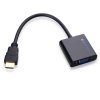
Here are some examples from EBay, for about $10-$15 (I bought mine from Amazon for $20): hdmi to vga adapter | eBay
EDIT: Hah, I just saw Dannemand's response! And I realized the first picture I posted was wrong -- MAKE sure to look for a FULL HDMI sized adapter (not micro or mini HDMI) if you decide to go that route.
-Matt -
I did a bit more looking and this model might work:
Amazon.com: Samsung Electronics VGA Dongle New Series9, Ultrabook and Series7 (AA-AV2N12B/US): Computers & Accessories
Samsung VGA Dongle for Series 9, Ultrabook and Series 7 Laptops: Computers : Walmart.com
AA-AV2N12B/US | eBay
-Matt -
Hmm I wonder if this would work, it's super cheap and I'm actually tempted to buy it. Samsung Series 5 Chromebook VGA Adaptor Dongle AA AV0N12B | eBay
-
It's an unfair world: My Z3A came with a VGA dongle. I tested it on my 1920x1200 LCD, and it works. But I only ever use HDMI -- and I DO use that all the time, both to my LCD monitor, to my HDTV, and to projectors at meetings. Picture quality is much better with HDMI -- assuming it's also HDMI or DVI on the monitor or projector.
And then, seemingly, all those owners who NEED to use VGA didn't get a dongle with their Sammy.
Matt's recommendation to use HDMI-VGA adapters is a good alternative. -
Wow, maybe we should trade places! Seems like I live in a world of VGA projectors. I keep complaining at work that we should convert to HDMI, and they just look at me like, "...HD...M...???.. what was that last letter?..."
-Matt -
I know, I used to give lots and LOTS of presentations, both in-house and at customers, and it was always VGA. But even many semi-old projectors have DVI, even if they don't have HDMI. Same with my HP 23" 1920x1200 LCD (from 2005): It's got DVI, but no HDMI. Just use an HDMI-DVI cable are you're good.
-
-
I say go for it!
-Matt -
Hi guys, I'm posting the question also in here...
I have a Samsung NP700Z7C-S01DE (Germany), unfortunately with the latest BIOS Version P06AAE. Now I have high CPU idle usage and low battery life as well as frame drops when gaming. Now I want to downgrade to verison PA05AAE.
Can somebody please tell me the exact name (ITEM_?????_???_WIN_P05AAE.exe) of the BIOS version PA05AAE?
Since my BIOS is in English, owners of the NP700Z7C-S0?US can also post their version.
Many thanks
Dominik -
Done, thanks to the uploaded BIOS-List! Great forum!
-
Is it worth upgrading to the P05AAG Bios? I'm still using P02 or P01 because I have two hard drives in my laptop which made me have high idle CPU usage with newer BIOS. I own the 14" version (NP700z3C)
-
I'm on P05ABJ (15") and have no problems. We saw recently that the high idle CPU usage was caused for some by the Intel Rapid Storage Technology (IRST) application. You might want to check and reinstall.
-Matt -
Hi guys,
I did some more testing. I downgraded my BIOS to P05AAE and did a clean install of WIN7 64Bit on my NP700Z7C-S01DE. I noticed that even without any drivers installed (at the first startup after the install), the CPU thread usage (one or two cores depending of which power option is selected) is constantly high for a couple of minutes (5 Minutes), then goes down to almost zero. I will live with that because there are no slowdowns during startup (the all over usage is only 15-20%).
What drives my crazy: after installing all drivers, I noticed, that there are massive slowdown in games every 10 seconds like there is a process in the background interrupting the game. On my recent installation with the exact same software and driver setup (even with the same BIOS), I had no problems when gaming... I will now switch to Windows 8 and see what happens then... (I get Win8 for free at my university, so I'll give it a try)
Windows really saves jobs...
Samsung Series 7 Lovers - Here's The NP700Z5C Ivy Bridge!
Discussion in 'Samsung' started by yknyong1, Apr 23, 2012.