Problems? See this thread at archive.org.
Hello lavabean.
There is a ton of discussion about this, including in this thread. But admittedly, it requires some work to find the exact information you're looking for. Here is what I came up with after a little little searching:
For cloning onto the SSD (before physical installation):
http://forum.notebookreview.com/samsung/675111-samsung-series-7-np700z5a-help-installing-ssd.html
For the physical disassembly:
http://forum.notebookreview.com/sam...ies-7-chronos-np700z5a-disassembly-guide.html
For special caddy allowing the HDD to be moved to the optical bay:
http://forum.notebookreview.com/samsung/626915-hard-drive-caddy-series-7-a.html
For Win7 Clean installation:
http://forum.notebookreview.com/sam...windows-7-8-via-usb-np700z-4.html#post9191509
You can also use the following Google syntax to find these and others discussions: site:notebookreview.com/samsung Series 7 sdd installation.
Hope that helps
-
-
This is the closest detailed guide that I know of, but it's really a simple process.
http://forum.notebookreview.com/samsung/632487-samsung-series-7-chronos-np700z5a-disassembly-guide.html
In terms of software changes, you'll just need to reinstall Windows (obviously) so there's really not much to do. The Samsung BIOS defaults to AHCI mode for the ssd. Personally, with an SSD I disable the page file, disable hibernation, disable defragmenting, and make sure TRIM is enabled. That's about it. -
Hi there,
wondering if anyone can help. I want to change the awful WIFI card in this machine, I was looking at this one: Killer Wireless-N 1202 + Bluetooth Mini-PCIe Card - Scan.co.uk but I heard the antenna connectors are a lot more bigger than the ones on the 6235. So my question is is there a card that is a lot better than the intel 6235 with the same sort of antenna?
if not how easy is it to swap over the anntenna??
thanks -
I would have expected the antenna connectors to be standard so that notebook manufacturers can use WiFi cards from different sources. Do you think the connectors on that Killer card are bigger than on the Intel 6235 Intel Centrino Advanced-N 6235 - Network Adapter - PCI Express Hal (6235AN.HMWWB) - dabs.com ?
To me, both look to be slightly smaller than the holes for the fixing screws.
John -
I'm having a problem when using the charger, it doesn't seem to be making contact properly, or maybe a loose connection inside. The external power indicator LED keeps going off and the Windows icon switches from battery to charger. Its becoming regular now and I'll have to do something about it.
I have the extended warranty from John Lewis, though wanted to ask if anyone else has the same problem, and if there might a be solution that avoids sending it back.
It isn't the charger, I think its likely to be the socket on the motherboard, or a component nearby, making an intermittent connection.
Is it a common problem? -
I too thought the connectors would be standard, it makes sense, but apparently according to posts I've read and a few youtube videos its not the case (unless its because their american?). One youtube video, Asus Zenbook UX32VD Wifi Upgrade - YouTube shows you having to tape the connectors on. weird.
so if there is one with the same connectors that would be more practical.
thanks -
A few Series 9 owners had similar problem until they pushed the power plug in further. If that isn't the problem then it's probably the socket.
I'd personally take the risk that the connectors are the same size.
John -
How does one get into the BIOS? I tried F2 or Escape key and it won't let me into the BIOS
I guess this have something to do with secure boot so how do you disable it so we can get into the BIOS
Thank you
Bill -
It should be F2, but sometimes it can be difficult to catch it before Windows loads. You start with the computer powered off, then immediately after Power On, you press F2. Don't press and hold it, but press it repeatedly 2-3 times per second. You may have to power off and try again a few times to catch it.
If you have Windows 8 and cannot seem to catch F2 before Windows loads, you may have to temporarily disable Fast Startup in Windows Power Options control panel under Change what the power buttons do (see below). Then Shutdown. Now you should be able to press F2 after Power On to enter BIOS. (Remember to change Fast Startup back afterwards, it's a good feature.)
View attachment 100098
Alternatively (if you're using Win8) you can use Charms - Settings - PC Settings - General - Advanced Startup to fully shutdown, which makes it easier to catch F2. -
What I been trying to do is boot either from USB stick or DVD Disc that why I wanted to get into my BIOS setting to see if it will allow me to set which to boot from.
However none of above worked for me except the last part Alternatively (if you're using Win8) you can use Charms - Settings - PC Settings - General - Advanced Startup to fully shutdown, which makes it easier to catch F2. which worked IF I select to change the UEFI setting then it will boot directly to BIOS.
After I got into BIOS and disabled the Secure Boot, finally I could see the "Press F2 for setup or F4 for Restore" at boot up but tapping F2 keys still does not take me to the BIOS almost if it was ignoring my F2 command completely and went directly to Windows 8 login screen even with FAST BOOT disabled.
Only time I can get into BIOS is to go in Windows 8 advance set up and select to change the UEFI setting which will cause it to reboot into BIOS.
I do computer repairs and been doing it for a very long time so I am very familiar with BIOS or CMOS POST etc. I know something is preventing me from getting into the BIOS unless I use the Windows 8 change UEFI setting method to get into the BIOS.
Reason I am trying to get into BIOS is I wanted to be able to boot either from USB stick or DVD disc and to see if there a setting to allow booting from there but there were no settings or boot options in the BIOS. Samsung BIOS is very limited in selections. I even tried hitting the ESC key to see if it will bring up BOOT MENU which is common among Samsung laptop but it did not work for this laptop either
My next question would be how does one boot from USB or DVD to diagnose or remove bad Malware/Virus/Trojan that is preventing from Windows to successfully boot up. I did seen in the setting where I could boot from USB in Windows 8 but that did not work for me either.
I recently had to repair several computers with a bad Trojan that would prevent Windows from loading completely even block Safe Mode access which only way was to boot with USB and clean it from there. Lucky it was all Windows 7 so far so I got to thinking would it work on Windows 8 and started testing that where I ran into all those issues of not being able to boot from USB or DVD in order to remove Malware or Trojan.
It seem that with Windows 8 if you get hit by this type of Trojan your out of luck because you wouldn't be able to boot into Windows 8 setting to choose alternative boot method which did not even work for me.
Does anyone have any suggestion or a different method to try? I am all eyes!
Thank you for your inputs
Bill -
Hi TechBill,
Sorry, I've been away from the PC most of the day. I don't know if you already made progress on this.
I am puzzled why you are still unable to boot BIOS using F2. But anyways, try to boot BIOS settings as you were doing before (going through Advanced Startup) then make the following settings (you may not have them all):
SecureBoot = Disable
OS Mode Selection = UEFI & CSM OS
Fast Boot/Fast BIOS = Disabled
USB Legacy Boot
This should definitely allow you to boot a USB or DVD drive. AFTER you made these changes you can either press Esc or F10 (depends on model) to select a boot device during startup OR you can change the Boot Priority in BIOS (this option should become available now).
As long as OS Mode Selection is set to UEFI, the computer is prevented from loading anything other than an UEFI OS (that is a GPT disk with an EFI/ESP partition). And when SecureBoot is enabled, only the installed Win8 can be booted. These features are designed specifically to avoid rootkits and malware.
The following Microsoft articles provide some good understanding of these issues. I apologize if you already knew this -- maybe it will help others:
http://technet.microsoft.com/en-us/library/dd799232(v=WS.10).aspx
http://msdn.microsoft.com/en-us/windows/hardware/gg463525.aspx -
Thank for the information, I read up on those links you provided and learn new thing about the UEFI.
So look like I got studying to do before I even try to repair Windows 8 computers that are hit by bad Trojans or Malwares, I live in a town where we have several different college here and students with infected laptop everyday needing service.
Thanks for sharing the information.
Bill -
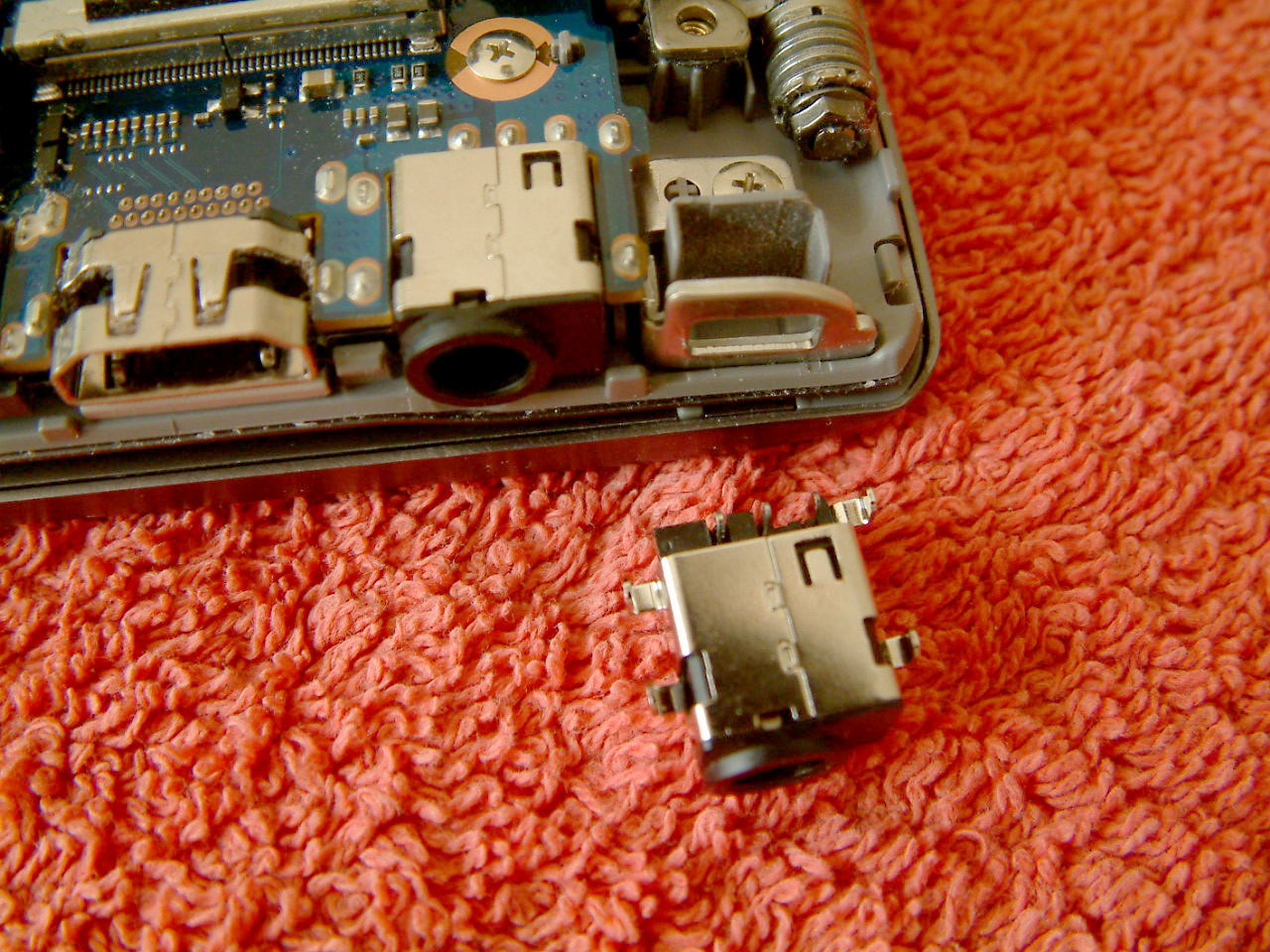
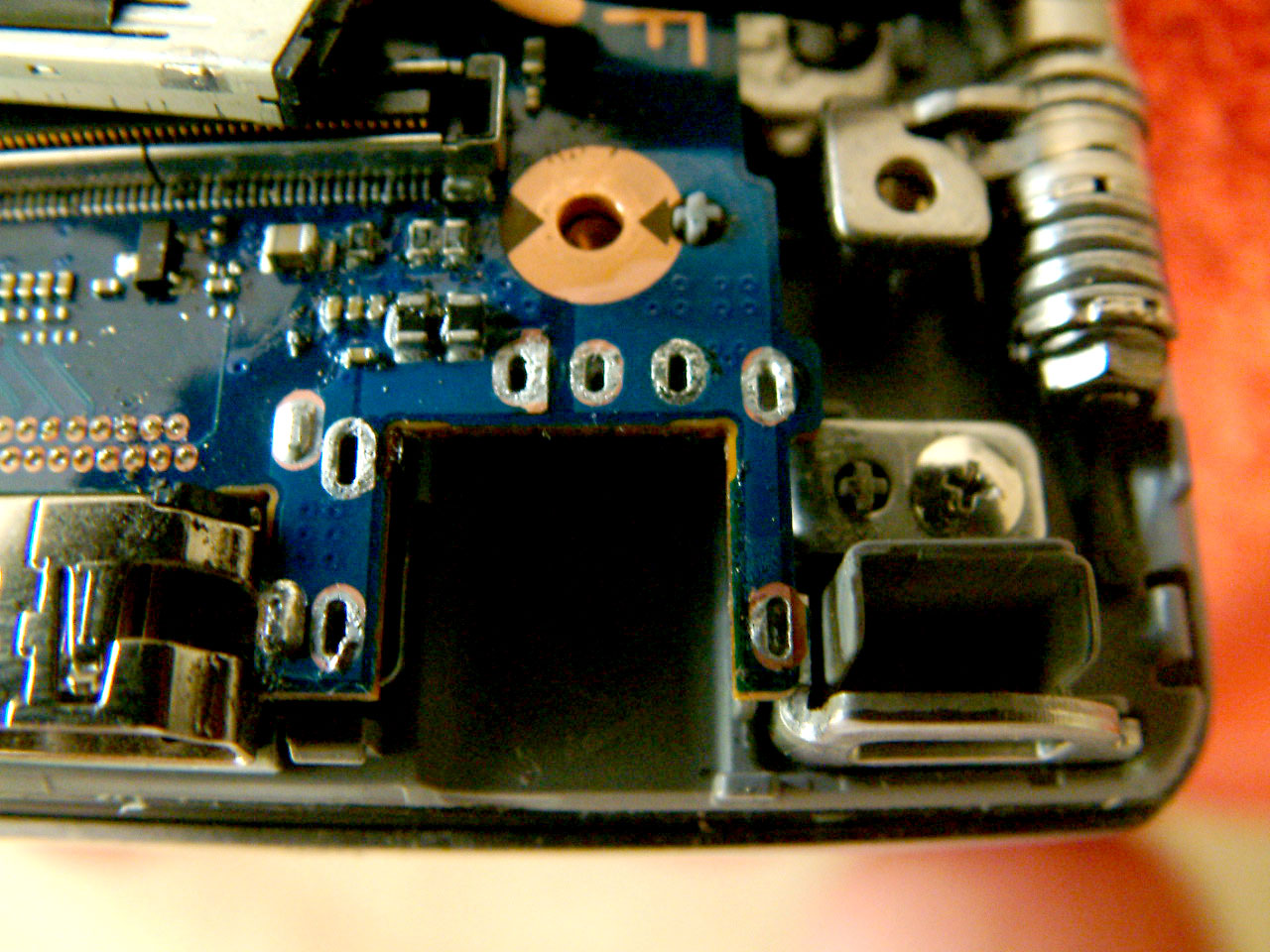
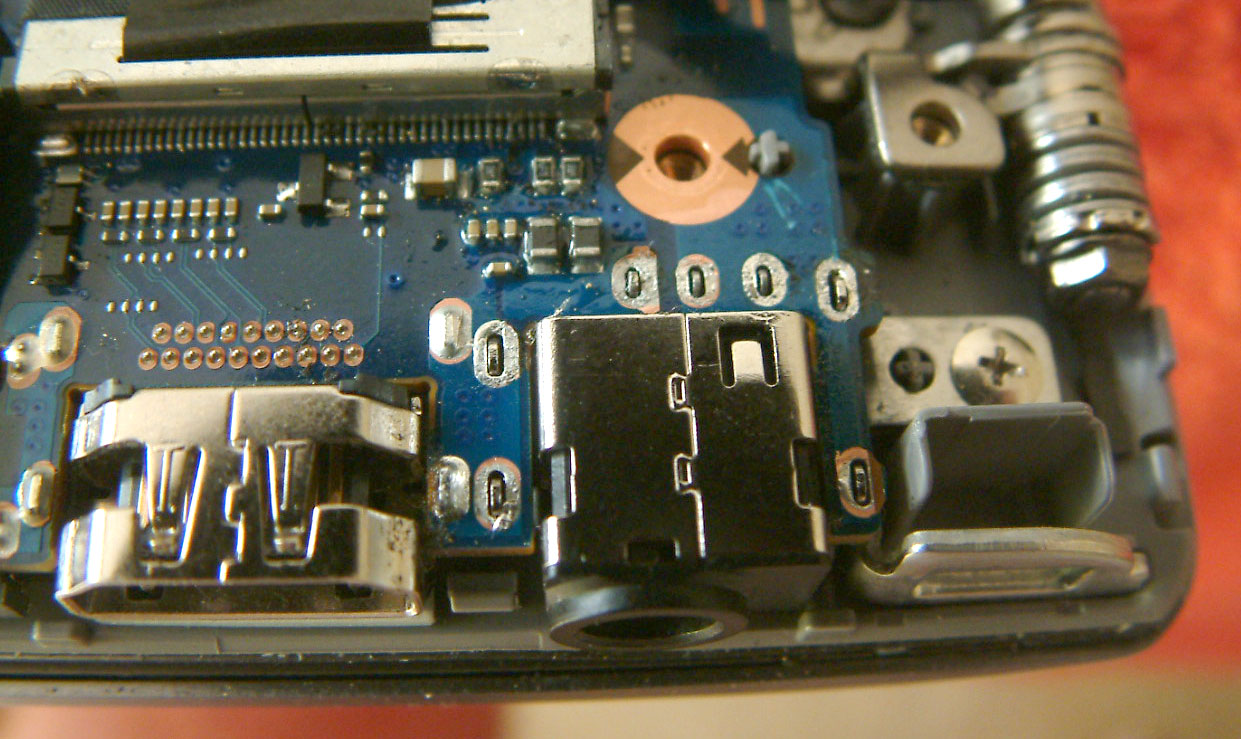
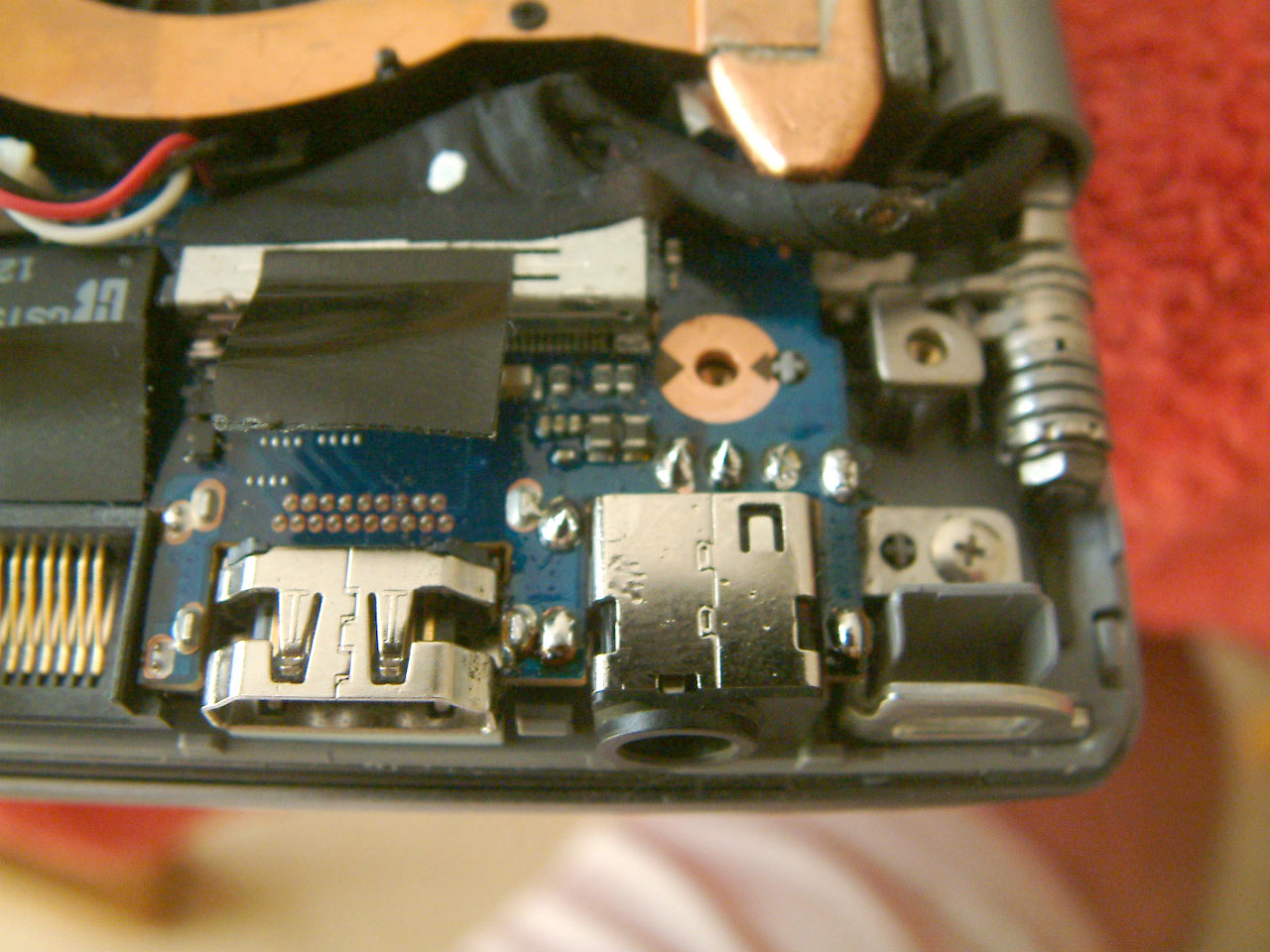
As I mentioned a few posts back the power socket was failing, and what started as an intermittent failure to charge was becoming more regular so something had to be done.
I've put an SSD in mine and replaced the DVD ROM with a HDD caddy, so restoring back to stock and taking to JL for a warranty repair, and the unknown time waiting for it to be fixed would have been a nuisance. It was easy enough to get a new socket, so I decided to have a go and replace myself. I wouldn't recommend you do this if you don't have the experience, tools or skills to work on the motherboard, but if you do I just wanted to show how its done.
There is a guide already on how to remove the bottom cover, so once that was off I desoldered the contacts on the socket. I removed the motherboard securing screws which just gave me enough space to lift it a little and get the old socket out. Once the pads were cleaned up the new one went in, and soldered in place.
I've attached some pics to show each stage. It was more difficult to remove all the solder than I was expecting, probably because of the lead free solder used initially, I found that by adding some flux and new solder it eventually flowed more easily and then all came away. I wouldn't try it unless you have an electric vacuum desoldering station.
It was about a 3 hour job, as I wanted to go slowly and carefully. Before starting I isolated the battery, and when the cover was off disconnected it as a precaution. Since the new socket went in the power is getting through, and charging without any problems now.
If I ever have to return it under warranty now for any other reason, I'll have to hold my breath to see if this repair gets noticed, so that would be another consideration before thinking about this kind of DIY fix.Attached Files:
-
-
Nice! Thanks for sharing this, btb32
-
Hi!
I bought a new 700Z5C-S03 about two months ago.
The problem i have is that the dedicated graphics card (GT640M) core clock is only 135MHz, i can only play Starcraft 2 with playable FPS with all settings in low.
I'm watching gpu-z on my second screen when i play and the gpu core keeps at 135MHz but the load is at 99%.
The Temprature pends between 87-113C.
I have set silent mode off, energy mode to high performence.
Is it the high tempratures that makes it running at 135MHz?
Is it a common problem that the GT640M can't run on it's standard core clock because of the high temprature?
The computer is new so there should not be any dust in the cooling system. -
Well that's not right, it should be at 635mHz - 744mhz while gaming. 135mHz is its idle speed. Those temperatures definitely are too hot, there may be the issue of your heatsink not being seated properly. My 640m peaks at ~83C while overclocked. Also, check the global settings under Nvidia control panel (Optimus settings) and make sure that Starcraft is indeed using the GPU and not the integrated HD 4000; despite the fact that GPU-Z is reporting 99% usage.
-
I thought I'd check in. i finally got around to taking mine in for a new screen on Sunday. Best Buy had it replaced and back to me Yesterday.
4 day turn around. FANTASTIC. -
Thanks for the answer. I'm sure that it uses the GT460M while playing. I have had some shutdowns because of high temprature on the 640. If i use HD4000 i have no problem with high temprature and shutdowns.
I'll try dissasembly it and check how the cooler looks, and put some new thermal paste on it.
Edit:
I dissambled the computer and found ot that the screws to the gpu heatsink wasn't tightened at all... The guys that did a service on this before i bought it made a terrible job.
I tightened them and now the gpu idles at 45-56C and it runs at 645MHz
/ Anton -
What program and how much are you overclocking with? I used ASI afterburner but didnt know how much to overclock so i never did. Do you also overclock your CPU?
-
With MSI Afterburner and the GT 640M you can basically throw the core clock and memory sliders all the way up to +135 and +1000 respectively. The 640M is basically an underclocked 660M anyway. I don't overclock the CPU, it gets hot enough as it is, and I don't think you can overclock it anyway. You can, however, try to use ThrottleStop if you want.
-
Does anyone know if its possible to use a monitor with a resolution of 2560x1440 with this laptop?
With a HDMI cable, I can't go higher than 1920x1200. -
I believe others gave up driving 2560x1440 with this model (such as this).
Googling hd4000 max resolution gave this hit among others, which confirms that the HD4000 doesn't do it through HDMI (as you wrote).
We have owners of the 2013 Series 7 / Ativ Book 8 (also Ivy Bridge and HD4000) doing 2550x1440 through DisplayPort, but unfortunately your model doesn't have that. Some were also able to do 2560x1440 through HDMI, but only at lower refresh rates (see this and this).
Yet, this is not a limitation of the HDMI specification itself, which has supported 2560x1600 since HDMI 1.3. -
What about disabling the HD4000, is that possible?
-
No, it's the one driving the display. Sort of like taking out the engine of a car because it isn't powerful enough
I know you probably meant if you can run purely on the discrete GPU (Nvidia in your case). But it would still be limited by the pixel clock of the HDMI interface.
I would check those posts from members who managed to get it working with lower refresh rates. Maybe your model will support that too -- assuming it's the same pixel clock as the 2013 model.
The only other possibility I can think of, is if you can find an external USB Display Adapter that supports DisplayPort and the higher resolution. It won't be fast enough for gaming, but should be OK for spreadsheets and stuff. -
Hey guys, I tried searching the thread but didnt find it. I have the Samsung NP700z5c-S02UB with windows 7 installed and it works great, and super fast. I currently have two issues, one of which is a minor annoyance and really isnt a big deal but I am curious if its a design flaw. When I dont use the laptop for a while the keyboard keys seem to stick the first time i hit them, after the initial stick feeling they are fine from then on. Is that a design flaw, or is that how its supposed to be designed? My second issue is when I open the lid I am forced to press the power button to make the laptop turn back on, it turns off fine when i close but when opened you have to press the button or it will not wake. Thanks guys for the help!
Edit: Nevermind guys, Samsung Easy Settings fixed the wake issue. I am still wondering about the key behavior when it isnt used for a while though. -
^
Yep, I see you found it: For others who may be wondering, it's Samsung Fast Start Mode under Lid Open Action on the Boot Management tab in Easy Settings. Actually, what you had before is default Windows behavior ( Fast Start Mode = disabled). It's described a little more in this post along with the other fast this and rapid that features. -
Dannemand do you know anything about my key activity on the keyboard? It seems like they stick when you first use em but after that its fine. Kind of seems like an unlocking activity or something. Also on boot I get a touchpad install dialog, if I dont run it my right/left click do not work. I have the latest drivers for it as well.
Also, fast start is incredible.. Makes the boot very fast. All in all this is a great laptop -
^
Oh, sorry, I forgot about that sticky keyboard issue: I haven't experienced that issue on my Z3A (older, smaller, but same keyboard as yours). And frankly, I don't think I remember seeing it mentioned here by other Z5C owners. Some have had issues with their space bar, but that's different from how I understand your issue.
Is it all the keys or only a few? Did you ever spill anything that could cause the keys to stick?
And I agree, these are great machines. One of the best laptops I ever had. I particularly like the keyboard
Edit: I just tried googling site:notebookreview.com/samsung sticky keys which gave some interesting hits, including earlier in this thread. Try it and see if some of them apply to your problem. -
It's several keys but once you press them once they don't stick at all. This was an open box but I haven't spilled anything on it. It should have a warranty good through next August though so if you think it's a defect maybe I'll probably send it in before the warranty expires.
-
^
Got it. If it still happens after using the machine for a few weeks -- and if it's enough to be annoying -- I would consider a warranty call in that situation. But do expect to be without the PC for 1-2 weeks or longer.
Meanwhile others may see this and have comments or suggestions. -
you were right about the connector! thanks
wireless is excellent now, the only niggle I have is that coming from sleep the wireless seems to need about 30 secs to connect, even though it says its connected, any ideas??
thanks again -
Hi guys,
For those who having wifi issues, expectually people who has N6235 Wireless card, just go to
and download the driver, I pretty sure there is no more disconnecting, or low wifi signal. Now I can work a lot better with this laptop. -
Thanks for the link. It saved me from a headache. Boost my signal strength to the max and no disconnects. +rep
EDIT: Does anybody know where can I a buy a replacement battery for this? I bought it used and there's a good amount of wear on the battery already.jeffcc likes this. -
Hey sorry for the late response! This website has a lot of replacement parts including the battery you're looking for here:
BA43-00318A - BATTERY
However you're better off using eBay or similar to save $40+ BA43-00318A | eBay
Maybe even try Googling the part name, BA43-00318A, and seeing if other sites may carry it. -
Just a heads up, Intel released another new driver for the 6235 network card. It seems pretty stable and fast.
-
HELLO everyone .
i would much apriciate if you will help me with my laptop problem. (series 7 chronos)
i have a memory problem, when i just open for example the chrome the ram capacity gets to 90% and its not supposed to be like that...
anyone have any idea? thanks ( i have i7, 8gb ram, nvidia640gt) -
Is IntelliMemory installed? If so, uninstall it.
John -
hi what do u meen? sorry
-
after searching is this what i shpuld do?
Run services.msc
Locate "IntelliMemory"
Right Click -> Properties
Startup Type -> Disabled
Click "Stop"
Click "OK"
Reboot
?? -
That might stop it, but I would go to Control Panel > Programs and Feature > then find it in the list of programs, right click and select Uninstall. Then reboot.
IntelliMemory is a caching program which uses spare RAM. However, it can slow things down while it releases RAM because another program wants it.
John -
@liava: NP700Z5C (2012 model) comes with ExpressCache, NOT IntelliMemory. If it is an NP770Z5E or NP780Z5E (2013 model) it DOES come with IntelliMemory, NOT ExpressCache. Presumably the IntelliMemory software could still have been manually download and installed on the older model. In either case can it be uninstalled in Programs and Features as John described -- assuming it is installed, of course
Otherwise I would look in Task Manager and see which apps consume a lot of memory. Window does use free memory for caching, which is perfectly normal, and will be released when needed. But it is almost impossible to use 8GB, unless particularly RAM hungry apps are in play (such as video editing or virtual machines). -
thank you very much! after uninstalling it the ram capacity went straight down to 40~% i think its still a bit high ...
is there any other methods for me to take to make my laptop faster? the chrome takes a lot for example , when im only with 1 window of chrome open it shows me in the task manager that 5-6+ windows are open.
thank you ! (intel core i7-3635-QM cpu 2.4GHz -
No problem
It sounds like you may have the 17 inch NP770Z7E model, is that correct?
Unfortunately that model doesn't have its own Owners Lounge here, it kind of fell through the cracks. Still, you will find more fellow owners in 2013 Series 7 / Ativ Book 8 Owners Lounge, which is very active and has lots of performance discussion. Its opening post has great tips and links. But you will also find some in the 2012 Series 7 NP700Z7C Owners Lounge since that model has a lot in common with yours.
You can use this post as guidance to clean out bloat (click the links in it).
But also, make sure you check thoroughly for malware and virus: These can significantly slow down a PC when they work their evil deeds in the background. That might also explain those phantom Chrome windows you're seeing. -
Last Night I updated to Windows 8.1 but .......... really wish I didn't ........
My Samsung rebooted after the update was done and then it went into a loop reboot and each time it reboot it would briefly display a blue screen with message something like "Your PC ran into a problem and needs to restart .............. (at the end) ... If you would like to know more ........ search for this error: ACPI BIOS ERROR."
So I got on Samsung support site and they said to hit F4 to go into recovery. I hit F4 and went into recovery. A screen pop up and said that my boot was corrupted and needed to be repaired so I click Yes to repair it. It finally booted into Windows 8.1
But this morning after booting up I got the same message again and this time it did not do a reboot loop instead it went directly to Recovery page with options to choose from so I choose 8 for Safe Mode in hope to recover some files before I mess with it further but it didn't work and rebooted back right into Recovery page.
So I rebooted and hit F4 again to go to Recovery and this time I get a message "This computer does not support recovery" so I am unable to use Recovery to repair my computer or at least limp to either safe mode to do a factory reset etc.
It won't just do anything but display a Recovery screen... even try the command prompt and it only reboot to the "Your PC ran into a problem and back to Recovery page again.
Anyone have any advice on how I can fix this?
I really don't care about the data on there because I have them in cloud so it not a real bad loss for me but I need this laptop working for my college thou.
Thank you
Bill -
Hi TechBill, sorry to hear about that.
Win 8.1 is not yet fully supported on Samsung laptops -- as you discovered, and as is covered in the sticky thread linked below:
http://forum.notebookreview.com/sam...pgrade-until-samsung-has-updated-drivers.html
In your case, I really wish you had done a full factory restore while Recovery was still working. It was bad advice on Samsung Support's part to tell you just to fix the boot problem, since they should know that Win 8.1 doesn't work properly.
If Recovery doesn't run at all, and if you don't have Recovery backups, I'd say the best option is to get hold of clean Win8 install media (DVD or USB) and use that to repair the boot areas (EFI partition and MSR partition). Maybe that will allow Recovery to run.
BUT, before we do anything else, I suggest you call Samsung again and explain how you ended up where you are now by following the advice from the last support call. This is a pretty dire situation caused by a Samsung's and Microsoft's combined lack of caution about this upgrade. -
Sigh ... that sucks ...
Is there a Windows 8 Rescue disk available online that I can burn to DVD?
Bill -
Unfortunately Win8 install media are not readily available for download, as is the case with Win7. There are a some options, as described in this post.
But even then, you really should contact Samsung first, since they created this mess. But it's important to point out how their tech support guided you -- otherwise they can just say you updated your Win8 PC to Win 8.1 and messed it up in the process, not their problem.
Worst case (if you cannot get Win8 install media) you can ask Samsung to re-image the disk (maybe even with Win 8.1). They will do that for a small fee, I hear $40-50. But you will have to send in the PC.
If you DO have the disk re-imaged, I recommend you make a bootable factory image backup on a 32GB USB stick as soon as you get it back. Use the procedure in this Samsung guide, making sure you enable the Create book disk option. That way you can always re-image this disk yourself, no matter how messed up it becomes.
I saw that you found the Win 8.1 sticky thread. Maybe others there will have suggestions. -
Thank you for your suggestions. And you probably saw in the other thread that I got my Samsung back up and running again. Phew!!!
I still don't know why the Boot Master got corrupted but at one point the recovery finally offered to fix the bootmaster so I quickly click YES! and it repaired the Boot Master then booted up but it was running to a crawl.
Then I noticed that the nvidia video driver some how no longer work so I went to the nvidia site and install the driver from there. After that Samsung laptop is running at full speed again and hopefully stay that way. I am currently on Windows 8.1 now ...
I don't have any of the Samsung junk on my laptop because I did a fresh factory reset when I first got the Samsung laptop and it did a clean Windows 8 install so it probably why Samsung recovery is all screwed up. I am not sure about this yet. I did download SW Updater and install Recovery but it doesn't seem to make any difference.
Since my Samsung is up and running, I will go try create a factory image now.
Thank again for all your inputs!
Bill -
hi its not 17 inch its the 15.6 S02-UB version.
my rm is still 40-50% capacity full. any more ideas to lower them? -
OK, got it, 15.6 inch. And I presume you mean the NP700Z5C (2012 model, whose thread we're in) and not the NP780/880Z5E (2013 model). The reason I was confused about your model was because you had IntelliMemory installed, which comes with the NP780/880Z5E, NOT the NP700Z5C. And it affects the solution I would suggest.
Assuming it's the NP700Z5C, disk fragmentation and ExpressCache can sometimes interact to cause the situation you describe of excessive CPU and disk activity. If that is the case, try the following:
1) Clear as much junk as possible from the Windows drive (C): First run CCleaner; then run Disk Cleanup in Clean up system files mode. It can take a LONG time, and you have to let it finish without interruption. Also remove any unnecessary Samsung junk using this post as guidance. After the cleanout, reboot.
2) Defragment the Windows drive (C).
3) Run BOOTOPT.BAT in the ExpressCache programs folder, probably C:\Program Files\Condusiv Technologies\ExpressCache. It should take some time, if it doesn't, it's not working right. In that case, defrag one more time, and run BOOTOPT.BAT again.
4) Reboot, and let ExpressCache finish its pre-loading of the cache.
See how that works to speed up things.
Samsung Series 7 Lovers - Here's The NP700Z5C Ivy Bridge!
Discussion in 'Samsung' started by yknyong1, Apr 23, 2012.