 Problems? See this thread at archive.org.
I haven't encountered any delays with the new touchpad driver but something I did to the previous driver because of temporary hang-ups was to change the task priority of ETDCtrl.exe and ETDCtrlHelper.exe to above normal. This enables them to do some queue-jumping if the CPU is busy.
John
-
-
I would like to use an external monitor with 2560 x 1440 at 60 Hz resolution. Just wondering if Series 7 Chronos laptop can support this. I have the i7 Sandy Bridge with the AMD GPU.
-
Hi Cobro,
well, i got my laptop from Samsung back. they just played a newer driver (no, an old
driver, from 2011) on it, when i came home i tested with a game if the switchable
graphics function works - and it did! don´t know if that is normal - i used gpu-z in
the background to see which graphic card is currently working - both Intel+AMD
were in progress. does anyone know if that is normal?
unfortunately my most liked game (microsoft train simulator) doesn´t like
to take the AMD card while the game runs. but ok thats a specific issue..
sorry haven´t better news.
Pastafan -
Cobro, there´s unfortunately still no way to switch manually between the two cards, Windows makes this automaticlly

hope someday Samsung brings out a fix mode driver or something.. -
@ Pastafan.
Can you look up wich driver version you have??
And i will insall gpu-z to see if switchable graphics works -
CAREFUL OF THE BIOS UPDATE!!!
Hi all,
I too was having issues with my trackpad after a driver update back in september. I have a NP700z5c-s05uk. I went onto samsung's website and downloaded the latest version of the driver from there - which is slightly more recent than the one being pushed through SW-update - and that seemed to fix it.
I then got the push through SW-update for the BIOS update yesterday which I ran and now. After installing and attempting to reboot the laptop it isscrewed and won't go back on. It doesnt even attempt to boot anymore. I contacted samsung and they said I would need to take it in.
Luckily I bought my laptop through John Lewis who game me a lone HP - yuk - so I'm not completely without. Just a strong word of warning - if you attempt to update the bios make sure you have backed up everything you need to and wont miss the laptop if it has to go back for up to 28 working days!
Gutted... -
There are several reports in the Z5C thread of BIOS P03AAG causing problems but none so terminal as yours.
John -
Sorry typo it is a NP700z5a-s05uk.
-
My current AMD Driverversion: 8.863.1.2000
-
Sorry for being a noob - but can someone tell me in a few short words what this fixed-mode problem is? Its not entirely clear from the first post.
I recently got a np 700z7c sc2se and I just want to know if it applies to this machine and if it is a type of problem that will be something I need to keep my eye on.
I see that AMD graphics are referenced a lot in this thread though and my model has an Nvidia card with optimus. I seem to be able to designate what apps I want to run on the Nvidia GPU via the Nvidia control panel so perhaps that negates the issue being discussed here and perhaps the problem does not apply to this model.
-Stigma -
@stigma,
This problem only applied to the 700ZXA series with AMD graphics. Due to a faulty driver, some applications and games (mainly those running on OpenGL) weren't able to access the dedicated card, and only ran on the Intel integrated GPU. As a result, this topic was created, asking for the option to manually switch between GPUs on-demand. The issue was resolved by a subsequent driver update from Samsung and we can now set which applications/games use which GPU from within the Catalyst Control Centre, similarly to how you do it with Nvidia version. I don't believe the ZXC series with Nvidia graphics had any similar problems. -
Thanks for the in-depth answer. I wouldn't fault anyone for getting pissed at that kind of issue. Glad it got solved though
-Stigma -
hello, i am from indonesia.. and i just bought this laptop on 27 january 2013.. samsung series 7 NP700Z5A - SOBUS ..
now the problem and the information :
1. i have updated it to the new bios, 15fd, and i am using windows 8
2. i also installed all the driver from sw update from samsung
3. my amd driver version is ver 9.2.0.0
now, while i am playing dota 2 it's laggy, then i try playing offline versus bot, still its laggy. so its not the internet connection.. i did some research on google, finally found this forum..
i hope this screen shot can help to understand my situation here.
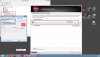
i think, the problem is that i cannot enable the dedicated vga (HD6750m) to work on the application i want..
the solution i have tried :
1. uninstalled the driver with fusion driver and cc cleaner, then installed it again, but still the same issue..
can anyone help ? samsung service centre in indonesia are hopeless.. is it possible to refund it and upgrade it to a newer version that doesnt have this problem, problem is my receipt from buying this laptop are already gone..
sorry for my bad english.. please help me.. -
Install GPU-Z and confirm that it does not show load on the AMD card when running Dota 2. If it does show load, check that PowerPlay is disabled in the Catalyst Control Centre. If that doesn't help, I am out of ideas - the solution in this thread applied only for Windows 7 drivers. I have no idea if the problem is fixed with a specific Windows 8 driver.
-
Hi guys
I have a problem with adobe flash player.It is crash every time . My driver is 8.951 any method to fix -
Try upgrading the driver. I'm running 9.10.8.0 without any problems whatsoever.
-
How to upgrade Can you tell me ... SW Update show for last driver is 8.951 in the official site have only this drivers 8.951.From where to download the last drivers for mu NP700Z5A
-
8.951 is the also the latest Win7-driver I have for my NP700Z3A. It worked perfectly for me, including with Flash. You can try and uninstall/re-install Flash and see if it helps. Also, if you right-click a Flash animation and enter Settings, you can enable/disable hardware acceleration (GPU).
Do note that if your problem is Zynga/Facebook games crashing, you're simply going to have to live with that. These things are so buggy and so beyond what Flash was designed for, I've never seen a PC that can run them without occasionally crashing (although admittedly it does vary from one PC to another). At least that's been my experience... -
I do everything uninstall/reinstall couple of time adobe flash and graphic drivers.With new drivers 11.6 Each browser crash every time when must to use the flash with old one I problem only with some application like google earth
-
I would use Samsung provided AMD drivers (not generic Catalyst drivers) to make sure graphics switching works correctly.
I think your problem is somewhere else, not with the graphics drivers or flash itself. Have you done a though check for virus/malware recently? -
Yes I checked for viruses too.When I used the leshcat drivers I don't have this problem.I really don't know what to do.I will make couple of test and if the problem isn't gone I will go back to leshcat drivers
-
OK, understood. All I can say is I don't have that problem using the Samsung provided drivers, neither in Win7 nor Win8 -- except when my wife plays Zynga games. If leshcat drivers solve it for you, just go for that.
-
When I tested the Leshkat drivers last year, the GPU fan stayed running all the time, which drained the battery faster.
-
Thank you guys I will make couple of test with leshcat and samsung drivers
-
I am having the exact same issue. Windows 8 as well with the same graphics card, same drivers and see the same screen as you are getting in CPU-Z. Did you find a resolution for this?
I have the NP700Z5A-S04 -
NP700Z5A was not designed for Windows 8. I suggest you install Win 7 and the driver posted on page 1 of this thread.
-
It is true that NP700Z5A was delivered with Win7, but it is fully supported for Win8 by Samsung, as shown here. Indeed, I have had zero problems running Win8 on my NP700Z3A (other than my Metro gripes) which is very similar hardware, except the larger LCD and faster CPU and GPU on the Z5A.
@bo2y_13: Although I don't game on my PC, I tested it with some older games I had so that I could report back on this forum. See the discussion here about experiences with graphics switching. Although I was able to get mine working, others were experiencing problems too.
Install HWiNFO64 and open its Summary screen to monitor your GPU while gaming (use the dropdown to switch between which GPU to monitor). That should help you determine if the AMD is being used. Maybe the bottleneck is somewhere else. If it is NOT being used, maybe there is another executable for the game than dota.exe that needs to be selected. -
Hi,
I got the samsung 700z (NP700Z5A)
I having a problem with the opencl feature in in the "liquify" command in photoshop CS6. The screen i just getting black. I am using the graphic card(6750m) at high performance.(at moment i am using display driver 8.951.9.3000).
I have read that catalyst 12.6 will solve the issue but i didn`t get it working.. Catalyst center wont start.
Anyone that knows what will solve this issue?
Any help would be useful.
Thanks -
Hi Ovaldo, welcome to the forum!
First of all, I assume you already used Configure Switchable Graphics and chose High Performance for Photoshop, right? Sorry, I had to ask, just in case.
I wish I had a concrete solution for you, but I am afraid I don't. Your model depends on AMD driver updates from Samsung, since they include both the Intel HD3000, the AMD drivers, and the switchable graphics configuration feature. And 8.951.9.3000 is indeed the latest official Win7 driver.
For Win8, there IS a newer version 9.2.0.0 driver. I use that driver myself on a smaller NP700Z3A with no problems, but at least two members have recently reported problems getting that newer driver to install correctly on NP700Z5A units. And again, that's Win8.
Below are some suggestions you can try. All of them will require some work -- and could mess up your Windows installation. Make sure you have good backups.
1) Try and install that Win8 driver 9.2.0.0 on your Win7. It probably won't work, but it's worth a shot. Use SW Update's Find Model function to look up your own model and find Win8 drivers, then save the AMD driver from there.
2) Try some of the latest AMD provided drivers. But you will probably have to manually install Intel HD3000 drivers first. Owners of the 2013 Series 7 Chronos models have found success with the latest Catalyst 13.5 Beta drivers (as described in the opening post of this thread), but remember that's an entirely different generation of chipset (Ivy Bridge vs Sandy Bridge), GFX (HD4000 vs HD3000) and GPU (AMD 8770 vs 6750m). I would be VERY interested if you can make this work on your NP700Z5A.
3) Upgrade to Win8 (if that is an option) which SHOULD allow you to install that Samsung provided Win8 driver 9.2.0.0. I emphasize "should" because, again, some members had problems getting it working on NP700Z5A; that could be unique to their machines, though. See this thread for details. Again, that's what I am running (and very smoothly) but I don't use Photoshop anymore and couldn't tell you if "liquify" works.
I think that's all I got. None of these are tested solutions, they are merely things you can try. Of course you can also contact Samsung and press for updated AMD drivers
Please keep us posted on your progress.
Edit: One more thing: You'll find lots more discussion about your model in the thread linked below. It's not so active anymore, but some owners may still subscribe to it and see if you post there. This thread here is really about a graphics switching problem in the Samsung provided drivers that was solved long ago.
http://forum.notebookreview.com/sam...0z3-np700z4-np700z5-series-owners-lounge.html -
"Thank you very much for taking your time helping. I appreciate it!
-
OK, got it. Thank you for that update. I see you already tried a lot here, I wish had a fix for you.
When you say the Catalyst 13.5 Beta drivers didn't work, do you mean that liquify didn't work, or that drivers wouldn't install or wouldn't run on this GPU? The 2013 model crowd ended up with a very specific list of steps to get it working right (as described in that thread). But I have no idea, if it's even compatible with your GPU.
Again, please keep us posted. Good luck to you! -
Yes i received a notification that Win8 was fully supported from Samsung and that is the whole reason i upgraded. To suggest rolling back to an older version of windows is just plain silly. Understandable if the machine was 20 years old and not capable of running windows 8 but i have had this machine barely a year.
Sorry if you have already stated this Dannemand but what setup are you using to run windows 8 with dual graphics cards working? -
Which model do you have?
Maybe I am just shamelessly lucky, but I was able to install Win8 with no problems whatsoever. In fact, I installed it several times to test things out, and I never had any of those graphics driver issues which some NP700Z5A owners have now described.
Check this thread for description of my installation and discussion of issues with another Z5A owner:
http://forum.notebookreview.com/sam...ows-8-my-series-7-chronos-np700z5a-s04us.html
Briefly, my steps were as follows:
1) Downloaded my $15 Microsoft Win8 Pro upgrade (before end of Feb 2013) and burned ISO to a DVD.
2) I already had two different OS partitions on my disk (48GB each) with two different Win7 installations (one for production, one for tests). I wiped the second of those partitions and made it Active (to avoid Win8 Setup overwriting the boot manager on my Win7 partition).
3) Booted the Win8 Pro DVD, chose that second partition as destination (now Active) and let Setup do its thing. When asked about Windows Update, I always choose to disable it first, then enable it later when I am ready to update.
4) Used SW Update to install most (but NOT ALL) drivers, and the rest manually -- as described in this post
5). Done.
I can choose GPU with the Configure Switchable Graphics feature. Using HWInfo, I can see it works in the games I tested, even though some games still think they're using the HD3000. As described in this post.
If it doesn't work on yours, I really think you have to keep pressing Samsung to either release an updated AMD driver OR take the NP700Z5A off their Win8-list (assuming that's what you have).
I'll be interested to hear of your progress. -
Sorry thought i had it setup to notify me of replies but didnt get anything so maybe i hadnt?
Anyway i have the NP700Z5A-S04
I still didnt get it fixed so have kind of just been waiting and checking for new drivers. Right it shows the 9.2.0.0 driver for both the AMD Radeon HD 6570 card and the Intel Card.
If i install the AMD driver then the Intel shows whatever driver i installed as well.
Its just plain annoying. -
Dont ask me why but i think it is now working.
I went and looked specifically for my model in SWupdate. Found the display drivers for windows 8 for that model and downloaded it. Installed it and the "configure switchable graphics" option disappeared.
This has happened before so i thought ok lets just try reinstalling the graphics again from the swupdate but i will just use the drivers it suggests (they were the ones i was already using). So I installed it again (this isn't the first time i have uninstalled and reinstalled it) and now when i run a benchmark test with Furmark it clearly says its running AMD Radeon HD 6750 and i can see its working in HWInfo now.
It still says its using 9.2.0.0 drive for both the cards in the device manager though. -
Hello dartd27, thank you for the update.
That was a surprising development: As you may recall, we had a few members with NP700Z5A units who (like you) were unable to get the 9.2.0.0 driver working correctly in Win8 -- whereas I have had absolutely zero problems with the exact same driver on my NP700Z3A.
With your latest report, it wold seem that something else affects whether that driver installs properly. For all we know, a certain alignment of celestial bodies may be a requirement
As frustrating as it is when something begins working for reasons unknown, it is still very positive that you were able to get it working. It means there is hope for other owners of this model who want to install Win8. Now if only we could find out why it sometimes installs correctly and other times doesn't. -
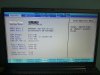
Bios mod for np700z4a and z5a.


-
Sorry for being so naive. Where does one obtain this modified bios? I have the NP700Z5A with BIOS version 15FD, but mine looks nothing like your screenshots...
-
Do you have the source for this?
EDIT: Seems like I have found the source ( http://www.bios-mods.com/forum/Thread-Samsung-np700z5a-bios-unlock-request?pid=61156#pid61156) but the file has been deleted >_<
Link to deleted file: http://rghost.net/49523441 -
Anyone discovered anything good on the mod bios?
Like undervolting the CPU or something about the dedicaded GPU? -
Hi, I have downloaded the unlocked BIOS for my Samsung laptop but I don't know how to flash it. Does anyone know any websito or tutorial I could follow? Thx you in advance.
-
This thread might get you pointed in the right direction.
John -
Thanks for answering so fast. I will try it, I don't know why some games doesn't even display the ATI card. I hope this will fix it.
-
I flashed the modded bios last night onto my 700z5a (S01-uk). All flashed ok and booted back into windows fine. I then went and had a look at the bios. there are a LOT of options in there. Things like how many CPU cores active, memory speed, volting etc.
The video stuff is what intrigued me the most. I tried a few options. the muxed one made the machine reboot and the screen did not come on. it wouldnt even turn on.I had to do a hard reset with the pin on the bottom. I havnt gone through all of the video options yet to test what they do but it might be that we are stuck with going through the intel card. not sure how that affects the switchable graphics though. i guess the drivers will have something to do with it as well. I would like to try ojne of the video modes and install the stock ATI drivers. -
So I did some more playing around with the video settings.
Putting it in PCI, IGD or PEG mode didn't really do anything as far as I could tell. I'll go back an make sure but didn;t look like it.
There was an option for selecting dGPU while still in muxless mode. That mean that the ati card is still rendering through the intel framebuffer BUT I think that it will be the main card used for all rendering. The reason I think this is that when I right click on the desktop, the option for switchable graphics is gone. Instead is an option for opening catalyst control centre. CCC wouldn't open however. It came up with a message saying there aren't any settings to change. both the ATI card and intel show up in device manager though. I need to do some benchmarks to confirm that the ati card is the main one being used here though. I'll try the GL extensions viewer (when I rememebr what that program is called).
I main reason I am investigating this is that I want to try and install OSX on the chronos and have the ati card be used. Probably wont work as it seems that OSX will detect the intel and doesn't know how to deal with the switchable graphics. maybe this bios will make it work but who the hell knows. -
I can't say I've had any problems using image-editing software, 3D modelling or playing things like Red Orchestra 2 with everything on. The switching seems to do its thing. I have it set to ask me which performance mode to use. My real annoyance is having to rely on Samsung for driver updates, as they haven't released anything since 2012. Why can't we just download and use the ATI drivers as in a desktop without having to fiddlearse around?
-
I'm curious if that BIOS would work for 700Z5B, which doesn't have expresscache. I might find an unaltered 700Z5A and a 700Z5B 15FD bios and do an md5sum and see if they are the same...or just post again in bios-mods.
-
Hi everyone, has anyone been able to have Intel Quick Sync working in Windows 8.1 with the latest AMD drivers availlable from Samsung.
I have the 700Z5B-W01UB and since I'm on Windows 8 this is not working if I use the AMD drivers. If I remove the AMD drivers and just use the plain Intel HD3000 drivers from Intel it's working perfectly.
It was working in Windows 7...
-
I have a Samsung series 7 (NP700Z5A) and I'm smashing my head against the wall because I can't play any of my games due to the switchable graphics problem. I hope you all can help me. I don't have the time to read through all of this forum. Anyone here have the heart to give me a hand getting my dedicated GPU working? I've been upset about this for far too long now and I love the laptop but I can't enjoy my games.
Series 7 Chronos All Models: Push for SAMSUNG to implement "FIXED MODE" in BIOS
Discussion in 'Samsung' started by yknyong1, Dec 9, 2011.


