 Problems? See this thread at archive.org.
Hi Chris, welcome to the forum.
Seems you didn't get much traction with that question. I am afraid I don't have any answers for you myself. I honestly don't know if this laptop even DOES support WOL from hibernation or power off -- it's a completely different beast from sleep wake-up, which is handled entirely within Windows.
I would recommend you post your question as a new thread instead, since the answer may come from owners of any model. It's been more than 24 hours since your post, so you can go ahead and do that without violating any cross posting rules. I hope we can get an answer for you.
-
-
Thank you for the advice, i will start a new thread then.
-
I installed the 13.5 and 13.6 catalyst beta drivers but I didn't see the app to assign the programs to run with the dGPU...
-
Check this thread, see if that helps. Your answer may be on the second page (it's juts a small thread).
-
Hi everyone.
Does anyone know where can I find NP740U3E that comes with i7 & 2 Sodimm slots for 16GB RAM upgrade?
Australia does not seems to stock this model. Most of the Australian stores only offer the i5 version with 4GB ram (2GB ram soldered + 2GB sodimm).
I really wanted the 2 sodimm model with i7, so I'll be very appreciated if someone can help me find an online store that sells that model & can ship it to Australia.
Thanks. -
Same problem here... I can't find it. Maybe it's just a legend

Do you think it's possible that Samsung will show next series 9 laptops in few months? Maybe it's worth waiting ? Sadly even so, it probably wouldn't have RJ45 ;/ -
So I finaly got the 730 with i7 6GB ram 128SSD.
All is groovy but for some reason I think I somehow disabled gestures as I can no longer scroll with the mousepad etc. Any idea on how to reenable them?
Thanks
Edit: Got an update that I installed which fixed it so all good
-
I also think my laptop may not be using the dgpu for games. I've tried changing the options with the switchable graphics settings with games, but have found no difference in frame rate between using high performance, and power saving. I have also tried installing the 13.6 beta drivers, but that hasn't changed anything. As an example, I've downloaded the fifa 13 demo, a supposedly very easy game to run, but have been only getting a average frame rate of around 60 fps on low graphics settings and 1366x768 resolution. When benchmarks have it at over 100fps with those settings. The box for my laptop says it is the 8570m in it, but I have heard some people saying it is the 8550m, in the Australian versions (which I have), and I will be very disappointed to hear that the card in my system is not the one advertised on the box. Is there a way to check specifically what model I have?
-
Download and run GPU-Z.
If your box says 8570m, that's what it should be. -
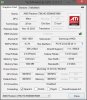
This is what GPU-Z showed me it wasn't very specific with the exact model number. Anyone able to tell if this is the 8570m by these results?
-
Hmm, I was kind've afraid of that nondescript GPU-Z reporting. According to Notebookcheck, when compared to the 8570m the 8550m has 50mHz faster core and shader clocks and 100mHz slower memory clocks, but they're probably the exact same part with a different vBIOS.
If you can check GPU-Z while your dGPU is running full-power, you can check its clocks - 700 Core and 900 Memory is 8550m while 650 Core and 1000 memory is 8570m. It downclocks when it's idle or on battery power, though, hence the 300/300 in your screen. Either way, it looks like the 8550m actually performs a bit faster than the 8570m in benchmarks because of the increased core and shader clock, so I wouldn't really worry either way given this info. -
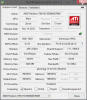
It appears I have the 8550m according to the core and memory clocks. I wouldn't mind so much, but the actual game performance benchmarks seem to be quite different (atleast with fifa 13), with it being much more playable with the 8570m (twice the frame rate), so I am a bit disappointed.
-
You might have noted that the 3DMark scores for the cards were much higher for the 8570m than the 8550m, even though the 8550m's GPU-only 3DMark scores were actually higher than the 8570m. That tells me that the machines they used to test the 8570m had much faster CPUs than the 8550m test machines, which could explain the game benchmark differences. If the only difference is a tradeoff of 50mHz Core/Shader clock one way and 100mHz Memory clock the other way, there's no way one is twice as fast as the other. It's also legitimately possible that some of those results were due to switching or driver issues, such as AMD powerplay (battery-friendly but game-unfriendly clockspeed limitations), switchable graphics not selecting the dGPU, or gaming on battery. Unfortunately, Notebookcheck is notoriously unreliable for GPU comparisons beyond "780M>HD4000", but it's also the best one-stop resource we've got.
-
Thanks for all the help! I've tried the 13.6 beta drivers, but I haven't noticed any increase in performance. I'll make do for now, but I'll be contacting Samsung to find out why The 8550m is installed, when it says on the box 8570m.
Also, I posted a few posts back, and am still wondering if there is a way disable the Fn function of the arrow keys, as I usually have the Fn lock button activated, and I'm not the biggest fan of the Fn function of the arrow keys. -
I am afraid I don't think there is a way to disable Fn. Even if you were to uninstall Settings (which would cause you to miss out other functionality) several Fn key combinations are hardware supported directly by Windows. I understand why you would want it: I never liked Fn arrow keys myself
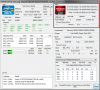
As for determining your GPU model and whether it is running as expected, you can also try HWInfo. Maybe it displays some details that GPU-Z doesn't. It also has a Summary screen that shows the activity of the AMD (if you select it).
-
Hi,
When you say that, could you give a little more details about how you have done it. I personally used Samsung Recovery Solutions 6 to save a Factory image on an external drive.
Then, either launching SRS or using the F4 at boot, I do not see any option in the menu to restore from a factory image located on an external source. What are the steps you followed, if you don't mind sharing them with us ?
many thanks in advance for your help. -
I believe backslash is referring to the BOOTABLE Factory Image backup option. This is a new feature now available in SRS6 (so you have it on yours). But you must backup the Factory Image to a USB stick and check the Make Bootable option (I forget the exact name).
You can backup your Factory Image to an external HDD (as you found) but you need to boot a working Recovery in order to restore it -- which kind of makes it pointless. A USB stick allows you to make a self-contained, bootable backup.
We've had a lot of discussion about this in pranktank's 2013 Series 7 Chronos Owners Lounge. For example, start reading here. -
Hello everyone, i have a bit of a dilemma going on on what configuration to choose,
in italy we have 2 models one with i5/4gb/128ssd for about 950€ and the other i7/6gb/256 for 1200€.Would you say that the i7 could lower the battery life noticeably?Since i will be buying the pc in late august i guess that i could get the second configuration for 50-80 € less -
The i7 CPU shouldn't make a significant difference to the battery run time. I would be more worried about the 128GB SSD which doesn't leave much space for user files (and it might be the poorly performing Sandisk U100).
However, what you can buy in late August may be different. Intel's new Haswell chips have now been officially launched and we can expect these to appear in Samsung notebooks before long. Models using Ivy Bridge should move down the price range or they may disappear completely.
John -
Has anyone received the black version? I can't find it anywhere for purchase:
Samsung ATIV Book 7 730U3E S06 - ÜBERSICHT | SAMSUNG -
Well i think I am gonna wait for a price cut on the the chronos 7 15.6.I tried the serie 7 ultra yesterday and it is too small,while the 15.6 seems the perfect size(mind that i come from a 17.3 asus so that 13.3 looks like my phone)
-
Thanks a lot!
13.6beta2 is working very good
-
New BIOS update: Version P05ABW. Does anyone knows what changes?
-
How much faster is the Radeon 8570m GPU compared to the Intel HD 4000? I cannot find very much info on the Radeon card on the net. All I know is that both are lower middle range and I am wondering whether it is worth to pay extra for a 8550m or 8570m video card.
What are your experiences with it? And is it possible to disable the discrete video card in the BIOS, but still being able to plug in an external screen? Perhaps I want to use Linux someday and the compatibility is so much better with the Intel card. -
Probably the best comparative source of information is the notebookcheck mobile GPU benchmark list.
John -
any news about the Ultra getting a Haswell refresh? or if the black color is making it to production?
-
I might be mistaken, but I think black versions are available in the EU. As for Haswell, Samsung said nothing at their big press event on the 20th, but the whole event was just new product releases - they said nothing about refreshes. Hopefully they'll quietly refresh sometime soon, but I'm no longer holding my breath.
-
According to a local Samsung guy, there will be no Haswell refresh until Christmas. That's a new Samsung policy - one refresh per year.
-
Also there probably will be no Haswell version of the non-touch ATIV Book 7, because Intel defines a new Ultrabook (incl. Haswell) only with Touchscreens ...
-
I'll only believe that if we get to the end of the year without a Haswell version. At the moment I believe that Samsung are still using last year's formula of delinking the chassis refresh from the Intel platform refresh. Based on last year's Ivy Bridge introduction it will take two or three months for the new chips to arrive in all models.
Samsung can make whatever they think will sell but can't use the Intel Ultrabook sticker unless it conforms to the Intel requirements.
John -
On the first paragraph, I hope you're right, although I've pretty much resigned myself at this point.
On the second paragraph, unfortunately, OEM's slobber over Intel's marketing as it represents their potential to make more money. While I hope I'm wrong, I suspect that few manufacturers will take the route that Sony's taken with the Vaio Pro (offering non-touch versions of a flagship ultrabook), and will instead fall over themselves to give in to Intel's "Ultrabook" specifications. While I want a touchscreen in my next notebook and appreciate the pressure Intel has put on OEM's to increase resolution (although the increases are now happening too fast for Windows' scaling tech to keep up and focusing too much on DPI as the end-all spec), I'm not at all a fan of an entire market segment being held hostage by a set of standards, especially when those standards keep pushing certain specs in the wrong direction: ever thinner and lighter (and more fragile), too-high resolution, "tabletization", and minimal performance standards are making ultrabooks into commodity consumption devices like tablets and smartphones. Buy it today, use it for a year or two until it breaks or the minimal iGPU can no longer run Instagram on the foolishly-high resolution or the tiny portion of single-channel RAM gets eaten up by a single Firefox tab, discard and repeat.
This rant brought to you courtesy of the Intel Ultrabook Specifications. -
So I read all the pages of this thread ( and lots of others) and have been thinking about taking the plunge and purchasing the series 7 ultrabook for my first touch windows 8 laptop experience for a few days now.
I went to BestBuy.com today and the computer appears to be no longer available! ( at least in the Seattle area). It says " store pick-up only" and when I get to the page with store listings they all show " unavailable" and won't let me complete the transaction.
Did I miss my opportunity? -
hopefully that means they've pulled it to refresh it with haswell. if they do that and make it available in black, i'll likely buy it.
-
I was at Best Buy last Saturday (Clearwater, FL) and saw the NP740U3E there. I haven't seen it before, it's very elegant -- not quite as smoking hot as the NP900X3E (which they also had on display) but getting up there.
I do see it's gone from bestbuy.com, but clearly still available in some stores. Maybe they can look it up for you. Otherwise I would expect a refresh to be on its way (as droyder said). I can't imagine Samsung would release a good product like this only to scrap it a few months later. -
I got someone to look it up for me...one machine in stock in all of WA state in Yakima ( 4 hours away).
She did say that there appears to be a " coming soon" replacement and gave me the sku number. Unfortunately it is the exact same machine w/ a different name but Best Buy doesn't have them yet and she doesn't have a date: # 8967042
I did find the machine on the Samsung USA site...but it is $100 more. -
So in other words, they appear to be cutting off the IB Series 7 Ultra so they can sell the IB ATIV Book 7... Come on Samsung - get your Haswell version together!
-
I can't find the black version anywhere in Europe, what's going on ?
Samsung ATIV Book 7 730U3E S06 - ÜBERSICHT | SAMSUNG -
Sucks. But it's not worth it to spend $60 in gas and putting 500 miles on your car -- let alone wasting an entire day --just to save $100. If you're not in a hurry, I would wait a little longer. I think they'll release a Haswell refresh later. Either go for that (at its higher cost) or pick up the current model at a discount when they clear that inventory.
-
hello,
i try to install beta drivers to hd8570m graphics card. First I removed old drivers from Catalyst, next I tried to install beta drivers from amd web site but this drivers don't works with my laptop (np730u3e).
Now I can't find and install old drivers and i'm stuck. Does anybody have same situation and could help?
EDIT: i used sw update and it works
-
Does SW Update not offer it for you?
I just used Find Model in SW Update to lookup NP730U3E-S02UK (not sure if it has the 8550M or the 8570M) and it shows an AMD Graphics Driver for Win8. Try that (or some other NP730U3E sub-models).
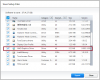
If all else fails, you could restore to factory (boot Recovery with F2). There should be an option that preserves your data -- although I would still make a thorough backup first. -
Hello, i'm new
I just bought a 730U3e S03 ( i7, 6GB,SSD256 ) and i would have some question to ask you.
I'm intentioned to expand RAM immediatly, so i started to search a 8GB module PC3 12800 @ 1600mhz 1,5v 204 pin.
Usually i get well with Corsair, so i found this modules:
Corsair Vengeance 1x8GB CMSX8GX3M1A1600C10 CL 10-10-10-27
Corsair Value Select 1x8GB CMSO8GX3M1A1600C11 CL 11-11-11-27 (same as Samsung 4GB installed )
Anyone tested this modules?
Another question: where can i find a step-by-step tutorial for doing a clean Win8 installation whitout messing up all ?
Last ( i promise ): it will be a real possibility in future of upgrading actual CPU whit Haswell one?
Thanks in advance at those that would help me.
-
Hi watchkatt, welcome to the forum. And congrats on your new machine.
I've heard of watch dogs, but never watch cats. I imagine it must take some serious training
I cannot speak to the RAM modules you ask about, hopefully others can.
Regarding your Haswell CPU question, I absolutely do NOT think you can upgrade to that without replacing the motherboard.
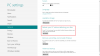
As for Win8 re-install, I would recommend you just use Win8's Refresh feature instead (see screenshot below) which gives you pretty much the equivalent of a clean install. Then use SW Update to install the drivers listed in this post.
If your desire is to wipe the partitions on your SSD (understandable) I recommend you first create a Bootable Factory Image backup to a USB stick using Recovery (F4). Lots of users here have realized too late they wish they still had their Recovery -- and this is the ONLY way to back it up.
Now you can wipe the SSD and install Win8 from an external DVD drive or USB. Samsung doesn't provide Windows install media with new PCs anymore. You can download an ISO from Microsoft if you have an MSDN subscription or a student ID. Please do not ask about or discuss illegal Win8 downloads on the forum.
Do note that even without the two Samsung Recovery partitions (20-26GB depending on model) you'll still have a lot of partitions after a clean install -- that's how the new UEFI/GPT system works. See this post for a list of standard partitions on Win8 systems.
Before installing, you'll have to boot into BIOS (F2) and set the following
Fast Boot/Fast BIOS = disabled (if your BIOS has it)
Legacy USB Boot = disabled (if your BIOS has it)
SecureBoot = disabled
OS Mode Selection = UEFI and CSM OS
You can change these back after completed installation. Assuming you install the same Win8 version as you had before (Pro vs non-Pro) it should pick up the Product Key stored in your BIOS.
Now you see why I recommend just using the Win8 Refresh feature instead
Let us know how it all works for you. Enjoy your new toy
-
I tend to buy whatever is cheapest. Provided the RAM is DDR3 SODIMM then it will work - the BIOS looks for the fastest timings supported by both modules. In your case if the on-board RAM is CL11 then you get no advantage of buying anything faster unless you plan to change the computer within a year or so, in which case faster RAM may be beneficial in your next machine.
John -
Hi Dannemand, thanks for the help!
Mmmm, i think it's better to use Win 8 Refresh only, my goal is wipe out all unwanted apps without leaving garbage all around...
It's a pity that if it will be no possible replacing CPU with an Haswell one, but for thousands reasons your scenario is the most probable.
Thanks again for your advices! :thumbsup:
(In my life i had a couple of cats of the bunch that was, for sure, a so "natural-watch-cat", any training done... )
PS: which extra RAM module did you put in? -
You are right :thumbsup:, in effect my first choice is for the Value.
Do you have any other good tested RAM stick to suggest me?
Thanks you
-
Got my 730U3E-K01 today in Russia for a mere 1,020$ (782 EUR) after all discounts.
It's a black (or navy-ish) one with Intel graphics.
Going to put a PLEXTOR PX-256M5M SSD into it. -
Yeah, I see, finally a black version, can you post some real life pictures of it please ?
-
Plenty of them are here.
Hope the link is accessible from abroad. -
Samsung confirmed that there will be no S07 in black available in Germany. Too bad.
-
No problem. I think you'll find that Refresh should be a simpler approach.
Again, I am afraid I don't have any advice for you on RAM. My laptop (a different model) still has the 8GB with which it came originally.
And now I think about, I guess I can imagine an intently watching cat. Yeah, I can see that
Series 7 Ultra NP730U3E / NP740U3E with AMD HD 8570M and optional 4G LTE
Discussion in 'Samsung' started by yknyong1, Jan 11, 2013.


