Problems? See this thread at archive.org.
@radji My name is not Iliya, it's Rafael >:[
@Mitlov My Galaxy Note 2 experience, so far, has been flawless. I'll give you a short list of the most noticeable things about this phone :
- Screen is gorgeous. No really, you'll really love its colors and screen quality. Although it's 720p, as per initial worry, it has no pixelation issues at all, and it's all very crisp.
- Battery life is incredible. With medium/heavy usage (gaming, browsing, music, texts and calls) it lasted me 1.5-2 days.
- It may be a bit big in the beginning, but with time, you'll get used to it and you're gonna love the size, since a) it has so many possibilities to watch more stuff and do more stuff and b) you'll feel any phone less than 4.8 inches small. Heck, my dad's Xperia Arc S is like a feather, and my friend's S3 is so small to me. 5.5" is the sweet spot!
- I thought I wouldn't use the S Pen much, but I end up using it a LOT, from just showing it off the nice Air view features, to using my Note 2 as a notebook in school when my laptop stays at home. And it's crazy accurate.
- Build quality is great, even though the back is plastic, the screen glass is very good and extremely scratch resistant.
- Camera is GREAT! I can upload a few examples if you'd wish so, just tell me!
- I've spoke about the hardware, now about the software. Touchwizz is flawless now, performance wise. No hiccups at all, and it doesn't deteriorate ANY performance at all. With the 2GBs of RAM of the Note 2, touchwizz runs like a breeze.
- Apps open up extremely quick and pretty much instantly.
- Rooting is very easy. Unlocked bootloader from factory FTW. And the best thing of that is that you can try any ROM you would like, and when you're happy, you can stay with them. Already tried around 10 ROMs, and it's just so easy (got TWRP as a custom recovery) to switch between ROMs by restoring them.
Overall, out of those 4, the Note 2 is hands down the winner. I've been using it almost 2 months now, and I can't find ANY issues or build quality issues or alike. Great phone, and definitely deserves all the 10/10 review it has gotten
-
-
I looked at them in person and the Note 2 was too big for my hands (I've got a smaller build). Yeah, nice screen and all, but my thumb only can reach 2/3s of the way across the screen. The Galaxy S3, on the other hand, fit me perfectly. Just the right size--not too small like my 3.6" HTC but not too big like the 5.5" Note 2.
And US Cellular is awesome. I explained to them that my work had quit supporting WP and I needed an upgrade, but I was 30+ days away from the upgrade time, even with US Cellular's "upgrade accelerator" (with US Cellular, you save up monthly points earned by paying your bill on time to either buy accessories or take several months off your upgrade time). I explained the situation at work to the sales guy, and he threw in another 2,000 points just as a "you're a good customer" thing. As soon as the additional points clear their system (a couple days), I'm eligible for a new device.
So I should have my Galaxy S3 by Monday or Tuesday. -
I thought the Note II's screen resolution was 1280x720? Same as my SGS3?
Let's try something simpler then. What is the domain of your email? @gmail.com, @sbcglobal.net, @hotmail.com, etc? If it's a private email for the company you work for, then there are a couple of options. If you use AT&T or Gmail or the like, then the apps for those email accounts work just fine. I have not found a reliable android app yet that works seamlessly with Microsoft Outlook.
I know that. But you stated you're originally from Ukraine, yes? That would make you more Illya Kuryakin than James Bond...right?
PS: if you don't get that reference, then I'm might have to slap you.
-
Hmm.. I was getting a "SIM Card Not Allowed" message on my home screen and no cell signal. 2 reboots later and it's gone. Weird though..
-
My work email is the private company's email, not a webmail service. It's the name of our firm (plus .com) after the @ sign. I also have two private email accounts, a gmail account and an outlook.com account. The work email is the most important for me to get on the go, since that actually affects my ability to serve clients, whereas accessing outlook and gmail are just for myself. So trading from a phone that can't access my firm email but handles my outlook.com email, to a phone that handles my firm email but has a clunky outlook.com interface, is a major upgrade in utility for me.
-
Very true. I use my sbcglobal email as my primary and my Gmail as my secondary. Even when I was working I refused a company email cause the "small business" server the company had just caused too many headaches to want me to have a company domain email address. The only reason I keep a Gmail account is so I can backup all my contacts and apps from my Android to my Google account. So if something happens to my phone, I need only get a new one, and log in to get my apps and contacts. The Outlook.com email app is very clunky. But to me, there's a big difference between using Outlook.com for an email, and using Microsoft Outlook for email. I've used Outlook Express, then upgraded to Outlook when MS discontinued Express.
If your company actually uses Microsoft Outlook 2007 or 2010 for the company email, then this app may be the best option for you: https://play.google.com/store/apps/...1bGwsMSwxLDEwMiwiY29tLnFvd2FvdXRsb29rbGl2ZSJd -
Gotcha. I was inquiring because it seems like your workplace deploys a Bring Your Own Device policy, which usually ties up with some sort of messaging system tied to the email server. One of the more popular ones being used is Good:
Good Technology
I noticed you currently have a Windows Phone 7 device, which if Good is what your IT is going with, does indeed support your current phone. I know they dropped support for the older Windows Mobile 5/6 devices last month, so I was just wondering if they're getting the information mixed up.
Good choice on the Galaxy S III, it's very well-rounded device. -
I may not understand the real issue going on and may not be accurately describing it. But in the end, the company that does our IT says they can't make WP get our business's email anymore but they can do it with iPhones and Android. Whether the barrier is the hardware or software itself, or whether the barrier is the competence level of my company's IT people, it's nevertheless a barrier I have to live with.
I was really happy with the Galaxy S3 when I played with it. It looks really cheap and ugly in pictures but it feels very nice in the hand, and the interface was very smooth, and the camera app was AWESOME compared to my 7 Pro's. -
Sadly, that's probably it. Windows Phone natively supports POP, IMAP, and Exchange. They just don't want to/don't know how to deal with Windows Phone and don't really care to learn.
-
Second that. There will never be a hardware barrier and very rarely be a software barrier.
-
You are correct. I like my G3 even more now. The thinness I talked about and the cover really does make this feel as solid as any. And because it started thin it is not over sized with cover. I have held many phones and with case this is still well sized and solid. I have dropped many times and no damage. The case I bought was from Sprint store BB did not have.
I don't see how the quad core is needed. Sure I would like but look at the benches for the "world" G3 vs US. OK world wins but that 2GB RAM really helps. I know the Note has 2GB. But vs other quads G3 hangs well. The phone is snappy it does well. -
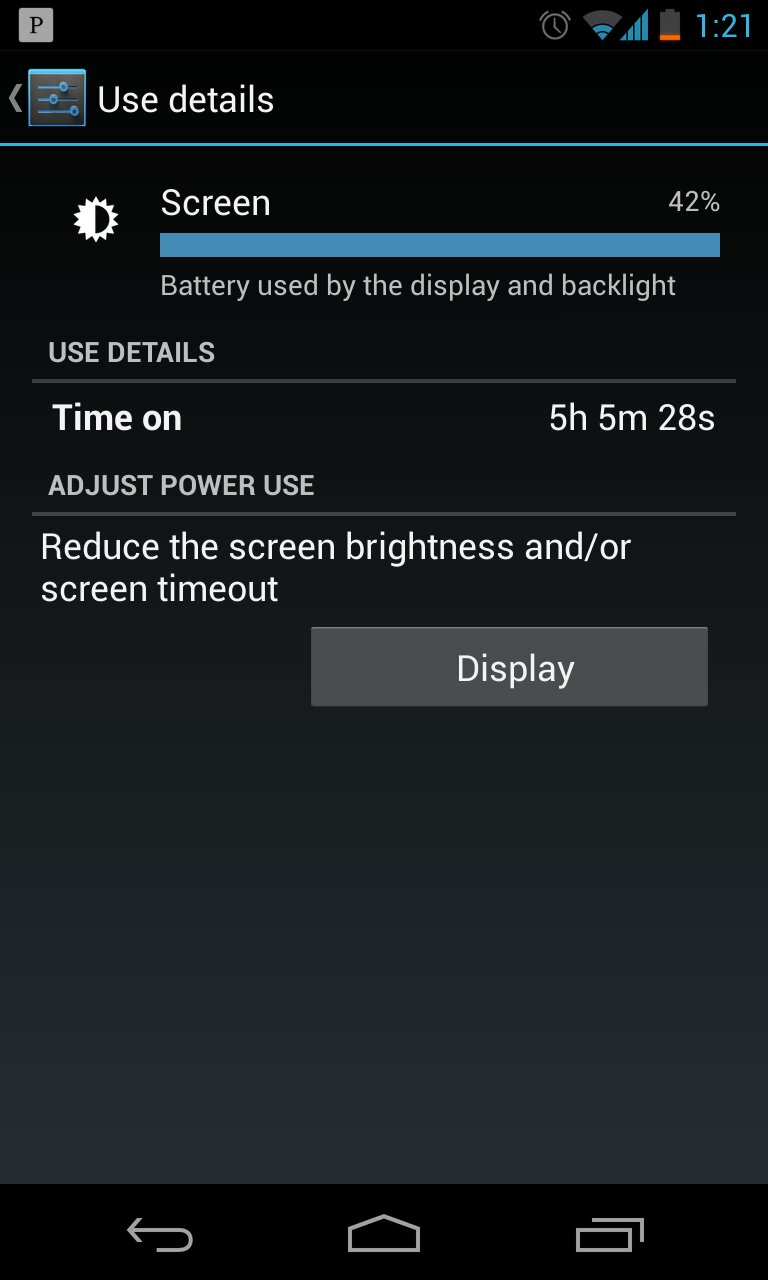
My Nexus 4. Mostly Wi-Fi, but I did use GPS navigation for about 20 minutes while running an errand. 15 hours of up time. Rev 11, 4.2.2. Google Now on, auto-sync off.
Sent from my Nexus 4 using Tapatalk 2Attached Files:
-
-
Seems strange that any private email system will support iOS and Android but not WP... there are really only two main email protocols, IMAP and POP... so it should work.
Sounds like the SIII is the right phone for you... but I would still try to check for WP email capability.. so you can wait for the SIV.
-
The company says "use X and Y but not Z." I don't quibble with them. Those are the rules now. I don't know or particularly care what the exact nature of the problem is. At the end of the day, I can't use Windows Phone as a work phone anymore. The "why" is an academic discussion that really doesn't affect me.
-
Your work likely just wants everyone on one platform to make troubleshooting easier, especially since they let you use windows phone before.
I know, its "BYOD" these days but I'd bet that 90% of the time its really "bring your own iPhone or corporate vetted Android phone".
Anyway, sounds like your leaning toward the gs3....its an excellent phone and far better than the Motorola (seriously they suck) and LG.
Sent from my DROID3 using Tapatalk 2 -
Report: Samsung Galaxy S IV to have Qualcomm Snapdragon 600 inside; boot screen leaks
If this is true, that's a bit of a bummer with the Exynos not making it. Quite interesting that this will be the first Galaxy S phone to not have an AMOLED panel and going back to a squarish case like the GS II. -
Qualcomm CPU and SoLux display? So it's an HTC One cousin? This will be interesting.
-
Good thing I got the Note 2 now, I can easily pass the Note 3 for the Note 4, Exynos is now a must for me after all the amazing experience I've had with it
EDIT : User experience is amazing on the Exynos, but dev ability is better on QCOM, so I can foresee codeworkx and other devs embracing the change. -
Pretty happy with the battery life on the Nexus 4. Wifi on 100% of the time (wasn't always connected to a network), sync on.
![[IMG]](images/storyImages/Screenshot_2013-02-23-12-38-53.png)
![[IMG]](images/storyImages/Screenshot_2013-02-23-12-39-02.png)
-
I just purchased a Note II N7102 from Swappa. It's the dual sim version.
-
I thought that version does not support U.S. 3G bands?
-
It looks like it doesn't. Someone asked the seller if it worked with US 3G, and he said it did. After I purchased it, I did a little more research. I could just sell it on Amazon and make a few bucks.
-
Oi, the seller sent me the casing to the One S instead of the Evitare's. I'm getting tired of trying to find an Evitare screen assembly so I may just piece this one back together and recoup the money on eBay.
Kairosoft just released a new game and I'm pining for a proper phone to play it on. -
Yea I agree, but it might make it easier for me to sit out this cycle. I actually liked things about my G2 better than G3. None on performance but on design and feel.
I did G1/G2/G3 I am getting tired. But if Sprint sells it to me for under $100 with trade in it will be hard to pass up. That is how they always get me. -
Tried playing Temple Run 2 for ten minutes and the HOX+ started getting really hot. Managed to grab the battery stats screenshot:
![[IMG]](images/storyImages/2n7ob4p.jpg)
-
Battery health: Overheat, that makes me giggle.
I've never had my Nexus 4 really overheat, there are times it gets warm, but every smartphone does. And 4.2.2 was godsend for battery life. -
Like a Prescott Pentium 4. Big bold marketing, hot running, tiny performance advantages.
-
Got the Galaxy S3! Got the 16 gb model (it's got SD expandable memory; why buy the 32 gb model for $50 more?) in the eggshell white (I prefer my plastics to be loud-and-proud about being plastic instead of pretending to be brushed metal).
Got it for $99. I wasn't due for an upgrade for another month, but a US Cellular salesman gave me 2000 upgrade accelerator points (about 6 weeks of time) simply as a "you're a good customer" thing, so I ended up eligible to upgrade immediately. And a saleswoman in the store volunteered that if I ordered online and then brought the device into the store for setup, instead of buying one from the store's inventory, I'd save $100. Finally, when I had a question about my online order, a call to their 1-800 number on a Sunday afternoon got a living, breathing customer service person without any waiting on hold. And the person wasn't tied to a script and could just talk to me in plain English about my questions.
I'm not excited about being forced off Windows Phone by my office's BYOD policies, but setting that aside, I'm quite excited for the Galaxy S3. Love its size, thinness, lightness, and particularly its camera. And the entire experience reminded me once again that US Cellular is by far the best carrier I've ever dealt with (also had Sprint and Verizon). -
Awesome! :thumbsup:
I promise you won't be disappointed. -
MWC starts in a few hours. Any predictions on anouncements? I'm hoping Sony gives us more dates on the Xperia Z release. Hopefully for USA.
-
I hope the Tab 3 7" will be non Tegra quad core and starting at 150.
-
@Mitlov: Congrats, it's a fantastic phone with a humongous developer backing. Good choice, don't think it'll disappoint you
They need to release that in the U.S. soon, and on multiple carriers. With every passing day, we see more 1080p flagship phone options, each with compelling features, so the time left to capitalize in that distinction is shrinking. That, and every OEM is inevitably going to get smashed once the Galaxy S4 is announced... -
Respectfully disagree. I don't think Sony will release it for the CDMA carriers.
-
Finally managed to catch someone on Craigslist with a NIB Titanium Grey Note II for a good price...much, much better. I look like an All-Samsung stable now, but nevertheless it's great to be back on this phone.
I have a feeling with how quiet the U.S. carriers are after the announcement of the Xperia Z/ZL, they're going to wind up in Sony's stores as unlocked devices. You can probably get them in the U.S. like the Xperia S/SL, but you're going to be eating the off-contract price for them. I can see them put the ZL up for $599 and the Z for $649/$699. -
Sure, neither do I. But that still leaves them AT&T and T-Mobile at the very least, and they have to make sure that happens.
-
The new Asus PadFone Infinity certainly is no slouch. Storage expandability and a release date are the only two things missing that I can think of.
Currently, the LG Optimus G Pro intrigues me the most from a spec perspective but I can't say I'm too fond of its GS3-like design, along with the choice of using mostly glossy plastic. I'm guessing the Snapdragon 600 will use the same DAC as the S4 Pro? -
xperia Z tablet pricing is announced. now just waiting for the release date along with the phone's release date.
Sony's sleek Xperia Tablet Z coming to the US for $499 | The Verge
EDIT:
also, Sony Xperia Z coming to 60 countries via 140 sales channels this week -
@Mitlov:
Been thinking about your BYOD policy... what does your work use as their primary OS... Windows? Or are you on Linux or OSX? -
Our work PCs are a mix of Windows XP and Windows 7. I also use my personal Windows 8 machine (Vaio Duo 11) for work. We don't have any Linux or OSX machines. However, for mobile devices, our IT company has always tried to steer people to iOS or Android, and the email issue pretty much makes it mandatory.
-
Very good looking. Less unique but more stylish than the Tablet S and Xperia Tablet S. I doubt it'll sell well given the track record of full-featured Android tablets, particularly those priced directly against the iPad, but I hope this one works out for Sony.
-
I looked at US Cellular but sadly they're just south and to the west of central PA...close enough to hear ads on the local radio station by my school...yet just far enough..lol
-
So do I. That's the kind of tablet I like. If I had the money, I'd get the Xperia Z Tablet.
-
I just want a Android tablet that I don't have to amp the hell out of the headphone jack to get decent sound output. The Qualcomm DAC physically can't go any louder, the Wolfson DAC Samsung uses can but it seems the only OEM that knows how to properly utilize Wolfson DAC's is Blackberry... HTC gets decently loud, but they have HORRIBLE noise feedback (especially on the Tegra versions). Apple and Blackberry are the only ones that sound good on headphone output QUALITY AND VOLUME.
-
My new Galaxy S3 is here! Initial thoughts:
(1) It's a maze of options and settings. Initial learning curve much higher than iOS or Windows Phone. Ironically, there's a "beginner's mode" with a tech-illiterate-friendly interface...hidden away deep in the settings where no beginner would ever find it. Nice joke there guys.
(2) Speaking of sick jokes, who put "flip to silence" on a device with the speaker on the back? Start music, put it face down so you can hear it, and...silence. Once again, nice joke there guys. Thankfully the feature can be deactivated.
(3) Once I spent a couple of hours to figure it out, it's definitely more versatile than WP or iOS thanks to widgets. I love having my next three or four appointments on a calendar widget, not just one (like WP) or none. I love having the album cover on my media player widget AND basic media player controls, not just the band's portrait (WP) or nothing (iOS).
(4) Swype? Someone deserves a Nobel Prize. For realz.
(5) Speaking of Nobel Prizes, "My Files." Nuff said.
(6) It's so ridiculously light that it feels like I forgot to put a battery in it. Love it.
(7) Case is slippery. Very very slippery. Was going to go caseless, but after nearly dropping it the first evening due to the slick skin, ordered an Elago slim-fit case. Want to keep the phone thin and light but add some grippiness, and it sounded like the right case for the job.
![[IMG]](images/storyImages/41QPBzuBetL._SL500_AA300_.jpg)
(8) It was a mass of homescreens and icons for stuff I never wanted to use when I got it. After a LOT of rearranging, it's perfect. I've got a nice simple three-home-screen setup. Main home screen is as it came from the factory: weather and time widget, under that a google search widget, under that email/camera/Play Store/etc. Swipe left for my "entertainment" screen. Audio player widget at the top, and icons for Nook, Kindle, Pandora, and a few blogs I follow. Swipe right from the main home screen for my "productivity" screen. Big calendar widget at the top, SkyDrive, My Files, Alarm Clock, google maps, flashlight widget. Works very well for me. -
Great to hear. I agree whomever invented Swype deserves a Medal of Honor, just be careful about what it auto corrects with. I put in religious nut and it auto-corrected with "Zionist". Go conjure that one. One app I invested in was Poweramp Music Player. It's got a great user interface (but I mostly invested in it cause an old grade school buddy worked on the initial release). Another recommendation is to download Dolphin Browser as opposed to the stock internet browser. DB is way more functional than the stock browser. Plus, being an Android, you can look into setting a live wallpaper. I chose this: https://play.google.com/store/apps/details?id=fishnoodle.koipond_free. It's very simple so as to not distract me from whatever I am doing on my phone. Other than those, I use Kingston Office to view and edit MS Office files on my phone (very good and functional app) and a little known app called UPM (Universal Password Manager) to manage my passwords. The db files the app saves my passwords to is very secure. I have tried many times to break it's encryption (just to see if it can be done) and I've never been successful. Just make sure you back up the database to your phone's flash memory
-
Congrats!
That's a damn nice case...for real. I like the blue.
TouchWiz's blessing/curse is the fact that it's extensive. It adds a lot to stock Android but the amount of options (ex: if using the stock browser and not Chrome, you can set a specific brightness....only for when your in the browser...not kidding) and features can overwhelm people.
The "flip to silence": actually on a lot of devices the speakerphone sounds better with the speaker facing the table. On my D3 there's a noticible difference. In that case it does make sense.
I do agree that there should be some sort of "intelligence" involved so it only works for ringtones/notifications.
A lot of phone makers tend to throw a lot of widgets and app shortcuts on the homescreen because many people don't customize their device. Its a surprisingly small number IIRC from HTC's own stats. Motorola and HTC are changing that up a bit with fewer homescreens but inviting you to add more on your own if desired (and even providing a handy link to do so if you attempt to slide beyond your set # of homescreens on Moto's latest).
Don't forget you can create labeled app folders by dragging one app on top of another. In TouchWiz this works both in the app drawer and on the homescreens. Speaking of the app drawer, hitting menu while in the drawer will allow you to sort the drawer or change the drawer to a alphabetical list...something that may prove useful to you coming from Windows Phone.
Keep in mind that Play Store by default is set to drop newly installed app shortcuts onto the homescreen. Its been like this since 4.0 and is intended to make things easier for the "recent iPhone switcher/smartphone beginner" set. You may want to turn this off if you have your homescreen layout set "just right" and don't want random app icons appearing on blank spots on your existing homescreens or on new ones.
Music controls shouls also appear on your lock screen when you open the notification shade....you can also interact with other notification options here too.
Sent from my DROID3 using Tapatalk 2 -
My coworker bought a GNex a year and a half ago (against my recommendation, I actually told him to buy an iPhone) and I still don't think he realizes he can move the icons.
-
xda-developers - View Single Post - [WIP][KERNEL][KEXEC] JB ROMS For Droid 3 [02/26: BOOT FIX]
I'm tempted to do this mostly out of boredom. I hate having to reboot into a different ROM for camera though....
:lol: Yeah, My Dad's Kindle Fire and Galaxy S are the same way...random icons and stuff everywhere. -
For those in the United States trying to wait out their contract to get the Xperia Z or ZL subsidized, you may want to look into something else or start saving your pennies. You'll going to have to pay straight up for it.
-
Any source for that?
All Things Android - Apps, Phones, Tablets - Discussion
Discussion in 'Smartphones and Tablets' started by H.A.L. 9000, Aug 1, 2010.