Problems? See this thread at archive.org.
Barring a lot of problems showing up with this laptop over the next couple of months, it very well will be my next laptop, actually my first non-business supplied laptop. Other than the fan noise, I noticed another problem on Toshiba's forums regarding an unresponsive space bar key, although they did not go into detail. Anyone else having this problem?
I especially like the fact that the i5 and i7 processors used in these laptops have both VT-x and VT-d virtualization features (VT-d is not available in too many i5 and i7 laptops, along with other missing processor features that I can make use of).
As a side note I found the actual spec sheets for these laptops:
-
Attached Files:
-
-
Has anyone tried Linux on the Z830 (Live, dual boot, main OS, whatever)? I would like to hear how well it supports Linux. Although I do not care what distro, because it at least gives an idea how compatible it is, I personally would be interested in installing one of the following (Centos, Scientific Linux, or Fedora) as dual boot with Windows 7. Please list the distro, version, and if possible what was verified as working (even if it at least boots and can be logged in to).
-
I saw the mention of a "space-bar" issue on Toshiba forums, but haven't seen the specifics.... Know maybe where I can find it?
Portégé Laptops - Toshiba Forums -
Thanks for the specs....mine is the 8302 but the Cdn number is diff. No probs whatsoever with space bar.
-
I've heard Linux support on Toshiba laptops can be a bit of a hit and miss. I don't think anyone has tried it yet, but maybe in the very near future someone can let us know.
-
I also had seen reference to that space bar problem. I'm not experiencing it here.
I started using the z830 as my desktop replacement within 7 hours of receiving it. -
the keyboard is likely the same as the one on my R700 and i've never had a response problem with the spacebar in the last year i've owned the laptop.
however of all the keys on the board its suffering the most from use, it still responds but it no longer feels sturdy like it used to and it also squeaks everytime i strike it which can be a little offputting.
however, for the hammer its had its not done bad
-
Bestbuy reduced the price to $799
-
Hmm... what's going on with flip-flopping?
I think I'll order one just so I can do an unboxing video and unleash some Bieber on everyone (and I want to see how it compares to my MBA). -
UPDATE!!!!!!
I am just testing my Z830 with the T50 Runcore SATA 3 and am getting full SATA 3 speeds !!!!!!!
This is very unusual because I never originally but....well here.... Wahoo!!!!!!!Attached Files:
-
-
I remember reading somewhere that Atto measures probably while the other 2 benchmarks, AS SSD and the other one that I can't recall the name are incorrectly measuring the write performance
-
Probably because of cyber Monday week and the Asus Zenbooks at that size are on back order.
-
I was hoping they would drop the price even further for BF or CM... didn't happen.
-
@ Series 9 Guy
Can you post the CrystalDiskMark results?
Off topic but you need to test this out in the X220 that you have. While the X220 does not look as slick as the Toshiba Z830 or the Samsung Series 9, it's really fast and EVERYTHING just works. It's faster on all WEI scores than the Series 9. The X220 is the one that I would rely on for business travel
-
Uggggh-Leeee!
-
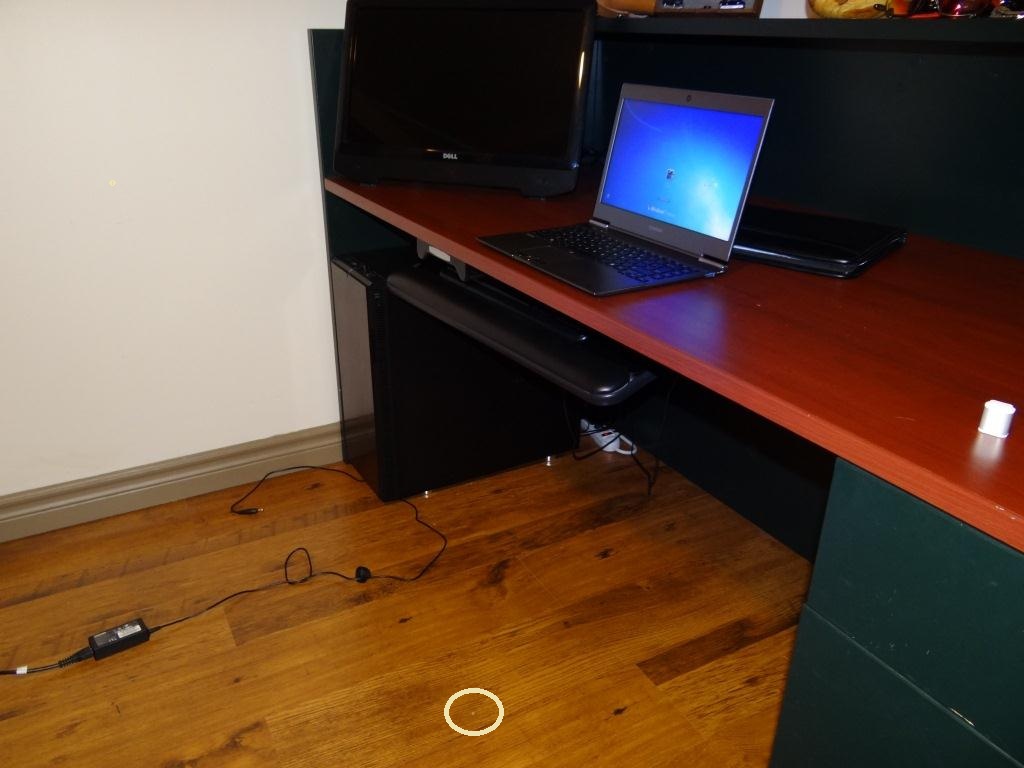
I will get benches up. The Toshiba is horrid. If you want to hear something NOT FUNNY, I did the first bench and saw it spitting out SATA 3 speeds and realized it wasn't plugged in. I quickly plugged it in the back and then went to plug it in the socket and heard a loud crash as the unit hit the hardwood floor from the desk...NOT GOOD!!!
I just checked it over head to tow....not a scratch and it works great! -
I don't suppose someone with access to to the inside of their z830 could try unplugging the fan and seeing what that does to the ventilation?
-
I hardly ever hear the fan at all...
-
Actually, I was originally going to buy a x220 when I get into grad school [months into the future], but I'm now thinking z830. Why? Sheer portability !!!
My Qosmio [18.4" 11 lb monster] has all the power I'll ever need. However, I want to supplement it with something a lot more portable [2 lb portege]. The thinness and the computing competence of the z830 are key features for me.
Not here to bash the x220, but if they could make a Thinkpad with the portability and presentation of the UltraBooks, I'm sold. -
Are you saying the portege hit the floor without any damage? Very curious to know the details! -
Neither do I, but I'm just wondering whether having it completely off affects the temperature. The toshiba health monitor would probably be able to track that.
-
Yup... that baby hit with a bang from where she sits in the pik to the hardwood.... If you look at the circle, that is a 1/4 inch deep chunk into the floor... Not a mark on the Z830 though!!!
Glad she is an SSD!Attached Files:
-
-
So... What kind of touchpad is it? Is it a synaptics or alps? My replacement laptop for now has an Alps touchpad... HORRID!
I never knew until last week that touchpads can be a dealbreaker for me. Its just that I've never had/used/experienced one from Alps. Their chiral motion for the synaptics IMO is leagues beyond better than alps. Sorry for off topic rant.
And also... no news on anyone doing a clean install yet?
Lenovo u300s, u300, or the u400. All beautiful and sexy, just like the z830, but it doesn't have a fingerprint reader
NICE! Too bad I'm low on cash to even upgrade the SSD... I don't even have one and I'm already thinking far ahead
-
Finally saw one in person... had to drive a bit to get to it but I needed to see it in person before I ordered one.
I would have bought it right there but this particular Best Buy was crazy and no one could help me and I had to be somewhere else.
I'm a bit disappointed in the keys spacing... the keys are shorter vertically make them more rectangular and the travel is shorter... tried typing and made some mistakes (similar to my experiences with the R7/8 series).
It is amazing how they fit all of it into such a small space... Toshiba did some great engineering with this machine. I also didn't notice the fan being on.
Now I have to decide between getting the BB $799 Z835 or paying $1099 for the bump in i5, WinPro, BT and the fingerprint scanner on a Z830 (I wish Amazon sold these so I can get a discount and no tax). -
So it does support sata 3 sweet
-
Here is a positive review, and it also talks about the SSD speed and SATA 2 vs. 3 issue that several people remarked about:
Toshiba Portege Z830 13.3" Ultrabook Laptop Review - Toshiba Creates One Amazing SSD Ultrabook! - The SSD Review -
Those pics look very familiar
Great review Series 9 Guy, you put a lot of effort and hardwork into it. I recommend others check it out
-
Newbie here hoping you guys will indulge me on a question about spending the extra to get one of the better processor models. I have a semester of grad school left and have been toting around an Acer Aspire One 9" netbook for three years for Word, Excel, emails, web, and light photo editing that I have beat all to hell and is getting tired. At this point in its lifespan I've upgraded the RAM, upgraded the battery, had to replace the HDD, lost an arrow key, broken a clip on the keyboard, scratched up the screen, worn the Windows POA off of the bottom, and recently the power button is squirrely. Basically, I've sucked as much equity as I possibly can out of this little guy and am looking for an upgrade, and am totally enamored by the portability of the recent wave of Ultrabooks.
The z830 seems to be the best of the initial lineup (I was looking at the Zenbook, but the problems in that seem like too much of a hassle), but I am hesitant to go for the lowest end version. Obviously, any new Ultrabook would be a significant bump up from my current machine, but I'm inclined to think that if I'm going to upgrade, I should go big. Even the 'slow' SSD would be loads faster than the spinning drive I have now. Most reviews online seem to be for the i3 model, since that's the one a 'normal' person would pick up from BB, but I'm curious if anyone has handled more than just the i3 version and feels the improvement in performance to the i5 model or even the i7 justifies the extra $500 in price. My current baby is beginning to chug something terrible, but at the same time, it was only a $300 machine, so I am hardly complaining.
My second question is just a quick one about durability. I've read through pretty much this entire thread, and saw that a couple of people have adopted z830s as their everyday and work computers, which is what I would expect to be able to do as well. I am just wondering how long you guys think these ultra-thins will really last? The beauty of the netbook was that it was made from chunky plastic and feels like a small tank, and was so cheap that I was never afraid to toss it around or in my bag, or crack it open to clean out the keyboard, or just generally put it through its paces. The metal construction on the z830 seems like it should be plenty durable, and I am planning on taking a drive to BB to at least put my hands on a display model, but I am curious just how durable people are thinking these will be.
Thanks for any insight, and apologies if this is too long of a post for this thread! -
As far as durability, I have been an avid technology buff too many years to count and am moving up from my Acer Timeline 11.6" that I have had too long to count. I expect this new system will be in service for two to three years AT LEAST. IN all honesty, its THE FIRST system I have had that has just been so well thought out.
For example, nobody likes the rear ports but if you had the choice between losing them (as with many other Ultras) and having them on the back...what would you go with. For example, I think this is the ONLY to keep an ethernet port. Has any traveller ever NEEDED one because some !@##% hotel only has wifi in the lobby??
Another thing which hasnt been mentioned... There are no physical on/off switches for things such asd wifi and bluetooth to hit accidentally. Has this ever occured in a download?
There is a button by the power button which opens the Windows Mobility screen and everything is RIGHT there. Brightness, volume, battery status and mode, wifi, screen orientation, external display, sync and presentations...RIGHT THERE! One click to bring it up and one click to put it away...Its truly sweet.
I don't think that ANYONE who has looked into the new Ultra line can deny that Toshiba has seriously went out of their way to make sure this was the most user friendly system available. Seriously, its not like its a hairline below all the others in thickness and weight... It is a significant difference... 2.47lbs. The closest to it is the Zen at 2.86lbs! The Mac Air is a half pound heavier.
Hmmm... I wonder if we will see SATA 3 Z830 units available in the spring? They only need to pop in a SATA 3 drive as I did.
I honestly don't praise things UNLESS they deserve it and then my enthusiasm takes over if it is just that good. This thing dropped off the desk and punctured my hardwood last night and there is no mark whatsoever...no damage...its just that well put together. A 3 foot straight drop on a hard wood floor should have damaged this unit.
OK...last thing and I am done here. Want to know what I really like best? Go to Staples or Office Depot and buy ANY 16 buck 8.5x11" portfolio and watch how PERFECT this slides in. Seriously... this means that there is no need for a @#$%^ case always hanging from my shoulders. Nobody in the world would guess its in that portfolio because its not bulky whatsoever. I would BELIEVE almost that Toshiba considered just this. -
is the $1200 toshiba website model worth the premium over the $800 bestbuy one?
-
Series 9, thanks for the response. The fact that I could also upgrade to a SATAIII drive on my own (right?) in the future is also appealing. It sounds like you are having exactly the experience with yours that I would be looking for. I'm reasonably careful with my stuff, but I have definitely dropped my netbook as well, so whatever comes next needs to at least be able to take a hit.
-
It seriously depends on what you are going to be using it for.. If I am only surfing the web, checking e-mails, writing some letters, I wouldn't think twice about the $899...but... if I am working on some intensive programs and doing alot of CPU intensive stuff, I might go for the more expensive one.
Why did I go for the Best??? Adobe Acrobat, Adobe Illustrator and I ALWAYS have at least 6 concurrent activities going on on my screen.
Why pay more if you don't have to?
Prom...
Yes I have upgraded the SSD to SATA 3 and it was a simple plug and play after migration using Paragon HDD to SSD. I can guarantee my hard drive would not have survived that since the system was turned on and running when I snagged the cord.
What really amazes me is that $800 was what I paid for the Acer Timeline Ultra (with hard drive) when I got that! How do you go wrong with the lightest laptop on the market WITH SSD for under a grand? -
That pretty much answers that question for me as well. I am a bit of a pig, and like to have everything open as much as possible. By default for class I typically have Chrome running about 6 or 8 tabs, Pidgin, Thunderbird, Word, and Adobe. At this point I have to be pretty conscious about closing unneeded Chrome tabs and programs when I'm not using them, or things start to really chug. The i3 models sounds a bit throttled, and I figure if I'm already having to buy from Toshiba directly, might as well get the 'best' one
-
Don't forget, the z 830 from Toshibadirect [pre-configured] have 3 year warranties included; hence part of the price hike.
Toshiba Direct | Portege Laptops & Notebook Computers -
My typical usage:
Opera browser (for webpages) + Firefox (for flash/streaming video) browser both open, VLC media player running video, Excel, Powerpoint, OneNote, and Word all open, Skype open. I'm guessing i3 won't be able to run this?
I am spoiled by my desktop PC i guess. It has Intel Q6600, 4gb ram, Radeon 6950 and can do all of above just fine, + having a game open but ram becomes an issue sometimes.
I don't have a laptop right now. The last laptop I had was fujitsu T2010 tablet that broke (screen problem) after 3 years of use. -
Gotta admit...3 year is an excellent warranty. I had that with my M1330 years ago and it resulted in an upgrade right near the end to a brand new Studio.
-
I got money back from squaretrade $1400 for my fujitsu but the warranty did cost $300 (paid extra for ADP but didn't need it, screen stopped working randomly with no drops/spills)
-
I would go for i5 for your uses.
-
Hey there all, I'm thinking about buying this new Z830 (the i5 model). I have a couple of questions for those who already have one and have been using it:
1) would you go with the i5 or the i7? After all, the only REAL difference between the two is the 1MB L3 more cache that the i7 has over the i5... does this make a significant difference?
2) Can you buy the basic 2GB model and then add on your own another 2 or 4 gb of RAM just by taking away the bottom and adding the ram yourself? or is it better to order it already with the ram desired?
3) I would like to have some feedbacks on the "feel" of the whole computer when you use it on your legs (or over every non-flat surface), in terms of rigidity and toughness
4) This is the best and most important question for me: How much BATTERY LIFE is there, REALLY?
thank you!! -
Order from Bestbuy and use it for couple of weeks, if you noticed it is slow then return it then order the higher one from Toshiba.
BB currently has extended return policy until Jan 24 and you do not pay restocking fees. Call them to double check and decide accordingly. -
Verified this in person last night at my local Best Buy. That's why I want to get a Z835 there so I can test drive for a while.
They had dropped the 15% restock fee some time ago apparently. -
Hi Troller. I have an i5 on an Asus slate that I've been using since January. I'll have to tell you, although I realize this is a different machine (my slate has a spinning hard drive instead of the SSD that this z830 has), I'm not only seeing a much faster writing-to-storage experience, I'm also experiencing what feels like a much faster *processing* experience. If you can afford it, I'd go i7. But then -- you'd expect me to say that since I did.
Others have addressed the RAM question. Since I haven't touched that, I'll let them respond.
"Feel" -- I'm using the z830 on my legs right now. It feels *great*. There is the *slightest* bobbing up and down -- maybe because the base unit isn't as heavy and the lid has a little more magnesium "spring" in it. However, it's still better than anything heavy on one's shoulders. So -- bottom line -- it's not so bad that I'd want to return it -- at all.
Batteries: Just last forever. Using the "ecomodes," it'll last 8 hours. Dialing up the display from "readable" to "brilliant," with an i7, it'll still go *3* hours. You'll love it.
Good luck!
Doug -
thanks!
So you have an i7 on your Z830 and when in Ecomode you can actually set the maximum performance to get out of it correct? For example max 30-40%...
are those 8 hours WITH the Wifi On?
thanks again. -
Sorry if this was mentioned before, but what's the difference between the Trubrite screen (offered at Toshiba Direct) vs the regular non-Trubrite screen?
Thanks... -
Hi Troller. Nope -- that 8 hours was taken from another user... wifi off, internet unavailable. What I was saying was -- 8 hours with ecomode tuned for long battery life. But I run at max performance, full brightness practically all day... because it's so fun ... and because I *can*. Under those conditions, it's probably good for 3 hours solid -- or more!
-
Toshiba has a description of the Trubrite Screen; can't find a description of the other.
Is the other screen matte ?
-
People who are going i5/i7 are you getting matte display or glossy? I mean how is the matte display on this laptop?
-
Well, thank you everyone again for the contribution to this thread. Thank you for letting me know about best buy's extended return policy. I will head on to best buy so I can try it out. If it meets/exceeds my expectation, I will cough up the bucks for the i5 model. Sad to say, I will miss the fingerprint reader from my hp dm4 for a few weeks.
I'd love to write a novice's review on it; it's just that I don't know how to do benchmarks and such... so there won't be any numbers to it =( Can't wait till 4pm so I can get off work and head on to best buy. -
So I ended up getting the BB Z835... maybe I'll do another unboxing video.
-
Your going to love it!!! Go for it!
New Portege Z830
Discussion in 'Toshiba' started by Hoopsontoast, Sep 12, 2011.