Problems? See this thread at archive.org.
This img by series9guy shows a matte screen:
http://forum.notebookreview.com/attachments/toshiba/73055d1322291179-new-portege-z830-z830.jpg
is this what you have?
-
Hi,
I am a Series 9 owner and I am interested in this model, I have 3 questions for the lucky ones who got it already:
- Is it possible to open the lid at 180° (unlike the 9 series which is blocked around 110°) ?
- Does the trackpad support right clicks with 2 fingers press ? I am not a fan of hardware buttons
- Does a SD card fully fit into the slot or does it "remain outside" as on the macbook air ?
Thank you ! -
Just ordered the i5 model

-
First off, thanks to everyone who has been contributing to this z830 forum. I've been following along for quite some time now, and it has been very helpful.
A few questions:
1) Are the i5 and i7 versions available in the US anywhere other than through Toshiba's site?
2) Has anyone found a good promotion or coupon? (I'm regretting missing the $100 off sale last Monday)
3) What cases are owners using?
Thanks -
Hi Charles. I began using the z830 as my primary computer within about 5 hours of receiving it. I just made sure it was plenty ahead on the battery charge, then switched over all my stuff. It's been like putting on an old pair of jeans for me. But, interesting that you mention an external monitor -- I keep a 24" on my desk at home and at work. So I'm usually looking at *way* higher resolutions than 768p as well, Thank the Lord.
-
1) I think Excalibur PC has it. I saw them when Google searching. (though not sure if they actually ship them or no)
2) I got mine around 125$ cheaper then on the site..*whistle*
3) laptops need a case? or you mean a bag? -
So I've been typing on this [supposedly] sub-par keyboard for 6 days. First time on a non-Lenovo keyboard in probably 15 years, I'm guessing. So I'm way used to concave keys and all kinds of Lenovo feedback. Even so, I just took that "ten thumbs" typing test and, again, after just 6 days, without training at all, I scored 69 words per minute my first time through the "To be or not to be" test -- with just 2% errors. I think once I understood the way the test worked and practiced once or twice the method, that score would go up quite a bit. What's more, once I have a month on this keyboard, I think it'll go up even more. So to the reviewers who cast a bad light on it, well, maybe it's just a matter of getting used to it?
69 wpm. 2%. Toshiba z830. 6 days on. -
Ryrad500, I'll admit that I've sure been the recipient of input from others in forums like this in the past. If it's my turn to give back something ... even if it's just a speck... it's about time I did.
I ordered the Toshiba neoprene rubber case. I think they advertise it as 12 1/2"... but they now mention in the ad that it fits the z830 and it does so *perfectly*. I had to take my z830 out in the rain today for the first time and, with all those ports exposed on all sides, I was glad to have a "wetsuit" for it, so to speak. I think I put the link to the case previously in this thread already. Very reasonable.... and it'll hold us over until we find something better... like a nice leather portfolio-style case that makes the unit indistinguishable from a thin "day-timer" calendar. (of course, that'll add a slice of weight, but it'll also help it become a little more socially acceptable to open it up, I'm guessing. )
-
z830guy,
Glad to see you liking the laptop. I had a chance to see it in person at BB today and I did like the keyboard considering that I have big hands. -
Yup, Leggy, I'm starting to conclude that, given the time and practice, I think I can learn it. I bet anyone could.
-
Is the i3 good enough or is the i5 a lot faster?
-
Hi Gloryfield. I'm the wrong guy to ask, in a way. I bought an i7. But in another way, I might be the right guy. First, it all depends on your application. If you're mainly doing lightweight word-processing, email, and web-browsing, an i3 might get you buy well. But if you ever do any high-end-processing... Stuff that was slowing me down with the i5 slate that I was trying to use -- included
- Publishing anything complex with high-res graphics
- Rendering any high-res videos
- Multi-tasking lots of busy tabs or windows
- Handling long documents
and anything similar, then honestly, get the i7. It's like a *dream*. Snappy. Responsive. Makes you feel better at your job because you *feel* quicker. -
It will depend on what you will be doing. As far as I know and heard from others, if your usage is limited to surfing, office works, watching videos then you should be good. If you are doing rendering or photo/video editing jobs then you may need a different machine because of the screen resolution, ram and SSD limitation with the Z83X models.
-
Hey guys, I've never used an SSD before, so I have nothing to compare it to. So for those that have used this Toshiba, how does the standard (supposedly slow) SSD compare to a regular old-fashioned hard drive? Is this SSD slower than a regular hard drive? Is it the same speed? A little faster? A lot faster?
Thanks in advance... -
The typical hard drive has an access time of about 9ms whereas the ssd is at .01ms or some 90 times faster. It is remarkably noticeable, especially in start times. The new Z830 starts from the push of the button until the desktop appearing at 14 seconds and I have yet to tune it.
Someone once asked me to make a comparison to explain the speed of the SSD and I recall stating that it is almost like the computer knows your next move before you even hit the key...its just that fast.
To give you a real life example, I work with reports that are sometimes upwards around 6-9000 pages. These reports contain sensitive information that must be removed or 'redacted'. You redact information in Adobe Acrobat. With a typical hard drive and once you have highlighted the elements that require redacting, it could take upwards to 10 minutes. There have been many times people have believed the system froze and they rebooted.
With an SSD, it has never taken more than 15-20 secondfs for the EXACT same job. -
whats the difference between Z830 and Z835? Is Z830 only sold online at toshibadirect?
I was dead set on a Asus ux31 but there are too many people having issues with it. Now I'm trying to decide between Sony SA and Toshiba Z830/835 -
By lookign at Toshibadirect and Bestbuy, I've concluded the differences between the z835 and z830 are listed below but not limited to:
z835 [lower tier]
--not customizable through retailer nor Toshiba [can still be customized by consumer]
--available in 2 formats [p330 BestBuy and ST8305 Toshiba, both preconfigured models; guessing difference is P330 has BestBuy PC App ?]
--i3 CPU only [dual-core]
--No Bluetooth
--No Fingerprint reader
--Windows 7 Home
--1 year standard warranty
z830 [higher tier]
--available in 3 formats: 1 customizable and 2 pre-configured
--i5 CPU or i7 CPU [both i5 and i7 are dual-core]
--bluetooth
--fingerprint reader
--Windows 7 Professional [Ultimate available]
--3 year standard warranty [only applies to pre-configured z830 models]
Toshiba Direct | Portege Laptops & Notebook Computers
Toshiba - Portégé Ultrabook Laptop / Intel® Core™ i3 Processor / 13.3" Display / 4GB Memory - Silver - Z835-P330
http://us.toshiba.com/computers/laptops/portege/Z830/available-models
Hope that helps -
There is actually one other difference which is kind of weird. The cheaper model has a TrueBrite Screen, while the more expensive model does not.
The configurable model lets you choose which one you want, and even though their text says TrueBrite is the upgraded screen and does not mention much about the other one..which makes you wonder which one is better :/ -
Thank you very much Uniten, Z830guy, Makryger, Alexmuw, and Series9Guy for your contribution to this unknown laptop. Sorry if I forgot to thank anyone else.
Has any of you done a clean install on one of these bad boys yet?
@Z830 guy, you said that this was your "fastest laptop" that you've owned.
Is it comparable to a 7200rpm HDD or is it significantly faster?
You did mention that it is also the "bottom of the heap", this has me worrying that it might be comparable to a HDD and how many of the reviews saying it is very slow for an SSD. I don't need it to be fast. Infact a 5400rpm HDD is perfectly fine for my use, but for the money I'm spending, I would expect it to be really good. -
Good! news: BestBuy updated Z835's price as 899 USD.
I think too many people asked about Z835 so they raised the price !
BUT!.. They have made a discount for Asus UX31. UX31 with i5 (2557), 256 GB SSD! is just 1.049 USD, its backordered but the price is excellent ! Just for 150 more we can get a i5-2557 + 256 GB SSD. Zenbook looks like a better choice for me. -
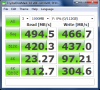
Here is what I found on the net..
Toshiba SSD:
![[IMG]](images/storyImages/Toshiba-Portege-z830-SSD-benchmark.jpg)
Here is a Hitachi 7200
The 256gb version I hear the hard drive has speed issues too :/ -
HI PinoyBoy. Appreciate the encouragement. No clean install here. Didn't have the nerve. Besides, I wondered if some of these custom Toshiba utilities might be useful.
"Fastest laptop": I guess I'm describing mainly the "sense" or "user experience." You'll see the supposed hard data (a benchmark test result) taken from this SSD (earlier in this same thread). I guess what that data show is that this SSD is among the slowest SSD read/write results on the market right now. However, PinoyBoy, it's important to realize that, if you're instead comparing it to a hard drive, it's way faster than anything with a platter that spins. Not only that, it's also way more dependable (no moving parts on the hard drive). So yes, I've replaced 5400rpm hard drives with 7200rpm hard drive and *felt* the increase in productivity. But this SSD experience is a generation beyond even that. No comparison. Hands down feels faster to the user. Quick -- like ... lightning.
Will I someday try to replace the SSD? The data would say I'd be silly not to, especially if I can find a faster SSD with more capacity. But the stock one is still way better than any hard drive that runs laps.
-
Sorry to bring this back, but could any Z830 owner answer these please ? Thanks so much in advance
-
- Lid goes to about 140 degrees.
- Not sure how to test the 2 finger press
- SD Card will be pretty much recessed within the computer. Its out by maybe a mm or two, but the tapered base hides it very well. -
Thank you very much makryger
Regarding the SD card, does it mean that the fake plastic one provided with the laptop (and which seems to fit perfectly) is smaller than a real SD ?
Would it be possible to take a picture with a real SD card in ? (I would leave a 64gb SDXC card permanently in)
In case you would be interested to know about the two finger press, I read somewhere that none of the multi-touch actions are enabled by default, you have to go to the Mouse settings in the Control Panel and check Synaptics options.
Cheers -
The SD card fits in flush, the lid does not open 180 deg...
I have performed a migrate which is the same as a clean install with respect to what you are looking for. ALL the drivers are available at Lenovo.. I get about a 14 sec start max. -
I'd have to somewhat disagree here..while SSDs offer great speed and access time advantages they do have 1 major disadvantage. The consumer grade SSDs tend to have higher fail rates then platter disks and when they fail unlike platter disks the data is virtually unrecoverable :/
So SSDs are awesome but I would highly suggest keeping backups of your most important data. (which goes without saying SSD or disk platter but it is more vital with SSDs)
-------
and anyone know which ram you can use to upgrade the notebook with? 204 pin 1333mhz ddr3? -
agreed, like any new technology, SSD's aren't infallible, but i keep backups anyway!
you guys in the US have such a cost monopoly over us Brits for tech its rediculous. the base spec Z830 over here is £899 excluding taxes, so thats $1340 (US) before any additional costs, which here is 20% for none business customers, so the total cost for me to buy one new would be $1608 and thats for the lowest spec. for an i5 its like $2015 (US)
totally unaffordable!lol! so when i here about you guys picking them up for $710 including taxes at BestBuy it makes me feel a bit sick inside. -
Thanks Series9Guy, I appreciate the detailed reply from last night... but that's not exactly what I meant.
What I mean is, I've seen several people say that this Toshiba has a slow SSD (compared to other SSDs) but I'm not quite sure what this means. So for those that have the Z830 or Z835, would you say its SSD is faster, slower or about the same speed as a regular (non-SSD) hard drive?
Thanks! -
People are very number conscious, the goal is to keep it under a 1,000 but whenever the currency costs more that just ups the profit margins. Its a psychological thing just like 899 cost..I mean they might as well say 900.
That is also why companies tend to first release to Europe market over US market and sometimes things don't even make it to the US.
That said while you may pay 20% on VAT, we pay 35% on income tax then up to 10% on sales tax(in stores)..so I'd take VAT any day
Read what I posted. -
think i get around 22% in deductions on my pay for income tax and national insurance plus the 20% VAT and the base price is already what, 50% higher??? same with cars as well, can't u guys get like a V8 monstrosity for around a nickel? 8 grand i think is the cheapest car in the uk and thats a malaysian shopping cart ;-)
although i still love it here!! lol -
Total Fallacy... SSDs don't and never have come remotely close to hard drive failure rate and the Google Study on hard drives might give you quite the eye opening. It just so happens that enough data is not available to run similar on SSDs as of yet.
SSDs suffer much the same as any new technology where the vocal minority overpowers the happy majority by a large margin. Very few happy owners will ever right about their satisfaction whereas, those few that have suffered the bumps of SSD failure will run to the net hoping for help. Are SSDs perfect yet? Absolutely not as they are an evolving technology and probably the only known to surpass that of CPU evolution. -
Any SSD is much faster than a typical hard drive....much NOTICEABLY faster. When people speak of the Toshiba SSD as being subpar, they are speaking of initial synthetic benchmarks for the most part because there has yet to be an appreciable amount of testing. The Toshiba is slower compared to other SSDs, however, the typical user could never tell the difference whatsoever between SSDS. They will, however, between a SSD and a hard drive.
-
Not disagreeing with anything Series 9 Guy says on SSDs. He's the pro
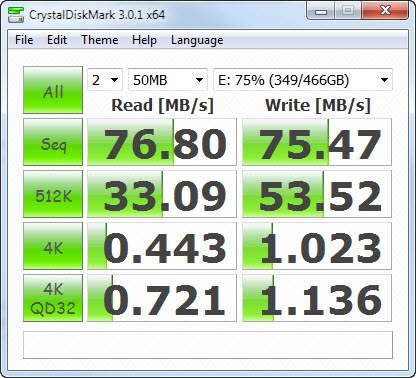
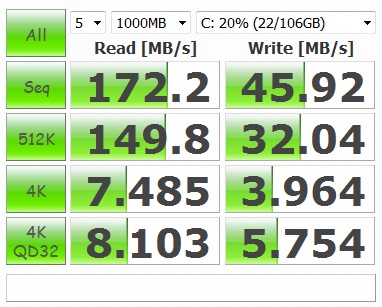
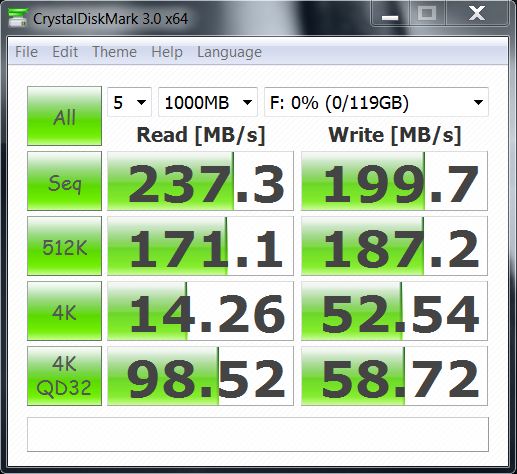
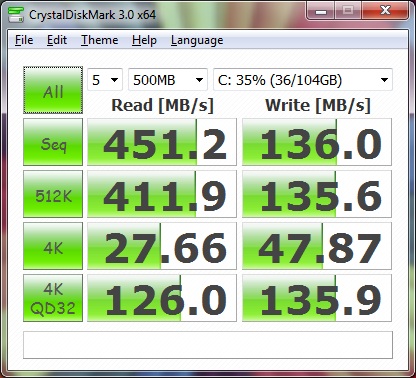
Here's some results that might help SoundsGood:
1. Seagate 7200RPM HDD
2. Toshiba Portege Z830 mSATA SSD
3. Samsung Series 9 mSATA SSD
4. ASUS UX31 128GB mSATA SSD (the 256GB Sandisk-based model is slower)
5. Runcore T50 mSATA SATA III (6 Gbp/s)
You can see the Toshiba Portege SSD (the second one) is slower than the other SSDs but is still CONSIDERABLY faster than a HDD.Attached Files:
-
-
I am aware of the Fallacy and like all things there are good quality and bad quality. For example back before the monopoly days the only 2 brands of HDs that I would recommend were WD and Seagate. Its no surprise by the end only these 2 brands remained lol. (Well Hitachi still remains but they are like 10%)
That said the issue that I have with using SSDs for primary storage is simple, when I contacted top level support in the biggest brands and asked them what is the recovery procedure for data in case of failure. Their answer? There is none, if its a concern buy platter disk HDs. This is straight from the manufacturers mouth....
I have had HDs fail on my in really really bad ways, (I am looking at you Maxtor) but no matter how badly and HD failed I was able to do recovery(even though it took me a month of the pc going at it none stop). Without a mainstream recovery method I don't think SSDs can replace platter disks just yet for main storage. For boot drives and for ultrabooks SSDs are awesome.
But we all know like all things eventually fail, its not a matter of IF its a matter of WHEN. And I doubt anyone can disagree that when something does fail a means of recovery is pretty darn important. -
Got it. Okay, thanks guys!
-
We can agree to disagree on things. I learned one thing at the LSI Summit last month and that was that hard drives are going anywhere fast. In fact, regardless of the medium, we will be discovering that storage just can't keep up with data production in the next few years.
I can comment a bit more on this system however. It arrived Friday and I spent the weekend away on business to return Sunday, take off again Monday and here I am once again in a hotel room too many miles from home.
My first system was a Series 9 and I remember having to plug it in everywhere. It was dead in Toronto, Hong Kong and Taiwan airports as well as the hotels...not the Z830 however. Whats even better is something I discovered earlier after becoming frustrated that I couldn't find a case.
I carry a portfolio similar to this:
STAPLES | BUREAU EN GROS
The Z830 fits into it perfectly and, because it is so thin, there is tons of room within. Excellent!
As well, I have a word into Toshiba Engineering (Tokyo) with respect to having the system upgraded to SATA 3... They were nice enough to send it up so lets hope they are nice enough to action and respond. -
Well actually I think soon will be the time for SSDs to shine, with the floods causing HD prices to go up, SSD prices dropping, and introduction of Cloud Storage. As far as the consumer market is concerned I don't think you need much space.
I mean I know I have been using PCs for a while, I rememebr being excited about the first over 1gb hard drive. Then before you know it got filled up, then I got a 4gb hd after..filled that up. Then I got the monster of 40gb hd years later, filled that up. Then got 60gb hd and that filled up too. Then got 80gb and that too. Better luck with 120gb? no that filled up then I got 240gb and that too and 500gb and 1tb lol..every time I think to myself that is mre space then I will ever need and it ends up filled. Just got a 3tb HD...I'm so never gonna fill it
But to most average consumers who won't ever bother recovering data and don't store much vital information the SSD is a godsend, mix in the cloud storage and you have everything you need.
I am also coming from a Series 9, I liekd it a lot but can't wait to swap to a touchpad with physical buttons!!! on my laptops I don't store too much data so SSD or HDD makes no difference.(I work using RDP) -
According to the FAQ: Does this laptop have an anti-glare display?
non-TrueBrite is matte. -
Interesting....so their branded display is worse then their regular display? lol..well anyways glad that came by default in my model.
Now all we need is a display comparison between the two! :/
Which leaves me with last question remaining, which ram chip to upgrade with -
Hiya All,
does the SSD come with "hidden" system restore partitions and what software would you recommend to clone the drive contents onto a new (larger) SDD?
Cheers, GPC. -
I wonder why Best Buy put it back up to $899... doesn't make it that good of a deal anymore.
-
Probably because of cyber Monday week and the Asus Zenbooks at that size are on back order.
-
Question: I have a spare 4gb DDR3-1333 Memory module I purchased for my R835.
I assume the Z has 2x2GB DDR3-1333 modules and so my questions are:
Is it the same module, can I swap one of the 2GB out to give me 6GB?
Can someone post instructions how to add it - is it simply unscrewing the back or is the back cover additionally sealed?
Toshiba's user manual just says it's upgradable but to contact the place you purchased for details for adding memory. -
My Z835 has a small security torx screw under the center rubber foot, an obscure shape that isn't usually included in most normal tool sets. Once that is out, (as well as the other 10ish regular philips head screws), the bottom should come right out, with memory slot readily available to swap out. I haven't doneit myself, but I plan on it. The max you'll be able to add is 6GB- the 2GB soldered on the board, and then a max of 4 in the slot.
-
204 pin memory correct?
-
Just finished leading a two-day planning conference for 2012. My z830 was driving the primary data projector, while it was Skyped in running an IPEVO X-ing conference mic/speaker to communicate with a vice-president on the road in California. There were times that we used GoToMeeting to show the z830 screen over the Net too, while at other times, we were using a real-time, multi-user outliner (Checkvist) for planning & collaboration. Throughout the entire 2 days, the z830 didn't miss a lick and the fan never kicked up a gear from idle. And all the operations *raced* like lightning. I was the one having to edit the 57-page planning document in Word, then transferring plans to the online outlining software, stopping occasionally to email the entire 57-page Word doc to the guy in L.A. This was all just 6 days after it arrived from Toshiba. I'm more than a happy customer. I'm ecstatic.
-
The bottom comes off with removal of 13 screws around the side and one torx under the middle rubber piece. The memory is standard 204pin and only a max 4GB module can be added for total 6GB as 2GB are integrated.
And....my views are similar to the post above...great description of your day which ran similar to my three presentations and then back to the hotel room where I am now. -
Great news z830guy !!! I hope your presentation went well; I hope some were intrigued by your new toy
-
They were indeed, Alexmuw. The "slice" that I was using was approximately 50% thinner than anything else in the room.
New Portege Z830
Discussion in 'Toshiba' started by Hoopsontoast, Sep 12, 2011.