Problems? See this thread at archive.org.
thats a shame, wonder why they omitted it from certain regions? seems crazy to remove one of the nice extra features that add to the premium feel of the laptop to me
-
On the fan noise issue. I hope this helps. It appears that i've got one of the louder ones. Loud is relative though and i've been trying to quantify the noise.
Originally posted at my forum
Z830 Fan Noise
And here's the most recent post.
I've been trying to quantify the fan noise level for you. It's almost impossible.
With a Db meter here it doesn't register so the only way I can quantify it is to say that i'm masking it completely with a music stream running at only 9% volume. (System volume 9%, WMP volume 100%)
Where my quiet room noise (i'm out of town) is 49-55db (on my meter, pc off) when i turn it on and stream music (groove salad instrumental downbeat) the meter shows 53-59 db which is still a quiet figure. [Edit: Lower than a typical office]
I think the main point is that the noise is maskable. It's a horrible sound, but it's maskable. It might sound stupid to accept this 'fault' but try working around a sub-optimal keyboard or a weak wifi module. Given that there are no options with the keyboard quality and wifi quality that the Z830 has along with the 1.1KG weight I have no choice (I literally need a Ultrabook for work within the next week) I have to go with the Z830. If I had time, I would wait for the Xnote Z330 or Lenovo Us300s.
Chippy -
Yeah, what can I do. Already buy and still love it.
Hopefully this Z830 can survive for next 3-4 years.
Please somebody answer my question about default partitions.
Can I recovery to default if I delete all and create only 1 partition ? -
nope, if you repartition the drive, you wipe the lot. you'd have to make some other kind of recovery media first
-
Question for those of you that had the Samsung Series 9:
Looks like the Wifi issue has been fixed on the newer models. With that in mind, which would you go with? and why?? -- the Samsung or the Toshiba?
Thanks! -
If samsung added a touchpad with buttons and has in-home warranty option probably samsung :/
-
Samsung have fixed the WiFi (with the addition of Intel 6300 and third antenna in the LCD) in two models currently available. Microsoft has the NP900X3A-B06US and Best Buy has the NP900X3A-B01UB.
They may have fixed the fragile power connection too... -
Best Buy Canada no longer sells this product.
-
I see. As long as I have create the recovery media (flash disk or dvd), repartition can be undo to default again.
Thank you. -
someone knows which kind of screwdriver we need to open this notebook?
I removed all the screws in the borders but there is a very strange center screw -
How much difference do you think the buttons make? I've only ever used laptops *with* buttons -- never without (so I'm not sure what it's like without them).
-
http://forum.notebookreview.com/8154091-post782.html
um..depends on your use...effectively the entire touchpad is 1 button..and there is no indicator for a right click, so you effectively have to "guess" the right click area. Not to mention as you can guess it requires more force to press as your tilting the entire thing. I also found some accuracy issues since when your holding it down while moving it causes your finger to slightly shift. Oh and single clicks turned into double clicks. (Though it got a lot better on the last firmware update) -
Hmm... I wonder why.
-
Returns... That would be the only reason. They were the exclusive initially and there were only a limited number in Southern Ontario. I heard that my return of four was only a drop in the bucket. I know of a number of places that subsequently created very strict return policy as well after that.
-
Yeah, I see what you mean. Thanks for the info.
-
As uniten said, the entire mousepad depresses as a button.
In addition to his complaints, with my experience playing around with an MBA11 and my current X220's "clickpad" touchpad:
-tap to click feels weird and is less reliable than on a regular touchpad.
-if you put a lot of pressure on the touchpad when you are mousing around like I do, its very easy to accidentally click.
-most manufacturers add lines and stuff to distinguish where the right click is. My X220 has two lines of different texture where the mouse buttons should be. I found it to be reliable at figuring out whether I wanted a right click or left click.
-The two finger to right click thing that Apple has is significantly better than a rightclick region like how it seems to be implemented on my X220.
-Since they are copying apple, a lot of manufacturers have smooth surfaces on their clickpads. I personally dislike this, the textured surface of my X220 touchpad feels much better.
-Apple definitely has the best clickpad.
I heard some reviews calling the X220 clickpad better than a lot of other clickpads, and quite honestly, if I was a touchpad user and not a trackpoint user, I would have probably returned the machine. -
I have the Z830, Series 9, X220 and Lenovo U265 in front of me right now, the U265 being the 12.5" version of the U300 Lenovo. BY FAR...the best trackpad for feel is the Lenovo and I believe it is glass???
-
Which do you like best? And why? And for extra credit
 which is your 2nd favorite?
Thanks... -
Not sure whether its glass, but the Series 9, Z830, and U300s/265 all have non-textured touchpads.
btw, what do you think about clickpads? So far two people have said something and we both dislike clickpads. -
I am gonna add even more based on what you said and how it relates to the Series 9 then lol
I disabled tap thing first day I got it, a long side multitouch...those elements add too much issues and miss-fire more then they are useful.
Unfortunately Samsung is not part of the "most", no line
I am not a fan of multi-touch on laptop trackpads, I use my laptop sometimes for over 24 hours and doing these hand signs puts a a lot of strain. I don't see why they just don't stick buttons, they can shove the buttons underneath to make it look more unibody if they care about looks but if it aint broken, why fix it :/
Series 9 is polished glass too with smooth surface, I also don't like smooth surface, it seems to put more strain on my wrist with smooth surface.
I may be alone on this but I liked my HP tx2000z touchpad..it felt like I was messaging my finger lol, only thing I didn't like about it is the buttons were way too close to the edge.
As for Z830, I have no clue why they decided to put chrome rims around the buttons, it makes me miss click the border..not to mention a huge fingerprint magnet. -
SoundsGood,
My favorite is the Z830 although I CANT WAIT to switch off this Canadian keyboard. This includes use of the trackpad as the Z830 is the easiest to use for my specific use although it is not as smooth on the fingers as the Lenovo. This trackpad feels metal.
I wont lie... I love the look of the Series 9 and think about getting another continually (as a permanent system)with a fixed antenna IF IT IS FIXED. This leaves 3 negatives for me in the S9 which are the fingerprints as it is a finger residue magnet and the open/close ports as well as the plug which broke right away.
The X220 has the benefit of mSATA and HDD (I have two ssds in) but is WAY TOO HEAVY and thick.
The Lenovo tangerine U265 does not have a SD card slot but has the nicest feel when moving your hand on the trackpad by far. It has an amazing look and the exterior feel is the absolute best of the bunch as it is aluminum yet its like they have a rubber coating on that that doesnt mark. My wife LOVES this system although the battery life would notwork for me. The Z830 has the best battery life of the bunch and I use it typically on balanced mode.
I also didnt find the S9 trackpad as smooth as a finger drag as the Lenovo....nothing has compared to this yet.
At the end of the day.....I am sitting here using the Z830 as my primary system. Even though the S9 has the best design, the Z830 just feels the lightest and thinnest which is what I wanted. The screen has a slight flex but does not feel cheap in any way; it just feels thin.
I will have the HP on return from CES that I can speak to then as well. -
So you have the Canadian version with the bilingual keyboard? Is it possible to replace the keyboard with the US one? -
Apparition, thanks very much for the info -- much appreciated. And nice new name, too!
-
I have the same thing. The think that sucks about the french keys is that the backlight doesn't shine through them. Really doesn't make any sense why they did this as it defeats the purpose of a backlit keyboard. It shouldn't be a problem to replace the keybopard with a US one. I plan to do it when I can get my hands on one.
-
Apparition,
Have to agree with you on the look of the Samsung Series 9. I still really like it. It does have the negatives that you mention though.
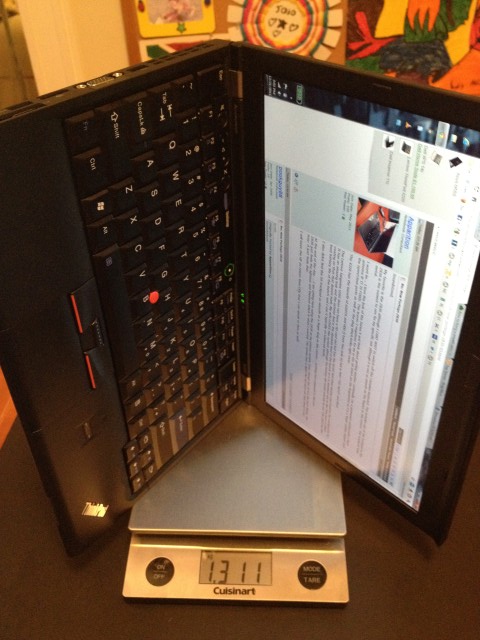
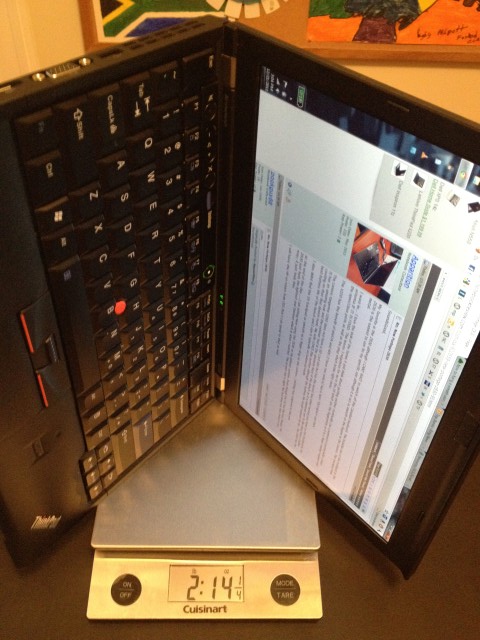
I don't agree with this statement though " The X220 has the benefit of mSATA and HDD (I have two ssds in) but is WAY TOO HEAVY and thick." If I put my small battery in, it's 2.1 pounds (or 1.3 kg)!!
That X220 weight is lighter than the Acer Aspire S3, the HP Folio and the Samsung Series 9 (mine was 3.0 pounds). Much the same weight as the Lenovo Ideapad U300S.
EDIT: And no, I'm not saying that the X220 is an Ultrabook alternative. I'm just saying that it's lighter and WAY MORE EXPANDABLE than some Ultrabooks out there.
Pictures attached...Attached Files:
-
-
I have the small battery in the X220. It just doesnt have the feel of an ultra...I am sorry. It simply feels like the typical Lenovo that I have come to know for so many years.
The weight alone takes it out of the running against the S9 and Z830 simply because it is too thick to properly fit inside my padfolio I had shown previously. Thats a full 1/2lb! I know I know...its getting personally but the design and feel of the X220 is the same to me whether it is the X220 or the larger 15" Lenovo I have been lugging around for 3 years now for work. We need a design refresh.
The U265 and U300 has that IMHO. -
Used my Z835 on WiFi last night... seems like much better battery life... 3 hours (pretty constant use in Excel and some web browsing) and maybe 60% battery left so may another 3.5-4 hours. That's pretty good.
-
CMIIW, I think you will void warranty.
-
Yes... I am certain as well that replacement of the keys will mean a full system disassembly which will probably void any warranty. Its worth it though.
-
If anyone has a z830 with a standard 3 year warranty, I would seriously consider the consequences of voiding a 3 year warranty before attempting this.
-
heres an interesting conundrum
just got my Z830,awesome bit of kit, but i installed a bunch of updates. it rebooted but now it wont let me into windows, the logon background is shown but no icons, just windows 7 logo at bottom of blue screen with the doves.
now this wouldnt be an issue, i'd usually hard reboot.......only i cant! my power was set for power button to put it to sleep, so i cant power it off!!!!!! and i cant unplug the battery as i'd need to dismantle the laptop
suggestions?!!!
lol! -
It probably would void the warranty but if there was ever an issue that required sending the laptop back (wouldn't affect me since I have onsite warranty) you could always install the original keyboard into the unit before sending it/taking it in. Unless you tell them the keyboard was changed it wouldn't be a big deal. Now if Toshiba would actually step up and provide us with a backlit keyboard that was completely backlit we wouldn't have this situation.
-
Try holding the power button for like . . . 10 seconds. See if that shuts her down cold. Then start from scratch.
-
Lenovo X220 specs says that its 3.1 lbs, not 3.1 kg. It has almost same weight with Portege R835.
-
tried that cheers, no chance, it sees the initial press as standby then the buttons none responsive, let go, press and hold again immediatly and it simply powers back up to same spot :-( lol!
can the battery be disconnected with the base off? simple to get to and just a pull plug from the mainboard i would guess???
note to everyone else, ensure yours is set to power off with the power button, not sleep!!!!lol!! -
Hmm...usually holding power button works...I think there is a connector..or you can always just power drain the laptop.
You can always set your eco button to be sleep instead of the power button.
I tend to keep it at shut down anyways, in my series 9 I had it set to sleep. Simply because it was in a really bad spot and when picking it up I would accidentally hit the power button closing half the programs I need lol..so I changed it to sleep as its not too much hassle to turn a laptop back from sleep. This laptop I keep it as power off as I would never miss press it. -
i dont like the power button set as sleep, i always have it set as power off, its just i was mid configuration of a new laptop and i was sorting updates first!lol! i never suspected to hit upon this issue. i'm opting for the attempt to drain the battery now, it was around 60% full and off eco mode. obviously no load on it currently so its just sat here slowly cranking down, few hours n hopefully it'll die
-
for reference, i dismantled the bad boy and ripped the battery connector out
seems fine after reboot
-
I had a typo on the weights. As per my pictures, I meant to say 2.1 lbs and 1.3 kg (not 3.1 kg).
My normal X220 weight is 3.1 lbs (but that's with 120GB+340GB SSDs). I was just doing a comparison with mSata only (like most of the Ultrabooks have) and to show that it's lighter or the same as around 50% of them. -
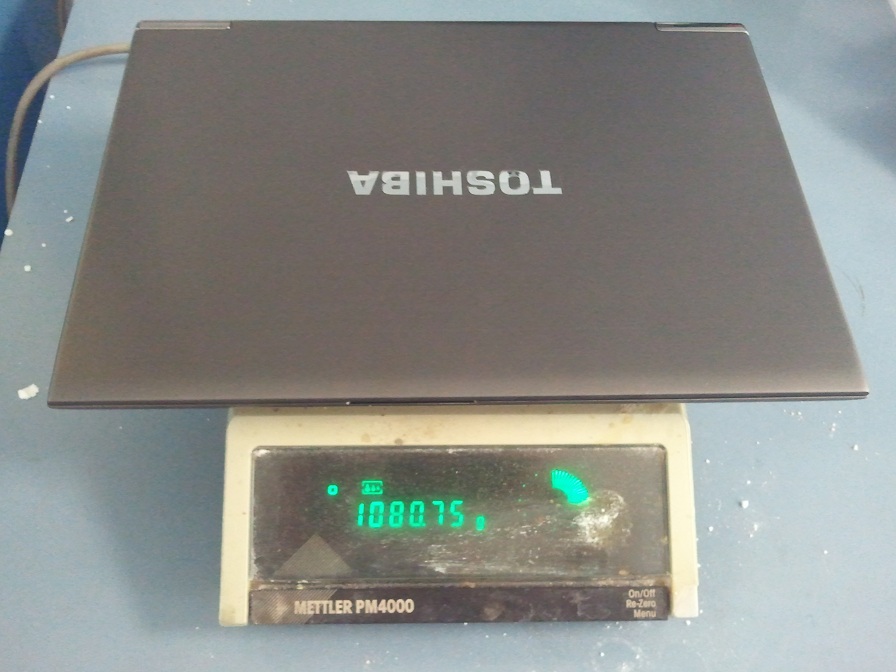
bonus, the things lighter than toshiba say
thats on calibrated laboratory scalesAttached Files:
-
-
Nice... a tenth of a pound lighter than the supposed "starting at" weight!
-
ai, i'll take a 4% weight drop
i will compare and contrast the Z830 to my R700 over the coming weeks/festive period and write up a bit of a review come the new year, but for now i will mention the few things that have struck me
- god is it light, i mean like really really light
- and thin!
- the fan is considerably noisier than the R700, i can see why people who are sensitive to it would find an issue, myself, not so fussed
- the screen does wobble more than the R700, if you put the laptop flat and hold palmrest down then adjust the screen, upon release it wobbles. not really an issue however thus far
- the HDD is quick in real terms, boot ups etc, however it only returns a poor 5. something on WEI as apposed to my SATA 2 Vertex 2 in the R700 which pumps out a 7.6. (i will benchmark the Z830 mSATA drive for the review, before and after my usual SSD tweeks)
thats what struck me in the first 18 hours of ownership
cheers
Ben -
Just a note on the fan noise. I had a i5 version and had to return it because of a defective spacebar they only had i3 versions so I took one of those and saved a few bucks. I did notice that the fan in the i3 version does make more noise even though they are the same. They are spinning at the same speed though so it looks like some of the fans are just more noisy. If you are really bother by it you could probably return yours and get one with a quieter fan but it will be hit and miss.
-
Why do you think the Toshiba comes with so many USB ports(for an ultrabook)? to help drain it lol
But I guess pulling out battery works too...
extend it to max, then it don't wobble -
Ummm the question that I have is regarding the chunky white powder all around your scale. I would be concerned posting such pictures eheh.
Attached Files:
-
-
lol, i cant possible comment on that substance, although ironically, one of the boys who comes to the lab regularly to work with said substance for purity testing of all things is called........wait for it......charlie blow!rofl! ;-)
-
when u say extend it to the max uniten, what do you mean???
-
Oh, I thought you were using it to weight drugs..silly me *whistle*
Take the screen and push it till it can go back no more. -
ah right, well obviously yeah that'd work!lol! not exactly practical thought ;-)
drugs? what are drugs? i know not of what you speak
-
That's alot of wasted stuff.
Is there an HDD that can fit in this tiny thing? My 2.5 HDD is almost thicker than the chassis. I know, stupid decision for downgrading from an SSD to an HDD.
New Portege Z830
Discussion in 'Toshiba' started by Hoopsontoast, Sep 12, 2011.