Problems? See this thread at archive.org.
How do I boot from a USB or my SD card with the z830?
Hitting F12 gives me access to the boot menu and bios setting, and changing the boot order doesn't do anything. USB and SD card boots perfect with all my other laptops, except for the z830.
I want to explore Linux and the world of live USB.
-
In the real worold doing typical things like surfing, e-mails and Word...not really as everything you are relying on is disk access speed which is similar in all SSDs.
-
Which USB are you trying to boot from?
I read somewhere you need to boot from the 2.0 one, not the 3.0 one (or is it the other way around?). -
Using the ones at the back, and I've even tried to use an SD card.
-
This blog says you should use the USB3 port.
Turning the Toshiba Z830 into a Ubuntu Ultrabook | digital nomad
I doubt SD card boot works. Laptops generally have their SD card slot via PCIe I believe, unless the manufacturer decided to work extra magic, SD card booting only works when the laptop has SD card via USB. -
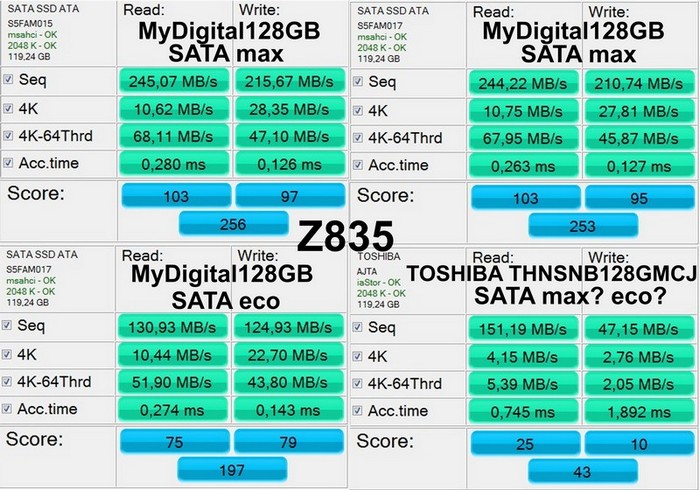
I test my Toshiba Portege Z835 with two BIOS setting sata max performance or sata battery(eco performance):
MyDigitalSSD 128GB - 015FW sata max performance, 017FW sata max performance 017FW sata battery(eco performance)
original ToshibaSSD 128GB - sata max performance or sata battery(eco performance) i dont now, I forget position, it was 2 month ago...Attached Files:
-
-
So... you are able to change this "max" vs "eco" performance in the bios for the MyDigitalSSD drive, but you are unable to see this setting for the Toshiba drive?
-
I forget position, it was 2 month ago...
-
Are there any 256 SSD that work in the Z830?
The Samsung PM830 256SSD is SATA3 y i think that don´t work because Z830 is SATA2..... -
The Z830 uses an mSATA SSD. Anything mSATA should work, unfortunately, I don't think there are any mSATA SSD's over 128GB available just yet.
-
Hello fellows,
Anyone can tell the detailed specs of the SD card reader in our lovely Portege z830? I mean capabilities, max supported read speeds, supported standards, ..etc.
I'm thinking of getting myself one of:
Amazon.com: Sandisk 64 GB Extreme SDXC UHS-I Memory Card, 45MBps Read/Write Speeds (Class10): Computers & Accessories
or
Amazon.com: SanDisk SDSDU-064G-A11 64GB Ultra SDXC UHS-I Card 30MB/s (Class 10): Computers & Accessories
But not sure I will make full use of their maximum read/write speeds.
Any suggestions? -
you can buy Dell XPS 13 256gb and change SSD...
-
And the new Samsung PM830 msata 256 SSD??? isn`t it valid to Toshiba Z830?
-
Should be. I don't know if anyone has tried it yet......
-
Yes stated a while back that I tried the 256GB version in the Z830 and it works but not in SATA 3.
-
SD boot works on my DM4. Thank you. I disregarded the USB3 port because when I did my clean install, the external DVD drive only worked on the back.
-
I am having a really bad experience with wireless. I am connected to my AP, supposedly at 54 to 78 mbps but everything about the net is slow. Pings to yahoo.com time out. This forum takes seemingly forever to load. Even running a remote desktop connection to a server on the LAN is such a bad experience that it won't even load the login screen. Any ideas?
-
I just played with one of these laptops for the first time in quite a while. I had forgotten how incredibly light it is!
-
But the Samsung PM830 256 SSD work in SATA2??? is not it SATA3???
-
Yes it works fine in SATA 2. I also had it working in SATA 3 until I installed another and then went to put it back in. The Z830 does not run in SATA 3 mode by default.
-
Hi all! How about battery draining? My battery lose about 20% in 2 days when I don't use my Z830. Is it normal?
Thank you! -
Is your z830 in sleep mode? hibernation? cold shutdown? Make sure you don't have a device leeching from it with the usb sleep feature thing.
Abit concerning IMO. I have never gone 2 days without using my z830, but the most I've lost within 24 hours of putting my z830 to sleep is around 5%. I rarely shut down my laptop so I have no say on that part. I disabled hibernation because I've never used hibernation, ever. -
No sleep mode, no hibernation, no connected devices via usb. Just shutdown. I will check again and post here results. Could anybody make a try with his Z830?
-
Friends,
this one worked just fine on my z830:
Corsair CMSO8GX3M1A1333C9 -
Was that an i7 equipped Z830?
Thanks!
-
Hi there!
Finally I've bought z830 i5. I want to do a clean install and I've seen that SSD it's partitioning like:
System 1.5GB
TI3...... 99.9GB
Partition 3 (Hibernation?): 8GB
Recovery: 9GB
I know I can delete Recovery partition but what happen if I removed Hibernation partition? and How i do that?
Thanks everybody -
OK -- so not worth it yet. Thanks.
-
Same here. I wonder if I've ever left mine in suspend for 2 hours, unplugged. Let alone 2 days. I take it everywhere. But -- I also can't remember that I've ever run the battery down -- even on cross-country jet flights. In a couple of weeks, I have a trip to Africa. The trip back will be all daylight. I'll be able to give it a real-world test then, perhaps... unless I'm on one of those newer ER777's with electrical plugs under the seats.
 To me, the battery is a dream. Lasts forever, using Lenovos, I always had to use the hibernation -- because suspend/resume kept using batteries. I haven't hibernated even ONCE with the z830. Always just -- shut the lid. Like a dream.
-
no, it was i5
-
Guys, should this one work?
Crucial CTFDDAA256MAG-1G1 -
can we see a pic of system info showing the model of the Z830, the CPU and 10Gb of ram installed and detected within windows?
-
Ok, I answer myself.
First, I installed BIOS 1.6 version (very great! fan is usually off now instead the horrible constant sound before updated). Then, I made a clean install and I installed all drivers (windows evaluation is the same as Review Toshiba Satellite Z830-10J Ultrabook - Notebookcheck.net Reviews
I installed eco mode and value added too. Do I need anymore?
Speaking of security solution I think I will use Is MSE + MBAM.
Everything works better with clean installation... -
see p139 - 10gb Z835 i3
my WEI SSD - 7.1 with MyDigitalSSD128GB with thessdreview.com optimization guide -
i was more after an actualy screenshot of the system page from within windows itself, or a screenshot of hwmon/cpuz or similar running onscreen.i dont want to sound like a doubter, but i am on stuff like the link you show which could be easily falsified
-
Are you sure you're charged up to 100%?
In eco mode, the battery only charges to 80% so maybe you think you're unit is fully charged when it's not. -
I went for the:
Amazon.com: SanDisk SDSDU-064G-A11 64GB Ultra SDXC UHS-I Card 30MB/s (Class 10): Computers & Accessories
Still wondering what are the detailed capabilities of the SD card reader in the Z830. Tried different Sys Info tools but couldn't identify it exactly.
Help will be appreciated! -
Although I updated BIOS to 1.6 (when the fan is off it's perfect), when it puts on it's very loud. Is there any option to reduce the speed or frequency of the fan?
-
unfortunately upto now i've not found a way, however on general use, inet, office apps and file movements my fan never comes on. i have repasted my cpu however as the toshiba effort was frankly shocking
-
I checked again and here my results:
Z830 was fully charged in Balance mode till 100%. Was shut down and disconnected from socket on Sunday, at 15.00. Nobody touched it. I turned it on today, Tuesday, at 16.30. The result is battery 76%.
Have I a defected ultrabook or it is issue of all Z830's?
PS The Sleep Utility was turn on. I want to check if disabling of Sleep Utility change situation. -
I was able to mostly fix this by updating the Intel drivers. Now it's still slow but not horribly.
-
@congrey:
Do you have Hi-Speed Start Mode on? -
No. I don't use this mode.
-
Z835, not mine
Samsung with i5 - Intel write wrong info on site...
![[IMG]](images/storyImages/i52467m12gb.png)
-
here is mine
Attached Files:
-
-
excellent stuff, seems i shall be grabbing a stick of 8gb and giving it a try
-
GUYS! About the fan noise, I read on a forum a post that says
The fan itself is quiet.
But, when the fan is inside the case, because of the really bad design of the copper pipe and wings wings that cool the pipe, the air running out through the wings will make the BUZZ, very irritating and frustrating.
SO apparently even replacing the fan with a better quality one, the sound should persist.
If someone experimented a way to modify the air moving inside the laptop, maybe a plastic piece that diverts the flow, please share! -
So true. I'm just reading a PDF on my Z830 and it's started to install a Windows update and the fan puts on and yes, the sound is very irritating...
-
So friends, I can confirm that turning on the Sleep Utility (which allow you to charge your cell phone for instance via USB, even if your ultrabook switched off) drains battery about 12% daily. Doesn't matter charge you your gadget or no.
-
Just picked up a z835 today and I have a question regarding the screen. I noticed when I'm on a webpage that has a black background and then switch over the tab to a page with white background the screen is a bit dim and then automatically gets brighter as I stay on the page. Is that normal ?. Any way to shut that feature off ?
-
Hello.I have z830, and when im just openboxed it was works 5h40m when im watched video from youtube,but in 2 days it works 4h40m with no flash,just browsing,how that?
maybe any tweaks to get more battarey life?
what is average battarey life with different load?
New Portege Z830
Discussion in 'Toshiba' started by Hoopsontoast, Sep 12, 2011.