 Problems? See this thread at archive.org.
z830guy
A friendly mod removed the link to the information from the meeting I had with Toshiba and the work I did on the SSD upgrade. Sucks. But you'll find the info over at UBN.
Hop on over to the link below and you'll see the articles. Feel free contact me over there.
We'll have a Z930 for review soon if you need more info.
Chippy.
-
-
I just bought an new Toshiba but it does not have the battery manger option in tools and utilities
Does anybody know what software i have to download to install this?
I just wondered if it would work on my new notebook.
Thanks
John.
-
Question. I see that some people have had success in the 8GB RAM upgrade to total 10. My questions is this. Is any DDR3 8GB RAM upgrade fine? Or is everyone reporting sucess on a specific brand, model, ect?
-
Do you have any eco utilities at all?
What options do you have when you right click on the battery icon in the lower right system tray? When I bring up Power Options, it also has a link to the Toshiba Eco utility. -
Checked out your site, ChippySteve. Maybe I just missed it, but I couldn't find much on the Toshiba z930 yet. I'm still considering making the jump, actually. I'm still 100% in love with my z830. (I mean, my wife shouldn't be worried. For now, at least.
 ) No but seriously, it's just... port heaven. I've just wrapped up a 4-day convention here in Orlando. Carried it with me almost every minute. Wasn't at all uncommon for me to open it up on the exhibit hall floor, look something up quickly, or enter something fast. The quick wake-up time and full-size keyboard is a dream. I might upgrade to the z930, if only to say to the folks at Toshiba, "We're lovin' what you're makin'!"
-
Has anyone tried and care to mention anything in particular about the iPearl MCover hard shell cases that case the laptop in a MacBook Air 13 type of fashion.
I am only guessing that because of the light screen, putting any extra weight on the case would do some damage to the hinges as the case with the first attempt at the same way with the first generation MAcbook air 13.
http://www.ebay.com/itm/CLEAR-mCove...tege-Z830-Z835-series-ultrabook-/230813228543 -
That's a pretty cool protective shell!
I'm going to tell my sister about that product [as she has a z835]; might add a little weight, but is probably needed since the z830 is meant to be an on the move laptop. -
i'm planning on getting that mcover as well ..... my z835 is due to arrive this week ..... but i've already seen and played with a z830 at the mall and yes the screen does flex a lot ..... so i'm hoping that mcover can help reduce any flex
also it's only $19 on amazon freeship if over $25 purchase -
I know this was covered, but I just wanted to mention that it shows 10GB RAM with the Corsaid ValueSelect 8GB 1333 chip. This was attempted on a Z835-330 BestBuy model. It indeed works. I also installed an Intel N 6250 WiMax card and was successful.
As for the MCase case, I got the blue color and wanted to say that the quality is ehh. The plastic resembles the quality of the old school water pistols in blue and of course the laptop gained weight and thickness which somewhat defeats the purpose. Still light though compared to other laptops. -
Sup guys.
My z835 got infected with some sort of BS java whatever. I don't know how I got it, but I'm assuming it's due to my carelessness. Every time I booted the z835, a ton of notification pops up saying the exact same thing "unable to write to disk sector". It also made all user accounts and files hidden and inaccessible. I checked msconfig, and it showed a few unkown programs in the start up tab. Command shows they were deeply imbedded in the appdata folder under java. I disabled those two start ups, and rebooted. Laptop doesn't show those pop ups anymore, but the damage is already done. So I did a factory restore Good thing I back up the important files atleast once a week.
Unrelated note, does anyone have used a keyboard cover/skin for their z830/z835? I found a few on ebay and I was wondering if any of you have used one. -
Which Antivirus were you using?
A good and FREE antivirus+anti-malware program is Microsoft Security Essentials. It's lightweight, scans realtime files, and can run daily quick-scans without decreased performance.
However, I'm glad you were able to do a factory restore without problems; and I am glad you made your recovery disks [which many people forget to do].
Keep us posted with any updates. -
been using avast free edition for hmmm 2-3yrs ...... haven't had a problem yet
-
I have a question. I keep trying to install Macosx usb and it keeps going to the Intel Agent Boot GE 1.3.something. How do I disable the Agent Boot? I tried disabling the LAN setting in the bios and still nothing. And I tried disabling in Windows with BootUID but says the x64 is not compatible or something.
Any ideas? -
Saw this on the Official Toshiba forums, looks like there's a way to temporarily achieve SATA III speeds; thought some of you may be interested in this info:
R835-P56X
-
Hey.
Anyone knows if it's possible to replace the z830/930 Canadian Bilingual keyboard with a US one and how difficult it is?
Thanks -
Is the mSATA slot on the Z930 SATA-II or SATA-III?
-
The 256GB European z930 model has a SATA-III capable mSATA drive. More info can be found here: http://forum.notebookreview.com/toshiba/676399-portege-z930-z935.html#post8763040
I would assume the the US z930/935 with the 256GB drive would have the same results. As for the 128GB drive, we would need more reviews to determine if it runs at SATA II or SATA III.
Good luck -
I'm not asking about the drives though. I'm specifically asking if the mSATA port is SATA-II or SATA-III. Some of the laptops I've looked at have their mSATA ports connected to a SATA-II port on the chipset, while some have them connected to a SATA-III port on the chipset.
-
All Sandy Bridge and Ivy Bridge Laptops are SATA-III Capable [ports 0 and 1]. [although the z830/z835 has 2 factors affecting speed: a SATA-II drive mSATA and the SATA-III speeds are crippled to SATA-II speeds]. For most laptops, if the mSATA is the main storage drive, it should be connected to ports 0 or 1 [SATA-III]
The review I linked above shows the drive in the 256GB z930 runs at SATA-III speeds. Thus, this shows that 2 conditions are satisfied: the 256 GB msata drive must be SATA-III compatible and the z930 has SATA-III speeds enabled [the mSATA is connected to ports 0 or 1]. I would also assume, any mSATA upgrades on the z930 should run at SATA-III speeds as long as the mSATA drive is SATA-III compatible.
However, I do not know if this is the case with the 128GB z930.
The 128GB could be the same SATA-II mSATA drive used in the z 830. We would need someone with a 128GB z930 to test whether it is SATA-II or SATA-III. However, upgrading to a mSATA drive that is SATA-III compatible should resolve the issue [such as the 256GB Toshiba mSATA drive]
Good luck -
I keep seeing reviews that predict a 512 GB SSD offering in the z930, but at the Toshiba USA site, I can custom-build only up to 256 GB. Has anyone else seen an offering for a USA 512 GB option? If so, I'll order today.
-
Another option: Instead of spending $2000 on a z930 (albeit, configured with 8GB of RAM and a 3-yr limited warranty), should I just opt for this New Egg 512 GB SSD, if that's really my driving motive to upgrade?
Newegg.com - SAMSUNG 830 Series MZ-7PC512N/AM 2.5" 512GB SATA III MLC Internal Solid State Drive (SSD) Notebook Upgrade Kit -
The z830/z930 only accepts mSATA as their drives; they won't accept a standard SSD drive.
Examples of mSATA: Newegg.com - PCs & Laptops, Laptop Accessories, msata
To show the size differences, here's a mSATA on the far left, a 2.5" SSD in the middle [white sticker Samsung], and a standard 3.5" Harddrive on the far right.
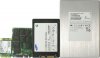
As for the 512GB mSATA, I haven't heard anything regarding that. Hopefully it will be available soon.
Good luck -
So something like this?
Amazon.com: Crucial m4 256GB mSATA Solid State Drive CT256M4SSD3: Computers & Accessories
and... are we guessing that I'd be better of with that $200 upgrade than a $2000 new machine? Honestly, I don't mind doing the new machine if that's going to deliver the best performance. I live with this thing 24/7. -
There aren't any 512GB mSATA's out yet. I don't think its possible until the next shrink in transistors.
As for speed, NoteBookCheck claims the Z930 256GB SSD is one of the fastest they have ever tested. -
OK, gulp -- I think i'll just bump up to the z930 then. The worst part is -- I'll be faced with an identity crisis here on the forum, carrying a user name identified with the z830, but working on a z930!
Heading over to Toshiba to order the new unit.
-
Ordered the z930. Already have a buyer for my z830.
-
Congrats!!
Let us know what you think of the z930, and how it compares to the z830.
Oh!! And if you want your username changed, you can ask "Charles" [lead NBR mod] to do so in this thread: http://forum.notebookreview.com/site-suggestions-help-announcements/557393-want-your-username-changed-request-here.html
Good luck -
That would be going WAY beyond the call of duty -- but it would be fun, too. I would never want to bother Charles for that -- but if he had time to do so, I'd gladly now become z930guy.
-
Unboxing my z930. Arrived today via the FedEx guy.
-
Whoa -- the hard drive is soooooooooooo much faster!
Windows Experience code on z830: 6.6
Windows Experience code on z930: 7.9
The difference is VERY appreciable.
Screen looks sharper and more colorful.
The 8 gigs (as opposed to 6 in my z830) can't hurt either.
Love it. -
Congrats on the nice upgrade
Glad to hear the 256GB mSATA is in fact much faster than the 128GB in the z830.
Keep us posted with any updates. -
So they actually improved the display? I heard from a lot of reviews that they didn't.
-
It seems crisper to me.
I've been on the machine now for 48 hours and I continue to be impressed by the faster clip. It's notable in nearly every operation. Of course, I took the RAM from 4 or 6 gig (whatever was the max in the z830) to 8 gig, too. I haven't found the bottom of the battery charge yet. When our I.T. guy was helping me install our network printer, he lifted it up off his laptop and said, "Amazing." -
Today I kept getting the BlueScreen of death... I thought that went away with WinXP... I need to figure out what is going on... hope it's not a virus.
-
I've never seen it on either the z830 or the z930, either one. Amazed at how rapidly it rips through my work. Sony Vegas Movie Studio Platinum, complete with all the 150 special video effects and just as many transitions, runs at breakneck speed ... and the fan is NEVER noisy. [Shaking my head] It's an amazing machine.
-
anybody knows how to replace the keyboard of a z830 or z930?
-
For the users who has been using Portege Z830/Z930, do you think the "flexible" screen makes it easy to get damaged? Did you always pay extra attention to it since it seemed to be "extra fragile"?
Thanks. -
I don't notice it.
I do pay extra attention to my z835 as a whole because it's so thin but ever since I got it... I can't think of going mobile with anything else but an Ultrabook. -
Do note that the flexible screen is a durability feature, not a problem. It's designed to bend so it doesn't break. LED backlit panels can take more bending and twisting and CCFL backlit ones found in older laptops.
-
I read somewhere that they fixed the wobbly screen on the Z830 with the Z930 upgrade. Is that true? I really liked the Z830 when I saw it at Best Buy, but the shaking screen when barely touching the laptop was a deal breaker for me. Were any of the other issues I saw throughout the Z830 threads fixed with this new model? I am looking again at this laptop since the upgraded ASUS Zenbook turned out to be a real reliability disaster, so much that it is currently being pulled from several stores; too bad they didn't put a comparable screen on the Toshiba. Any other contenders?
-
Toshiba claimed to make the screen stiffer. I don't know what they actually did though.
-
Hi,
I have a question, has Z830/Z930 utility for whole disk encryption?
I found only EFS and with TPM I have to write password every wake up, it is not working with fingerprint scanner together.
I have HP 4740s without TPM and it has utility for whole disk encryption.
Thank you for help. -
Just got in my custom ordered z930 with 128 GB Drive and the WEI for the Disk Transfer Rate is 7.9. So maybe it us running at SATA III.
-
Did a custom order on a z930 with 4 GB of RAM on board and no memory in the slot. I then upgraded with a Patriot PSD38G16002S 8GB stick for a total of 12 GB RAM (11.9 usable). So far so good
The WEI memory value before the upgrade was 5.9. After the upgrade the value jumped to 7.5.
Next upgrade is to a 256 GB MSATA! -
The screen in Z930 is still wobbly.
-
I would like reinstall Windows on the Z830. Is there anyway to get a Recovery disc from Toshiba?
The drivers on the Toshiba site are confusing as to which need to be installed. -
Are you not able to create your own Recovery Media from the recovery partition on your z830? [would require the use of an external DVD/CD drive].
Look for the program called " TOSHIBA Recovery Media Creator" under start menu.
If your still not able to create your own recovery media, you can buy the discs from Toshiba for a fee. See here: Recovery media - Toshiba Forums -
The person I bought it from installed Windows Enterprise and there is no recovery installed.
The wireless is terrible keeps dropping. I have tried to install updated drivers from the Intel site but it won't let me.
Do at this point I just want to reinstall.
Thanks for the info I ordered the Recovery from Toshiba. -
From what I know
the system being a single drive a several partition
when put through a proper formating before install would mean a total wipe out of all data
I know I would do that way
so if it is indeed a fresh format/install
then you basically will have no recovery partition
the best is to get from toshiba, but not sure if they will do that
another is to get a copy from another z830 user and try to see if that works
but for a DIY geek like me, I much rather try to download and install the needed driver with a fresh formatting OS
since the z930 i have only had 70GB ssd space out of 128GB(which 27GB is not visible at all)
so a fresh instal might give me back some more space than a default system setup
plus understanding the drivers may help when you decide to instal a different/newer OS -
After a long way i've found a fix for the fan noise of my z830: I've replaced the fan with the original fan of the z930. The result is amazing: The fan stands up to a higher temp totaly still. If the core temp reach a certain level the fan goes very slowly on. So now its quite a perfect ultrabook!!! - If you come from germany, i could help you! I was trying many fans and this one is really great! And its a original one...
New Portege Z830
Discussion in 'Toshiba' started by Hoopsontoast, Sep 12, 2011.
)


